
Description
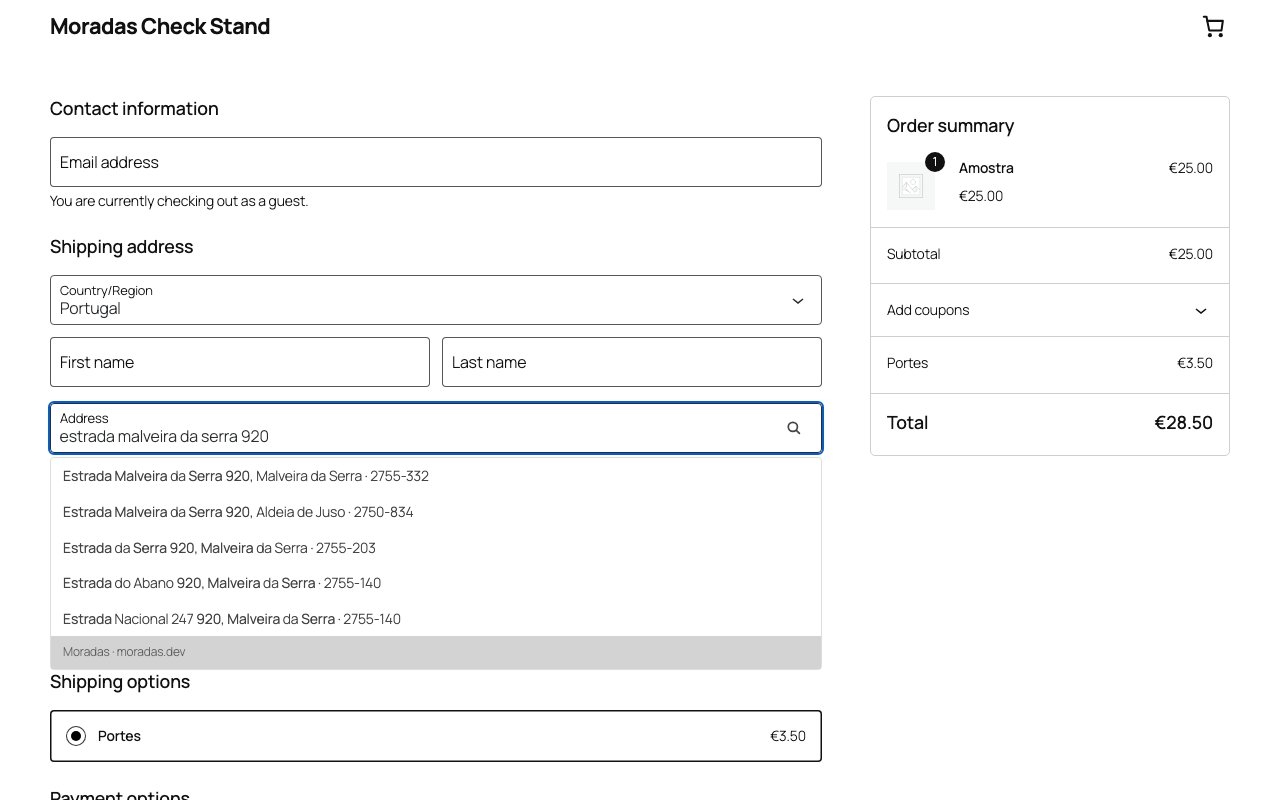
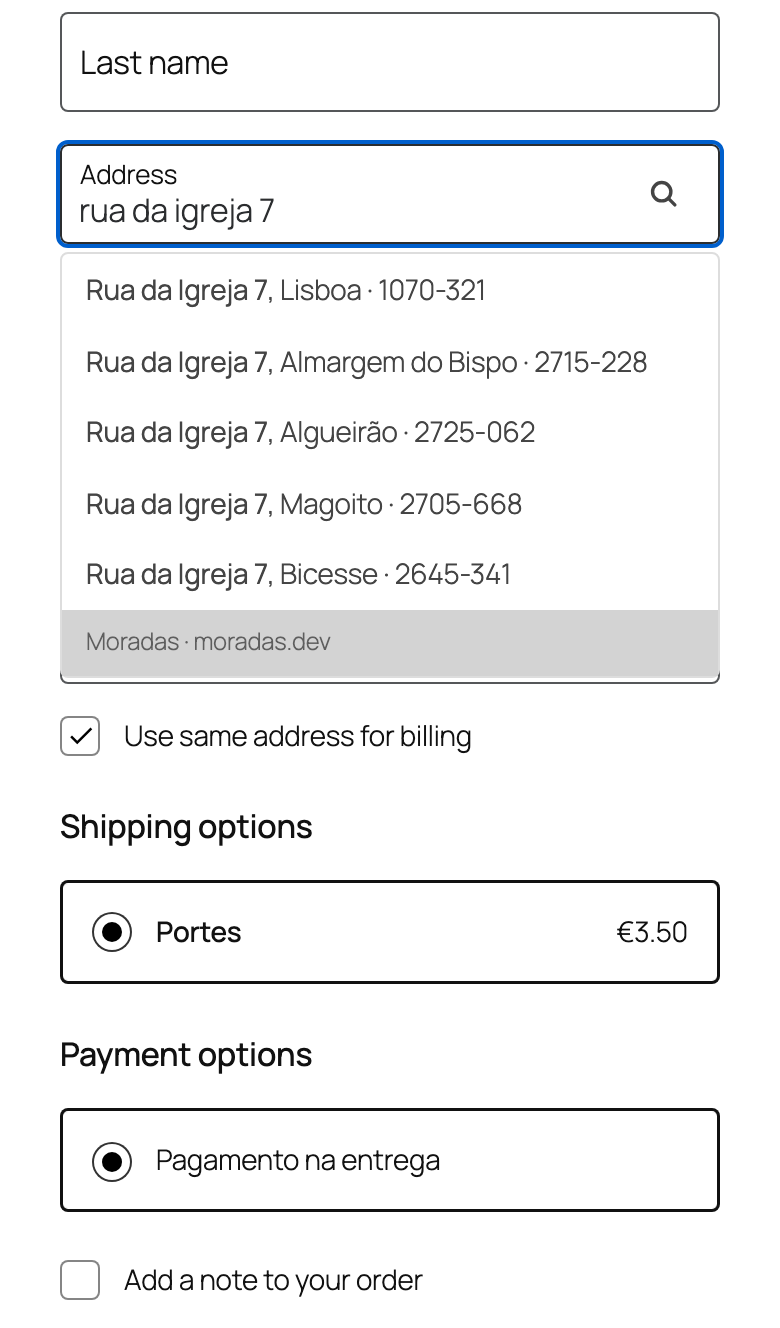
Customers type their address once, in one line, and pick it from a list. The
plugin fills in the street, the postal locality and the exact seven-digit
Portuguese postal code (código postal, CP7): the code carriers need on the
shipping label, chosen by door number. Moradas is Portuguese for “addresses”.
It is built for stores that ship to Portugal. Missing accents, abbreviations and
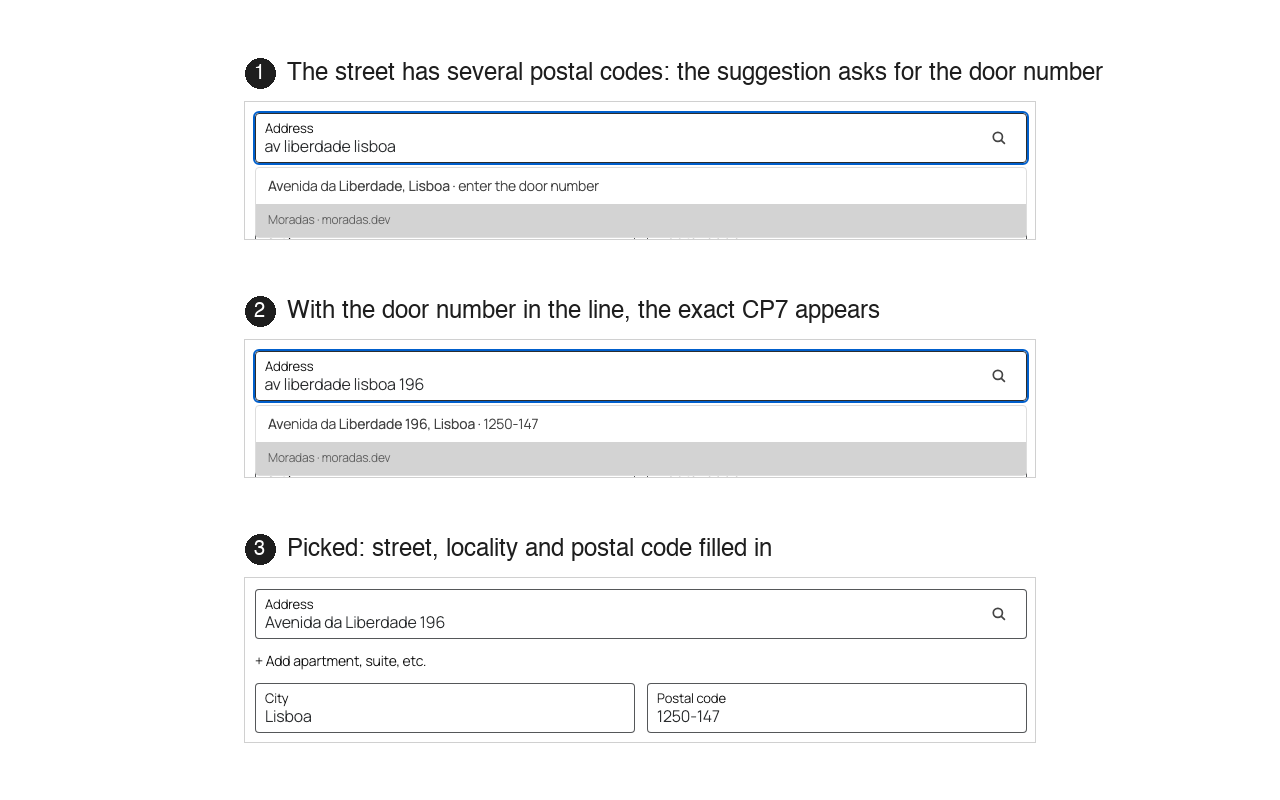
small typos are understood (“av liberdade lisboa 196” becomes Avenida da
Liberdade, Lisboa, 1250-147), and a postal code typed on its own fills in the
street and the locality. The service behind the plugin is free and public: no
API key, no account, and the typed text is not stored.
How it works
- The customer starts typing in the address field of the checkout: street,
locality and door number, all in one line. - Suggestions appear under the field as they type, each with its postal code.
When a street has several postal codes and the door number is still missing,
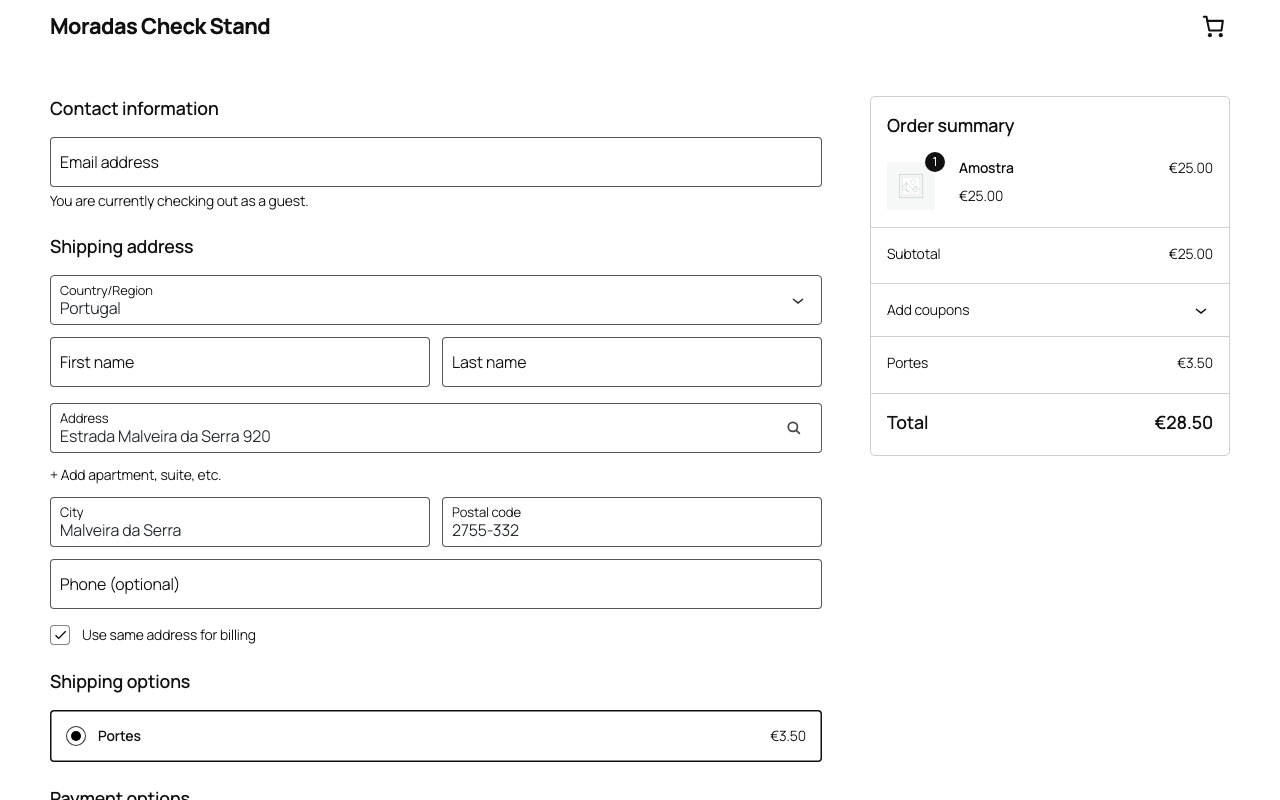
the suggestion says so. - The customer picks one. Street, locality and postal code are filled in, and
every field stays editable.
What you get in the checkout
- One line is enough: “av liberdade lisboa 196” resolves to Avenida da Liberdade, Lisboa, 1250-147.
- The exact CP7 for the door number, not just a code for the street or the town.
- A postal code works as input too: “1000-098” fills in Praça do Chile, Lisboa.
- Forgiving matching: accents are optional (“sao joao”), abbreviations are understood (“av” for Avenida), small typos are corrected.
- Larger towns are ranked first.
- Suggestions only for Portugal: for any other country the checkout is untouched.
- On WooCommerce 9.9 and newer the suggestion list is drawn by WooCommerce itself, so it follows your theme.
- Nothing is added to the order and no extra fields are created: the plugin fills the standard address, city and postcode fields.
Privacy
- No cookies, no tracking, no account.
- While the customer types in the address field, the typed text is sent to the Moradas service at moradas.dev to produce the suggestions (see “External services” below). Nothing is sent from any other page, from the WordPress admin, or when the plugin is activated.
- No name, e-mail, phone number, order or account data is sent.
- The service does not store the typed text; it keeps only hourly aggregate usage counts.
- The bundled widget can report errors to the service; in this plugin that option is switched off.
Compatibility
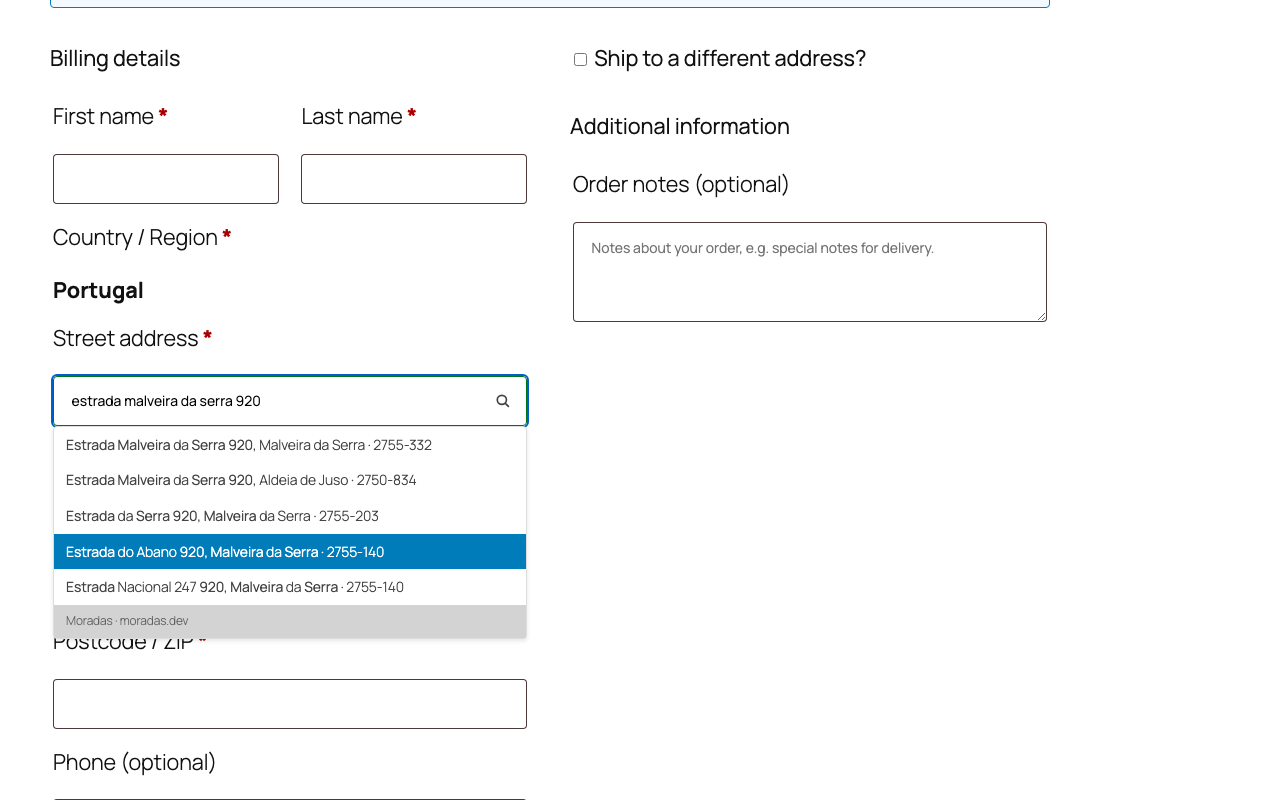
- Both checkouts: the Checkout Blocks (the default checkout) and the classic shortcode checkout. The plugin registers itself as a WooCommerce address autocomplete provider, so the same suggestions appear in both.
- WordPress 6.5 or newer, PHP 7.4 or newer. WooCommerce 9.9 or newer for the block checkout (tested up to 11.2); with older WooCommerce versions the plugin still works in the classic checkout, using its own suggestion list.
- Declares compatibility with High-Performance Order Storage (HPOS) and with the Cart and Checkout blocks.
Free, no API key
The service at https://moradas.dev is public and free, including for commercial
use. There is no key to paste and no account to create. Fair-use limits are
described at https://moradas.dev/docs. Stores that run their own instance of the
service can point the plugin to it under WooCommerce Settings Advanced Moradas.
Portuguese translation included
The plugin’s interface text (the settings, the admin notices and the “enter the
door number” hint in the checkout) ships with a Portuguese (Portugal)
translation. The suggestions themselves are addresses, so they read the same in
any language.
External services
This plugin connects to the Moradas address API (https://moradas.dev), a free
public service run by the authors of this plugin, to turn what the customer types
into address suggestions and into the exact postal code. Without this service the
plugin has nothing to suggest.
When it is used: only on the checkout page and only when the country is Portugal,
while the customer types in the address field, and once more when a suggestion is
picked. Nothing is sent when the plugin is activated, in the WordPress admin, or
on any other page.
What is sent: the text typed in the address field (for example
“av liberdade lisboa 196”) and, when a postal code has to be resolved, the
identifier of the chosen street together with the door number. No name, e-mail,
phone number, order or account data is sent. The requests go from the customer’s
browser straight to the API, without cookies; like any web request, they include
the browser’s IP address and user agent. The service does not store the typed
text and keeps only hourly aggregate usage counts.
Terms of use and usage limits: https://moradas.dev/docs
Privacy policy: https://moradas.dev/privacy
Screenshots
Installation
- Install and activate the plugin.
- Activation switches on WooCommerce Settings General “Address autocomplete” if your store has never used another address provider. You can turn it off there at any time.
- That is all. Suggestions are active for addresses in Portugal.
The API endpoint can be changed under WooCommerce Settings Advanced Moradas, for stores that run their own instance of the service.
FAQ
-
Does it work without an API key or an account?
-
Yes. The service at https://moradas.dev is public and free, including for
commercial use. Install, activate, done. Contact: dev@moradas.dev -
What happens if the service is unreachable?
-
The checkout keeps working as a plain form: no suggestions appear and the
customer types the address by hand, exactly as without the plugin. Nothing
blocks the order. -
Why only Portugal?
-
The service covers Portuguese addresses (moradas) and their seven-digit postal
codes, nothing else. Suggestions appear only when the selected country is
Portugal; for every other country the checkout is untouched. -
How does it find the exact postal code from the door number?
-
In Portugal a street is often split into several postal codes, each covering a
range of door numbers. The service keeps these ranges, so as soon as the door
number is in the address line it picks the code that matches. Until the number
is known, the suggestion says “enter the door number” and the postal code stays
empty; the moment the customer adds the number, the exact CP7 is offered. -
What about the GDPR?
-
The personal data involved is the address text the customer types, which is
sent to the service to produce suggestions, together with the technical data of
any web request (IP address, user agent). No name, e-mail, phone number, order
or account data is sent, no cookies are set, and the service does not store the
typed text. If your privacy policy lists the services your checkout talks to,
add Moradas and link to https://moradas.dev/privacy. -
How do I switch it off?
-
Deactivate the plugin: it puts the WooCommerce “Address autocomplete” setting
back the way it was. To pause suggestions without deactivating, turn off
WooCommerce Settings General “Address autocomplete”. -
A street or locality is missing or wrong. How do I report it?
-
Write to dev@moradas.dev with the address as the customer would write it and,
if you know it, the postal code. The data behind the service is refreshed
regularly, and reports are checked against the next refresh. -
Is there a version for PrestaShop or other platforms?
-
Yes. The same service has a PrestaShop module, a JavaScript widget for any
address form and an API for custom integrations. See https://moradas.dev/docs.
Reviews
There are no reviews for this plugin.
Contributors & Developers
“Moradas — Portuguese Address Autocomplete for WooCommerce” is open source software. The following people have contributed to this plugin.
Contributors
Translate “Moradas — Portuguese Address Autocomplete for WooCommerce” into your language.
Interested in development?
Browse the code, check out the SVN repository, or subscribe to the development log by RSS.
Changelog
0.3.0
- The bundled address widget (used on the classic checkout when WooCommerce is older
than 9.9) is now version 0.3.0. A reply from the service that is not in the expected
format is handled like a network error: the “service temporarily unavailable” message
is shown and the checkout keeps working as a plain form. - Widget 0.3.0 can send anonymous error reports to the service; in this plugin that
option is switched off, so the plugin still makes no requests of its own (see
“External services”). - The example address in this readme now matches what the service returns.
0.2.1
- Fix: no more “translation loading was triggered too early” notice with WP_DEBUG on.
- If WooCommerce is not active, the plugin shows a notice and stays idle.
- Admin notices appear only where they are relevant: the Plugins screen, the Dashboard
(missing WooCommerce) and the WooCommerce settings. - Interface text is now in English, with a Portuguese (Portugal) translation included.
0.2.0
- First public release.
- Works in both the Checkout Blocks and the classic checkout through the official
WooCommerce address autocomplete provider API (WooCommerce 9.9+). - Suggestions show the postal code, or ask for the door number when the street
has more than one. - Activation switches on the WooCommerce “Address autocomplete” setting when no
other address provider is present; deactivation puts it back. - Declares compatibility with HPOS and with the Cart/Checkout blocks.