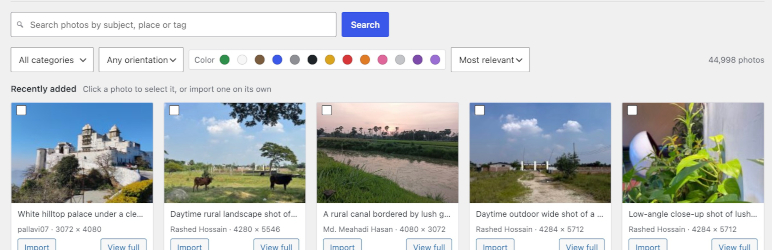

Description
This plugin adds a “Photo Directory” search UI to wp-admin that talks to the
public Photo Directory REST API.
You can search, preview, and import photos directly into your own Media
Library, where the imported image behaves exactly like any regular upload
— usable as a featured image, inside blocks, in a gallery, etc.
Entry points:
- Media > Photo Directory — a dedicated search/browse admin page.
- “Photo Directory” button next to Add Media in the classic editor.
- “Photo Directory” tab inside the native WordPress media picker itself
(Set Featured Image, Add Media, an Image block’s Media Library button,
etc.) — works in both the classic and block editor, since they share the
same underlying media picker.
Notes for developers
- This is an unofficial integration with a public but not formally
documented API.includes/class-photofetch-api.php::normalize_item()is where
the raw JSON from the Photo Directory gets mapped into predictable
sizes/alt/authorfields — it tries several plausible shapes
(media_details.sizes, an embedded featured-media object, a bare
source_url, etc.). If wordpress.org changes the API’s response shape,
this is the one function that should need updating. - Title and alt text are sourced independently: alt text prefers a real
alt-text field if the API exposes one, otherwise falls back to the same
text used for the Description field (seePhotoFetch_API::normalize_item()for
the exact priority order). It’s never derived from the title. For title,
known upstream placeholder strings (currently “Photo Detail”, “Untitled”,
“Untitled Photo” — seephotofetch_generic_title_placeholdersfilter) are
treated as no title at all, and a fallback title is derived from the
photo’s slug instead (e.g.red-fox-in-snow“Red fox in snow”). If
the slug itself isn’t usable, the title falls back to “Untitled photo”. - The attachment’s Description field (post_content) and alt text both get
the photo’s full description text; its Caption field (post_excerpt) gets
only the photographer credit line (e.g. “Photo by Jane Smith, via the
WordPress Photo Directory.”), or is left empty if no author name is
available. - The search/browse picker UI doesn’t display each photo’s title — many
photos on the Photo Directory only have a slug-derived fallback title
(see above), which isn’t meaningful to show while browsing. The title is
still set on the imported attachment; it’s just not shown in the grid. - Imports are deduplicated: each imported attachment gets a
_photofetch_source_id meta value, and re-importing the same photo returns the
existing attachment instead of downloading it again. - Image format conversion (Settings > Photo Directory,
PhotoFetch_Settings::get_format()) happens in
PhotoFetch_Importer::maybe_convert_image(), right after download and before
sideloading. It re-checkswp_image_editor_supports()at import time
rather than trusting the stored setting outright, and falls back to the
original file on any failure. - Search results are cached for 5 minutes via transients to avoid hammering
the upstream API on repeat searches. - All photos on the Photo Directory are released CC0 (no attribution
required), but the plugin stores the original photo URL and author name
(when available) as_photofetch_source_url/_photofetch_source_authorattachment
meta for your own reference, in addition to the caption credit above.
Installation
- Upload the plugin files to the
/wp-content/plugins/photofetchdirectory, or install the plugin through the Plugins > Add New screen in wp-admin directly. - Activate the plugin through the Plugins screen in WordPress.
- That’s it — no configuration is needed and no API key or account is required. Look under Media > Photo Directory, use the “Photo Directory” button next to Add Media in the classic editor, or use the “Photo Directory” tab inside the native media picker (Set Featured Image, Add Media, an Image block’s Media Library button, etc.).
FAQ
-
Do I need an API key or account to use this?
-
No. The Photo Directory REST API is public, so the plugin works as soon as it’s activated.
-
Do I need to credit the photographer?
-
No — every photo on the Photo Directory is released under CC0, so attribution isn’t legally required. The plugin adds a photographer credit line to each imported photo’s caption anyway, when the API provides an author name, so credit is there if you choose to show it.
-
Why does an imported photo’s title look like a URL slug instead of a real title?
-
Some photos on the Photo Directory only have a generic placeholder title, because the original uploader never set a real one. The plugin recognizes those placeholders and falls back to a title built from the photo’s slug or description instead, rather than importing the placeholder text as-is. It’s a best-effort fallback, not guaranteed to read naturally — worth a glance before publishing.
-
That button is added next to Add Media via the
media_buttonshook, which only the classic editor fires. In the block editor, use the “Photo Directory” tab inside the native media picker instead — it opens the same way from Set Featured Image, Add Media, or an Image block’s Media Library button. -
Can I choose what size image gets imported?
-
Yes. Both the Media > Photo Directory browse screen and the media picker tab let you choose Full, Large, or Medium before importing.
-
Can imported photos be converted to WebP or AVIF?
-
Yes, if your server’s image editor supports it. Go to Settings > Photo Directory to choose — WebP is used automatically whenever your server can produce it. If it can’t, the page says so plainly and photos keep their original format. A quality field appears alongside the format choice whenever WebP or AVIF is selected; it has no effect when keeping the original format, so it’s hidden in that case.
-
Where does the plugin store which photos I’ve already imported?
-
Each imported attachment gets a
_photofetch_source_idmeta value matching its ID on the Photo Directory. Importing the same photo again returns the existing attachment instead of downloading a duplicate.
Reviews
There are no reviews for this plugin.
Contributors & Developers
“PhotoFetch” is open source software. The following people have contributed to this plugin.
Contributors


Translate “PhotoFetch” into your language.
Interested in development?
Browse the code, check out the SVN repository, or subscribe to the development log by RSS.
Changelog
2.0.0
Renamed the plugin from “Photo Directory Importer” to “PhotoFetch.” Unlike the 1.3.16 rename, this one is a full internal rebrand, not just the public-facing name:
* Main plugin file renamed from photo-directory-importer.php to photofetch.php; every includes/class-pdi-*.php file renamed to includes/class-photofetch-*.php; the bundled .pot file renamed to languages/photofetch.pot.
* The Text Domain (and every translation call’s domain argument) changed from photo-directory-importer to photofetch, matching the new slug — same requirement as the 1.3.14 and 1.3.16 fixes.
* Unlike 1.3.16, this time the internal-only identifiers were deliberately included: all PDI_* class names (PDI_API, PDI_Importer, PDI_Plugin, PDI_Settings) are now PhotoFetch_API, PhotoFetch_Importer, PhotoFetch_Plugin, PhotoFetch_Settings; the PDI_* constants are now PHOTOFETCH_*; every pdi_-prefixed hook, filter, nonce, AJAX action, option, and meta key (including the _pdi_source_id/_pdi_source_url/_pdi_source_author/_pdi_imported attachment meta) is now photofetch_-prefixed; and every pdi-* CSS class, script/style handle, and HTML id is now photofetch-*.
* This is a breaking change for existing installs: deactivate and remove the old plugin, then install this one fresh. Site functionality and every imported photo’s existing attachment meta are otherwise unaffected — only the identifiers above changed, not what they do.
1.3.17
- Fixed the phpcs findings from a fresh run against the renamed plugin:
an equals-sign alignment warning inclass-pdi-plugin.php‘s author-link
rewriter, missing short descriptions in three doc comments (one each in
class-pdi-importer.php andclass-pdi-settings.php, two total in the
latter), andlanguages/index.php‘s file comment switched from a//
line comment to the required/** ... */docblock style.
1.3.16
- Renamed the plugin from “WP Photo Directory Importer” to “Photo
Directory Importer” — WordPress.org’s plugin guidelines prohibit “WP” or
“WordPress” in a plugin’s name, since it implies an official affiliation
the plugin doesn’t have. This touched everything tied to the old name:
thePlugin Nameheader, the main plugin file
(wp-photo-directory-importer.phpphoto-directory-importer.php),
theText Domain(and every translation call’s domain argument, to
match — same requirement as the 1.3.14 fix), the bundled.potfile’s
name and contents, and the@packagedocblock tag across every PHP
file. Internal-only identifiers (thePDI_*class names,pdi_–
prefixed hooks/filters/nonces,pdi-*CSS/JS handles) were left
untouched, since none of them spell out “WP” or “WordPress” and
changing them would be an unrelated, unnecessary breaking change.
1.3.15
- Fixed incorrect plural handling in the browse screen and media-picker
tab: several “N selected”/”N imported” strings picked between exactly
two hardcoded forms using acount === 1check in JavaScript — correct
for English, but impossible for a translator to adapt to a language
with three, four, or six plural forms (Russian, Polish, and Arabic,
among others). Now useswp.i18n._n(), which consults the current
locale’s real plural-forms rule instead. Along the way this also fixed
a visible English-language bug: the single-photo “quick import” success
message was using the plural template with the count hardcoded to 1,
producing “1 photos imported.” - Added a bundled
.potfile (languages/photo-directory-importer.pot)
and aDomain Pathheader, so translators have a starting point instead
of needing to generate one themselves before they can begin.
1.3.14
- Fixed a Plugin Check error: “Mismatched text domain. Expected
‘photo-directory-importer’ but got ‘pdi’.” WordPress.org requires the
Text Domain header, and every translation function’s domain argument,
to exactly match the plugin’s own folder/slug. Changed the domain from
pdi tophoto-directory-importereverywhere: the plugin header
and all translation function calls across every PHP and JS file.
Internal-only identifiers that happen to start withpdi_(hooks,
filters, nonces, meta keys, transient keys) were deliberately left
untouched, since those aren’t text domains. - Reformatted a handful of PHP statements that became excessively long
purely from the domain string’s length.
1.3.12
- On the Plugins list page, each contributor’s name now links to their
own wordpress.org profile (https://profiles.wordpress.org/username)
instead of the whole comma-separated author list linking to one shared
GitHub URL — the standard plugin header format only supports one link
for the entire “Author” string, so this rewrites the row directly via
theall_pluginsfilter. - Added a “Settings” link to the plugin’s row on the Plugins page,
appearing first among the action links, right next to “Deactivate”.
1.3.11
- Added a quality field to Settings > Photo Directory, shown only
when converting to WebP or AVIF (hidden automatically when “Keep
original format” is selected — quality has no meaning there, since
nothing gets re-encoded). Defaults to 82, matching WordPress core’s own
default JPEG compression quality. Clamped to 1–100 on save regardless
of what’s posted.
1.3.10
- Added a Settings > Photo Directory page. If this server’s image
editor (GD or Imagick, whichever core picked) can actually produce
WebP — checked live viawp_image_editor_supports(), not assumed from
PHP version or extension presence — a format picker appears: keep the
original format, convert to WebP, or convert to AVIF (the latter only
offered when supported too). WebP is the default whenever it’s
available. If WebP isn’t supported, the page simply says so and no
photos are converted, same as before this release. - Conversion happens right after download, before the file is sideloaded,
so every generated thumbnail/medium/large sub-size is produced from the
converted file directly rather than converted a second time after the
fact. - A conversion failure for any reason falls back to importing the
original file untouched — this is meant to be a nice-to-have, never
something that can turn a failed conversion into a failed import. - The “Import settings” link in the Media > Photo Directory page header,
present but hidden since 1.3.4, now points at the new settings page.
1.3.9
- Added
w.orgto the default trusted image hosts (pdi_allowed_image_hosts).
The Photo Directory serves its images frompd.w.orgspecifically —
w.org is WordPress.org’s own short domain, the same family as
s.w.org, its well-known static-assets host. The 1.3.8 fix (adding
wp.com for Photon) turned out not to be where these images actually
live; this corrects it based on the real rejected host.
1.3.8
- Fixed a regression from 1.3.7 that broke every import. The trusted-host
check added in 1.3.7 only allowedwordpress.org(and its subdomains),
but the Photo Directory serves uploaded images through Automattic’s
Photon CDN (i0.wp.com,i1.wp.com, etc.) rather than from
wordpress.org’s own domain directly — so every single import was
rejected as “untrusted.”wp.com(and its subdomains) is now included
in the default allowed hosts. - The “not on a trusted host” error message now includes the actual
rejected hostname, so a similar mismatch in the future is immediately
diagnosable without digging through network requests, and can be
resolved on the spot via thepdi_allowed_image_hostsfilter.
1.3.7
Security review and hardening. No user-facing behavior changes; all four
items below were fixed as defense-in-depth rather than in response to an
exploited vulnerability.
- Sideloaded image URLs are now pinned to a trusted host.
PDI_Importer::import_photo() downloads whichever image URL the Photo
Directory API returns for a photo; that URL is data returned by the
API, not something this plugin generates itself. Added
is_allowed_image_host(), checked beforedownload_url()is ever
called, requiring the URL’s host to bewordpress.orgor a subdomain of
it (filterable viapdi_allowed_image_hosts). Nothing a site visitor or
lower-privileged user supplies can influence which host this plugin
talks to for search or photo lookups — those always go to the hardcoded
REMOTE_BASE/TAXONOMY_BASEconstants — so this specifically guards
against a compromised or malicious upstream API response causing this
site to download and store a file from an attacker-controlled server. - Removed an unused
innerHTMLcode path.assets/js/admin.js‘sel()
helper had a dead'html'attribute branch (e.innerHTML = attrs.html)
that nothing in the codebase called, but that would become an XSS sink
the moment anything did. Removed it entirely. - Added
rel="noopener noreferrer"to the “View in Media Library”
link inassets/js/admin.js, which opens in a new tab
(target="_blank"). Its destination is fully server-generated today, so
this wasn’t exploitable, but it’s standard, zero-cost protection against
reverse-tabnabbing regardless. - Added explicit
returnstatements after everywp_send_json_error()
call inclass-pdi-api.php(ajax_search(),ajax_terms()) and
class-pdi-importer.php (ajax_import()) that wasn’t already the last
statement in its function.wp_send_json_error()callswp_die(),
which WordPress’s AJAX handling turns into an immediatedie(), so
execution already halted in normal operation — this wasn’t currently
exploitable. But code after those calls was relying on that implicit
behavior instead of stating it, which would fall through with
invalid/stale state (e.g. continuing with a photo ID of 0, or treating a
WP_Error object as an array) ifwp_die()‘s behavior were ever
filtered, as some testing harnesses deliberately do.
1.3.6
- Added a “View full” button to the “Photo Directory” tab inside the
native media picker (Set Featured Image, Add Media, etc.), next to the
“Import only” button in the footer. Opens the currently-detailed
photo’s full-size image in a plain, image-only overlay (closes on
Escape, clicking outside the image, or the close button).
1.3.5
- Added a “View full” button to every photo card on the Media > Photo
Directory browse screen. Opens the photo’s full-size image in a
lightbox (closes on Escape or clicking outside the image), which
includes its own Import button (or a “View in library” link, once the
photo has been imported).
1.3.4
- Rebuilt Media > Photo Directory as a filterable browse screen
(assets/js/photo-browser.js, React viawp-element): category,
orientation, and color filters populated live from the Photo
Directory’s own taxonomies; sort by relevance or newest; multi-select
with a bulk-import tray; per-photo title/alt/caption edits and a
photographer-credit toggle before import. - Rebuilt the “Photo Directory” tab inside the native media picker as a
two-pane picker (thumbnail grid + detail sidebar) with the same
filters, matching the browse screen. - Photos already in the Media Library are now flagged in bulk for a
whole result page at once (PDI_Importer::find_existing_attachments())
instead of one lookup per card. _embednow requests only the two relations the plugin reads
(author,wp:featuredmedia) instead of every relation the API would
otherwise expand, avoiding an unnecessarywp:termexpansion per
taxonomy per photo.- Title fallback now prefers a short title derived from the photo’s own
description over a humanized slug, since most Photo Directory slugs are
opaque hex strings (e.g.6836a813f7) with no human meaning to
humanize in the first place. - Normalized photo data now includes width, height, MIME type, and file
size, and the computed credit line is available directly on the photo
object for the new UI to prefill. - Added Michelle Frechette as a contributor.
- Removed the bundled
LICENSEfile in favor of linking the license
online. - Fixed the search field’s icon overlapping its placeholder text.
1.3.3
- Sanitize untrusted fields from the Photo Directory API before use: the
slug now goes throughsanitize_title(), the author name through
wp_strip_all_tags()/trim(), and every image URL through
esc_url_raw(). - Moved the
wp-admin/includes/{media,file,image}.phprequires from
file scope intoimport_photo()itself, so they’re only parsed while
an import is actually happening rather than on every page load
(this file loads on every request viaplugins_loaded, including the
front end). - Fixed a phpcs suppression bug: the slow-query warning for
meta_key/meta_valuewas suppressed with a singlephpcs:ignore
comment, which only covers the next line and so didn’t actually
suppress themeta_valuewarning. Switched tophpcs:disable/
phpcs:enable spanning both lines. - Fixed invalid XML in
phpcs.xml.dist— an unescaped--inside an XML
comment (--dev) is illegal in XML and would cause strict parsers to
reject the whole ruleset file. - Added gusteci to the plugin’s Author/Contributors list.
1.3.2
- Alt text now falls back to the same description text used for the
Description field, rather than a separate excerpt-only source that was
frequently empty even when the description itself had usable text. - Reverted the 1.3.1 Caption/Description swap: Description (post_content)
gets the photo’s full description text again, and Caption (post_excerpt)
goes back to containing only the photographer credit line.
1.3.1
- Swapped the Caption/Description field mapping: Caption (post_excerpt)
now gets the photo’s full description text, and Description
(post_content) gets only the photographer credit line. - Removed the (often meaningless, slug-derived) title text from the
search/browse picker grid. The title is still set on import; it’s just
no longer shown while browsing.
1.3.0
- Alt text now falls back to the photo’s excerpt specifically, rather than
its (potentially much longer) content/description. - The Caption field (post_excerpt) now contains only the photographer
credit line; description text no longer appears in both the Description
and Caption fields.
1.2.3
- Alt text now falls back to the photo’s description when the upstream
API doesn’t expose a dedicated alt-text field of its own — that appears
to be the closest thing to alt text the Photo Directory API offers.
1.2.2
- Alt text was coming through empty for photos that, per direct testing,
do have alt text upstream — the embedded-featured-media lookup this
plugin relied on apparently isn’t where the Photo Directory’s custom
post type actually stores it. Added speculative fallback checks
(alt_textandmeta.alt_text/meta._wp_attachment_image_alton the
item itself) pending confirmation against a real API response.
1.2.1
- The upstream Photo Directory substitutes a generic placeholder title
(e.g. “Photo Detail”) for photos the uploader never titled. That
placeholder is now recognized and treated as no title, with a fallback
title derived from the photo’s slug instead (e.g.red-fox-in-snow
“Red fox in snow”) rather than importing the literal placeholder text.
Filterable viapdi_generic_title_placeholders.
1.2.0
- Fixed a bug where the attachment title was copied into the alt text
field whenever the upstream photo had no alt text of its own, so the
title and alt text would end up identical (and, for photos with a
generic placeholder title, both fields would show that placeholder).
Alt text is now only ever populated from the upstream photo’s own alt
text, and left blank otherwise. - Added a photographer credit line to the imported attachment’s caption
when the upstream API exposes an author name. - Removed the block editor sidebar panel; the native media modal tab
(added in 1.1.0) covers the same use case without a separate panel.
1.1.0
- Added a “Photo Directory” tab inside the native WordPress media modal
(Set Featured Image, Add Media, Image block, etc.), so photos can be
searched and imported without leaving the picker you’re already in.
1.0.0
- Initial release.