

Description
Every plugin wants a slice of your dashboard: “Rate us 5 stars”, “Upgrade to PRO”, “Help us improve by sharing usage data”. Ingenio Notice Inbox moves all of that out of the way and keeps it in one place, so the screen you open is about your work again.
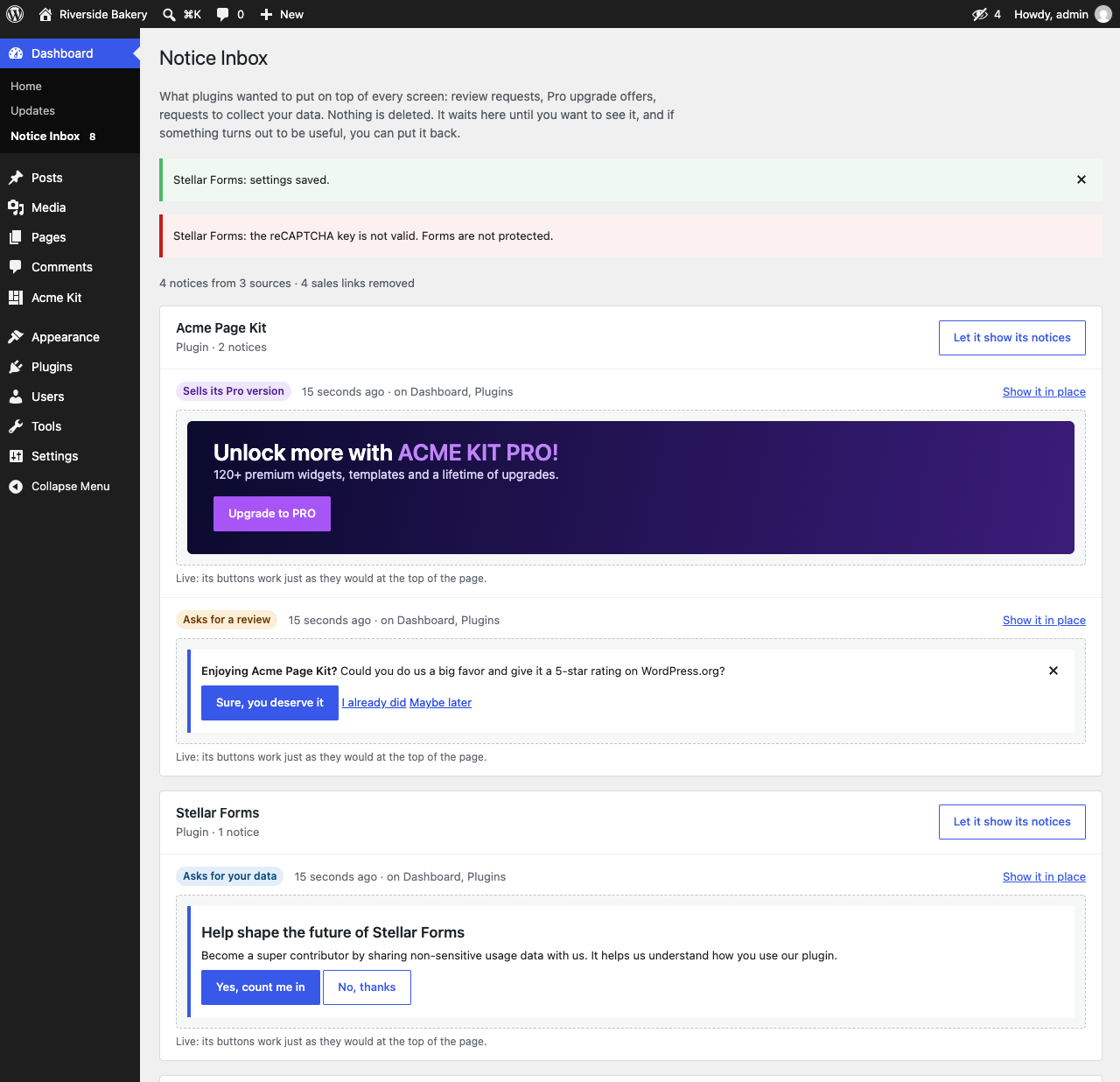
Nothing is deleted. Hidden notices go to Dashboard Notice Inbox, grouped by the plugin that sent them. Open it whenever you like, and put back anything you actually want to see.
What it hides
- Admin notices from plugins and themes: review requests, Pro upgrade banners, data-collection opt-ins and other dashboard notifications.
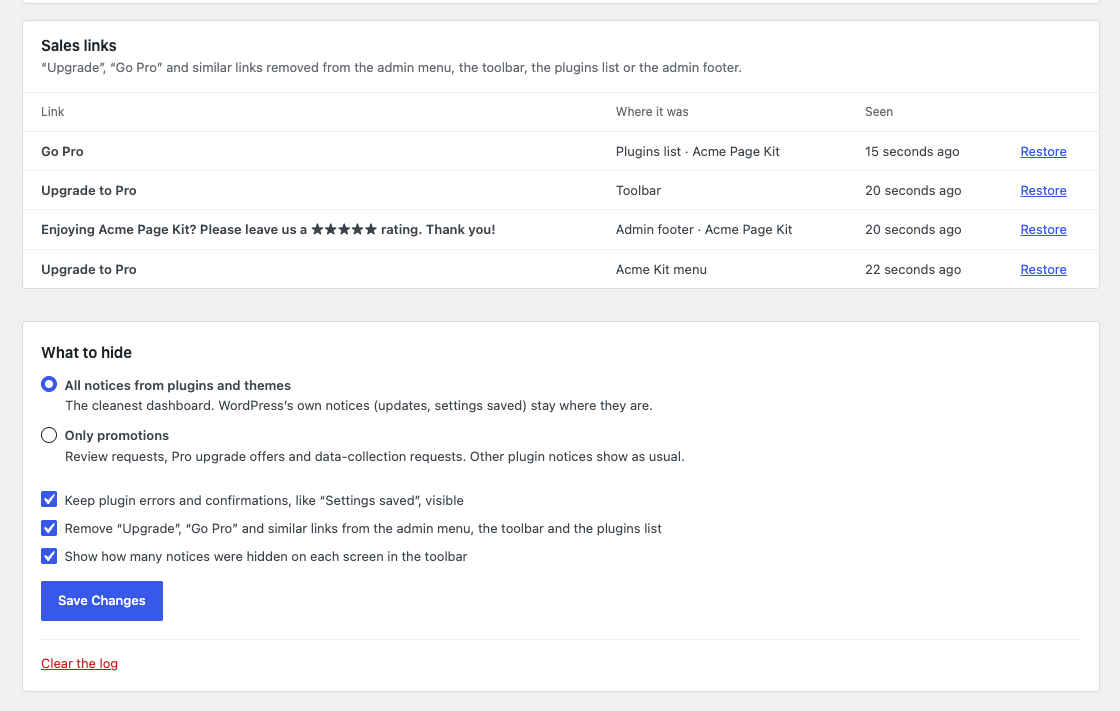
- Upsell links: “Upgrade to Pro” in the toolbar, “Go Pro” in the admin menu and in the plugins list.
- Footer nags such as “Please leave us a ★★★★★ rating”.
- Notices added with JavaScript after the page loads, when they look like promotions.
What it never hides
- WordPress core notices, such as updates.
- Errors and confirmations from plugins, like “Settings saved” (you can change this).
- Code from your own site, such as snippets added with Code Snippets.
It works on its own
There is nothing to click notice by notice. Ingenio Notice Inbox reads what each notice says and recognizes the usual promotions (review requests, Pro upsells, data-collection opt-ins), so a new plugin’s banner is caught the first time it shows up. The same goes for “Upgrade” and “Go Pro” links in the toolbar, the admin menu and the plugins list.
It knows which plugin sent each notice
Ingenio Notice Inbox checks the file each notice comes from, so the inbox can tell you “this came from ElementsKit” instead of showing an anonymous list. That also lets you allow a single plugin to keep showing its notices while the rest stay quiet.
Two modes
- All notices from plugins and themes (default): the cleanest dashboard. Errors and confirmations still show.
- Only promotions: hides review requests, Pro upsells and data-collection requests. Other plugin notices show as usual.
Privacy
Ingenio Notice Inbox does not connect to any external service and does not collect any data. The inbox is stored in a single option on your own site, and it is removed when you delete the plugin.
Screenshots

Installation
- Go to Plugins Add New, search for “Ingenio Notice Inbox” and click Install Now. You can also upload the ZIP file.
- Activate the plugin. There is nothing to set up: notices start going to the inbox right away.
- Open Dashboard Notice Inbox to see what was hidden and to change the settings.
FAQ
-
Will I miss important messages?
-
WordPress core notices are never touched, and plugin errors and confirmations stay visible by default. Everything else is kept in the inbox, and a counter in the toolbar shows how many notices were hidden on the current screen.
-
Can I let one plugin keep showing its notices?
-
Yes. In the inbox, click “Let it show its notices” next to the plugin, or “Show it in place” next to a single notice.
-
Notices caught while loading the inbox are shown live, so their buttons work, including “Dismiss” or “I already rated”. Notices seen earlier on other screens are shown as a saved copy.
-
Does it work with Elementor add-ons, WooCommerce and other popular plugins?
-
It works with any plugin that shows its notices through the standard
admin_noticeshook, which is almost all of them. It has been tested with the notices shown by Elementor, ElementsKit, Jeg Kit and Skyboot Custom Icons. -
Does it slow down the admin area?
-
No. It only runs on admin screens, and the inbox is written to the database only when something new appears.
-
Is it translated?
-
It is ready to be translated at translate.wordpress.org, and a Spanish translation is on the way.
Reviews
There are no reviews for this plugin.
Contributors & Developers
“Ingenio Notice Inbox – Hide Admin Notices & Dashboard Notifications” is open source software. The following people have contributed to this plugin.
Contributors
Translate “Ingenio Notice Inbox – Hide Admin Notices & Dashboard Notifications” into your language.
Interested in development?
Browse the code, check out the SVN repository, or subscribe to the development log by RSS.
Changelog
1.0.0
- First public release.