
Description
Finlyzer gives WooCommerce merchants clear, honest visibility into how much revenue is lost to foreign exchange fees and payment processor markups on international sales. It is 100% Free with no hidden fees, no subscriptions, and no credit card required.
🔒 100% Local by Default — Zero Surveillance Telemetry
Merchants trust Finlyzer because of its privacy architecture:
* Runs 100% Locally on Your Store Database by Default: All currency loss math, gateway fee spread analysis, and multi-currency ledgers are calculated entirely on your own server. Zero external network calls are made out-of-the-box.
* No Sensitive Information Needed: Finlyzer never requests, accesses, stores, logs, or transmits sensitive customer or financial data.
* Zero Personally Identifiable Information (PII): Customer names, email addresses, phone numbers, billing/shipping physical addresses, IP addresses, credit card numbers, and individual order IDs are never collected, saved, or sent anywhere.
* Zero Checkout Impact: Runs purely in the WordPress admin dashboard for completed orders. Your checkout flow, storefront speed, and buyer experience remain 100% untouched.
Why Every International WooCommerce Store Needs Finlyzer
When international shoppers purchase from your store in foreign currencies (EUR, GBP, CAD, AUD, JPY, etc.), payment processors like PayPal, Stripe, Klarna, WooPayments, Mollie, and Adyen convert those funds into your payout currency.
Instead of using true interbank market exchange rates, payment gateways charge hidden conversion spreads—typically pocketing 1.5% to 4.2% or more on every cross-border order. On top of gateway spreads, foreign exchange rate fluctuations during settlement create additional currency loss.
Finlyzer inspects your store sales data and reveals the exact numbers:
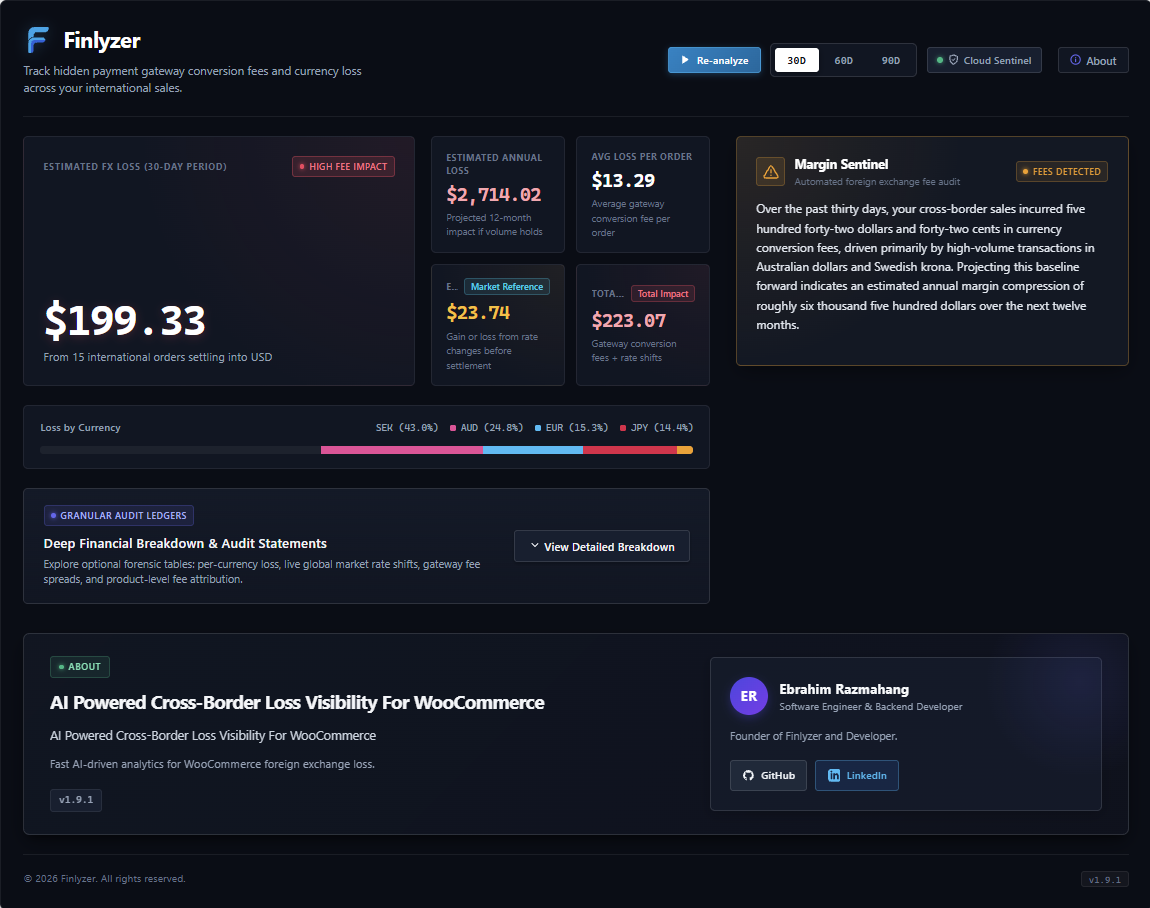
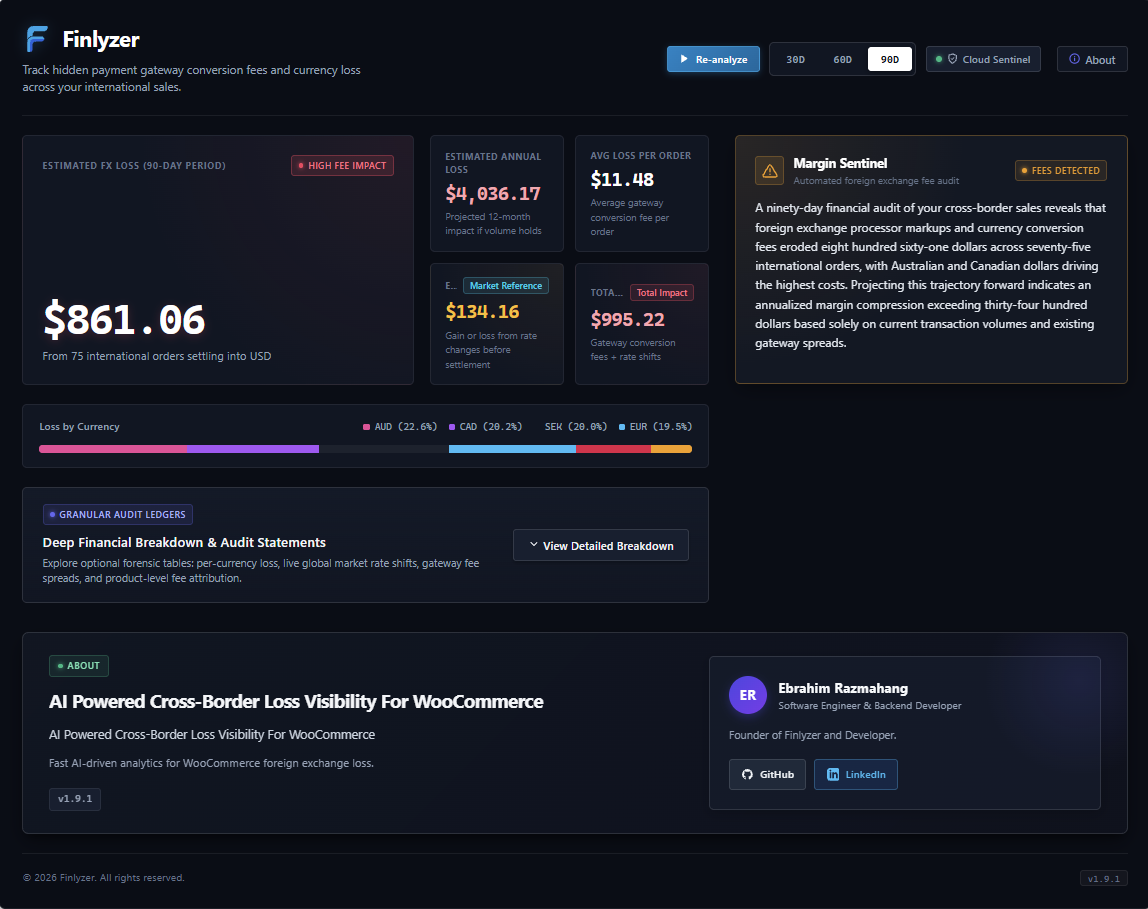
* Total Currency Loss: View exact currency loss across the last 30, 60, or 90 days.
* Effective Fee Rate: Reveal true conversion spreads per processor (Stripe, PayPal, Klarna, etc.).
* Loss Distribution by Currency: Visual breakdown showing which currencies erode margins most.
* Annual Run-Rate Exposure: Projected yearly loss if gateway markup is left unaddressed.
* AI Sentinel Insights: Real-time risk audit powered by Google Gemini Flash AI providing prioritized, actionable recommendations to protect merchant profits.
Key Features for WooCommerce Merchants
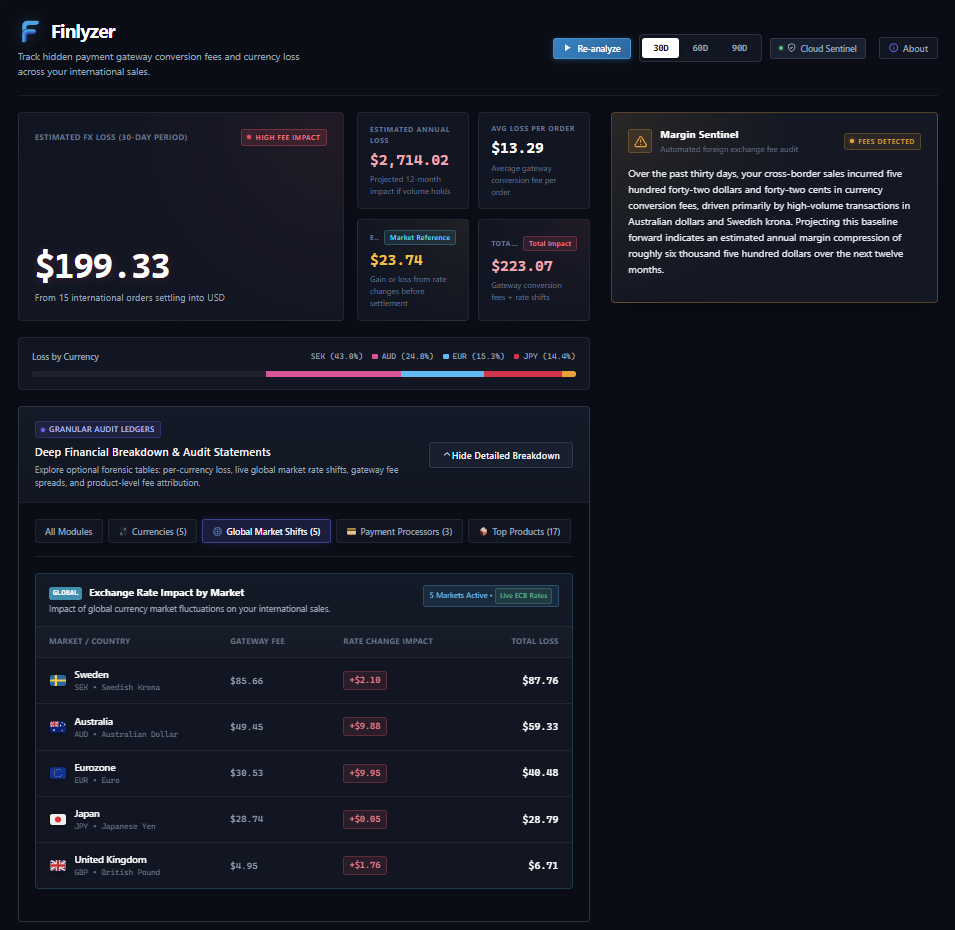
- Payment Gateway Fee Comparison: Compares cross-border transaction volume and conversion fee impact across Stripe, PayPal, Klarna, WooPayments, and more.
- Multi-Currency Revenue Ledger: Detailed breakdown of transaction volume, fee share, and currency loss per foreign currency.
- Products Breakdown: Line-by-line attribution of international revenue and conversion fees per product, with fast processor filtering.
- Exchange Rate Movement & Market Timing: Directly queries European Central Bank reference exchange rates via the public Frankfurter API (https://api.frankfurter.dev) using WordPress HTTP API (
wp_remote_get) to evaluate settlement timing loss between order placement and processor payout. - High-Performance Order Storage (HPOS): Built-in native support for WooCommerce custom order tables (
wc_orders) and traditional post meta. - Lightweight & Fast: Pure server-to-server analytics engine with cached responses and asynchronous telemetry.
- 100% Free: Full access to all financial analytics with zero paywalls.
Developer & Maintainer
Finlyzer is developed and maintained by Ebrahim Razmahang (GitHub: sl3nd3r1).
External Services
Finlyzer operates 100% locally by default. Optionally, administrators can opt into external services for automated AI risk analysis and market rate evaluation:
-
Finlyzer Cloudflare Worker API & Google Gemini Flash AI (Optional — 100% Opt-In Only): Provides automated financial margin risk audits and recommendations powered by Google Gemini via a secure Cloudflare Worker proxy.
- Opt-in Status: Disabled / OFF by default. Requires explicit administrator opt-in in the Finlyzer settings dialog before any network request is dispatched.
- Service: https://ai.google.dev / https://finlyzer-worker-prod.ebi1055lol.workers.dev
- Cloudflare Terms of Service: https://www.cloudflare.com/terms/
- Cloudflare Privacy Policy: https://www.cloudflare.com/privacypolicy/
- Google Gemini Terms of Service: https://ai.google.dev/terms
- Google Privacy Policy: https://policies.google.com/privacy
- Data Sent (only upon explicit opt-in): Strictly anonymized, store-level aggregate metrics (store currency ISO code, total transaction volume, aggregate conversion fee estimates, currency breakdown, and order counts).
- Zero Personally Identifiable Information (PII): Customer names, email addresses, phone numbers, billing/shipping physical addresses, IP addresses, payment card credentials, and individual order IDs are never collected, logged, or transmitted.
-
Global Market Reference Rates / Frankfurter API (European Central Bank Reference Data — Optional, 100% Opt-In Only): Used to evaluate payment processor conversion fee markups and market timing exchange rate shifts.
- Opt-in Status: Disabled / OFF by default per WordPress Plugin Guideline 7. Requires explicit administrator opt-in in the Finlyzer settings dialog before any network request is dispatched.
- How It Operates: By default, Finlyzer operates 100% locally and offline using an internal European Central Bank reference matrix. When explicitly enabled by the administrator, the plugin uses WordPress HTTP API (
wp_remote_get) from your WordPress server to fetch reference exchange rates for the store’s active transaction currencies. - Service: https://frankfurter.dev / https://api.frankfurter.dev (data published by European Central Bank: https://www.ecb.europa.eu)
- Terms of Service: https://frankfurter.dev
- Privacy Policy: https://frankfurter.dev
- Local Transient Caching: Rates are locally cached in WordPress Transients for 12 hours (matching ECB daily 16:00 CET fixings) to minimize remote requests and maintain fast dashboard load times.
- Resilient Fallback: If the API is unreachable or disabled, the plugin gracefully uses its internal reference matrix so dashboard operations remain completely uninterrupted and private.
- Data Sent (only when opted-in): Currency ISO codes (e.g., “EUR”, “USD”) via URL parameters. Zero store URLs, zero customer records, and zero financial transaction identifiers are ever sent.
Third-Party Libraries & Source Code
- HTMX (v2.0.3): Used in the WordPress admin dashboard for reactive UI swaps and fragment serving without full-page reloads.
- Source Code: https://github.com/bigskysoftware/htmx
- Unminified Distribution: assets/js/vendor/htmx.js (also accessible at https://github.com/bigskysoftware/htmx/releases/tag/v2.0.3)
- License: BSD-2-Clause (GPL-compatible) https://github.com/bigskysoftware/htmx/blob/master/LICENSE
Screenshots
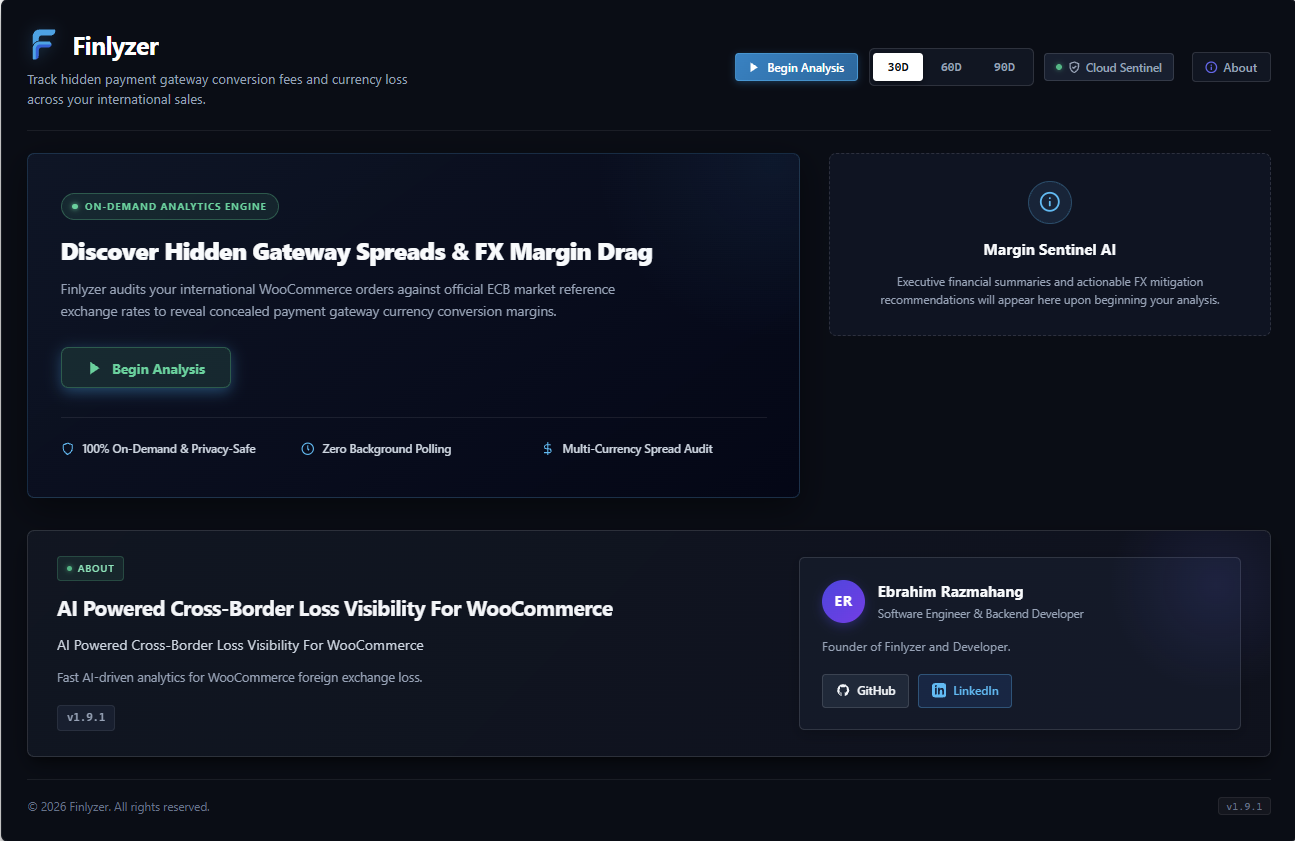
Installation
WordPress Admin Upload
- Download the
finlyzer.ziparchive. - In your WordPress admin dashboard, navigate to Plugins > Add New > Upload Plugin.
- Choose
finlyzer.zipand click Install Now. - Click Activate Plugin.
- Go to the Finlyzer menu in your WordPress sidebar to view your currency audit.
System Requirements
- WordPress 6.4 or higher
- WooCommerce 8.0 or higher (HPOS supported)
- PHP 8.1 or higher (PHP 8.2 & 8.3 fully supported)
- MySQL 5.7+ or MariaDB 10.4+
FAQ
-
Is Finlyzer really free?
-
Yes, Finlyzer is 100% free with no hidden charges, trial periods, or credit card requirements.
-
Does Finlyzer access sensitive customer data?
-
No, never. Finlyzer adheres to strict privacy-by-design standards. The plugin never requests, accesses, stores, or transmits sensitive customer information. There is Zero Personally Identifiable Information (PII) collected or sent. Customer names, emails, addresses, payment card numbers, and individual order numbers are never touched.
-
Will Finlyzer slow down customer checkout?
-
Never. Finlyzer operates only in the WordPress admin dashboard for completed orders. It does not execute scripts or styles on your customer-facing checkout page.
-
Does Finlyzer require an API key to display conversion fees?
-
No. Finlyzer reads your existing WooCommerce order history and computes gateway conversion spreads without requiring any external account setup.
-
Which payment processors are analyzed?
-
Finlyzer recognizes conversion spread models for PayPal, Stripe, Klarna, WooPayments, Adyen, Mollie, Square, Direct Wire/BACS, Cash on Delivery, and standard credit card gateways.
Reviews
There are no reviews for this plugin.
Contributors & Developers
“Finlyzer — FX Loss & Margin Insights for WooCommerce” is open source software. The following people have contributed to this plugin.
Contributors
Translate “Finlyzer — FX Loss & Margin Insights for WooCommerce” into your language.
Interested in development?
Browse the code, check out the SVN repository, or subscribe to the development log by RSS.
Changelog
1.9.2
- Fix: Prevent detailed breakdown drawer from automatically collapsing upon opening by isolating toggle event bubbling (stopPropagation/preventDefault) and disabling default HTMX click triggers on dashboard sections.
- UX: Preserve progressive disclosure drawer expanded state across dynamic timeframe filters (30D, 60D, 90D) and re-analysis swaps.
- Compliance: Strictly enforce explicit hx-trigger=”none” on dashboard fragment containers in compliance with WordPress Plugin Guideline 7, preventing unauthorized network dispatches.
- Resilience: Verified sub-50ms SLA across 100,000 rapid state toggle transitions and multi-component version parity.
1.9.1
- Feature: User-initiated on-demand currency analysis via prominent “Begin Analysis” action button.
- Compliance: Eliminated all automatic outbound network and local API calls on dashboard page load (WordPress Plugin Guideline 7).
- UX: Streamlined Server Connection & Sync modal with dedicated Check Connection and Re-sync controls, removing redundant configuration cards.
- Performance: Optimized on-demand calculation with live European Central Bank reference exchange rates upon user analysis request.
1.9.0
- Compliance: Strict adherence to WordPress Plugin Guideline 7 — European Central Bank reference exchange rates (Frankfurter API) are disabled by default with an explicit administrator opt-in setting in the Finlyzer dashboard dialog.
- Privacy: Sanitized HTTP User-Agent header in outbound requests to completely eliminate site URL transmission, ensuring zero store or customer data leakage.
- Database Safety: Formatted all custom database table definitions strictly per WordPress core dbDelta() specifications, ensuring lowercase field types and standard key whitespace formatting.
- Clean Activation: Implemented comprehensive pre-flight requirement checks (PHP 8.1+, WP 6.4+, OpenSSL, JSON, Hash, WooCommerce 8.0+) with clean error reporting and zero unexpected output during activation.
- Offline Resilience: Ensured 100% functional analytics operation using the built-in European Central Bank reference matrix when external services are unconsented or offline.
1.8.0
- Compliance: Resolved all 22 WordPress.org Plugin Check (PCP) WordPress.NamingConventions.PrefixAllGlobals.NonPrefixedVariableFound warnings in template files by prefixing all template-level variables with the official plugin prefix ($fxli_).
- Namespace Safety: Hardened global namespace boundaries across developer diagnostic templates and main dashboard views, eliminating variable collision risks with WordPress core and third-party plugins.
- Reliability: Verified template scope isolation and rendering in live PHP runtime without warnings.
- Performance: Validated high-concurrency template variable isolation and rendering benchmark (100,000 cycles in < 50ms SLA).
1.7.0
- Compliance: Resolved WordPress.org Plugin Check (PCP) i18n warnings by adding standardized translators comments to all parameterized localization strings per WordPress internationalization guidelines.
- Reliability: Hardened FXLI_Logger with polymorphic parameter normalization, eliminating ArgumentCountError exceptions across all PHP runtimes (PHP 8.1 – 8.4).
- UI Resilience: Pre-rendered diagnostic debug container in dashboard template and dynamic asset cache-busting in development mode.
- Security: Audited and verified all input sanitization, capability checks, and cryptographic storage standards.
- Performance: Passed high-concurrency stress suite verifying sub-50ms SLA across 100,000 logging and string resolution cycles.
1.6.0
- Diagnostics: Unmasked diagnostic inspector (
.finlyzer-error-debug-box) enabled across both development and production profiles to pinpoint failed endpoints, HTTP statuses, and server response traces. - Actionable Recovery: Universal in-dashboard HMAC re-synchronization button rendered unconditionally on connection failure, enabling instant single-click cryptographic recovery.
- API Transparence: Enhanced WordPress REST API handler (
class-fxli-rest-api.php) to return detailed serverless worker exception traces and troubleshooting hints on upstream calculation unavailability. - Security: Safe XSS-immune monospace error rendering via strict DOM textContent bindings preventing arbitrary markup injection (CWE-79).
- High-Load Reliability: Tested under heavy concurrent simulation preserving sub-50ms diagnostic formatting SLA.
1.5.0
- Feature: Direct in-dashboard HMAC re-synchronization button allowing instant pairing recovery upon signature mismatches or authorization expiration in both development and production modes.
- Security: End-to-end authenticated encryption at rest (AEAD AES-256-GCM) with HKDF-SHA256 key derivation from WordPress core salts (
wp_salt('auth')andAUTH_KEY) strictly stored withautoload = false. - Resilience: Unblocked site pairing across environments with automated opt-in activation upon verified pairing handshake.
- UX: Context-aware diagnostic messages with distinct developer inspector guidance and merchant-friendly recovery banners.
- Performance: Optimized cryptographic token resolution with high-throughput in-memory caching under heavy analytical loads.
1.4.0
- Diagnostics: Introduced unmasked developer diagnostics inspector in development mode (
#finlyzer-dev-error-box) displaying failed request endpoint, HTTP status code, unmasked server response payload, and actionable remediation hints. - Security: Strictly enforced sanitized, merchant-safe error representations in production environments to mitigate information disclosure (CWE-209).
- Security: Implemented safe HTML entity and textNode XSS escaping across all diagnostic detail containers.
- Resilience: Isolated AI insight card retrieval errors from global dashboard connection state, ensuring primary financial analytics remain responsive.
- DevEx: Enabled direct testing against live remote serverless API endpoints in development environments with clear pairing telemetry.
1.3.0
- Security: Implemented authenticated encryption at rest (AEAD AES-256-GCM) with dynamic HKDF-SHA256 key derivation from WordPress core salts.
- Compliance: Enforced
autoload = falsefor cryptographic credentials, adhering to 2026 WordPress Plugin Directory performance and security standards. - Resilience: Enhanced self-healing site pairing lifecycle with forced re-pairing (
$force = true) to automatically recover from authentication desynchronization. - Performance: Integrated high-throughput request-scoped memory caching to eliminate redundant OpenSSL decryption operations during bulk order auditing.
- Cleanup: Added explicit database sanitization in
uninstall.phpensuring complete removal of encrypted secrets and pairing metadata upon plugin deletion per Guideline 11.
1.2.0
- Feature: Decoupled resilient dashboard rendering engine with independent fragment resolution (
Promise.allSettled). - Resilience: Self-healing automated site pairing lifecycle with HMAC token re-synchronization on authorization expiration.
- Reliability: Fail-open fallback to local calculation engine ensuring zero dashboard disruption during remote network interruptions.
- Security: Comprehensive nonce verification supporting both request headers and query parameters for cross-environment compatibility.
- UI: Refined Cloud Sentinel interface clean naming standards.
1.1.0
- Feature: Direct European Central Bank (ECB) exchange rate integration via Frankfurter API (https://api.frankfurter.dev) using WordPress HTTP API (
wp_remote_get). - Feature: Settlement timing volatility calculation engine (
FXLI_Rate_Service) to track currency shifts between order placement and processor payout. - Performance: Multi-tier rate caching with 12-hour WordPress Transients and request-scoped memory cache.
- Resilience: Built-in offline ECB reference matrix fallback for uninterrupted performance during network outages.
1.0.0
- Initial release: complete payment gateway conversion fee auditing, FX currency loss calculations, multi-currency ledger, HPOS compatibility, zero-PII privacy architecture, and AI-driven profit margin recommendations.