
Description
SanBar EXPress NF-e XML Import-BR reads the NF-e (Brazilian Electronic Invoice) XML file your supplier issued for a purchase, and brings the items straight into WooCommerce in a grid organized exactly like the invoice’s own fields (Code, EAN/GTIN, NCM, CST, CFOP, ICMS/IPI values and other taxes), ready to become a product — no manual data entry.
Standalone plugin: works on its own, with no dependency on any other plugin from the SanBar suite. A Plus edition also exists, with one-action complete product creation (fiscal data + Price Calculator fields + taxes), manual linking, stock updates, and syncing already-registered data — the features marked below as “Plus only”.
How it works
- Upload the purchase NF-e XML file.
- Review the summary (supplier, invoice number, items, total, access key) before anything is saved.
- Review the items in the grid, laid out exactly like the invoice’s own fiscal fields.
- Create the product, link it to an existing one, or just update price/stock/fiscal data — each action is independent and always asks for confirmation before applying.
Features
- XML upload with security validation (access key, check digit, protection against malicious XML, file size limit)
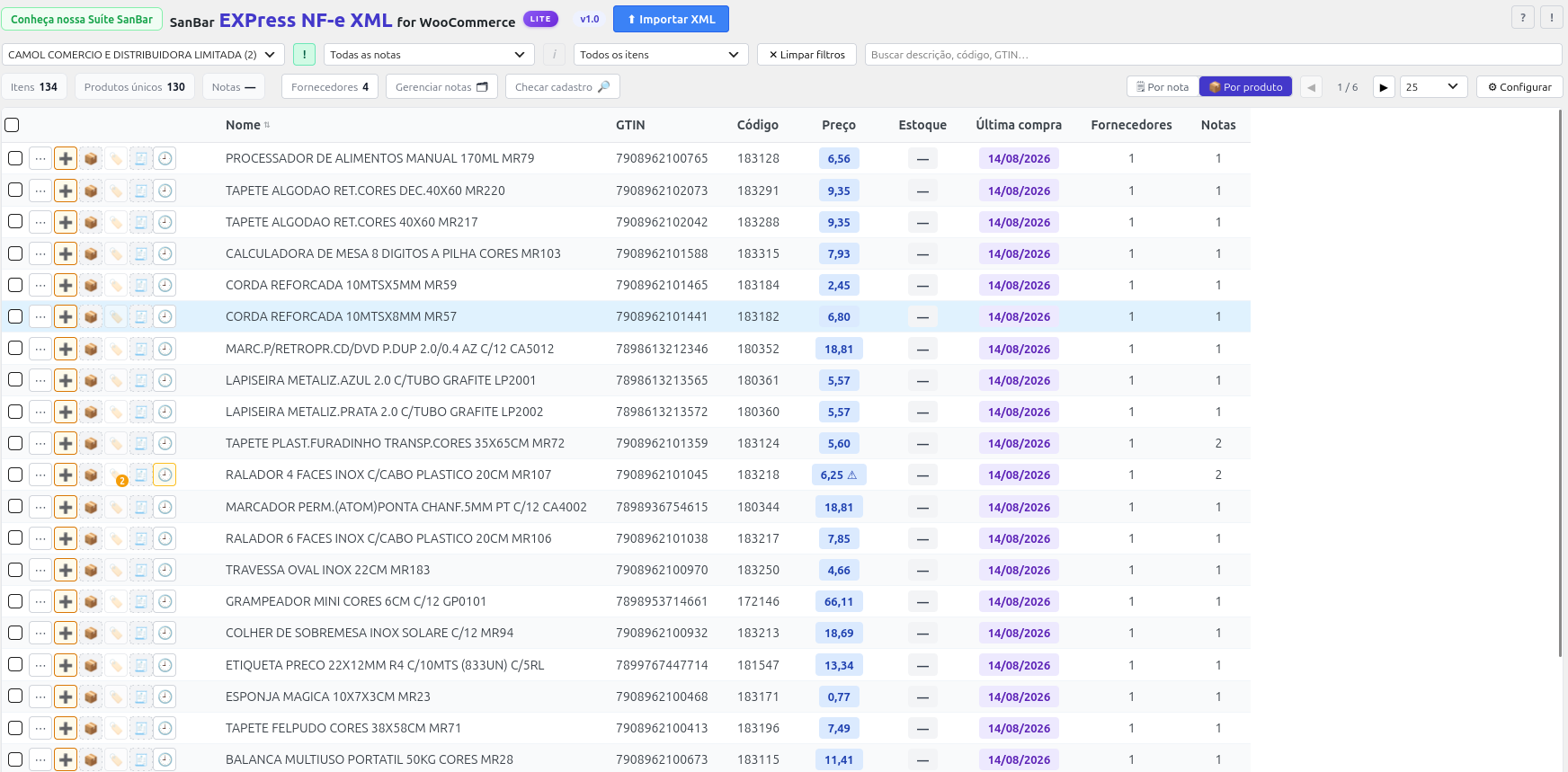
- Review grid in the invoice’s fiscal layout, with pagination, search, and column sorting (Supplier, Description)
- Two views: per invoice line and per product (aggregated by identity)
- Special filters: linked, pending, price changed between invoices, duplicate/same GTIN, invoices or price in a date range, ignored, linked with full fiscal data (Plus only)
- Product creation as a draft — individually or in bulk
- Automatic linking to an already-registered product by GTIN match
- Manual linking to an existing product, writing full identity and fiscal data (Plus only)
- Additional matching by supplier + code when the invoice has no GTIN (Plus only)
- One-action complete product creation — identity, fiscal data, Price Calculator fields, and taxes (Plus only)
- Stock update (add to or set the quantity) straight from the invoice (Plus only)
- Price (cost) update and SKU/GTIN source update on an already-registered product
- Fiscal data sync on an already-linked product, without duplicating it (Plus only)
- “One registered product = one NF-e identity” rule, with a warning and assisted resolution on conflict
- Registry cross-check against the WooCommerce catalog — shows what the invoice brings side by side with what is already registered
- Price history per product/supplier, with a visual indicator for price variation between invoices or between different suppliers
- “Ignore” system for items that will never become a product (samples, giveaways, internal use)
- Invoice manager (safe deletion, without affecting products already created) and Supplier library (registration with CNPJ/CPF validation)
- Internal audit log and error log, with a configurable verbosity level
- Icon glossary — explains what each on-screen indicator means
- Optional integration with SanBar EXPress Store Manager, when installed
Fiscal security
- Access key check digit (44 digits) validated before accepting the XML
- Protection against XXE (external entities) and an upload size limit
- An invoice already imported is rejected — never overwrites an existing link
- Transactional saving: if any item fails, the whole invoice is not left partially saved
Screenshots



Installation
- Upload the plugin folder to
/wp-content/plugins/. - Activate the plugin from the WordPress admin.
- WooCommerce must be active.
FAQ
-
Do I need another SanBar plugin installed?
-
No. SanBar EXPress NF-e XML Import-BR works on its own. It integrates automatically with SanBar EXPress Store Manager when that is also installed, but this is optional.
-
Does the plugin also import sales NF-e?
-
No. The focus is purchase NF-e — bringing the products you bought from a supplier into WooCommerce.
-
Which taxes does the plugin capture from the invoice?
-
ICMS, ICMS-ST, IPI, FCP, PIS, COFINS, II, DIFAL, IBS, CBS, and IS — the full list of taxes that a model-55 purchase NF-e allows capturing safely. Applying that data to the product in one action is a Plus edition feature.
-
What is the difference from the Plus edition?
-
This edition (Lite) already covers reading the invoice, the grid, draft creation, and automatic linking by GTIN. The Plus edition adds: one-action complete product creation (fiscal data + Price Calculator fields + taxes), manual linking and linking by supplier + code, stock updates, and fiscal data sync on an already-linked product.
Reviews
There are no reviews for this plugin.
Contributors & Developers
“SanBar EXPress NF-e XML Import-BR” is open source software. The following people have contributed to this plugin.
Contributors
Translate “SanBar EXPress NF-e XML Import-BR” into your language.
Interested in development?
Browse the code, check out the SVN repository, or subscribe to the development log by RSS.
Changelog
1.0
- Initial release.