

Description
Seamless job board with shortcode listings, CF7 & Gravity Forms integration, and easy job management. Simplify functionality for hiring.
Features
1. Job Posting Management
- Custom post type for job postings
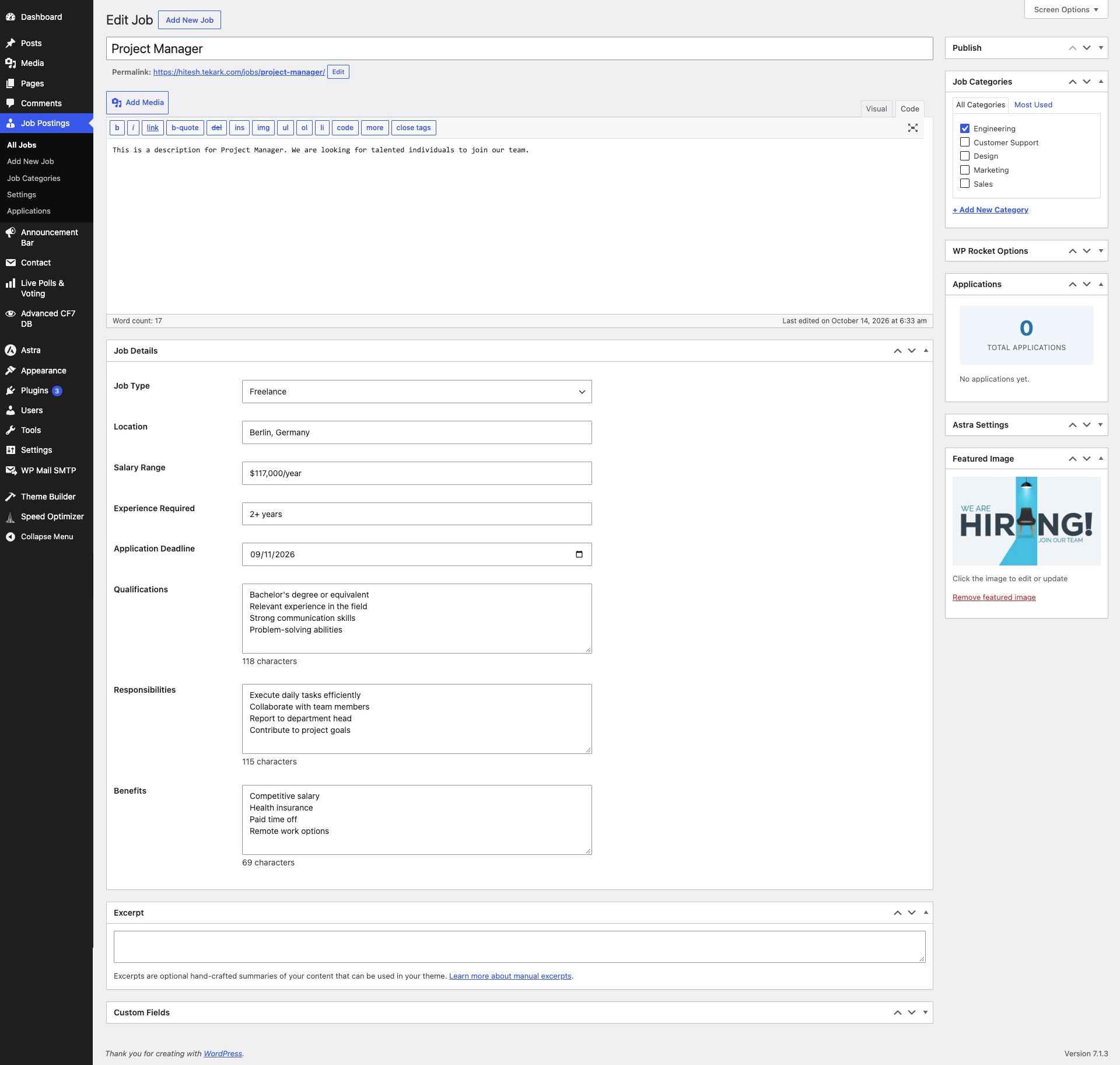
- Rich job information fields:
- Job Type (Full-time, Part-time, Contract, Freelance, Internship)
- Location
- Salary Range
- Experience Required
- Application Deadline
- Qualifications
- Responsibilities
- Benefits
- Featured images support
- Category taxonomy for job organization
- SEO-friendly URLs
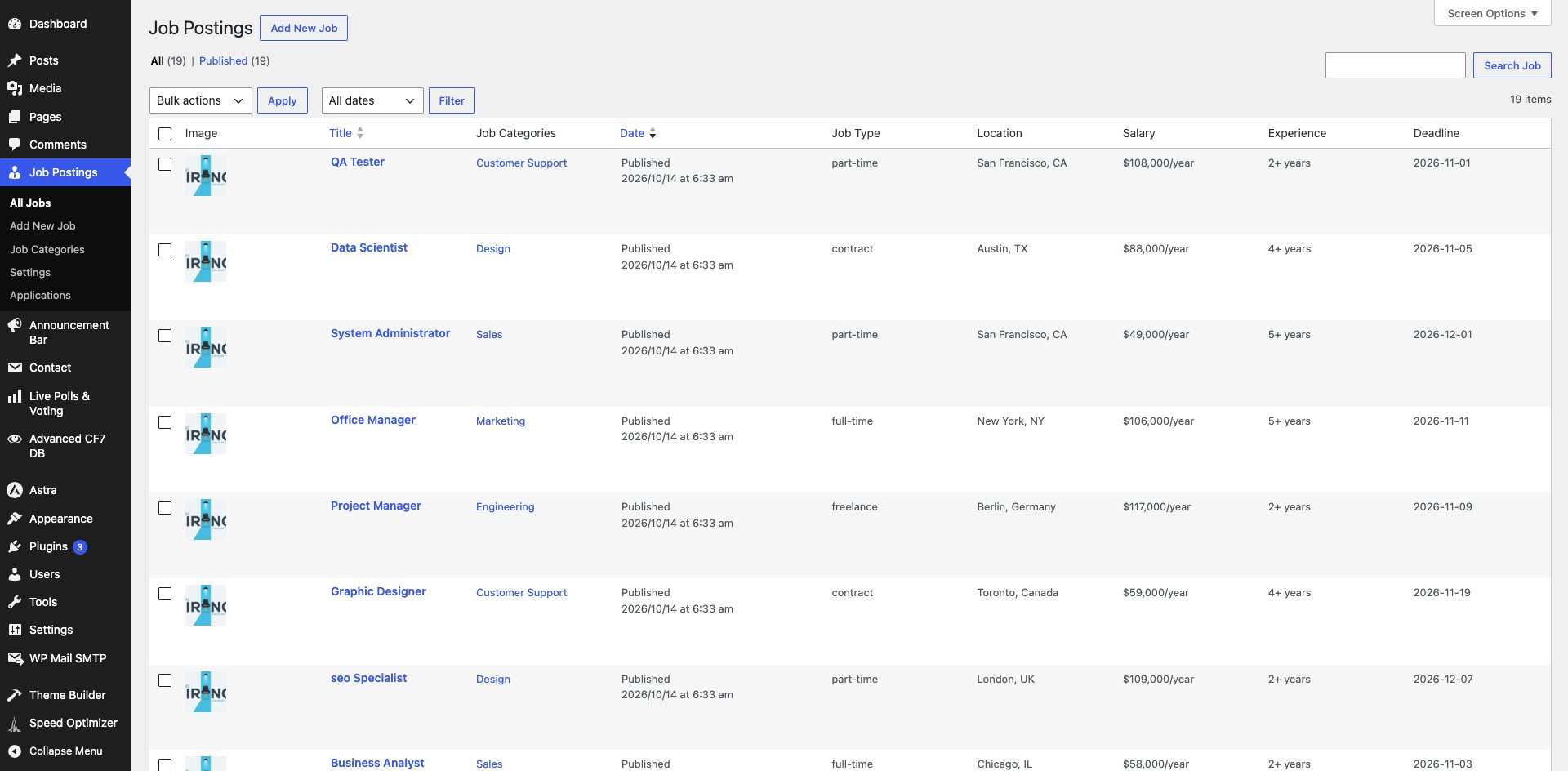
- Demo Content: Automatically creates 19 sample job postings on activation for easy testing
2. Job Listing Shortcode
Display jobs with flexible options:
– Layout Options: Grid or Row layout
– Grid Columns: 2, 3, or 4 columns
– Sorting: Ascending or Descending order
– Order By: Date, Title, Modified date, or Meta value
– Filtering: By category
– Pagination: Dual pagination support – Traditional page list or AJAX Load More button
– Customization: Show/hide various elements
3. Job Details Page
- Professional single job template
- Detailed job information display
- Application form integration
- Responsive design
- Sticky sidebar with apply button
4. Form Integration
Supports both Contact Form 7 and Gravity Forms:
– Automatic form insertion on job detail pages
– Hidden fields for job ID and title
– Application tracking
– Application count tracking
5. Additional Features
- Admin settings page
- Application logging
- Responsive design
- Translation ready
- SEO optimized
Requirements
- WordPress 5.8 or higher
- PHP 7.4 or higher
- Contact Form 7 OR Gravity Forms (for application forms)
Configuration
Setting up Contact Form 7
- Install and activate Contact Form 7
- Go to Contact > Contact Forms
- Create a new form or edit existing
-
Add the following hidden fields to your form(Optional):
[hidden job_id]

[hidden job_title] -
Add your application form fields (examples):
`
Your Name (required)
[text* your-name]
Your Email (required)
[email* your-email]
Phone Number
[tel your-phone]
Resume (required)
[file* your-resume filetypes:pdf|doc|docx]
Cover Letter
[textarea your-cover-letter]
[submit “Submit Application”]
`
- Go to Job Postings > Settings
- Select “Contact Form 7” as the form plugin
- Select one Form
- Save settings
Setting up Gravity Forms
- Install and activate Gravity Forms
- Go to Forms > New Form
- Create your application form
- Add two hidden fields:
- Field Label: Job ID
- Parameter Name:
job_id - Check “Allow field to be populated dynamically”
- Field Label: Job Title
- Parameter Name:
job_title - Check “Allow field to be populated dynamically”
-
Add your application fields:
- Name (required)
- Email (required)
- Phone
- File Upload for Resume (required)
- Paragraph Text for Cover Letter
- Any other custom fields you need
-
Configure form settings and notifications as needed
- Copy the form ID
- Go to Job Postings > Settings
- Select “Gravity Forms” as the form plugin
- Select one Form
- Save settings
Usage
Creating a Job Posting
- Go to Job Postings > Add New
- Enter the job title
- Add job description in the content editor
- Fill in the Job Details:
- Select Job Type
- Enter Location
- Enter Salary Range
- Enter Experience Required
- Set Application Deadline
- List Qualifications (one per line)
- List Responsibilities (one per line)
- List Benefits (one per line)
- Assign Job Categories
- Set Featured Image (optional)
- Publish
Using the Shortcode
Basic usage:
[goteja_job_listing]
Shortcode Parameters
Parameter
Options
Default
Description
layout
grid, row
grid
Layout style
columns
2, 3, 4
3
Number of columns (grid only)
order
ASC, DESC
DESC
Sort order
orderby
date, title, modified, meta_value
date
Sort by field
meta_key
any meta key
–
Meta key for sorting by meta_value
posts_per_page
number
6
Number of jobs to display
category
category slug
–
Filter by category
show_excerpt
yes, no
yes
Show job excerpt
show_location
yes, no
yes
Show job location
show_type
yes, no
yes
Show job type
show_date
yes, no
yes
Show post date
pagination
yes, no
yes
Show pagination
pagination_type
pagelist, loadmore
pagelist
Pagination style (pagelist = numbered pages, loadmore = load more button)
Shortcode Examples
Grid layout with 3 columns (default):
[goteja_job_listing]
Grid layout with 4 columns:
[goteja_job_listing layout="grid" columns="4"]
Row layout:
[goteja_job_listing layout="row"]
Show only 6 jobs:
[goteja_job_listing posts_per_page="6"]
Filter by category:
[goteja_job_listing category="developer"]
Sort by title in ascending order:
[goteja_job_listing order="ASC" orderby="title"]
Hide certain elements:
[goteja_job_listing show_excerpt="no" show_date="no"]
Load More pagination (AJAX):
[goteja_job_listing pagination_type="loadmore"]
Traditional numbered pagination:
[goteja_job_listing pagination_type="pagelist"]
Combined example with Load More:
[goteja_job_listing layout="grid" columns="3" order="DESC" orderby="date" posts_per_page="12" category="engineering" show_excerpt="yes" pagination="yes" pagination_type="loadmore"]
Combined example with Page List:
[goteja_job_listing layout="grid" columns="3" order="DESC" orderby="date" posts_per_page="12" category="engineering" show_excerpt="yes" pagination="yes" pagination_type="pagelist"]
Form Handling
How It Works
-
When a user visits a job detail page, the plugin automatically:
- Adds hidden fields with job ID and job title to the form
- Displays the configured form at the bottom of the page
-
When a user submits an application:
- The form data is processed by the respective form plugin
- GoTechArk Easy Job Apply logs the application
- Application count is incremented
Form Fields Recommendations
Minimum Required Fields:
– Name (required)
– Email (required)
– Resume/CV Upload (required)
Recommended Additional Fields:
– Phone Number
– Cover Letter
– LinkedIn Profile URL
– Portfolio URL (for creative positions)
– Availability/Start Date
– Current Salary
– Expected Salary
– Additional Information/Comments
Customization
Template Override
You can override the single job template by copying:
/wp-content/plugins/gotechark-easy-job-apply/templates/single-goteja_job_posting.php
To your theme:
/wp-content/themes/your-theme/gotechark-easy-job-apply/single-goteja_job_posting.php
Styling
The plugin includes comprehensive CSS that can be customized:
– Frontend styles: /assets/css/goteja-frontend.css
– Admin styles: /assets/css/goteja-admin.css
To override styles, add custom CSS in your theme or use Customizer.
Troubleshooting
Form not showing on job page
- Check if form plugin (CF7 or GF) is active
- Verify form ID in settings is correct
- Check if form exists and is published
- Clear cache if using caching plugin
Jobs not displaying in shortcode
- Make sure jobs are published
- Check category slug if using category filter
- Verify shortcode syntax
- Check posts_per_page parameter
- Clear permalinks: Settings > Permalinks > Save Changes
Applications not being tracked
- Verify form has hidden fields (job_id and job_title)
- Check if form submission is working
- Review error logs
- Ensure proper parameter names in Gravity Forms
Support & Customization
Need Help or Guidance?
If you need assistance with installation, configuration, troubleshooting, or general usage, please visit https://gotechark.com/support/ or contact us at support@gotechark.com.
Need Customization or New Features?
If you require custom development, feature enhancements, integrations, or any other customization, please contact us at sales@gotechark.com.
Screenshots
![Frontend Job Listings Grid - The clean and modern grid layout created using the [goteja_job_listing] shortcode, displaying active job postings with pagination, and job badges.](https://ps.w.org/gotechark-easy-job-apply/assets/screenshot-1.png?rev=3765868)
[goteja_job_listing] shortcode, displaying active job postings with pagination, and job badges.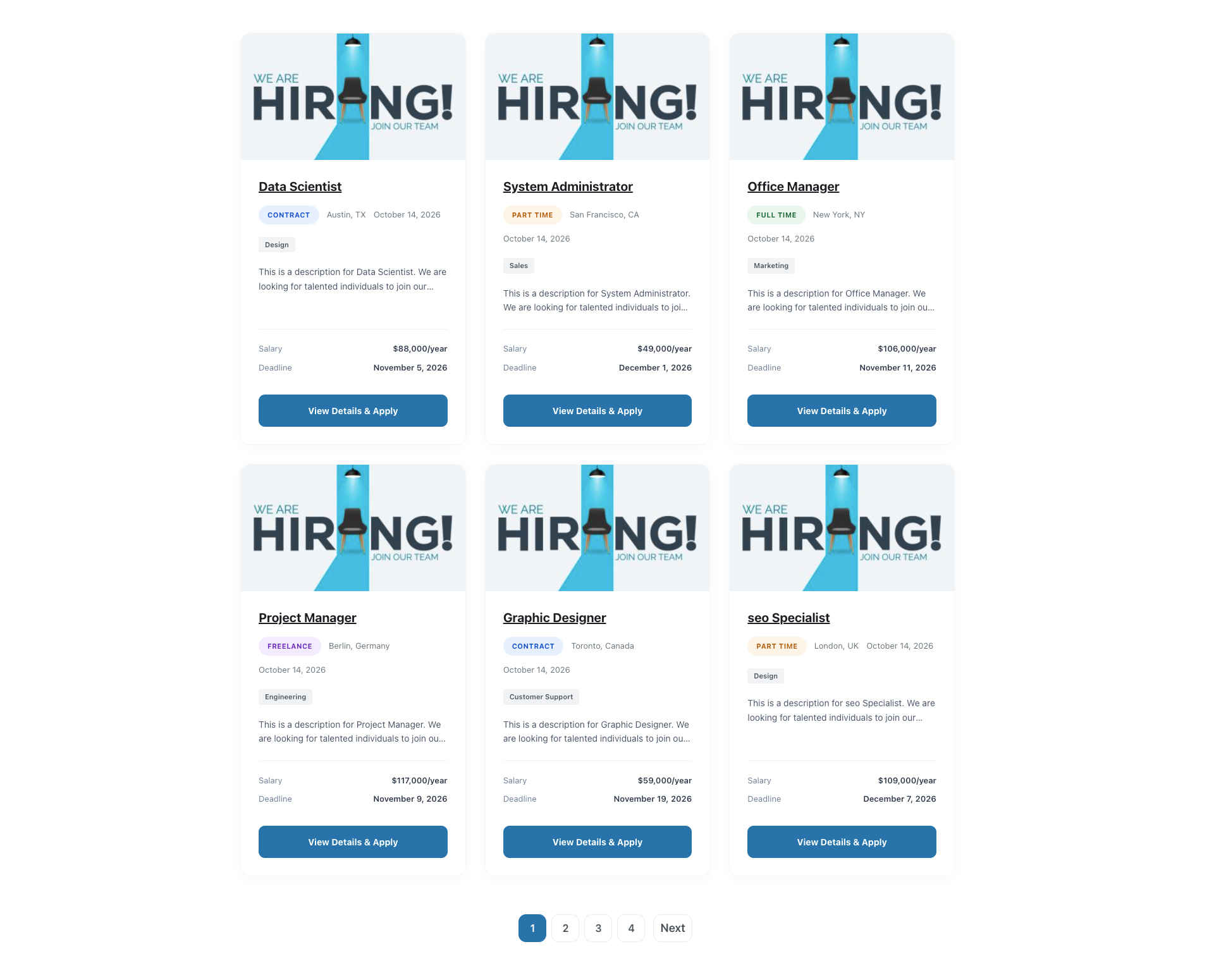

Installation
- Download the plugin files
- Upload the
gotechark-easy-job-applyfolder to/wp-content/plugins/directory - Activate the plugin through the ‘Plugins’ menu in WordPress
- Demo Content Created: 19 sample job postings are automatically created to help you get started
- Configure settings under Job Postings > Settings
Demo Content
Upon activation, the plugin automatically creates: – 19 Sample Job Postings in various categories and job types – 5 Job Categories: Engineering, Marketing, Sales, Design, Customer Support – All with realistic content, qualifications, and deadlines
To Remove Demo Content: 1. Go to Job Postings > Settings 2. Click the “Remove All Dummy Jobs” button 3. This will delete all sample jobs and categories 4. Then add your own job postings
Reviews
There are no reviews for this plugin.
Contributors & Developers
“GoTechArk Easy Job Apply” is open source software. The following people have contributed to this plugin.
Contributors


Translate “GoTechArk Easy Job Apply” into your language.
Interested in development?
Browse the code, check out the SVN repository, or subscribe to the development log by RSS.
Changelog
Version 1.0.0
- Initial release
- Job posting custom post type
- Job category taxonomy
- Comprehensive meta fields
- Shortcode with grid/row layouts
- Contact Form 7 integration
- Gravity Forms integration
- Application tracking
- Responsive design