

Description
BuildForUser SEO brings everyday search optimization tools into your WordPress dashboard. Write metadata, preview search and social cards, check content, manage redirects, and publish XML sitemaps without switching between several plugins.
The current plugin features are available free. Optional AI generation uses your own provider API key; provider charges and limits apply. The optional BuildForUser Cloud service is separate from the local plugin.
Search appearance and content tools
- Set SEO titles, meta descriptions, canonical URLs, and indexing preferences for individual posts and pages.
- Use dynamic title and description templates for posts, pages, and archives.
- Preview Google desktop and mobile results, Facebook OpenGraph cards, and Twitter / X cards.
- Estimate title width with a browser-based pixel meter. Search engines may display different titles, descriptions, and layouts.
- Check a primary focus keyword and up to five related phrases for placement in your content.
- Review heading structure, readability indicators, images, and internal links.
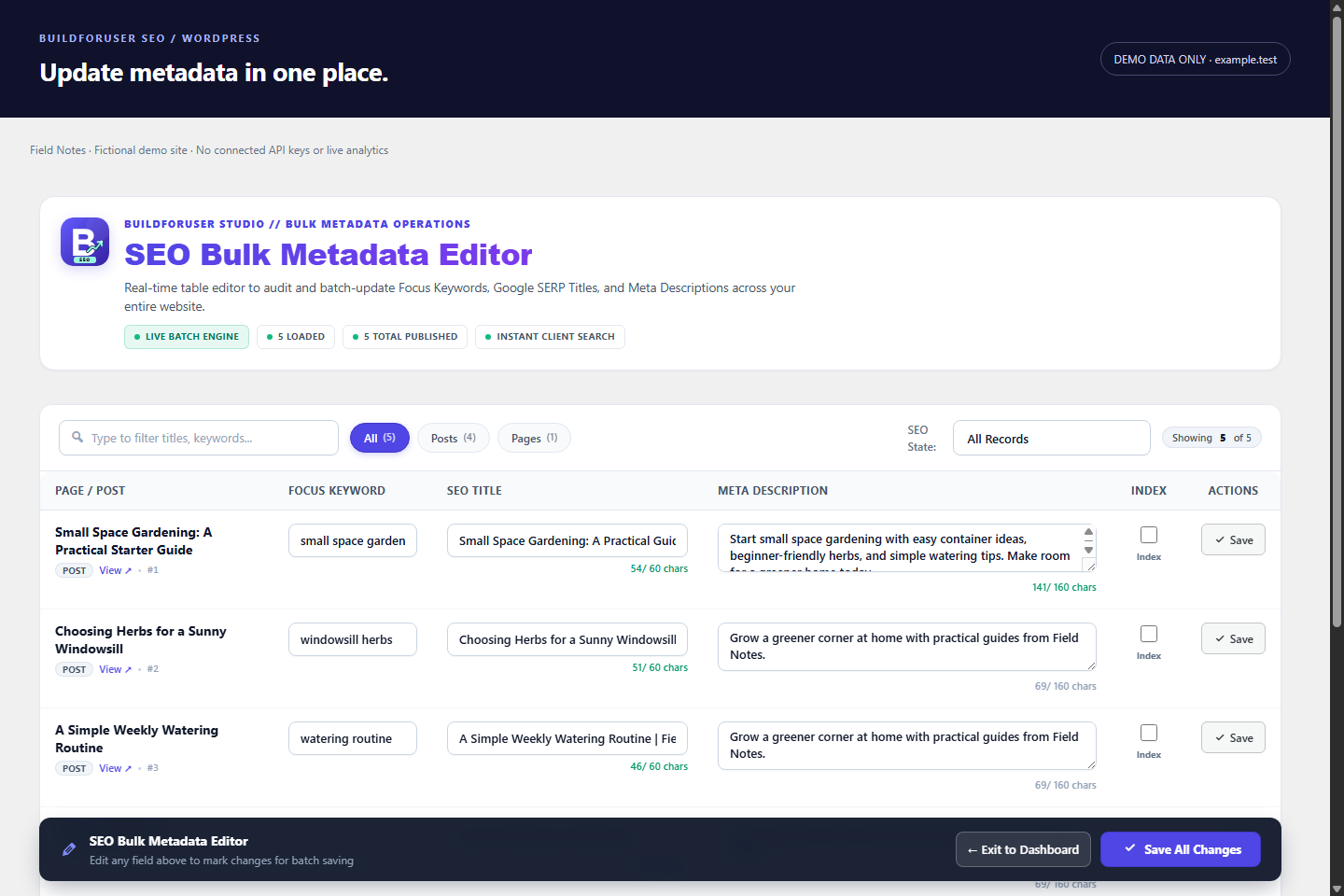
- Edit titles, descriptions, focus keywords, and noindex settings in the bulk metadata editor.
Sitemaps and technical SEO
- Publish a dynamic XML sitemap index with post, page, taxonomy, and custom post type support.
- Configure image, news, and video sitemap options.
- Create redirects, use regex patterns, return 410 responses, and import redirects from CSV.
- Automatically create redirects when published content slugs change.
- Monitor 404 requests and check link health. Scheduled scans and external link checks require administrator opt-in.
- Configure breadcrumbs, robots.txt additions, webmaster verification, and optional performance settings.
- Delegate sitewide structured data to a separate schema plugin. A schema builder is a separate plugin.
- Import supported metadata from Yoast SEO, Rank Math, and All in One SEO.
Optional AI and llms.txt tools
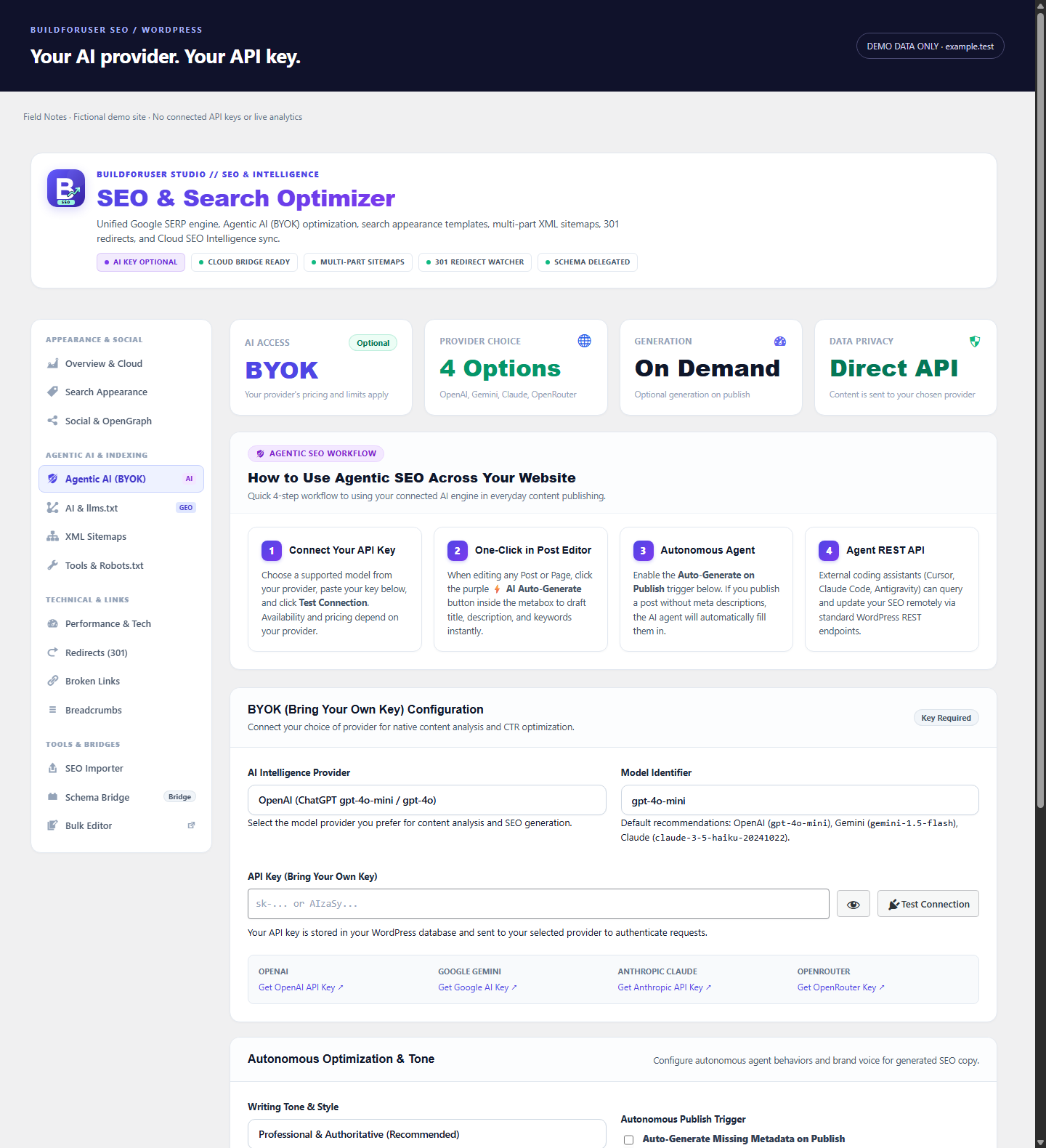
- Connect OpenAI, Google Gemini, Anthropic Claude, or OpenRouter with your own API key.
- Generate suggested SEO titles, descriptions, focus keywords, related phrases, and social copy from article content.
- Optionally generate missing metadata when content is published.
- Publish /llms.txt, /llm.txt, and /llms-full.txt Markdown feeds with content selection and per-post exclusions.
- Connect external tools through authenticated REST endpoints for SEO overviews, content audits, metadata updates, and related operations.
The llms.txt feeds are an optional way to present content to tools that choose to read them. They do not guarantee crawling, indexing, rankings, AI citations, or inclusion in an answer engine. Excluding a page from these feeds does not block access to its public URL.
Privacy and external services
The plugin does not send plugin usage telemetry by default. External integrations are optional. Review your provider’s terms before enabling them, and avoid sending sensitive content to an AI service.
AI providers: When you request AI generation, or enable automatic generation on publish, the plugin sends article text, the article title, site name, current focus keyword, and selected tone to the configured provider. The API key is sent for authentication. Connection tests also contact the selected provider. AI output should be reviewed before use.
- OpenAI: https://api.openai.com/ – Terms: https://openai.com/policies/terms-of-use/ – Privacy: https://openai.com/policies/privacy-policy/
- Google Gemini: https://generativelanguage.googleapis.com/ – Terms: https://ai.google.dev/gemini-api/terms – Privacy: https://policies.google.com/privacy
- Anthropic: https://api.anthropic.com/ – Terms: https://www.anthropic.com/legal/commercial-terms – Privacy: https://www.anthropic.com/legal/privacy
- OpenRouter: https://openrouter.ai/api/ – Terms: https://openrouter.ai/terms – Privacy: https://openrouter.ai/privacy
Link checks: Internal links are checked by default when a scan is requested. If external scanning is enabled, requests are also sent to linked external websites. Those servers receive normal HTTP request information. Scheduled scans are disabled by default.
BuildForUser Cloud bridge: An optional shared API key allows authenticated external tools to read SEO information and update supported settings through the plugin’s REST API. Configure this only for a service you trust. Provider: BuildForUser Studio, https://buildforuser.com/ – Terms: https://buildforuser.com/terms-of-service – Privacy: https://buildforuser.com/privacy-policy
Google Analytics: If you configure a GA4 measurement ID, the plugin loads Google’s analytics script on the public site. Google receives analytics data according to your configuration. Site owners are responsible for configuring any required consent mechanism. Terms: https://marketingplatform.google.com/about/analytics/terms/us/ – Privacy: https://policies.google.com/privacy
Webhooks: If configured, event notifications are sent to the webhook URL you supply. Only use a destination you trust.
Development source
The release includes readable JavaScript and CSS alongside minified assets. Development source and build instructions are included in the plugin’s source/ directory. To rebuild, install Node.js, run npm install in source/, then run npm run build.
Screenshots



Installation
- Upload the buildforuser-seo folder to /wp-content/plugins/, or install BuildForUser SEO from the WordPress plugin directory.
- Activate the plugin in Plugins.
- Open BFU SEO to configure search appearance and sitemaps.
- Edit a post or page to use the SEO fields, content checks, and previews.
- Optionally configure an AI provider API key. Leave automatic generation disabled until you are ready to use it.
When replacing another SEO plugin, back up your database, import supported metadata, and deactivate the previous SEO plugin before enabling overlapping metadata and sitemap features.
FAQ
-
Is the plugin free?
-
Yes. The current local plugin features are available without a paid license. AI provider usage is billed separately by your chosen provider. Optional cloud services are separate.
-
Do I need an AI API key?
-
Only for AI generation. Metadata editing, content checks, previews, redirects, sitemaps, and llms.txt do not require an AI key.
-
Does this guarantee better rankings or AI citations?
-
No. The plugin provides tools to manage search settings and review content. Search engines and AI services decide how they crawl, index, rank, and cite websites.
-
Where is my sitemap?
-
When enabled, the sitemap index is available at https://yourdomain.com/sitemap.xml. Save WordPress permalink settings if a newly activated endpoint returns 404.
-
Can I migrate from another SEO plugin?
-
The importer supports selected metadata from Yoast SEO, Rank Math, and All in One SEO. Back up your site and review the importer preview before applying changes.
-
Does BuildForUser SEO replace a schema builder?
-
No. It provides breadcrumb markup and is designed to work with a dedicated schema plugin for broader structured data needs.
-
Are the screenshots from a real customer site?
-
No. All screenshots use fictional Field Notes demo content and example.test URLs. They show the plugin’s PHP-rendered interface with isolated demo fixtures; they do not display customer data, live analytics, or paid AI results.
Reviews
There are no reviews for this plugin.
Contributors & Developers
“BuildForUser SEO – Agentic SEO & Generative Engine Optimization (GEO)” is open source software. The following people have contributed to this plugin.
Contributors
Interested in development?
Browse the code, check out the SVN repository, or subscribe to the development log by RSS.
Changelog
0.0.1
- Initial release with metadata editing, search and social previews, and multi-keyword content checks.
- XML sitemaps, redirect management, breadcrumbs, link monitoring, and migration tools.
- Optional bring-your-own-key AI metadata generation and authenticated REST integrations.
- Dynamic llms.txt and full-content Markdown feeds.
- Directory screenshots use fictional demo content only.