
Description
Aco Subscription and Recurring Payments for WooCommerce is a WooCommerce addon that enables store owners to sell subscription-based products with a simple and user-friendly interface without unnecessary settings.
Key Features
- Simple subscription product setup
- Flexible billing intervals
- Multiple payment gateway support
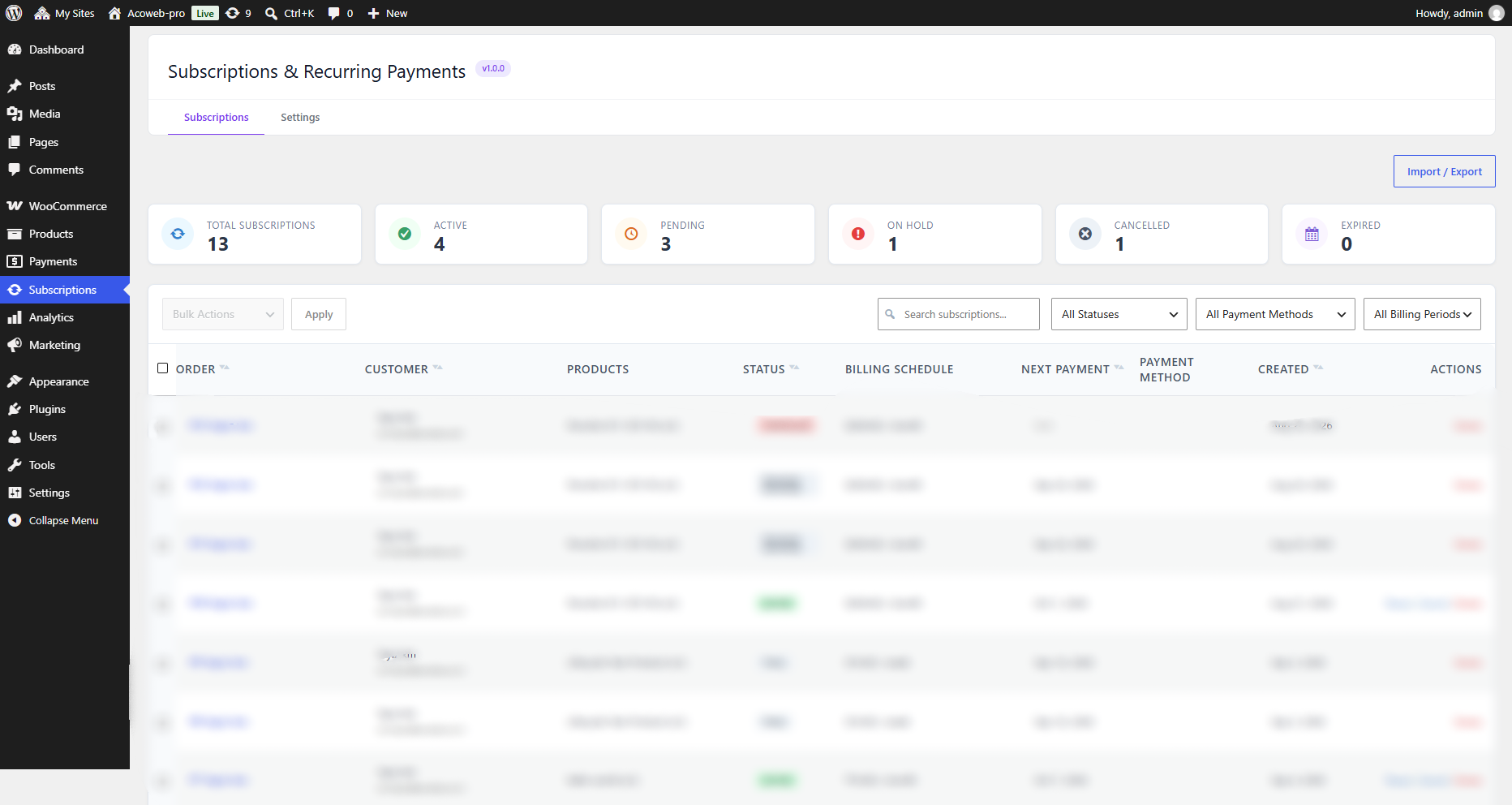
- Subscriber management dashboard
- WooCommerce HPOS compatible
Requirements
- WordPress 6.5 or higher
- WooCommerce 9.0 or higher
- PHP 7.4 or higher
External Services
This plugin connects to external third-party services and supports configurable outgoing webhooks to process subscription payments and synchronize billing events. Below is full disclosure of all external communications, hosts, data sent, account requirements, and terms/privacy links:
1. PayPal (WooCommerce PayPal Payments)
This plugin integrates directly with PayPal REST APIs to process subscription checkouts, verify subscription agreements, and automatically capture recurring renewal payments.
- Service Provider: PayPal, Inc.
- Official Service Website: https://www.paypal.com
- Terms of Service: https://www.paypal.com/legal/user-agreement-full
- Privacy Policy: https://www.paypal.com/legal/privacy-full
- API Hosts & Endpoints:
- Live / Production Host:
https://api-m.paypal.com - Sandbox / Testing Host:
https://api-m.sandbox.paypal.com - Subscriptions Creation:
POST /v1/billing/subscriptions(Created when customer subscribes at checkout) - Subscription Status Verification:
GET /v1/billing/subscriptions/{id}(Queried upon customer return to verify authorization) - Renewal Orders Capture:
POST /v2/checkout/orders(Executed on scheduled renewal dates using stored vault tokens)
- Live / Production Host:
- When Communication Happens:
- During customer checkout when purchasing a subscription product using PayPal.
- When a customer returns to the store after authorizing their subscription on PayPal.
- Automatically in the background on scheduled subscription renewal dates (via Action Scheduler) to capture recurring renewal payments.
- Data Categories Sent:
- Order & Renewal Metadata: Order ID, subscription ID, renewal invoice ID, currency code, total amount, and plan/product quantity.
- Customer Information: Subscriber billing first name, last name, email address, and shipping preference.
- Contextual Data: Store name (site title), return URL, and cancel URL.
- Payment Vault Information: Merchant-initiated transaction credentials and vaulted customer token ID. No credit card numbers or account passwords are ever handled, transmitted, or stored by this plugin.
- Authorization: OAuth Bearer access tokens generated via the merchant’s connected WooCommerce PayPal Payments plugin.
- Account & Setup Requirements:
- Requires an active PayPal Business account.
- Requires the official WooCommerce PayPal Payments plugin to be installed, active, and connected to the merchant’s PayPal account.
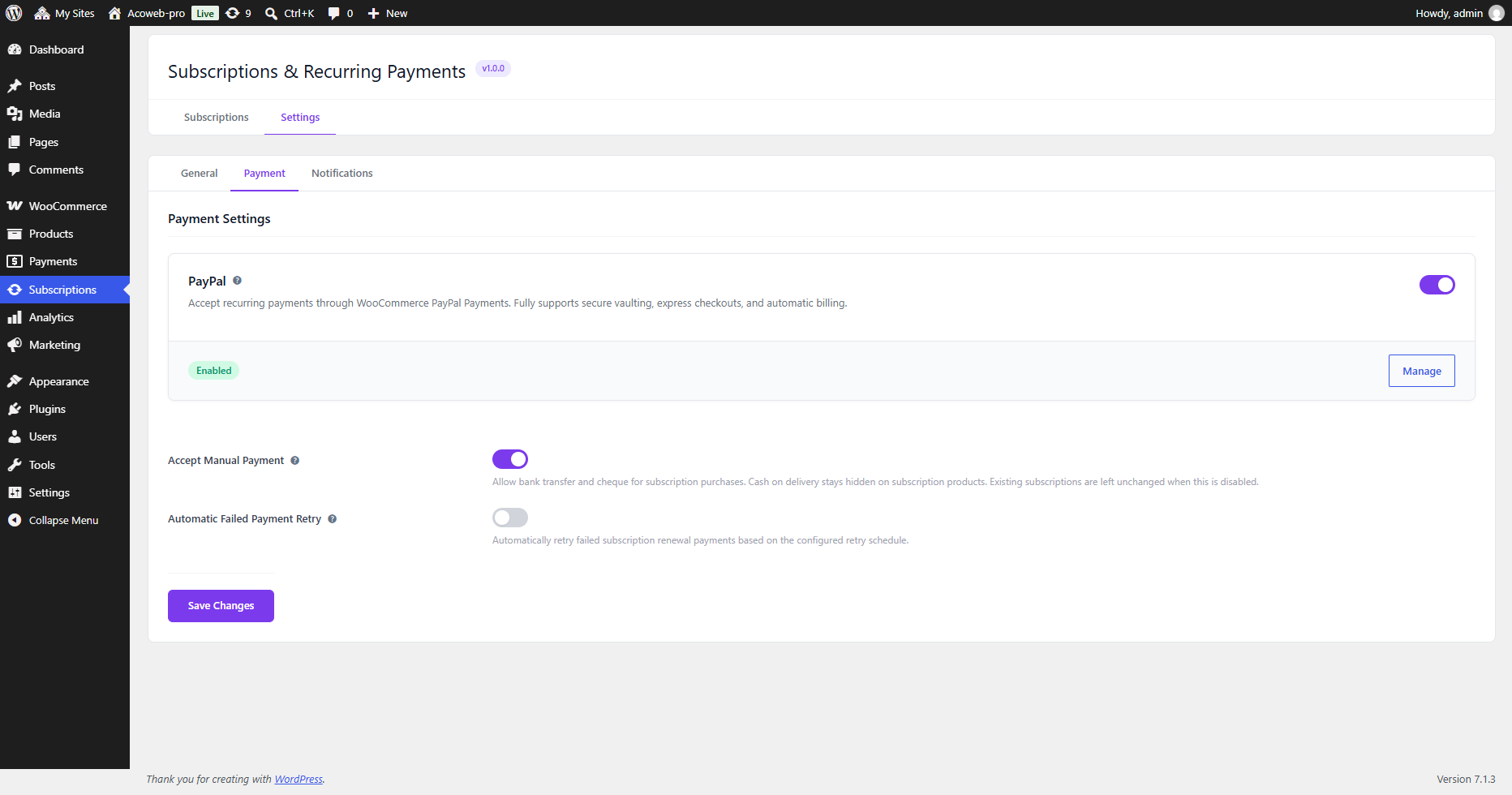
- PayPal communication occurs only when PayPal Payments is enabled in WooCommerce settings and in Subscriptions > Settings > Payment.
2. Outgoing Webhooks
This plugin includes an administrative feature to dispatch outgoing webhooks for subscription lifecycle events.
- Destination URLs: By default, this plugin does NOT transmit data to any predefined or hardcoded external webhook URL. Outgoing webhooks are sent ONLY to destination URLs explicitly configured by the store administrator in the WordPress admin panel under Subscriptions > Webhooks.
- When Communication Happens:
- Communication occurs only when an administrator has created, configured, and enabled a webhook topic (e.g., Subscription Created, Subscription Status Changed, Subscription Renewed, Subscription Cancelled, or Renewal Payment Failed).
- Outgoing HTTP POST requests are dispatched at the moment the specified subscription event triggers.
- Data Categories Sent:
- Event Payload: JSON payload containing subscription details relevant to the triggered event (subscription ID, status, customer ID, billing schedule, totals, currency, and line items).
- Security Verification: Each webhook request includes an
X-ACO-Webhook-SignatureHTTP header computed via HMAC SHA-256 using the secret key configured by the administrator.
3. Payment Gateways: Automatic vs. Manual Renewals
- Automatic Renewals:
- Supported via PayPal (through WooCommerce PayPal Payments). Payment methods are securely vaulted on PayPal servers, and subsequent recurring renewals are processed and captured automatically on the scheduled renewal date without customer intervention.
- Manual Renewal Payments:
- Supported for all standard WooCommerce payment methods (such as Direct Bank Transfer, Cheque, Cash on Delivery, or other standard gateways) when manual payments are allowed under Subscriptions > Settings > Payment.
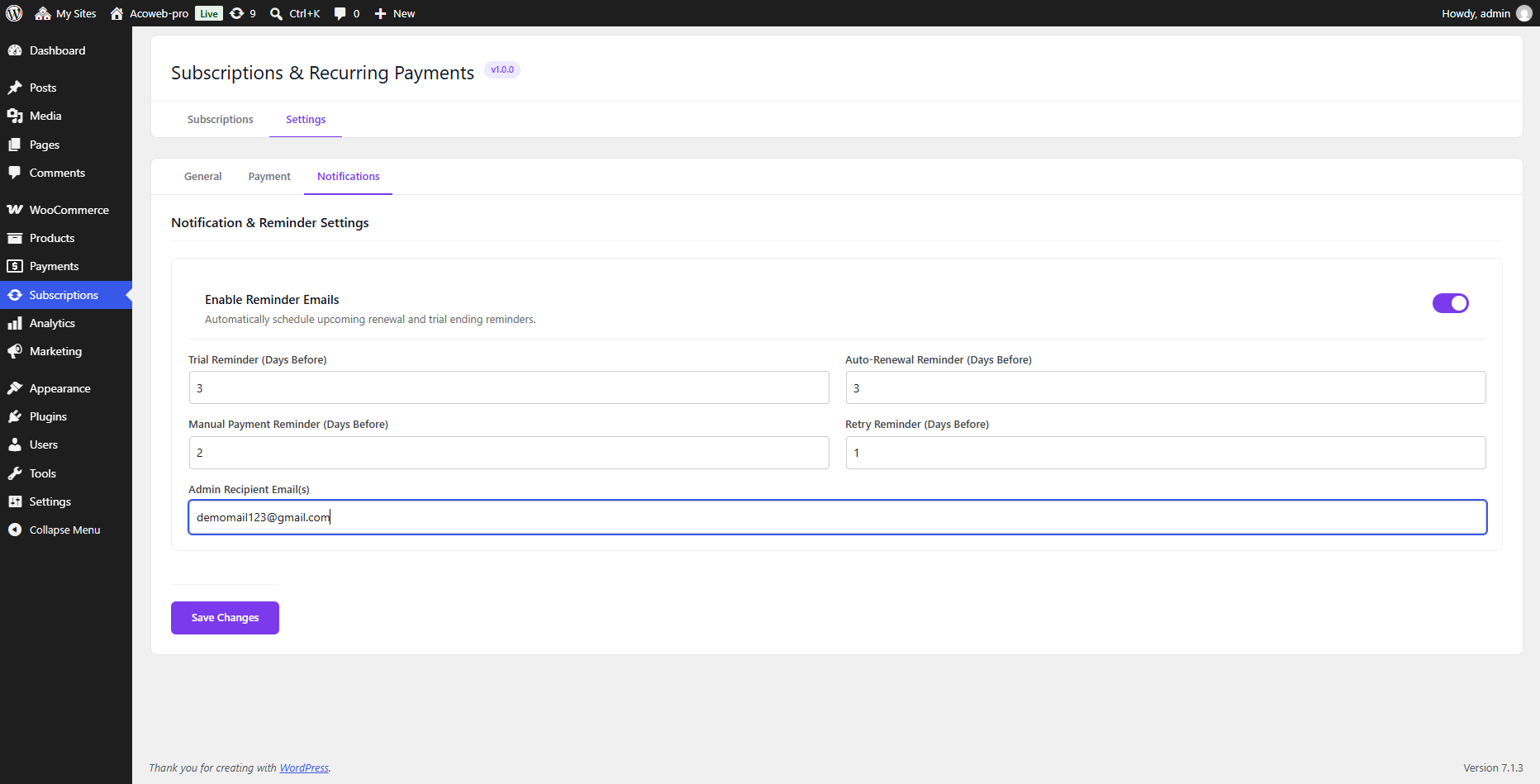
- For manual renewal subscriptions, the system automatically generates a pending renewal order on the renewal date and sends email notifications with a payment link. The customer logs in and completes the payment manually through the standard WooCommerce checkout page.
Third-Party Libraries & Licenses
This plugin bundles and relies on the following third-party software components. Each component is licensed under a compatible open-source license:
-
React & ReactDOM (Externalized to WordPress Core)
- Source: https://github.com/facebook/react
- License: MIT License
- Copyright: Copyright (c) Meta Platforms, Inc. and affiliates. / Facebook, Inc. and its affiliates.
- Notice: Externalized to WordPress Core
wp.element(window.React,window.ReactDOM). The plugin uses the compatible classic JSX transform (React.createElement) to guarantee full compatibility with the declared minimum WordPress 6.5+ without bundlingreact/jsx-runtime. Full license text is available inTHIRD-PARTY-NOTICES.mdandassets/js/admin.js.LICENSE.txt.
-
@remix-run/router
- Source: https://github.com/remix-run/react-router
- Version: 1.23.3
- License: MIT License
- Copyright: Copyright (c) React Training LLC 2015-2019, Remix Software Inc. 2020-2021, Shopify Inc. 2022-2023.
- Notice: Full license text is available in
THIRD-PARTY-NOTICES.mdandassets/js/admin.js.LICENSE.txt.
-
React Router
- Source: https://github.com/remix-run/react-router
- Version: 6.30.4
- License: MIT License
- Copyright: Copyright (c) React Training LLC 2015-2019, Remix Software Inc. 2020-2021, Shopify Inc. 2022-2023.
- Notice: Full license text is available in
THIRD-PARTY-NOTICES.mdandassets/js/admin.js.LICENSE.txt.
-
React Router DOM
- Source: https://github.com/remix-run/react-router
- Version: 6.30.4
- License: MIT License
- Copyright: Copyright (c) React Training LLC 2015-2019, Remix Software Inc. 2020-2021, Shopify Inc. 2022-2023.
- Notice: Full license text is available in
THIRD-PARTY-NOTICES.mdandassets/js/admin.js.LICENSE.txt.
-
Composer Autoloader
- Source: https://github.com/composer/composer
- License: MIT License
- Copyright: Copyright (c) Nils Adermann, Jordi Boggiano.
- Notice: Full license text is available in
vendor/composer/LICENSEandTHIRD-PARTY-NOTICES.md.
-
WooCommerce Subscriptions API Compatibility Stubs
- Reference Ecosystem: WooCommerce Subscriptions
- Original Author: WooCommerce / Automattic
- License: GNU General Public License v2 or later (GPL-2.0-or-later)
- Notice: Mock classes and interface stubs in
includes/Payment/PayPal/PayPalCompatibilityMocks.phpprovide compatibility wrappers to interoperate with payment gateways.
Build Instructions
The administration user interface is built with React and Sass located in the /app directory, and compiled into production-ready assets in /assets:
- Prerequisites: Node.js (v18 or higher) and npm.
- Navigate to the
/appdirectory:
cd app - Install dependencies:
npm install - Build production assets:
npm run build
This executeswebpack --mode production, outputting minified bundles to../assets/js/admin.jsand../assets/css/admin.css, generating../assets/js/admin.asset.phpwith WordPress script dependencies (wp-element,wp-components,wp-api-fetch,wp-i18n), and automatically populating../assets/js/admin.js.LICENSE.txtwith full third-party license notices. - Development / watch mode:
npm run dev
Screenshots

Installation
- Upload the plugin files to
/wp-content/plugins/aco-subscription-and-recurring-payments-for-woocommerce/or install through the WordPress plugins screen. - Activate the plugin through the ‘Plugins’ screen in WordPress.
- Navigate to Subscriptions in the admin menu to get started.
FAQ
-
Does this plugin require WooCommerce?
-
Yes, WooCommerce must be installed and activated for this plugin to work.
-
Which payment gateways are supported?
-
The plugin supports automatic recurring renewals with WooCommerce PayPal Payments, as well as manual renewal payments with standard WooCommerce payment gateways.
-
How do automatic renewals work with PayPal?
-
When a customer checks out with PayPal, a billing agreement or payment vault token is created. On scheduled renewal dates, the plugin automatically charges the saved payment method in the background without requiring the customer to revisit the site.
-
How do manual renewals work?
-
If manual payments are enabled in settings, customers can purchase subscriptions using standard payment gateways. When a renewal is due, the plugin creates a renewal order and notifies the customer via email to pay manually at checkout.
-
Does this plugin send data to external servers by default?
-
No external requests are made unless you enable PayPal payments (which communicates with PayPal’s secure API to process payments) or explicitly set up outgoing webhook URLs under Subscriptions > Webhooks.
Reviews
There are no reviews for this plugin.
Contributors & Developers
“Aco Subscription and Recurring Payments for WooCommerce” is open source software. The following people have contributed to this plugin.
Contributors
Translate “Aco Subscription and Recurring Payments for WooCommerce” into your language.
Interested in development?
Browse the code, check out the SVN repository, or subscribe to the development log by RSS.
Changelog
1.0.0
Initial Release