
Description
Lojavo AI connects your WooCommerce store to an AI assistant that helps
visitors find, compare and choose products using natural language, always
grounded in your real catalog data — never invented by the AI.
Key features
- Public chat widget — a lightweight floating assistant on your storefront (under 50KB of JavaScript), with no external dependencies loaded in the visitor’s browser.
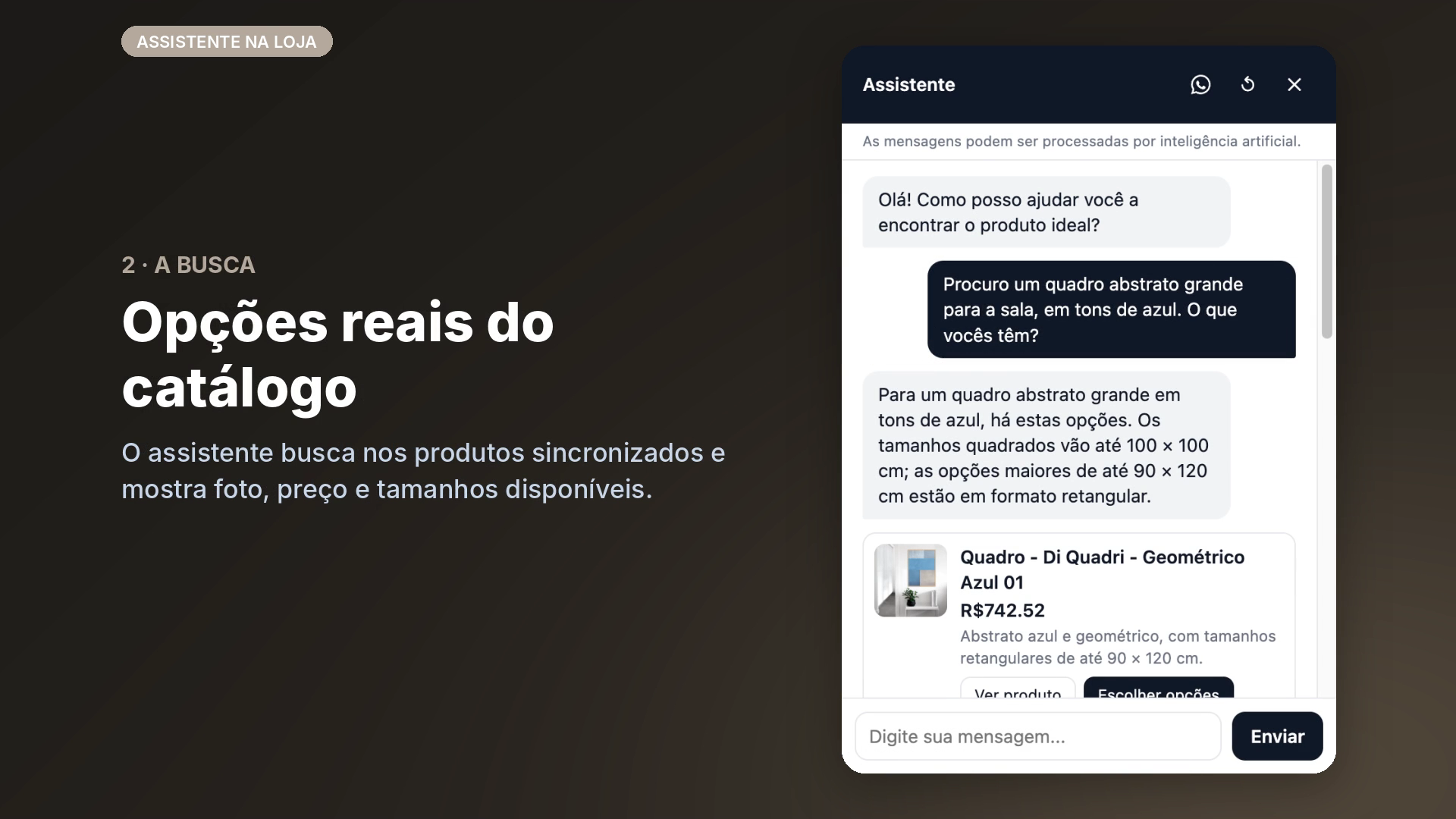
- Natural-language search — visitors describe what they’re looking for in their own words; semantic search finds the right products in your catalog, with recommendations and comparisons.
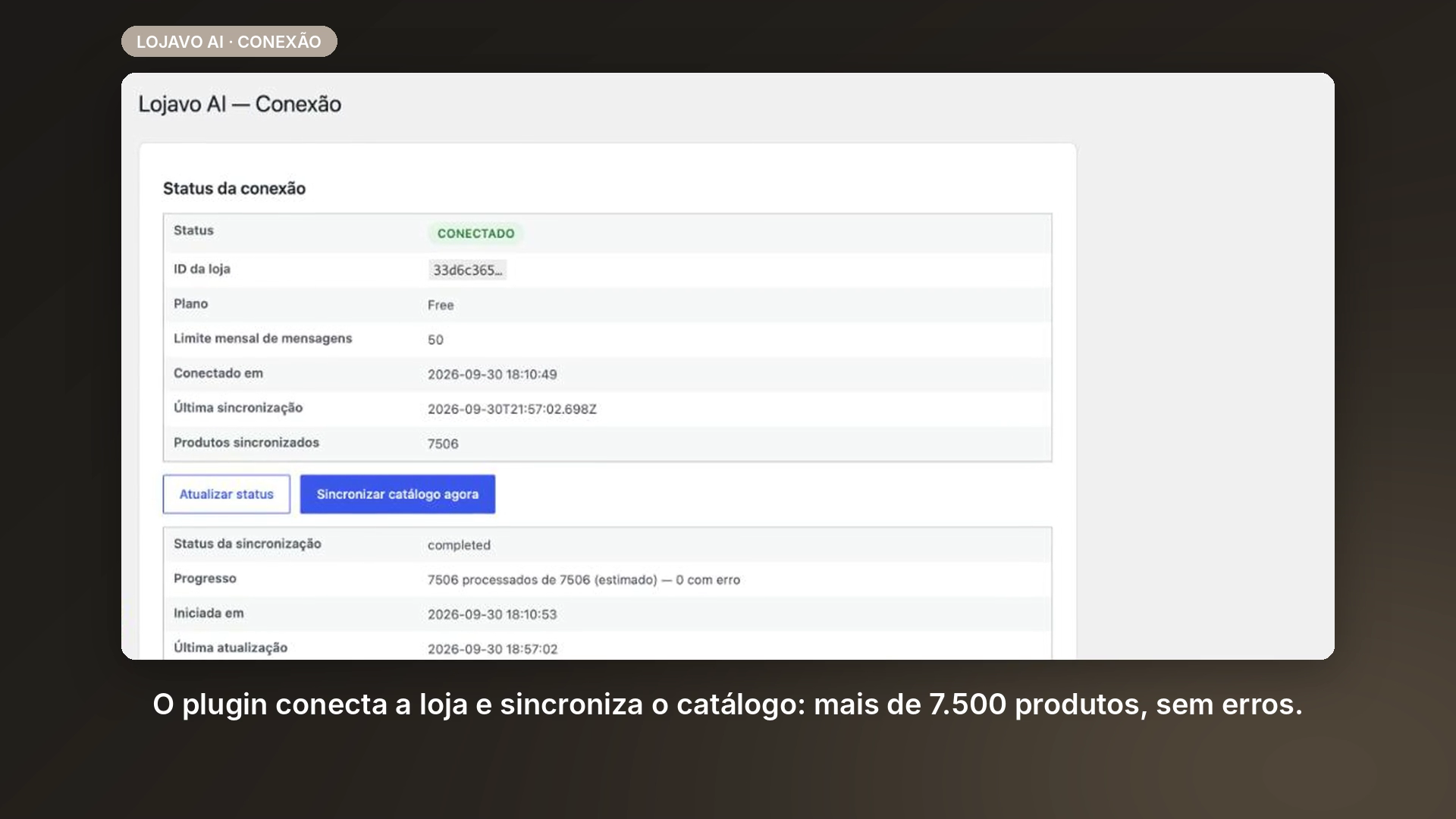
- Catalog sync — full and incremental sync (products, variations, price, stock) between WooCommerce and Lojavo AI, resilient to dropped connections and interrupted batches.
- Automatic lead capture — when a visitor leaves an email, phone number, or shows purchase intent in the chat, the conversation is automatically flagged as a lead, at no extra AI cost.
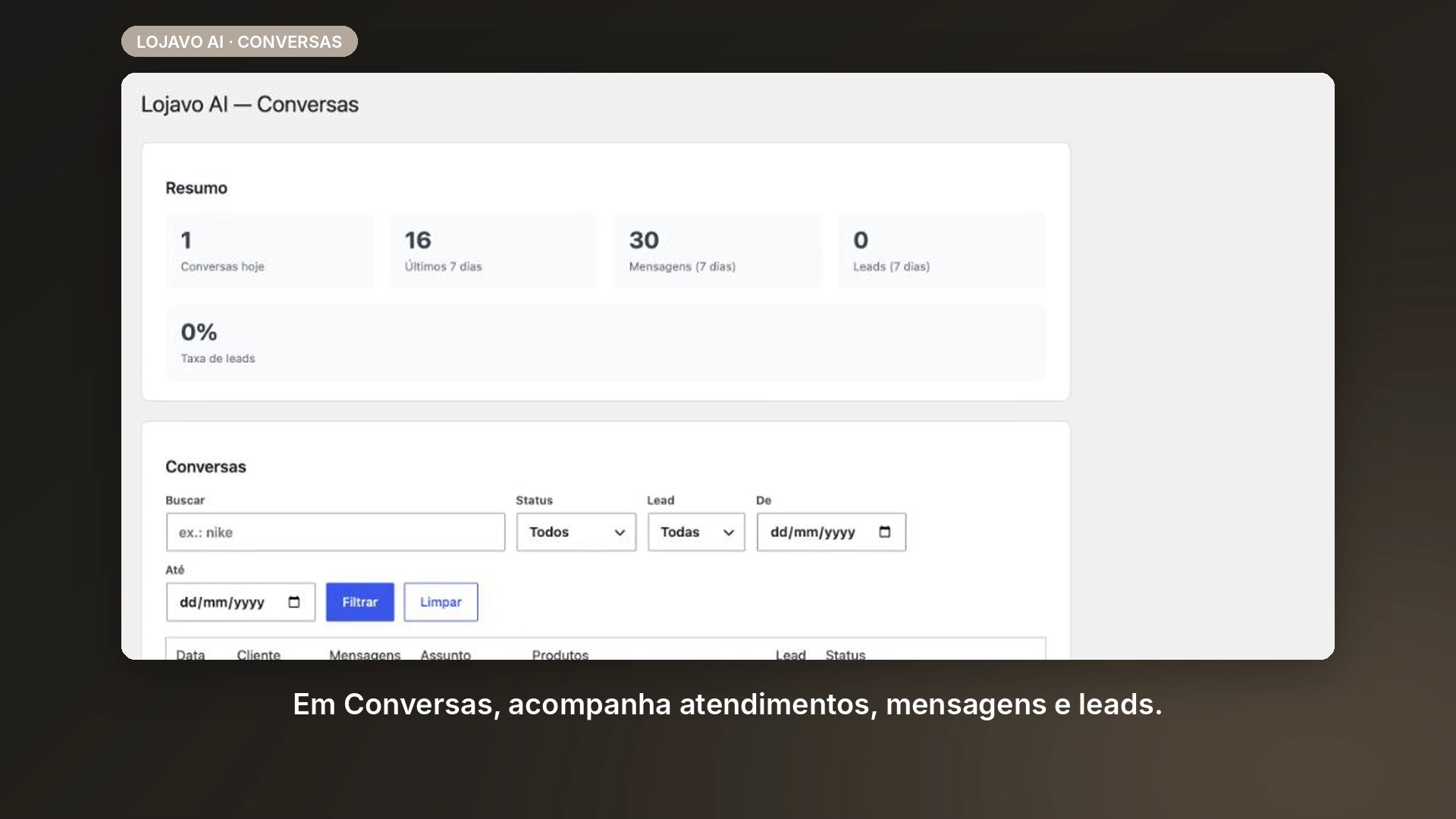
- Conversations dashboard — review every chat conversation, filter by period, status and lead, and see the full history (messages, recommended products, tokens/latency) right inside wp-admin.
- Plans and billing inside wp-admin — start for free or subscribe to a paid plan without leaving the WordPress dashboard; checkout securely processed by Stripe.
How it works
Lojavo AI is the client plugin for a service hosted by Lojavo AI (SaaS). The plugin syncs your catalog data to the Lojavo AI servers and processes chat messages through that API — you need to create an account (free or paid) to connect your store and use the assistant. See “External services” below for the exact detail of what is sent and where.
This is a product under active development. The free plan is fully functional for small stores; higher conversation volume and additional channels (e.g. WhatsApp) are part of the paid plans.
External services
To work, this plugin connects to third-party services. This happens entirely on the server side (visitor credentials are never exposed in the browser). Full detail of every field sent is documented in docs/data-flow-audit.md in the plugin’s repository.
Lojavo AI API (our own backend, required for any plugin functionality)
- Why it is used: it is the service that performs semantic search, generates the assistant’s replies, and stores the conversation history shown in wp-admin.
- When communication happens: during catalog sync (a full sync when the store is connected, incremental on every product created/edited), and on every message sent in the chat widget. For a full sync, the Lojavo AI servers fetch the catalog from a private REST endpoint the plugin adds to your site (
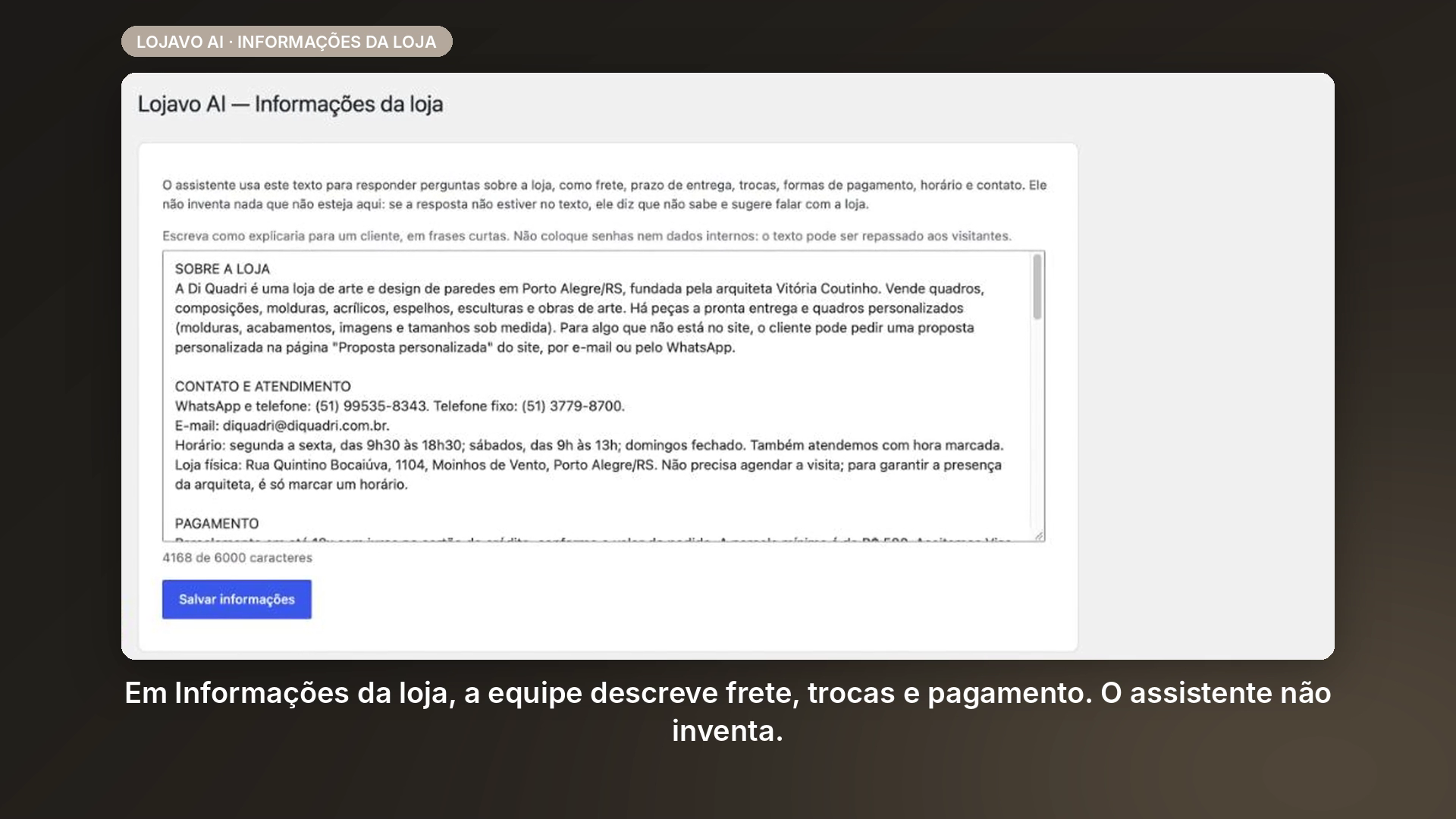
/wp-json/lojavo-ai/v1/catalog/products), which only answers requests signed with your store’s secret key. - Data sent: from the catalog — name, description, price, SKU, stock, categories, attributes, variations, image and URL of published products. From the chat — the text typed by the visitor and the current conversation history. From the “Store information” screen — the text you write there (shipping, returns, payment, hours, contact).
- Terms of Service · Privacy Policy
OpenAI (AI provider, used by our backend)
- Why it is used: generates the assistant’s replies and the semantic-search embeddings for the catalog.
- When communication happens: on every chat message processed — called exclusively by our backend, never directly by your site or the visitor’s browser.
- Data sent: the visitor’s message text, the conversation history, data for candidate products being recommended (name, short description, category, price, stock), and the text of your “Store information” screen. Never the visitor’s email, IP address, or store identifier.
- OpenAI Terms of Use · OpenAI Privacy Policy
Stripe (payment processor, used by our backend, only for paid plans)
- Why it is used: processes checkout and recurring billing for the subscription.
- When communication happens: when subscribing to or changing a paid plan from wp-admin.
- Data sent: the store owner’s email and the chosen plan. Card data is entered directly on a page hosted by Stripe itself — it never passes through your WordPress server or our backend.
- Stripe Terms of Service · Stripe Privacy Policy
Source code
The minified assets/dist/widget.js and assets/dist/widget.css shipped with
this plugin are built from the human-readable source included in this same
package, at assets/src/widget.js and assets/src/widget.css.
Screenshots
Installation
- Upload the
lojavo-ai-shopping-assistantfolder to/wp-content/plugins/. - Activate the plugin from the WordPress “Plugins” screen.
- Make sure WooCommerce (8.0+) is installed and active.
- Go to “Lojavo AI” in the dashboard menu to connect your store to the API.
FAQ
-
Does the plugin work without WooCommerce?
-
No. Lojavo AI depends on WooCommerce to read the product catalog. If
WooCommerce is not active, the plugin will show a clear notice and will not
load its features. -
Are my API keys exposed in the browser?
-
No. Store credentials (the HMAC secret) are stored only in the WordPress
database and used only in server-to-server calls made by the plugin itself.
They are never sent to scripts, public pages, or REST responses. -
Do I have to pay to use it?
-
No. The free plan connects your store and activates the chat widget at no
cost, no credit card required. Paid plans exist for higher conversation
volume and additional features — always optional, chosen from inside
wp-admin. -
What data leaves my store?
-
Catalog data (published products: name, description, price, stock, category,
images) and the text of chat conversations. Never customer payment data or
information from other plugins. See “External services” in the description
for the full detail.
Reviews
There are no reviews for this plugin.
Contributors & Developers
“Lojavo – AI Shopping Assistant for WooCommerce” is open source software. The following people have contributed to this plugin.
Contributors
Translate “Lojavo – AI Shopping Assistant for WooCommerce” into your language.
Interested in development?
Browse the code, check out the SVN repository, or subscribe to the development log by RSS.
Changelog
1.1.0
- New “Store information” screen (Lojavo AI Store information): write your shipping, returns, payment, opening hours and contact details once, and the assistant answers those questions in the chat using only that text. If the answer isn’t there, it says so and suggests contacting the store instead of guessing.
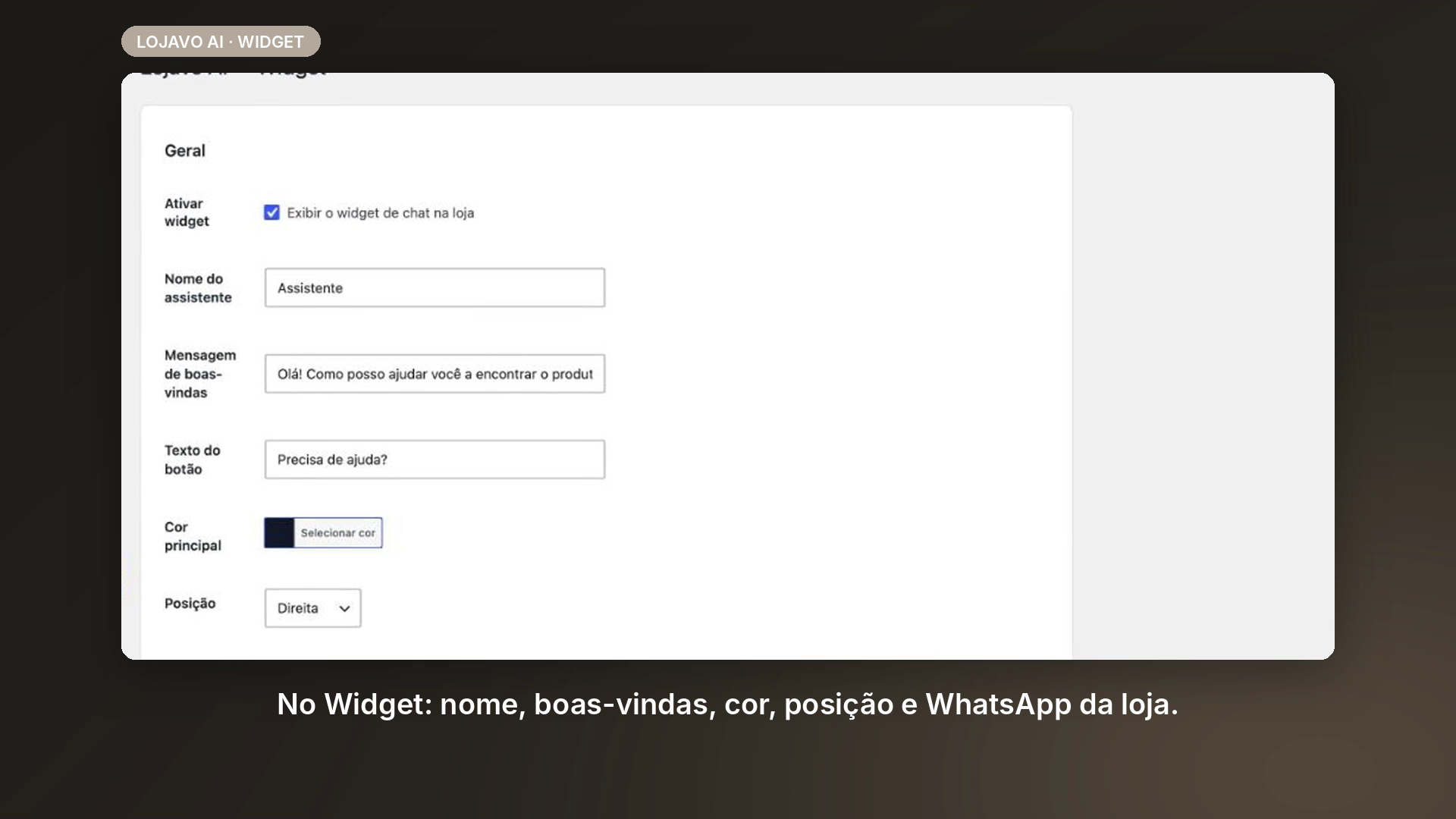
- WhatsApp shortcut: add your WhatsApp number on the Widget screen and the chat shows a WhatsApp button in its header, plus a “Talk on WhatsApp” button whenever the assistant can’t answer. Brazilian numbers can be typed with just the area code.
- One-click free activation: a single “Activate for free” button on the Connection screen creates the free license, connects the store and starts the catalog sync — no license code to copy and paste.
- Faster, more reliable catalog sync: the full sync is now fetched by the Lojavo AI servers through a private, signed endpoint, instead of WP-Cron batches that stalled on low-traffic sites.
- Plugin links and the default service address now point to lojavo.com.br.
- Fixed: long assistant replies now scroll to their beginning instead of the end.
- Fixed: admin screens could load stale cached scripts after an update.
1.0.0
- Plugin renamed from CommerceChat AI to Lojavo – AI Shopping Assistant for WooCommerce prior to directory approval.
- Cancel/reactivate subscription right from wp-admin: new “My subscription” section on the Billing screen shows plan, status, amount and next charge date, with explicit “Cancel subscription” (with confirmation) and “Keep subscription” (reactivates a scheduled cancellation) buttons — no need to open the Stripe Portal. The Connection screen now has a direct “Manage / cancel subscription” link to it.
- Plan always in sync with Stripe: upgrades, downgrades or cancellations made from the Customer Portal or directly in the Stripe dashboard now automatically reflect in wp-admin (Connection and Billing screens), with no need to reconnect the store. Fixed a case where a plan change only updated the internal license record, not the store’s — leaving the admin showing the old plan even after Stripe confirmed the change.
- Automatic downgrade to the free plan: when a subscription is canceled (via the new button, the Portal, or directly in Stripe), the store automatically falls back to the free plan, with no manual action required.
- Terms of Service and Privacy Policy links: footer with links to the legal documents on every admin screen of the plugin.
- Fixed: new installs using the default API URL could not connect (address without valid DNS); it now points to the production service.
0.6.0
- New “Conversations” screen (Lojavo AI Conversations): list of chat conversations with filters (period, status, lead, text search), summary cards (conversations today/last 7 days, messages, leads, lead rate) and a chat-style detail view (visitor/assistant bubbles, recommended products, AI tokens/latency/model).
- Automatic lead detection: when a visitor leaves an email, phone number, or shows purchase intent in the chat, the conversation is automatically flagged as a lead (deterministic rules, no extra AI cost).
0.5.0
- Automatic connection after payment: after completing Stripe checkout, Stripe redirects back to wp-admin itself (instead of the API page) and the store connects automatically on the paid plan — no code to paste.
- “Subscribe to a plan” card disappears once connected: shows a summary of the current plan plus an “Upgrade plan” button that reveals the full form, instead of always showing the 4 subscription buttons.
- New “Billing” screen (Lojavo AI Billing): subscription billing history, fetched live from Stripe (date, number, status, amount, invoice link).
0.4.0
- Subscribe to a plan right from wp-admin: new “Subscribe to a plan” card on the Connection screen. “Start for free” generates a free-plan license instantly (no Stripe) and pre-fills the license field below; “Subscribe Basic/Professional/Agency” redirects to Stripe’s secure checkout — once payment completes, the API itself shows the code to paste into “Connect store”.
0.3.1
- Cancel sync: a “Cancel sync” button on the Connection screen, visible while a full sync is in progress. Marks the job as
failed(the API does not distinguish “canceled” from “failed”), releases the lock and stops the browser loop — you can start a fresh sync right after.
0.3.0
Full sync no longer depends solely on WP-Cron/Action Scheduler to move
forward. On low-traffic stores (staging, a newly connected catalog) nothing
triggers those queues between one batch and the next — the sync stayed
“in progress” without processing anything, even with all the layered
recovery from 0.2.0 (which reschedules the batch, but does not run it on
its own).
- Progress driven by the sync screen itself: while the wp-admin tab is
open on “Lojavo AI”, the front end processes one batch per AJAX call
and chains the next one automatically — without waiting for any cron. The
Action Scheduler is still rescheduled after every batch as a safety net:
closing the tab midway does not lose the sync, it just falls back to it
(slower). - Front-end backoff: if a batch fails and enters a server-side wait, the
browser loop detects that the cursor did not advance and waits
progressively longer before retrying, instead of hammering the same
failure.
0.2.0
Full catalog sync resilience. In production, sync would intermittently and
permanently hang: a batch would POST successfully, the API would confirm it,
local state would be saved — and the process would die before scheduling the
next batch, permanently stalling the chain and leaving the UI lying
“in progress” indefinitely, with no trace of what happened.
- Layered recovery against a batch that dies mid-way: before any costly
work, the batch itself already schedules a safety continuation for the
same position (survives the process being killed by the OS or by
PHP-FPM/the server, the scenario observed in production); a shutdown
handler covers fatals that PHP itself detects (memory_limit,
max_execution_time); and a watchdog onaction_scheduler_failed_action
covers the case where Action Scheduler takes hours to notice (observed in
production: 14h) — with its own attempt counter, since the process dies
before the existing retry counter is saved. All three layers use the same
idempotency guard (comparison against persisted state), so they never
duplicate work in a divergent way. - Stale job detection on the Connection screen: if sync has not advanced
in over 10 minutes, the UI shows “stalled since…”, re-enables the action
and offers “Resume from cursor X” — instead of restarting from scratch, it
resumes exactly where it stopped, without opening a new job on the API. - Batch sized by variations, not just by products: 25 products could
mean anywhere from 25 to 1,000 variations (catalogs with variable products
averaging ~40 variations each). A new per-batch variation budget (filter
lojavo_ai_sync_batch_variation_budget, default 200) cuts the batch
short before that happens, always including at least 1 product. The
previouslojavo_ai_sync_batch_sizefilter still works (product
cap, default reduced from 25 to 10). - Pagination by ID, not by offset:
offsetgets progressively more
expensive and is fragile if the catalog changes during sync. State saved
in the old format (without the new ID-based cursor) degrades safely,
restarting pagination from scratch without duplicating products (the
upsert byexternalIdalready guarantees that). - Memory hygiene between products: WordPress’s non-persistent cache (an
in-memory array, even without Redis/Memcached) retained every
product/variation loaded until the entire sync finished. It is now
released product by product. - Per-batch instrumentation: cursor, products, variations, duration,
peak memory and query count, viawc_get_logger()(context
lojavo-ai) — without this it was not possible to prove the root
cause behind a slow or dead batch. - Consistent locking: the “one sync at a time” lock is now renewed after
every successful batch, instead of a fixed 30-minute ceiling set at the
start — the TTL now tracks actual duration, and is always released even
if something unexpected is thrown during finalization.
0.1.0
- Initial plugin structure and connection screen to the API.