
Description
Harvify Cron Monitor shows you exactly what your site’s scheduler is doing — and tells you when it stops. Unlike basic cron viewers, it records an execution history (duration, memory, success/error) so you can see what actually ran, not just what is scheduled.
Free features:
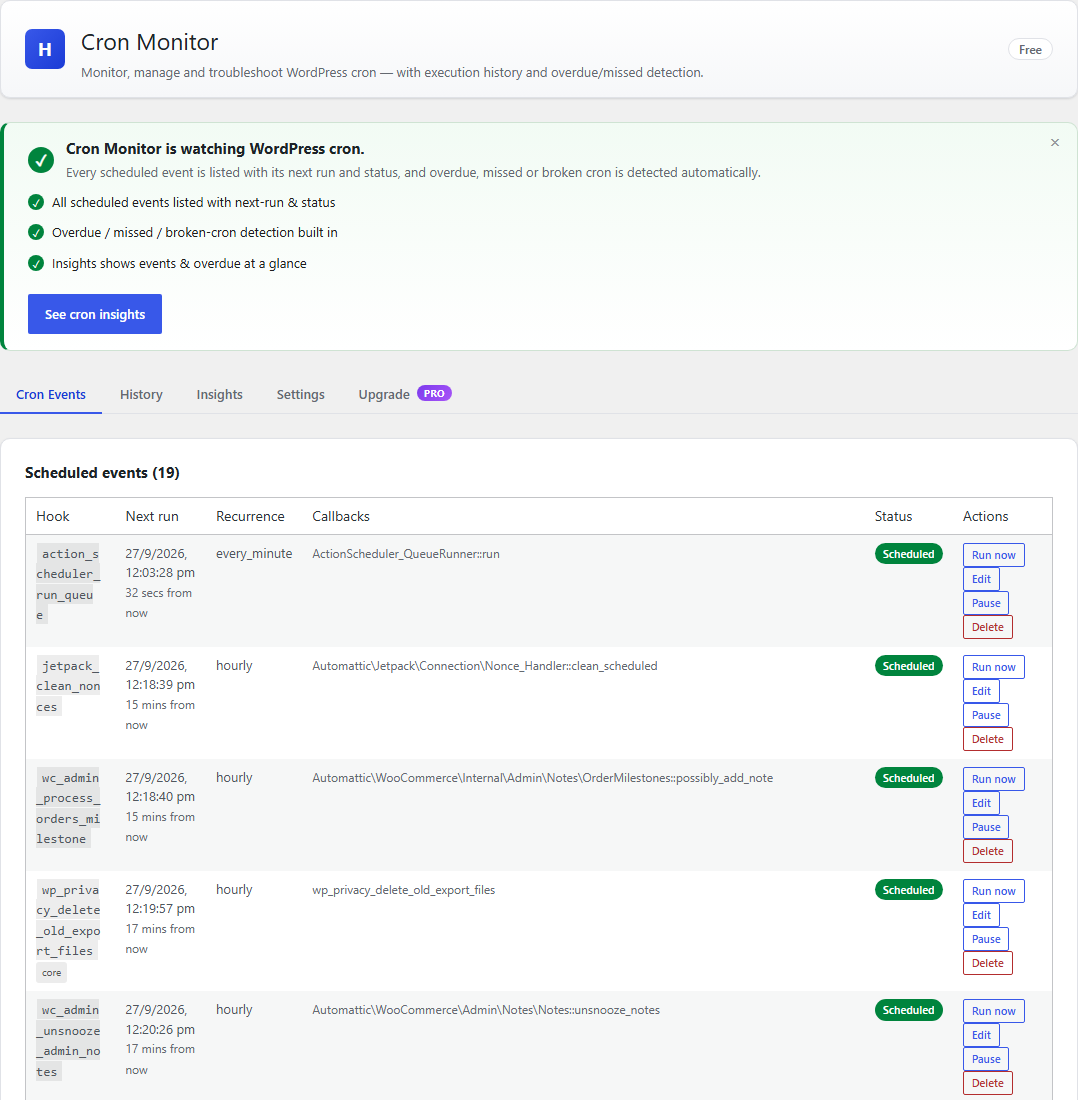
- List all WP-Cron events — hook, next run, recurrence, arguments, callbacks
- Full event management — run now, pause/resume, delete, with a safety guard
on WordPress core events - Add events — schedule an existing hook by name, or an HTTP request
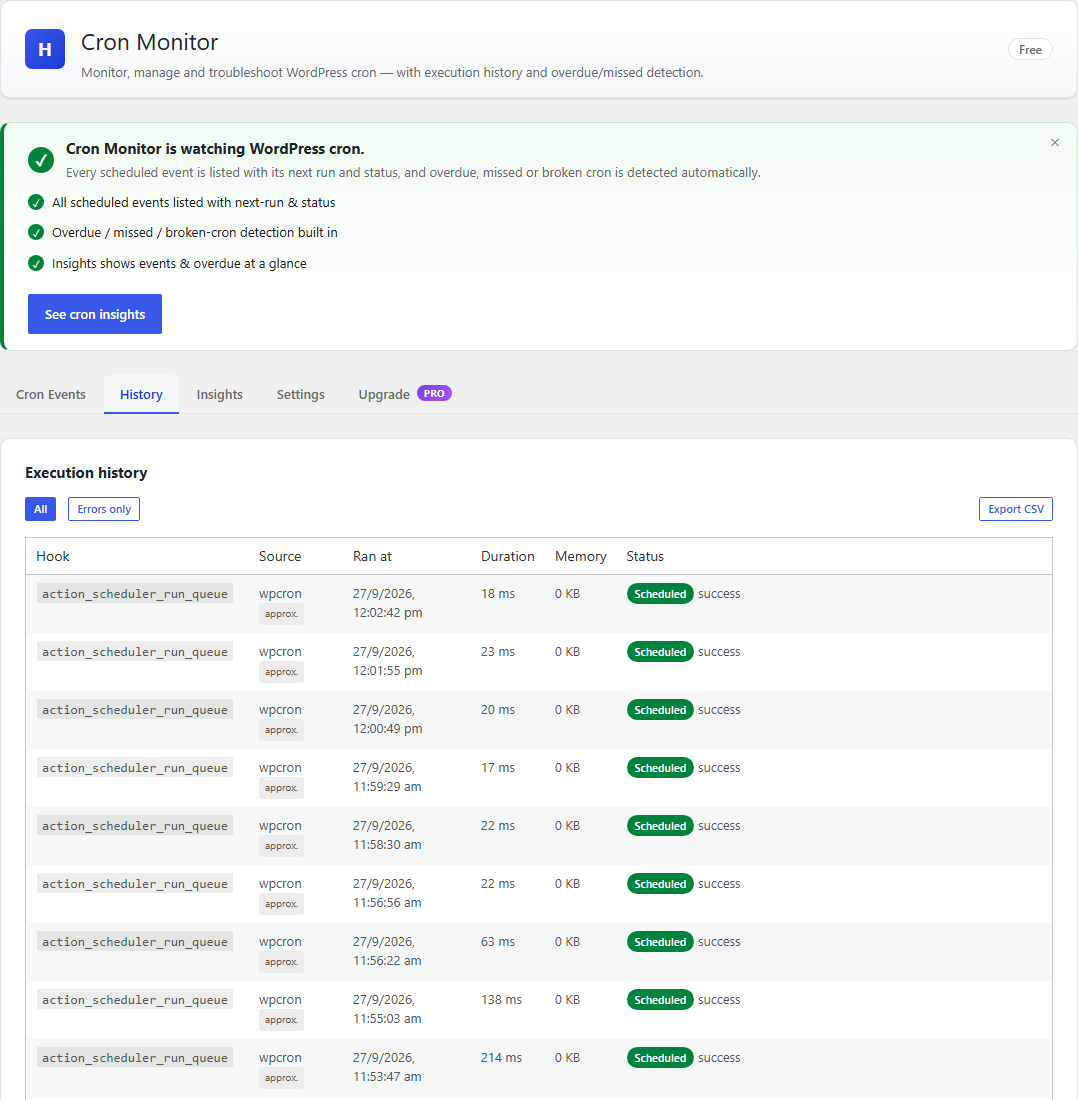
- Execution history with timestamps — every run, its duration, memory, and
status - Overdue, missed, and broken-cron detection (including DISABLE_WP_CRON
warnings) - Action Scheduler queue visibility (precise timing for AS jobs)
- CSV export of history
- Dashboard widget — cron health at a glance
Pro features. These are not part of this plugin and are not included in this
download. They are provided by a separate plugin distributed by Harvify:
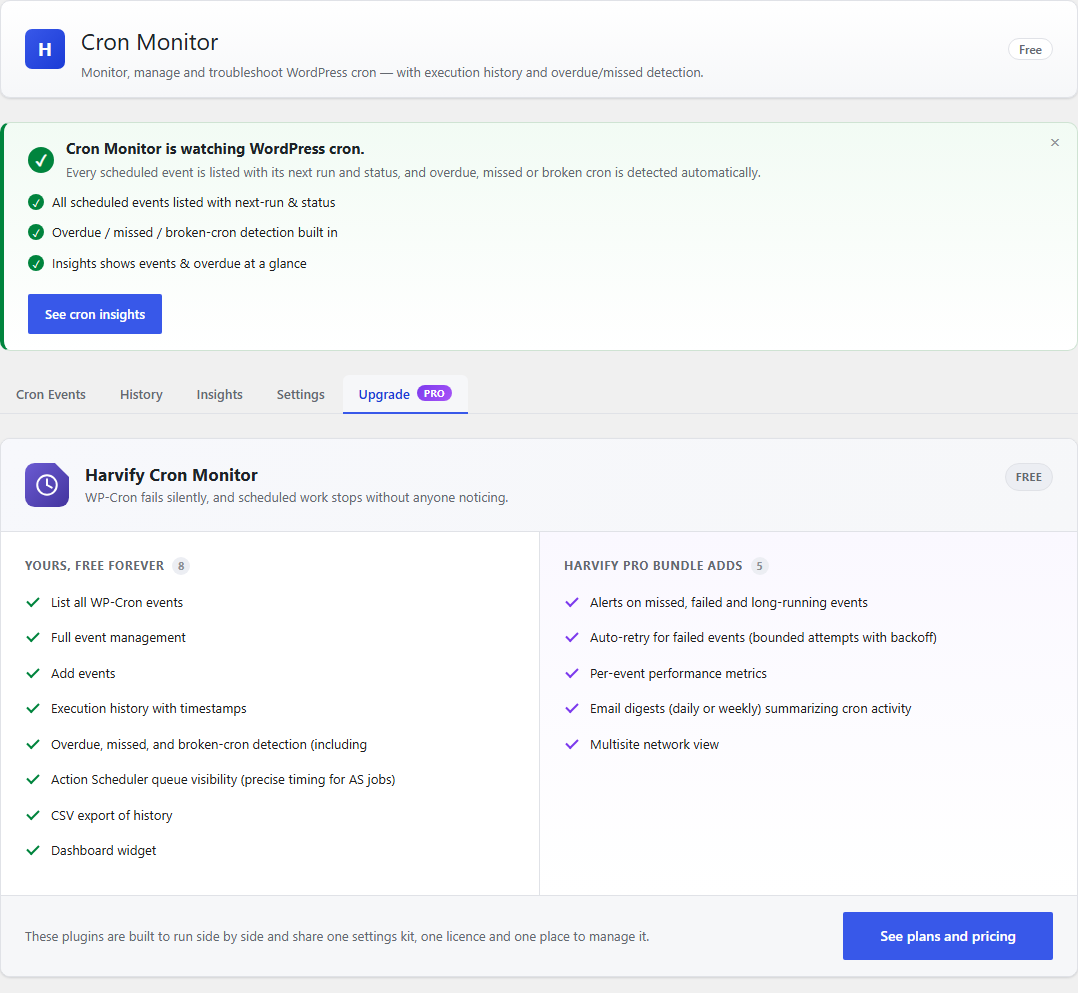
- Alerts on missed, failed and long-running events — Email, Slack, Discord,
and Telegram - Auto-retry for failed events (bounded attempts with backoff)
- Per-hook performance metrics — average/max duration and memory, added by
the separate Pro plugin (not included in this download) - Email digests (daily or weekly) summarizing cron activity
- Multisite network view — cron health across every site
A note on timing accuracy
Action Scheduler events are measured precisely (we hook its before/after execution events). WordPress core has no native per-event start/finish hook, so WP-Cron timings are best-effort: we bracket each due hook’s callback on the cron request and record a fatal/timeout via the shutdown handler. WP-Cron rows are labelled “approx.” in the history so you always know which numbers are exact.
Security
This plugin does not evaluate code. It schedules hooks that already exist on your site, and can optionally perform an HTTP request on a schedule. There is no code editor and no author-supplied code is ever stored or executed.
- Creating, editing, and running events requires the
manage_optionscapability and a valid nonce. - URL events use WordPress’s safe HTTP API (SSRF protections apply) and only accept http(s).
External services
This plugin connects to Freemius, the licensing and update service Harvify uses to
sell and deliver the Pro tier of its plugins.
Nothing is sent to Freemius unless you choose to send it. On activation you are shown
Freemius’s standard opt-in screen. Until you answer it a fresh install makes no
outbound request at all, and if you choose Skip the free tier stays fully usable
and still sends nothing. Data is transmitted only when you take one of these
actions:
- You click “Allow & Continue” on the Freemius opt-in screen. This sends your
site address, your administrator email address, and your WordPress, PHP and active
plugin/theme details, so Harvify can provide support and know which environments to
test against. Skipping that screen sends nothing and leaves the plugin working
normally. - You enter a Pro Bundle licence key. This sends the key together with your site
address so the licence can be activated for that site. While a licence is active the
site also re-checks periodically that it is still valid and whether a Pro update is
available.
Service provided by Freemius, Inc. – https://freemius.com/
Terms of service: https://freemius.com/terms/
Privacy policy: https://freemius.com/privacy/
URL cron events (optional, no default destination)
Cron Monitor can run a “URL event”: a scheduled request to an address you supply. No
URL event exists until an administrator creates one, and there is no default
destination, so a fresh install contacts nothing. An administrator can also switch
URL events off entirely in Settings, which stops any that already exist from running.
Sent: an HTTP GET to the URL you entered. The plugin adds no page content and no
information about your users. As with every HTTP request WordPress makes, the
standard request header identifies the sender as “WordPress/; “, so the destination you chose can see your site address.
Screenshots
Installation
- Upload the plugin to
/wp-content/plugins/harvify-cron-monitor/ - Activate via Plugins Installed Plugins
- Go to Harvify Cron Monitor
FAQ
-
Does this replace WP-Cron?
-
No. It monitors and manages the existing WP-Cron system and, when present, Action Scheduler. It does not change how cron is triggered.
-
Why are some durations marked “approx.”?
-
WordPress core does not expose a per-event start/finish hook, so WP-Cron timings are best-effort. Action Scheduler jobs are measured exactly.
-
Does this plugin run custom PHP?
-
No. It schedules hooks that already exist on your site and can make scheduled HTTP requests. It contains no code editor and no evaluator.
Reviews
There are no reviews for this plugin.
Contributors & Developers
“Harvify Cron Monitor” is open source software. The following people have contributed to this plugin.
Contributors
Translate “Harvify Cron Monitor” into your language.
Interested in development?
Browse the code, check out the SVN repository, or subscribe to the development log by RSS.
Changelog
1.0.21
- Removed the Freemius
anonymous_modeoption, so activation now shows Freemius’s
standard opt-in screen. Nothing is sent before you answer it, and choosing Skip
leaves the free tier fully usable and still sends nothing. - The “External services” section now describes that flow accurately, and no longer
lists alert channels that are not part of this download.
1.0.18
- Removed: scheduled execution of custom PHP — from the free build and the Pro
build alike. The evaluator, the “Allow PHP events” setting, the “PHP code” option
on the add-event form and the settings control that switched it on are all gone.
This is not a feature that moved behind a licence: no build of 1.0.18 contains it,
and there is nothing to upgrade to in order to get it back. Any PHP event you had
scheduled stops running. Schedule an existing hook, or a URL event, instead. - Changed: per-hook performance metrics are now supplied by the separately
distributed Pro plugin rather than being present-but-inactive in this download. - Changed: every identifier this plugin owns has been renamed off its old
three-characterhcm_prefix, which is shorter than WordPress.org accepts.
Functions, options, cron hooks and the plugin’s own actions and filters are now
harvify_cron_*; global constants areHARVIFY_CRON_*; classes are
Harvify_Cron_*. - Developers: the REST namespace is now
harvify-cron/v1. The oldhcm/v1
namespace is GONE and there is no compatibility alias — any code that calls
hcm/v1 routes will 404 until it is updated. Also renamed: the admin script and
style handlehcm-adminis nowharvify-cron-admin, the localized JavaScript
objecthcmAdminis nowharvifyCronAdmin, and the plugin’s hooks are now
harvify_cron_run_recorded,harvify_cron_digest_frequency_changedand
harvify_cron_fs_loaded. - Your configuration is carried across for you. On the first page load after
updating, your settings, your custom schedules, your uninstall-data preference and
every event you had scheduled are migrated onto the new names. Nothing has to be
re-entered and no event has to be rescheduled by hand. Execution history is
untouched — the database tables are unchanged. - Hardened: the add-event endpoint now rejects any event type other than a
standard hook or a URL outright. Previously an unrecognised type was quietly
treated as a standard event when a hook name happened to be supplied. Nothing
was ever executed either way, but the refusal is now explicit. - Corrected the External services section: URL events are described accurately as a
capability that is available by default with no destination configured, and the
disclosure now states that WordPress’s standard request header identifies your
site address to a URL event’s destination. - No other behaviour changes. Monitoring, event listing, history, failure detection,
scheduling and URL events are unchanged.
1.0.15
- Added: a single Support entry in the Harvify menu, so you can reach us from
inside WordPress. Until now no plugin offered a contact route at all. One entry for
the whole suite rather than one per plugin. - No behaviour changes.
1.0.14
- Added: an External services section to this readme, naming every third-party
service the plugin can contact, exactly what is sent, when, and each provider’s terms
and privacy policy. Required for WordPress.org submission. - Changed: the
Contributorsfield now names the correct WordPress.org account. - No behaviour changes.
1.0.13
- Rebuild: the published 1.0.12 package was generated from an earlier tree. No behaviour
changes beyond bringing the package back in step with the source.
1.0.12
- Added: a single Manage licence link on the Plan screen, so an active customer can
deactivate this site, change their licence key or re-check their licence without
needing a URL from support. No per-plugin Account tab is added.
1.0.11
- Fixed: updating the plugin did not update its database. WordPress only runs a plugin’s
setup routine when you activate it, never when it updates — so a change to the plugin’s own
tables never reached sites that had simply updated. On those sites some features failed with a
database error. The update now applies itself on the next page load. - One upgrade link instead of one per plugin. With several Harvify plugins active the
menu showed a row called “Upgrade” for each of them, all identically labelled, and it kept
saying Upgrade to people who had already bought. They are replaced by a single Plan
screen that says what the bundle costs, what it covers, and whether your licence is active. - The dashboard is quiet again. Each plugin used to add its own “opt in to make this
better” notice to the main WordPress dashboard, so five plugins meant five notices. Harvify
plugins now share one queue: promotional notices appear only on Harvify’s own screens, and
only one at a time. Licence and account messages are never held back. - Fixed: the “Data & uninstall” box covered the page. It was being drawn into the admin
footer, which WordPress pins to the bottom of the screen, so it floated on top of whatever was
underneath it. It now sits in the page like any other card. Saving it also tells you what it
saved, instead of just reloading. - Fixed: the upgrade screen advertised the wrong number of sites. Several plugins listed
the Freelancer and Agency plans as covering 5 and 25 sites. They cover 3 and 10.
1.0.10
- The new “Data & uninstall” control did not appear on this plugin’s screen. Its shared-package
loader never listedadmin-ui, so the package shipped in the download but was never loaded and
the control could not render — which also meant the opt-in could never be switched on. Fixed by
loading the package. Your data was never at risk: with the control unreachable the plugin always
took the safe path and kept everything.
1.0.9
- Uninstall no longer destroys your data by default. Deleting the plugin used to remove
everything it had stored, with no way to stop it — so deleting it to troubleshoot took the lot
with it. Now the default is to KEEP your data, and a new Data & uninstall control on the
plugin’s own screen lets you opt in to a full wipe if that is what you want. Scheduled jobs are
always tidied up either way, and the wipe works with no internet connection.
1.0.8
- Fixed: the tables ran off the right-hand side of the screen. The scheduled-events table
has six columns and a hook name that cannot wrap, so on a 1280px display it came out wider
than the window: the Status and Actions columns were cut off past the edge, and the whole
admin page grew a horizontal scrollbar that took the sidebar and header with it. Hook names
now wrap, and each table sits in its own scrolling area, so any overflow stays inside the
card instead of dragging the page sideways. All four tables are fixed, not just the one.
1.0.7
- Housekeeping: removed five admin screens that nothing could reach — the pre-SPA PHP pages,
replaced by the current monitoring app. No feature changes; one of them was shipping inside
the premium build.
1.0.6
- New: long-running event alerts. Cron Monitor has always recorded how long every task took;
it can now tell you when one takes longer than a threshold you set (30 seconds by default), on
the same channels as the missed and failed alerts. Only durations the monitor measured
directly count — runs it could only estimate are marked “approx.” and never trigger an alert,
so the channel stays worth listening to. One alert per hook per six hours.
1.0.5
- Your licence is now manageable from the plugin itself. The Account screen was previously
hidden, which also hid Deactivate License — so a licence could not be released from one
site to move it to another without contacting support. It is visible again, along with the
licence key, plan, Sync and Change License. - Harvify Tools now opens with a Your licences table: every installed Harvify plugin,
the plan it is on, whether Pro features are actually running, and a link to its Account screen.
Freemius gives each product its own separate Account page, so this is the one place that
answers “what am I on” across the whole bundle. - The repeated “Opt in to make … better!” admin notice no longer appears. Licence, plan and
update notices are unaffected — only the opt-in prompt is suppressed.
1.0.4
- Change: License activation now uses per-plugin key entry — enter your bundle license key on each Pro plugin to unlock Pro. Improves activation reliability.
1.0.3
- New: custom cron schedules — define named intervals (name, display, seconds; minimum 60s) that register via cron_schedules and are available to any event; deletion is blocked while an event still uses the schedule.
- New: inline event edit — change an existing event’s schedule and/or next-run time in place (no more delete + re-add). Timing only: the hook, arguments and payload are never touched, so no new code-execution surface.
1.0.2
- New admin design system (Harvify Admin Kit): the admin screen is now a single-page app with a branded header, first-run onboarding, section navigation (Cron Events, History, Insights, Settings), skeleton loader, coaching empty states, an at-a-glance Insights panel (scheduled events, overdue, 7-day runs/errors, cron-health warnings), and a contextual, dismissible upgrade card. UI layer only — event management, execution history, detection and free/Pro gating are unchanged.
1.0.1
- Internal: uninstall cleanup now runs on Freemius’s after_uninstall hook (removed uninstall.php) for Freemius Deployment compatibility. What gets removed on uninstall is unchanged.
1.0.0
- Initial release.
- WP-Cron event listing + full management (run/pause/resume/delete) with core-event guard.
- Add standard and URL events (security-contained).
- Execution history with precise Action Scheduler timing and best-effort WP-Cron timing.
- Overdue/missed/broken-cron detection + dashboard widget + CSV export.
- Pro: Email/Slack/Discord/Telegram alerts, auto-retry, per-hook performance, digests, multisite view.