

Description
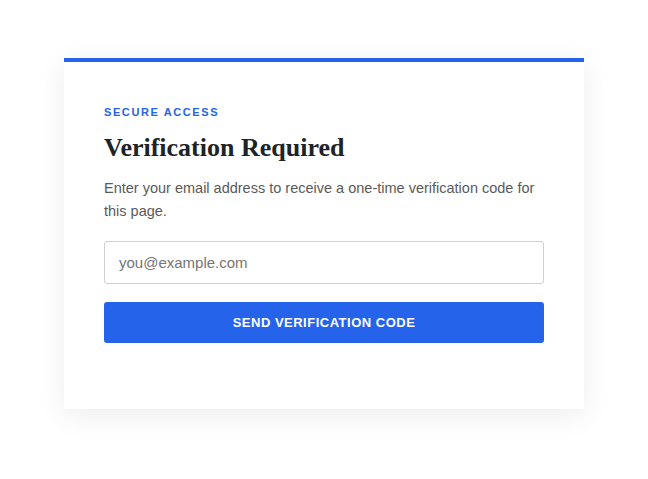
LumeaPixel Access is an email verification and one-time password (OTP) plugin for WordPress. It adds a verification checkbox to any page, post, or custom post type you choose. When a visitor tries to open that content, they see a verification screen instead: they enter their email address and, depending on your settings, either receive a one-time password to enter, or get in immediately after submitting their email.
Use it to gate a private dashboard, a resource library, a client portal, or any page you want to keep off the open web without building a full membership site.
Optionally, every visitor who gets through can also be saved to a simple subscriber list you export as CSV, so the same gate can double as a lightweight signup capture, whether or not OTP verification is turned on.
No user accounts are created. No third-party OTP gateway or subscription is required. Codes are sent with your site’s normal wp_mail() setup, and this works automatically with any SMTP plugin you already use.
Features
- Adds a verification checkbox to the content types you choose, right in the editor sidebar
- OTP verification itself is optional. Turn it off to just ask for an email address and grant access immediately, with no code sent
- Optional marketing list: visitors who submit their email can be saved for follow-up (with or without OTP verification), with a customizable on-screen notice and a built-in export and delete screen
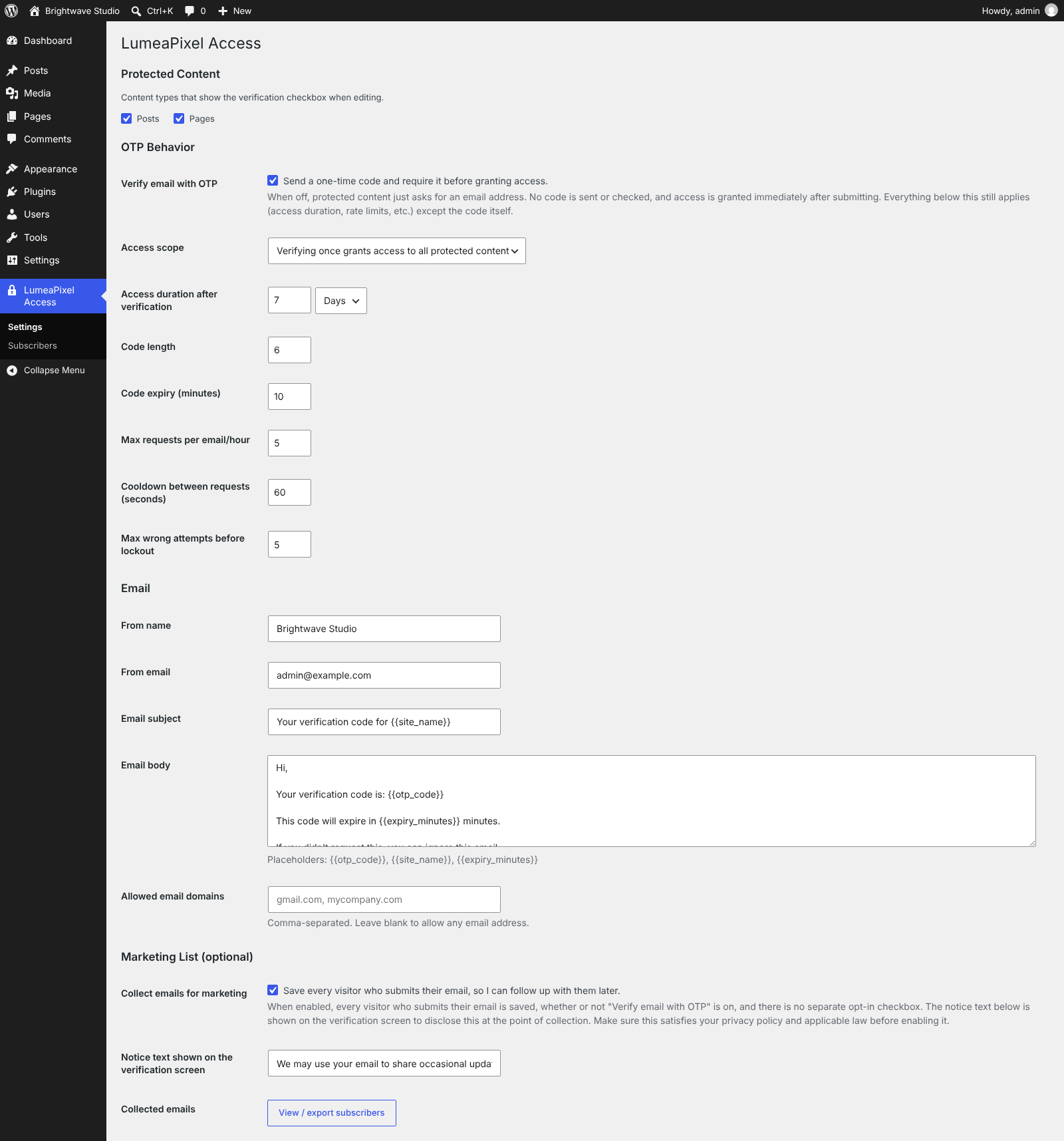
- Fully configurable code length, expiry time, and how long a verified visitor is remembered
- Choice of access scope: verify once for all protected content, or require separate verification per item
- Rate limiting (requests per hour, cooldown between requests, max wrong attempts) to prevent abuse
- Customizable email subject and body, and every piece of on-screen text (headings, button labels, and more)
- Adjustable accent color to match your site
- Optional allow list of email domains
- No data is stored beyond a short-lived, hashed one-time password and a signed browser cookie, and nothing is logged permanently
Privacy
By default, this plugin does not store any personal data beyond what’s required to verify a visitor: a short-lived, hashed one-time password (deleted immediately after use or on expiry) and a signed browser cookie recording that verification happened.
This plugin optionally offers a marketing list feature, disabled by default. If a site owner enables “Collect emails for marketing” in LumeaPixel Access > Settings, every visitor who submits their email has it stored in the site’s database for later follow-up. This happens whether or not “Verify email with OTP” is turned on, and there is no separate opt-in checkbox. A customizable notice (shown on the verification screen) discloses this at the point of collection. Site owners who enable this feature are responsible for ensuring this notice, together with their privacy policy, satisfies applicable laws (e.g. GDPR, CAN-SPAM) in their jurisdiction. Note that some of these require affirmative opt-in consent for marketing specifically, not just notice at collection. A “Delete all” control and per-subscriber removal are provided under LumeaPixel Access > Subscribers to support data deletion requests.
Screenshots


Installation
- Upload the plugin files to
/wp-content/plugins/lumeapixel-access, or install the plugin through the WordPress plugins screen directly. - Activate the plugin through the ‘Plugins’ screen in WordPress.
- Go to LumeaPixel Access > Settings to choose which content types should show the checkbox, and to adjust behavior, email, and text.
- Edit any page or post of an enabled type and tick the checkbox in the “Access Control” box to gate it.
FAQ
-
What does LumeaPixel Access do?
-
It puts an email verification screen in front of any WordPress page, post, or custom post type you choose. Visitors enter their email address and, depending on your settings, either enter a one-time password sent to that address or get in right away.
-
Does this create a WordPress user account for visitors?
-
No. Verification is tied to a signed cookie, not a WordPress account.
-
Will this work with my SMTP plugin?
-
Yes. Codes are sent using
wp_mail(), so any SMTP plugin you already have configured is used automatically. -
Can I protect posts and custom post types, not just pages?
-
Yes. Go to LumeaPixel Access > Settings and choose which public content types show the checkbox.
-
Can a verified visitor access all protected content, or just the page they verified on?
-
Both are supported. Choose “Access scope” in the settings: verify once for everything, or require separate verification per item.
-
Do I have to use OTP verification at all?
-
No. Turn off “Verify email with OTP” in LumeaPixel Access > Settings and protected content will just ask for an email address. No code is sent or checked, and access is granted as soon as it is submitted. This is independent of the marketing list feature, so emails can still be saved either way.
-
Is LumeaPixel Access free?
-
Yes. It’s free to use, with no premium tier, upsells, or required subscription.
Reviews
There are no reviews for this plugin.
Contributors & Developers
“LumeaPixel Access” is open source software. The following people have contributed to this plugin.
Contributors
Translate “LumeaPixel Access” into your language.
Interested in development?
Browse the code, check out the SVN repository, or subscribe to the development log by RSS.
Changelog
1.0.0
- Initial release.