
Description
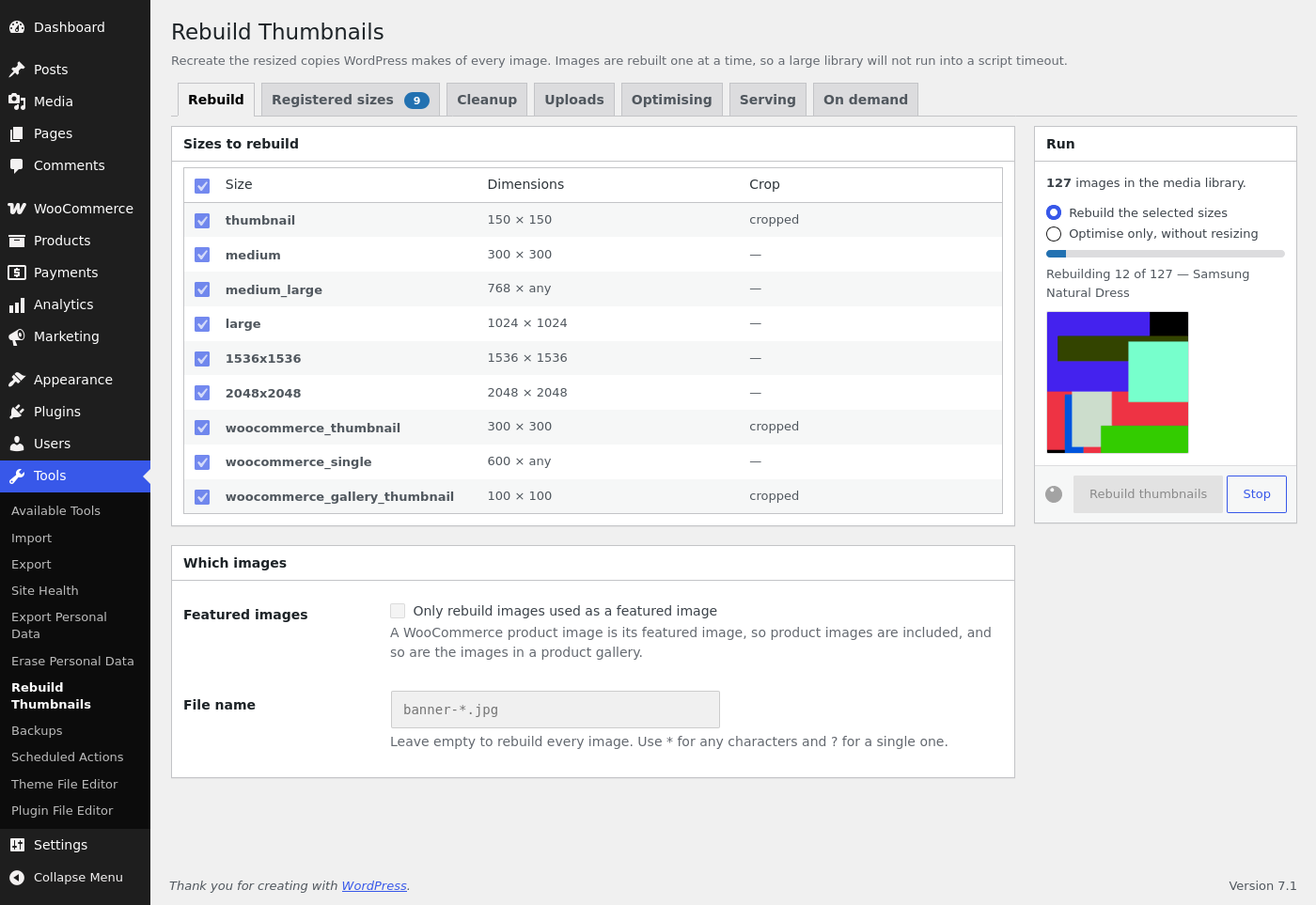
AJAX Thumbnail Rebuild recreates the resized copies WordPress makes of every image in your media library. It does them one image at a time, so a library of any size gets through without running into the script timeout that stops the plugins which rebuild everything in a single request.
You need this whenever the sizes change: a new theme with different dimensions, a plugin that registers a size of its own, or a size you have edited yourself. WordPress applies those to images uploaded afterwards and leaves everything already in the library at its old dimensions. Rebuilding fills the gap.
On its screen under Tools you can:
- Pick which of the registered sizes to rebuild, so a single changed size does not mean redoing all of them.
- Rebuild only the images used as a featured image – which covers WooCommerce product images and product galleries – or only the file names matching a pattern, e.g.
banner-*.jpg. - Watch it run: a progress bar, the image being worked on, a Stop button, and a list of anything it had to skip.
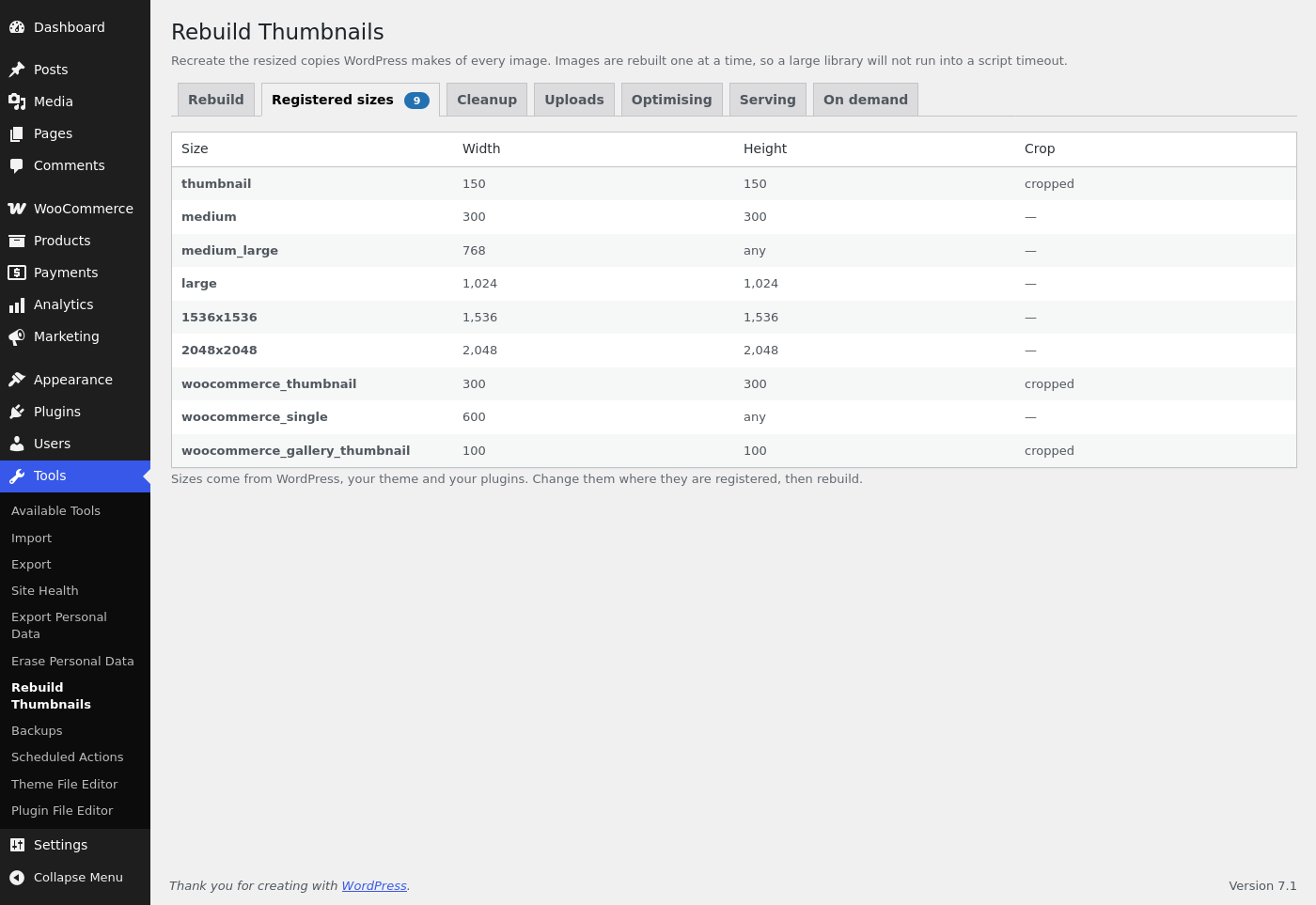
- See every image size registered on the site with its dimensions and crop setting.
- Clean up the resized files left behind by sizes that no longer exist.
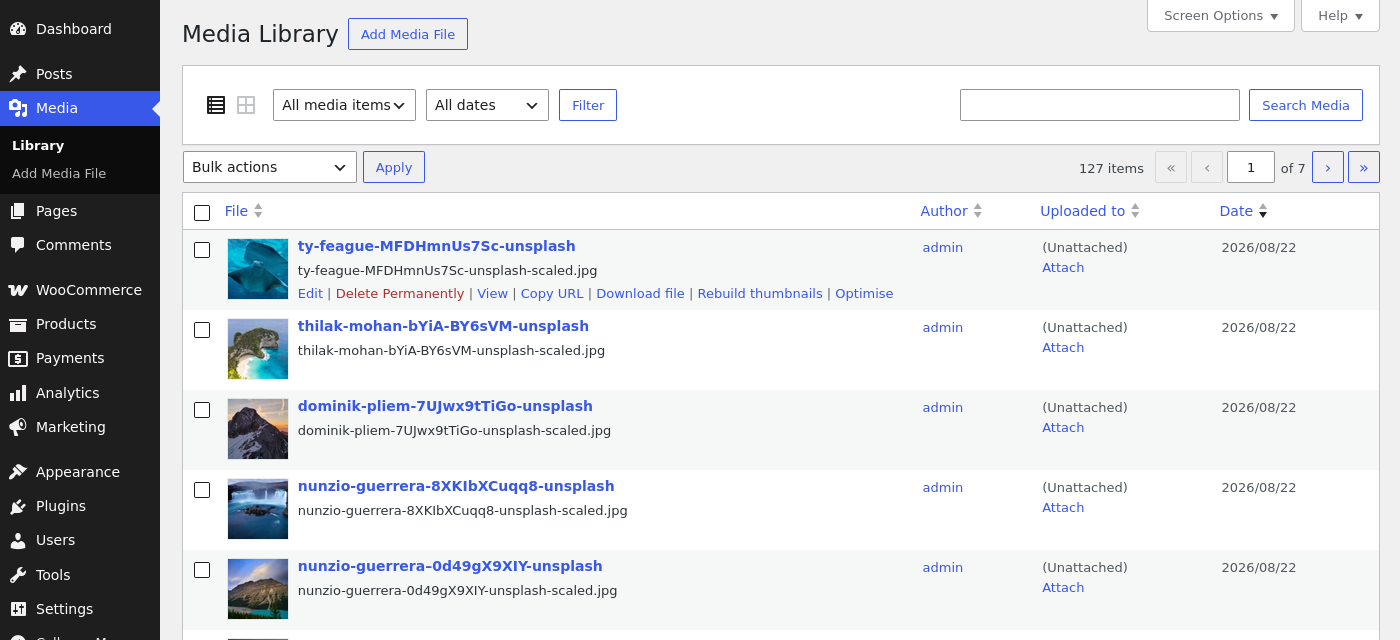
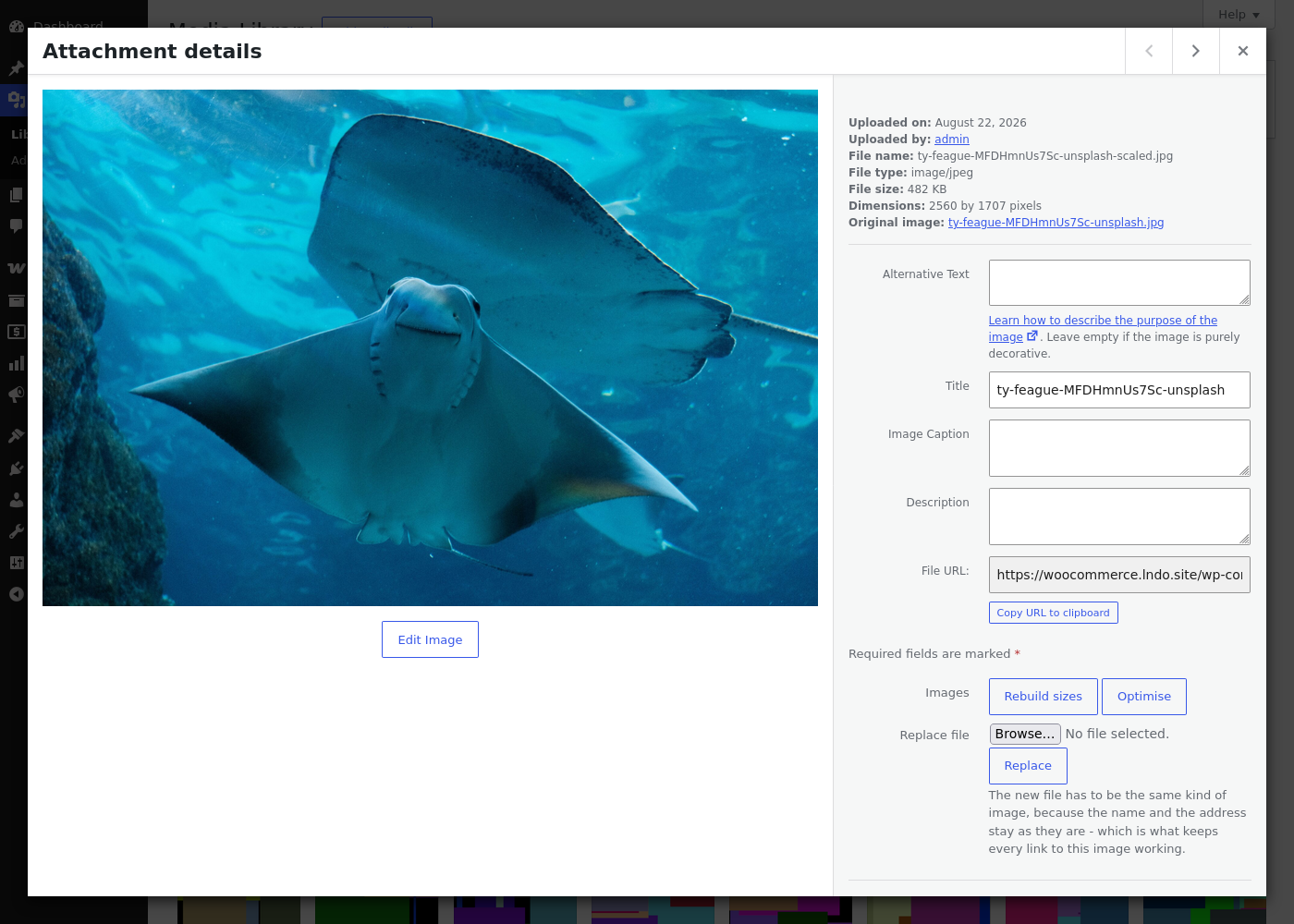
You can also work on one image at a time without leaving the media library: a row action rebuilds or optimises a single image, a bulk action hands a selection to the plugin’s screen, and the attachment details panel – wherever it opens – rebuilds, optimises, or replaces the file. A replaced image keeps its id, title and address, so every post and product already pointing at it shows the new picture.
Beyond rebuilding, each of these is off until you turn it on:
- Uploads. How hard WordPress compresses the copies it writes, and how large an image may stay before it is scaled down.
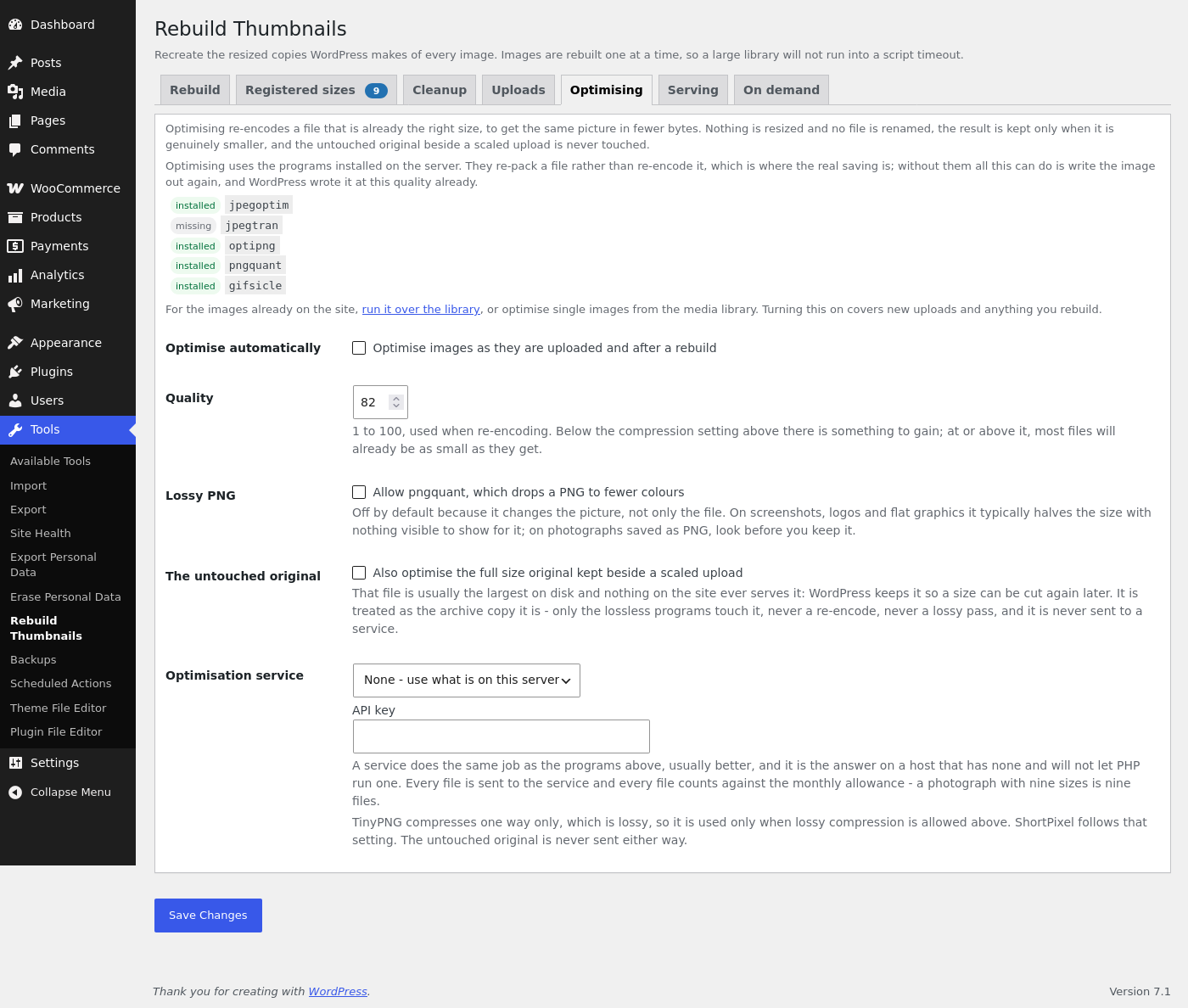
- Optimising. Makes files smaller without resizing them, using the optimisers installed on the server – jpegoptim, optipng, gifsicle, and pngquant where lossy PNG is allowed. Where a host has none, TinyPNG or ShortPixel can do the same job over their API. A file is replaced only when the new one is genuinely smaller.
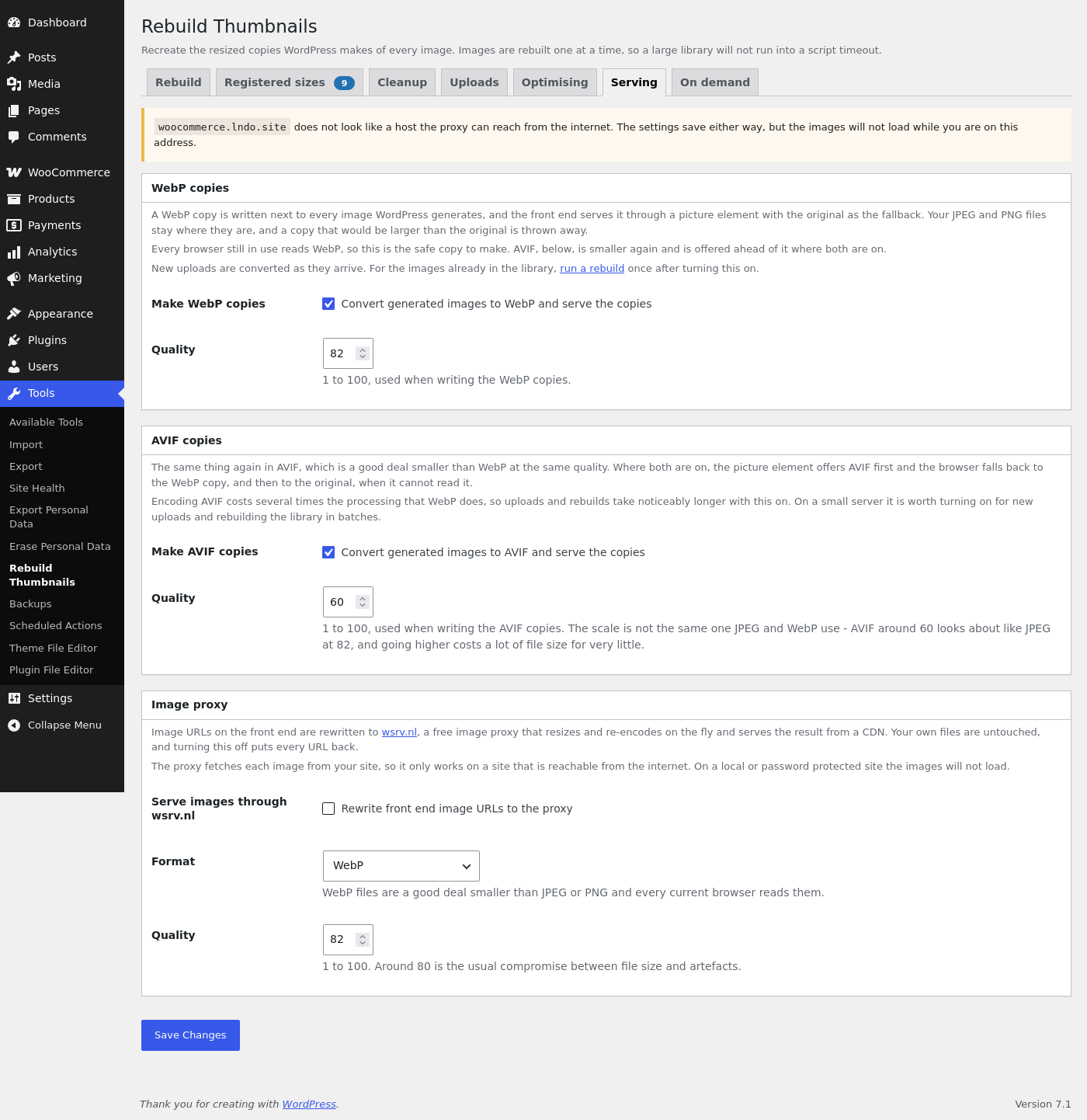
- AVIF and WebP copies. Written next to every image WordPress generates and served through a picture element, AVIF first, WebP after it, the original as the fallback – which works behind a page cache.
- Background processing. Optimising and the copies are the slow half of an upload. Queue them instead, and the upload finishes as soon as the sizes are written – on Action Scheduler where the site has it, on WP-Cron where it does not.
- Image proxy. Front end image URLs can be served through wsrv.nl, which resizes and re-encodes on the fly and serves the result from a CDN. Your own files are never touched.
- Sizes on demand. An upload keeps only its own file, and each size is cut the first time something asks for it.
This plugin requires JavaScript to be enabled.
Contributions are welcome at Github
Screenshots
Installation
Upload the plugin to your blog, activate it, done. Everything is under Tools -> Rebuild Thumbnails: the rebuild screen itself, the registered sizes, cleanup, and a tab per group of settings.
FAQ
-
Does rebuilding change my original images?
-
No. A rebuild writes the resized copies again and leaves the file you uploaded as it is. The only setting that touches an original is “Also optimise the full size original” on the Optimising tab, and even then only the lossless programs run on it – never a re-encode.
-
What happens if I close the page while it is running?
-
It stops where it is. The images it had already got through keep their new copies and nothing is left half written, but the run does not carry on in the background – open the screen and start it again.
-
Optimising saved nothing on my images. Why?
-
Look at the Optimising tab: it lists which optimisers are installed on this server. Those re-pack a file rather than re-encode it, which is where the saving is. Where none of them is installed the plugin falls back to PHP’s own image library, and since WordPress already wrote those files at that quality there is usually nothing left to win. On such a host, TinyPNG or ShortPixel will do the job over their API.
-
Uploading a batch of photographs is slow. Can that be fixed?
-
Turn on background processing, under Optimising. Optimising a file and writing its WebP and AVIF copies both happen while the browser is still waiting for the upload, and neither has to: with this on the upload finishes as soon as the resized copies are written, and the rest is queued. Action Scheduler runs the queue where a plugin provides it – WooCommerce and many others do – and WP-Cron runs it everywhere else. An image is served in its own format for the minute or two before the queue reaches it.
-
Is it safe to turn on AVIF or WebP copies?
-
Yes. The copies are extra files written next to your images; the originals stay exactly where they are, a copy that comes out larger than the original is thrown away, and the copies are deleted along with the attachment. Turning the setting back off puts the front end back to serving the originals. AVIF costs several times the processing WebP does, so expect uploads and rebuilds to take longer with it on, and where the server’s image library cannot write AVIF the screen says so and the WebP copies go on being served.
-
Can it write the WebP and AVIF copies without serving them?
-
Yes, with one line of code. The screen has a single switch per format, but a filter separates the two, so the copies go on being written while the front end serves your originals – which is what you want when a CDN or the server itself hands the copies out:
add_filter( 'ajax_thumbnail_rebuild_serve_copies', '__return_false' ); -
I turned on WebP or AVIF. Do I need to rebuild?
-
New uploads are converted as they arrive. For the images already in your library, run a rebuild once.
-
Can I replace an image with a different kind of file?
-
No – a JPEG can only be replaced by a JPEG, a PNG by a PNG. The attachment keeps its name and its address, which is what keeps every post and product already pointing at it working, and that only holds while the file type stays the same.
-
What does Cleanup delete?
-
Only resized files left on disk that no image size on this site refers to any more – what a removed theme or a size you no longer register leaves behind. It shows you the list and what it would free before anything is deleted, and the files your attachments actually use are never among them.
-
Does it need JavaScript?
-
Yes. The screen talks to the site over a REST API of its own, one image at a time, which is what keeps a large library from running into a script timeout.
-
I use Advanced Custom Fields. Why do my sizes not say what they should?
-
An ACF image field hands back an array of every size the site registers, which is what it does unless you tell it otherwise – and to build that array it asks for all of them at once. With sizes waiting to be cut, that is a listing rather than a page asking to show a picture, and cutting ninety files inside a visitor’s page view to answer it is worse than the upload this feature was meant to spare you.
So nothing is cut while an ACF field is being read. The sizes already on disk are reported as usual; one that is still waiting is reported as the full file, which is what WordPress itself falls back to for a size that does not exist yet. Nothing else changes: the first time a template actually renders that size it is cut, exactly as before.
If you read sizes out of that array –
$image['sizes']['my-size']– ask the field for an ID instead and let WordPress draw the image:'return_format' => 'id' on the field, then `wp_get_attachment_image( $id, 'my-size' )`.To have it behave as it did before, cutting every size the moment such a field is read:
add_filter( 'ajax_thumbnail_rebuild_on_demand_while_enumerating', '__return_true' );
Reviews


Contributors & Developers
“AJAX Thumbnail Rebuild” is open source software. The following people have contributed to this plugin.
Contributors

“AJAX Thumbnail Rebuild” has been translated into 16 locales. Thank you to the translators for their contributions.
Translate “AJAX Thumbnail Rebuild” into your language.
Interested in development?
Browse the code, check out the SVN repository, or subscribe to the development log by RSS.
Changelog
2.2.1
- Nothing is cut while something is only listing the sizes. Advanced Custom Fields hands an image field back as an array of every size the site registers – and a video or audio field the same array for its poster image – and every entry in those lists was answered by cutting the file for it – on a site with ninety-six registered sizes, one image field on one page wrote 240 files and took 29.5 seconds, inside a visitor’s request. Inside that window the full file is returned instead, which is the honest answer while the size does not exist yet; the first time something actually renders one of those sizes it is cut exactly as before.
ajax_thumbnail_rebuild_on_demand_while_enumeratingputs the old behaviour back. - A size the original is too small for is no longer attempted. WordPress does not upscale, so the cut could only fail – but it failed the expensive way, after loading an image editor and reading the file, and again on the next page view for as long as anything asked for that size. It is worked out as arithmetic now, against the file the crop would actually be cut from. An SVG is skipped before any of that, rather than being rasterised once per registered size.
- A size asked for after its record has gone is cut again. The note that keeps one request from cutting the same size twice was never taken down, so once a rebuild or
wp media regeneratehad rewritten the attachment metadata, anything asking for that size again was served the full file where it had asked for a crop.
2.2.0
- New setting The untouched original, under Uploads beside the limit: the full size original kept beside a scaled upload is brought down to the limit as well. WordPress cuts the sub sizes from that file and then leaves it alone at whatever it arrived as, which on a photograph from a modern camera is most of what the library weighs. Off by default, and it cannot be undone – the resolution the original was uploaded at is gone, and no size larger than the limit can be cut from it afterwards. New uploads are covered as they arrive; an image already in the library is covered the next time it is rebuilt, and its
-scaledcopy comes down with it where that was written to an older limit. - A size marked as made on demand can be rebuilt again. It was shown ticked off and disabled on the rebuild screen, so a file cut for it stayed as it was however the size changed. It is now rebuilt for the images that already have it and cut for no others, which refreshes what is there without writing the files the setting exists to avoid.
2.1.1
- Sizes a theme or plugin adds through
ajax_thumbnail_rebuild_on_demand_sizesnow show up ticked under Made on demand instead of looking switched off, and are greyed out there: unticking one never had any effect, because the filter put it back on the next read.
2.1.0
- New setting When the work happens, under Optimising: optimising and the WebP and AVIF copies can be queued instead of run on upload, so an upload finishes as soon as the resized copies are written. The queue runs on Action Scheduler where the site has it and on WP-Cron where it does not.
- New filters
ajax_thumbnail_rebuild_background_enabledandajax_thumbnail_rebuild_use_action_scheduler.
2.0.1
- New filter
ajax_thumbnail_rebuild_serve_copies. Return false to keep writing the WebP and AVIF copies while the front end serves the originals, for a site where a CDN or the server itself hands the copies out.
2.0.0
The whole plugin has been worked through: one 430 line file is now a set of
classes, the browser talks to a REST API of its own instead of admin-ajax, and
the screen is built from the components WordPress itself ships.
The screen:
- A tab each for rebuilding, the registered sizes, cleanup, and one per group of
settings, so no page is a wall of fields. - Rebuilt out of tabs, list tables, postboxes and notices, with a progress bar,
a running preview, a Stop button and a list of anything it had to skip. - A “Registered sizes” tab listing every image size on the site with its
dimensions and crop setting. - Rebuild only the images whose file name matches a pattern, e.g.
banner-*.jpg. - Rebuild straight from the media library: a row action for one image, and a
bulk action that hands the selection to the plugin’s screen, where it runs one
image at a time. - Rebuild, optimise or replace an image from the attachment details, wherever
they open – the media library, the grid, or the modal inside the post editor –
without leaving the page you are on. - Replace an image by uploading a new file. The attachment keeps its id, its
title and its address, so every post and product already pointing at it shows
the new picture; the sizes are cut again and what the old picture left behind
is deleted. The new file has to be the same kind of image, which is what keeps
the links working. - “Only rebuild featured images” also covers the images in a WooCommerce product
gallery. A product’s main image is its featured image, so that was already
included.
New, all off by default:
- Upload settings. How hard WordPress compresses the copies it writes, and
how large an image may stay before it is scaled down – both of which WordPress
decides for you and gives no screen for. Set the size to 0 to keep uploads
exactly as they arrive. - Optimising. Makes files that are already the right size smaller, using the
optimisers installed on the server – jpegoptim, optipng, gifsicle, and
pngquant when a site allows lossy PNG. They re-pack a file rather than
re-encode it, which is where the saving is; where none is installed the plugin
says so and falls back to re-encoding with PHP’s own library. Nothing is
resized, a file is replaced only when the new one is genuinely smaller, and
the untouched original beside a scaled upload is left alone unless a site asks
for it. Where a host has no optimiser and will not run one, TinyPNG or
ShortPixel can do the same job over their API. Runs on upload, over the
library, or on single images from the media library. - AVIF and WebP copies. Every image WordPress generates gets a copy written
next to it in either format, and the front end serves them through a picture
element – AVIF first, WebP after it, the original as the fallback – which
works behind a page cache. Each format has a switch and a quality of its own,
a copy that would be larger than the original is discarded, and the copies are
deleted with the attachment. AVIF is the smaller of the two and the slower to
encode; where the server’s image library cannot write it, the screen says so
and the WebP copies go on being served. - Image proxy. Front end image URLs can be served through wsrv.nl, which
resizes and re-encodes on the fly and serves the result from a CDN. Your own
files are never touched. - Sizes on demand. An upload keeps only its own file and each size is cut
the first time something asks for it – either for every size, or for single
sizes ticked off one by one, which a rebuild then skips. - Cleanup. Finds the resized files nothing points at any more – the ones
left behind every time an image size changes – and deletes them after you have
looked at the list. The scan only reads; a file that is an attachment of its
own, or an AVIF or WebP copy of a file still in use, is never listed.
Fixed:
- Rebuilding no longer throws away the rest of the attachment metadata.
original_image andfilesizesurvive, so WordPress can still find and
delete the untouched upload (props @toolshedlabs-hash). - Sub sizes are cut from the original image rather than from the “-scaled” copy,
which used to leave a duplicate set of files behind. - Selecting a subset of sizes rebuilt every size anyway.
- Sizes registered through the
intermediate_image_sizes_advancedfilter are
picked up; the filter now receives the metadata and attachment id core passes
it. - “Toggle all” checks or clears every size instead of inverting each one.
- The button on a single attachment works when several attachments are on
screen; it no longer prints a copy of the whole script per image. - An image whose file is missing or unreadable is skipped and listed, instead of
stalling the run. - PHP 8.4 compatible; undefined variables, unchecked
getimagesize()results
and unescaped output cleaned up throughout.
1.14
- Fix security issues (props @patchstack)
- Fix Github link (props @Julix91 @garretthyder)
- Fix crop-settings for additional sizes (props @karlkowald)
1.2.2
- Compatibility with PHP 7.2 (props @thomas-gordon)
- Implemented throttling and retries for image regeneration (props @da2x)
1.2.1
- NEW: Allow custom crop areas, read more
1.2
- Compatibility with PHP7
1.12
- FIX: An issue where rebuilding thumbnails in the media gallery
would not work
1.11
- FIX: An issue where the plugin would sometimes break the media gallery.
1.10
- NEW: Rebuild thumbnails of single images on the media attachment page.
1.09
- NEW: Checkboxes can be activated by clicking on text.
1.08
- NEW: Slovak translation, provided by Branco Radenovich.
1.07
- FIX: Don’t create metadata with empty size when original image is smaller
than the target size.
1.06
- FIX: Don’t forget metadata for sizes that aren’t rebuilt.
- FIX: Option to only rebuild featured images should now work correctly.
- FIX: Don’t fail if there are no attachments.
- NEW: It’s now possible to toggle all selected sizes.
- NEW: Added translation: German.
1.05
- Add option to only rebuild post thumbnails (featured images)
1.04
- Tested with WordPress 3.2
1.03
- Fixed: Show correct height value for thumbnails.
1.02
- You can now select which thumbnail sizes you want to rebuild. Thanks to Nicolas Juen!
1.01
- Tested with WordPress 3.0
1.0
- Initial release