
Description
wpgraft copies a section of any public web page and rebuilds it inside your own
page builder — Elementor, the block editor (Gutenberg), Divi, Bricks, Beaver
Builder, Breakdance or Oxygen — not as an embedded screenshot, not as a block of
pasted HTML, but as the builder’s own elements, with the styles written into the
builder’s own fields. Once it lands you edit it the way you edit anything else
you built by hand.
This plugin is the WordPress half of that. The copying happens in the wpgraft
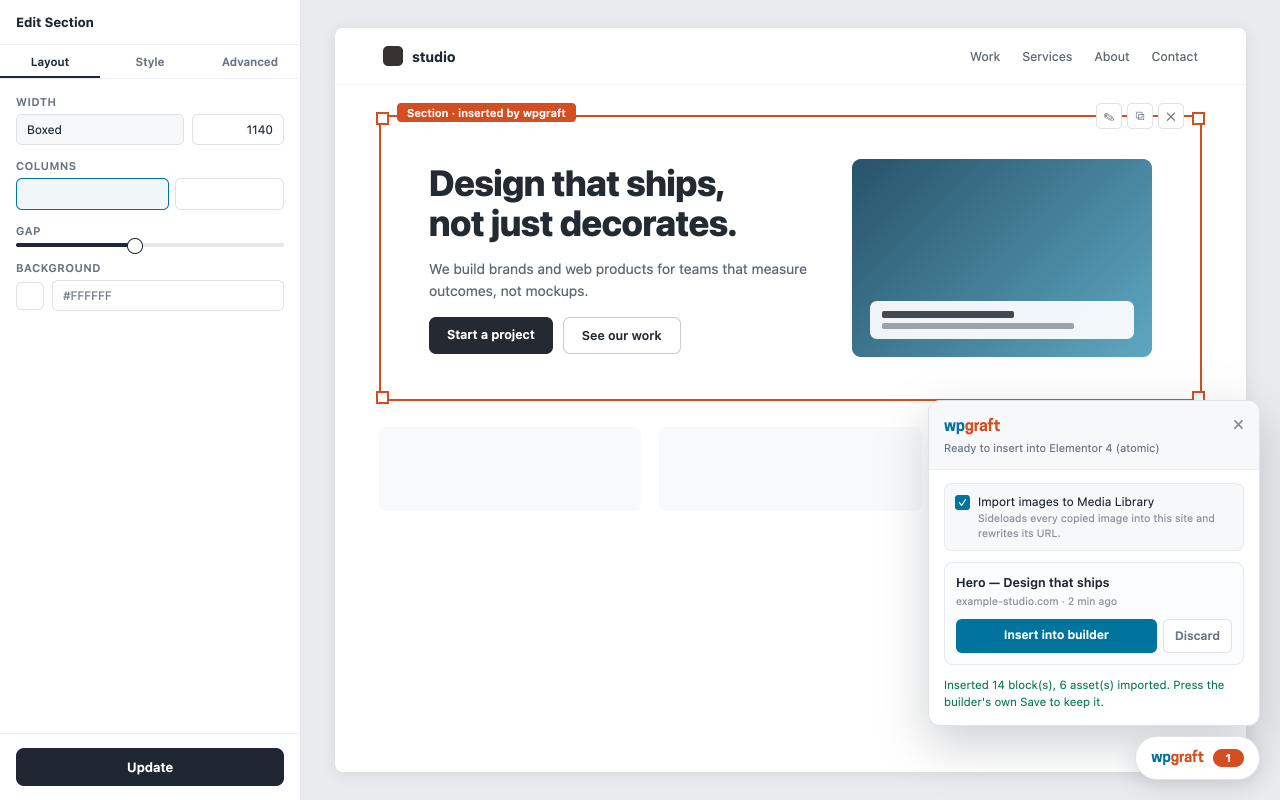
browser extension; this plugin receives the result, shows it in a panel inside
the editor, inserts it into the page you have open, and pulls the images it needs into
your Media Library.
Supported editors
- Block editor (WordPress core)
- Elementor — both the classic (v3) and the atomic (v4) document models
- Bricks
- Divi 5
- Beaver Builder
- Breakdance
- Oxygen 6 and Oxygen Classic
What the plugin itself does
- Adds a wpgraft panel inside the editor listing sections waiting to be inserted.
- Inserts a section into the open document using each builder’s own data
structures, so the result is editable natively — no shortcode, no iframe, no
“do not edit this block” wrapper. - Imports the images a section needs into the Media Library and rewrites the
references to point at your own copies, so the layout does not break when the
source site changes. - Loads a copied page’s typeface from Google Fonts by name (or the closest Google
font when the original is not there) instead of copying the source site’s font
files. The exceptions are fonts the copy itself embeds: icon fonts, and the
embedded faces of a block-editor copy, which are stored in your uploads. - Registers REST routes under
wpgraft/v1, each one gated on both a capability
check and thewp_restnonce.
What it will never insert
The plugin has no code editor, no CSS box and no field where anyone types code.
What arrives is a page description the conversion service produced; before any
of it is stored the plugin removes every script element, event-handler
attribute and PHP open tag, and empties every JavaScript field a builder element
may have. Every stylesheet in it is parsed and rebuilt from an allowlist: a
declaration is kept only when its property is a standard CSS property and its
value is made of standard CSS values and functions, a selector only when it is
made of selector syntax, an at-rule only when it is one of a short list
(@media, @supports, @font-face, @keyframes, …), and url() only for
http(s), image and font addresses. Everything else is dropped and reported, and
no markup character survives in a stored stylesheet. That happens for every
user, administrators included, because the content was copied off somebody
else’s page. On top of that, page-level CSS is only stored
for users who hold edit_css or unfiltered_html — the capability WordPress
itself requires for Additional CSS — and raw-HTML builder elements are only
kept for users who hold unfiltered_html; everyone else gets the section with
those parts removed and a warning saying so. Styles are written into each
builder’s own fields, so you edit them where you edit everything else.
What it does not do
No account to connect here, no licence key, no options page to fill in — the
settings screen is a status readout and nothing else. Nothing in this plugin is
metered, counted, time-limited or held back for a paid plan: there is no licence
check anywhere in the code, no usage counter and no upgrade prompt. It inserts
whatever the extension hands it, on any site, for as long as you keep it
installed. It reads no visitor data and writes nothing to your pages that you
did not insert yourself. What it stores: the queue of sections waiting to be
inserted (per user, removed on insert or discard), the images and embedded
fonts a copy brings (Media Library and uploads), and the styling of inserted
copies in post meta and the builder’s own settings.
Requires a paid wpgraft plan (an external service)
This plugin is free software and always will be, but on its own it does nothing:
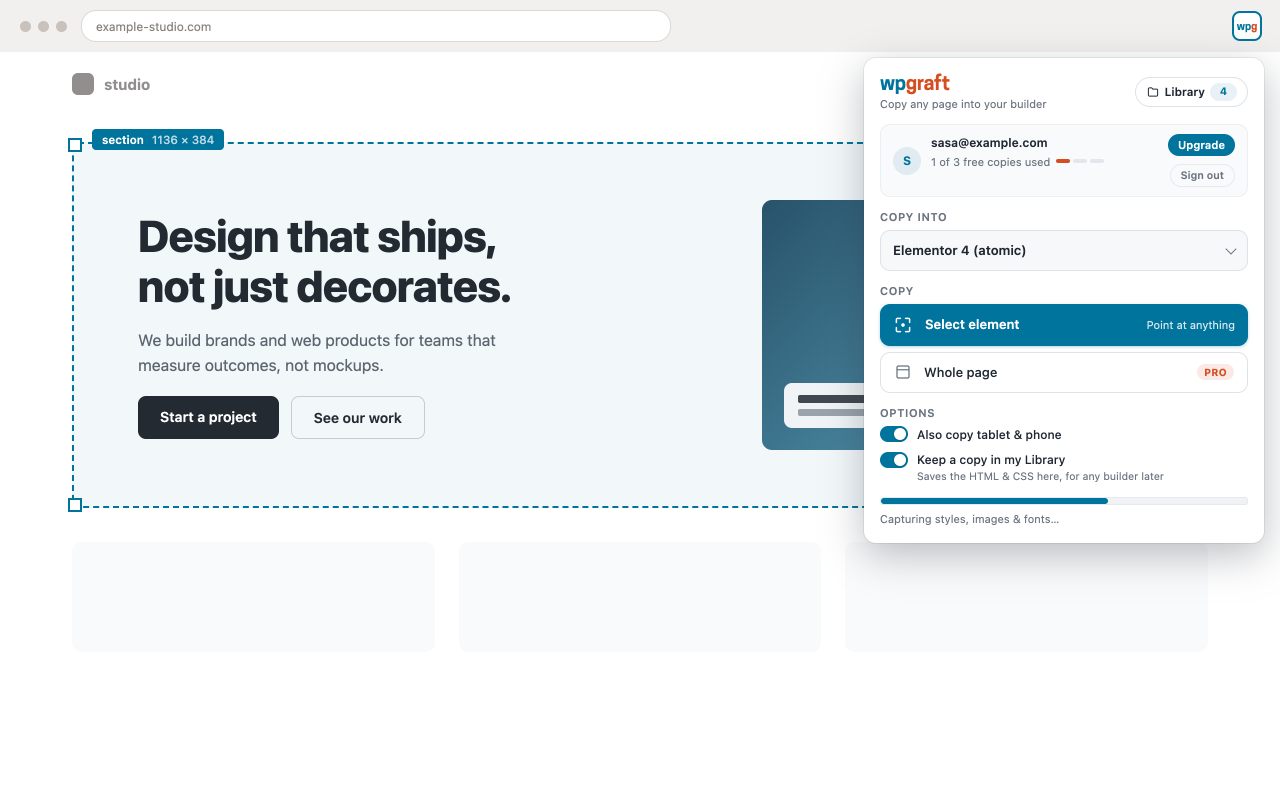
sections reach it from the wpgraft browser extension, and the extension converts
a captured page through the wpgraft conversion service. That service is paid:
copying requires a wpgraft account with a paid plan — Pro monthly, Pro yearly or
Lifetime. There is no free tier and no trial. Plans and prices are at
https://wpgraft.com/#pricing. The plan is checked there — in the browser
extension and on our server, before anything reaches WordPress — never by this
plugin. See the section below for exactly what is sent where.
Not affiliated with Elementor, Bricks, Elegant Themes (Divi), Beaver
Builder, Soflyy (Oxygen, Breakdance) or any other builder vendor. Those names
appear here to describe compatibility, and they belong to their owners.
Bundled resources. The plugin ships the Cooper Hewitt typeface
(assets/fonts/), used only for the wordmark on its own settings screen, under
the SIL Open Font License 1.1 — the full text is in
assets/fonts/LICENSE-OFL.txt. Everything else in the plugin is GPLv2 or later.
External services
This plugin is a companion to the wpgraft browser extension and the wpgraft
conversion service, operated by wpgraft (https://wpgraft.com).
1. The wpgraft conversion service — used by the extension, not by this plugin.
When you copy a section, the browser extension sends the captured HTML and CSS
of the page you chose to https://wpgraft.com/api/convert, together with your
account token, and receives the builder document that this plugin then inserts.
That request is made by the extension in your browser. This plugin does not make
it and does not hold your account credentials. Sections picked in the wpgraft
section Library (https://wpgraft.com/library) arrive the same way, through the
extension. The service is paid: it converts only for accounts with a paid
wpgraft plan (Pro monthly, Pro yearly or Lifetime); there is no free tier.
-
Plans and prices: https://wpgraft.com/#pricing
-
Terms: https://wpgraft.com/terms
- Privacy policy: https://wpgraft.com/privacy
2. Downloading the assets a copied section uses. When a section references
images, your WordPress site downloads them from the URLs the
capture recorded — usually the site you copied from — and stores them in your
Media Library. That traffic goes from your server to that site directly; it
does not pass through wpgraft. Only users who can already upload files can
trigger it. A file is accepted by its own bytes, not its name: raster images,
web fonts, and SVG — every SVG is rebuilt by a sanitizer that removes scripts,
event handlers and external references before it is stored. An image that is
not imported (the import was switched off, or it failed) keeps its original
address, so your visitors’ browsers load it from the site it was copied from.
3. The quality rating — only if you fill it in and press the button. After a
copy is inserted, the panel asks how it turned out: a score from 1 to 5, an
optional comment, and a tick-box that decides whether the copy itself is sent
back to wpgraft so the fault can be reproduced and fixed. Pressing the button
sends the score, the comment, the tick, your site’s HOSTNAME and this plugin’s
version to https://wpgraft.com/api/feedback, from your browser, using a
single-use ticket that came with the copy. No account credential of yours and no
WordPress credential is involved, and the request carries no cookie. The
tick-box is ticked by default and the button says what will be sent (“Send
rating & copy” or “Send rating only”). The reply is a short thank-you message,
and for a 5 it may carry a link to leave a review.
Nothing is sent unless you press that button. Dismissing the card sends nothing.
Unticking the box sends the score and the comment and no page content at all.
The HTML and CSS of the copy do not come from your site — this plugin never had
them — they are uploaded separately by the browser extension, from the account
that made the copy, and only for ratings you consented to.
- Terms: https://wpgraft.com/terms
- Privacy policy, section 5.10: https://wpgraft.com/privacy#what-we-collect
4. Google Fonts, for the typeface a copied page uses. When a copy names a
font, the page it was inserted into links a stylesheet from
https://fonts.googleapis.com, so your visitors’ browsers load that font from
Google. Only Google Fonts URLs are accepted. A site that wants no third-party
requests can drop them with the wpgraft_capture_font_links filter.
- Google Fonts terms: https://developers.google.com/fonts/terms
- Google Fonts privacy: https://developers.google.com/fonts/faq/privacy
- Google privacy policy: https://policies.google.com/privacy
This build of the plugin’s PHP contacts wpgraft.com for nothing at all —
updates come from WordPress.org like any other plugin here, and your server
makes no request to us. The one request above is made by your browser, from the
editor screen, when you press the button on the rating card.
Screenshots
Installation
- Install and activate this plugin.
- Install the wpgraft browser extension for Chrome, and sign in.
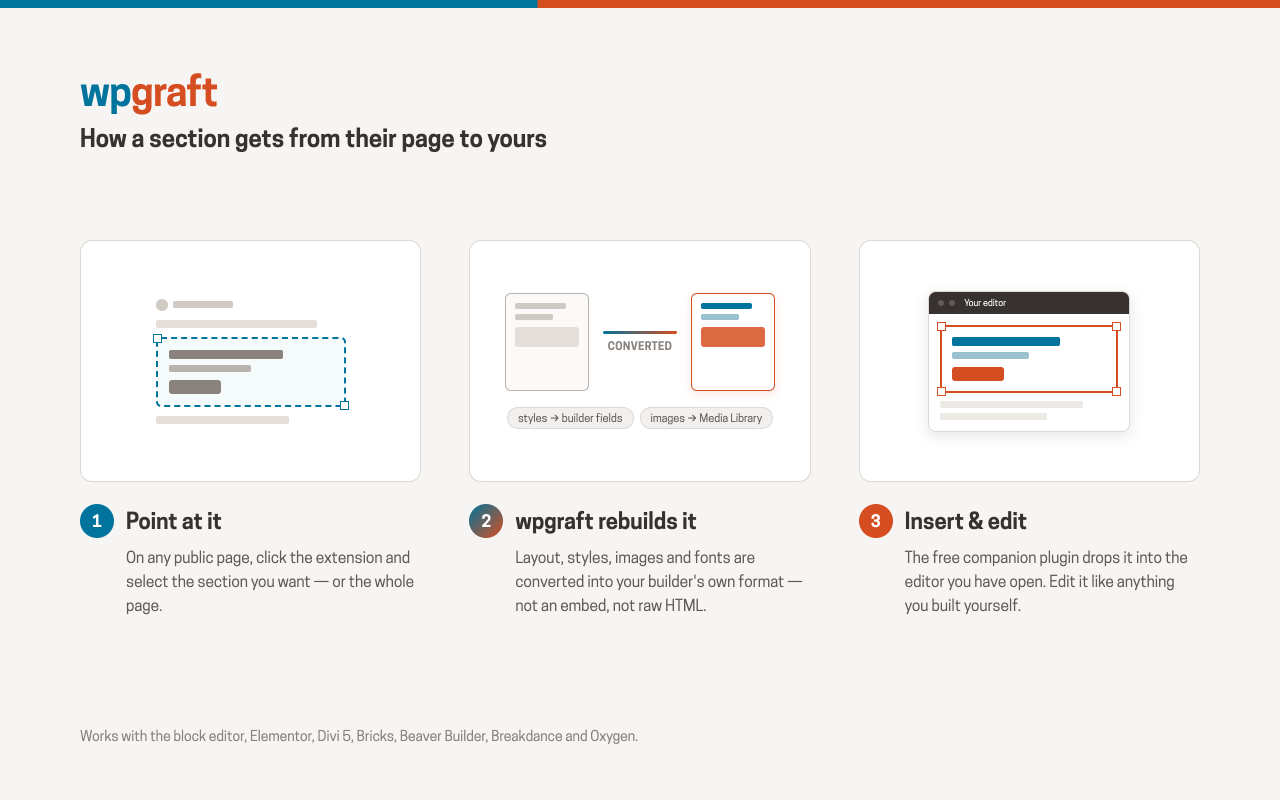
- Open the page you want to copy from, pick a section with the extension, and choose the site and builder to send it to.
- Open the target page in your builder. The wpgraft panel lists what is waiting; insert it, and edit it like anything else.
The plugin needs no configuration. Settings wpgraft shows which builder it detected, whether the in-editor runtime loaded, and the REST base the extension talks to — useful when something does not arrive.
FAQ
-
Which page builders does it work with?
-
Elementor (both the classic v3 and the atomic v4 document models), Bricks,
Divi 5, Beaver Builder, Breakdance, Oxygen 6, Oxygen Classic, and the
WordPress block editor. Each one gets a document written in its own native
format, so a copied section arrives as Elementor widgets, Bricks elements,
Divi modules, Beaver Builder modules or core blocks — whichever builder you
opened. -
Do I need the browser extension?
-
Yes. The plugin is the receiving end; nothing is copied without the extension.
-
Is a copied section really editable?
-
That is the point of it. Each builder gets its own document written in its own
format, with the styles in the builder’s own style fields, so you edit, restyle
and delete the elements normally. Where a builder has no field for something the
source page did, the plugin says so rather than faking it with a raw HTML block. -
Does it work without a paid plan?
-
No. The plugin itself is free and has no licence check, but every section it
receives is converted by the wpgraft conversion service, and that service needs
a paid wpgraft plan — Pro monthly, Pro yearly or Lifetime. There is no free tier
and no trial. Without a plan the extension copies nothing, so nothing reaches
this plugin. Plans and prices: https://wpgraft.com/#pricing -
Does the plugin phone home?
-
No. Your server never contacts wpgraft.com, and updates come from WordPress.org.
The only request to wpgraft.com is the rating card’s, made by your browser when
you press its Send button (see External services, 3). -
Which user can use it?
-
Inserting requires
edit_poston the post being edited; importing assets
requiresupload_files. Anything that writes raw HTML or CSS additionally
requiresunfiltered_html/edit_css, so a contributor cannot smuggle markup
in through a copied section. -
Can a copied page inject JavaScript or PHP into my site?
-
No. The plugin never stores or prints JavaScript or PHP for any user. Script
elements, event-handler attributes and PHP open tags are removed from every
copy before it is stored, the JavaScript field of every builder code element
is emptied, and every stylesheet is rebuilt from an allowlist of standard CSS.
Nothing the plugin hands a builder is something that builder executes. Links
that point at executable code (javascript:URLs) are disabled. Each of those
removals is reported in the editor panel so you know what was left out. -
Oxygen 6 shows an error or takes minutes when I save a copied page
-
Oxygen 6 saves the page itself, in its own request; this plugin is not part of
that request. Oxygen’s selectors are site-wide, and whenever a save changes
them (a pasted copy adds its own), Oxygen rebuilds the stylesheet of every
selector on the whole site. The time that takes grows much faster than the
number of selectors: a site with a few thousand saves in seconds, one with tens
of thousands can take minutes. So a site that has received many copies saves
more and more slowly, whatever the size of the copy being saved. When the
rebuild runs past PHP’s maximum execution time (often 30 to 120 seconds on
shared hosting) the save fails.- Raise PHP’s
max_execution_timefor the site to 300 seconds (your hosting
panel,php.inior.user.ini, or ask your host). - Deleting a copied page does not delete its selectors: they stay in Oxygen’s
“wpgraft” selector collection and keep counting toward every save. Other
pages may use the same selectors, so delete one only when you know that no
page on the site uses it.
- Raise PHP’s
-
Will it copy a whole page?
-
Yes. Whole-page copies and section copies arrive through the same panel and are
inserted by the same code — this plugin treats them identically and puts no
limit on either. Copying either kind needs a paid wpgraft plan; the plan is
checked by the remote conversion service, not by this plugin.
Reviews
There are no reviews for this plugin.
Contributors & Developers
“WPGraft – Copy any web page into your page builder” is open source software. The following people have contributed to this plugin.
Contributors
Translate “WPGraft – Copy any web page into your page builder” into your language.
Interested in development?
Browse the code, check out the SVN repository, or subscribe to the development log by RSS.
Changelog
1.2.5
- WordPress admin files (file, media, image) are loaded only immediately before
the one function that needs them. - Fonts and the block-editor stylesheet find the post being edited through
WordPress (or the open builder) and only for a user who may edit it, instead
of reading the post ID from the request. - Breakdance and Oxygen 6 global selectors are written through the builder’s own
option API. - Removed an unused Divi 5 font-registry writer.
1.2.4
- Every stylesheet a copy carries is now parsed and rebuilt from an allowlist of
standard CSS properties, values, functions, selectors and at-rules, instead of
being screened for known-bad patterns. Over 54,000 real copied stylesheets the
result is identical; anything that is not standard CSS is dropped and
reported. The Beaver Builder per-module CSS, Elementor page and per-variant
CSS and Divi 5 free-form CSS fields are covered too. - The editor runtime is loaded as a script file (assets/js/wpgraft-editor.js)
instead of being printed inline, and the admin-ajax address comes from
WordPress rather than being assumed. - Bricks: only inline SVG drawings are signed, after the SVG sanitizer rebuilt
them; a Bricks Code element is never signed. - Elementor: importing a copy’s images into the Media Library requires the
upload_files capability, like every other import path.
1.2.3
- One-click insert from the wpgraft section Library: a section you pick on
wpgraft.com/library goes straight into the builder you have open, the same way
the panel’s own Insert button does. Older plugins still receive it in the panel. - A builder that reloads to show a paste (Divi 5) no longer leaves the same copy
in the panel a second time.
1.2.2
- Rating card: closing the panel with the × or the wpgraft button now closes an
unanswered rating card too. Before, the next copy opened on the previous
copy’s rating card, with its own Insert button hidden underneath. - The rating card now appears after every insert. The “Don’t ask again” link,
its row on Settings -> wpgraft and the /wpgraft/v1/prefs REST route are gone.
Closing the card still sends nothing. - After you rate a copy, the card answers with one short headline and one clear
next step: a review link for a 5, a support ticket link when the copy was not
sent, and what happens next for a low score. - The readme no longer says web fonts are imported: no font files are installed.
A copied page loads its typeface from Google Fonts by name (listed under
External services).
1.2.1
- Elementor 4.3: copies insert again. Elementor 4.3 changed how heading,
paragraph and button text is stored, and refused every copy with
“Settings validation failed. title: invalid_value”. wpgraft now writes the
text in whichever form the site’s Elementor expects, so 4.2 and 4.3 both work,
and adding to a page that already holds an earlier copy works too.
1.2.0
- wpgraft is now a paid service (Pro monthly, Pro yearly or Lifetime); the
plugin itself is unchanged in that respect and checks nothing. - Ready for icon fonts that travel with a copy (used once the conversion
service sends them): icons still drawn by a font, rather than inline SVG, can get
that one icon face added to the page. New REST route: /wpgraft/v1/icon-faces
(same permission as /save; only@font-faceblocks with embeddeddata:
fonts are accepted). - Elementor: large copies open in the V4 editor instead of stalling; inserting
regenerates only the CSS of the page you inserted into, not the whole site’s;
Elementor 3 copies keep their hover styles and icon-list icons; YouTube
embeds work in Elementor Free. - Elementor: two copies inserted at the same moment on a full global-class kit
no longer leave one page unstyled. - Image import on slow hosts no longer stops at PHP’s 120-second limit.
- Very deep Breakdance copies (more than 64 levels) are accepted.
1.1.0
- The panel asks how each copy turned out once it is inserted: a score from 1
to 5, a comment, and a tick-box that sends that one copy back to wpgraft so
the fault can be reproduced. Nothing is sent unless you press the button, and
no page content is sent while the box is unticked. “Don’t ask again” turns
the card off for your user; Settings -> wpgraft turns it back on. - Every queued copy shows its size against what this site can store and render
(the PHP memory limit, the MySQL packet size, the builder’s own ceiling)
before you insert it. A copy that will probably fail is labelled “Insert
anyway” rather than blocked. New read-only REST route: /wpgraft/v1/limits. - A copy the database refused to store is now reported instead of acknowledged
and lost. - Direct-download build only (not this one): the “Enable auto-updates” link
appears for the plugin. - Elementor: inserting on a site with hundreds of Elementor documents and a
full global-class kit no longer ends in a critical error. - Oxygen Classic: large copies are inserted in one pass; the editor no longer
crashes at a few thousand elements. - The panel talks to the page’s own origin, so sites behind a TLS-terminating
proxy, or opened on www when WordPress is configured without it, no longer
get 401/403; plain permalinks no longer 404 the queue. - Images the site already has are reused rather than fetched again.
1.0.2
- Direct-download build only (not this one): a fix to its update check. Sites
installed from WordPress.org are updated by WordPress.org and were never
affected.
1.0.1
- Every copy is now scrubbed of script elements, event-handler attributes, PHP
open tags and JavaScript fields before it is stored, for every user, and
every stylesheet is validated statement by statement before it is saved. - A copy whose only root element was a code block no longer bypasses the
unfiltered_html gate on Breakdance and Oxygen. - Oxygen 6’s HTML Code and CSS Code elements are now covered by the same gate
as the Breakdance Code Block. - Stylesheets the plugin prints on the front end go through the WordPress
style API instead of a hand-writtenstyleelement; the settings screen’s
styling moved to a stylesheet file.
1.0.0
- First stable release. All ten builder targets supported: Gutenberg, Elementor
(v3 and v4), Bricks, Breakdance, Divi 5, Beaver Builder, Oxygen 6 and
Oxygen Classic.
0.1.2
- Beaver Builder and Divi 5 support.
- Elementor: both the classic (v3) and atomic (v4) document models are detected
and written natively. - Assets are matched by content, so re-importing a section reuses the
attachments it already created.
0.1.1
- Block editor support, including per-instance custom CSS.
- Oxygen Classic: stylesheet writes normalised so the editor cannot be left
hanging on load.
0.1.0
- First release: Bricks, Breakdance, Oxygen 6, Oxygen Classic and Elementor.