

Description
Replai Favicon turns a single master image into every icon your site needs — and adds the right HTML automatically. No copy-paste, no third-party service: everything is generated on your own server.
From one image the plugin creates:
- favicon.ico (16/32/48) — the classic icon, still used by browsers on PDF pages and elsewhere.
- PNG favicons — 16, 32, 48 and 96 px for crisp browser tabs and Google search results.
- Apple Touch icon (180×180) — the iOS home-screen icon, always with a solid background.
- Android icons + web app manifest — 192 and 512 px plus a maskable icon and a
site.webmanifest. - Windows tiles — an
mstile-150x150.pngand abrowserconfig.xml. - SVG favicon — if your master image is an SVG, it is served as a modern vector favicon too.
Many options
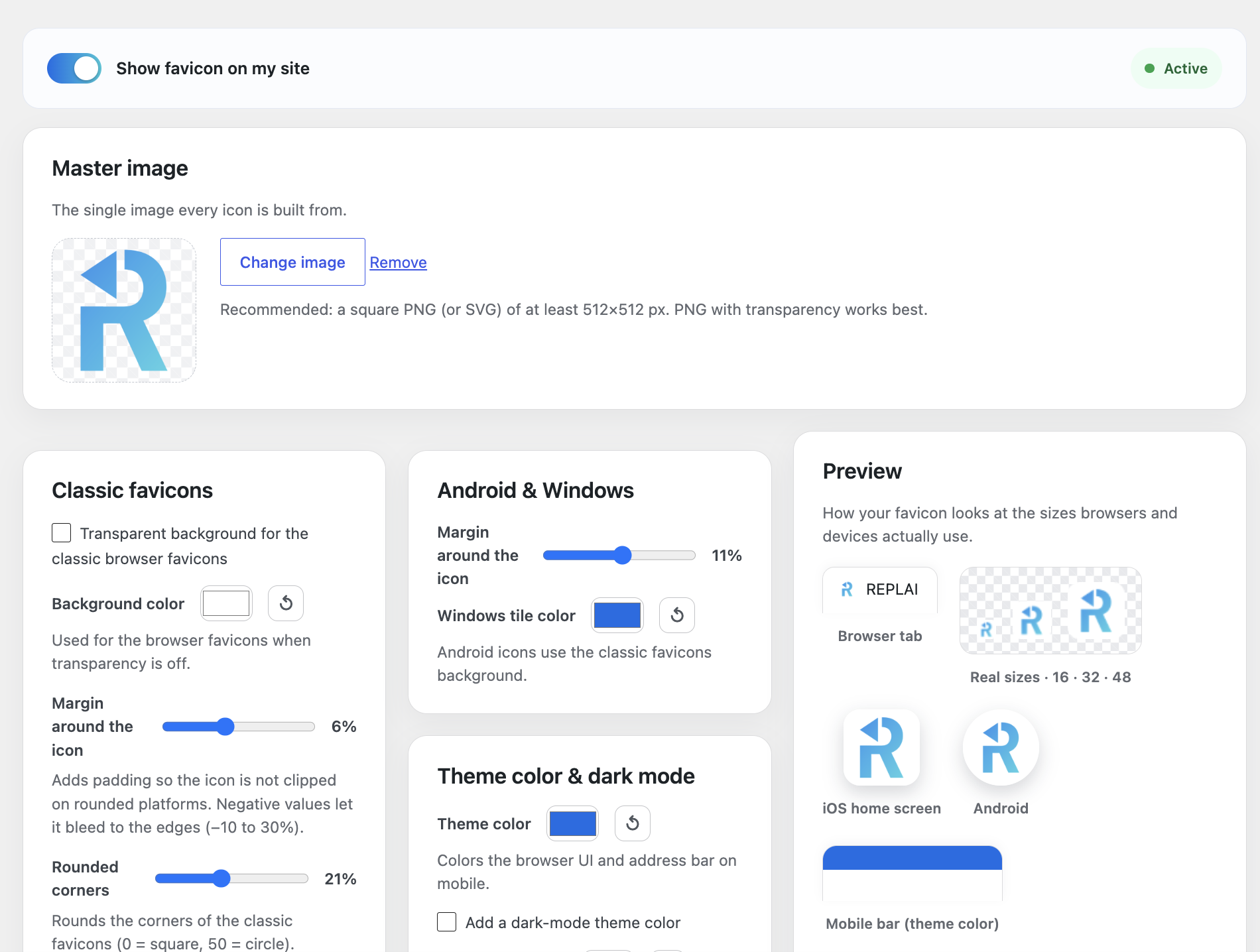
- Transparent or solid background for the classic favicons, with a color picker and a one-click reset to white.
- Padding per icon type — set a different margin for browser favicons, Apple Touch and Android, and even go slightly negative so the icon bleeds to the edges.
- Rounded corners for the classic favicons, from square all the way to a circle.
- Apple Touch background (iOS icons are always opaque).
- Theme color for the mobile browser UI, plus a Windows tile color.
- Dark mode — an optional alternative
theme-colorforprefers-color-scheme: dark. - App name for the web app manifest (defaults to your site title).
Smart and safe
- Real-time preview — a sticky preview panel shows your icon in a browser tab, at real sizes, on iOS and on Android, and updates live as you change any option, before you generate.
- Replaces the WordPress Site Icon tags (optional) so you never get duplicate icon markup.
- Serves /favicon.ico from the site root (optional) for browsers and crawlers that request it directly.
- Turn it on or off without regenerating — the files are kept.
The whole admin is available in 7 languages (English, Spanish, Catalan, French, Italian, Portuguese and German) based on your site language.
Everything runs on your own site. Icons are generated locally with GD or Imagick — your image is never uploaded to an external service.
Screenshots

Installation
- Upload the replai-favicon folder to
/wp-content/plugins/, or install it from the WordPress plugin directory. - Activate the plugin.
- Open the Replai Favicon menu, choose your master image, adjust the options and press Generate favicon.
FAQ
-
What image should I use?
-
A square image, at least 512×512 px. A PNG with transparency works best; SVG is also supported and served as a modern vector favicon.
-
Does it call any external service?
-
No. All icons are generated on your own server with GD or Imagick. Your image never leaves your site.
-
My server has no GD or Imagick. What happens?
-
The plugin shows a notice. Ask your host to enable the GD extension (available on almost all hosting) and generate again.
-
Will it clash with a Site Icon set in the Customizer?
-
No. By default Replai Favicon replaces the WordPress Site Icon tags so there are no duplicate icons. You can turn this off.
-
Does /favicon.ico work at the site root?
-
Yes, optionally. When enabled, requests to
/favicon.icoare redirected to the generated icon, which helps browsers and crawlers that request it directly (for example on PDF pages). -
Can I change the icon later?
-
Yes. Pick a new master image or change any option and press Regenerate. A cache-busting version is added automatically so browsers pick up the new icon.
Reviews
There are no reviews for this plugin.
Contributors & Developers
“Replai Favicon – Favicon & App Icons for Every Device” is open source software. The following people have contributed to this plugin.
Contributors
Translate “Replai Favicon – Favicon & App Icons for Every Device” into your language.
Interested in development?
Browse the code, check out the SVN repository, or subscribe to the development log by RSS.
Changelog
1.0.12
- Branding: the plugin directory icon now uses the official REPLAI logo, consistent with the other REPLAI plugins.
- The plugin description in the Plugins list now follows your site language (7 languages), like the rest of the admin.
1.0.11
- UI: the option cards now use a masonry layout, so they line up neatly regardless of their height.
- Confirmed compatible with WordPress 7.1.
1.0.10
- UI: cleaner layout. The enable bar and the master image span the full width at the top; the options are grouped by icon type (classic favicons, Apple Touch, Android & Windows, theme color, app & advanced) with the live preview beside them.
1.0.9
- Listing and About page refreshed to cover per-type/negative padding, rounded corners, the reset-to-white control and the real-time sticky preview.
1.0.8
- UI: the live preview now follows the scroll down the whole settings column instead of stopping near the top.
1.0.7
- New: rounded corners for the classic favicons (0 = square, 50 = circle).
- New: padding can now go slightly negative (−10%) so the icon bleeds to the edges. All reflected live in the preview.
1.0.6
- New: independent padding per icon type (browser favicons, Apple Touch, Android/Windows), reflected live in the preview.
- New: a reset-to-white button next to each color picker.
1.0.5
- UI: two-column layout — settings on the left and a sticky live preview on the right, so you don’t have to scroll to see your changes.
1.0.4
- New: real-time preview. As you change the master image, background/transparency, padding, theme color and dark mode, the browser tab, real sizes (16/32/48), iOS and Android previews update live — before generating.
1.0.3
- UX: the “show favicon” switch now appears off (not just disabled) until a favicon has been generated.
1.0.2
- Code standards: wrap the color and margin settings in standard sanitizers (PHPCS).
1.0.1
- UX: the “show favicon” switch stays disabled until a favicon has been generated, and the Generate button is disabled until a master image is selected.
1.0.0
- Initial release: generate a complete favicon set (favicon.ico, PNG favicons, Apple Touch, Android icons + web app manifest, Windows tiles and SVG) from one image, locally with GD/Imagick. Options for background/transparency, padding, theme color, Windows tile color and dark mode. Instant preview, automatic head injection, optional Site Icon replacement and root /favicon.ico serving, and a multilingual admin.