

Description
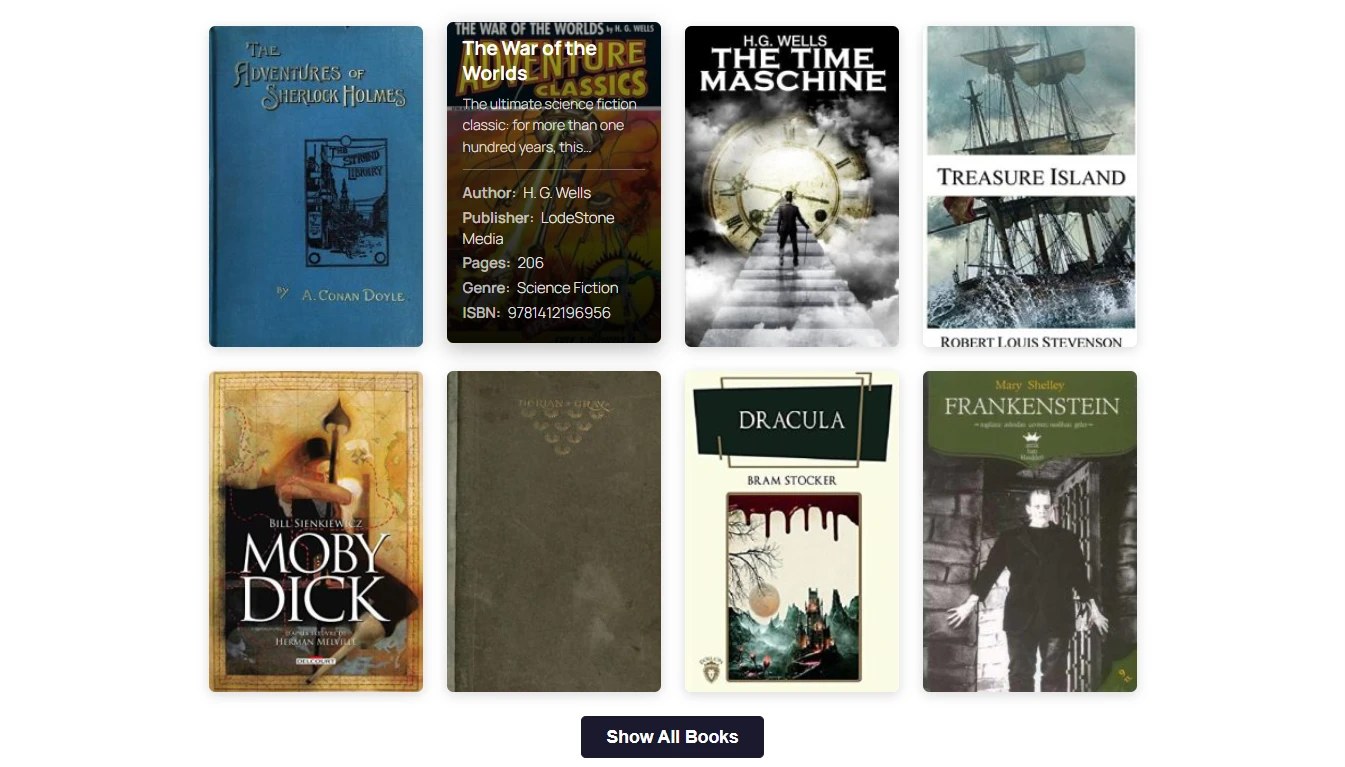
Montecchiani Book Catalog adds a dedicated Book content type to WordPress and displays your books
anywhere on your site with the [mbcat_books] shortcode: a responsive 1–5 column grid of covers
with an overlay that reveals the book details on hover, on focus or on tap.
Every book stores its own details (author, publisher, publication year, number of pages,
language, ISBN and an optional shop link), can be organised with the Genres taxonomy,
and is automatically described with Schema.org Book structured data (JSON-LD) so search
engines can show rich results.
ISBN autofill
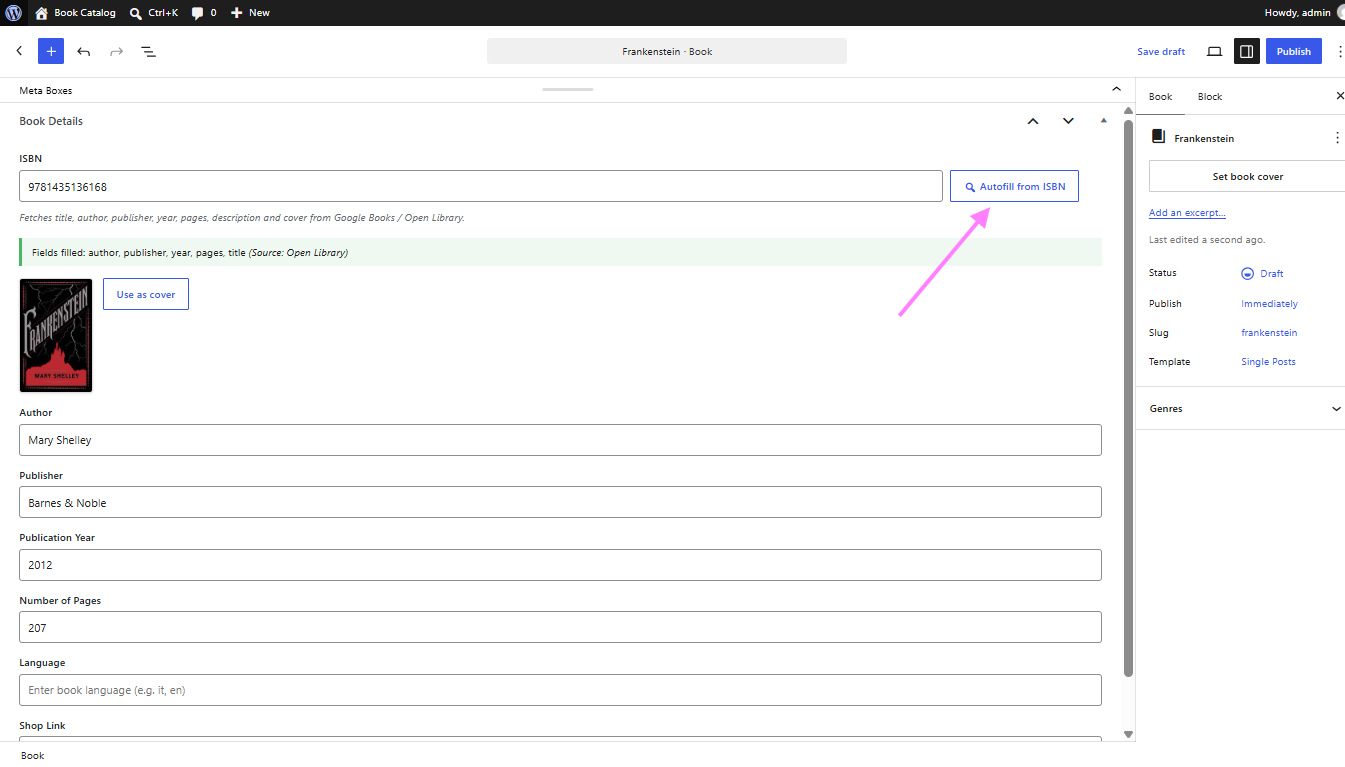
Type an ISBN in the book editor and click Autofill from ISBN. The plugin queries the
Google Books and Open Library catalogs and fills in the empty fields only — title, author,
publisher, year, pages, language and description — never overwriting anything you already
wrote. If a cover is found you can import it into the Media Library and set it as the
featured image with one click.
Main features
- Custom Book post type with cover, excerpt and full editor support (block editor ready)
- Genres taxonomy to organise and filter the catalog
- Book fields: author, publisher, publication year, pages, language, ISBN, shop link
- ISBN autofill from Google Books and Open Library, with the results merged and cached
- Cover import: one click to store the cover in the Media Library as the featured image
[mbcat_books]shortcode withcolumns,hitem,orderby,orderandgenreattributes- Responsive grid (1–5 columns), hover overlay, keyboard accessible, touch friendly
- “Show All Books” button that loads the rest of the catalog over AJAX
- Schema.org
BookJSON-LD structured data for SEO - Admin list columns for cover, author, year and ISBN, sortable by author and year
- Settings page: default author, author label, columns, ISBN data source, uninstall cleanup
- Fully translatable — French, Spanish, Italian and Japanese translations are prepared
for translate.wordpress.org, where any other language can be contributed too - Assets are only loaded on the pages that actually use the shortcode
External services
This plugin can query two third-party book databases in order to autofill book details from
an ISBN. Every request is made from your server, only inside the WordPress admin, and only
when a logged-in editor clicks the “Autofill from ISBN” button or the “Use as cover”
button. Nothing is ever sent from the public side of your site, no request is made
automatically or in the background, and no personal data about you or your visitors is
transmitted.
Google Books API — endpoint: https://www.googleapis.com/books/v1/volumes
What is sent, and when: the ISBN you typed, each time you click “Autofill from ISBN” (unless
you disabled this source in the settings) and, if the cached result of that lookup has expired
in the meantime, again when you click “Use as cover”. If you entered an optional Google Books
API key in the plugin settings, that key is sent with the request too. Every request also
carries a User-Agent header identifying the plugin and its version
(Montecchiani-Book-Catalog/1.3.1); your site URL is not sent.
When the answer includes a cover, your server also downloads its small thumbnail (a few
kilobytes) from the address returned by the API, on books.google.com or its file host
books.googleusercontent.com, and embeds it in the editor as a preview: the editor page itself
never loads anything from Google. If you then click “Use as cover”, the cover image file is
downloaded from the same address by your server and stored permanently in your site’s Media
Library.
Terms of Service: https://developers.google.com/books/terms and
https://policies.google.com/terms
Privacy Policy: https://policies.google.com/privacy
Open Library API (Internet Archive) — endpoint: https://openlibrary.org/api/books
What is sent, and when: the ISBN you typed, each time you click “Autofill from ISBN” (unless
you disabled this source in the settings) and, if the cached result of that lookup has expired
in the meantime, again when you click “Use as cover”. Every request also carries a User-Agent
header identifying the plugin and its version (Montecchiani-Book-Catalog/1.3.1); your site
URL is not sent.
When the answer includes a cover, your server also downloads its small thumbnail (a few
kilobytes) from the address returned by the API, on covers.openlibrary.org (which may redirect
to archive.org, the Internet Archive’s file server), and embeds it in the editor as a preview:
the editor page itself never loads anything from Open Library. If you then click “Use as cover”,
the cover image file is downloaded from the same address by your server and stored permanently
in your site’s Media Library.
Terms of Use: https://archive.org/about/terms.php
Privacy Policy: https://archive.org/about/terms.php
Please note that cover images downloaded from these services are third-party content: it is
your responsibility to check that you are allowed to publish them on your site.
You can choose which of the two services is used — or use only one of them — in
Book Catalog Settings ISBN Autofill. Lookup results and cover previews are cached on
your own server for 12 hours so that repeated lookups do not generate new outgoing requests.
Screenshots

Installation
- Upload the
montecchiani-book-catalogfolder to/wp-content/plugins/, or install the plugin through the Plugins Add New screen in WordPress. - Activate the plugin through the Plugins menu.
- Go to Book Catalog Add New Book to create your first book.
- Add the
[mbcat_books]shortcode to any page, post or block where you want the catalog. - Optionally review Book Catalog Settings to set the default author, the number of columns and the ISBN data source.
FAQ
-
How do I display the catalog?
-
Add the
[mbcat_books]shortcode to a page or post. Available attributes:columns— number of columns, from 1 to 5 (defaults to the value in the settings)hitem— show only this many books, with a “Show All Books” button underneathorderby—date,title,year,author,rand,menu_orderormodifiedorder—ASCorDESCgenre— one or more genre slugs, comma separated
Example:
[mbcat_books hitem="6" columns="3" orderby="title" order="ASC" genre="fantasy,thriller"] -
Does the ISBN autofill overwrite what I already typed?
-
No. Only empty fields are filled in. The title and the description are only set when the
post title and the editor are still empty. -
Do I need a Google Books API key?
-
No. Google Books answers without a key. A key only raises the request quota, which matters
if you import a large number of books in a short time. You can add one in
Book Catalog Settings. -
Why did the cover import fail?
-
Not every ISBN has a cover scan in either database, and some records only carry a low
resolution thumbnail. Try the other data source in the settings, or set the featured image
manually. Importing a cover requires a user who is allowed to upload files to the Media
Library. -
Where does the plugin send my data?
-
Only the ISBN you type is sent, and only to the services you enabled in the settings. See
the “External services” section above for the full details. -
What happens to my books if I delete the plugin?
-
By default nothing is deleted: your books, genres and covers stay in the database. If you
want a full cleanup, tick Delete Data on Uninstall in Book Catalog Settings before
deleting the plugin. -
Can I show more than 500 books at once?
-
A single request renders at most 500 books, so a very large catalog cannot exhaust the PHP
memory limit. Developers can raise the limit with thembcat_max_books_per_requestfilter. -
Which languages is the plugin available in?
-
English out of the box. Translations are delivered through translate.wordpress.org:
French, Spanish, Italian and Japanese are being added there, and WordPress downloads a
translation automatically as soon as it is available for your site’s language, with no
configuration.Any other language can be contributed on the plugin’s translation project:
https://translate.wordpress.org/projects/wp-plugins/montecchiani-book-catalog/
Reviews
There are no reviews for this plugin.
Contributors & Developers
“Montecchiani Book Catalog” is open source software. The following people have contributed to this plugin.
Contributors
Translate “Montecchiani Book Catalog” into your language.
Interested in development?
Browse the code, check out the SVN repository, or subscribe to the development log by RSS.
Changelog
1.3.1
- Fixed: the cover preview in the book editor was loaded by the browser straight from
Google Books or Open Library. The preview is now downloaded by the server together with
the lookup and embedded in the response, so the editor never loads a file from a
third-party host. - Changed: the cover import no longer accepts a URL from the browser. The server resolves
the cover from its own cached lookup of the ISBN, so the cover-host allowlist and the
mbcat_allowed_cover_hosts filter are gone. - Changed: cover downloads are limited to 10 MB and previews to 128 KB.
- Privacy: the cover download no longer sends your site URL, which the default WordPress
User-Agent carried. - Fixed: the Plugin URI pointed at a repository that does not exist.
1.3.0
- Changed: the plugin is now named Montecchiani Book Catalog. Post type, taxonomy,
shortcode, options, transients, AJAX actions and every PHP symbol now carry the
mbcat prefix to rule out collisions with other plugins. - Changed: the shortcode is
[mbcat_books]. The former unprefixed[books]name
(and its[wpbc_books]alias) registered a generic name that other plugins may
legitimately want. - Changed: translation files are no longer bundled; translations are delivered
automatically through translate.wordpress.org.
1.2.0
- Fixed: importing a cover from Google Books could never work. Those URLs carry no file
extension, whichmedia_sideload_image()rejects outright; covers are now downloaded
first and typed from their actual content. - Fixed: ordering by year or author sorted the books that had no value at all by an
unrelated meta value, so their position was effectively random. Ordering now uses a
single keyed LEFT JOIN; books without a value always come last. - Fixed: the “Default Author” setting was written into a book’s own meta the first time
the book was saved, so changing the setting later no longer affected existing books. It
is now shown as a placeholder and resolved when the book is displayed. - Fixed: the admin stylesheet restyled core WordPress tables and headings on every Book
screen. All admin styles are now scoped to the plugin’s own markup. - Fixed: uninstalling with “Delete Data on Uninstall” enabled left every genre behind and
skipped books in the Trash, and it only cleaned the current site on multisite. - Fixed: network-activating on multisite set up only one site, leaving the other sites
without rewrite rules or settings. New sites are now set up automatically too. - Fixed: the “Show All Books” button stopped working on sites with full-page caching once
the cached nonce expired. The endpoint is read-only and public, and no longer uses one. - Fixed: the book details overlay was hidden from screen readers, and the non-linked cards
were focusable without any role. Publication year and page count could not be cleared. - Fixed: submitting an array value for a book field could fatal on PHP 8.
- Security: importing a cover now also requires the
upload_filescapability, the host
allowlist is matched case-insensitively and applied to the lookup response as well, and
cover URLs are passed throughesc_url_raw(). - Privacy: the plugin no longer sends your site URL to Google Books / Open Library.
- Privacy: the Google Books API key is no longer rendered back into the settings page.
- Added:
[wpbc_books], a prefixed alias of the original[books]shortcode (both were
replaced by[mbcat_books]in 1.3.0). - Added: a 500-book cap per request, adjustable with
mbcat_max_books_per_request. - Added: the
mbcat_shortcode_query_args,mbcat_allowed_cover_hostsandmbcat_lookup_data
filters. - Added: readme.txt, a bundled copy of the GPLv2 licence and a
.distignore. - Improved: the JSON-LD block is refreshed when “Show All Books” expands the catalog, and
the books admin list now shows the default author like the front end does. - Added: French, Spanish and Japanese translations, alongside the existing Italian one.
- Removed: the manual
load_plugin_textdomain()call, which WordPress has not needed
since 4.6.
1.1.0
- Added ISBN autofill from Google Books and Open Library, with cover import.
- Added Schema.org Book structured data (JSON-LD).
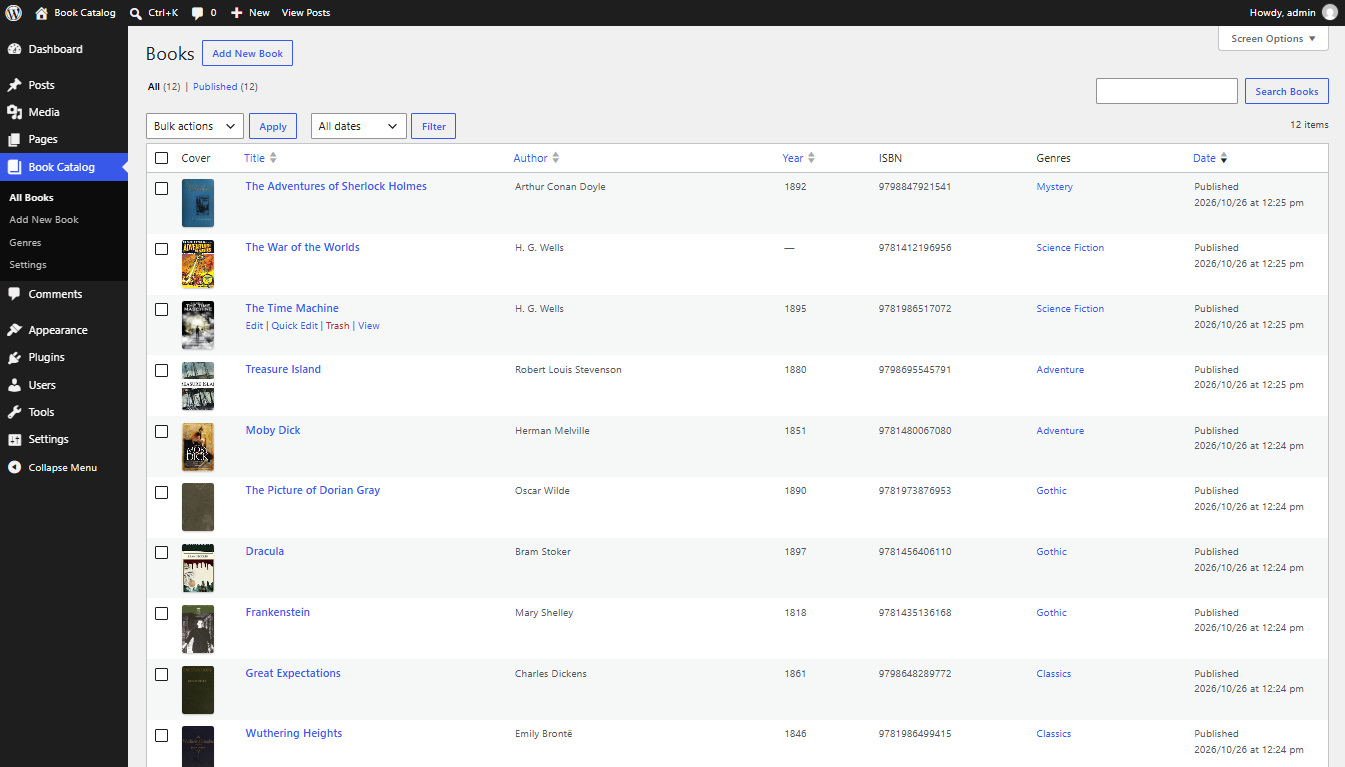
- Added admin list columns for cover, author, year and ISBN, sortable by author and year.
- Added the Genres taxonomy filter to the shortcode.
- Added the settings page options for the ISBN data source and uninstall cleanup.
1.0.0
- First release: Book post type, book fields,
[mbcat_books]shortcode, responsive grid with
hover overlay, “Show All Books” AJAX button, settings page and Italian translation.