

Description
Tango Form Wire is built for developers who prefer to own their form markup without rebuilding the submission pipeline every time.
Add one data-form-relay attribute to an existing same-site HTML form and Tango Form Wire handles the handoff to WordPress. You keep full control of your HTML, CSS and frontend experience while the plugin handles submission processing, email delivery, success and error responses, and stored submissions.
There is no form builder or external form API to configure. The built-in spam protection requires no account; an optional Cloudflare Turnstile widget can be enabled when an additional browser-level check is wanted.
What Tango Form Wire handles
- Connect existing HTML forms with one generated data attribute.
- Create multiple independently configured forms.
- Deliver through WordPress mail, local cPanel SMTP or a custom SMTP server.
- Store valid submissions in WordPress, including failed delivery attempts.
- Build and preview HTML email templates using submission placeholders.
- Show inline loading, success and error responses, or redirect to a WordPress thank-you page.
- Configure sensible sender and Reply-To behaviour.
- Protect submissions with same-site checks, WordPress nonces, a honeypot, payload limits, rate limiting and duplicate protection.
- Optionally require Cloudflare Turnstile verification on selected forms.
- Extend behaviour through developer filters and actions.
You build the form. Tango Form Wire handles the handoff.
Optional Cloudflare Turnstile
The built-in spam protection remains active on every Form without requiring an account. For an additional check, create a Managed widget in Cloudflare Turnstile, open Form Relay > Cloudflare Turnstile, enable the integration, and enter its Site Key and Secret Key. Turnstile can then be enabled independently on each Form.
Each Form offers a Turnstile Location setting. Before the submit button inserts the widget automatically. Manual placement uses an empty element with the data-form-relay-captcha attribute inside the form. The Secret Key can be defined as TANGO_FORM_WIRE_TURNSTILE_SECRET in wp-config.php instead of being stored in WordPress.
When Turnstile is enabled, the visitor’s browser connects to Cloudflare to load the widget and obtain a verification token. Tango Form Wire sends that token to Cloudflare’s Siteverify API before accepting the submission. Tango Form Wire does not send submitted form field contents to Cloudflare.
This service is provided by Cloudflare and is only used after an administrator explicitly configures and enables it:
Developer hooks
Filters: form_relay_submission_data, form_relay_email_subject, form_relay_email_html, form_relay_from_email, form_relay_smtp_host, form_relay_smtp_port, form_relay_error_code, form_relay_error_message, form_relay_duplicate_window, form_relay_max_fields, form_relay_max_field_name_length, form_relay_max_field_value_length, form_relay_max_payload_size.
Actions: form_relay_before_send, form_relay_after_send.
Screenshots

Installation
- Upload the plugin folder to
/wp-content/plugins/, or install its ZIP through Plugins > Add New > Upload Plugin. - Activate Tango Form Wire.
- Open Form Relay in wp-admin and create or edit a form.
- Copy its Form Attribute into the opening tag of your existing HTML form.
- Configure the recipient, responses, templates, and email delivery method, then save.
Add data-form-relay=”FORM_ID” to an existing form on the same WordPress site. Form Relay’s frontend script detects it, submits it using a WordPress nonce, and displays the configured success or safe public error message. No custom JavaScript, PHP, response element, API key, or external relay configuration is needed unless optional Turnstile protection is enabled.
Each Form has independent templates, success and error messages, behaviour, ignored fields, enabled status, and IP-based rate limits. Protection includes same-site checks, nonce validation, a honeypot, duplicate-submission detection, payload limits, sanitisation, and escaping.
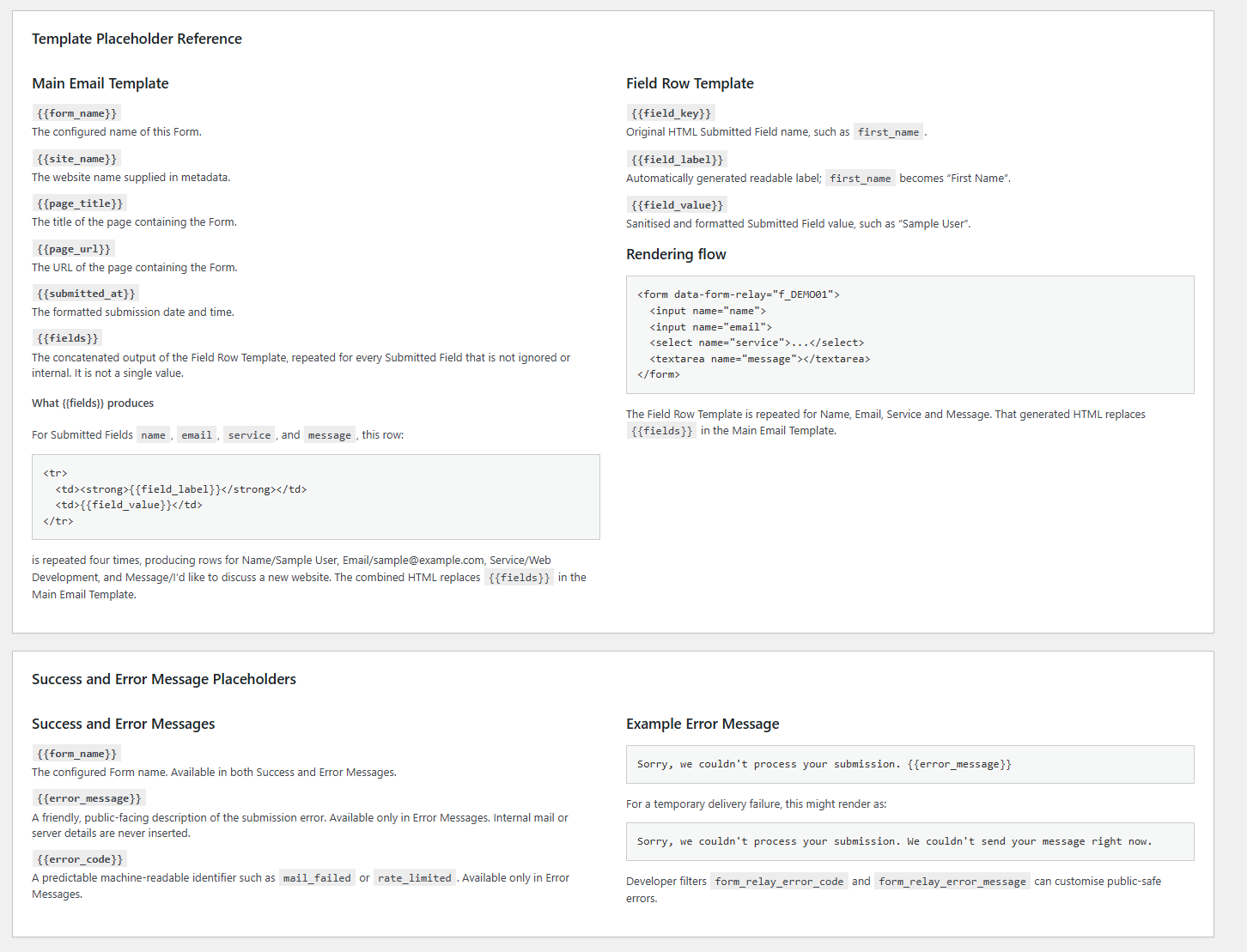
Responses can show an inline Thank You Message or redirect to a selected WordPress Thank You Page. Inline thank you and error elements are inserted as the final child inside the form and accept optional custom CSS classes. Error Message templates support {{error_message}}, {{error_code}} and {{form_name}}; Thank You Messages support {{form_name}}.
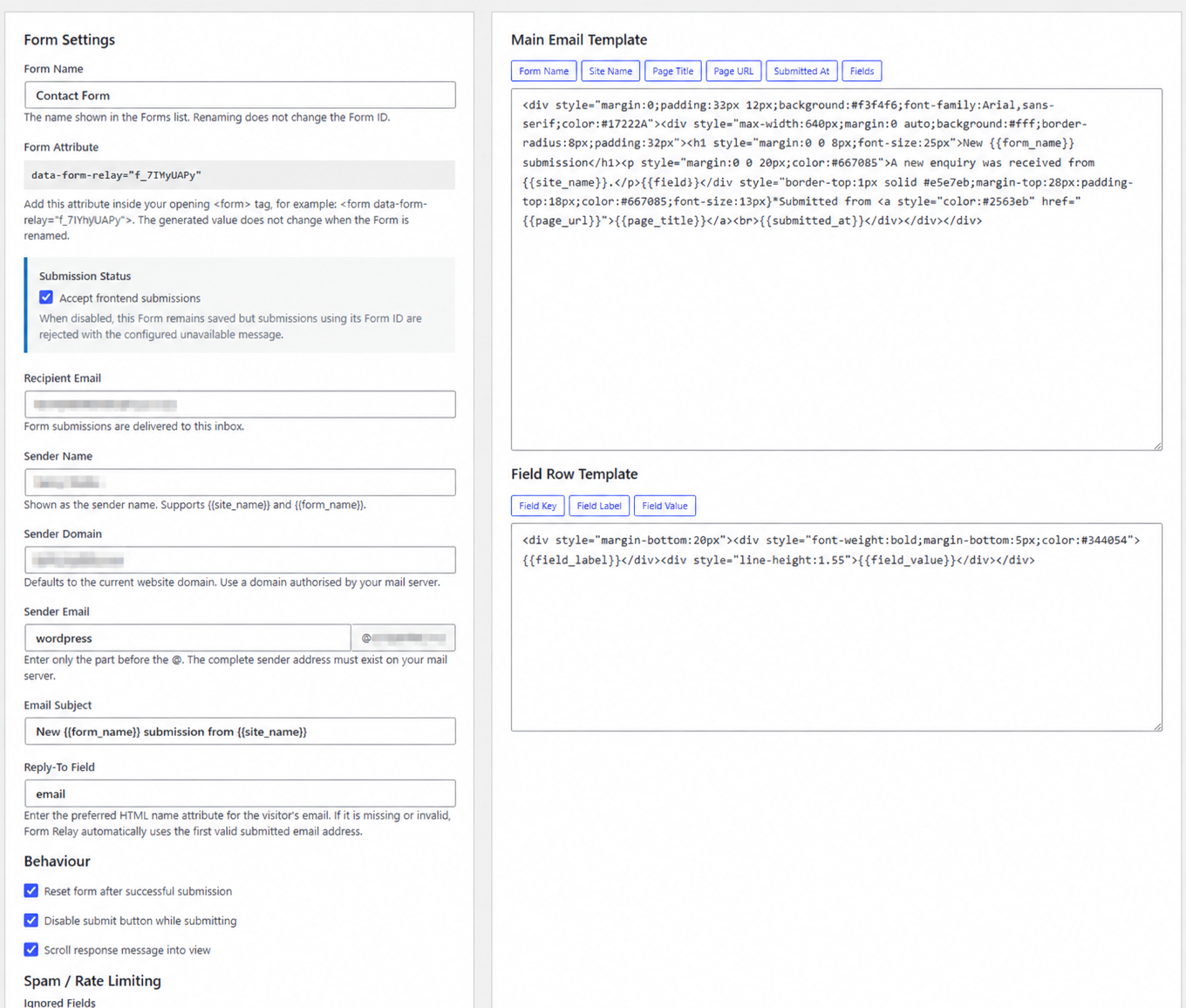
The Main Email Template supports {{form_name}}, {{site_name}}, {{page_title}}, {{page_url}}, {{submitted_at}} and {{fields}}. The {{fields}} Placeholder is the concatenated output of the Field Row Template repeated for every non-ignored Submitted Field. The Field Row Template supports {{field_key}}, {{field_label}} and {{field_value}}. Full examples and quick-insert controls are available in wp-admin.
The Form editor includes an Email Preview modal. It renders the current unsaved templates and subject with generic dummy data without sending an email.
Outgoing messages use the configured Sender Name, Sender Email and Sender Domain. The Sender Email is the local part before the @, while Sender Domain defaults to the current WordPress site domain. The default Sender Name is {{site_name}} Enquiries and supports {{site_name}} and {{form_name}}. A valid submitted email address is used as Reply-To, preferring the configured Reply-To Field and otherwise detecting the first valid email Submitted Field. The visitor’s address is never used as From, which protects SPF and DMARC deliverability.
Email delivery can use the WordPress default mail configuration, a GoDaddy/cPanel local SMTP preset at 127.0.0.1:25, or a custom SMTP server. New installations default to WordPress mail so existing SMTP plugins and hosting configuration continue to work. Installations upgrading from an earlier Form Relay release retain the local SMTP behaviour. Custom SMTP supports port, encryption and optional authentication; the password can be stored in WordPress or defined as FORM_RELAY_SMTP_PASSWORD in wp-config.php. The form_relay_smtp_host and form_relay_smtp_port filters can override the relay address.
While a frontend submission is being sent, Form Relay inserts an accessible inline loading indicator as the final content inside the form. It is removed when the configured success or error response is ready.
Each valid frontend submission is stored in the current site’s dedicated Form Relay submissions table after email delivery is attempted. Open Form Relay > Submissions to filter by Form or delivery status, inspect submitted fields, and delete individual or multiple records. Failed deliveries are stored so an enquiry is not lost when email delivery is unavailable.
FAQ
-
Does this plugin create the form markup?
-
No. It is designed for developers who have already built a form in a theme or template. The plugin connects that existing form to WordPress by means of a
data-form-relayattribute. -
Can I use my existing SMTP plugin?
-
Yes. Select WordPress Default as the delivery method and Tango Form Wire will use the normal WordPress mail configuration, including a compatible SMTP plugin.
-
Does it support multisite?
-
Yes. Settings are stored per site, so each site in a network can have its own forms and delivery configuration.
-
Does metadata logging store submitted message content?
-
No. The optional diagnostic log stores metadata such as time, form, outcome, and error code. It does not store submitted field values.
-
Are submitted fields stored in WordPress?
-
Yes. Valid frontend submissions are stored in a dedicated per-site database table and are visible only to administrators with the
manage_optionscapability. They remain until an administrator deletes them from Form Relay > Submissions. Site owners should account for this personal data in their privacy and retention policy.
Reviews
There are no reviews for this plugin.
Contributors & Developers
“Tango Form Wire” is open source software. The following people have contributed to this plugin.
Contributors
Translate “Tango Form Wire” into your language.
Interested in development?
Browse the code, check out the SVN repository, or subscribe to the development log by RSS.
Changelog
1.10.0
- Added optional Cloudflare Turnstile protection while preserving the existing no-account spam defences.
- Added a dedicated Turnstile settings page with a plain-English overview and guided setup instructions.
- Added per-Form activation with automatic placement before the submit button or precise manual placement.
- Verify every single-use Turnstile token server-side before sending email or storing a submission.
- Added friendly verification errors, automatic token resets and rate limiting for failed challenge attempts.
1.9.1
- Renamed the plugin to Tango Form Wire and updated the readme contributors list.
1.9.0
- Added a Submissions submenu with a WordPress-style list, filtering, pagination, bulk deletion, and submission detail views.
- Store both successful and failed email delivery attempts in a dedicated per-site database table.
1.8.0
- Added selectable WordPress, local cPanel, and custom SMTP delivery methods.
- Added delivery diagnostics and WordPress.org submission metadata.
- Improved sender configuration, form responses, email previewing, and frontend loading feedback.