

Description
BridalOp is bridal boutique management software — appointments, point of sale, inventory, purchase orders and reporting in one place.
This plugin connects your BridalOp account to the store on your own website — WooCommerce or FluentCart — so the gowns and accessories you’ve flagged for online selling appear there, and their stock follows what’s physically in your shop.
Bridal is unusual: nearly every gown is a single physical item. Sell one twice and somebody has to telephone a bride. So stock is the thing this plugin takes most seriously — a dress sold at your counter stops being buyable online within about ten seconds.
What it does
- Publishes products you’ve marked for online selling in BridalOp, with their photographs, sizes and prices
- Keeps store stock matched to the units actually available in your locations
- Brings website orders back into BridalOp as real sales, with the gown taken off your racks
- Sends refunds and cancellations back the other way, putting the dress back on the racks
- Marks an order as sent on your website when you send it, so your store emails the customer
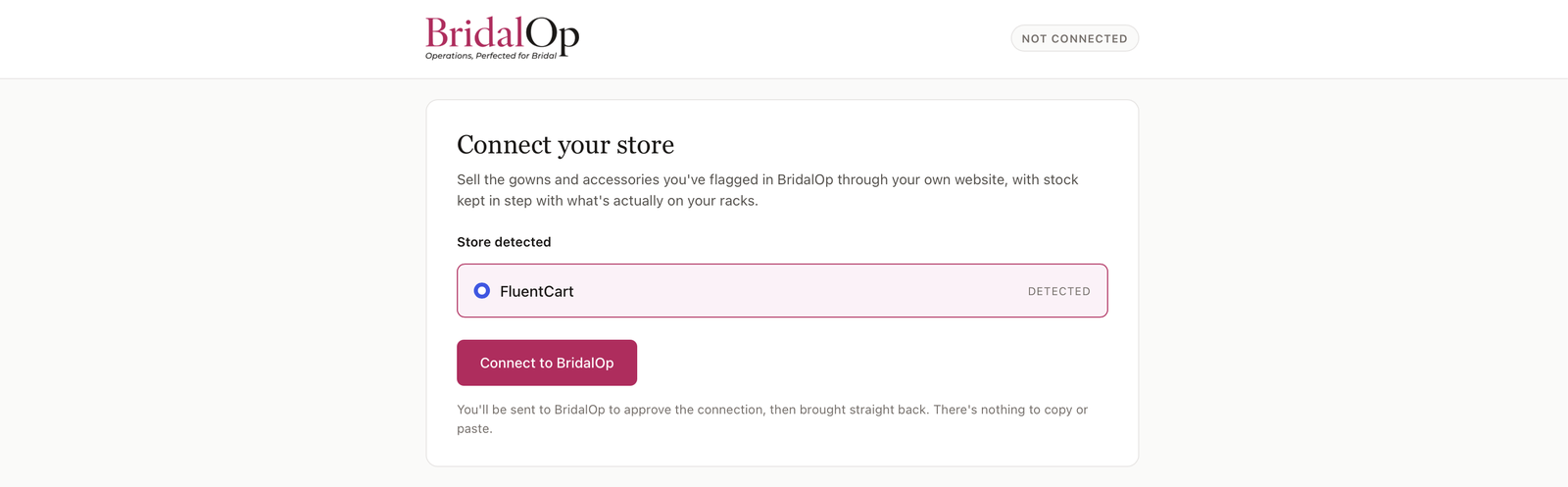
Connecting is one click.
You’ll be sent to BridalOp to approve the connection and brought straight back. There are no API keys to generate, copy or paste — the plugin handles that for you, and removes the credentials again if you disconnect.
External services
This plugin connects to BridalOp, a third-party service, to synchronise your products, stock levels and orders. It is required for the plugin to function.
Data sent to BridalOp:
- Your site address, when you connect
- Store API credentials generated by this plugin, so BridalOp can publish products and update stock
- Order details (items, quantities, totals and customer contact details) when a sale is made through your store, so the sale can be recorded against your inventory
Data received from BridalOp:
- Product details and stock quantities for the items you have chosen to sell online
An active BridalOp account is required. Service terms: https://app.bridalop.com/legal/terms — Privacy policy: https://app.bridalop.com/legal/privacy
Screenshots
Installation
You need a BridalOp account and either WooCommerce or FluentCart already running on this site.
- Install and activate this plugin
- Go to BridalOp in your WordPress admin menu
- Confirm the detected store
- Click Connect to BridalOp and sign in to your BridalOp account
That is the whole setup. There are no API keys to copy: the plugin creates the store credentials BridalOp needs and hands them over during the connection.
Nothing is published to your store until you tick Sell online on a product inside BridalOp.
FAQ
-
Do I need a BridalOp account?
-
Yes. This plugin connects an existing BridalOp account to your website’s store, and does nothing on its own.
-
Which store platforms are supported?
-
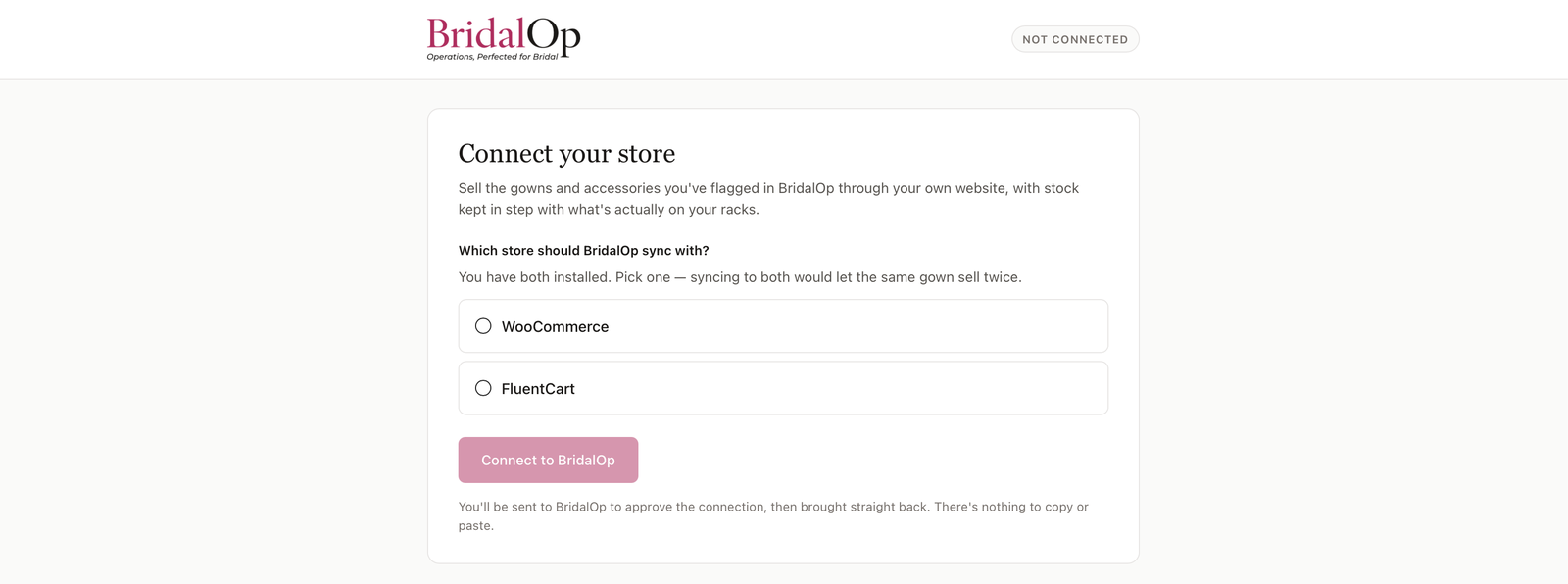
WooCommerce and FluentCart. If you have both installed the plugin asks you to pick one, because syncing to both would draw two shops down from a single pool of stock and let the same gown sell twice.
-
I use FluentCart. Is there anything I need to switch on?
-
Yes, and it matters. Turn on FluentCart’s own Inventory feature before connecting. While it is off, FluentCart accepts the stock levels BridalOp sends and then ignores them — the numbers look right in its product editor, but the shop will still sell a gown that sold months ago, with no warning anywhere. WooCommerce enforces stock as standard, so there is nothing to switch on there.
-
Will it publish everything in my inventory?
-
No. Only products you’ve flagged to sell online in BridalOp are published.
-
What happens if I disconnect?
-
Syncing stops and the store credentials BridalOp was given are removed from your site. Products already in your store are left alone.
Reviews
There are no reviews for this plugin.
Contributors & Developers
“BridalOp – Bridal Shop Inventory, Stock & Order Sync for WooCommerce & FluentCart” is open source software. The following people have contributed to this plugin.
Contributors
Interested in development?
Browse the code, check out the SVN repository, or subscribe to the development log by RSS.
Changelog
1.0.5
- The directory listing now says what the plugin does. It was titled “BridalOp”,
which tells a boutique owner searching for a way to sell their gowns online
precisely nothing. No functional change.
1.0.4
- FluentCart is now offered to everyone. It was previously hidden while it was
being proven against a real store; it has been, so the gate is gone. - Rewrote the plugin description, which still described WooCommerce as the only
supported store.
1.0.3
- Fixed: the service terms and privacy links pointed at pages that did not exist.
- Fixed: admin CSS is now enqueued rather than printed into the page head.
1.0.2
- Added: FluentCart support. Sell the same BridalOp inventory through a
FluentCart store — products, sizes, prices, photographs and stock, with orders
coming back as real sales. Requires FluentCart’s own Inventory feature to be
switched on; without it FluentCart accepts stock levels and then ignores them. - Fixed: cancelling an order on your website now releases the gown in BridalOp.
- Fixed: marking an order as sent updates your website, which emails the
customer to say it is on its way. - Fixed: connecting a store now retires the one it replaces, so the same gown is
never published to two shops drawing on one pool of stock.
1.0.1
- First public release.
- Sell your BridalOp inventory through WooCommerce, with stock kept in step with
what is actually on your racks. - Orders, refunds and cancellations flow back to BridalOp as they happen.
- Mark an order as sent in BridalOp and your store emails the customer.
0.2.13
- Packaging for the WordPress.org directory: the plugin now ships the readable
source the admin screen is built from, and the readme documents how to rebuild
it. No functional change.
0.2.12
- Fixed: if a cancellation can’t reach BridalOp it is now retried instead of
being dropped silently. A lost cancellation leaves a gown marked sold and
unsellable, with nothing anywhere explaining why.
0.2.11
- Fixed: full support for WooCommerce’s High-Performance Order Storage, which
is the default on current WooCommerce. Without it three things failed
silently on those stores: changes BridalOp made were echoed back as though a
person had made them, the “sent to BridalOp” marker never saved, and an order
that failed to send retried forever instead of stopping after five attempts. - Added: BridalOp now declares itself compatible with that storage, so it no
longer appears in WooCommerce’s incompatible-plugins list.
0.2.10
- Fixed: cancelling an order on your website now releases the gown in BridalOp.
Previously it stayed marked sold — off your racks and unsellable — with
nothing explaining why. - Added: orders now tell BridalOp whether your payment provider can refund them
automatically, so BridalOp can say what will happen before you refund rather
than failing afterwards. Bank transfer and pay-on-collection never can. - Added: BridalOp can mark an order complete on your website when you send it,
which triggers your store’s own “on its way” email to the customer. - Fixed: changes BridalOp makes to an order are no longer echoed back to
BridalOp as though a person had made them.
0.2.9
- Fixed: reactivating or updating the plugin now checks in with BridalOp
straight away instead of waiting for the next hourly slot. This is the moment
it matters most — when BridalOp reports a shop as offline it asks you to
reactivate the plugin, and the warning needs to clear once you have.
0.2.8
- Fixed: on sites with full-page caching, front-end visits are served without
running PHP, so the hourly check-in could be missed and the shop wrongly
reported as offline. It now also rides the plugin’s existing scheduled event —
either route is enough, so caching and a broken scheduler are both covered.
0.2.7
- Added: the plugin now reports in to BridalOp hourly, so BridalOp can tell the
difference between a quiet week and a plugin that has been switched off. If it
goes quiet, BridalOp warns the boutique rather than silently missing orders. - Added: reports whether the order listener is still attached, so a conflicting
plugin removing it is caught rather than causing orders to vanish. - Note: does not use WP-Cron, so it keeps working on hosts where the scheduler
is disabled or broken.
0.2.6
- Lets BridalOp warn you if your website is already sending sales to QuickBooks, so the same sale isn’t recorded twice.
0.2.5
- Warns you if your site’s scheduled tasks have stopped running, with plain steps to get it fixed.
0.2.4
- Orders now reach BridalOp even on sites where WP-Cron is disabled — they send once the shopper’s page has finished loading, so checkout is still never held up.
0.2.3
- Online sales are now sent to BridalOp as real orders, with the gown marked sold.
- Orders are sent in the background, so checkout is never held up waiting on BridalOp.
- Failed sends retry, and a resent order can never be recorded twice.
0.2.2
- Product counts now count products rather than every size and colour separately.
0.2.1
- Fixed a blank connection screen when BridalOp returned an unexpected response.
- Errors from BridalOp now say what went wrong instead of failing silently.
0.2.0
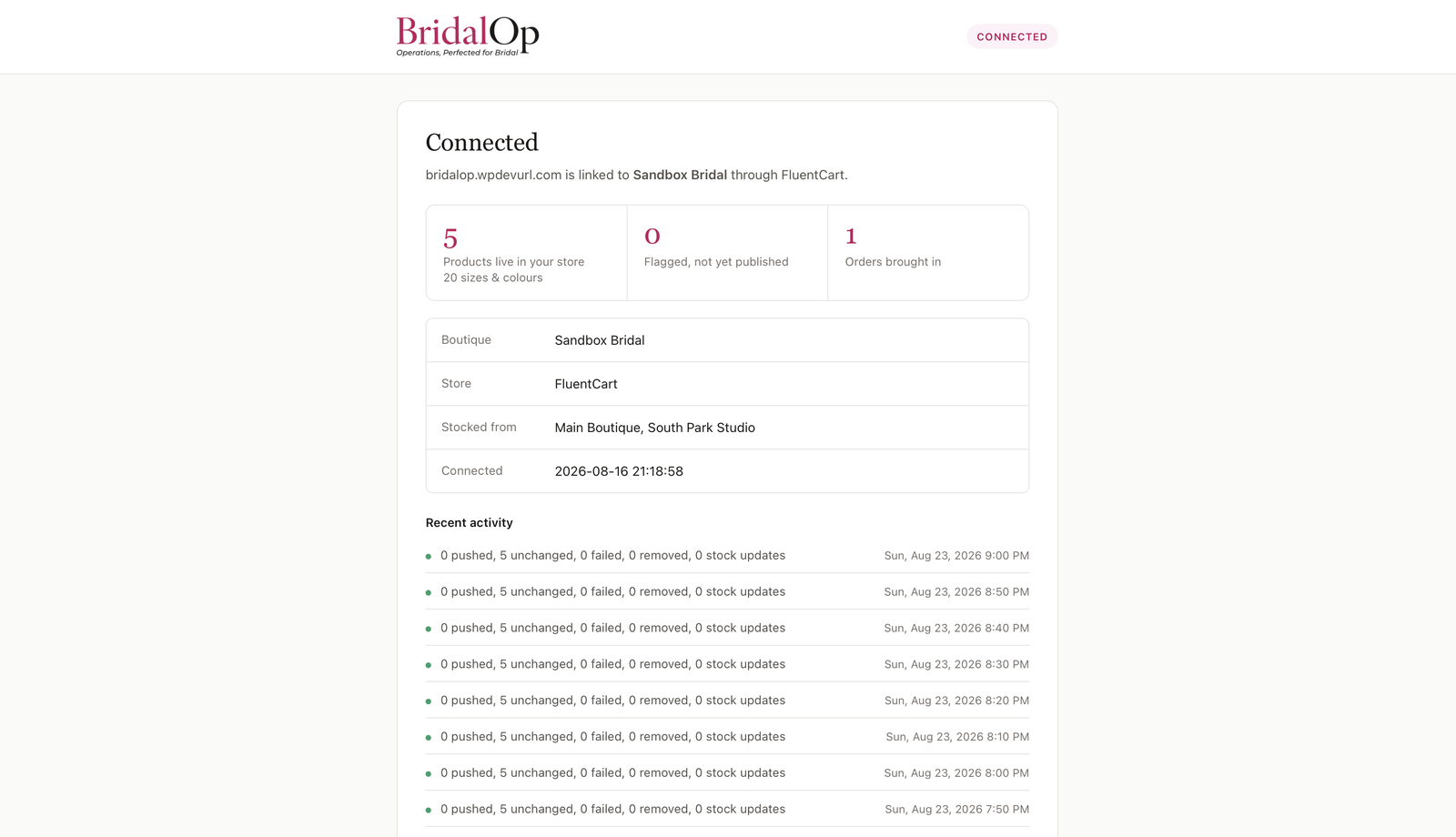
- Connection screen now reports what’s published, what’s pending and any orders needing attention.
- Shows recent sync activity, in your boutique’s timezone.
- A connection that BridalOp no longer recognises now offers a Reconnect button instead of an error.
- BridalOp branding throughout.
0.1.0
- Initial release: one-click connection to BridalOp, WooCommerce and FluentCart detection.