
Description
LUMA TruAI is a lightweight AI chatbot store assistant by DemeWebSolutions.com, powered by TruAI technology. It helps merchants add a visitor chat widget with catalog-grounded answers for online stores (WooCommerce recommended).
Published by DemeWebSolutions.com (My Deme, LLC). Not affiliated with luma.ai, Luma AI, or the separate WordPress.org plugin Luma Product Fields (product specifications—not AI chat).
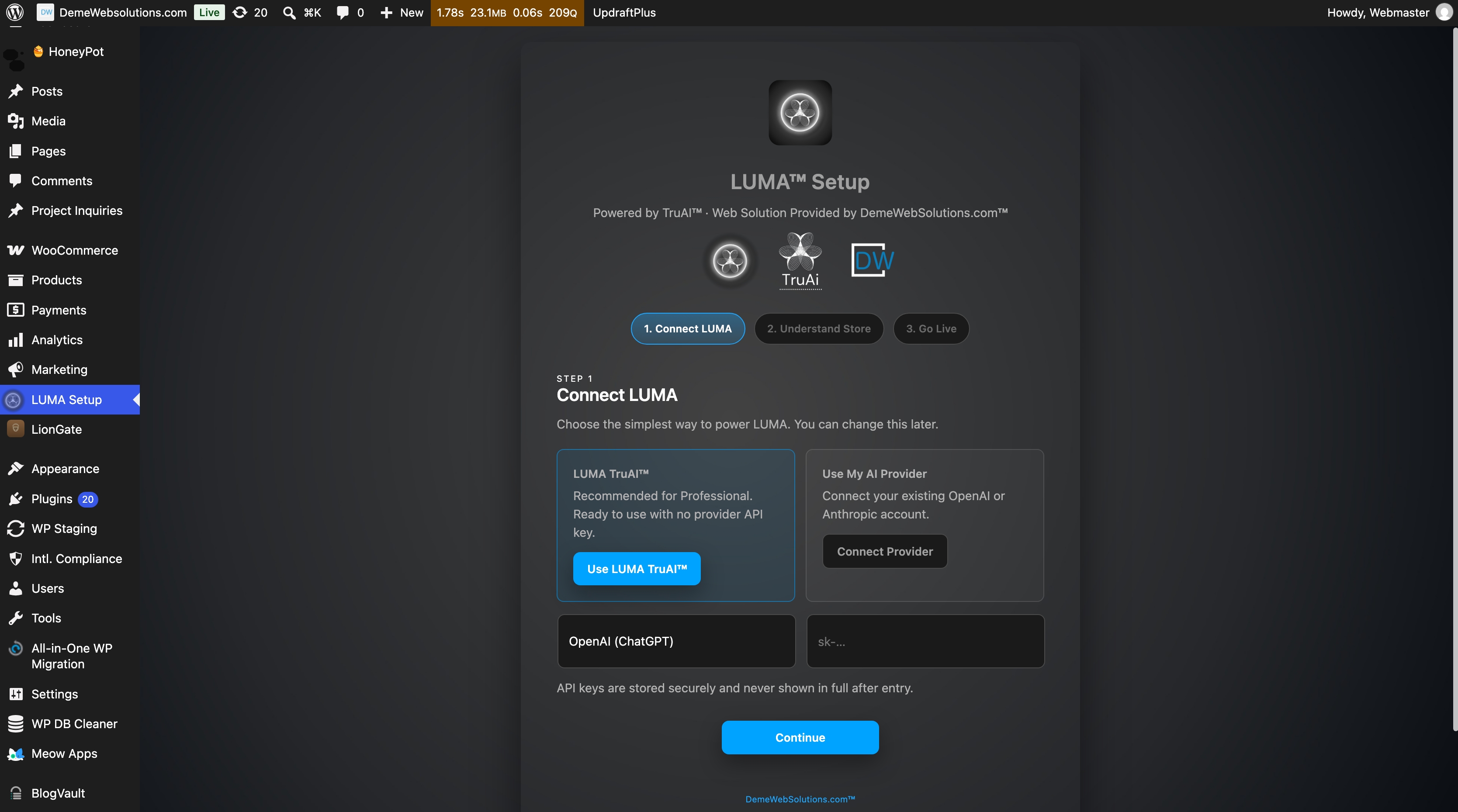
- Three-step setup wizard (provider key, catalog consent, go live)
- TruLUMA local catalog index from published products (with admin consent)
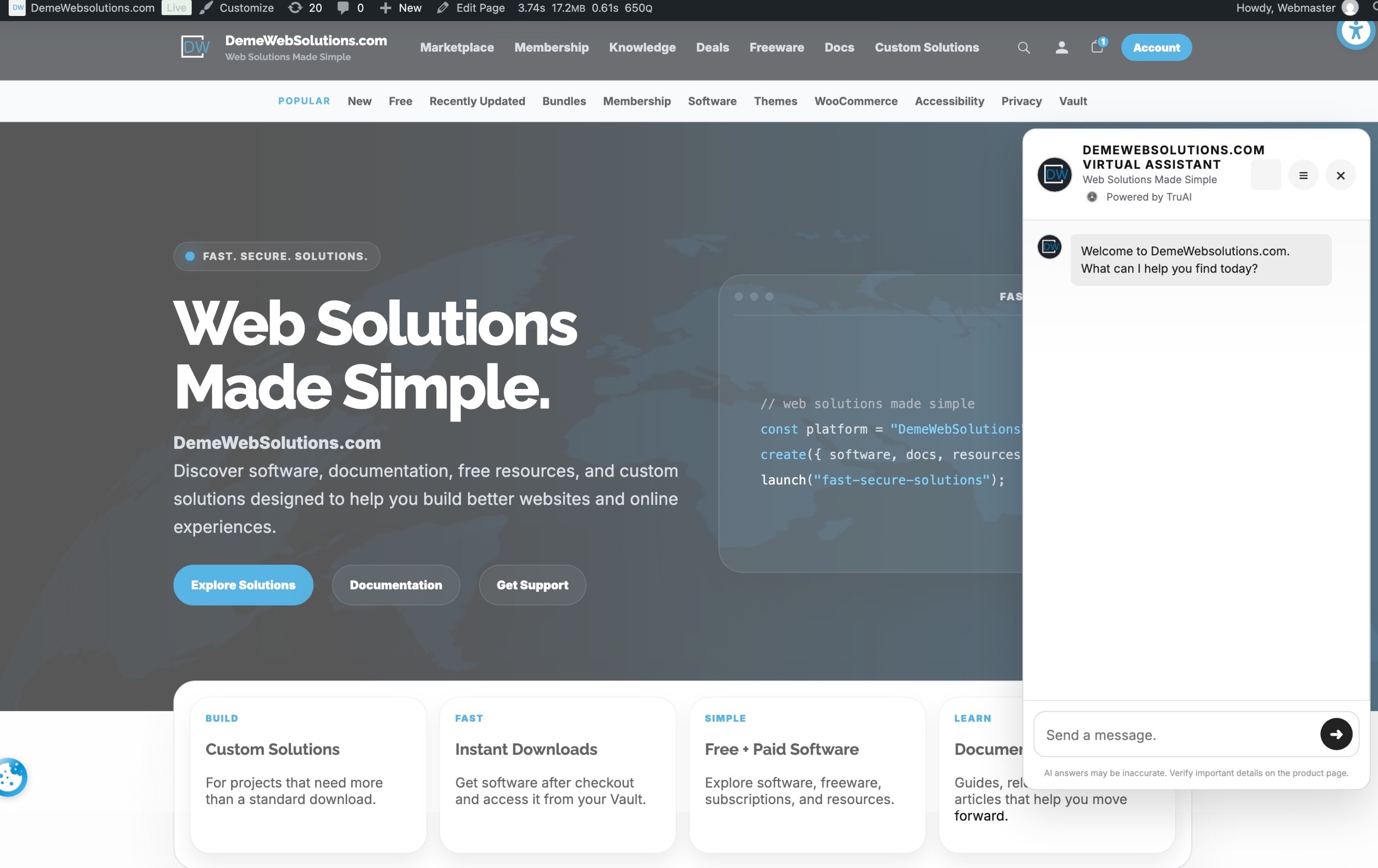
- Visitor chat widget on shop and product pages
- Catalog-grounded answers from your indexed products
- AI-enhanced replies when your provider key is configured (OpenAI or Anthropic)
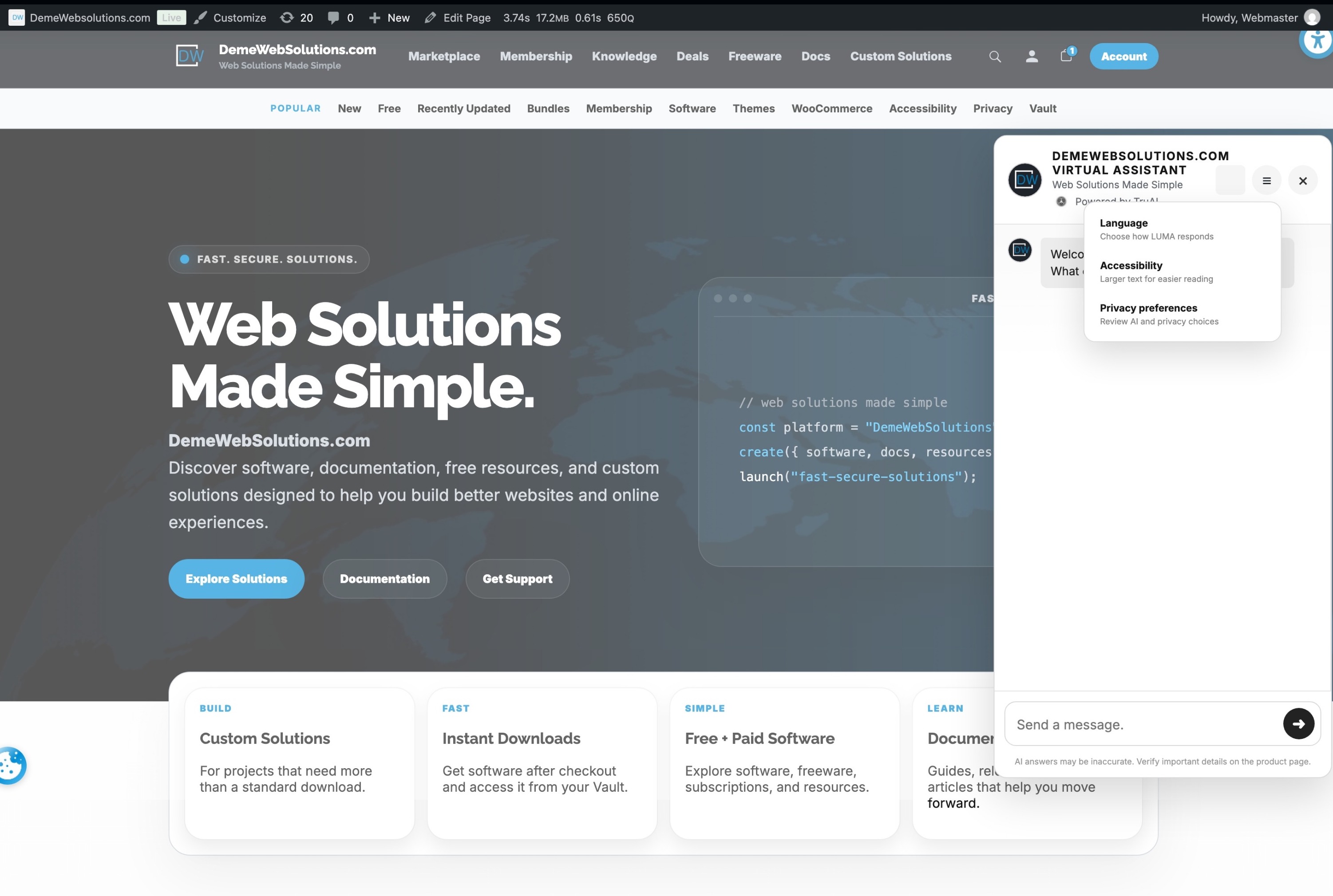
- LUMA White, ionGrey, and LUMA Night appearance modes
- Launcher label and welcome popup controls
- Session rate limiting for abuse prevention (not a paywall)
- Bring your own key (BYOK) — LUMA TruAI does not resell tokens
- No arbitrary code execution — responses are text only; no AI-generated PHP or JS on your site
Storefront LUMA / TruAI developer attribution is off by default. Administrators must explicitly opt in under Appearance Show LUMA / TruAI attribution before any visitor-facing credit appears. Admin-only plugin screens may show DemeWebSolutions attribution as permitted by the Plugin Directory guidelines.
This free version is designed for WordPress.org policies: no ads in dashboard, no nagging notices, and all assets loaded locally.
External services
When you enter an API key, LUMA TruAI sends chat prompts to the provider you choose so the assistant can reply to visitors.
Supported providers in this release:
LUMA TruAI stores your API key in your WordPress database. You are responsible for provider billing, usage limits, and compliance with provider terms.
Professional & Agent Editions
LUMA TruAI for WordPress.org is a complete free edition with storefront chat, catalog grounding, provider BYOK, appearance presets, and core assistant controls.
Professional and Agent editions are available exclusively from DemeWebSolutions.com and provide expanded branding and deployment options for businesses, professionals, and agencies.
Professional / Agent capabilities may include custom accent colors, custom launcher-label colors, custom launcher artwork, and additional DemeWebSolutions.com account services according to the selected license.
Explore Professional & Agent editions at DemeWebSolutions.com. Those editions are separate products. This WordPress.org package does not lock features that already ship here.
Privacy
LUMA TruAI may store plugin settings, an API key (admin-only), catalog index rows, and short-lived rate-limit transients. When AI replies are enabled, visitor messages and relevant catalog context are transmitted to your chosen AI provider under that provider’s terms.
Asset Licensing
- All plugin code is GPLv2 or later.
- All bundled images, SVGs, and icons in
assets/are original works by DemeWebSolutions.com (My Deme, LLC) and released under GPLv2 or later. - No remote CDNs are used; all assets load locally.
Contact
Website: https://demewebsolutions.com/luma-truai/
Email: Legal@DemeWebSolutions.com
Screenshots


Installation
- Upload the
luma-truaifolder to/wp-content/plugins/. - Activate the plugin through the ‘Plugins’ screen in WordPress.
- Open LUMA Setup and complete the three steps: connect a provider key, approve catalog sync, and enable the widget.
FAQ
-
Is this affiliated with luma.ai or Luma AI?
-
No. LUMA TruAI is published by DemeWebSolutions.com and is not affiliated with luma.ai or other third-party products using similar names.
-
Is this the same as Luma Product Fields?
-
No. Luma Product Fields is a different plugin for structured product specifications. LUMA TruAI is an AI-powered store assistant from DemeWebSolutions.com.
-
Do I need an OpenAI or Anthropic account?
-
Optional for catalog-only replies. For natural-language AI answers, connect your own OpenAI or Anthropic API key.
-
Does LUMA TruAI send my whole catalog to OpenAI or Anthropic every time?
-
No. LUMA builds a local TruLUMA catalog index on your site after you approve a scan. Only relevant product context and the visitor message are sent when AI replies are enabled.
-
Is WooCommerce required?
-
Recommended for catalog sync and default widget placement on shop and product pages.
-
Where is my API key stored?
-
In your WordPress database as a site option, accessible only to administrators.
-
Does LUMA TruAI execute AI-generated code on my site?
-
No. LUMA TruAI does not run arbitrary PHP, JavaScript, or shell commands from AI output.
-
Can visitors see LUMA or TruAI attribution on my storefront?
-
Only if you explicitly enable Show LUMA / TruAI attribution under Appearance. It is disabled by default.
-
Are Professional or Agent editions required?
-
No. The WordPress.org edition is a complete storefront assistant. Professional and Agent editions are separate products at DemeWebSolutions.com for expanded branding and deployment.
-
Why does LUMA TruAI call AI providers directly instead of the WordPress AI Client?
-
This release uses a bring-your-own-key (BYOK) model so each merchant connects their own provider account and billing. WordPress core AI Client integration may be evaluated in a future release when it supports this workflow.
Reviews
There are no reviews for this plugin.
Contributors & Developers
“LUMA TruAI” is open source software. The following people have contributed to this plugin.
Contributors

Translate “LUMA TruAI” into your language.
Interested in development?
Browse the code, check out the SVN repository, or subscribe to the development log by RSS.
Changelog
0.1.12
- Directory description adds a restrained Professional & Agent section after External services
- One optional Appearance note points merchants to DemeWebSolutions.com for separate branding editions — no nag, no modal
0.1.11
- Welcome popup beside the launcher (“Welcome, Need Assistance?”) with a close button
- Popup colour follows Site matching — Light, Grey, or Dark — with inverted text
- Appearance setting for the popup message and how many seconds it stays on screen
- Launcher label uses a light chip and black title text so the words stay visible
0.1.10
- Launcher label switch stays off by default
- Appearance settings remain on screen after save — no more jump back to Home that hid the control
0.1.9
- Three chatbot colour modes: LUMA White (light), ionGrey (grey), and LUMA Night (dark), sharing the Variant A launcher
- Launcher label is now an explicit setting: switch the assistant title on or off beside the launcher mark
- Labelled launchers expand into a pill with dedicated padding, so the mark and the title never overlap
- Professional and Agency licences can set custom accent and launcher label colours, plus launcher artwork
- wp.org builds keep the three modes, the label switch, and the LUMA mark — no custom colours or images
- wp.org launcher mark renders fully circular
0.1.8
- Floating launcher retires while the chat panel is open, so it can no longer overlap the panel composer in the same corner
- Settings and wizard card blocks capped at 872px for consistent reading width
0.1.7
- Visitor widget is on by default and renders on all public pages, so it appears in its default corner right after setup
- Brand marks render with their resolved asset server-side — no blank frame or swap flicker on the setup wizard and dashboard
- Launcher stays above CookieJar consent chrome (z-index 100000) and is no longer hidden by unrelated
#woo-chatbot-ballmarkup - Setup wizard heading contrast aligned with TruGuard admin styling
0.1.6
- ionGrey preset: WoowBot-style floating launcher shell (
#woo-chatbot-icon-container/ 60px brand ball at 50px offset) - ionGrey panel header and composer copy aligned with ionGrey.com production chat chrome
- WoowBot bridge styles load for ionGrey preset sites without legacy WoowBot plugin
0.1.5
- Post-approval maintenance: aligned monorepo build with Directory slug luma-truai
- Launcher identity, edition simulators, admin UX improvements since 0.1.2 review baseline
0.1.2
- WordPress.org review: visitor storefront attribution requires explicit administrator opt-in (Guideline 10)
- Default widget subtitle is neutral; no “Powered by” text to visitors unless opted in
- Approved for Plugin Directory under slug luma-truai
0.1.1
- Merchant-native ionGrey conversation UI
- Ability / CookieJar integration hooks and consent-aware REST
- Widget skin presets, product cards, visibility modes
0.1.0
- Initial release to WordPress.org
- Tested with WordPress 7.0