

Description
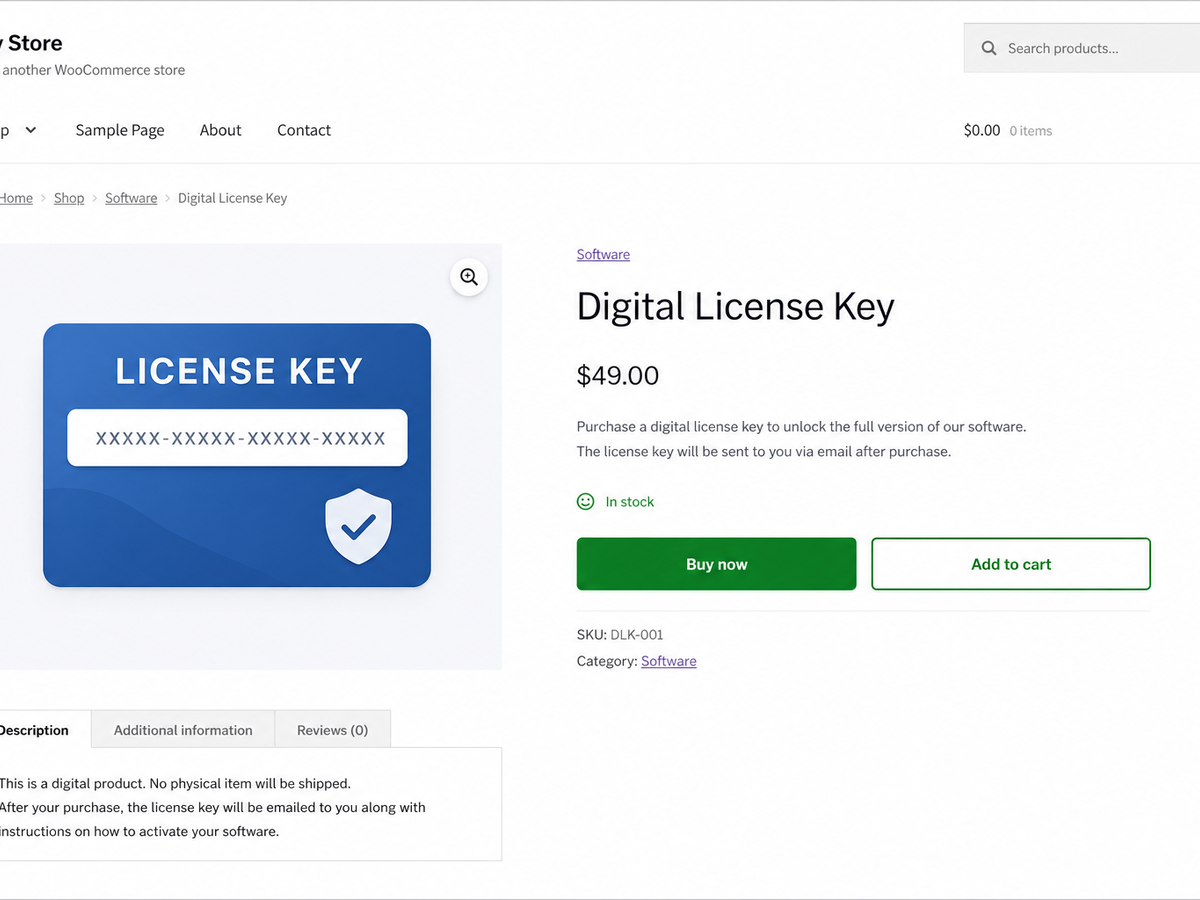
Swift adds a “Buy Now” quick buy button to your WooCommerce products. One click adds the product to the cart and sends the shopper straight to checkout, skipping the cart page so a purchase takes one click instead of three.
The button can appear on single product pages, on shop and archive loops, or both. You choose the label, where it redirects (checkout or cart), and whether the cart is emptied first so the buyer checks out with only the product they clicked.
Swift is stateless: it stores no per-product data and creates no database tables. It handles the button hooks, nonce verification, cart handling and redirect, and nothing else.
Swift is developed in the open. Source code, bug reports and feature requests live at https://github.com/wppoland/plogins-swift.
Documentation and links
- Documentation – https://plogins.com/plogins-swift/docs/
- Plugin page – https://plogins.com/plogins-swift/
- Source code – https://github.com/wppoland/plogins-swift
- Bug reports and feature requests – https://github.com/wppoland/plogins-swift/issues
What it does
- Adds a “Buy Now” button that adds-to-cart and redirects in one click.
- Works on single product pages and/or shop and archive loops.
- Place the button before or after the native add-to-cart button on single product pages.
- Drop the button anywhere with the
[swift_buy_now]shortcode or the Elementor “Buy Now Button” widget (optionally targeting a product by id). - Redirects to the checkout (skip the cart) or to the cart, whichever you prefer.
- Optionally empties the cart first so checkout shows only the chosen product.
- Optionally respects the quantity chosen on the product page (simple products).
- Pick a button style, theme default, solid, or outline, with an optional accent colour.
- Honours stock and purchasability, the button is hidden for out-of-stock or non-purchasable products, and is not shown for variable products.
Settings
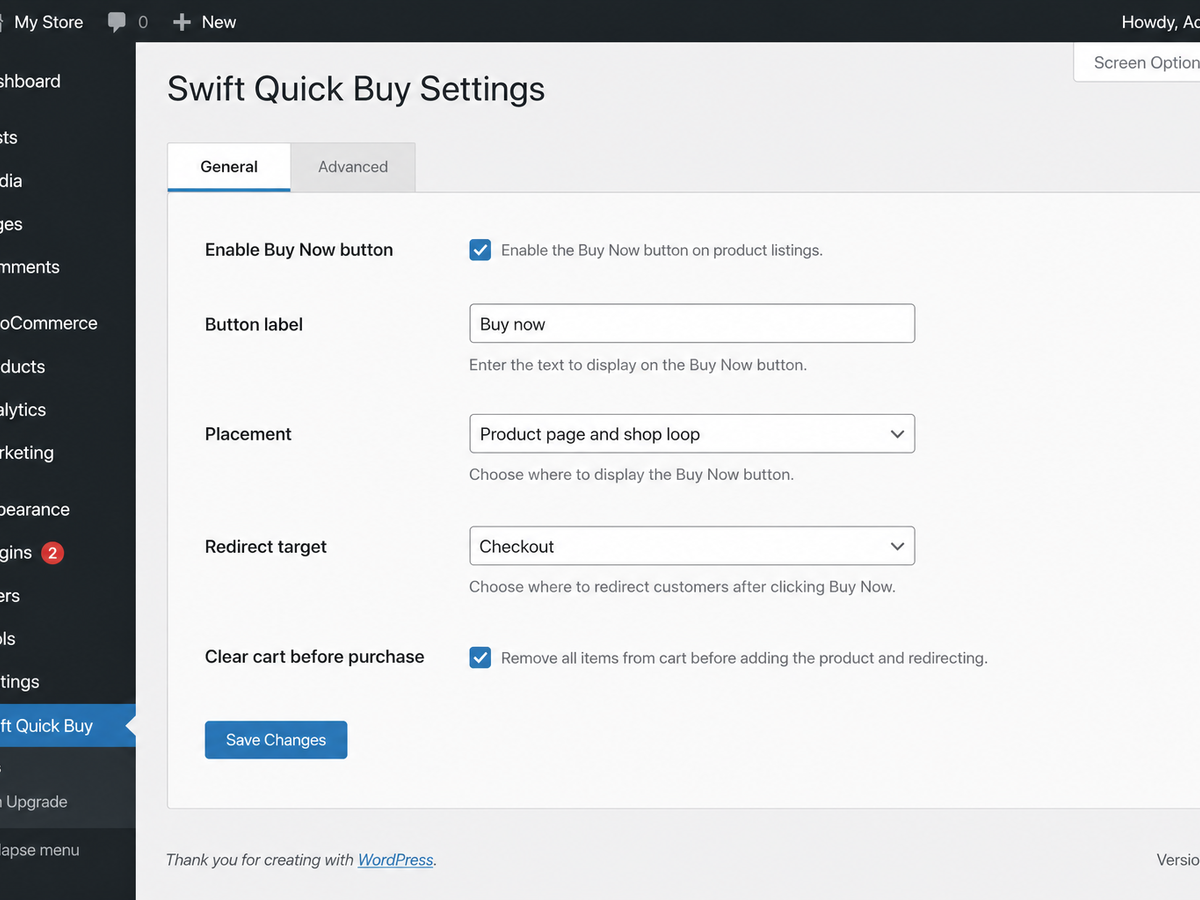
A simple WooCommerce settings page (WooCommerce Swift Quick Buy) lets you:
- Enable or disable the Buy Now button.
- Set the button label.
- Choose where the button appears (single product, shop loops, or both).
- Choose whether it sits before or after the add-to-cart button on single products.
- Choose where it redirects (checkout or cart).
- Choose whether to empty the cart before adding.
- Choose whether to respect the quantity selected on the product page.
- Pick a button style (theme, solid, outline) and an optional accent colour.
Shortcode and Elementor
Use [swift_buy_now] to render the Buy Now button anywhere, inside a page, post or block. It targets the current product by default; add an id to target a specific simple product:
[swift_buy_now id="123"]
If Elementor is active, the same button is available as a “Buy Now Button” widget. The Product ID control is the shortcode’s id argument: leave it at 0 on a product page.
External Services
Swift does not connect to, send data to, or load anything from any external service. There is no SDK, no API client, no remote font, CDN or analytics endpoint, and no phone-home or licensing check, its CSS and JavaScript are bundled with the plugin and enqueued from your own site.
All of Swift’s work happens on your server. It reads and writes a single settings option (swift_settings) and a schema-version marker (swift_db_version), and creates no custom database tables and no product meta. The Buy Now button adds the chosen product to the visitor’s own WooCommerce cart and redirects them within your site to your checkout or cart page; nothing about the product, the cart or the shopper leaves your installation.
Translations
Swift is fully translatable and ships the plogins-swift.pot template. Translations are delivered by WordPress.org language packs from translate.wordpress.org, which is where Polish, German and Spanish are being contributed; the package itself carries no compiled translation files.
Screenshots
Installation
- Upload the plugin to
/wp-content/plugins/plogins-swift, or install via Plugins Add New. - Activate it. WooCommerce must be active.
- Visit WooCommerce Swift Quick Buy to configure the button label, placement and redirect target.
FAQ
-
Does it require WooCommerce?
-
Yes. Swift requires an active WooCommerce installation.
-
On single product pages and/or shop and archive product loops; you choose which in the settings. Everywhere it shows, it is shown only for simple, in-stock, purchasable products.
-
Does it skip the cart?
-
Yes, if you set the redirect target to “Checkout”. The product is added to the cart and the shopper is taken straight to the checkout page. You can also choose to redirect to the cart instead.
-
Yes. Swift can clear the cart before adding the selected product, so direct checkout contains only the item the shopper clicked.
-
Does it respect the selected quantity?
-
Yes for simple products on single product pages, when the “respect quantity” setting is enabled.
-
Does it create database tables?
-
No. Swift is stateless, it stores only its settings (one option) and creates no custom tables or product meta.
-
Does it work with variable products?
-
The free version is designed for simple products. The button is shown for simple products only, on single product pages as well as on loops, since a variation must be chosen first. Full Buy Now support for variable products (with an inline variation picker) is planned for Swift Pro.
-
Yes. Use
[swift_buy_now]for the current product or[swift_buy_now id="123"]for a specific simple product. The same control is the Elementor “Buy Now Button” widget when Elementor is active.
Reviews
There are no reviews for this plugin.
Contributors & Developers
“Swift – Buy Now Button for WooCommerce” is open source software. The following people have contributed to this plugin.
Contributors
Translate “Swift – Buy Now Button for WooCommerce” into your language.
Interested in development?
Browse the code, check out the SVN repository, or subscribe to the development log by RSS.
Changelog
1.0.11
- New: Elementor “Buy Now Button” widget. Same output as the
[swift_buy_now]shortcode, loaded only when Elementor is active.
1.0.10
- Clearing the button label now works. The field says leaving it empty restores the default “Buy now”, but the old label was quietly kept and your storefront went on showing it. Empty means “Buy now” again.
- The Buy Now button no longer appears on variable product pages, where it could not work. Clicking it gave the shopper an error notice instead of a checkout, because a variation has to be chosen first. The placement setting and the FAQ now say plainly that Swift covers simple products.
1.0.9
- Removed variation handling that this plugin had no way to reach. The bundled checkout engine accepted a
variation_idon the request while nothing here could choose a variation, and the code said the capability belonged to the paid edition. Swift is a Buy Now button for simple products and the package now contains only that. - The accent colour is re-validated when it is written into the stylesheet, instead of being trusted from storage. The settings screen already sanitised it on save, but an option can also be set by a migration, WP-CLI or another plugin.
1.0.8
- Corrected the Translations section. It said the package bundles Polish, German and Spanish files; it does not, and must not: .distignore strips every .po and .mo because WordPress.org serves translations from translate.wordpress.org. The .pot template ships as before.
- The build now names the package folder from the plugin’s Text Domain instead of the local checkout directory, so the artifact is plogins-swift rather than swift.
1.0.4
- Translations: completed Polish, German and Spanish for the PRO upgrade panel.
1.0.3
- Fixed low-contrast admin headings under an OS dark-mode preference.
1.0.2
- Added bundled Polish, German and Spanish translations for the plugin interface.
1.0.1
- First stable release.
0.2.1
- Renamed to Plogins Swift for WooCommerce for a more distinctive plugin name.
0.2.0
- New:
[swift_buy_now]shortcode to place the Buy Now button anywhere (optionally targeting a product by id). - New: choose whether the button sits before or after the add-to-cart button on single product pages.
- New: optionally respect the quantity chosen on the product page (simple products).
- New: button style options, theme default, solid, or outline, with an optional accent colour.
- New: “Settings” link in the plugins list row.
- New: uninstall cleanup removes the plugin’s options (multisite-aware).
- Improved: redesigned settings page with grouped cards, a live button preview, a Live/Off status indicator, and accessible “?” help tooltips on every option.
- Improved: modern, themeable storefront button styles (CSS custom properties, dark-mode support, reduced-motion-safe transitions) with no layout shift.
- Improved: accessibility, keyboard-operable help tooltips, visible focus styles, and ARIA roles throughout the admin.
- Improved: robustness, the button never renders in a broken state for unpurchasable products, and the accent colour is scoped to Swift’s own buttons.
0.1.0
- Initial release: a Buy Now button for WooCommerce that adds to cart and redirects straight to checkout (or cart), with a settings page for the label, placement and redirect target.