

Description
Most consent plugins load Google’s tag on every page view and rely on Consent Mode signals to keep data collection switched off. This plugin does not have to. In its default “Basic” mode the tag is not requested at all until the visitor clicks, so before that decision no connection to googletagmanager.com is made and no data leaves the browser. That is the conservative reading of the GDPR, and here it is a single setting rather than a paid tier.
The “Advanced” mode is the other side of that trade: tags load immediately without cookies and send denied signals, which is what Google’s conversion modeling needs. Pick one per site.
Everything runs on your own server. There is no external CMP service to sign up for, no account, no license key, no phone-home, and no server-side consent log. The whole plugin is under 60 KB of vanilla JavaScript and PHP with no build step, no jQuery and no third-party libraries.
- Google Consent Mode v2: the default for ad_storage, ad_user_data, ad_personalization and analytics_storage is always “denied”.
- Google Tag Manager support: configure a GTM container ID (GTM-XXXXXXX) in addition to, or instead of, GA4/Google Ads.
- GA4 (G-XXXX) and optional Google Ads (AW-XXXX) configurable by tag ID.
- Granular categories: visitors can accept all, deny all, or open a details panel and choose Statistics (Google Analytics) and Marketing (Google Ads) individually. Essential is always active.
- Equal “Deny” button (GDPR). Withdrawal any time via the shortcode [geencb_settings_link] or window.geencbShowBanner().
- Open the banner from any footer/menu link: point a custom link to #geencb-settings or give any element the class geencb-open – no shortcode needed.
- Optional imprint link shown next to the privacy policy link inside the banner.
- Automatic theme colors: primary, background and text color can be derived from the active block theme palette, or set manually.
- Themeable via CSS custom properties, so the banner can be restyled from your theme’s Additional CSS without touching plugin files.
- Cache-safe: the stored decision is read client-side from the cookie, so it works behind full-page caches such as WP Super Cache.
- Accessible: keyboard focus moves to the banner on open, Esc dismisses it, focus returns to the previously focused element.
External services
This plugin can load Google tag scripts and thereby transmit data to Google. Nothing is loaded and no data is sent until a tag is configured in the settings.
Which scripts are loaded depends on your configuration:
- Google gtag.js (
https://www.googletagmanager.com/gtag/js) when a GA4 or Google Ads ID is set. - Google Tag Manager gtm.js (
https://www.googletagmanager.com/gtm.js) when a GTM container ID is set.
When the scripts load and what is sent depends on the tag mode:
- Basic mode (default): the scripts load only after the visitor consents (clicks “Accept all” or saves a selection that grants at least one category). Before that, no request reaches Google.
- Advanced mode: the scripts load immediately on page load, without cookies, sending Consent Mode v2 signals (all “denied” until consent). This enables Google’s conversion modeling.
Data transmitted to Google may include the visitor’s IP address, user agent, the page URL, and the current consent state, plus any data collected by Google Analytics, Google Ads or the tags configured in your GTM container. This data is processed by Google. See Google’s Privacy Policy (https://policies.google.com/privacy) and Google Business Data Responsibility (https://business.safety.google/privacy/).
By using this plugin with a Google tag configured you are responsible for disclosing this data transfer in your own privacy policy.
Legal notes
This plugin provides the technical consent mechanics only. The site operator remains responsible for legal compliance, in particular:
- A complete privacy policy including a section on Google Analytics/Google Ads and the third-country data transfer to the USA (covered by the EU-US Data Privacy Framework).
- Setting the privacy policy link in the settings so it appears directly in the banner.
- Making withdrawal visible and easy: enable the built-in floating revoke button or place the shortcode
[geencb_settings_link]. - There is no server-side consent logging (deliberately lean); if you require documented proof of consent, you need a full consent management platform (CMP).
This plugin does not constitute legal advice.
Screenshots


Installation
- Upload the
geenen-cookie-bannerfolder towp-content/plugins/. - Activate the plugin.
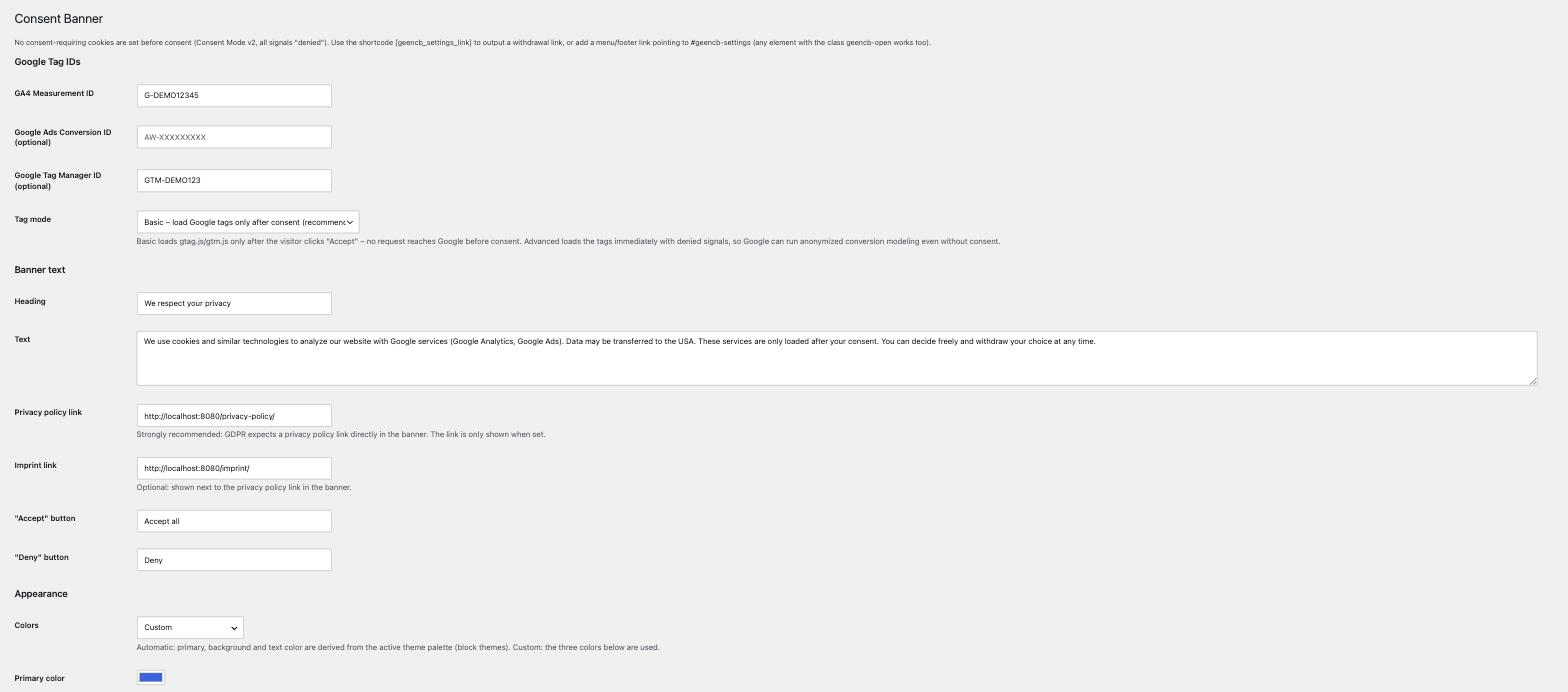
- Under Settings -> Consent Banner enter your GA4 Measurement ID (and optionally a Google Ads ID and/or a GTM container ID) and adjust text, colors and position.
- Optionally place the shortcode
[geencb_settings_link], e.g. in the footer, so visitors can withdraw their consent.
FAQ
-
No. Before a click on “Accept all”, “Deny” or “Save selection” no consent-requiring cookies are set. Consent Mode is “denied” and Google tags respect that. Only the functionally necessary cookie
geencb_consent(your own decision) is stored after the click. -
Is gtag.js or gtm.js loaded before consent?
-
That depends on the tag mode. In “Basic” mode (default) the scripts load only after the click on “Accept all” (or a saved selection granting a category) – before consent not a single request reaches googletagmanager.com. In “Advanced” mode the scripts load immediately without cookies, but send only denied signals (Consent Mode v2) until consent is given; this enables Google’s conversion modeling.
-
Are any scripts loaded without a tag ID?
-
No. Without a configured GA4, Google Ads or GTM ID, no scripts are loaded and the banner is not shown.
-
Can I use Google Tag Manager?
-
Yes. Enter a GTM container ID (GTM-XXXXXXX) in the settings. It loads alongside GA4/Google Ads, or on its own. The same Consent Mode v2 defaults apply, because GTM shares the dataLayer.
-
How do I withdraw my consent?
-
Use the shortcode
[geencb_settings_link]or the JavaScript callwindow.geencbShowBanner()to reopen the banner. -
Colors and position are settings (Appearance section). Everything else is plain CSS: put it in your theme’s Additional CSS panel – Appearance -> Editor -> Styles -> Additional CSS on block themes, Appearance -> Customize -> Additional CSS on classic ones – or in a child theme stylesheet. The quickest wins are the CSS custom properties
--geencb-primary,--geencb-bg,--geencb-textand--geencb-primary-contrast, e.g.:root { --geencb-primary: #e11d48; }. Scope them to:root, not to#geencb-banner– the floating cookie settings button and the[geencb_settings_link]button sit outside the banner and read the same variables. The base styles use!importantto survive theme CSS, so overriding those properties needs!importanttoo. -
I use a caching plugin with “delay” or “combine” JavaScript. Anything to watch out for?
-
Exclude the script handle
geencb-consentfrom JavaScript delaying, combining and deferring. It carries the Consent Mode defaults and has to run before any Google tag on the page; if it is delayed while another plugin’s tag is not, the tag fires before consent is signalled. -
Add a custom menu link (Appearance -> Menus -> Custom Links) with the URL
#geencb-settingsand a label such as “Cookie settings”. The plugin opens the banner when it is clicked. Alternatively use the shortcode[geencb_settings_link], or give any element the CSS classgeencb-open.
Reviews
There are no reviews for this plugin.
Contributors & Developers
“Geenen Cookie Banner for Google Consent Mode v2” is open source software. The following people have contributed to this plugin.
Contributors
Translate “Geenen Cookie Banner for Google Consent Mode v2” into your language.
Interested in development?
Browse the code, check out the SVN repository, or subscribe to the development log by RSS.
Changelog
2.0.2
- Author is now “Geenen IT-Systeme GmbH” and links to the company site, and the plugin list entry carries a plugin website link.
2.0.1
- German translations are bundled again (
de_DEandde_DE_formal). WordPress picks them by the site language under Settings -> General; sites left on English stay English. - The floating revoke button setting now names the alternatives in its description: the shortcode
[geencb_settings_link], a link to#geencb-settings, or the classgeencb-open.
2.0.0
- First release in the WordPress.org plugin directory.
- Renamed the plugin and its text domain; all internal prefixes, the settings option, the shortcode, the consent cookie and the CSS class names changed accordingly. Settings from earlier builds are not carried over and have to be entered once.
- Removed the Custom CSS field. Style the banner from your theme’s Additional CSS panel or a child theme stylesheet instead. The CSS custom properties keep their meaning but follow the new prefix:
--geencb-primary,--geencb-bg,--geencb-textand--geencb-primary-contrast. - The Consent Mode bootstrap and the settings page script are enqueued through the WordPress script loader instead of being printed as inline tags.
- Dropped the bundled German translations. Translations now come from translate.wordpress.org and are unavailable until the plugin is published there, so the banner falls back to English until then.
1.8.0
- Last of the builds handed out directly, before this plugin was submitted to the directory. Notes for those earlier versions are not repeated here. They installed under a different folder name, so WordPress treats them as a separate plugin: deactivate and delete the old copy before installing this one.