

Description
Core Web Vitals are a Google ranking factor. If your LCP, INP, or CLS scores are in the red, your WordPress site is losing search rankings and visitors every single day — and you may not even know it.
MultiAddons – Core Web Vitals & Speed Checker brings real Google performance data straight into your WordPress admin dashboard, so you can monitor, diagnose, and act on your site’s speed scores without ever leaving wp-admin.
Powered by the official Google PageSpeed Insights API, this plugin gives you real-world field data from Google Chrome UX Report (CrUX) — the same data Google actually uses to evaluate your site for search rankings.
100% Free. No API key required. No account needed. Works out of the box.
🔍 What Are Core Web Vitals?
Core Web Vitals are a set of real-world performance signals that Google uses as a direct ranking factor. There are three metrics that matter:
- LCP – Largest Contentful Paint: How fast does your page’s main content load? Google’s threshold: ✅ Good = under 2.5s | ⚠️ Needs Improvement = 2.5–4s | 🔴 Poor = over 4s
- INP – Interaction to Next Paint: How quickly does your page respond to user input (clicks, taps, keypresses)? ✅ Good = under 200ms | ⚠️ Needs Improvement = 200–500ms | 🔴 Poor = over 500ms
- CLS – Cumulative Layout Shift: Does your page layout jump around while loading? ✅ Good = under 0.1 | ⚠️ Needs Improvement = 0.1–0.25 | 🔴 Poor = over 0.25
A failing Core Web Vitals score directly affects your Google Search ranking. This plugin helps you track and understand all three metrics for both mobile and desktop, in one place.
⚡ Key Features
Real-World Core Web Vitals Monitoring
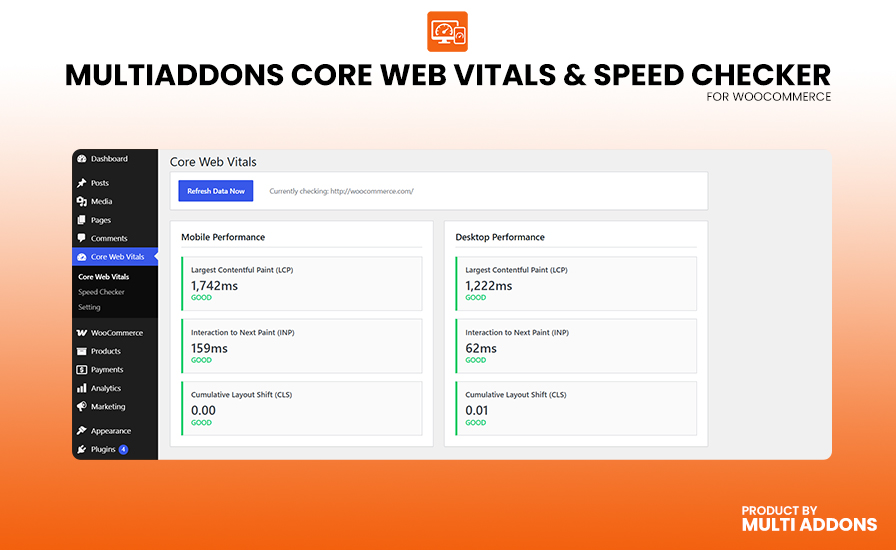
Fetches live LCP, INP, and CLS field data from Google CrUX — the same real-user measurement data that feeds Google Search ranking signals. Not synthetic lab estimates.
Built-In Google PageSpeed Speed Checker
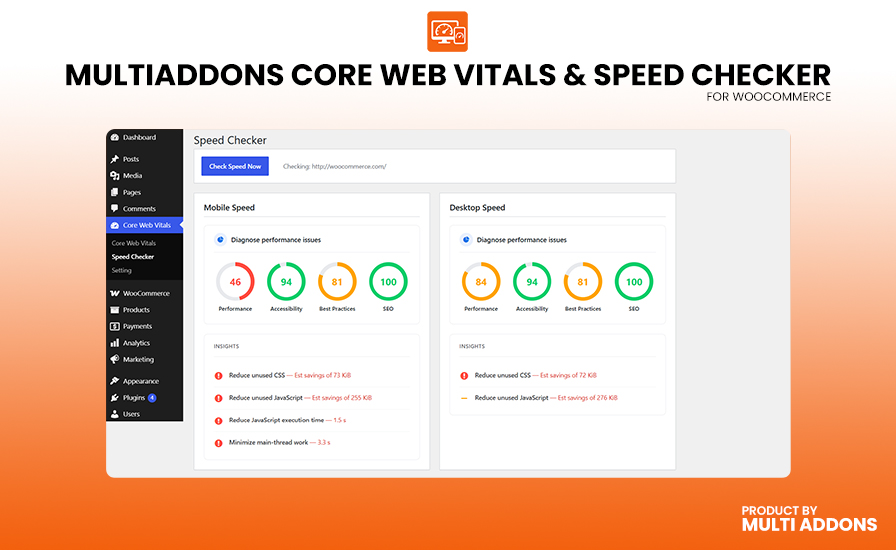
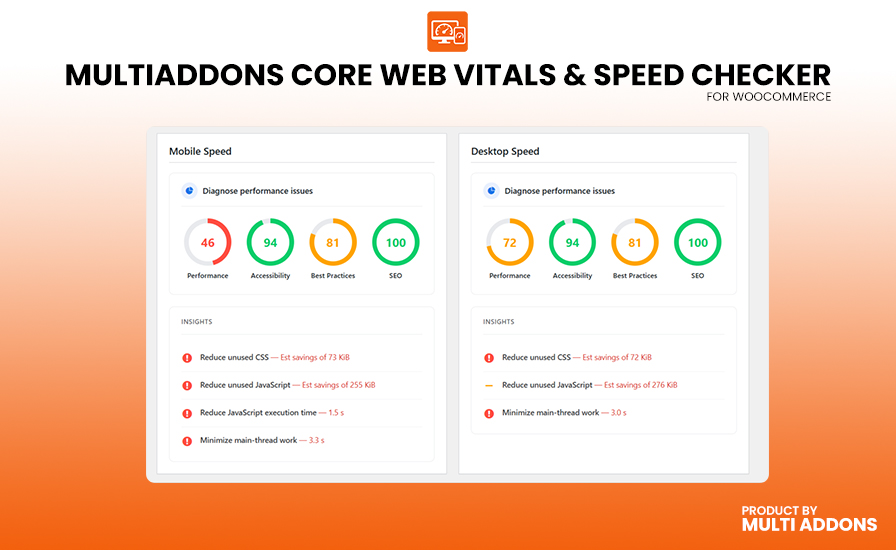
Run a full Google PageSpeed Insights audit for your site in one click. Get Lighthouse scores for Performance, Accessibility, Best Practices, and SEO — all displayed with visual gauge dials inside WordPress.
Mobile & Desktop Scores — Side by Side
See your Core Web Vitals and Lighthouse scores for both mobile and desktop separately. Google evaluates mobile and desktop performance independently for rankings.
Dashboard Widget — At-a-Glance Scores
A compact, color-coded Core Web Vitals widget appears right on your WordPress dashboard the moment you log in. No need to navigate anywhere — your scores are always visible.
Actionable Diagnostic Insights
The plugin surfaces the most impactful Lighthouse audit findings: render-blocking resources, unused JavaScript, unused CSS, unminified assets, slow server response time, oversized images, layout shift elements, DOM size, and more. Each insight tells you exactly where the performance bottleneck is.
Color-Coded Pass / Needs Improvement / Poor Badges
Every metric is displayed with Google’s official color coding — green, orange, and red — so you immediately know which scores need attention.
Automatic Weekly Refresh via WP-Cron
Your Core Web Vitals data is automatically refreshed in the background once a week using WordPress scheduled tasks. You always have an up-to-date snapshot without lifting a finger.
Manual Refresh On Demand
Need fresh data right now? Hit the “Refresh Data Now” button at any time to pull the latest scores from Google PageSpeed Insights instantly.
Optional Google API Key Support
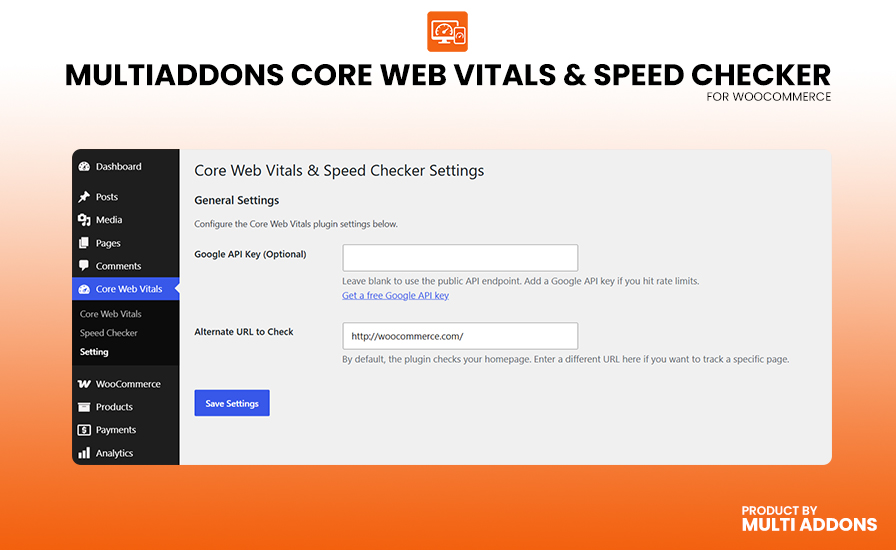
Works with Google’s public API endpoint by default — no key required. If you run a high-traffic site or check scores frequently, add your own free Google API key in the plugin settings to avoid rate limits.
Check Any URL — Not Just Your Homepage
Point the plugin at any page on your site using the Alternate URL setting. Perfect for tracking the performance of landing pages, product pages, blog posts, or any custom URL.
Lightweight & Privacy Friendly
No JavaScript loaded on your site’s front end. No tracking, no telemetry, no data collection from your visitors. The only external call is the Google PageSpeed Insights API request, made server-side from WordPress.
Multisite Compatible
Safely runs on WordPress Multisite (Network) installations with no conflicts.
WordPress Coding Standards Compliant
Built with fully namespaced OOP architecture, proper nonce verification, sanitized inputs, escaped outputs, and WP-compliant HTTP calls. Designed to pass the official Plugin Check (PCP) tool with zero errors.
🎯 Who Is This Plugin For?
- WordPress site owners who want to know their real Google Core Web Vitals scores without paying for expensive SEO tools.
- SEO professionals who need a quick way to check a client’s LCP, INP, and CLS scores inside WordPress.
- WordPress developers who want to monitor performance during theme or plugin optimization.
- WooCommerce store owners who need fast page load times to maximize conversions and search rankings.
- Bloggers & content creators who want to maintain good Core Web Vitals to protect their Google Search traffic.
📊 How It Works
- Install & Activate — the plugin is ready to use immediately after activation with zero configuration.
- Refresh Data — click “Refresh Data Now” or wait for the automatic weekly cron to run. The plugin calls the Google PageSpeed Insights API server-side.
- View Your Scores — your LCP, INP, and CLS scores for mobile and desktop are displayed in the dashboard widget and the full admin page with color-coded status indicators.
- Run a Speed Check — visit the Speed Checker page for full Lighthouse gauge scores (Performance, Accessibility, Best Practices, SEO) and a list of diagnostic insights.
- Fix Issues — use the insight list to pinpoint exactly which performance problems are dragging your scores down.
🔗 Useful Links
- Google PageSpeed Insights — verify your score online
- Google Core Web Vitals Overview — official documentation
- Chrome UX Report (CrUX) — the data source powering this plugin
External Services
This plugin connects to the Google PageSpeed Insights API to retrieve Core Web Vitals and Lighthouse performance data for your website.
What the service is and what it is used for
Google PageSpeed Insights (PSI) is a free performance analysis tool provided by Google. This plugin uses the PSI API (v5) to fetch:
- Real-world Core Web Vitals field data (LCP, INP, CLS) sourced from the Google Chrome UX Report (CrUX).
- Lighthouse lab scores for Performance, Accessibility, Best Practices, and SEO.
- Diagnostic audit insights to help identify performance bottlenecks.
What data is sent and when
The URL of your website (either your homepage or the alternate URL configured in the plugin settings) is sent to the Google PageSpeed Insights API. No personally identifiable information (PII) about your site’s visitors is transmitted.
Data is sent in two situations:
- Automatically, once per week — via a scheduled background task (WP-Cron) to keep your metrics fresh.
- On demand — when you click the “Refresh Data Now” or “Check Speed Now” button in the WordPress admin.
No data is sent on the front end of your website. The API call is always made server-side from your WordPress installation.
Third-party service details
This service is provided by Google LLC:
- Service: Google PageSpeed Insights API — https://developers.google.com/speed/docs/insights/v5/about
- Terms of Service: https://developers.google.com/terms
- Privacy Policy: https://policies.google.com/privacy
Screenshots
Installation
Automatic Installation (Recommended)
- Go to Plugins Add New in your WordPress admin.
- Search for “MultiAddons Core Web Vitals”.
- Click Install Now, then Activate.
- A new Core Web Vitals menu item will appear in your WordPress admin sidebar.
- Click “Refresh Data Now” to fetch your first performance report.
Manual Installation
- Download the plugin
.zipfile. - Go to Plugins Add New Upload Plugin.
- Upload the
.zipfile and click Install Now, then Activate.
Via FTP
- Unzip the downloaded file.
- Upload the
multiaddons-core-web-vitals-speed-checkerfolder to/wp-content/plugins/. - Activate the plugin through the Plugins menu in WordPress.
After activation, navigate to Core Web Vitals in the admin sidebar and click “Refresh Data Now” to load your first performance report.
FAQ
-
What are Core Web Vitals and why do they matter for SEO?
-
Core Web Vitals are three real-world performance metrics — LCP (Largest Contentful Paint), INP (Interaction to Next Paint), and CLS (Cumulative Layout Shift) — that Google uses as a direct ranking signal in Google Search. Sites that pass Google’s Core Web Vitals thresholds receive a ranking boost over competitors with poor scores. This plugin lets you monitor all three inside WordPress, for both mobile and desktop.
-
Do I need a Google API key to use this plugin?
-
No. The plugin works out of the box using Google’s public PageSpeed Insights API endpoint — no API key, account, or sign-up required. However, if you run a high-traffic site or trigger many manual refreshes, you can optionally add your own free Google API key in the plugin settings to increase your rate limit and avoid throttling.
-
Where does the data come from? Is it real-user data or just a lab test?
-
The plugin uses real-world field data from the Google Chrome UX Report (CrUX) — the same dataset Google uses to evaluate your site for search rankings. CrUX collects performance measurements from real Chrome users who have opted into usage statistics. When CrUX field data is available, it is always used. For low-traffic sites where CrUX data isn’t available, the plugin falls back to Lighthouse lab data from the PageSpeed Insights API.
-
My site shows “No Data” — what does that mean?
-
This means Google’s Chrome UX Report does not have enough real-user data for your URL yet. CrUX requires a minimum threshold of real Chrome users visiting your site over the past 28 days to generate a report. This typically happens for new sites, very low-traffic sites, or specific pages that aren’t visited often enough. You can verify this at PageSpeed Insights directly.
-
How often is the Core Web Vitals data refreshed?
-
The plugin automatically refreshes your data once per week using WordPress WP-Cron in the background. You can also trigger an instant manual refresh at any time by clicking the “Refresh Data Now” button on the Core Web Vitals admin page or the “Refresh Data” button in the dashboard widget.
-
Can I check a specific page instead of my homepage?
-
Yes. Go to Core Web Vitals Settings and enter your preferred URL in the “Alternate URL to Check” field. The plugin will fetch PageSpeed Insights data for that specific URL instead of your homepage. This is useful for tracking high-value pages like product pages, landing pages, or key blog posts.
-
What is the Speed Checker page?
-
The Speed Checker page (found in the Core Web Vitals submenu) shows your full Lighthouse scores — Performance, Accessibility, Best Practices, and SEO — displayed as visual gauge dials, just like the PageSpeed Insights website. It also lists the most impactful Lighthouse audit findings (render-blocking resources, unused JavaScript, oversized images, etc.) so you know exactly what to fix.
-
What is LCP and how can I improve it?
-
LCP (Largest Contentful Paint) measures how long it takes for the largest visible element on your page to fully load. Common causes of poor LCP are: slow server response times, render-blocking JavaScript or CSS, unoptimized hero images, and no lazy loading. To improve LCP: use a fast host, enable a caching plugin, optimize and compress your images, and defer non-critical JavaScript.
-
What is INP and how can I improve it?
-
INP (Interaction to Next Paint) replaced FID (First Input Delay) as a Core Web Vital in March 2024. It measures how quickly your page responds to user interactions — clicks, taps, and key presses. Poor INP is usually caused by heavy JavaScript execution, large DOM sizes, and long tasks on the main thread. To improve INP: reduce unused JavaScript, optimize third-party scripts, and minimize long tasks.
-
What is CLS and how can I improve it?
-
CLS (Cumulative Layout Shift) measures how much your page’s layout shifts unexpectedly while loading. A high CLS score means elements are jumping around as the page loads, creating a poor user experience. Common causes: images without defined dimensions, ads that load dynamically, and web fonts that cause FOIT/FOUT. To improve CLS: always set width and height on images and videos, and avoid inserting content above existing content after load.
-
Does this plugin affect my website’s front-end performance or speed?
-
No. This plugin is 100% admin-only. No scripts, styles, or code from this plugin are loaded on the front end of your website for visitors. The only external API call is made server-side from WordPress (never in the visitor’s browser), and only when you trigger a manual refresh or the weekly cron runs.
-
Is this plugin compatible with WooCommerce, Elementor, Divi, and other page builders?
-
Yes. This plugin does not interact with your theme, page builder, or WooCommerce in any way. It is a read-only reporting tool that fetches external data from Google’s API and displays it in the WordPress admin. It is fully compatible with all themes, page builders, and e-commerce plugins.
-
Is this plugin multisite compatible?
-
Yes. The plugin is built with WordPress Multisite compatibility in mind and can be safely activated on a network installation.
Reviews
There are no reviews for this plugin.
Contributors & Developers
“MultiAddons – Core Web Vitals & Speed Checker” is open source software. The following people have contributed to this plugin.
Contributors
Translate “MultiAddons – Core Web Vitals & Speed Checker” into your language.
Interested in development?
Browse the code, check out the SVN repository, or subscribe to the development log by RSS.
Changelog
1.0.0
- Initial Release.
- Dashboard widget displaying LCP, INP, and CLS for mobile and desktop.
- Full admin page with detailed Core Web Vitals metric cards.
- Speed Checker page with Lighthouse gauge scores (Performance, Accessibility, Best Practices, SEO).
- Diagnostic insights list highlighting the most impactful performance issues.
- Automatic weekly data refresh via WP-Cron.
- Manual “Refresh Data Now” button for on-demand updates.
- Settings page with optional Google API key and alternate URL support.
- Multisite compatible. Lightweight. No front-end scripts loaded.