

Description
WeDispatch gives written content a voice. Every time something is published, the text is sent to
the WeDispatch service, read aloud by professional voices, and an audio player appears on the page.
Writers change nothing about the way they work: they publish, the audio appears.
It was built inside a newsroom, for newsrooms, but nothing about it is specific to news. Any site
that publishes text can use it: a magazine, a documentation site, an online shop, a public body
with an accessibility obligation.
Why a newsroom cares
- Nobody has to remember anything. Audio is produced on publication, not by a separate step someone forgets on a busy day.
- Scheduled content is ready on time. An article scheduled for 6 a.m. has its audio prepared in advance and published at the same moment as the text. The first reader of the day finds audio, not a “preparing” message.
- A voice per section and per author. Sport does not have to sound like the obituaries. The routing is category, then author, then site default, and the editor panel shows which voice will actually be used, before publication.
- Correcting a typo does not spend a generation. When the text of something that already has audio changes, the audio online keeps being served and the item is marked “to regenerate”. You rebuild it once, when the text has settled.
- Subscriber-only audio, with nothing to code. If your full articles are reserved for subscribers, the audio follows the same rule. Your site attests to a status (“subscriber”), never to an identity, and no personal data about your readers leaves your server.
Accessibility
Audio is not a bonus feature for a large part of the audience. It is how blind and partially
sighted readers, people with dyslexia, people with a motor impairment and readers who simply cannot
look at a screen right now get to the same content as everyone else.
- The player is exposed as a labelled landmark, so a screen reader announces it and its user can jump straight to it instead of hunting through the article.
- The player is keyboard operable and does not start on its own.
- The audio version is an alternative to the text, never a replacement for it: the written article stays complete and indexable.
This helps a site meet WCAG 2.1 / 2.2 and the accessibility duties that flow from them: the
European Accessibility Act and EN 301 549 in Europe, RGAA in France, Section 508 and the ADA in the
United States. Accessibility is a property of a whole site, not of one plugin: no plugin can make a
site conformant on its own, and any that claims otherwise is overselling. This one removes one
specific barrier, properly.
What the plugin does
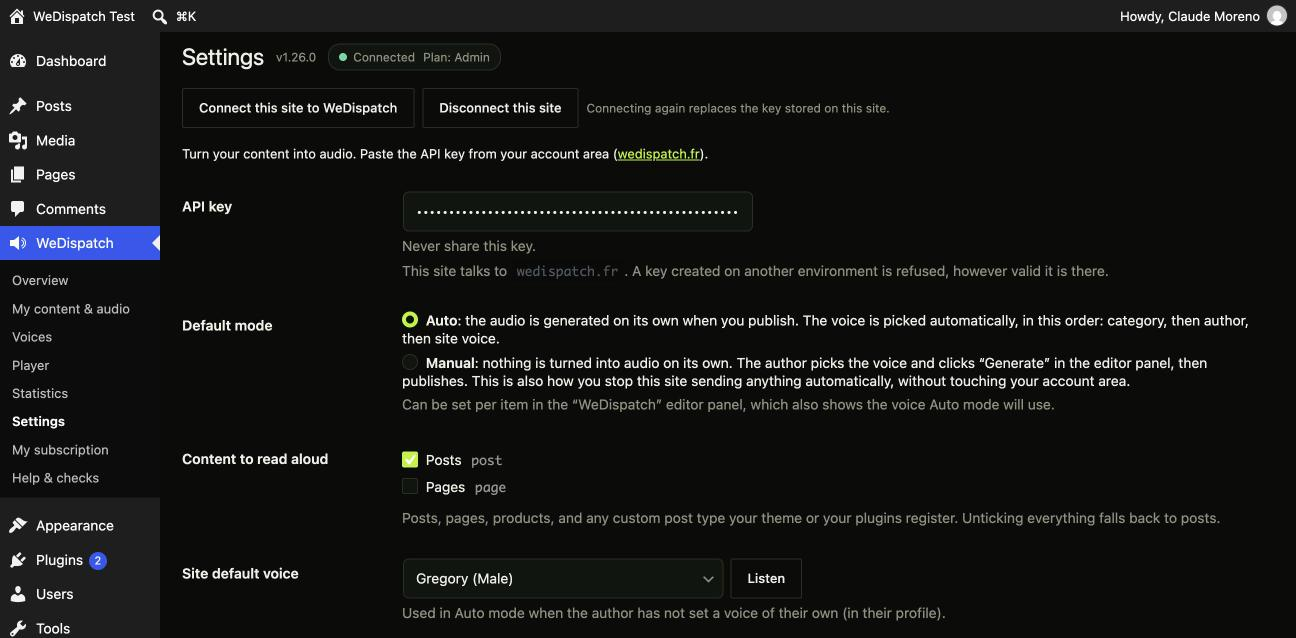
- Two modes: Auto (audio is generated on publication) or Manual (the author generates it from the editor, then publishes).
- Any content type: posts, pages, products, and any custom post type registered by your theme or your plugins. You tick the ones you want.
- Automatic voice routing: category, then author, then site voice, with a preview, inside the editor, of the voice that will actually be used.
- Multilingual reading: French, English, Spanish, German, with a native voice per language. The language of each item is detected automatically (Polylang, WPML, or the site language).
- Scheduled content: the audio is prepared ahead of time and goes live at the same moment as the text.
- The player goes at the top or the bottom of the article, or exactly where you want it: an editor block, a widget, or the
[wedispatch]shortcode. - Optional synchronised text (word-by-word highlighting during playback).
- An optional transcript under the article, folded, for readers who cannot use audio and for search engines.
- An optional “Listen next” list, based on the article being read and never on who is reading it.
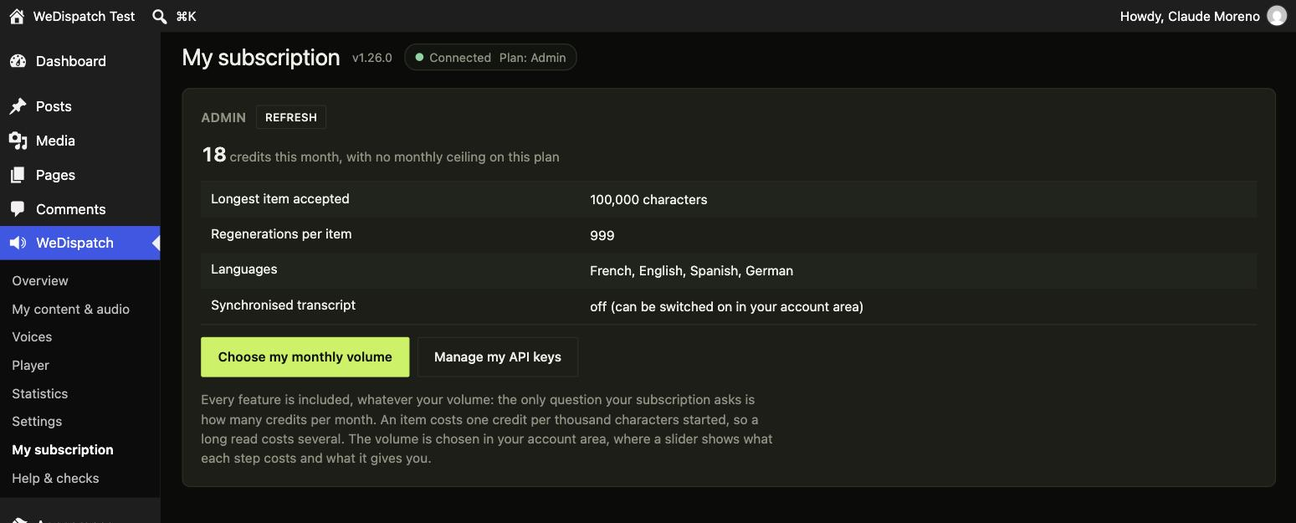
- A “My subscription” panel in the settings: plan, monthly usage and a shortcut to subscribe.
- Loaded through the standard WordPress script queue, deferred and in the footer, so caching and performance plugins handle it like any other asset.
Translated, not just translatable
Every screen of this plugin is translated, and a French translation ships with it. Most plugins in
this category are English-only, whatever their settings page claims. If your language is missing,
it can be contributed on translate.wordpress.org and WordPress will distribute it automatically.
Account required
This plugin is the connector for an online service: it requires a WeDispatch account. The service
is paid for (plans are listed on wedispatch.fr). Connecting the site creates its key for you, from
the WeDispatch menu; until a site is connected, the plugin performs no processing at all and makes
no request.
External services
This plugin relies on the third-party service WeDispatch (https://wedispatch.fr) to convert the
text of your content into audio, and to host and serve the audio files. The plugin does not work
without this service.
Data sent, and what triggers it
- Generating an audio version, sent to
https://wedispatch.fr/api/v1/podcasts: the text content of the item, its title, its canonical URL, its WordPress ID, its category, its language, its go-live date if it is scheduled, and the chosen voice. Triggered when an item is published or scheduled (Auto mode), or when someone clicks “Generate audio” (Manual mode). - Voice catalogue, request to
https://wedispatch.fr/api/v1/voices: no personal data, only the API key for authentication. Triggered when the settings screens are displayed (cached for 1 hour). - Subscription and usage, request to
https://wedispatch.fr/api/v1/accountandhttps://wedispatch.fr/api/v1/usage: only the API key. Triggered when the settings page is displayed, to show the plan. - Conditional access, request to
https://wedispatch.fr/api/v1/access: only the API key, to retrieve the signing secret when audio is reserved for signed-in readers. Triggered when the API key changes and once per hour. - Transcript, request to
https://wedispatch.fr/api/v1/podcasts/{id}/subtitles: only the API key and the identifier of the item. Triggered when the transcript is displayed or downloaded (cached for 12 hours). Only if you turn the transcript on. - “Listen next”, request to
https://wedispatch.fr/api/v1/recommendations: only the API key and the identifier of the item being read. Nothing about the visitor is sent. Triggered when the list is displayed (cached for 6 hours). Only if you turn the list on. - Connecting the site, request to
https://wedispatch.fr/api/v1/connect/exchange: the one time code returned by the authorisation screen, and a secret this server generated and never sent anywhere else. Triggered once, when you connect the site. The answer contains the API key. - Player settings, request to
https://wedispatch.fr/api/v1/profile: only the API key to read them, and the settings you change to write them. Triggered when the Player screen is displayed or saved. - Listening figures, request to
https://wedispatch.fr/api/v1/stats: only the API key. Triggered when the Statistics screen is displayed (cached for 15 minutes). The answer contains counters only, never anything about an individual listener. - Audio player (visitor side): the public page loads the script
https://wedispatch.fr/player.jsand plays the audio file from WeDispatch. The visitor’s IP address and user agent are therefore known to the service, and plays are counted for the site’s statistics.
The API key is stored in the WordPress site and is never exposed to the browser: every call is
made from the server. The text that is sent is used only to produce the audio.
Terms of service: https://wedispatch.fr/conditions-generales-de-vente
Privacy policy: https://wedispatch.fr/politique-de-confidentialite
Screenshots
Blocks
This plugin provides 1 block.
- WeDispatch audio player Places the audio version of this article exactly where you want it.
Installation
- Install the plugin (Plugins, then Add New, then Upload Plugin) and activate it.
- Open the WeDispatch menu in the sidebar and click “Connect this site to WeDispatch”. You sign in or create your account on wedispatch.fr, you authorise this site, and the key is created and stored here for you. There is nothing to copy, and your password never enters WordPress.
- WeDispatch, then Settings: choose the mode (Auto or Manual), tick the content types to read aloud, and pick the player position.
- WeDispatch, then Voices: pick the site voice, and if you want, a voice per category and per author.
- Publish something: its audio version is generated and the player appears.
If you already have an API key, you can still paste it by hand in WeDispatch, then Settings. That is the older way round and it is kept for people who prefer it.
FAQ
-
Does the plugin work without a WeDispatch account?
-
No. It is the connector for an online service: the site has to be connected to a WeDispatch
account. Until then, no processing takes place and no request is made. -
What data leaves my site?
-
The text of the item, its title, its URL and its ID, at the moment of generation. See the “External
services” section above, which lists every request and what triggers it. -
Can it read pages and custom post types, not just posts?
-
Yes. The settings screen lists every public content type on the site (posts, pages, products, and
anything a theme or another plugin registers) and you tick the ones that should be read aloud.
Posts are the default. -
Yes. In Auto mode, the voice is chosen in this order: category, then author, then the site default
voice. The editor panel shows which one will be used. -
What happens if I edit something that already has audio?
-
The audio that is online keeps being served and the item is marked “to regenerate”: fixing a typo
does not trigger a new reading. Once the text has settled, the “Generate audio” button in the
editor panel produces the new version. A setting also lets the plugin handle that itself; it is off
by default, since each regeneration uses one generation from the plan. -
My site is multilingual: which language is each item read in?
-
Its own. The plugin reads the language from Polylang or WPML, and falls back to the site language
if no multilingual plugin is installed. Voice lists are grouped by language, with the language of
the item first. To impose a different rule (custom field, language per category), use the
wedispatch_post_language filter. -
What if I schedule something for tomorrow morning?
-
The audio is prepared as soon as the item is scheduled and goes live at the planned time, together
with the text. The first reader of the day finds the audio, not a “preparing” message. -
Where does the player go?
-
At the top or the bottom of the article by default. Set the position to “Manual” and place it
yourself: the WeDispatch audio player block in the editor, the widget of the same name in a
sidebar, or the[wedispatch]shortcode anywhere a shortcode works, including a theme template or
a page builder. -
Is the plugin’s own interface available in my language?
-
Every screen is translatable and a French translation ships with the plugin. Other languages can be
contributed on translate.wordpress.org, and WordPress installs them automatically once they are
published. -
Does the plugin slow my site down?
-
No. Generation happens on the service side, off your server. The player is a small script loaded
through the standard WordPress queue, deferred and in the footer, so caching and performance
plugins handle it like any other asset. -
I was using an earlier version installed by hand. What do I do?
-
Version 1.10.0 changed the plugin folder name. Deactivate the old “WeDispatch” plugin, install this
one, and activate it. Every setting, every voice and every audio version already produced is kept:
they are stored in the database, not in the plugin folder. The old plugin can then be deleted.
Reviews
There are no reviews for this plugin.
Contributors & Developers
“WeDispatch Audio Text to Speech” is open source software. The following people have contributed to this plugin.
Contributors
Translate “WeDispatch Audio Text to Speech” into your language.
Interested in development?
Browse the code, check out the SVN repository, or subscribe to the development log by RSS.
Changelog
1.26.0
- The Custom CSS box is gone from the Player screen. The plugin no longer takes a stylesheet typed into WordPress, in line with the directory guidelines. The setting itself has not changed and is still in your WeDispatch account, where it applies to this site exactly as it did before; the Player screen links straight to it.
1.25.0
- Your plan is counted in credits, and the screens now say so. An item costs one credit per thousand characters started, so a long read costs several: calling them “items” was a shortcut that stopped being true.
- The installation steps no longer tell you to copy an API key by hand. Connecting the site creates its key for you, from the WeDispatch menu, and your password never enters WordPress. Pasting a key still works for those who prefer it.
1.24.1
- Every script the plugin uses in the admin is now a proper enqueued file rather than a tag written into the page. Nothing changes on screen; it means the scripts are versioned, cached, and can be removed by a site that needs to.
1.24.0
- Eleven more settings can now be changed from WordPress instead of only from your account area: the player’s custom CSS, an audio jingle before the article, background music and its volume, an advertising break inside long items, a different jingle per category, the pronunciation lexicon, and the five texts a visitor sees when your audio is reserved.
- A default voice per language. This one belongs to your account rather than to this site, and it applies according to the language of each item.
- The pronunciation lexicon is written as plain lines, “written = pronounced”. A line without an equals sign is ignored rather than guessed at, because an invented pronunciation would be heard on every article.
- Settings that exist on your account but not on this site are never erased by saving here. Jingles set for a category of another one of your sites, and voices set for a language this screen does not show, are kept.
1.23.0
- Fixes a setting that could be lost without anyone touching it. A player layout or a voice this screen could not display was replaced by the first item in the list, and the next save sent that instead, even if you only came to change something else. Anything the screen does not recognise is now shown as it is and left alone.
- The player layouts are now read from your account instead of being listed in the plugin. The four newest ones (guided reading, floating bar, summary first, episode) can be chosen from here, and any layout added later will appear without updating this plugin.
- Each layout says what it needs from an item before you pick it, rather than after. An item that cannot supply it is served with the compact bar instead, with no error, which used to look like a broken plugin.
1.22.1
- Housekeeping for the WordPress.org directory: the plugin URI and the author URI are now two different addresses, as the directory requires. The plugin is published by Tout Est Faisable, which operates the WeDispatch service.
1.22.0
- The plugin folder is now
wedispatch-audio-text-to-speech, matching the name and the directory address. If you installed an earlier version by hand from wedispatch.fr, WordPress sees the new folder as a separate plugin: deactivate and delete the old one after installing this one. Your settings and the link between each item and its audio are stored in the database, not in the folder, so nothing is lost.
1.21.2
- The plugin is now called “WeDispatch Audio Text to Speech”.
1.21.1
- French typography: a label and its explanation are now separated the way French does it, with a space before the colon. The colon lived in the template, outside any translatable string, so no translation could fix it.
- The screenshots on this page were retaken on the current version.
1.21.0
- Bylines can now be added to items that already have audio, and it costs nothing: a new card on the overview posts them in one click. The text has not changed, so no audio is produced and nothing is taken off your monthly volume. This supersedes what 1.20.0 said about bylines not being retroactive: the service changed on the same day.
- The plugin now tells the service which sends are automatic and which are asked for. Only the automatic ones (an item published in Auto mode) go under the “Automatic audio” switch of your account and of the site. A click on “Generate”, a bulk action or a queue from a screen always goes through, even on a site that is paused.
- An item that was not turned into audio because that switch is off now says so, on the Content screen, instead of showing an unexplained “No audio”. It is also queued again correctly once the switch is back on.
- Manual mode is what stops this site from sending anything on its own, and the setting now says it.
1.20.0
- Listening figures by byline. A new table on the Statistics screen shows, for each byline, how many items, how many listens and how many were heard to the end. Items with no byline keep their own row, so the rows add up to the totals above them.
- The plugin now sends the byline with each item, taken from the author’s display name. It sends nothing when it cannot tell, because a guessed byline enters a newsroom ranking and nobody would know it was guessed. Co-Authors Plus bylines are read when that plugin is active, and the
wedispatch_signaturefilter lets a site send anything else (“The newsroom”, a pen name, a custom field). - Bylines are not retroactive: items already turned into audio stay unsigned until their next generation. Correcting a byline never costs a generation.
1.19.2
- You can disconnect the site. Until now you could connect but never leave, except by emptying the API key field by hand. The confirmation says exactly what goes (the key, everything read from your account, the listening secret and its hourly refresh), what stays (your settings, and the link between each item and its audio, so reconnecting puts everything back), and what it cannot do for you (the key keeps existing on wedispatch.fr until you revoke it there).
- Choosing or changing your monthly volume now goes straight to your account area, where the slider lives.
1.19.1
- Fixes “The link you followed has expired” when connecting the site in one click. Nothing had expired: the return address was escaped for HTML, so the security token arrived under a mangled name. One-click connection had never worked end to end; it does now.
- Fixes pasting an API key by hand. The plan, the entitlements and the usage of the previous account stayed on screen for five minutes, which read as “my new key is not being taken”. Changing the key now forgets everything that described the old account.
1.19.0
- You can now hear a voice before choosing it. Every voice list has a Listen button, wherever it appears: our screens, the Categories screen, an author’s profile, the editor panel. Picking a voice from a name and two adjectives was guesswork.
- “My subscription” shows the volume you actually subscribed to, in items per month, and so does the status badge on every screen.
- A new card on the overview: what is left this month, which published items have no audio yet, and one button to queue them. Unused items are lost at the end of the month, so this uses what was about to disappear. It never queues more than you have left.
- The page cache is emptied when an audio is attached. “I generated the audio and the page does not show it” is almost always a cache serving the version from before. WP Rocket, LiteSpeed, W3 Total Cache, WP Super Cache, Cache Enabler and Cloudflare are handled; the Help screen names the one it found, or says it found none.
- Subtitles download as SRT as well as VTT.
1.18.0
- One offer, and one question: how many items per month. There is no longer a tier to compare, so every feature is included whatever your volume. “My subscription” now counts in items rather than characters, shows how many are left, and says plainly that unused items are not carried over to the next month.
- The WeDispatch screens now carry the product’s own colours, the same ones as your account area. Settings on this site and settings on wedispatch.fr no longer look like two different products. Only our own pages change: your admin menu, your toolbar and every other plugin are untouched.
- A voice per category is part of a paid subscription, and the screens now say so before you set one rather than after. Every category voice already set keeps working and stays visible: nothing is erased, and it all comes back the day the subscription does.
- A voice per author is unchanged and stays open to everyone.
1.17.0
- Connecting your site no longer means copying an API key by hand. One button, one authorisation page on wedispatch.fr, and the site is connected. No password is ever typed into WordPress, and the key never travels through a browser.
- Works on staging, on an intranet and behind HTTP authentication: your site does the calling, so nothing has to reach it from outside.
1.16.4
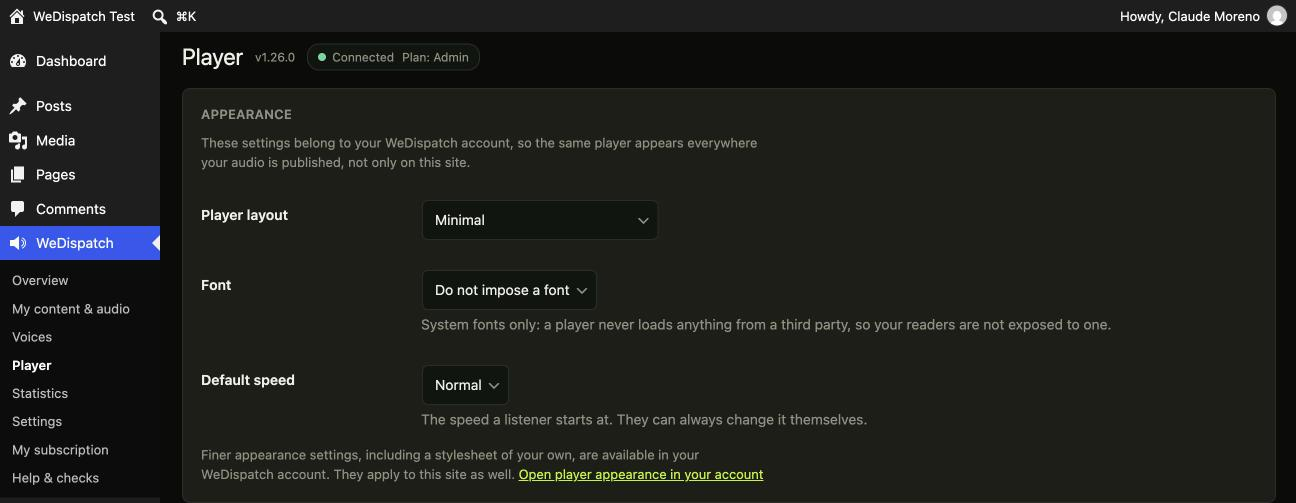
- The default speed list no longer offers two choices that do the same thing. An unset speed and “Normal” both play at exactly 1: you picked one, heard no difference, and started doubting the rest. An account that never set a speed now simply shows “Normal”, which is what it already sounds like.
- The font list said “Inherited from the player” on a screen called Player, which explains nothing. It now says what it does: do not impose a font. That option is not a duplicate of “System”; one leaves the player its own font, the other imposes the system stack.
1.16.3
- Fixes a “Contact support” link that led to a page which had never existed, on the Help screen, which is exactly where someone with a problem goes. It now opens an email to the support address the rest of the site uses.
1.16.2
- The Player screen now says “this screen is ahead of the service” instead of showing a bare 404 when the WeDispatch service has not been updated yet. The plugin and the service are released separately, so that window always exists. Nothing is broken in it: the player works and its settings are untouched, and the screen starts working on its own.
- A route that does not exist yet and a service that is down are opposite pieces of news: one asks you to wait, the other to act. They no longer look the same.
1.16.1
- The connection state is now proportional to the news: a quiet pill in the header when everything works, a full width banner the moment something does not. Six green banners a day train people to ignore the red one.
- Screens no longer stretch across a whole wide monitor: a table that runs 2500 pixels loses the eye between the title on the left and the date on the right.
- My content & audio: the voice source is shown only when it is an exception. On a site with one voice it used to repeat “site voice” on every single row, which hid the two rows where it actually differed.
1.16.0
- New screen: Player. Layout, font, default speed, highlighting, summary, download, sharing buttons. Until now these lived only in your WeDispatch account, and this plugin could do nothing but tell you to go there.
- A setting your plan does not include is shown disabled and explained, never offered and then refused when you save. A form that proposes what it cannot deliver is the fastest way to make people doubt everything else.
- “Who can listen” is shown here but changed on your account, on purpose: switching it moves every audio file you have ever published from one storage area to another, and done halfway it would silence your whole archive.
- Listening samples: where the service provides one, voices can be heard before they are chosen.
1.15.0
- Transcript. Optional, folded, under the article. It is what makes the audio reach a deaf or hard of hearing reader, which a player alone never does, and it is text that search engines index. Built from the word-level timing already captured for highlighting: no AI, no extra cost. Downloadable as .vtt or .srt from My content & audio.
- “Listen next”. Optional, under the article: same category first, then the most recent. The list depends on the article being read, never on who is reading it, and only content published on this site is suggested.
- Both are off by default. Adding things under someone’s articles without being asked is not an improvement.
- Bulk generation now sends up to 25 items in a single request instead of one background task per item. On a low traffic site a batch of fifty used to drain at the speed of visitors.
- Statistics: content produced from another site with the same key is now listed separately, below your own. On a shared key it used to fill the whole table, and nobody could find their own articles.
- Statistics: fixes a total that was smaller than its own 30 day period. Two different definitions of the word “listen” had been coexisting on the service side.
1.14.0
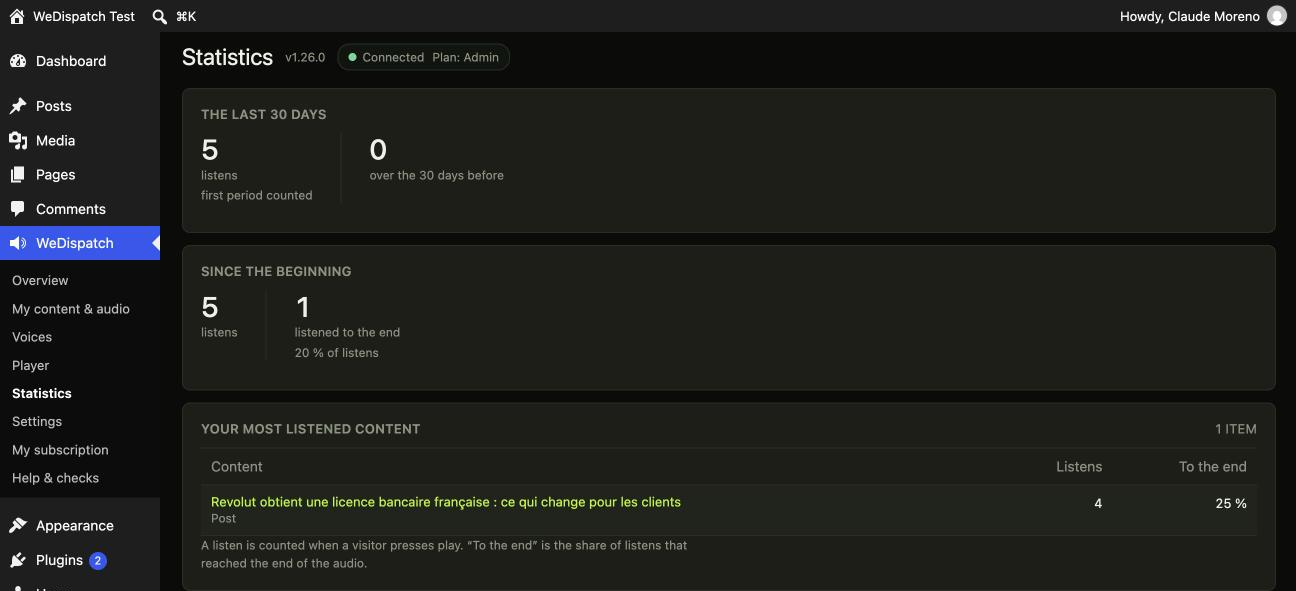
- New screen: Statistics. Listens over the last 30 days against the 30 before, listens since the beginning, and how many people listen to the end.
- Your most listened content, named the way you name it: the figures are matched back to your posts and pages, so each line is a title you recognise with a link to edit it, not an internal identifier.
- A figure that is structurally zero is not shown. A site that reserves nothing for subscribers does not need to read “subscribe prompt conversion: 0%”, which is exactly true and reads like a fault.
- Content counted by the service but absent from this site is still listed, and said to be so: deleted here, or produced from another site using the same key. Hiding it would leave a total that never adds up.
- Figures are cached for 15 minutes, with a Refresh button, because counting them costs the service real work.
1.13.0
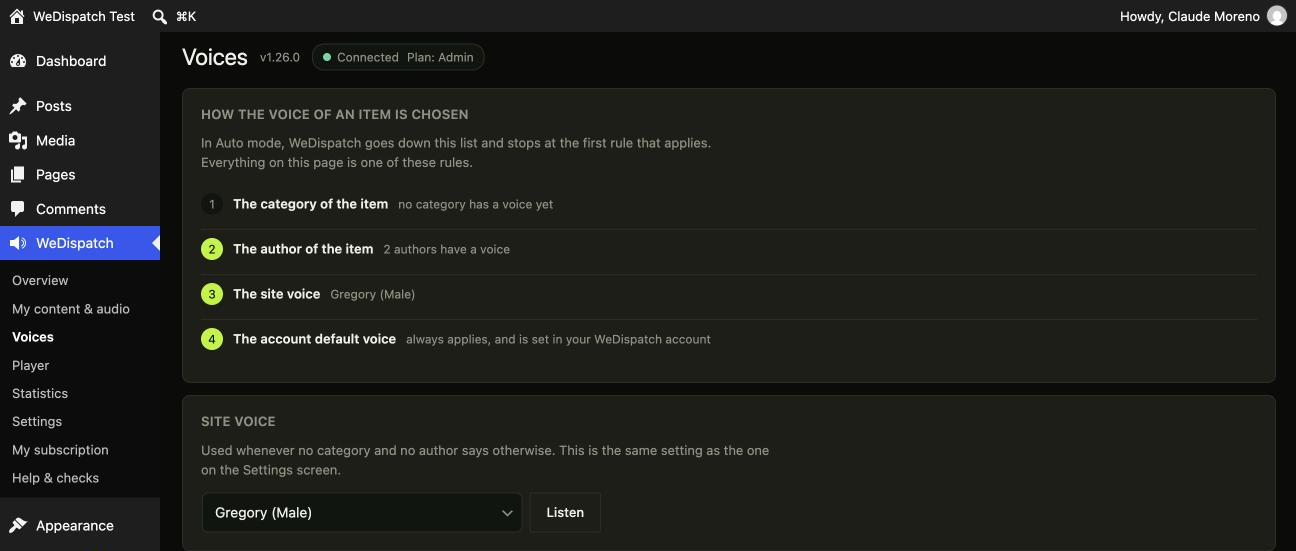
- New screen: Voices. Who reads what, on one page. The site voice, a voice per category and a voice per author, all set and saved together.
- Until now those three settings lived in three unrelated WordPress screens: ours, the Categories screen, and each author’s profile. Almost nobody found the last two, so the feature that sets this plugin apart went unused.
- The screen opens on the routing itself: the four steps WeDispatch goes down to pick a voice, and how many rules you have set at each one.
- Only the people who have actually published in the content types you read aloud are listed, so a shop with ten thousand customer accounts still gets a short list.
- If the voice catalogue cannot be read, the page shows your rules but refuses to let you save. An empty list of voices would quietly erase every choice already made.
1.12.1
- The Overview screen now agrees in number: “1 item with audio”, not “1 items with audio”.
- When the site is not connected, Overview no longer ends on empty space. It shows the next step, worded for the situation at hand: no key yet, a key that is refused, or a service that could not be reached.
1.12.0
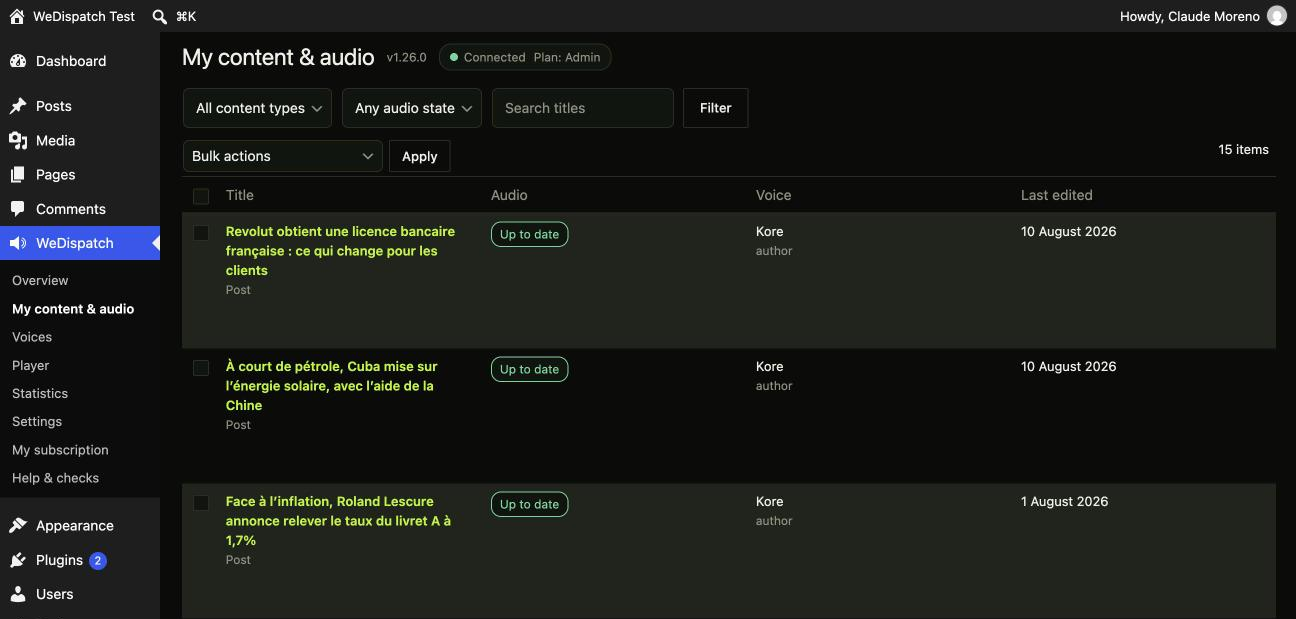
- New screen: My content & audio. Every post, page or product on the site, with its audio state, the voice that will read it, and what to do next. Generate or rebuild one item, or several at once. Filter by content type, by audio state, or search the titles.
- The list is built entirely from WordPress, with no network call. The service is only asked to do work, never to describe your site.
- Bulk actions are queued in the background rather than run inside the page, so a batch of fifty does not time out halfway with nobody knowing what went out. The screen says “queued”, because that is what happened.
- An item whose text changed since its audio was made is shown as such. Its audio keeps being served: that is a decision to take, not a failure to repair.
- Fixes a stylesheet that failed to load in 1.11.0, which left the new screens unstyled.
1.11.0
- WeDispatch now has its own place in the WordPress menu, instead of hiding under Settings. Four screens to start with: Overview, Settings, My plan, and Help & checks.
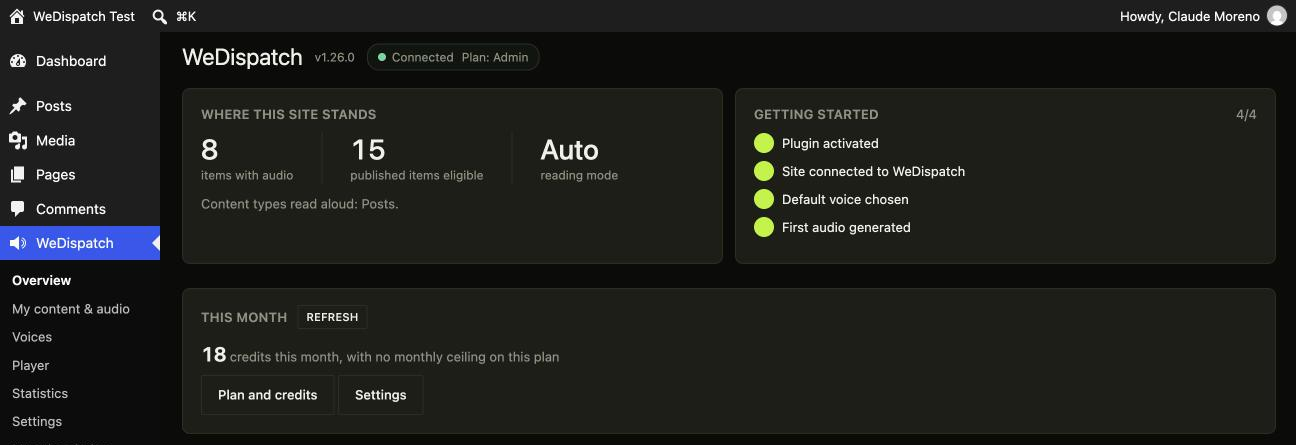
- The Overview screen answers the three questions you actually have: is it connected, what is it costing this month, and what is left to set up. Every item in the getting-started list is computed from this site, not copied from a manual.
- The connection state is now at the top of every screen, and it tells the difference between a refused key and an unreachable service. Those two need opposite reactions, and confusing them sends people to regenerate a key that was never the problem.
- Help & checks: a one-click key check, plus a diagnostics table you can paste into a support request.
- The old address (Settings, then WeDispatch) still works: it redirects.
1.10.1
- The settings screen now names the WeDispatch address this site talks to, right under the API key field. A key created for a different WeDispatch environment is refused with “invalid key”, which is true and tells you nothing about the cause.
1.10.0
- Posts are no longer the only thing that can be read aloud: pages, products and any custom post type can be, each one ticked in the settings.
- New WeDispatch audio player block for the editor, and a widget of the same name for sidebars, alongside the shortcode, which is unchanged.
- Every screen of the plugin is now translated. A French translation ships with it, and any other language can be contributed on translate.wordpress.org.
- The player is exposed to screen readers as a labelled landmark, so it can be announced and jumped to instead of being a silent block at the top of the article.
- Requires WordPress 6.3 or later (the editor block uses the current block API).
1.9.1
- Settings: the reading mode selected on the settings page, Automatic or Manual, is stored and applied exactly as chosen.
- Conditional access: the player identifies a signed-in reader through the REST route on sites served by a page cache, so audio follows the same access rules as the text.
1.9.0
- The player script now goes through the standard WordPress script queue: it is deferred and placed in the footer, so caching and performance plugins can handle it like any other asset. Its position in the article is unchanged.
- Every setting is now validated against a closed list of accepted values before being stored, and the API key is trimmed of the stray spaces a copy-paste often carries, the most common cause of a “key refused” message.
- Form tokens added to the per-author and per-category voice fields.
- Readme rewritten in English and tested against WordPress 7.0, as required by the official plugin directory.
1.8.0
- Every item is read in its own language. The plugin determines it on its own: Polylang, WPML, or the site language for a single-language install. A
wedispatch_post_languagefilter lets you set it differently. - Voices are now grouped by language in the selection lists, with the language of the item first, and the account’s signature voices at the top.
- Scheduled items are handled from the moment they are scheduled: the audio is prepared ahead of time and goes live at the planned hour, together with the text.
- New setting: automatic regeneration when the text of an item that already has audio changes. Off by default, since each regeneration uses one generation.
- Every request carries an idempotency key: a call replayed after a network drop produces neither a duplicate reading nor a duplicate charge.
1.7.1
- The “Generate audio” button now regenerates an item whose text has changed since the last audio version, instead of announcing a preparation that was not happening. The status shown in the editor panel now distinguishes audio ready, preparation in progress and scheduled go-live.
- Publishing and updating no longer hold up the save: generation runs in the background and the editor is handed back immediately.
- The voice catalogue is checked before every request. A stored voice that no longer appears in the plan’s catalogue is reported in the admin area and replaced by the account’s default voice, instead of failing silently.
1.7.0
- The category travels with the item: the first category (other than the default one) is sent to the service, which applies the per-category voice, jingle and statistics configured in your account area.
1.6.0
- Self-contained access lock: the plugin signs the visitor token itself (no code needed on the editorial side), with the secret retrieved from the service; a “Check that everything works” button in the settings.
1.5.0
- Preparation for the WordPress.org directory: external service declaration, complete headers (license, required versions), capability check on the per-category save, hardened handling of form data.
1.4.0
- “My subscription” panel in the settings: plan, monthly usage (bar), included rights and a suggested upgrade, with “subscribe” and “manage my subscription” shortcuts.
1.3.0
- Editor panel: preview of the voice actually used in Auto mode (category, author, site routing) and clearer mode labels.
1.2.0
- Voice per category (taking priority over the author), voice per author, mode meta box and manual generation.
1.0.0
- First release: generation on publication, automatic player, connection test.