

Description
Schnieders AI Media Labels helps you comply with the transparency obligations of the EU AI Act (Article 50), which require AI-generated media to be disclosed.
Open any image in the Media Library, tick “This image is AI-generated” (and optionally note the tool used, e.g. Midjourney), and the plugin displays a clear, configurable label wherever that image appears on your site.
Features
- A simple checkbox in the Media Library to flag any image, video or audio file as AI-generated.
- Optional field to record the AI tool or model used.
- Automatic front-end labelling of flagged files — no theme edits required.
- Auto-detection: uploads that already declare AI provenance (IPTC/XMP “Digital Source Type”) are flagged automatically.
- Media Library column, AI-status filter and bulk mark/unmark actions.
- Optional machine-readable marking: writes the IPTC “Digital Source Type” (trainedAlgorithmicMedia) into the image file (JPEG/PNG) so the AI status travels with the file.
- Works with images in post content, Gutenberg blocks, featured images, theme templates, and video/audio blocks.
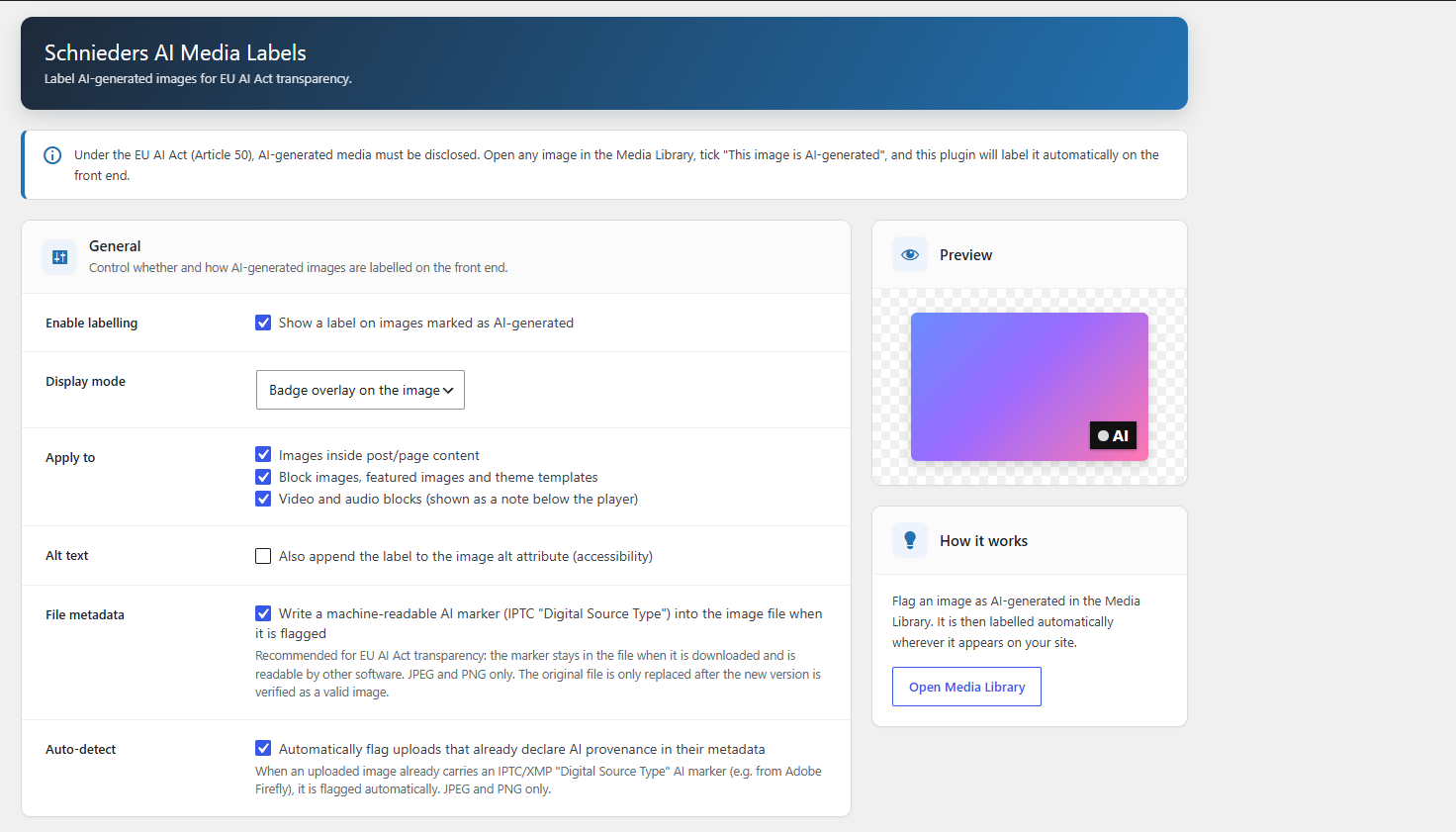
- Settings page to control:
- Whether labelling is enabled.
- Display mode: badge overlay, caption, or both.
- Badge position (all four corners).
- Badge shape: square, rounded, pill or circle.
- Font size and distance from the corner (in pixels).
- Indicator inside the badge: none, a dot, or a custom symbol (e.g. “!”).
- Short badge text and full label text.
- Badge background and text colour.
- Whether to append the label to the image alt attribute (accessibility).
- Fully translation ready — translations are provided through translate.wordpress.org.
- No tracking, no external requests, no database tables.
Disclaimer: this plugin is a tool to help with disclosure. It does not constitute legal advice; please verify your obligations under the EU AI Act.
Screenshots
Installation
- Upload the
schnieders-ai-media-labelsfolder to/wp-content/plugins/, or install it through the Plugins screen. - Activate the plugin through the “Plugins” screen in WordPress.
- Go to Settings > Schnieders AI Media Labels to configure how labels appear.
- In the Media Library, open an image and tick “This image is AI-generated”.
FAQ
-
Does this modify my images?
-
Only if you leave the “File metadata” option enabled. In that case, when you flag an image, the plugin writes a small machine-readable IPTC/XMP marker into the JPEG/PNG file (and its generated sizes). The pixels are not re-compressed, and the file is only replaced after the new version has been verified as a valid image. If you turn that option off, your files are never touched — the plugin then only stores a flag and displays a label on the front end.
We strongly recommend testing on a staging site and keeping backups before enabling file-metadata writing on a large existing library.
-
What is the machine-readable marker?
-
It is the IPTC “Digital Source Type” property with the value “trainedAlgorithmicMedia”, stored as XMP inside the file. This is the same standard used by Google, Adobe and others to indicate AI-generated media.
-
Which images get labelled?
-
Only images you explicitly flag as AI-generated in the Media Library.
-
Does it work with page builders?
-
It labels images rendered through the standard WordPress functions (post content, blocks, featured images,
wp_get_attachment_image). Some page builders output custom markup that may not be covered. -
Does the plugin send data anywhere?
-
No. It makes no external requests and stores nothing outside your own database.
Reviews
There are no reviews for this plugin.
Contributors & Developers
“Schnieders AI Media Labels” is open source software. The following people have contributed to this plugin.
Contributors
Translate “Schnieders AI Media Labels” into your language.
Interested in development?
Browse the code, check out the SVN repository, or subscribe to the development log by RSS.
Changelog
1.0.0
- Initial release.