

Description
PallasMark records short video/photo proof of your orders before they ship, and lets the buyer
approve (or dispute) that proof before the package leaves your warehouse — protecting you from
“item not as described” disputes and chargebacks.
This plugin automates the whole connection: paste a one-time connect token from your PallasMark
account, click Connect to PallasMark, and the plugin registers itself with PallasMark and
creates the order.created / order.updated webhooks on WooCommerce’s modern REST API
(wp_api_v3) — using the single webhook secret PallasMark actually verifies, so there’s nothing
left to copy between the two systems by hand.
What this plugin does:
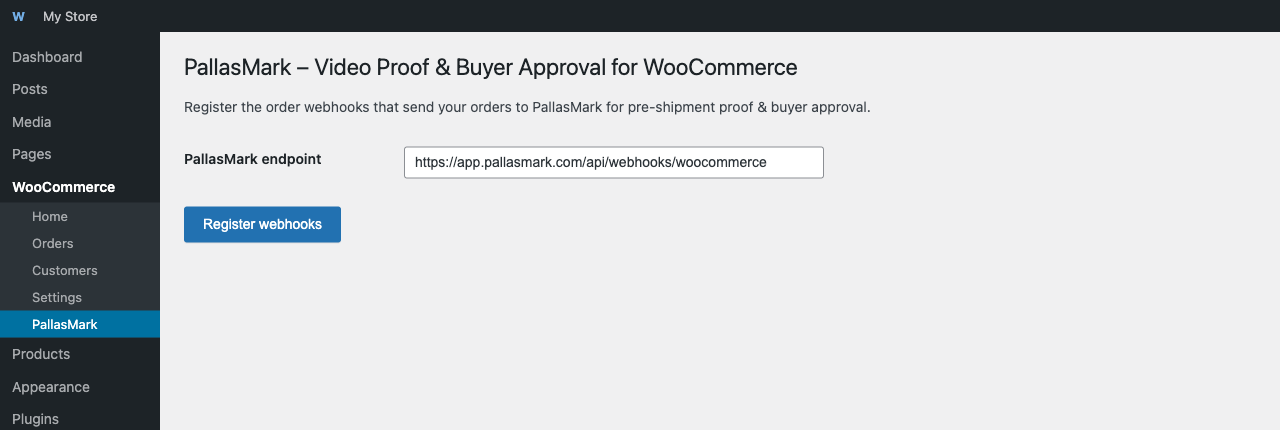
- Adds a WooCommerce PallasMark settings page.
- On your click, calls PallasMark with your one-time connect token and this store’s URL, receives
back a webhook secret, and creates the order webhooks pointed at PallasMark using that secret —
no manual webhook setup in WooCommerce Settings Advanced Webhooks, and nothing to
copy-paste into PallasMark yourself. - Re-running “Connect to PallasMark” is safe — it replaces any previous PallasMark webhooks
instead of creating duplicates.
What this plugin does NOT do: it does not send any order data anywhere by itself outside of
the explicit setup action described above. Once connected, WooCommerce’s own webhook delivery
system sends the order payload to PallasMark whenever triggered by real order activity. You still
need a PallasMark account to receive and use that data — this plugin is
the WooCommerce-side half of the connection, not a full product on its own.
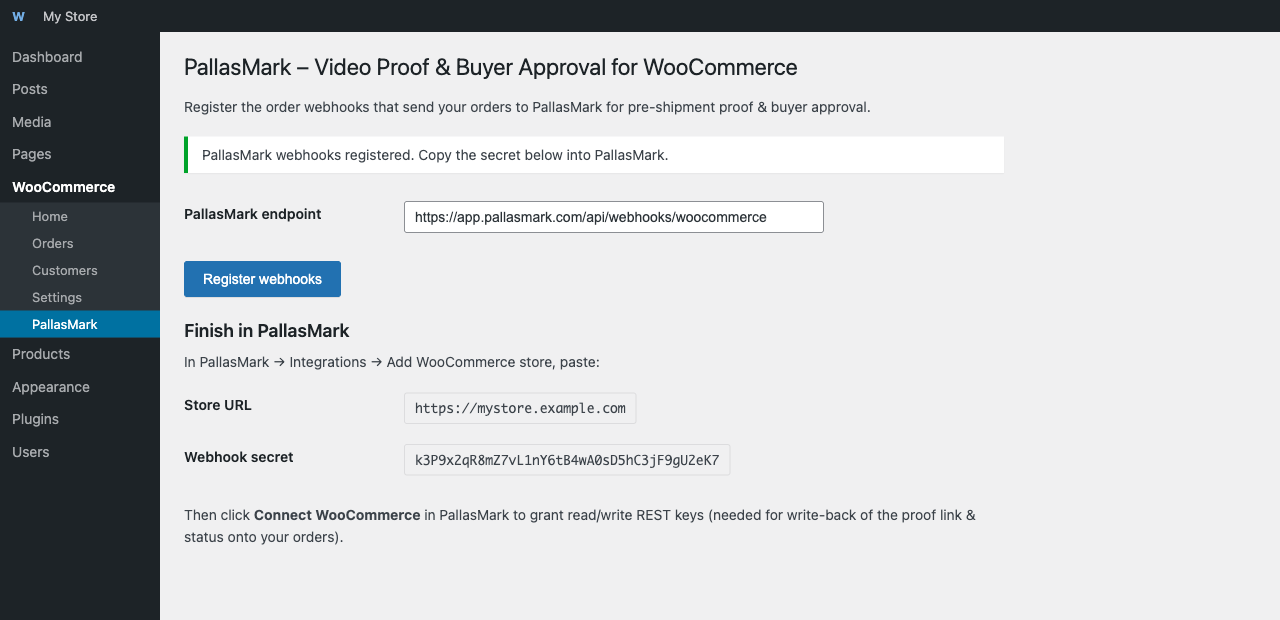
After connecting here, you’ll also need to click Connect WooCommerce inside PallasMark
(Integrations page) to grant a read/write REST API key pair — this is what lets PallasMark write
the proof link and approval status back onto your orders. The webhook connection alone only lets
orders flow in; the REST key is what lets status flow back.
External service disclosure: PallasMark is a hosted Software as a Service product. When you
explicitly click Connect to PallasMark, the plugin (a) calls PallasMark’s registration API
with your connect token and this site’s URL to obtain a webhook secret, and (b) configures
WooCommerce to send order-created and order-updated webhook payloads to the PallasMark service
going forward. Depending on the order, those payloads may include customer contact, billing,
shipping, product, and order-status data. The plugin does not contact PallasMark before this
explicit setup action. Use of the service is subject to the
PallasMark Terms of Service and
Privacy Policy.
Screenshots
Installation
Already have a PallasMark account?
- Upload the plugin files to
/wp-content/plugins/pallasmark-for-woocommerce, or install the plugin through the WordPress plugins screen directly. - Activate the plugin through the Plugins screen in WordPress.
- In PallasMark (Integrations page), click Get WooCommerce connect token and copy it.
- Go to WooCommerce PallasMark in your WordPress admin, paste the token, and click Connect to PallasMark.
- Back in PallasMark, click Connect WooCommerce to finish granting write-back access.
New to PallasMark?
- Activate the plugin, then go to WooCommerce PallasMark.
- Click Create a free PallasMark account — this opens PallasMark in a new tab with a 14-day Pro trial (no card required) and already knows this is a WooCommerce store.
- On the “Connect your store” step, click Get connect token and copy it.
- Switch back to your WordPress tab, paste the token, and click Connect to PallasMark.
- Back in PallasMark, click Connect WooCommerce to finish granting write-back access.
FAQ
-
Do I need a PallasMark account?
-
Yes. This plugin only connects an existing WooCommerce store to an existing PallasMark
account — it doesn’t create one for you. Sign up at https://pallasmark.com first. -
Is my data sent anywhere else?
-
No. The plugin only talks to the PallasMark URL you configure (default:
app.pallasmark.com) —
once to register the connection when you click Connect to PallasMark, and afterwards via
WooCommerce’s own webhook delivery mechanism. You can review or change the URL on the PallasMark
settings page before connecting. -
What happens if I deactivate the plugin?
-
The webhooks it created remain registered in WooCommerce (visible under WooCommerce Settings
Advanced Webhooks) until you delete them manually or reactivate the plugin and re-register
(which replaces them). Deactivating the plugin does not disconnect your PallasMark account. -
I previously used the “drProof” plugin — do I need to do anything?
-
Re-running Register webhooks on this version automatically removes any leftover webhooks from
the old plugin name and endpoint, and creates fresh ones pointed at the current PallasMark
endpoint.
Reviews
There are no reviews for this plugin.
Contributors & Developers
“PallasMark – Video Proof & Buyer Approval for WooCommerce” is open source software. The following people have contributed to this plugin.
Contributors
Translate “PallasMark – Video Proof & Buyer Approval for WooCommerce” into your language.
Interested in development?
Browse the code, check out the SVN repository, or subscribe to the development log by RSS.
Changelog
1.0.6
- Added a “Create a free PallasMark account” button for merchants who install this plugin
directly from the WordPress.org search results without a PallasMark account yet — it opens
signup with this store’s URL already attached, so PallasMark’s onboarding can skip straight
to a connect token instead of a generic setup screen.
1.0.5
- Replaced the manual “copy a plugin-generated secret into PallasMark” step with a one-time
connect token: paste it once, click Connect, and the plugin registers itself with PallasMark
automatically. The previous flow had no way to actually get the plugin’s secret into PallasMark,
so webhook signature verification could never succeed — this fixes that.
1.0.4
- Declared WooCommerce as a required plugin dependency.
1.0.3
- Confirmed compatibility with WordPress 7.0 and WooCommerce 10.9.
- Added the external-service, data-transfer, Terms of Service, and Privacy Policy disclosure
required for transparent PallasMark SaaS integration. - Fixed translation-domain declarations so the plugin passes WordPress.org Plugin Check.
- Updated the plugin homepage to a live PallasMark URL.
1.0.2
- Plugin title expanded to “PallasMark – Video Proof & Buyer Approval for WooCommerce” —
the plain brand name alone isn’t a keyword anyone searches the plugin directory for; the
functional description improves discoverability without stuffing the title with unrelated
keywords (search-relevant terms live in Tags/description instead, per directory guidelines).
1.0.1
- Renamed from “drProof for WooCommerce” to “PallasMark for WooCommerce” (product rebrand).
- Fixed the default endpoint, which still pointed at the retired drproof.com domain instead of
app.pallasmark.com. - Re-registering webhooks now also cleans up old drProof-named webhooks left over from the
previous plugin name, not just PallasMark-named ones. - Added translator-ready strings (text domain:
pallasmark-for-woocommerce).
1.0.0
- Initial release.