
Description
ChainCheckout is a cryptocurrency payment gateway for WooCommerce that enables merchants to accept cryptocurrency payments directly into their own wallets without relying on custodial payment processors or intermediaries.
Unlike traditional crypto payment gateways, ChainCheckout puts you in control by allowing payments to go straight to your wallet while providing a familiar and seamless WooCommerce checkout experience for your customers.
Why Choose ChainCheckout?
- Direct Wallet Payments — Receive cryptocurrency payments directly into your own wallet without third-party custody.
- No Middlemen — No custodial wallets, payment processors, or unnecessary intermediaries between you and your funds.
- Use Your Own Wallet — Configure the wallet you already own and control — no need to create or maintain additional accounts.
- Choose Your Preferred Cryptocurrency — Select the supported cryptocurrency you want to accept for payments.
- Live Exchange Rates — Payment amounts are calculated using live market exchange rates to help customers pay the correct amount.
- QR Code Payments — Customers can quickly scan the generated QR code with their compatible wallet application for a smooth checkout experience.
- Native WooCommerce Integration — Works seamlessly with WooCommerce using the familiar payment gateway interface.
- Flexible Configuration — Configure the gateway to match your business requirements with simple, straightforward settings.
Key Features
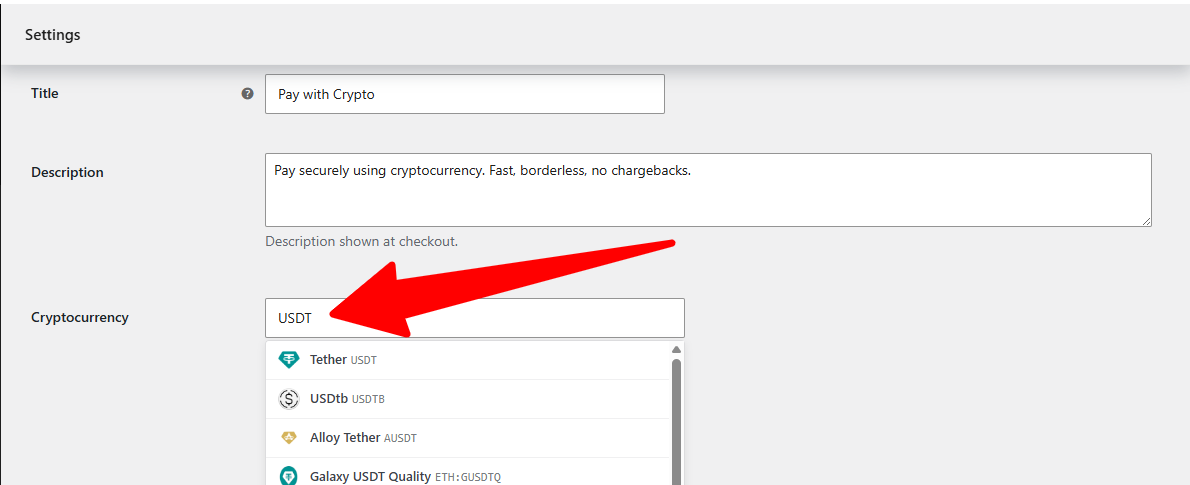
- Search and select your preferred cryptocurrency from over 18,000 tracked by CoinGecko — your choice of one to accept
- Live exchange rates fetched from CoinGecko (with Coinbase as a fallback), cached for 5 minutes to reduce API calls
- QR code generation with the coin’s logo rendered at the center
- Optional transaction screenshot upload to speed up manual payment verification
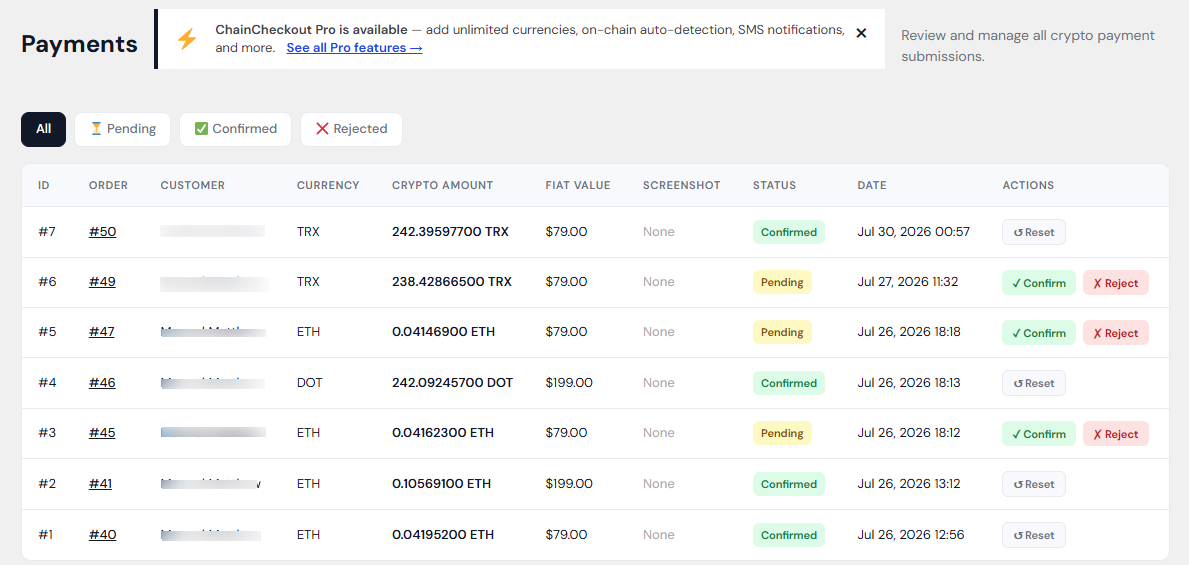
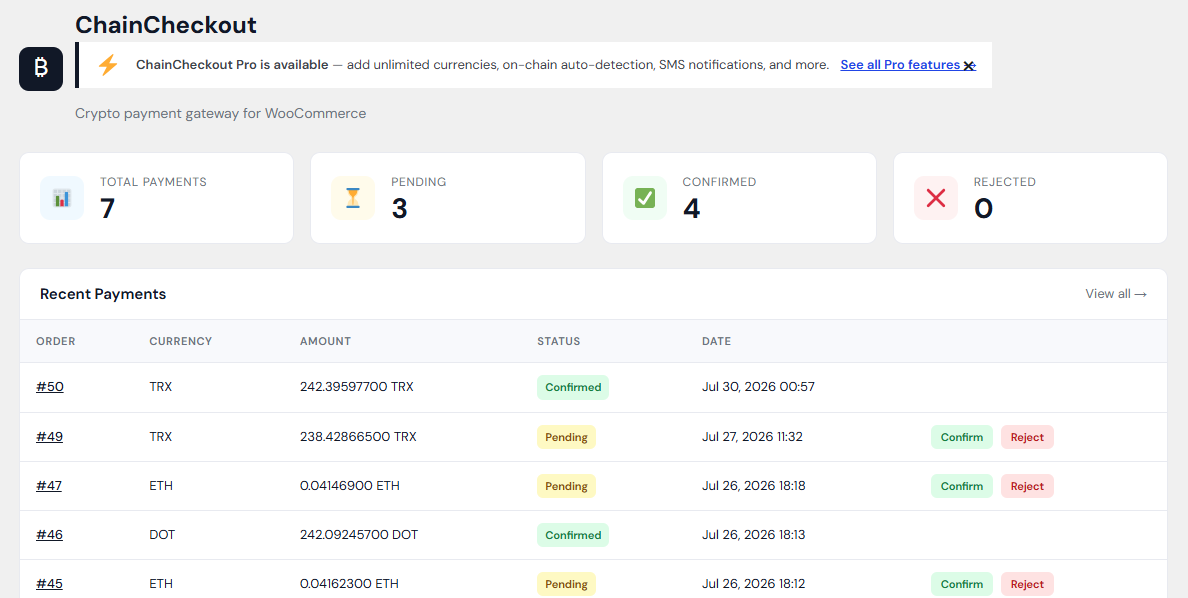
- Admin dashboard to review, confirm, or reject pending crypto payments
- Email notifications to both store admin and customer when a payment is submitted or its status changes
- Works with both the classic WooCommerce checkout and the block-based Cart & Checkout blocks
- Compatible with WooCommerce High-Performance Order Storage (HPOS)
Perfect For
- Online stores
- Digital product sellers
- Service providers
- Membership websites
- Donation websites
- Freelancers and agencies
- Businesses accepting cryptocurrency payments
How It Works
- In WooCommerce Settings Payments ChainCheckout, choose your cryptocurrency and enter your wallet address
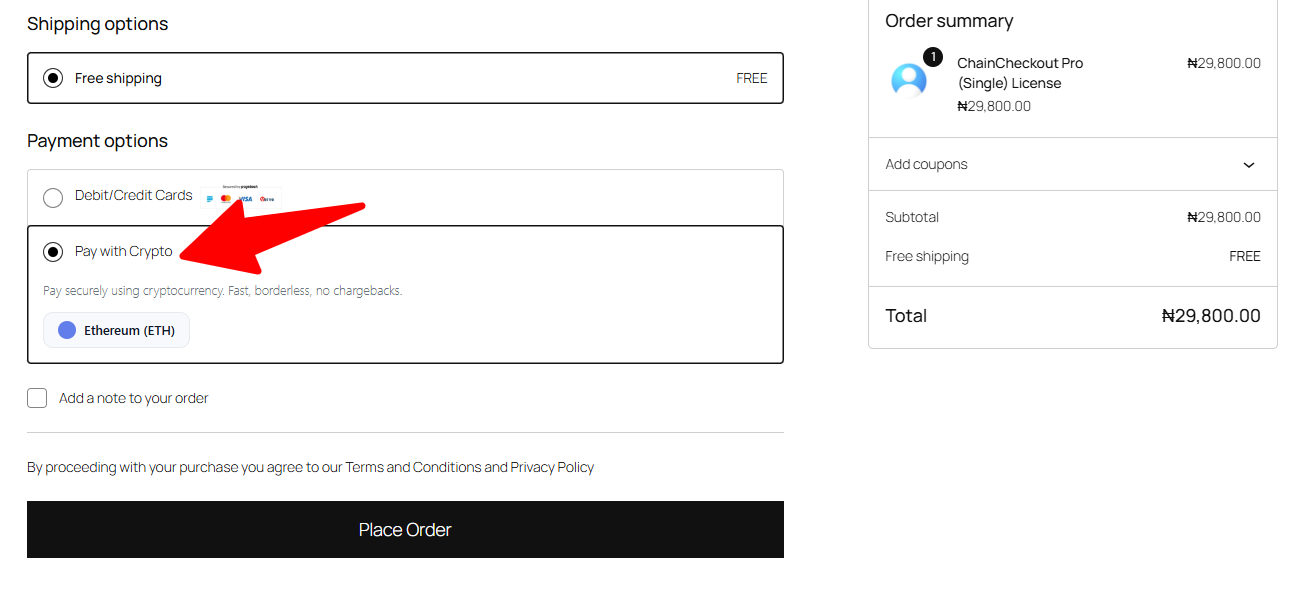
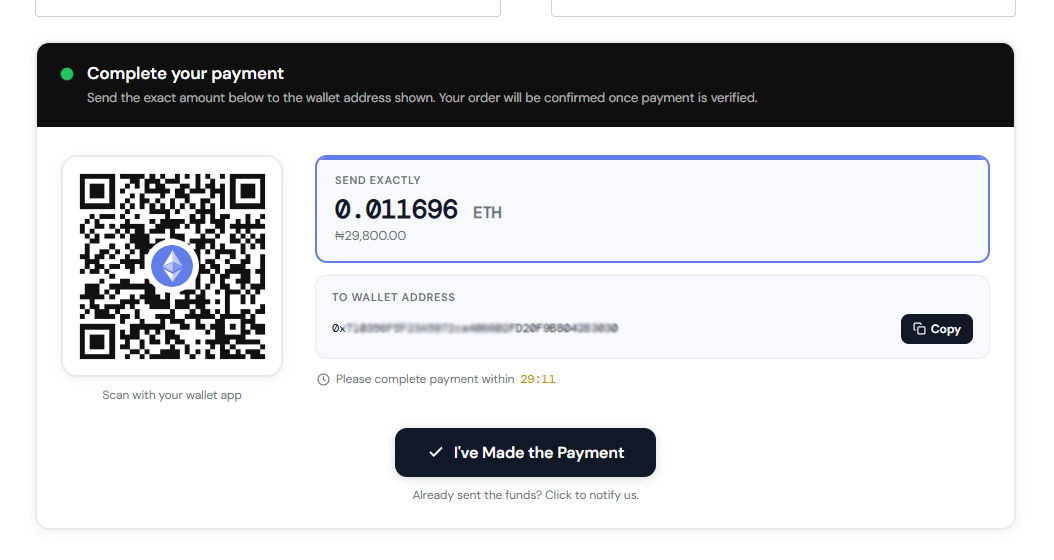
- A customer selects “Pay with Crypto” at checkout and sees a live-converted amount with a QR code for your configured coin
- They send the payment from their own wallet app and click “I’ve Made the Payment,” optionally attaching a screenshot
- You get notified by email and review the payment in ChainCheckout Payments, confirming or rejecting it with one click
- The customer is notified automatically once you’ve made a decision
Third-Party Services Used
This plugin fetches live cryptocurrency exchange rates from two third-party APIs so that the amount shown to your customers is accurate at the time of checkout:
- CoinGecko (primary) — API documentation: CoinGecko API. Terms of use: CoinGecko Terms and Conditions.
- Coinbase (fallback, used only if CoinGecko is unreachable) — API documentation: Coinbase Exchange API docs. Terms of use: Coinbase User Agreement.
No personal or order data is sent to either service — only the cryptocurrency symbol and your store’s currency are used to request a current exchange rate. No account, registration, or API key is required for either service.
Privacy
ChainCheckout communicates with external services only when required to retrieve live cryptocurrency exchange rates and generate payment information. See our Privacy Policy for details.
Documentation
Documentation, setup guides, FAQs, and troubleshooting resources are available at jetlegz.com/documentation/chaincheckout.
Support
Need help or have a question? Visit jetlegz.com/support or contact us at info@jetlegz.com.
Screenshots
Installation
- Upload the plugin files to
/wp-content/plugins/chaincheckout, or install directly through the WordPress plugins screen - Activate the plugin through the ‘Plugins’ screen in WordPress
- Go to WooCommerce Settings Payments ChainCheckout, choose your cryptocurrency, and enter your wallet address
- Enable the gateway on that same settings screen
- That’s it — the option will now appear at checkout
FAQ
-
Does this plugin process payments automatically?
-
No. ChainCheckout is a manual-confirmation gateway. Customers send cryptocurrency directly to your own wallet address, then notify you. You review and confirm the payment yourself in the ChainCheckout Payments screen. This plugin does not have access to your wallet, hold funds, or move cryptocurrency on your behalf at any point.
-
Do I need an account with ChainCheckout to use this?
-
No. There is no registration, account, or external dashboard required. You install the plugin, add your own wallet address, and use it entirely within your own WordPress admin.
-
Where do the exchange rates come from?
-
Live rates are fetched from CoinGecko’s public API, with Coinbase’s public API used as a fallback if CoinGecko is unreachable. See the “Third-party services used” section above for details.
-
Which cryptocurrencies are supported?
-
You can search and select from over 18,000 coins tracked by CoinGecko right on the settings screen — Bitcoin, Ethereum, Tether (USDT), and thousands more. Only one cryptocurrency can be active at a time per store.
-
Does ChainCheckout verify that my wallet address is valid?
-
For Bitcoin, Ethereum (and other EVM-compatible chains like BNB Chain and Polygon), Solana, XRP Ledger, Litecoin, Dogecoin, Cardano, and Tron, ChainCheckout checks that the address you enter matches that chain’s format before saving it. For coins outside these chains, it tells you plainly that it can’t verify the format yet and asks you to double-check the address yourself — it will never falsely claim an address is valid.
-
Does this work with the new WooCommerce block-based checkout?
-
Yes. ChainCheckout supports both the classic shortcode-based checkout and the newer Cart & Checkout blocks.
-
Can I accept more than one cryptocurrency?
-
The free plugin supports one cryptocurrency at a time — you choose which one in WooCommerce Settings Payments ChainCheckout. If you need to accept multiple currencies simultaneously, that’s available in ChainCheckout Pro, a separate paid add-on — see jetlegz.com/chaincheckout for details. Pro also adds automatic on-chain payment detection, SMS notifications, subscription renewal support, and a branded payment screen.
-
Is payment confirmation manual? Can it be automated?
-
In the free plugin, you confirm payments manually in ChainCheckout Payments after a customer notifies you. ChainCheckout Pro adds automatic on-chain detection — it polls the blockchain every 5 minutes and confirms orders automatically when payment lands in your wallet, with no admin action required.
-
Is there a Pro version?
-
Yes. ChainCheckout Pro is a separate add-on plugin available at jetlegz.com/chaincheckout. It requires this free plugin to be installed and active. Pro adds: unlimited multi-currency support (any CoinGecko coin), on-chain auto-detection, Twilio SMS notifications, WooCommerce Subscriptions renewal support, and a branded payment page builder.
-
Where can I get documentation or support?
-
Full documentation is available at jetlegz.com/documentation/chaincheckout. For support, visit jetlegz.com/support or use the Support forum on this plugin’s WordPress.org page.
Reviews
There are no reviews for this plugin.
Contributors & Developers
“ChainCheckout – Crypto Payment Gateway” is open source software. The following people have contributed to this plugin.
Contributors
Translate “ChainCheckout – Crypto Payment Gateway” into your language.
Interested in development?
Browse the code, check out the SVN repository, or subscribe to the development log by RSS.
Changelog
1.0.17
- Rewrote the third-party service links in the “Third-Party Services Used” section so link text is a readable label instead of a raw URL, resolving a plugin-review URL-validation false positive.
- Renamed the currency-search transient cache key from
cco_search_tochaincheckout_currency_search_for namespace consistency with the rest of the plugin’s options and transients.
1.0.16
- Corrected an outdated price shown for the Pro Enterprise plan on the “Upgrade to Pro” screen, and added the monthly price alongside the annual price (previously only annual was shown).
1.0.15
- Additional output-escaping and coding-standards fixes following a full WordPress.org plugin review pass — no functional changes.
1.0.14
- Hardened input handling and output escaping throughout the admin dashboard, payments list, and checkout screens ahead of WordPress.org submission.
- Fixed a translatable string missing a translators comment, and corrected placeholder ordering in a translatable order note.
- Synced the readme’s stable tag with the plugin version.
1.0.13
- Admin menu icon color now matches the WordPress admin menu text color for a more consistent look.
1.0.12
- Enlarged the admin menu icon, which was rendering noticeably smaller than other menu icons.
1.0.11
- Fixed the ChainCheckout admin menu icon not appearing at all on hosts with stricter security configurations, by loading it as a standard image file instead of inline image data.
1.0.10
- Further fix for the admin menu icon not displaying on some setups.
1.0.9
- Fixed the ChainCheckout admin menu icon appearing invisible in the WordPress sidebar.
1.0.8
- Fixed “Creation of dynamic property” deprecation notices on PHP 8.2+ for the gateway’s coin/wallet/metadata properties. On hosts that display PHP notices inline, these were being printed before the coin-search AJAX response and corrupting it — which is the most likely cause of the search picker still hanging on “Searching…” after the 1.0.7 timeout fix.
1.0.7
- Fixed the coin search picker getting stuck on “Searching…” indefinitely when the search request hangs (e.g. a host that can’t reach CoinGecko) — the request now times out after 15 seconds and shows a clear error instead of hanging forever.
- Added debug.log entries (when WP_DEBUG_LOG is on) for CoinGecko search failures, to make connectivity issues diagnosable.
1.0.6
- The Cryptocurrency field is now a search picker (powered by CoinGecko) instead of a fixed 6-coin dropdown — search any coin by name or symbol, still limited to the one wallet the free plugin supports.
- Fixed live rate pricing and checkout icon/logo not resolving correctly for coins selected outside the old fixed list.
1.0.0
- Initial release