

Description
Replai GEO brings Generative Engine Optimization (GEO) to WordPress. Instead of only optimizing for classic search engines, it makes your content easy to read, understand and cite for large language models such as ChatGPT, Claude, Perplexity and Gemini.
It does three things, all from your WordPress admin:
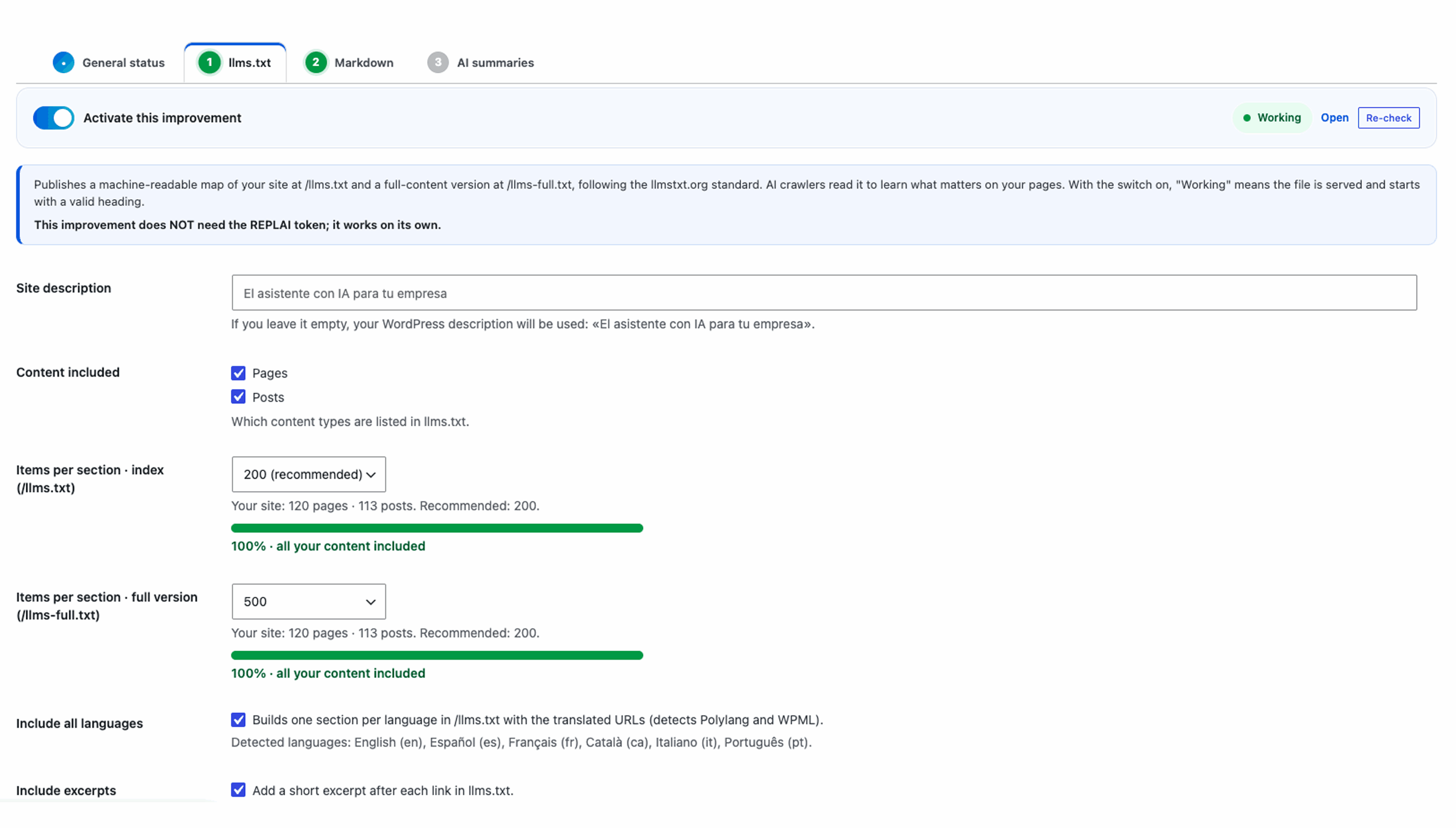
- llms.txt generator (the flagship): publishes a machine-readable map of your site at
/llms.txtand a full-content version at/llms-full.txt, following the llmstxt.org standard. You choose which content types are included (pages and/or posts), the number of items per section, the site description and whether to add short excerpts. Results are cached and rebuilt automatically when you save content or settings. Multilingual-aware: on Polylang or WPML sites it builds one llms.txt with a section per language and the translated URLs. - Clean Markdown per page: add
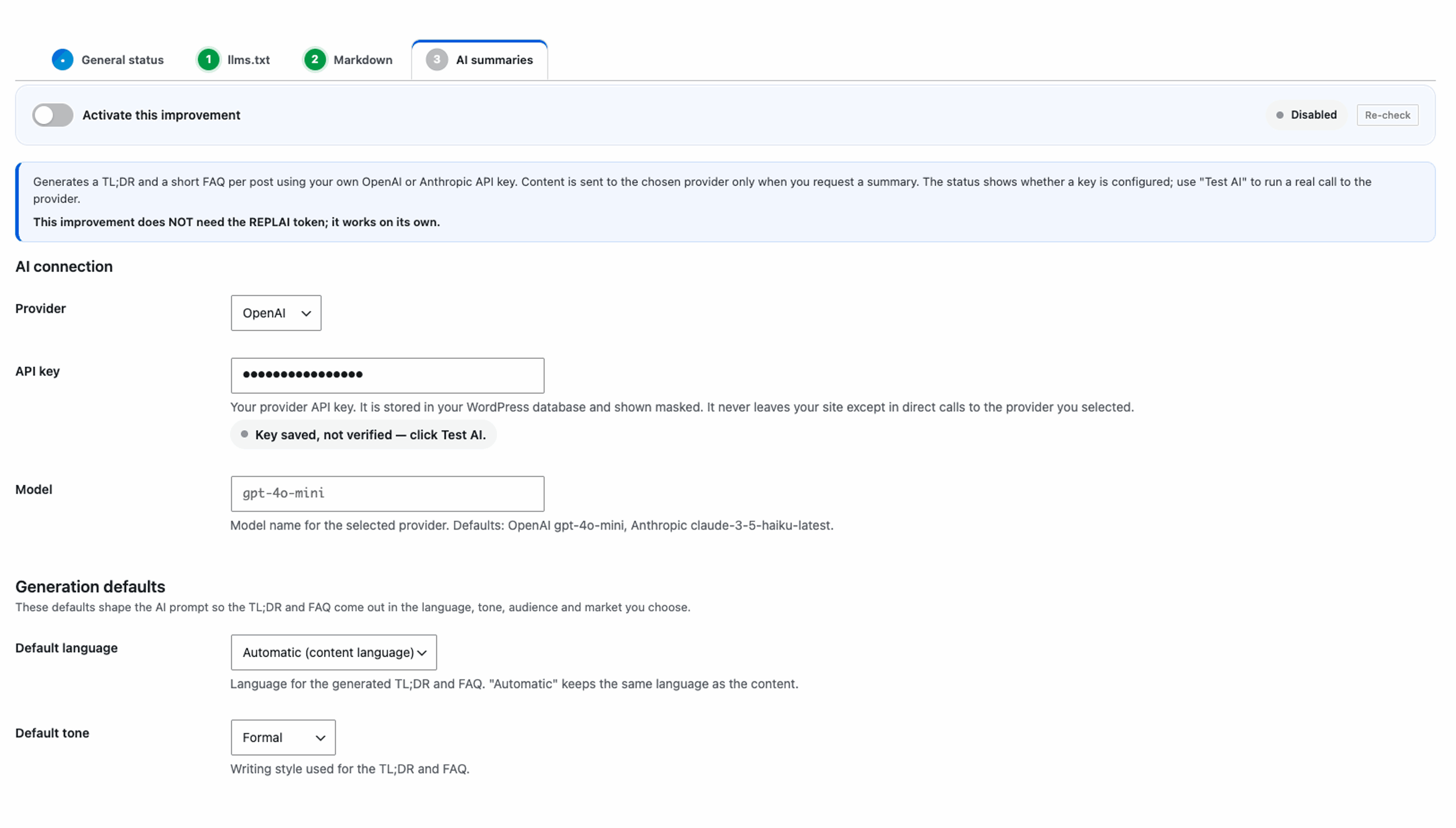
?format=mdto any page or post URL and the plugin serves a clean Markdown version (title, date and the content converted to Markdown), with no menus, scripts or clutter — exactly what AI agents prefer to read. - AI summaries & FAQ with your own key: generate a TL;DR and a short FAQ for any post using your own OpenAI or Anthropic API key. Set generation defaults (language, tone, target audience and market/country) that shape the AI prompt, and optionally feed the TL;DR into your llms.txt or inject the TL;DR/FAQ into the post content.
Extra niceties:
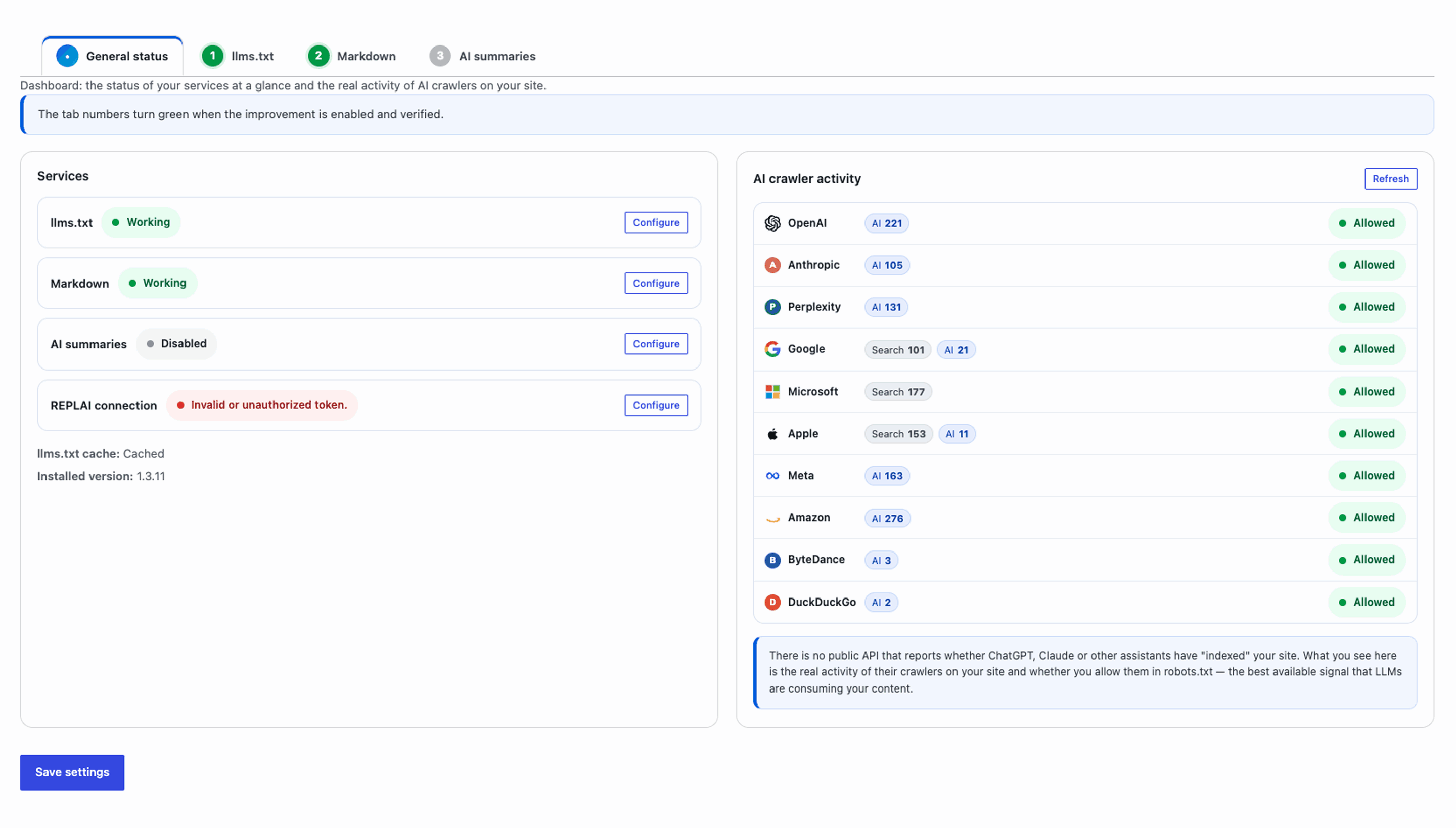
- AI crawler analytics: the “General status” dashboard shows all your services and their live status plus the real activity of AI crawlers on your site — grouped by provider with its logo (OpenAI, Anthropic, Perplexity, Google, Microsoft, Apple, Meta and more) in compact rows, with visit counts, last-seen dates and whether you allow each of them in your robots.txt. It also distinguishes classic search crawling from AI crawling (e.g. Googlebot vs Google-Extended). There is no public “indexing” API for AI assistants, so this crawler activity is the best available signal that LLMs are consuming your content.
- Discovery links in your site
<head>:<link rel="alternate" type="text/plain">to llms.txt and<link rel="alternate" type="text/markdown">to the Markdown version of singular pages. - A Try / Demo panel in the admin: generate llms.txt, preview the Markdown of a page and generate an AI summary, all inline without reloading.
- Fully translated admin (English, Spanish, Catalan, French, Italian, Portuguese and German) shown in your site language right away.
- Optional REPLAI connection: add a project token to monitor this installation from your REPLAI dashboard. Entirely optional — the plugin works 100% without it.
External services
This plugin can connect to external services, but only in the situations described below and only when you explicitly opt in. Out of the box, with no API key and no REPLAI token configured, the plugin makes no external calls.
OpenAI (optional, only when you add an OpenAI API key and request a summary)
When you choose “OpenAI” as the provider, enter your OpenAI API key and click “Generate AI summary” (or enable AI features that trigger generation), the plugin sends the title and content of the selected post to the OpenAI Chat Completions API (https://api.openai.com/v1/chat/completions) to produce a TL;DR and FAQ. No data is sent to OpenAI unless you provide a key and request a generation.
Terms of use: https://openai.com/policies/terms-of-use
Privacy policy: https://openai.com/policies/privacy-policy
Anthropic (optional, only when you add an Anthropic API key and request a summary)
When you choose “Anthropic” as the provider, enter your Anthropic API key and request a summary, the plugin sends the title and content of the selected post to the Anthropic Messages API (https://api.anthropic.com/v1/messages) to produce a TL;DR and FAQ. No data is sent to Anthropic unless you provide a key and request a generation.
Terms of service: https://www.anthropic.com/legal/consumer-terms
Privacy policy: https://www.anthropic.com/legal/privacy
REPLAI (optional, only when you add a REPLAI token)
If you add a REPLAI project token, the plugin connects to the REPLAI cloud platform (https://app.replai.net) to validate the token and link this installation to your REPLAI dashboard. Leave the token empty and no data is sent to REPLAI. This is entirely optional; the plugin works fully without it.
Terms of service: https://replai.net/en/termsandconditions/
Privacy policy: https://replai.net/en/privacy-policy/
Screenshots
Installation
- Upload the replai-ai-seo folder to your
/wp-content/plugins/directory, or install it directly from the WordPress plugin repository. - Activate the plugin from the WordPress admin panel.
- Go to Replai AI SEO in the admin sidebar to configure the llms.txt generator, the Markdown links and (optionally) your AI key.
- Visit
/llms.txton your site to see the generated file, or add?format=mdto any page URL to see its Markdown version.
FAQ
-
What is llms.txt?
-
It is an emerging standard (llmstxt.org) that publishes a plain-text, machine-readable map of a website so AI assistants can quickly find and understand the important content. This plugin serves it at
/llms.txtand a full-content variant at/llms-full.txt. -
/llms.txt does not respond. What should I check?
-
The plugin registers rewrite rules for
/llms.txtand/llms-full.txtand flushes them automatically on activation and updates, so normally there is nothing to do. If it still does not respond, go to Settings Permalinks and make sure you are NOT using the “Plain” structure (use “Post name”, for example), then re-check from the plugin’s General status tab. No manual .htaccess editing is required. -
Is an AI API key required?
-
No. The llms.txt generator and the Markdown output work without any key. An OpenAI or Anthropic key is only needed for the optional AI TL;DR/FAQ feature, and the key is your own.
-
Does the plugin change how my site looks?
-
No, unless you turn on “Inject into content”. By default the AI TL;DR/FAQ are only used where you decide (for example in llms.txt), so your public design is untouched.
-
Is REPLAI required?
-
No. The REPLAI token is optional and the plugin is fully functional without it.
-
Can it tell me if ChatGPT/Claude indexed my site?
-
Not exactly, and no plugin honestly can: the AI assistants do not expose a public API that reports whether they have “indexed” a given website. What this plugin shows instead is the best available real signal — the actual activity of their crawlers on your own site (GPTBot/OAI-SearchBot/ChatGPT-User for OpenAI, ClaudeBot/anthropic-ai for Anthropic, PerplexityBot, Google-Extended, bingbot, etc.), with visit counts and last-seen dates, plus whether your robots.txt allows each of them. If their crawlers visit and you allow them, your content is being consumed by LLMs.
-
Does it support multilingual sites (WPML / Polylang)?
-
Yes. The plugin detects both Polylang and WPML and builds a single
/llms.txt(and/llms-full.txt) with one section per language, each listing that language’s pages and posts with their translated URLs. You can turn this off with the “Include all languages” toggle. On single-language sites nothing changes.
Reviews
There are no reviews for this plugin.
Contributors & Developers
“Replai GEO – Generative Engine Optimization for AI & LLMs” is open source software. The following people have contributed to this plugin.
Contributors
Translate “Replai GEO – Generative Engine Optimization for AI & LLMs” into your language.
Interested in development?
Browse the code, check out the SVN repository, or subscribe to the development log by RSS.
Changelog
A full changelog is also available in CHANGELOG.md.
1.3.11
- Renamed the plugin to “Replai GEO – Generative Engine Optimization for AI & LLMs” to comply with WordPress.org naming guidelines (brand-first, no third-party product names in the title). The slug and text domain (
replai-ai-seo) are unchanged.
1.3.10
- Slug alineado a
replai-ai-seo: el text domain del plugin ahora coincide con el slug (corrige el aviso textdomain_mismatch de Plugin Check). - Cumplimiento de los estándares de código de WordPress.org: escape del SVG de logos con wp_kses, saneamiento de entradas de servidor, descripción corta ≤150 y anotaciones para los hooks de core/WPML.