

Description
Three things every WordPress site needs, and one screen that shows you all of them working.
WordPress loads roughly 90 KB of scripts and styles on every single page that most sites never use. Emoji detection. A jQuery compatibility shim for code written a decade ago. An icon font for visitors who will never see the admin. This plugin removes them, and then tells you exactly how many kilobytes and how many requests it saved. Not an estimate: the size of the real file on your server.
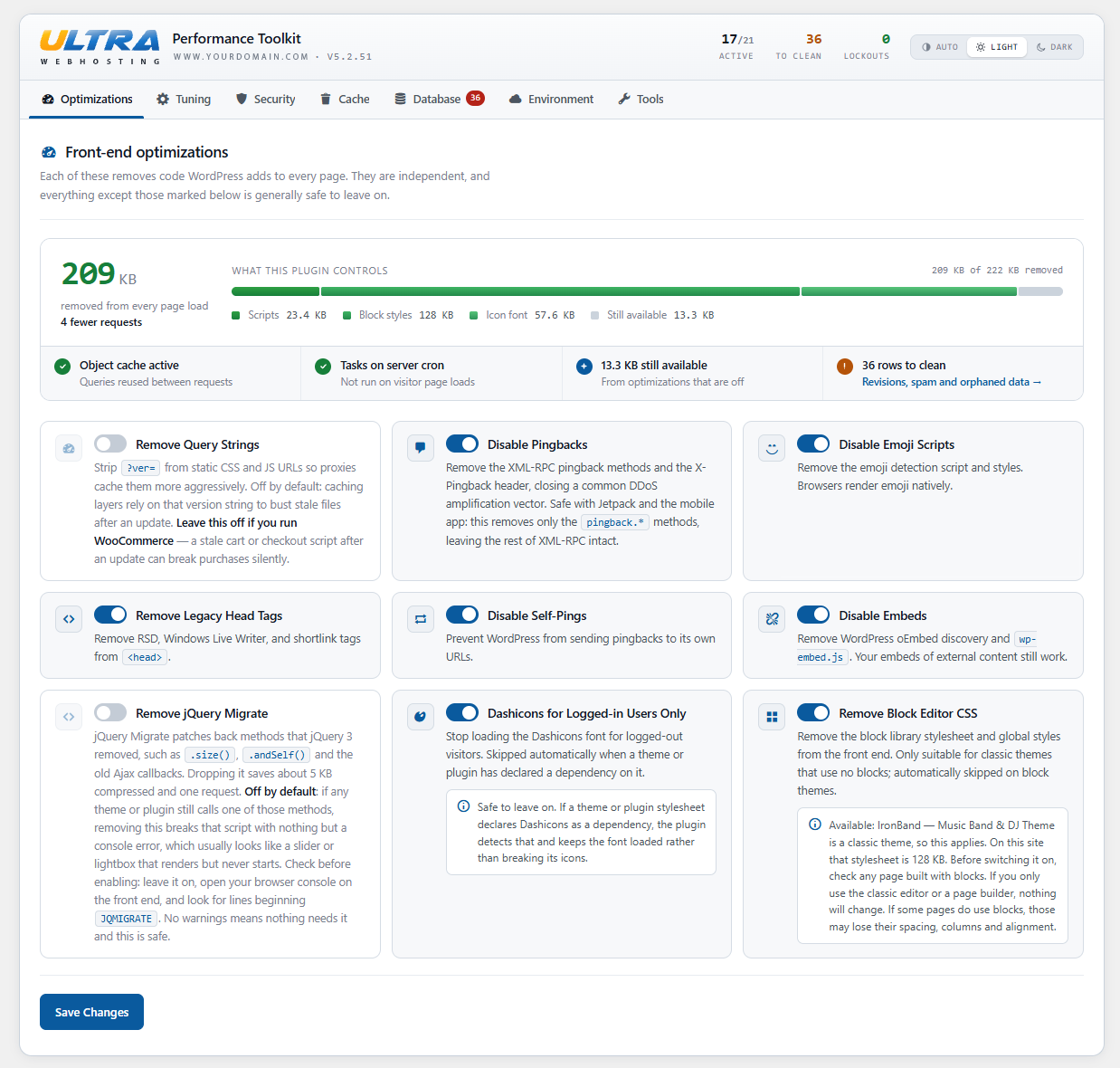
Speed. Twenty-one optimizations, each a plain toggle. The Optimizations tab opens with a running total of what your current settings have stripped from every page load, broken down by category, next to how much is still on the table. You never have to wonder whether a switch did anything.
Security. Brute-force login protection with a per-IP lockout and a log of who tried. Comment spam stopped by a honeypot, a signed speed trap and a link limiter. XML-RPC closed. The registration page closed. The theme and plugin file editors removed, so a stolen password no longer means arbitrary PHP on your server. Each one steps aside politely when a dedicated security plugin is already handling it.
One button that clears everything. LiteSpeed, AccelerateWP, WP Rocket, W3 Total Cache, WP Super Cache, WP Fastest Cache, Autoptimize, Elementor, Divi, Beaver Builder, Oxygen, GeneratePress, Brizy, OPcache, the object cache, your server’s reverse proxy and Cloudflare. One click, from the admin bar, wherever you are. It calls each plugin’s own flush routine rather than deleting its files behind its back, so it cooperates with your stack instead of fighting it. And if something fails, it says so and names it, rather than reporting a success that did not happen.
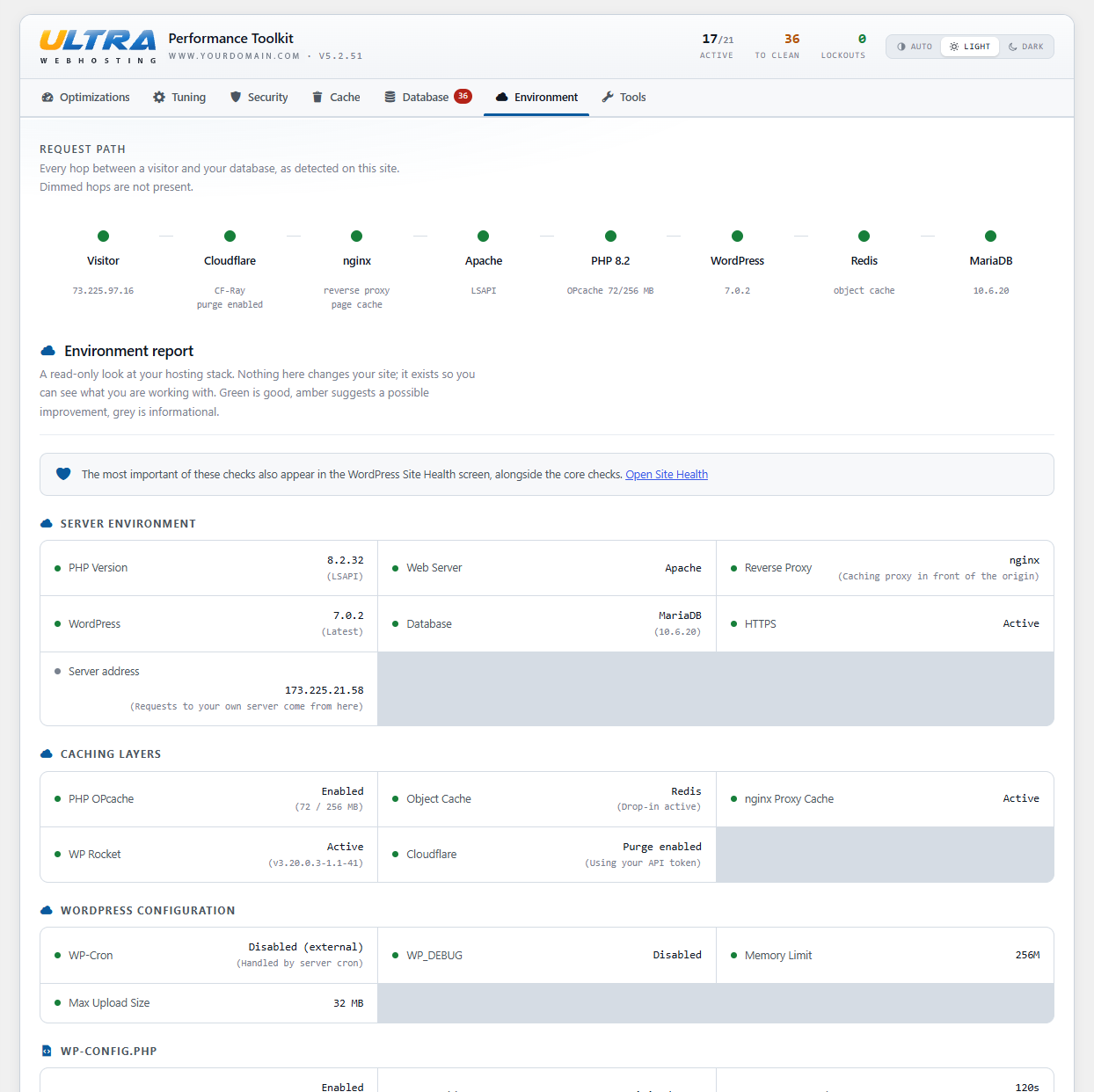
It tells you what you are actually running. The Environment tab draws the path a visitor’s request takes to reach your database, each hop lit or dimmed by what was detected, then grades your PHP version and handler, web server, reverse proxy, database, opcode and object caches, and the wp-config.php and .htaccess settings that matter. All read-only. The same checks appear in WordPress Site Health, where you already look.
No upsell, no account, no paid tier, and nothing phones home. The only external service the plugin ever contacts is Cloudflare, and only if you have deliberately set that up.
Every option is a plain toggle, and anything not marked below is generally safe to leave on.
Front-end optimizations
- Remove query strings from static CSS/JS URLs so proxies and CDNs cache them more aggressively. Off by default, since stripping
?ver=can serve stale CSS/JS after an update on sites that rely on it for cache-busting. Leave it off if you run WooCommerce, where a stale cart or checkout script can break purchases silently. - Disable emoji scripts — browsers render emoji natively, so the detection script is dead weight.
- Remove legacy head tags (RSD, Windows Live Writer, shortlink).
- Hide the WordPress version generator tag from page source and feeds.
- Disable embeds — removes the oEmbed discovery links, REST route, and
wp-embed.js. - Remove jQuery Migrate — patches back methods jQuery 3 removed. Saves about 5 KB compressed and one request. Off by default, because if anything on the site still calls one of those methods this breaks it with only a console error to show for it. Leave jQuery Migrate loaded, open your browser console, and look for
JQMIGRATEwarnings first. - Dashicons for logged-in users only — skips the icon font for logged-out visitors, and steps aside automatically when a theme or plugin has declared a dependency on it.
- Remove block editor CSS — drops the block library stylesheet and global styles from the front end. Off by default, and skipped automatically on block themes. Only suitable for classic themes that use no blocks.
- Heartbeat API control — set the interval independently for the front end, dashboard, and post editor, or remove the heartbeat from public pages entirely. Blank leaves the WordPress default in place.
- Disable pingbacks and self-pings — removes only the
pingback.*XML-RPC methods and the X-Pingback header, closing a common DDoS amplification vector. Safe with Jetpack and the mobile app, which use the rest of XML-RPC.
Security and spam
- Login protection — five failed attempts triggers a 15-minute per-IP lockout, with a lockout log on the settings page. Automatically steps aside when Wordfence, Solid Security, Sucuri, All-In-One WP Security, WP Cerber, Limit Login Attempts, LoginPress, Jetpack Protect, or Imunify Security is active, so there are no double lockouts.
- Disable XML-RPC — returns 403 on
xmlrpc.phpto block brute-force amplification. - Comment spam protection — honeypot field, signed submit-speed trap, and link limiter. Comments with too many links are held for moderation rather than rejected, so a genuine comment is never lost.
- Auto-close old comments — closes comments on posts older than 90 days, the favourite target of spam bots. Existing comments are preserved. Recommended, but off by default because it overrides your Settings > Discussion choice, so turn it on deliberately.
- Block the registration page — closes
wp-login.php?action=registerand hides the Register link. Turning off “Anyone can register” stops accounts being created but still renders the form, and that URL is among the most probed on any WordPress site. Defers to the core setting: a site that allows registration is never blocked, however this is set. - Disable the file editors — removes the theme and plugin editors from the admin. Those editors let anyone with administrator access write PHP that runs on your server, which is the first thing an attacker reaches for after stealing a login.
One-click cache purge
Adds a Clear All Caches button to the admin bar that flushes, in one click: the WordPress object cache and transients, PHP OPcache, LiteSpeed Cache / AccelerateWP, WP Rocket, W3 Total Cache, WP Super Cache, WP Fastest Cache, Autoptimize, and Elementor / Divi / Beaver Builder / Oxygen / GeneratePress / Brizy generated CSS. Cloudflare purging and server-level cache purging are available as opt-in extras.
For each caching plugin the button calls that plugin’s own flush routine, so it works alongside your caching stack rather than fighting it. Anything not installed is skipped.
Database cleanup
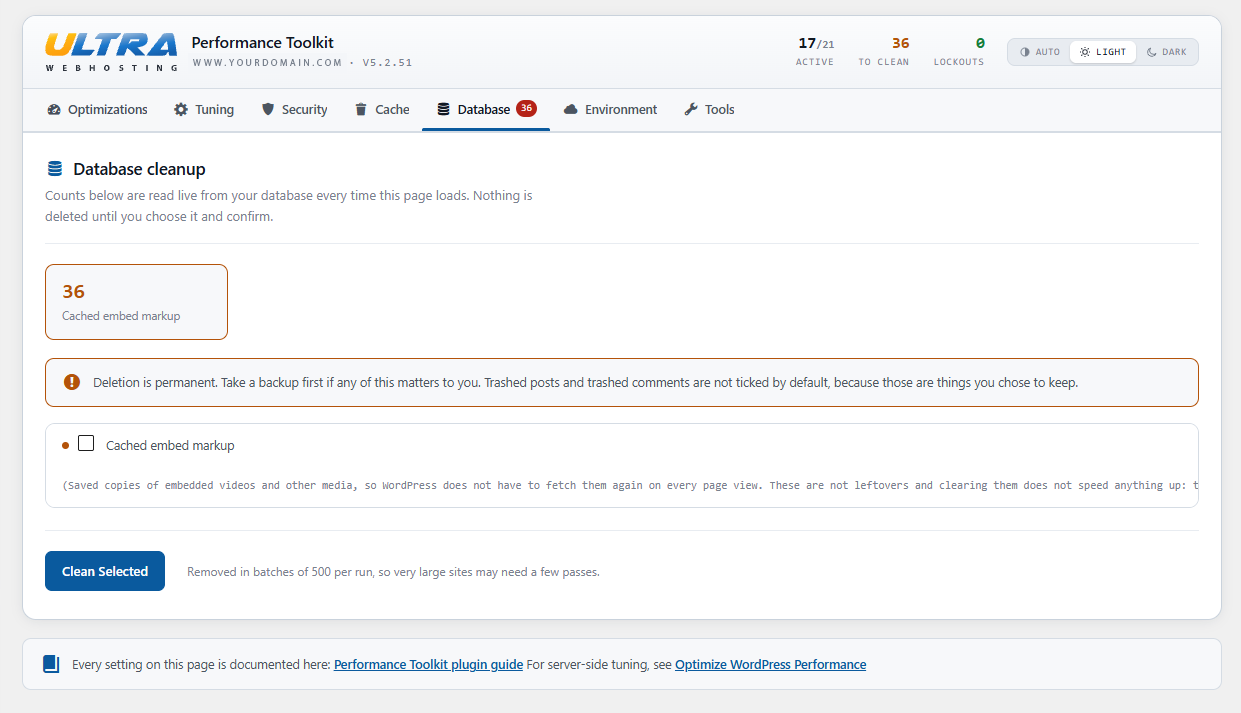
Reports exactly how much cruft is in your database before removing any of it: post revisions, auto-drafts, trashed posts, spam and trashed comments, expired transients, orphaned post and comment metadata, and cached oEmbed markup. Counts are read live, nothing is pre-selected that is destructive, and deletion runs in bounded batches so a neglected site cannot time out the request. Removal goes through the WordPress APIs wherever they exist, so related rows are cleaned up by core rather than left behind.
Site Health integration
Adds five checks to Tools > Site Health: persistent object cache, PHP opcode cache, WP-Cron configuration, post revision accumulation, and visitor IP detection. The information appears where WordPress users already look for it.
WP-CLI
wp ultra-perf purge, `status`, `cleanup`, `lockouts`, `unlock`, `export`, and `import`. Cleanup supports `--dry-run` and `--items=`, and defaults to the non-destructive items only.
Server cache
A reverse proxy in front of WordPress can keep serving a page after every WordPress cache has been cleared, and PHP running as the site user cannot reach it. Two methods are offered: an HTTP purge request to the server itself, which is immediate where the host has configured a purge module, or a request written into the plugin’s own folder in the uploads directory for a privileged process on the server to collect, which works where the proxy cannot be addressed from the site at all.
Automatic is the default and the right choice for almost everyone. It tries the immediate method, quietly falls back to queuing if the server will not answer, remembers the answer so it stops asking, and reports a problem only when neither works. The settings page shows which methods your server has actually been shown to support.
Light and dark
The settings screen has a light and a dark theme, chosen per user from the switcher in the header, so two people administering the same site can each have their own. Light is the default, because WordPress has no admin dark mode and following the operating system would leave a dark panel inside a light admin. Auto is available for anyone who wants the system preference honoured.
Visitor IP detection
Login protection needs the real visitor address. Forwarding headers such as X-Forwarded-For and CF-Connecting-IP can be set by anyone, so they are only ever trusted on requests that genuinely arrived from a proxy.
Auto-detect handles this for you and is the default. It checks the connecting address against Cloudflare’s published ranges, then against loopback and private ranges, and falls back to the raw connection when neither matches. A header on a request that did not come from one of those ranges is ignored, so auto mode cannot be tricked by a spoofed header.
The settings page shows what the plugin sees on your own request: the address it resolved, which header it came from, and whether your current mode matches the evidence. A CDN other than Cloudflare needs Reverse proxy mode with its ranges listed.
Privacy
This plugin does not collect, store, or transmit any personal data about your visitors, and it contains no analytics or tracking of any kind.
Login protection stores the IP addresses of clients that trigger a lockout so an administrator can review and clear them. Entries are capped at the fifty most recent, and everything is removed when the plugin is deleted.
External services
This plugin contacts exactly one external service, and only if you switch it on:
- Cloudflare API (
api.cloudflare.com) — disabled by default. Contacted only if you enable Cloudflare purging on the settings page and supply an API token, and only when you click “Clear All Caches.” Two requests are involved: a zone lookup that sends your site’s hostname, and the purge itself. Your API token is sent as a credential with both. No visitor data, post content, or personal information is transmitted. The purge clears the entire zone, so take care if several sites share one Cloudflare zone. See the Cloudflare terms of service and privacy policy.
To work out whether an nginx reverse proxy sits in front of the site, the plugin sends a HEAD request to this server’s own address, as reported by the server itself, with your site’s Host header. It falls back to your home URL if the server does not report an address. Both go to your own server, no third party is involved, and the answer is cached for twenty-four hours. The server’s own address is tried first because a request to your public URL travels through your CDN, if you have one, and a CDN answers with its own headers, hiding the origin stack behind it.
Nothing else leaves your site. The WordPress version comparison on the dashboard reads the update data WordPress already keeps for its own update checks, rather than making a request of its own.
Host-specific behavior
The plugin writes nothing outside WordPress and makes no assumptions about your server’s filesystem.
A reverse proxy cache, such as nginx or Varnish sitting in front of WordPress, cannot be cleared by touching files: the paths belong to the host, are usually not writable by the site, and differ everywhere. Instead, Clear the Server Cache asks the proxy directly, using the same HTTP method Varnish and nginx purge modules have accepted for years. The request is addressed to your own server, with your site’s Host header, so it reaches the proxy running there rather than travelling out through a CDN. Nothing leaves the machine.
The setting does nothing until your host configures the proxy to accept it, and the plugin reports that rather than claiming success. For nginx with ngx_cache_purge, one location block is enough:
location ~ /purge(/.*) {
    # The request originates on this machine, so allow the server's own
    # address. Add 127.0.0.1 as well if your setup routes it that way.
    allow 203.0.113.10;
    deny all;
    proxy_cache_purge my_cache_zone "$scheme$request_method$host$1";
}
The Environment tab shows the address the plugin will send from, so you can match the rule to it.
Where a proxy cannot be addressed from the site at all, the purge can instead be queued for the server to collect. Each purge writes a JSON record into wp-content/uploads/ultrawebhosting-performance-toolkit/ containing a timestamp, the site URL, its filesystem path and the layers already cleared. Nothing outside WordPress is touched, and the directory denies web access.
A privileged process on the server collects those records and clears what WordPress cannot reach itself. This is the approach to use where the proxy cache is owned by root and is deliberately not writable by the site, which is the normal arrangement on shared hosting. Records are pruned automatically, so a host that never collects them costs a site a few bytes and nothing else.
A minimal watcher, run from cron once a minute:
find /home/*/public_html/wp-content/uploads/ultrawebhosting-performance-toolkit \
     -maxdepth 1 -type f -name 'purge-*.json' -mmin -15 |
while read -r trigger; do
    user="${trigger#/home/}"; user="${user%%/*}"
    [ "$(stat -c '%U' "$trigger")" = "$user" ] || continue   # trigger must belong to the account
    rm -f "$trigger"
    your-purge-command "$user"
done
Check the ownership as shown. Without it, a writable uploads directory on one account could trigger work for another.
Hosts preferring their own mechanism can hook ultra_after_cache_purge instead:
add_action( 'ultra_after_cache_purge', function ( $cleared, $failed ) {
    // Your host's own purge mechanism.
}, 10, 2 );
The plugin also reads a few well-known paths to work out which control panel it is running on, so its advice about scheduled tasks and object caching matches the reader’s host. Those are existence checks only; nothing is written.
Developer notes
Every threshold is adjustable with a standard filter:
`
// Comment spam protection
add_filter( ‘ultra_spam_max_links’, fn() => 2 );
add_filter( ‘ultra_spam_min_time’, fn() => 3 );
add_filter( ‘ultra_spam_close_after_days’, fn() => 90 );
// Login protection
add_filter( ‘ultra_login_max_attempts’, fn() => 5 );
add_filter( ‘ultra_login_lockout_duration’, fn() => 15 * MINUTE_IN_SECONDS );
add_filter( ‘ultra_login_tracking_window’, fn() => 30 * MINUTE_IN_SECONDS );
// Heartbeat intervals in seconds; a front-end value of 0 disables it
add_filter( ‘ultra_heartbeat_frontend_interval’, fn() => 0 );
add_filter( ‘ultra_heartbeat_admin_interval’, fn() => 120 );
add_filter( ‘ultra_heartbeat_editor_interval’, fn() => 30 );
// Trusted proxy ranges used for visitor IP detection
add_filter( ‘ultra_trusted_proxies’, function( $ranges, $mode ) { return $ranges; }, 10, 2 );
// Whether a full opcache_reset() is allowed when per-file invalidation is unavailable
add_filter( ‘ultra_purge_opcache_reset’, ‘__return_false’ );
// Rows removed per pass by the database cleanup
add_filter( ‘ultra_cleanup_batch_size’, fn() => 500 );
// Warm the origin before purging the CDN, so the edge cannot cache a 404
// for an asset that is about to be regenerated
add_filter( ‘ultra_warm_origin_before_cdn_purge’, ‘__return_true’ );
// Minimum gap between login lockout alert emails
add_filter( ‘ultra_lockout_email_cooldown’, fn() => HOUR_IN_SECONDS …
Screenshots

Installation
- Upload the
ultrawebhosting-performance-toolkitfolder to/wp-content/plugins/, or install it through Plugins > Add New in your dashboard. - Activate the plugin through the Plugins menu in WordPress.
- Visit Settings > Ultra Performance to review the toggles and the environment dashboard.
The recommended defaults apply the moment you activate. Query-string removal, jQuery Migrate removal, block editor CSS removal, and comment auto-close ship off, because each can break a site quietly rather than obviously. Turn them on once you have checked they are safe for yours.
FAQ
-
Will this conflict with my caching plugin?
-
No. The cache-purge button calls each caching plugin’s own flush routine, so it works alongside LiteSpeed Cache, WP Rocket, W3 Total Cache, and the others rather than replacing them.
-
Will login protection clash with my security plugin?
-
No. If a dedicated security plugin (Wordfence, Solid Security, Sucuri, All-In-One WP Security, WP Cerber, Limit Login Attempts, LoginPress, Jetpack Protect, or Imunify Security) is active, The plugin defers login protection to it and shows a notice saying so.
-
My site is behind Cloudflare. Will lockouts apply to the right address?
-
Only if you tell it so. Under Visitor IP detection choose Cloudflare, and the forwarding header will be honoured for requests that genuinely arrive from a published Cloudflare range. The setting exists because that header can be forged by anyone when no proxy is present, which would let an attacker sidestep a lockout or lock out somebody else.
-
How do I create the Cloudflare API token?
-
- Open
https://dash.cloudflare.com/profile/api-tokenswhile signed in to Cloudflare. - Select Create Token, scroll to the bottom, and choose Create Custom Token.
- Give it a name you will recognise later.
- Under Permissions choose Zone, then Cache Purge, then Purge. That one permission is all this needs.
- Under Zone Resources choose Include, then Specific zone, then pick your domain from the list. That list shows domain names rather than IDs; the Zone ID is collected separately in step 7.
- Continue to summary, then Create Token, and copy the value straight away. Cloudflare only displays it once, but a lost token does not have to be recreated: open it later and choose Roll, which issues a fresh value while keeping the same name, permissions and zone.
- Back in the Cloudflare dashboard, select your domain and stay on the Overview page. In the right-hand column under the API heading is the Zone ID, a 32 character string, with a copy button.
Both values are needed. A token limited to Cache Purge has no permission to list your zones, so the plugin cannot work out which zone your site belongs to on its own.
- Open
-
I locked myself out. How do I get back in?
-
From another admin account, open Settings > Ultra Performance and click Unlock next to your IP in the lockout log. Otherwise the lockout clears on its own after fifteen minutes. You can also clear it with WP-CLI by deleting the
ultraperf_lock_*andultraperf_att_*transients for your IP. -
Does disabling XML-RPC break the mobile app or Jetpack?
-
It can. XML-RPC is required by the legacy WordPress mobile app and some Jetpack features. If you rely on those, turn off the Disable XML-RPC toggle.
-
A comment from a real visitor was held for moderation.
-
That is the link limiter working as designed: comments with more than two links are queued rather than rejected, so a genuine comment is never lost. Approve it from the Comments screen, or raise the limit with the
ultra_spam_max_linksfilter. -
My CSS or JavaScript looks out of date after an update.
-
If you turned on Remove Query Strings, some caching layers may be serving old files because the version string they used for cache-busting is gone. Clear all caches, and if it persists turn that toggle back off. This is why it ships off by default.
-
Does it delete my data when I uninstall?
-
Yes. Deleting the plugin removes its settings, lockout log, and all of its transients, across every site on a multisite network. Deactivating leaves them in place so you can reactivate without reconfiguring.
Reviews
There are no reviews for this plugin.
Contributors & Developers
“Ultra Web Hosting Performance Toolkit” is open source software. The following people have contributed to this plugin.
Contributors
Translate “Ultra Web Hosting Performance Toolkit” into your language.
Interested in development?
Browse the code, check out the SVN repository, or subscribe to the development log by RSS.
Changelog
5.2.52
- Plugin header description now matches the directory listing. The short description had already been updated to the current wording, but the
Description:header in the main plugin file still carried the previous line, so the wordpress.org page and the in-dashboard plugin row disagreed. No functional change.
5.2.51
Everything below was found by running the plugin on live sites, which surfaced problems static analysis could not.
Security and correctness:
- Removing an optional script no longer breaks scripts that depend on it. Handles were removed with
wp_deregister_script(), which silently drops every script declaring the removed handle as a dependency. On a site that combines and minifies JavaScript the resulting bundle is built from whatever survived, downloads with a healthy 200, and throws at runtime; the symptom is a slider or carousel that renders its markup and does nothing. Removal now checks for dependents first, and runs late enough to see what other plugins have actually enqueued. - The CDN is purged last, after the origin has been warmed. Purging before regenerated assets exist left a window where the edge had nothing cached and the origin nothing to serve, so a request landing in it received a 404 for an asset that was about to exist, and the CDN cached that 404.
- A failed purge is no longer reported as a success, and a site behind a CDN with purging unconfigured now says so.
- Cloudflare credentials are stored separately from the settings, so a reset or reseed can no longer take the API token with it, and the panel no longer claims purging is enabled when no usable credentials are saved.
- Nothing is written outside WordPress. A reverse proxy cache is now cleared by asking the proxy over HTTP rather than writing to a host-owned directory, and uploads paths are resolved with
wp_upload_dir(). - Added an automatic method, and made it the default. The plugin already recorded which method a server supports, then carried on attempting one it knew would fail, producing a warning on every purge that the reader could do nothing about. Automatic uses whichever method the server has shown it supports, falls back the first time rather than reporting a failure nobody chose, and stops attempting one that has already been refused. An unactionable warning is worse than none, because it teaches people to ignore the warnings that matter.
- Paths and URLs are built with the function or constant WordPress provides for each, rather than assembled by hand:
add_query_arg()for the cron URL,WPMU_PLUGIN_DIRfor must-use plugins,get_home_path()for the .htaccess location, andWPINCfor core asset paths. A site that has moved any of those directories now works correctly. - The purge notice now requires the manage_options capability and a valid nonce. It reports what a purge cleared and what it failed to clear, which is information about the server, and reading it clears the stored failure list. Neither belongs behind an unauthenticated query flag.
- The placeholder file written into the uploads directory is now empty rather than containing a PHP comment. A plugin may not create executable files there, and the allowance covers only an empty placeholder.
- No longer includes a WordPress core file by an assembled path. The filesystem abstraction is used when WordPress has already loaded it, and the direct path otherwise, which is all this needed for clearing a page builder’s cache.
- Fixed the auto-draft guard, which was not working at all. It compared the GMT modification column, and WordPress stores zeroes there for any status with a floating date, auto-draft included. Every auto-draft therefore matched, so a post someone had open seconds earlier was still counted and would still have been deleted. The comparison now uses the same column core’s own cleanup uses.
- The auto-drafts description now states that only those untouched for more than seven days are counted. The guard was added earlier but the wording was never updated, so the screen still described the old behaviour of removing every one.
wp ultra-perf cleanup --dry-runnow reports on every item rather than only the ones it would remove, with a column saying which is which. Listing six of nine meant a table of zeroes could be read as an empty database while the items deliberately left alone went unmentioned.- The server cache method no longer asks people to work out which option their host supports. That instruction predated Automatic doing it for them, and left the impression that a manual choice was required.
- Opening the Cache tab no longer sends a purge request. Checking whether the server supports the immediate method issued a real request when it had no cached answer, so drawing the settings page purged the site, and the page could produce the very state it was then reporting. It now reads only what is already known.
- A method that has not been tried is no longer reported as a method that failed. A site that had not purged since updating was shown a red warning saying nothing was collecting its requests, when in truth nothing had been queued yet. Warnings now require evidence of failure rather than an absence of evidence of success.
- A server cache method that is unavailable is no longer shown as a warning when another method is working. Hosts clear these caches in different ways, and one route being unavailable is not a fault if the other one does the job. The screen also no longer tells anyone their host needs to configure a purge module, which is one way of doing it and not a requirement.
- The settings screen now reports what your server actually answered when a purge was attempted, rather than only concluding that it is unsupported. The conclusion is not much use on its own; a support desk will ask what was sent and what came back.
- Four things were left in the database when the plugin was deleted, including every user’s saved colour theme. They held no credentials, but a plugin that says it removes everything should remove everything.
- Sites still on the old “ask the proxy” default are moved to Automatic. That default produced a failure on every purge for anyone whose host has no purge module, which is most of them, and installing one is not something a site owner can do. Nobody chose that setting, so nobody should have to live with its warning.
- Fixed the proxy purge being sent over plain HTTP regardless of the site’s own scheme. On a site that forces HTTPS the request was redirected before reaching anything that could purge, which looks exactly like a host with no purge module, so a correctly configured host could be reported as unsupported.
- Purge failures explain themselves. A message reading “the server answered 301” states a fact and communicates nothing. Each outcome now says what happened and what it means: a redirect reached your normal site configuration rather than a purge module, a refusal may need the host to allow the request from the server’s own address, and so on.
- Fixed a purge being reported as successful when nothing was purged. Many servers treat an unrecognised method as an ordinary page view and answer 200 with the home page, which was counted as success. The response is now judged on its content as well as its status, so a web page is recognised for what it is.
- The server cache methods now say which one your host actually supports, instead of offering three options and leaving you to find out by choosing wrongly. The plugin records whether your server accepted a purge request, and whether anything collected a queued one, and reports both beside the choice with a recommendation. “Both” carries a warning that it is only worth choosing when a host supports both, because a method that can never succeed produces a failure on every purge, and a warning that always appears is a warning nobody reads.
- A failed purge now names the layer that failed, instead of reporting only that something did. A count of successes next to an unexplained failure tells you there is a problem without telling you what, which is worse than saying nothing at all.
- Fixed the server cache method being reset when the feature was switched on. The selector was hidden until the option was enabled, so the very save that enabled it submitted no method and the choice fell back to the default. The selector is always shown now, and a setting whose field was not on the page is no longer overwritten.
- The database cleanup no longer deletes things that are not cruft. Auto-drafts are the post WordPress creates the moment someone clicks Add New, so removing all of them removed whatever a colleague had open in another tab; only those older than seven days are now touched, matching what core does itself. Orphaned metadata excluded rows belonging to no post, which looks like an orphan but is how several plugins store settings that belong to the site rather than to a post, Advanced Custom Fields options pages among them; those are now left alone. Both items were ticked by default.
- Cached embed markup is no longer offered as cruft to be swept away. Those rows are a cache: each one saves WordPress asking YouTube or Vimeo for the same embed again. Deleting them frees nothing worth having and costs the next visitor a fresh request to the provider, after which the row is written again, so on a site with embedded content they appeared to regenerate endlessly. They are now unticked by default and described as what they are, with the one good reason to clear them stated: forcing a stale embed to refresh.
- Fixed settings being seeded incompletely on a fresh activation, a lockout countdown that always read one minute under an external object cache, an orphaned-metadata query that could never run, a cache purge that released every blocked IP, and a symlink escape in the cache directory cleanup.
Compatibility:
- No longer calls
wp_is_block_theme()orwp_cache_flush_group(), which postdate the declared minimum WordPress version, and no longer contactsapi.wordpress.org. - Advice adapts to the detected host rather than assuming one. The scheduled task command looks for a PHP binary that exists and matches the site’s version instead of trusting
PHP_BINDIR, offers a URL form for hosts without shell access, and names a control panel only when one is detected.
New:
- The Optimizations tab opens with a measured summary: how many kilobytes and requests have been removed from every page load, where each saving came from, and how much is still available. Every figure is read from the real file on disk; nothing is estimated.
- The Environment tab opens with the request path — the hops a visitor’s request passes through, each lit or dimmed by what was detected.
- Settings are grouped into tabs, with a light and a dark theme chosen per user.
- Feature cards explain what a setting means for this specific site, naming the active theme, and warning when Jetpack or WooCommerce make a particular option unwise.
- Added toggles for disabling the file editors and WP-Cron, and for clearing a server-level proxy cache.
- Added Block the Registration Page. Turning off “Anyone can register” stops accounts being created but still renders the form, and
wp-login.php?action=registeris among the most probed URLs on any WordPress site. This closes the page and hides the Register link. It defers to the core setting: a site that allows registration is never blocked, however the toggle is set, so a shop or membership site keeps working without anyone having to remember this exists. - Added Clear the Server Cache, covering caches the server owns rather than WordPress. A reverse proxy in front of WordPress can keep serving a page after every WordPress cache has been cleared, and PHP running as the site user cannot reach it. Two methods are offered: asking the proxy directly over HTTP, which is immediate where the host has configured it, or queuing the request into the plugin’s own folder in the uploads directory for a privileged process to collect, which works where the proxy cannot be addressed from the site at all. Nothing is written outside WordPress, the directory denies web access, and queued records are pruned automatically.
- AccelerateWP is now named as itself in the purge results. It is built from WP Rocket and shares its function names, so a single call clears either, but reporting “WP Rocket” on a site that has never installed WP Rocket was confusing. The label now comes from where the function was actually defined.
- The two checks that need to reach this server directly, rather than through a CDN, now use the address the server reports for itself instead of a hardcoded loopback address. A fixed loopback address is wrong on any host that does not route it, and has no place in shipped code.
5.2.8
- Plugin URI now points at the plugin’s own documentation article rather than the broader hosting performance guide. The settings page links to both: the plugin guide for the settings on that screen, and the hosting guide for server-side tuning.
5.2.7
- The Plugin URI and Author URI headers were both pointing at the same address. Plugin URI now points to the plugin’s own documentation page, and Author URI to the company site, which is what each header is for.
5.2.6
- Removed the request to
api.wordpress.org. The environment dashboard now reads the update information WordPress already keeps for its own update checks, so the same comparison is shown with no outbound request at all. The only external service the plugin can now contact is Cloudflare, and only when you have explicitly enabled and configured purging. - Reworked the readme description to lead with what the plugin does that others do not, rather than opening with a list of toggles.
5.2.5
Fixes for everything reported by the official Plugin Check tool:
- Block theme detection no longer calls
wp_is_block_theme(), which only exists from WordPress 5.9 while this plugin supports 5.6. It now applies the same structural test WordPress itself uses, looking for a block template index in the active theme and its parent, so it works on every supported version with no capability shim. - Removed the
wp_cache_flush_group()call from uninstall, which required WordPress 6.1. Under an external object cache the few short-lived lockout keys are now left to expire on their own, which takes at most the lockout duration. Flushing the entire object cache to tidy them would have been far too blunt. - Shortened the 5.0.0 upgrade notice to fit the 300 character limit.
Both version issues were previously wrapped in function_exists() guards, so there was no fatal error on older WordPress. They are now resolved by not depending on the newer functions at all, rather than by raising the minimum supported version.
5.2.4
Submission hardening, found by running the WordPress Coding Standards security, database, and internationalization rulesets over the whole plugin:
- The two orphaned-metadata deletes now use
$wpdb->prepare()with generated placeholders rather than an interpolated ID list. The values were already cast to integers so there was no injection path, but the prepared form is what a reviewer expects to see. - The pasted import payload and the database cleanup selection are now sanitized at the point they are read, in addition to the validation they already passed through.
- Added the missing translator comments on the two pluralized login-protection strings.
- Annotated the two deliberate exceptions: LiteSpeed Cache’s own purge hook, which is invoked on purpose, and the writability check on the host’s nginx spool, which sits outside the WordPress tree where WP_Filesystem cannot reach.
- Added a translation template so translators have a starting point covering all strings.
5.2.3
- Rewrote the Scheduled purge section. It previously said only that it “uses WP-Cron”, which does not help anyone decide whether to switch it on. It now explains that most sites do not need it, what situations actually call for it, what a purge costs in rebuilt pages, and why a daily schedule on a quiet site will not run on time. The warning about WP-Cron timing is only shown when a schedule is actually enabled, and adapts to whether the site runs scheduled tasks from a real cron job.
- Purge on Publish now says plainly that it is the option most sites want, so people stop reaching for a schedule to solve a problem it already solves.
5.2.2
- The dismiss button on this plugin’s own admin notices is now centred vertically at any notice height, rather than only lining up when the message happened to be a single line. Other plugins’ notices are untouched.
5.2.1
- Fixed the settings tabs wrapping onto a second row on narrower screens. The bar is now always a single row: it tightens in stages as space runs out, and falls back to icons before it would ever wrap or push the page wider.
5.2.0
- The settings page is now organised into tabs: Optimizations, Tuning, Security, Cache, Database, Environment, and Tools. Everything was previously on one very long page, which buried the newer features below the environment report. Tabs with something needing attention show a count.
- Removed the duplicate Heartbeat setting. A “Throttle Heartbeat API” checkbox gated three interval fields elsewhere on the page, so with the box unticked those fields looked editable but did nothing. The intervals are now the only control, and a blank field means leave WordPress alone. Sites that had throttling switched off are migrated to blank intervals, so behaviour does not change.
- Site Health and WP-CLI were previously invisible from the settings page. The Environment tab now links to Site Health, and the Tools tab lists every WP-CLI command.
- Each section gained the context it was missing: what the heartbeat actually is, why the editor interval should stay low, what a scoped Cloudflare token needs, and how many revisions are already stored next to the setting that limits them.
- Autosave interval and trash retention are PHP constants with no filter in WordPress, so they cannot be set from a plugin. Rather than omit them silently, the Tuning tab now shows the exact wp-config.php lines.
- The page still works without JavaScript; every panel simply stays visible.
5.1.1
- Visitor IP detection gained an Auto-detect mode, now the default. It identifies Cloudflare edge addresses and local reverse proxies without configuration, and still ignores forwarding headers on any request that did not arrive from a recognised range. Sites already running 5.1.0 keep whatever mode they selected.
- The settings page now reports the address it resolved for your own request, which header it came from, and whether your configured mode matches what the server is actually doing. The Site Health check uses the same diagnosis.
- Hide WordPress Version moved from Front-end performance to Security, where it belongs, and its description now says plainly that it is obscurity rather than hardening.
5.1.0
Added:
- Database cleanup. Live counts for revisions, auto-drafts, trashed posts, spam and trashed comments, expired transients, orphaned post and comment metadata, and oEmbed caches, with batched removal through the WordPress APIs. Destructive items are never pre-selected.
- Site Health integration. Five native checks under Tools > Site Health.
- WP-CLI commands under
wp ultra-perf: purge, status, cleanup, lockouts, unlock, export, import. - Heartbeat intervals are now editable in the UI, separately for the front end, dashboard, and editor, rather than filters only.
- Post revision limit can be set from the settings page. Defers to WP_POST_REVISIONS where wp-config.php defines it, and says so on screen.
- Purge on publish and an optional daily or weekly scheduled purge.
- Email alert on login lockout, rate limited to one message per hour so a sustained attack cannot flood the inbox or get the sending server treated as a spam source.
- Settings export and import as JSON, from the settings page or WP-CLI. The Cloudflare API token is deliberately excluded from exports and preserved from the destination site on import.
Changed:
- The purge routine is now a single shared function used by the admin bar button, purge on publish, the scheduled purge, and WP-CLI, so all four clear exactly the same layers.
- Feature descriptions clarify that Remove Query Strings should stay off on WooCommerce sites, and that Disable Pingbacks is safe alongside Jetpack because it removes only the
pingback.*methods.
5.0.0
Security:
- Visitor IP detection no longer trusts
X-Forwarded-FororCF-Connecting-IPby default. Forwarding headers are honoured only when you have declared a proxy and the request actually arrives from a trusted range. Previously any client could forge these headers to evade a login lockout or to lock out an arbitrary third party. - The comment speed trap now uses a signed timestamp, so a comment form served from a page cache cannot be replayed with a forged submit time.
- Recursive cache-directory cleanup no longer follows symbolic links and refuses any path that does not resolve inside
wp-content. - Clearing caches no longer deletes the plugin’s own lockout records, which previously released every blocked IP on each purge.
- Page-builder cache directories are only cleared when the corresponding builder is actually installed.
Fixed:
- Lockout countdowns were always reported as one minute on sites using an external object cache. The expiry is now stored with the record rather than read back from the options table.
- The transient sweep now escapes LIKE wildcards correctly and is skipped when an external object cache is in use, where it had no effect.
- OPcache purging invalidates only this site’s own files where possible, instead of resetting the shared pool for every site on the server.
Added:
- Remove jQuery Migrate, skip Dashicons for logged-out visitors, and remove block editor CSS on classic themes.
- Heartbeat throttling now uses separate, filterable intervals for the front end, dashboard, and editor, and disables the front-end heartbeat entirely.
- Auto-closing old comments is now its own toggle rather than being bundled with spam protection, and ships off by default because it overrides Settings > Discussion. Sites upgrading from 4.x keep their existing behaviour.
- Cloudflare purging is now opt-in with its own API token and optional zone ID, instead of silently reusing another plugin’s stored credentials.
Changed:
- Fully internationalized.
- Settings are grouped by purpose on the settings page.
- Restructured into
includes/, with all styles moved to enqueued stylesheets. uninstall.phpnow removes every option and transient, including the 4.x names, across all sites on a multisite network.- Functions renamed to a distinct
ultraperf_prefix. All documented filter and action names are unchanged.
4.2.0
- Query-string removal now ships disabled by default, since stripping
?ver=can serve stale CSS/JS after updates on sites that rely on it for cache-busting. Existing installs keep their saved setting; only fresh installs are affected. - Hardening for the WordPress.org Plugin Directory: escaped all remaining dynamic output, sanitized superglobal reads, and removed direct writes to other caching plugins’ stored data (their own flush APIs are still called).
4.1.3
- Prepared for the WordPress.org plugin directory: bundled all assets locally, added uninstall cleanup, and a Settings link.
- Removed shell-based nginx detection in favor of HTTP header detection.
- No longer hides other plugins’ admin notices.
4.1.0
- Added login brute-force protection, XML-RPC disabling, embed removal, and comment spam protection.
- Added the server environment and caching dashboard.
4.0
- Initial public feature set: query-string, emoji, head-tag, heartbeat, and pingback optimizations plus the one-click cache purge button.