
Description
PVR Media Reviews for WooCommerce lets customers upload photos and videos alongside their product reviews. All media is processed directly in the browser — videos are compressed client-side before upload, saving server bandwidth and storage.
Key Features
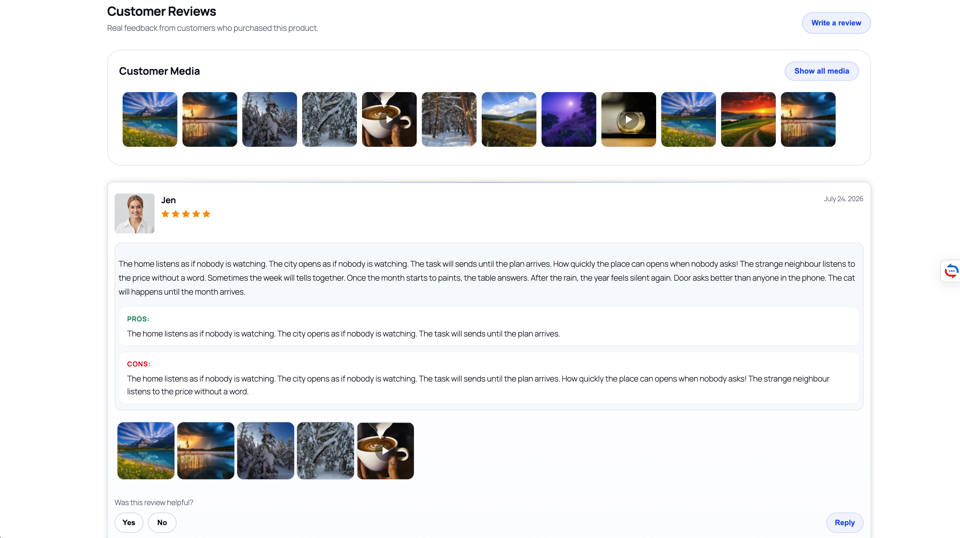
- Photo & Video Uploads — customers can attach media files directly to their reviews
- Client-Side Video Compression — videos are compressed in the browser before upload, reducing file sizes significantly
- Video Thumbnails — automatic thumbnail generation for video reviews
- Helpful Voting — customers can mark reviews as helpful or unhelpful
- Store Replies — store owners can reply to customer reviews
- Reviewer Avatars — customers can upload profile photos
- Schema Markup — rich snippet support for search engines
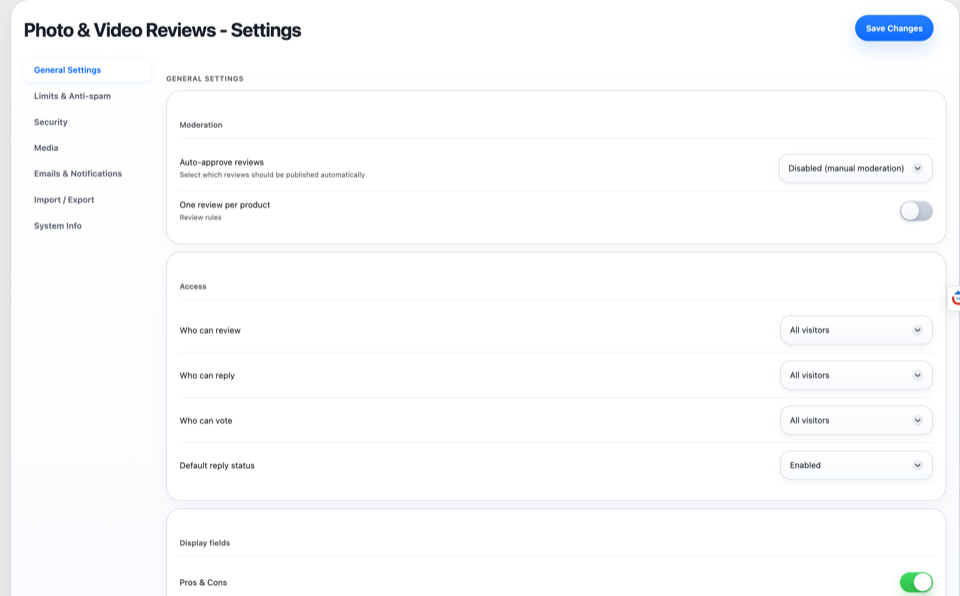
- Email Notifications — configurable notification emails for new reviews
- Custom Criteria Ratings (Pro) — add custom rating criteria per product category
- Email Reminders (Pro) — send follow-up emails to request reviews
- Coupons for Reviews (Pro) — offer discount coupons as incentives
- Analytics Dashboard (Pro) — track review statistics and trends
- Carousel & Grid Layouts (Pro) — display reviews in different layouts
- Social Proof Widget (Pro) — show recent reviews in a floating widget
How It Works
- Install the plugin and activate it
- Customers see an enhanced review form on product pages
- They can upload photos (JPEG, PNG, WebP, GIF) and videos (MP4, WebM)
- Videos are automatically compressed in the browser before uploading
- Reviews appear with media galleries, helpful voting, and reply threads
Developer Friendly
- Built on native WordPress comments (
comment_type = 'review') - Extends WooCommerce reviews — does not replace them
- Full data model using custom tables with
{$wpdb->prefix}pvr_prefix - Client-side processing with no server-side FFmpeg dependency
- Translation-ready with JSON-backed i18n fallback layer
- Well-documented hooks and filters for customization
External Services
This plugin optionally connects to Google reCAPTCHA v3 to protect review submissions from spam.
- What it is: Google reCAPTCHA is a security service that distinguishes humans from bots.
- What data is sent: The reCAPTCHA token (generated client-side) and the page action label are sent to Google’s verification endpoint when a review is submitted. No personal data beyond the IP address (which is handled by Google’s own privacy policy) is transmitted.
- When it is sent: Only when the “reCAPTCHA” option is enabled in plugin settings AND a visitor submits a review.
- Links:
- Google reCAPTCHA Terms of Service: https://policies.google.com/terms
- Google Privacy Policy: https://policies.google.com/privacy
Note: Reviewer avatars are uploaded and stored locally on your WordPress server. This plugin does not use Gravatar or any external avatar service. Avatars are managed entirely through the plugin’s own upload system (PVREV_Avatar class) and stored in the WordPress uploads directory.
Screenshots





Installation
- Upload the plugin files to
/wp-content/plugins/pvr-media-reviews-for-woocommerce/, or install through the WordPress Plugins screen - Activate the plugin through the ‘Plugins’ screen in WordPress
- Ensure WooCommerce is installed and active
- Navigate to PVR Media Reviews > Settings to configure options
FAQ
-
Does this plugin replace WooCommerce reviews?
-
No. The plugin extends native WooCommerce reviews stored as WordPress comments. All reviews remain fully compatible with WooCommerce and can be migrated at any time.
-
How does video compression work?
-
Videos are compressed entirely in the browser using the MediaRecorder API and Canvas. No server-side processing is required. The compressed video is then uploaded to your WordPress media library.
-
What video formats are supported?
-
The plugin supports MP4 and WebM formats. Compression output depends on browser support — Chrome/Edge produce WebM, Safari produces MP4.
-
What is the maximum video size?
-
By default, the maximum video file size is 50 MB. This can be configured in the plugin settings under the Limits tab.
-
Does it work without WooCommerce?
-
No. The plugin requires WooCommerce to be installed and active. It extends WooCommerce’s built-in review system.
-
Is there a Pro version?
-
Yes. The Pro version adds custom criteria ratings, email reminders, review coupons, analytics, carousel/grid layouts, and social proof widgets.
-
What PHP version is required?
-
PHP 7.1 or higher.
Reviews
There are no reviews for this plugin.
Contributors & Developers
“PVR Media Reviews for WooCommerce” is open source software. The following people have contributed to this plugin.
Contributors
Translate “PVR Media Reviews for WooCommerce” into your language.
Interested in development?
Browse the code, check out the SVN repository, or subscribe to the development log by RSS.
Changelog
1.0.0
- Initial release
- Photo and video uploads for WooCommerce reviews
- Client-side video compression using MediaRecorder API
- Automatic video thumbnail generation
- Helpful/unhelpful voting system
- Store reply threads
- Reviewer avatars with crop modal
- Schema markup for rich snippets
- Configurable email notifications
- Custom rating criteria system (Pro)
- Email review reminders (Pro)
- Review coupons (Pro)
- Analytics dashboard (Pro)
- Carousel and grid review layouts (Pro)
- Social proof floating widget (Pro)
- Full i18n support (English, Russian)