

Description
ShopToAI Connector places machine-readable product data (Schema.org / JSON-LD) on your WooCommerce product pages so AI shopping assistants such as ChatGPT, Perplexity and Gemini can read your catalog and recommend your products.
It connects your store to ShopToAI, a hosted service that audits your catalog, fixes gaps and builds the markup. The plugin is the piece that puts that markup into your live pages, where the REST API alone cannot reach reliably.
What the plugin does on your site
- Adds one authoritative Schema.org Product block to each product page, pulled from your ShopToAI feed.
- Suppresses duplicate Product markup from WooCommerce core and the Yoast SEO WooCommerce add-on, so an assistant never reads two conflicting blocks. Your WebPage, Breadcrumb and Organization schema are left untouched.
- Allows AI crawlers in robots.txt (GPTBot, PerplexityBot, ClaudeBot, Google-Extended and others).
- Serves
/llms.txtat your store root and comparison guides at/ai-guides/{slug}, both fetched from ShopToAI and cached, so an assistant that cites them cites your domain. - Reports a heartbeat so your store shows as connected in the ShopToAI dashboard.
The plugin never invents product data. It only places markup that you have reviewed and approved in the dashboard, and every response it fetches is cached with a short fallback so a brief network problem never slows your pages.
External service: ShopToAI
This plugin requires an account with ShopToAI, a third-party service operated by YAStuning OÜ (the data controller named in the Privacy Policy). The plugin will not produce any markup without it. When configured, the plugin makes requests to the ShopToAI API (by default https://shoptoai.com) to:
- fetch the approved JSON-LD for a product (the request sends your store’s feed token and the product’s SKU and WooCommerce ID),
- fetch your
/llms.txtand any AI guides (the request sends your feed token), - send a heartbeat and a disconnect signal (these send your feed token and a plugin secret so the dashboard can show the connection status).
No customer or order data is sent. The requests carry product identifiers and your connection keys only. The API base URL is fixed to https://shoptoai.com; a self-hosted or white-label deployment can override it with the SHOPTOAI_API_BASE constant in wp-config.php.
- Service: https://shoptoai.com
- Terms of Service: https://shoptoai.com/legal/terms
- Privacy Policy: https://shoptoai.com/legal/privacy
Developed by ILUXA WEB (https://iluxa-web.com) for ShopToAI.
Compatibility note
The plugin requires WooCommerce’s REST API v3, which shipped as the standard in
WooCommerce 3.5 and later; a store on an older WooCommerce release will show a clear
“not found” error at connection time rather than a silent failure. Automated tests run
against a lightweight WordPress/WooCommerce test double, not a live install of every
listed version – if you hit an issue on a specific WordPress or WooCommerce release,
please report it so we can confirm and update this note.
Screenshots

Installation
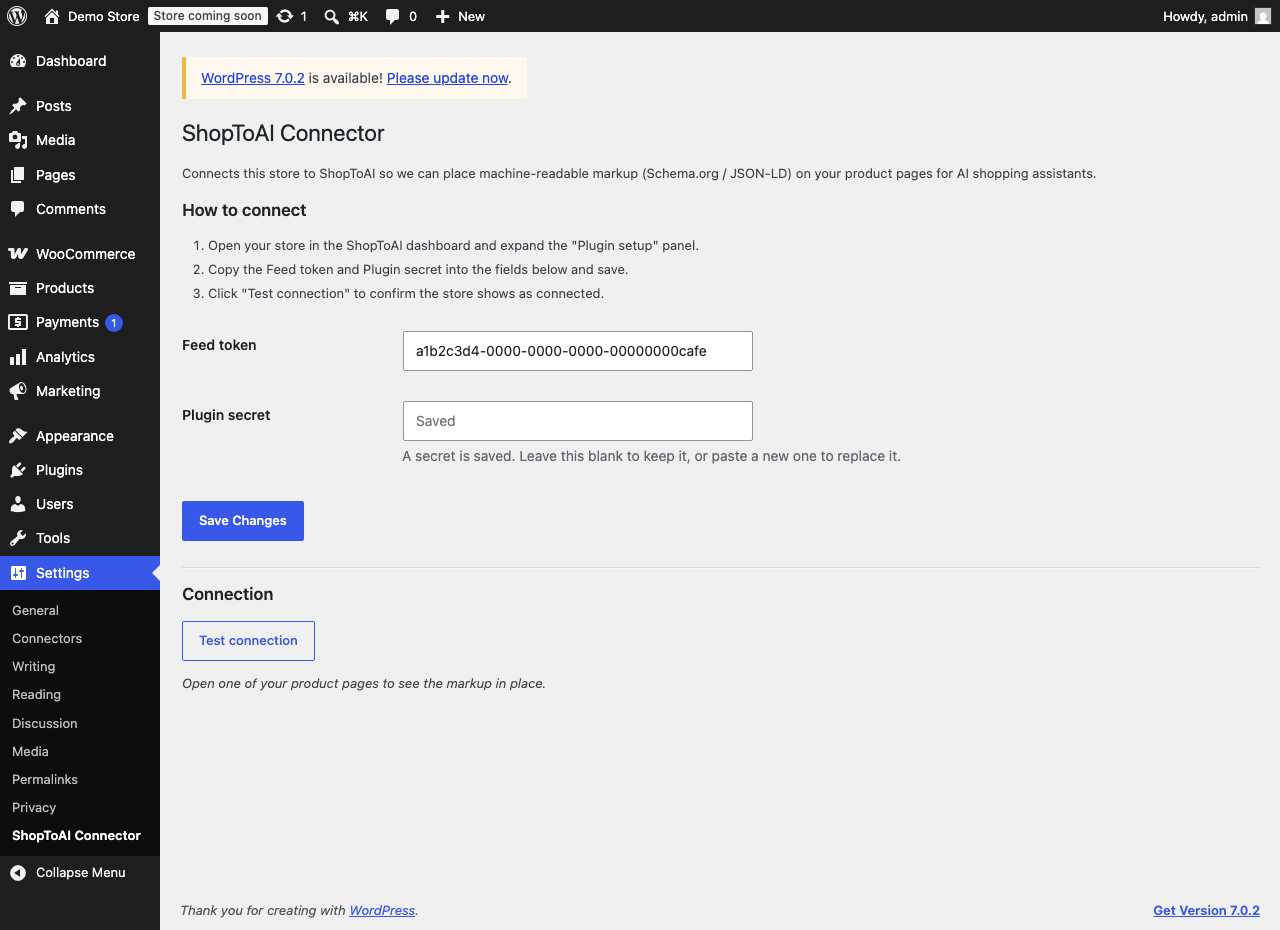
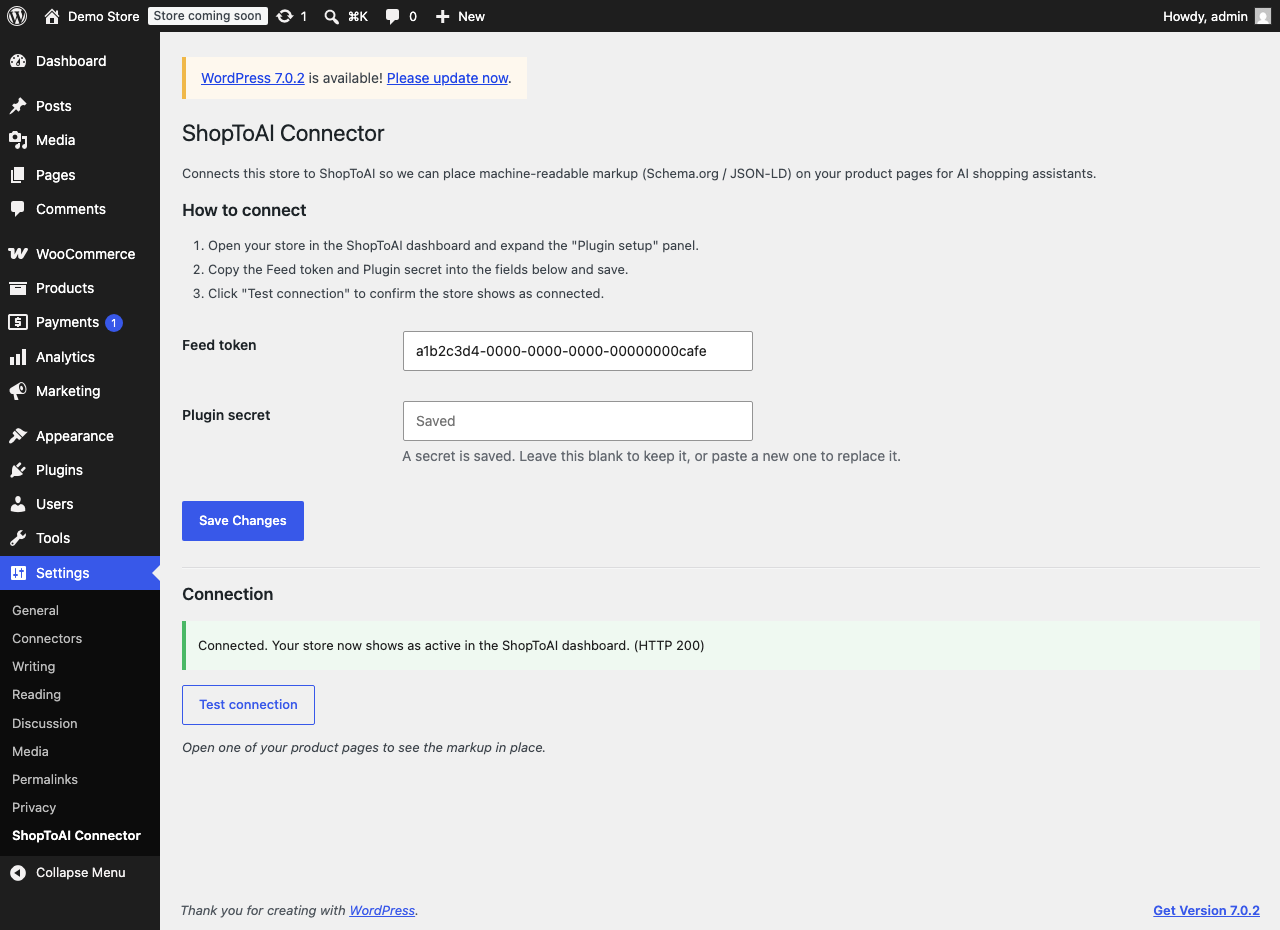
- Install and activate the plugin, then open Settings -> ShopToAI Connector (there is also a Settings link next to the plugin on the Plugins screen).
- Open your store in the ShopToAI dashboard and expand the “Plugin setup” panel.
- Copy the Feed token and Plugin secret into the plugin settings and save.
- Click Test connection to confirm your store shows as connected.
Once an audit or AI enrich has run in the dashboard, your product pages start carrying the approved markup automatically.
FAQ
-
Do I need a ShopToAI account?
-
Yes. The plugin places markup that ShopToAI builds for your catalog, so it needs your account’s feed token and plugin secret. Without them it stays inactive and changes nothing on your site.
-
Will it slow down my product pages?
-
No. Every fetch from the API is cached, and a brief network failure is negatively cached for a few minutes, so a page view never turns into a repeated blocking request.
-
Does it send my customer or order data anywhere?
-
No. The plugin sends only product identifiers (SKU and WooCommerce ID) and your connection keys to the ShopToAI API. It does not read or send customer, cart or order data.
-
What happens to my existing structured data?
-
When the plugin has approved markup for a product, it emits one Product block and hides the duplicate Product markup from WooCommerce core and Yoast. If it has no data for a product, your existing markup is left exactly as it was.
-
Can I point it at a self-hosted or white-label instance?
-
Yes. Define the SHOPTOAI_API_BASE constant in wp-config.php with your own ShopToAI base URL (it defaults to https://shoptoai.com). The URL must be https, since your feed token and plugin secret travel over it; plain http is accepted only for a local development host.
-
What does uninstalling remove?
-
Everything the plugin stored: your connection settings and all cached feed data. Deactivating leaves your settings in place, so you can deactivate and reactivate without re-entering anything.
-
I already run the older AEO Connector plugin. What happens?
-
This plugin replaces it. While the old one is still active this one stays out of the way and shows a notice, so your pages never carry two competing Product blocks. Deactivate the old plugin and this one picks up your existing settings automatically.
Reviews
There are no reviews for this plugin.
Contributors & Developers
“ShopToAI Connector” is open source software. The following people have contributed to this plugin.
Contributors

Translate “ShopToAI Connector” into your language.
Interested in development?
Browse the code, check out the SVN repository, or subscribe to the development log by RSS.
Changelog
0.13.3
- The API URL is now fixed to https://shoptoai.com and is no longer an editable setting, so it can’t be misconfigured. A self-hosted or local-development setup can override it with the SHOPTOAI_API_BASE constant in wp-config.php.
0.13.2
- Confirmed compatibility with current WordPress and refreshed the “Tested up to” version (no functional change).
0.13.1
- Corrected the “Tested up to” WordPress version and added the WooCommerce minimum
version this plugin actually depends on (no functional change).
0.13.0
- Renamed all internal functions and constants to a
shoptoai_prefix. Existing settings are carried over automatically. - Stays inactive while the older AEO Connector plugin is present, so no page ever carries two Product blocks.
- Uninstalling now removes the options and cached entries the plugin created.
- The plugin secret is entered in a password field instead of a plain text one.
- The API URL must be https outside local development, since your keys travel over it.
- Reactivating reports to the dashboard immediately instead of showing disconnected for up to an hour.
- Guide URLs keep underscores, and guide caches clear when you save settings or test the connection.
- Rewrite rules refresh on update, so
/llms.txtand/ai-guides/keep working after an upgrade. - No longer redirects you on activation.
0.12.0
- Per-product JSON-LD fetch so injection scales to large catalogs.
- Serve
/llms.txtand/ai-guides/{slug}from the store domain. - Heartbeat and disconnect signals for accurate connection status in the dashboard.
- Negative caching so a briefly unreachable API never slows product pages.