
Description
WordPress searches posts with a LIKE '%term%' scan of the posts table. It cannot rank, it cannot tolerate a typo, and it gets slower as a site grows.
Coywolf Search replaces that with a proper search engine, built out of two small database tables of its own:
- A custom full-text index. Post content is cleaned — block markup, shortcodes, and HTML stripped — and stored as terms your visitors can actually search. The posts table is never touched.
- BM25 ranking. The standard relevance model used by Elasticsearch and Lucene, with
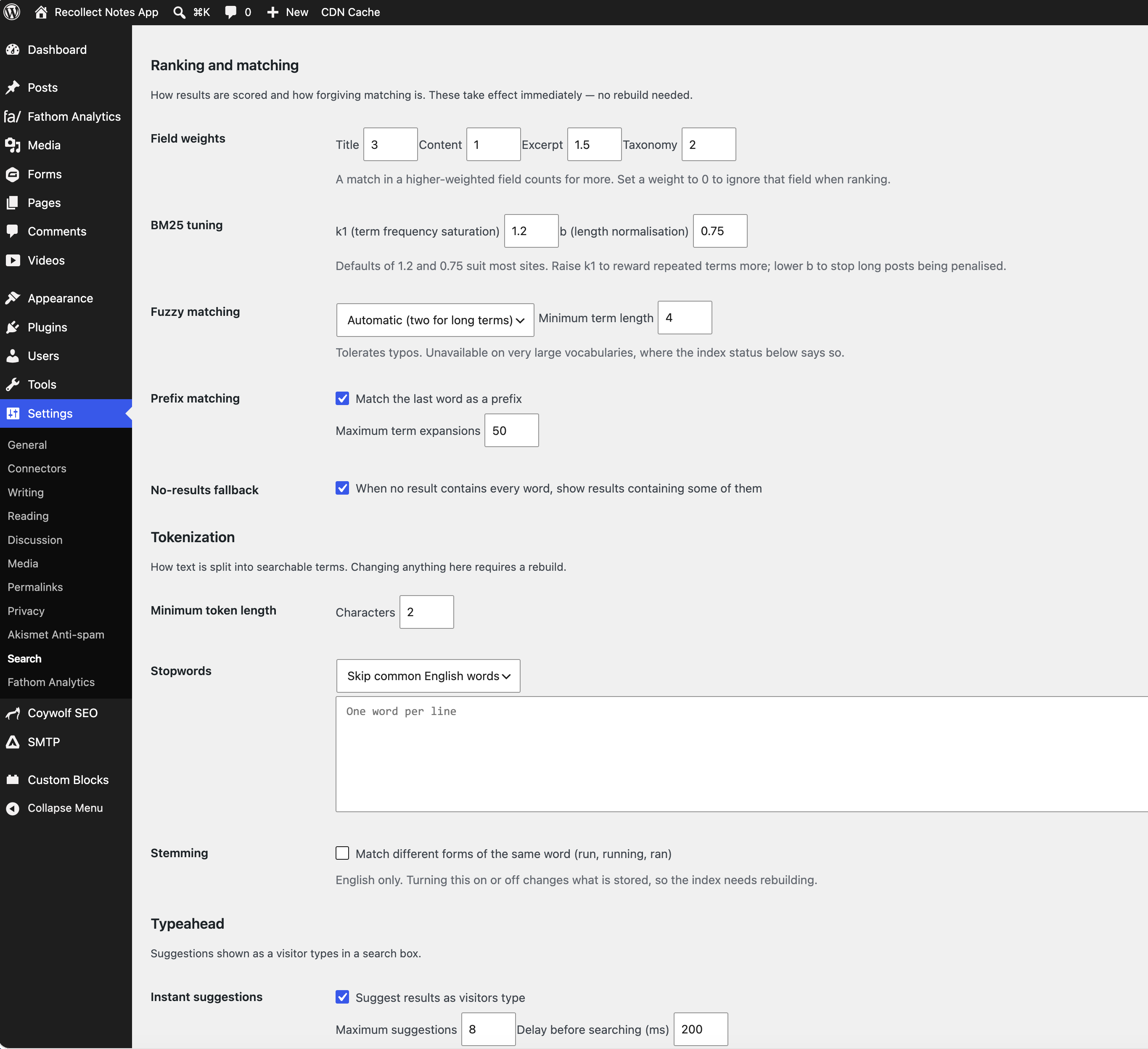
k1andbexposed so you can tune term saturation and how much long posts are penalised. - Per-field weights. A match in the title counts for more than a match halfway down the content. Titles, content, excerpts, and taxonomy terms each get their own multiplier.
- Fuzzy matching. “Reciept” still finds “receipt”. Off, one character, or automatic — where longer words tolerate two.
- Prefix matching. The last word matches as a prefix, so “photog” finds “photography”.
- AND matching with a graceful fallback. Results must contain every word; if nothing does, you can choose to show posts containing some of them, ranked by how many they cover.
- Per-post-type and per-taxonomy control. Choose exactly which post types are searchable and which taxonomies contribute their term names.
- Optional English stemming and stopwords, with your own stopword list if the built-in one isn’t right for your content.
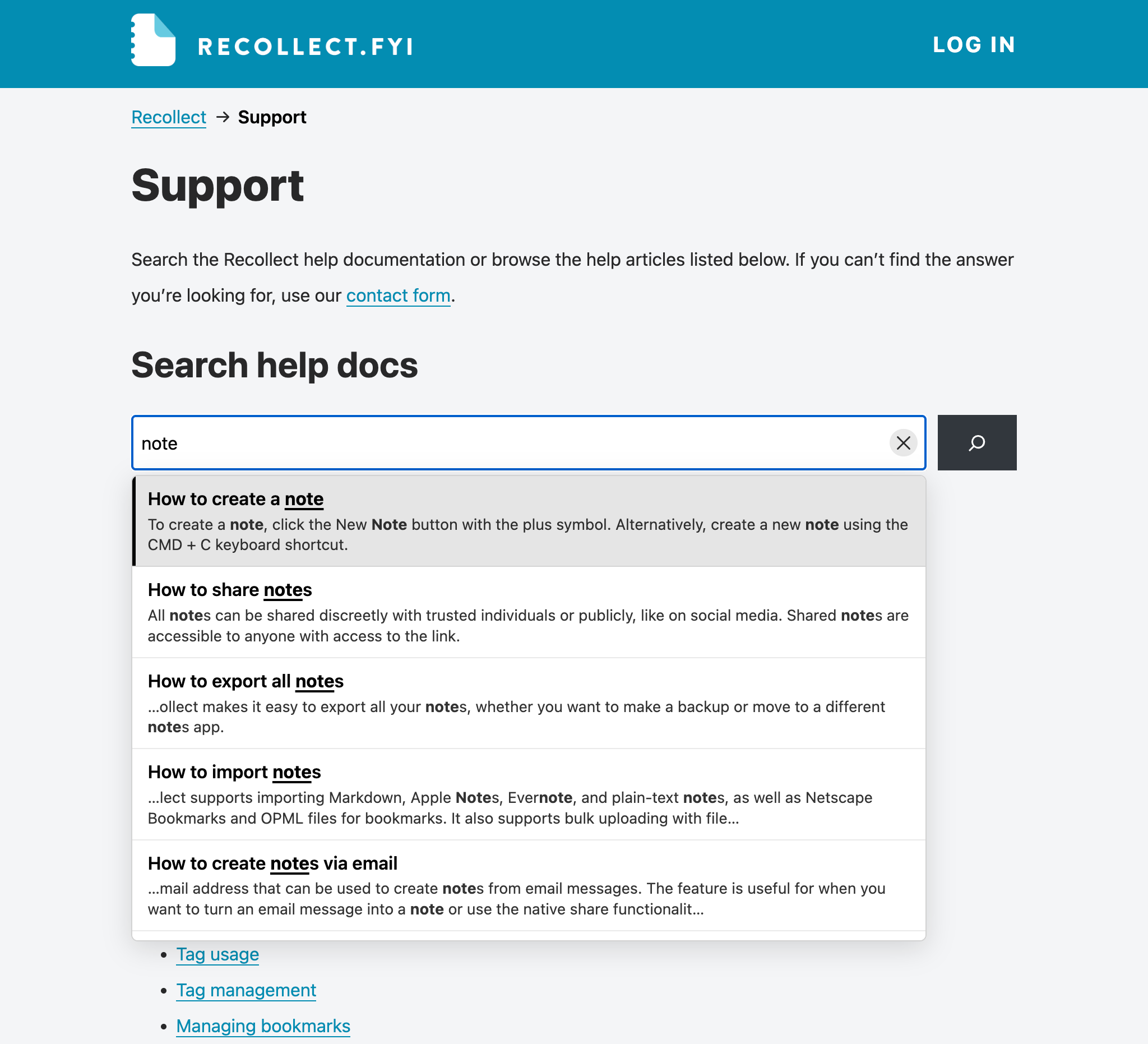
- Suggestions as you type. Matches appear on the keystroke — instantly from a small index of titles held in the browser, then merged with full-text results from the server a moment later. The first suggestion is highlighted so it is obvious what Enter will open; the arrow keys move between them, Escape clears the box, and a clear button does the same with the mouse. It attaches itself to whatever search box your theme already has, whether that came from the search block or
get_search_form(). - It looks after its own index. The first build starts the moment you activate the plugin, edits are picked up in the background, and changing a setting that affects what gets stored queues a rebuild automatically.
- A read-only search API.
GET /wp-json/coywolf-search/v1/search?q=…returns the same ranked results as a search page, with a highlighted snippet for each, so you can build a custom search experience against the same engine.
It replaces search without replacing your theme. /?s= and get_search_form() keep working, your search template renders the results, and pagination behaves normally — the plugin changes which posts come back, not how they look. If the index is empty, or anything at all goes wrong, WordPress runs its own search instead. Search never breaks the page.
Privacy and safety
- Password-protected posts are never indexed. Drafts, private, and scheduled posts enter the index only once they are published, and a post that stops being public is filtered out of results even before the index catches up.
- The plugin makes no outbound network connections of any kind. No telemetry, no phone-home, no remotely-loaded assets.
- Deactivating removes the index and hands search back to WordPress, keeping your settings. Uninstalling removes everything: both tables, every option and transient, and every scheduled event.
Screenshots
Installation
- Upload the plugin to
/wp-content/plugins/coywolf-search/, or install it through Plugins Add New. - Activate it.
That’s it. The index starts building in the background as soon as the plugin is active, and search switches over to it as soon as the first build finishes. Visit Settings Search to choose what gets indexed and tune ranking — changes that affect what is stored queue their own rebuild.
FAQ
-
Do I have to change my theme?
-
No. The plugin answers the query behind
/?s=, so your theme’s existing search form and search results template keep working unchanged. -
What happens when I deactivate it?
-
The index tables are dropped and WordPress goes back to its own search immediately. Your settings are kept, so reactivating and rebuilding restores exactly what you had. Nothing you wrote is ever stored only in the index — it is entirely derived from your posts.
-
Are drafts or private posts ever exposed?
-
No. Only published, non-password-protected posts of the types you selected are indexed, and every search re-checks the post’s current status before returning it. A post you unpublish disappears from results straight away, even if the background reindex hasn’t run yet.
-
Does it call out to any external service?
-
No. There are no outbound HTTP requests, no analytics, and no remotely-loaded files. Everything runs on your own server.
-
Does it slow down publishing?
-
No. Saving a post only flags it; the reindex happens in a background job a minute later, so the editor never waits for it.
-
Do I ever have to rebuild the index by hand?
-
Normally no. The index builds itself when you activate the plugin, and rebuilds itself whenever you change a setting that affects what gets stored — which post types, taxonomies, or fields are indexed, the minimum token length, stopwords, or stemming. Ranking settings like weights,
k1,b, fuzzy, and prefix matching apply immediately and need no rebuild at all.The Rebuild index button on Settings Search is there for the cases where you want to force it: a site with WP-Cron disabled, or content changed outside WordPress.
-
What happens to search while the index is rebuilding?
-
Nothing breaks. A rebuild clears the index and refills it, and while it is empty WordPress answers searches with its own built-in search — so visitors always get results, they just get better ones once the rebuild finishes. On a large site a rebuild runs in background batches over a few minutes.
-
Does the typeahead slow my pages down?
-
It is built not to. Nothing loads on a page with no search box at all. On a page that has one, the only thing that loads up front is a small deferred script — the search library and the list of titles are fetched the first time somebody actually interacts with a search field, so visitors who never search never download them.
-
Does the typeahead work with my theme’s search form?
-
It attaches to any search form on the page, whether it came from the search block,
get_search_form(), or hand-written markup, and it does it without altering your theme’s markup. If your form is unusual enough that it is missed, thecoywolf_search_should_enqueuefilter lets you force it on. -
What if a visitor has JavaScript turned off?
-
The search form behaves exactly as it always did: it submits, and the server answers with the same ranked results. The suggestions are an enhancement on top, never a requirement.
-
Is there an API I can query?
-
Yes.
GET /wp-json/coywolf-search/v1/search?q=your+searchreturns ranked results as JSON — title, permalink, date, post type, and a snippet with the matched words wrapped in<mark>. It acceptspageandper_page, is read-only, and only ever returns content that is already public. It is rate-limited per visitor to keep it from being used to hammer your database. -
Does it support phrase searches in quotes?
-
Not in this version. The index stores which terms are in a document, not where they sit, so
"exact phrase"is treated as the individual words. Quotation marks are ignored rather than silently returning wrong results. -
Does it work with languages that don’t use spaces?
-
Partly. Words are split on whitespace and punctuation, so languages that don’t separate words that way — Chinese, Japanese, Thai — won’t tokenize usefully. Stemming is English-only, and can be turned off.
-
My host has WP-Cron disabled. Will the index go stale?
-
Yes — both the automatic rebuilds and the background reindexing of edits rely on WP-Cron. With it disabled, use the Rebuild index button on Settings Search. That screen also shows how many posts are waiting to be reindexed, so you can tell at a glance whether anything is falling behind.
Reviews
There are no reviews for this plugin.
Contributors & Developers
“Coywolf Search” is open source software. The following people have contributed to this plugin.
Contributors
Translate “Coywolf Search” into your language.
Interested in development?
Browse the code, check out the SVN repository, or subscribe to the development log by RSS.
Changelog
1.4.2
- The search rate limiter now spells out its transient names with the full plugin prefix at each call, so automated reviews can see the prefix. No change to behaviour.
1.4.1
- Updated the plugin’s home page link and refreshed the screenshots.
1.4.0
- Suggestions that match nothing now say “No matching results.” in the dropdown instead of the dropdown disappearing. The message cannot be selected or opened — Enter still runs a normal search.
- The suggestion list fades in and out instead of flashing on and off. Visitors who ask their system for reduced motion still get the instant version.
- New “Suggestion colours” settings: background, title, and snippet colours for the list, plus background, left border, title, and snippet for the highlighted suggestion. Leave any colour empty to inherit it from your theme.
1.3.0
- Security: the search endpoint’s rate limiting now counts requests by the connecting address as well as the visitor address, so a spoofed forwarded header can no longer sidestep it, and buckets are salted so nobody can aim traffic at another visitor’s bucket.
- Security: a search query is now capped at 16 words (6 with typo tolerance), and one search can no longer pull an unbounded number of index rows.
- Security: unpublishing a post now also removes its title from the cached suggestion data, instead of it lingering for up to a day.
- Accessibility: screen readers now hear when no suggestions match, when the count changes, and how the rebuild is progressing; keyboard focus survives starting a rebuild.
- Accessibility: Escape now closes the suggestions first and only clears the field on a second press; suggestion highlights are underlined so they are visible in bold titles; every settings control now carries a proper name and group.
- Performance: searches no longer load the full content of every matching post just to order results — broad searches on large sites are dramatically lighter.
- Performance: the suggestion data is cached in the browser for the session and revalidates with ETags, so it is downloaded once instead of on every page view, even on sites whose page cache strips caching headers.
1.2.1
- Suggestions now keep a readable width when the search field itself is narrow, and stay inside the window rather than overflowing it.
- Removed the browser’s own clear button from search fields, which was showing a second cross next to the plugin’s.
- The arrow keys, Enter, and Escape now work whenever the suggestion list is open, not only while the search field still holds focus.
- Enter with no usable suggestion submits the search form instead of doing nothing.
1.2.0
- Added instant as-you-type suggestions, with the first result highlighted so Enter’s target is always visible, arrow-key navigation, Escape to clear, and a clear button.
- Suggestions attach to any theme’s search form without modifying its markup.
- The search library and the title list load only when a visitor first interacts with a search box, so pages nobody searches from download nothing extra.
- Added a setting for whether to show the content type beside each suggestion (off by default).
1.1.0
- The index now builds itself on activation, and rebuilds itself whenever a setting changes what would be stored — no button press needed.
- Added a public read-only search API at
coywolf-search/v1/search, returning ranked results with highlighted snippets. - Reindexing delay after a post is edited is now filterable via
coywolf_search_reindex_delay.
1.0.0
- Initial release: custom full-text index, BM25 ranking with per-field weights, fuzzy and prefix matching, per-post-type and per-taxonomy control, optional stemming and stopwords, and a batched index rebuild.