

Description
RatingStar.de Seal brings the reviews of your RatingStar profile into your WordPress site:
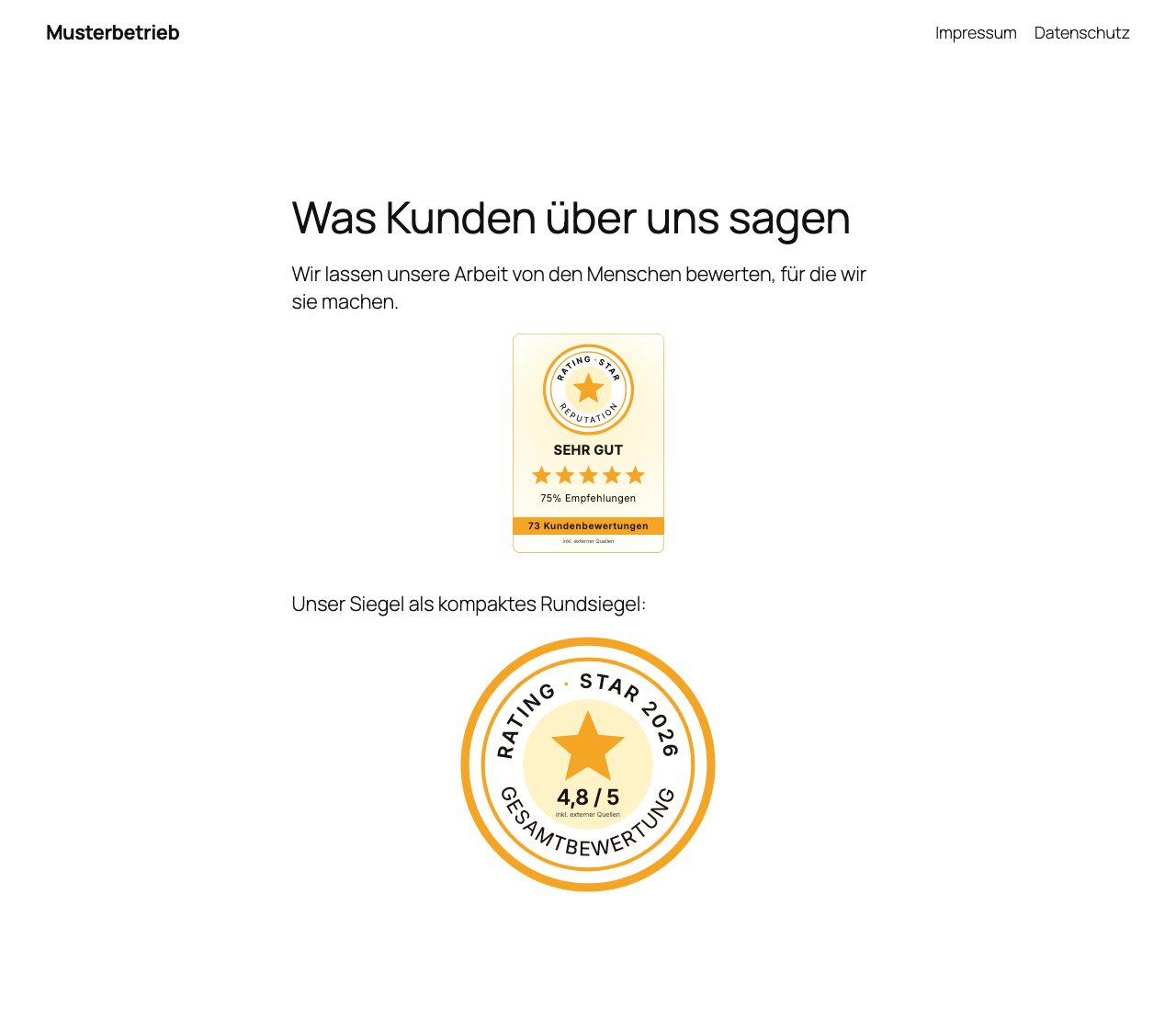
- A seal widget in nine variants — the static round seal and banner seal, plus the live widgets: profile card, trust bar, hero snippet, featured quote, carousel, wall of love and footer bar.
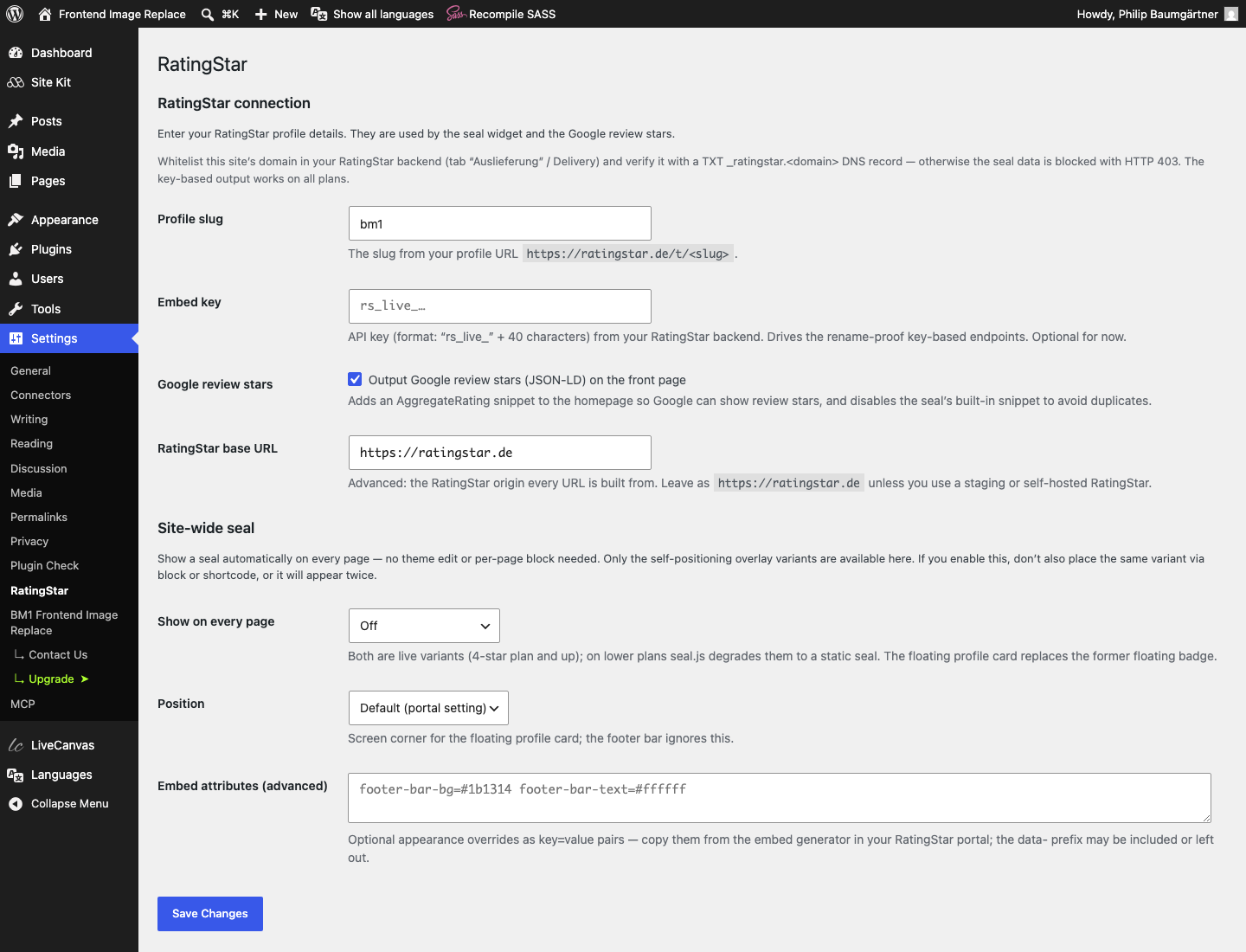
- A site-wide seal: show the floating profile card or the footer bar on every page — no theme edit, no per-page block.
- Google review stars — server-side JSON-LD (
LocalBusinesswithAggregateRating) so search engines can show star ratings for your site. - A static image mode: the round seal, banner seal and profile card as a plain SVG image, linked to your profile — for contexts without JavaScript.
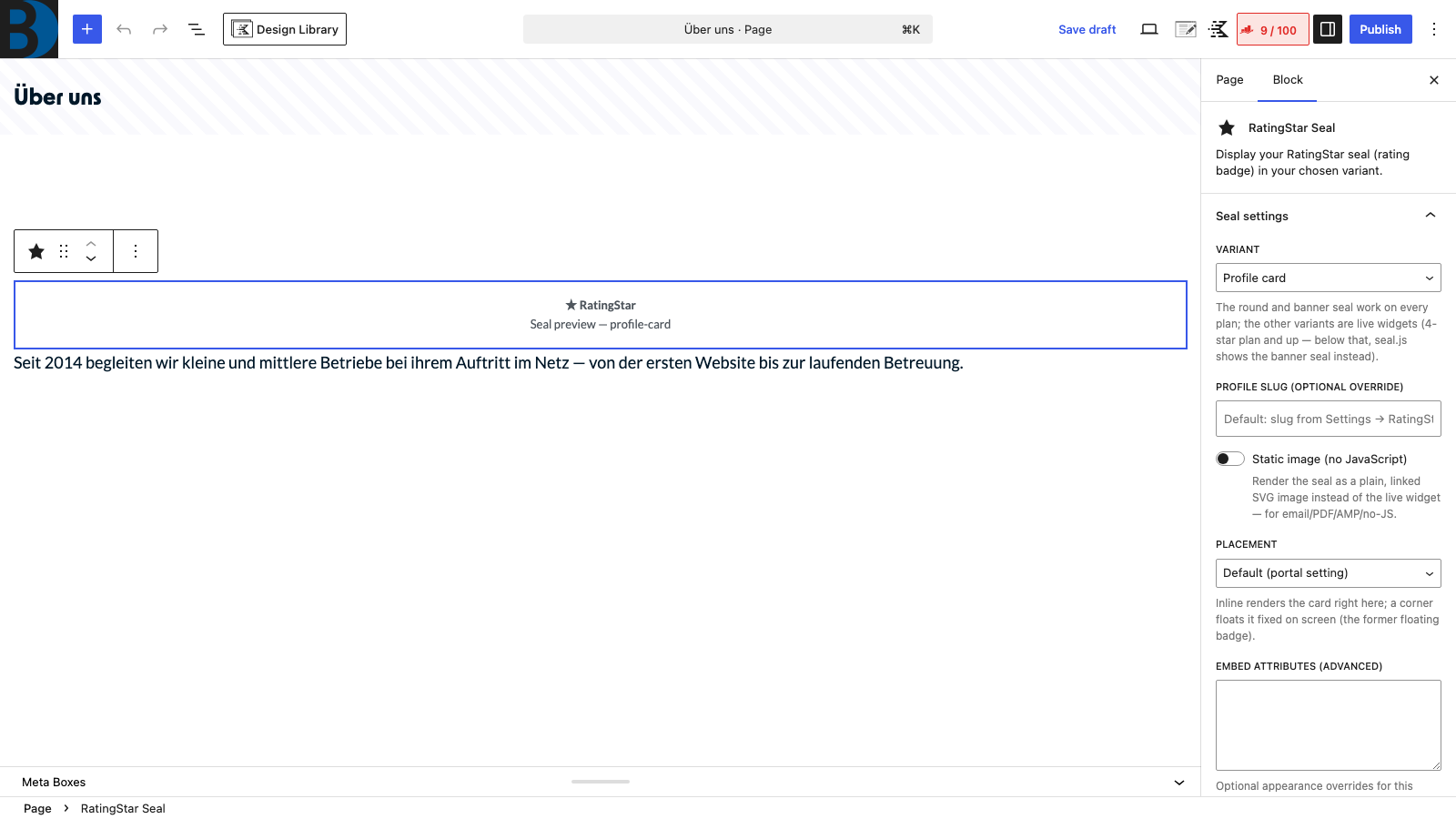
Enter your RatingStar profile slug once under Settings RatingStar, then place the seal anywhere with the [ratingstar] shortcode or the RatingStar Seal block — or switch on the site-wide seal.
Customising the look: every embed accepts the appearance attributes produced by the embed generator in your RatingStar portal (for example pc-color, car-count, footer-bar-bg). Use them as shortcode attributes ([ratingstar variant="carousel" car-count="4"]), paste them into the block’s “Embed attributes” field, or into the site-wide settings — seal.js validates the values.
Why it stays fast and clean:
- The seal script (
seal.js) is loaded asynchronously and only on pages that actually contain a seal. - The JSON-LD rating is fetched server-side — key-based when an API key is set, so it survives a profile rename — and cached for 6 hours; it is printed only on your front page.
- When the JSON-LD output is enabled, the seal’s own snippet is suppressed so the
AggregateRatingis never duplicated. - The static image is rendered and cached by ratingstar.de, with long-lived CDN and browser caching.
Deutsch
RatingStar.de Seal bringt die Bewertungen Ihres RatingStar-Profils auf Ihre WordPress-Seite. RatingStar ist eine deutsche Bewertungsplattform; Profil, Portal und Support sind deutschsprachig.
- Bewertungssiegel in neun Varianten — statisches Rundsiegel und Banderole sowie die Live-Widgets: Profilkarte, Trust-Bar, Hero-Snippet, Zitat-Karte, Karussell, Wall of Love und Footer-Leiste.
- Seitenweites Siegel — schwebende Profilkarte oder Footer-Leiste auf jeder Seite, ohne Theme-Anpassung und ohne Block auf jeder einzelnen Seite.
- Google-Sterne — server-seitiges JSON-LD (
LocalBusinessmitAggregateRating), damit Suchmaschinen Sternebewertungen zu Ihrer Seite anzeigen können. - Statischer Bildmodus — Rundsiegel, Banderole und Profilkarte als reines SVG mit Link aufs Profil, für Umgebungen ohne JavaScript.
Tragen Sie Ihren RatingStar-Profil-Slug einmalig unter Einstellungen RatingStar ein und platzieren Sie das Siegel dann mit dem Shortcode [ratingstar] oder dem Block RatingStar Seal — oder schalten Sie das seitenweite Siegel ein.
Aussehen anpassen: Jede Einbindung akzeptiert die Gestaltungs-Attribute aus dem Embed-Generator in Ihrem RatingStar-Portal (etwa pc-color, car-count, footer-bar-bg). Sie funktionieren als Shortcode-Attribute ([ratingstar variant="carousel" car-count="4"]), im Feld „Embed-Attribute” des Blocks oder in den Einstellungen für das seitenweite Siegel; ungültige Werte fallen still auf den Standard zurück.
Schlank und schnell: Das Siegel-Skript wird asynchron und nur auf Seiten mit Siegel geladen. Die Bewertungsdaten fürs JSON-LD holt Ihr Server selbst — bei hinterlegtem API-Key umbenennungs-fest über den key-basierten Endpunkt — und speichert sie 6 Stunden zwischen; ausgegeben wird das Markup nur auf der Startseite. Ist die JSON-LD-Ausgabe aktiv, unterdrückt das Siegel sein eigenes Snippet, damit die Bewertung nie doppelt im Markup steht.
External services
This plugin connects to the RatingStar platform (https://ratingstar.de), a review collection and rating seal service operated by Baumgärtner Marketing GmbH. The connection is what the plugin is for: it displays your RatingStar seal with live rating data and outputs your rating as Google review stars. Without a RatingStar profile the plugin does nothing.
What is sent, and when:
- Seal widget: When a page containing a seal is shown, the visitor’s browser loads
seal.js, the seal styles and the rating data for the configured profile from ratingstar.de, and requests a tracking pixel that counts the seal impression (and, on click, the click). As with any web request, the visitor’s IP address and user agent technically reach the server; the plugin itself transmits no names, e-mail addresses or other personal fields. - Static image mode: The visitor’s browser loads a single SVG image from ratingstar.de.
- Google review stars (JSON-LD): Your web server — not the visitor — fetches the rating summary from ratingstar.de (identified by your site URL in the user agent) and caches it for 6 hours. No visitor data is involved.
- Settings: When you save a changed profile slug, your web server verifies it against ratingstar.de once.
Service provider: Baumgärtner Marketing GmbH, Germany.
- Terms of service: https://ratingstar.de/agb
- Privacy policy: https://ratingstar.de/datenschutz
Screenshots
Blocks
This plugin provides 1 block.
- RatingStar Seal Display your RatingStar seal (rating badge) in your chosen variant.
Installation
- Upload the
ratingstar-de-sealfolder to/wp-content/plugins/, or install the ZIP via Plugins Add New Upload Plugin. - Activate RatingStar.de Seal through the Plugins menu.
- Go to Settings RatingStar and enter your profile slug (the part after
ratingstar.de/t/). The slug is verified against your live profile. Optionally add your API key (rs_live_…) for the rename-proof key-based endpoints. - Whitelist your domain in the RatingStar backend (tab “Auslieferung” / Delivery) and verify it via the
TXT _ratingstar.<domain>DNS record — otherwise the seal data may be blocked with HTTP 403. - Place the seal on a page or post —
[ratingstar variant="profile-card"]or the RatingStar Seal block — or enable the site-wide seal in the settings.
Deutsch
- Plugin über Plugins Installieren suchen und installieren — oder den Ordner
ratingstar-de-sealnach/wp-content/plugins/hochladen. - RatingStar.de Seal unter Plugins aktivieren.
- Unter Einstellungen RatingStar den Profil-Slug eintragen (der Teil hinter
ratingstar.de/t/). Der Slug wird gegen Ihr Live-Profil geprüft. Optional den API-Key (rs_live_…) für die umbenennungs-festen key-basierten Endpunkte hinterlegen. - Ihre Domain im RatingStar-Backend unter „Auslieferung” freischalten und per DNS-Eintrag
TXT _ratingstar.<domain>bestätigen — sonst können die Siegel-Daten mit HTTP 403 blockiert werden. - Siegel auf einer Seite platzieren —
[ratingstar variant="profile-card"]oder Block RatingStar Seal — oder in den Einstellungen das seitenweite Siegel aktivieren.
FAQ
-
Where do I find my profile slug?
-
It is the last part of your public profile URL:
https://ratingstar.de/t/<slug>. Enter just the<slug>part on the settings page. -
Which variants are there?
-
The round seal and the banner seal are static and work on every plan. Profile card, trust bar, hero snippet, featured quote, carousel, wall of love and footer bar are live widgets and need a 4-star plan or higher — on lower plans seal.js shows the banner seal instead.
-
How do I change colours, sizes and other options?
-
Open the embed generator in your RatingStar portal, configure the widget and copy the resulting attributes into the shortcode, the block’s “Embed attributes” field or the site-wide settings. The
data-prefix may be included or left out; invalid values fall back silently. -
The seal does not appear.
-
Make sure a profile slug is saved under Settings RatingStar and that the page contains the
[ratingstar]shortcode, the RatingStar Seal block or an enabled site-wide seal. Check that your domain is whitelisted and DNS-verified in the RatingStar backend. If you use a caching or “remove unused JavaScript” plugin, make sureseal.jsfromratingstar.deis not blocked. -
Does this work with caching plugins?
-
Yes. The rating data for the JSON-LD is cached server-side for 6 hours via a WordPress transient, so page caches stay light. The seal itself renders client-side from live data; the static image is cached by CDN and browser.
-
Data protection / GDPR
-
The seal widget loads
seal.jsand rating data fromratingstar.de, so visitors’ browsers connect to that domain when a seal is shown. Mention this in your privacy policy and, if you use a consent solution, treatratingstar.deaccordingly. The server-side Google review stars (JSON-LD) do not require any client-side connection; the static image mode only requests a single image. -
Do I need an embed key?
-
The seal works with your public profile slug alone. The API key (format
rs_live_…from your RatingStar backend) is recommended for the Google review stars: it drives the rename-proof key-based endpoints, which keep working when your profile slug changes and are open on all plans.
Reviews
There are no reviews for this plugin.
Contributors & Developers
“RatingStar.de Seal” is open source software. The following people have contributed to this plugin.
Contributors
Translate “RatingStar.de Seal” into your language.
Interested in development?
Browse the code, check out the SVN repository, or subscribe to the development log by RSS.
Changelog
1.0.0
- First public release.
- Seal widget in nine variants (shortcode + block) with the portal’s per-embed appearance attributes.
- Site-wide seal: floating profile card or footer bar on every page.
- Server-side Google review stars: key-based
LocalBusinessJSON-LD, cached for 6 hours, duplicate-free. - Linked static image mode (SVG) for round seal, banner seal and profile card.
- Slug verification, configurable base origin, domain-whitelist hints.
- German translations (de_DE and de_DE_formal), including the block editor.