

Description
SoftGlaze PDF Invoices turns WooCommerce orders — and invoices you create by hand — into clean, professional PDF documents. Everything renders 100% locally: the bundled dompdf engine runs on your own server, every logo, icon and font is embedded from local files, and a document render never makes an outbound HTTP request. The default install talks to zero external services; the only features that can ever reach the network are opt-in and off by default (the EU VIES VAT lookup, cloud backup, and WhatsApp Cloud API sending — each to an official service or your own account).
It scales with you: from “I just need an invoice attached to my order emails” all the way to a full self-service invoice-builder website your visitors sign up and use — all from one plugin, driven by a modern React admin.
Full documentation, setup guides and screenshots: https://softglaze.com/docs/pdf-invoices-plugin-for-woocommerce-and-manual
Four document types, one design system
- Invoices, packing slips, proforma invoices and credit notes — one template engine, four faces. Each document type uses a stock design or a custom template you build, at the paper size you choose (A4 / Letter).
- Credit notes on refund — refund an order and a credit note is offered automatically, referencing the original invoice.
- Receipts — an optional “Receipt vs Invoice” choice at checkout, with its own template and (optionally) its own number sequence.
- Delivery notes — print carrier, tracking number, shipping and expected-delivery dates on the invoice and/or packing slip (opt-in, per type).
Numbering that fits your books
- Sequential auto-numbering with prefix/suffix,
{YYYY}/{MM}placeholders, zero-padding and yearly reset — or simply reuse the WooCommerce order number or the raw order ID. - Separate, race-safe sequences for credit notes and proforma invoices, each with its own start / prefix / suffix / padding.
- Migrating from another plugin? Detect existing YITH / WebToffee numbers and continue your sequence from the highest, so numbering stays unbroken.
Automation
- Auto-generate documents on the order statuses you choose.
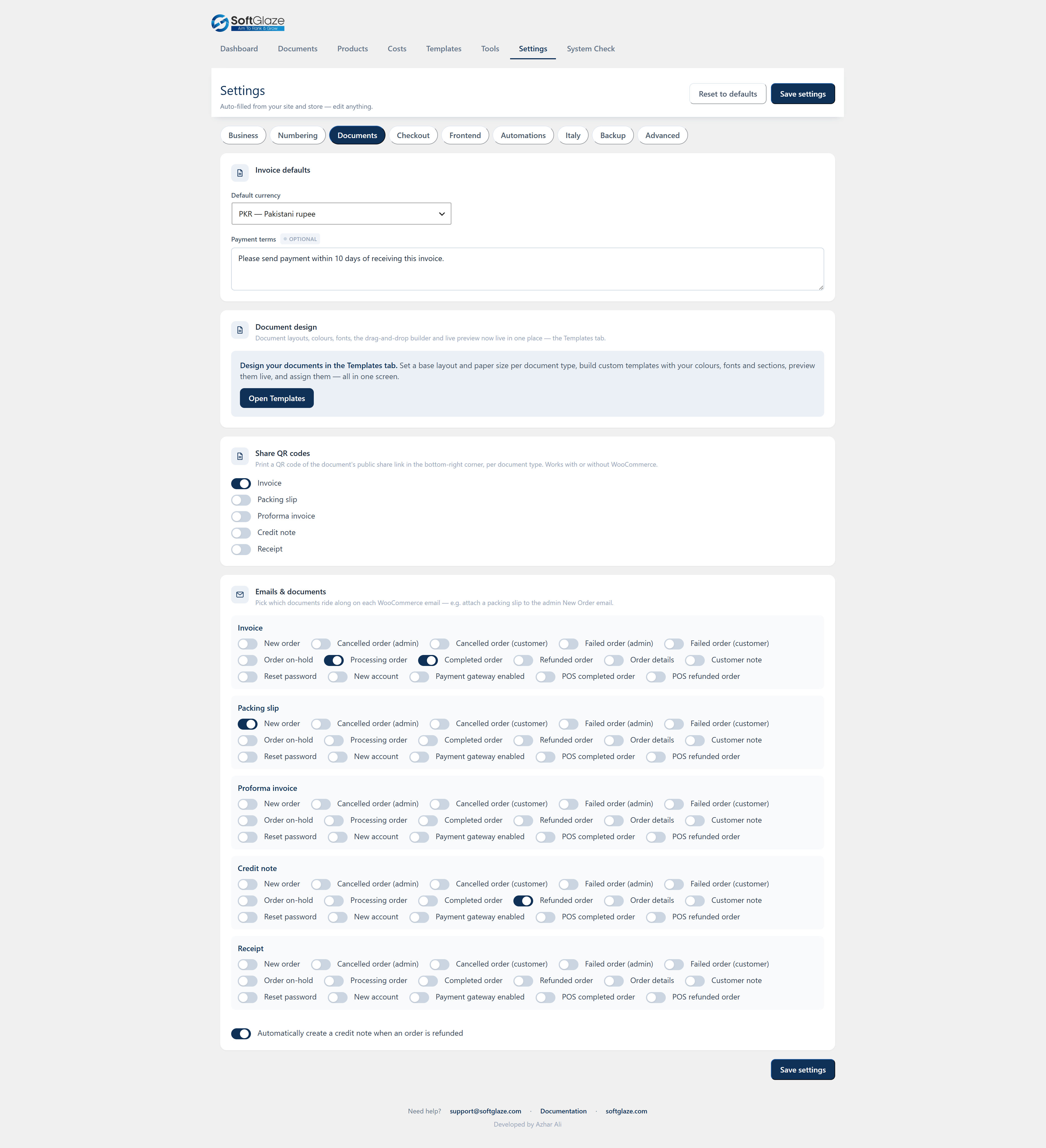
- A configurable document × WooCommerce-email matrix — attach the right document to the right transactional email (e.g. the invoice on “Completed”, the packing slip on “Processing”).
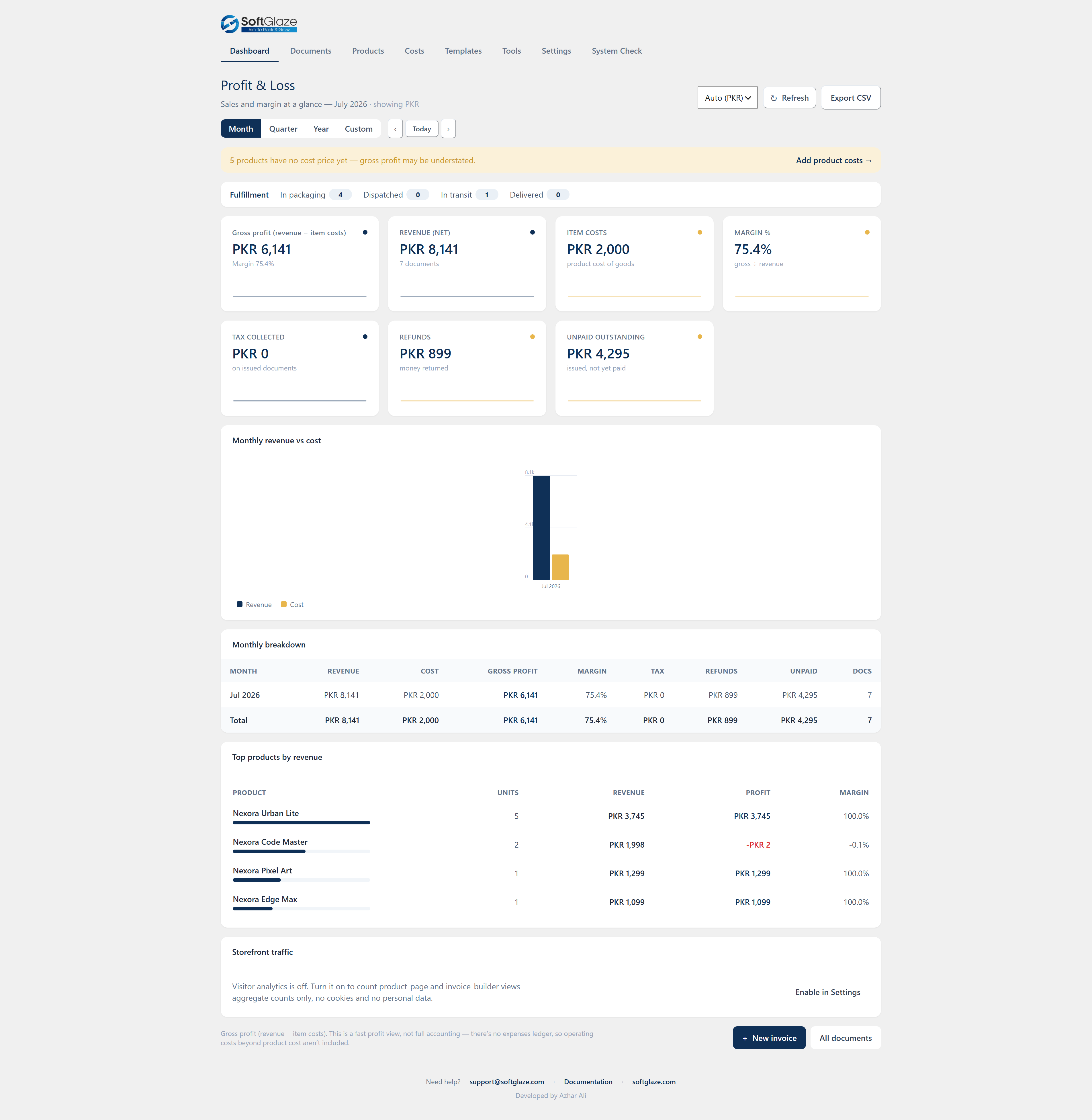
- Fulfillment stages — a safe parallel flow (In packaging Dispatched In transit Delivered) that never touches WooCommerce’s own order statuses, with live dashboard counters, optional per-stage customer emails, and the current stage printed on packing slips.
- Payment reminders — automatically email customers past their due date at the day-offsets you set; reminders stop the moment an order is paid.
- Accountant export — on a chosen day each month, email your accountant a ZIP of last month’s invoice PDFs plus a CSV index. A global kill-switch pauses every automated email at once.
A real admin, not just a settings page
- A Profit & Loss dashboard — Revenue, Item costs, Gross profit, Margin %, Tax collected, Refunds and Unpaid outstanding, with a month / quarter / year / custom switcher, inline charts, a monthly breakdown and top products, all exportable to CSV. (Honestly labelled “gross profit = revenue − item costs” — sales-and-margin at a glance, not double-entry accounting.)
- A searchable, filterable Documents manager with bulk actions — generate, email, or download a ZIP — across both WooCommerce and manual documents, with source / type / status / stage / date filters.
- A Products table mirroring your WooCommerce catalogue (thumbnail, SKU, price, cost, stock) with a Cost price field that feeds the margin maths, plus branded product-catalog PDFs.
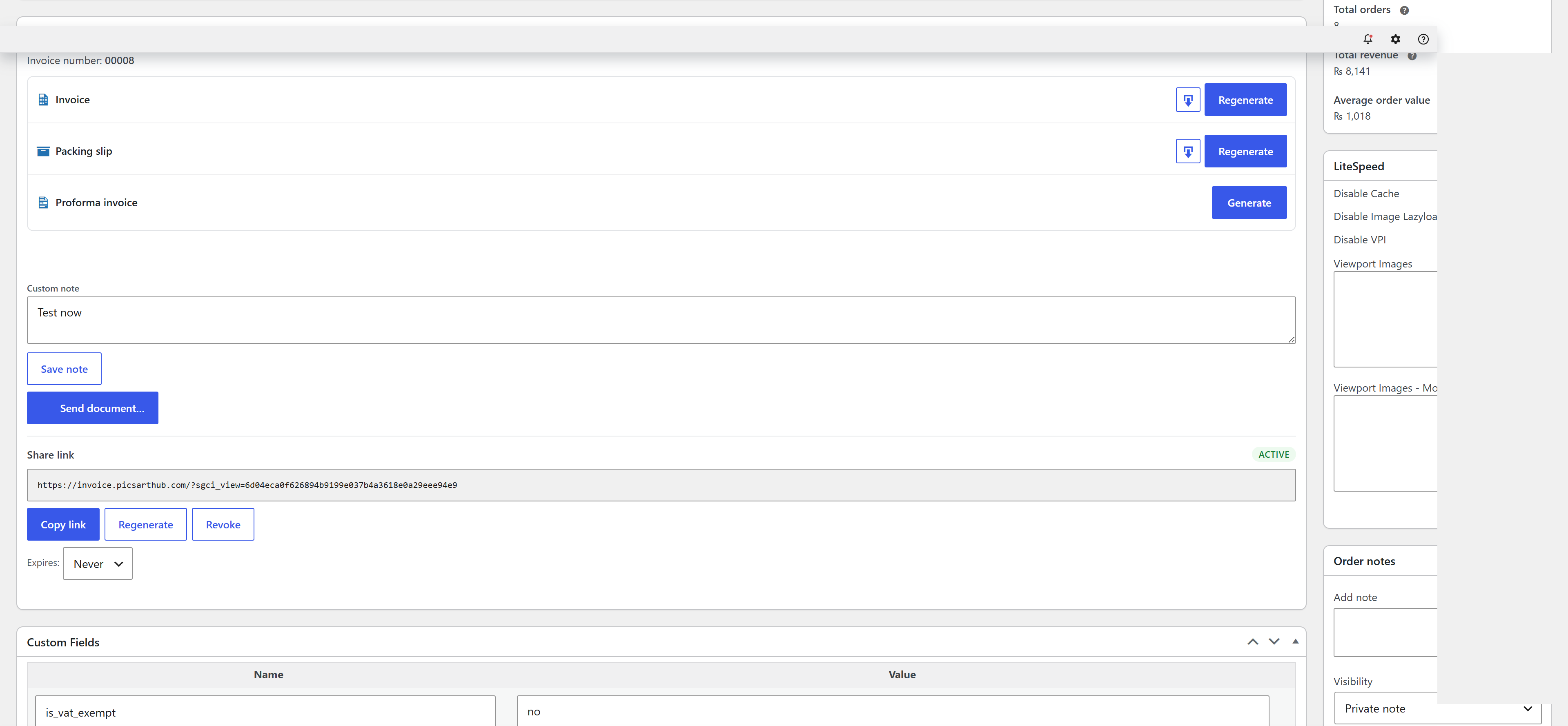
- On the WooCommerce order screen: generate / view / email documents, set the fulfillment stage, and record carrier & tracking — on both the classic and HPOS order screens. There’s also an Invoice column and bulk actions on the orders list, and a “Download invoice” button in My Account.
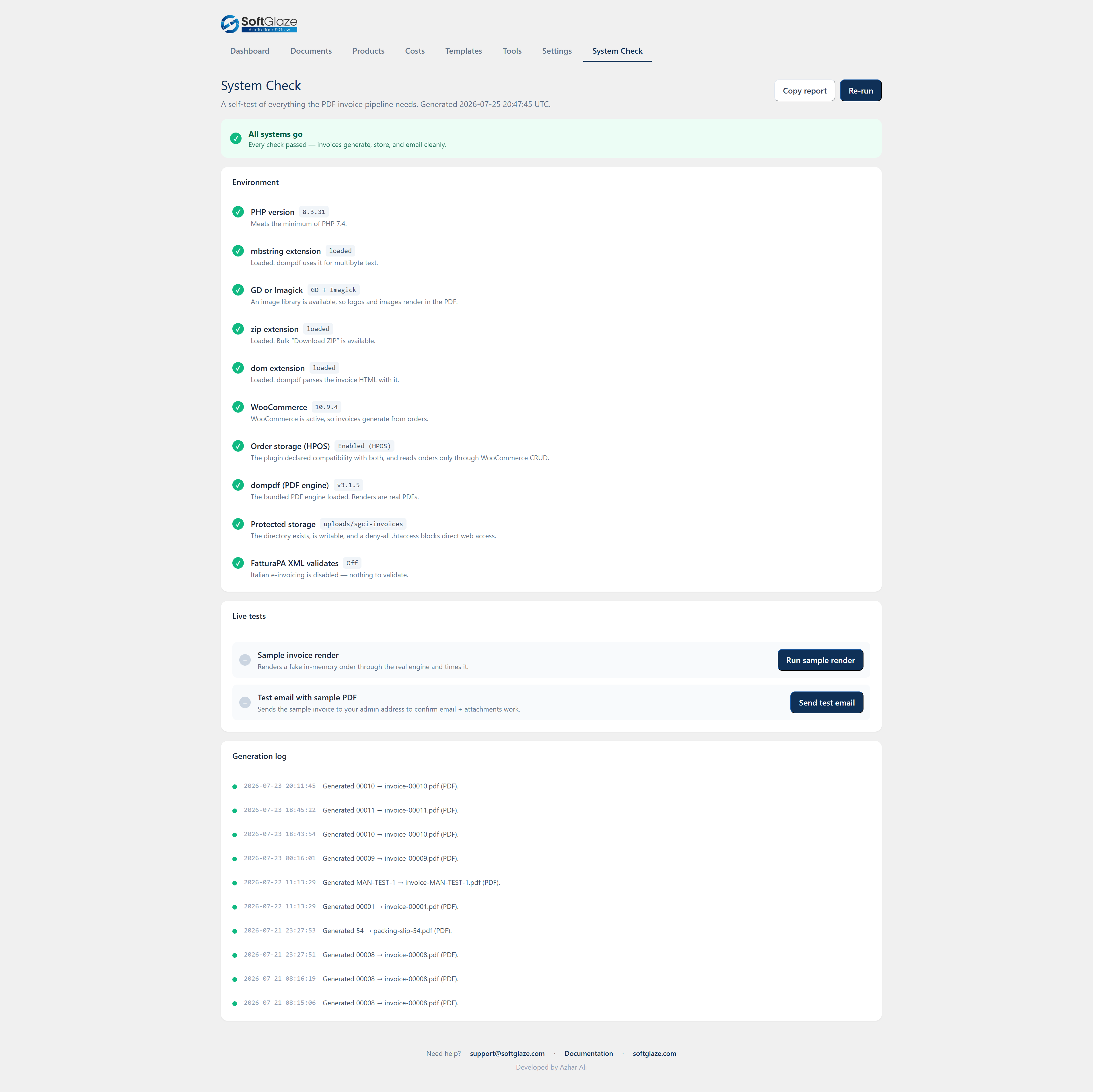
- A built-in System Check page (and WordPress Site Health tests) that verifies PHP, extensions, storage and the engine, and renders a live sample PDF so you can confirm it works before you rely on it.
- A guided first-run setup wizard for company details, currency and numbering (with a live invoice-number preview).
Design your documents visually
- A drag-and-drop template builder: reorder sections (header, bill-to, meta, items, totals, payment, terms, signature, plus text / divider / spacer and a sanitised custom-HTML block), toggle what each shows, and choose which item columns print.
- Design tokens — colours, a bundled dompdf-safe font, base size, heading case, corner radius, header / totals style, logo position and your uploaded logo.
- A side-by-side live preview renders through the real engine as you edit, plus an “Exact PDF” button — what you preview is exactly what generates. Start from any of 10 stock designs, and export / import templates as JSON between sites.
- Two layout modes — Flow and Canvas. Flow stacks sections down the page; Canvas places blocks freely — drag to move, resize with corner/edge handles, nudge with the arrow keys, and layer them front-to-back. Blocks are positioned as a percentage of the page, the same coordinates the PDF uses, so the layout you build is the layout that prints. Existing templates stay in Flow mode.
Works with or without WooCommerce
- Manual invoices — a full “New invoice” screen: saved clients (de-duplicated by email), unlimited line items (quantity, unit price, cost, tax rate), currency, date, template and status. A race-safe number is assigned, the PDF is stored, and a share link is ready — even with WooCommerce switched off.
- A public invoice-builder website — four shortcodes (
[sgci_invoice_builder],[sgci_my_invoices],[sgci_dashboard],[sgci_login]/[sgci_register]) let visitors sign up, build their own invoices with a live preview, and manage them — a complete self-service invoice site. Every document is private to its owner; one user can never see another’s. When WooCommerce is active, the same view merges into a My Account Invoices tab.
Share & send
- Public share links — a tokenised, no-login viewer page with single-PDF download, per-document expiry (7 / 30 / 90 days or never), regenerate and revoke, and an optional QR code printed on the PDF.
- Send any document by email from the order screen or the Documents manager, with an editable recipient / subject / message, dynamic
{tags}filled in on send, and a logged send history.
Payments, deposits & client acceptance
- Partial payments and deposits — record payments against any document (date, amount, method, note). Once a payment exists, the PDF prints an Amount paid and Balance due pair beneath the total (on all 10 stock designs and your custom templates), the dashboard’s “Unpaid outstanding” counts the remaining balance, and two tags —
{amount_paid}and{balance_due}— are available in the builder. On WooCommerce orders the balance respects the order status (only Pending / On-hold show a balance). - Online client acceptance — turn on an “Accept” button on the public share link, per document type (typically a proforma or quote; off by default). The client types their name, ticks an agreement box and accepts; their name, the date/time and IP are recorded, an “Accepted online by …” stamp is added to the PDF, and the order screen logs who accepted. It is a clear, honest online acceptance — not a legally binding electronic signature.
WhatsApp delivery
- Click-to-chat (free, zero setup) — every generated document gets a WhatsApp button on the order screen and the Documents manager. It opens WhatsApp (app or web) with the customer’s number and a message containing the document’s secure share link; your own WhatsApp sends it. There are no API keys, and the plugin makes no request of its own.
- Cloud API server-send (optional) — connect your OWN Meta WhatsApp Business Cloud API and a “Send on WhatsApp now” action delivers the share link to the customer directly from your server. Inside WhatsApp’s 24-hour customer-service window it sends your session message; outside it, it falls back to your pre-approved template. It is off by default, your access token is stored encrypted, and nothing is ever sent automatically.
Compliance & exports
- VAT / fiscal-code at checkout (classic and block checkout) — each field independently optional or required, scoped to all countries / EU only / a country list, with per-country VAT format checks, the Italian Partita IVA & Codice Fiscale checksums, and an optional EU VIES online lookup (off by default).
- Italian e-invoicing (FatturaPA) — generate the official FatturaPA 1.2 (FPR12) XML for invoices and credit notes, per-document or as a bulk ZIP, validated locally against the Agenzia delle Entrate schema before download. Honest scope: it produces the XML file — it does not transmit to the SDI, and it refuses to guess when data can’t be mapped cleanly.
- Accounting exports — the Documents list exports to CSV or XML (respecting your active filters), and each document to a UBL-lite XML. Product lists export to CSV / XML too.
- Compliance field packs — show your seller VAT, GST/HST and a generic Tax ID in the company block (per document type, off by default), and print an editable EU reverse-charge note (defaults to the Art. 196 wording). In automatic mode the note appears only where reverse charge actually applies — intra-EU B2B with your EU VAT number and a VAT-registered customer in another EU country — or you can set it to always print. The note is informational; it never changes your tax totals.
Multi-language & right-to-left documents
- Print the customer-facing document in a chosen language — a store default under Settings Documents Language & direction, or per document (on the invoice editor and the WooCommerce order screen). The built-in labels (Invoice, Bill To, Subtotal, Tax, Total, and the rest) translate automatically.
- French, German, Spanish, Dutch, Italian, Portuguese and Hebrew are built in; Hebrew (and other right-to-left languages) render the whole document right-to-left using the bundled font, with no extra setup. With no language chosen, documents render exactly as before, and your admin screens stay in English. (Arabic is not offered yet — the bundled PDF engine cannot join Arabic letters correctly.)
Cloud backup (optional, off by default)
- Copy every generated document to your own Dropbox or Google Drive, mirroring the local folder layout (
/SoftGlaze Invoices/{Year}/{Month}/). - You use your own app credentials via a standard OAuth flow — there is no SoftGlaze server in the middle. Refresh tokens are stored encrypted at rest on your server.
- Background uploads with automatic retry, a “Backup everything now” backfill, and a disconnect that revokes and deletes the stored tokens. Nothing is uploaded — and no backup task is even scheduled — until you connect an account.
Privacy, security & compatibility
- Zero external requests by default. The PDF engine always renders locally; the only opt-in network features are the EU VIES check, cloud backup and WhatsApp Cloud API sending, each disclosed here and in a settings notice.
- HPOS (High-Performance Order Storage) compatible; all order data is read through WooCommerce CRUD.
- Generated files live in a protected uploads directory (deny-all + index guard) and are served only through capability- and ownership-checked endpoints — a direct link to someone else’s document returns “not found”.
- Every feature added since your current version is off by default and update-safe: an existing store’s checkout, documents, emails and numbering are unchanged until you opt in.
- Developer-friendly — human-readable React source ships in
src/; the filterssgci_document_template_jsonandsgci_document_htmllet you reshape output in code; and a shared dynamic-tag engine powers{invoice_number},{order_number},{total},{share_url},{carrier},{tracking_code},{order_meta:key},{user_meta:key}and more.
Bundled libraries (all GPL-compatible, in vendor/): dompdf (LGPL-2.1) with php-font-lib and php-svg-lib, with docs and tests removed.
Screenshots




![The public invoice builder ([sgci_invoice_builder]) — visitors build their own invoice with saved company details, line items, a design picker and a live preview.](https://ps.w.org/softglaze-pdf-invoices/assets/screenshot-17.png?rev=3623858)

![The standalone customer dashboard ([sgci_dashboard]) — invoices and a "Create invoice" builder together as simple tabs, for sites without WooCommerce.](https://ps.w.org/softglaze-pdf-invoices/assets/screenshot-19.png?rev=3623858)

![Self-contained sign-in / create account ([sgci_login]) — users pick their own password and are signed straight in, with an on-site "forgot password" flow and no wp-login screen.](https://ps.w.org/softglaze-pdf-invoices/assets/screenshot-21.png?rev=3623858)


Installation
- Upload the plugin folder to
/wp-content/plugins/(or install the ZIP from Plugins Add New). - Activate it through the Plugins screen.
- Open SoftGlaze Invoices Settings and fill in your company, logo, bank and numbering details (they are pre-filled from your site and WooCommerce store).
- Open a WooCommerce order and click Generate Invoice PDF, or let auto-generation handle it on your chosen statuses.
WooCommerce is required for order invoicing. The bundled dompdf library ships with the plugin; if it is ever missing, documents fall back to print-ready HTML.
FAQ
-
Does it send any data to an external service?
-
By default, no. Rendering is entirely local — the PDF engine embeds all assets from your own server and makes no outbound HTTP request when generating a document.
There are exactly three opt-in exceptions, all off by default:
-
EU VIES VAT check — if you turn on Settings Checkout Verify EU VAT numbers online with VIES, a VAT number entered at checkout is sent to the official EU VIES service to confirm it exists. Format and checksum checks always run locally first.
-
Cloud backup — if you connect a destination under Settings Backup, generated documents are uploaded to YOUR own Dropbox or Google Drive using YOUR app credentials. There is no SoftGlaze middleman server, refresh tokens are stored encrypted on your server, and nothing is uploaded until you connect an account. Disconnecting revokes and deletes the stored tokens.
-
WhatsApp Cloud API sending — if you enable it and save your own Meta credentials under Settings Automations WhatsApp Cloud API, clicking “Send on WhatsApp now” on a document sends its share link to the customer via YOUR own WhatsApp Business account (
graph.facebook.com). Your access token is stored encrypted on your server, nothing is sent until you connect and click send, and the free click-to-chat button needs none of this. (The click-to-chat button itself uses WhatsApp’swa.melinks and makes no request from your server.)
Until you switch one of these on, the plugin makes zero external requests.
-
-
Is it compatible with High-Performance Order Storage (HPOS)?
-
Yes. The plugin declares HPOS compatibility and reads orders only through WooCommerce CRUD.
-
What happens to my data if I delete the plugin?
-
By default, uninstalling removes only the plugin’s own options and order meta. Enable Remove data on uninstall in Settings first if you also want the invoice records and generated PDF files deleted.
-
Are there developer hooks for customising documents?
-
Yes. Two filters let you override document output in code:
sgci_document_template_json—apply_filters('sgci_document_template_json', $template, $doc_type). Fires when a named custom template is about to render a document type; return a modified template array (name,base_preset,tokens,sections,doc_types) to change what renders — for example to reorder sections or inject a custom-HTML section programmatically.sgci_document_html—apply_filters('sgci_document_html', $html, $invoice). Fires on the final document HTML immediately before the PDF is rendered (and before the HTML fallback is written), for every document type and template/layout. Return modified HTML to post-process the document.
Dynamic template tags are resolved by one shared engine used by PDFs, emails and reminders. Alongside
{invoice_number},{order_number},{date},{due_date},{customer_name},{company_name},{total}and{share_url}, you can pull arbitrary order or customer meta with{order_meta:your_key}and{user_meta:your_key}. Values are output-escaped; an optional key allowlist (Settings) restricts which keys resolve. -
How do I build a complete standalone invoice-builder website with the shortcodes?
-
You can assemble a self-service invoice site — where visitors sign up and make their own PDF invoices — from three pages, no WooCommerce needed:
- Turn the feature on. Go to SoftGlaze Invoices Settings Frontend and enable the master switch. (It is off by default on existing sites and on for brand-new installs.) While you are there you can choose which of your saved templates the builder may offer, the per-user daily limit, the default currency, and default terms.
- Allow sign-ups. In Settings General, tick Membership: Anyone can register so visitors can create an account, or place
[sgci_register]on a page for the standard WordPress registration form. - Create three pages:
- A “Create invoice” page containing
[sgci_invoice_builder my_invoices="/my-invoices/"]— the full builder (company details saved per user, client, line items, currency, a design picker, a live preview, and Generate PDF + share link). - A “My invoices” page containing
[sgci_my_invoices builder="/create-invoice/"]— each user’s own documents, with search, download, duplicate, a copyable share link, and delete. - A “Sign in” page containing
[sgci_login](and, if you like,[sgci_register]).
- A “Create invoice” page containing
- Link them together. The
my_invoicesandbuilderattributes above accept a page path (e.g./my-invoices/), a full URL, or a numeric page ID; they power the builder’s “My invoices” link, the list’s “+ New invoice” button, and the empty-state call-to-action. Add the three pages to your menu and you have a complete builder site — any membership or login-redirect plugin works alongside it.
Privacy: every document a visitor creates is owned by that visitor. One user can never see, download, or touch another user’s invoices, and a direct link to someone else’s document returns “not found”. Guests are shown a login/register prompt instead of the builder.
-
Do I need WooCommerce to use this plugin?
-
No. WooCommerce is required only for order-based invoicing — turning orders into documents, the order-screen tools, the orders-list column and the My Account download. Without WooCommerce you can still create invoices by hand, design templates, use share links, and run the public invoice-builder site.
-
Which document types can it create?
-
Invoices, packing slips, proforma invoices, credit notes, receipts and delivery notes. Each type has its own template assignment and can use its own number sequence.
-
Can I create an invoice by hand, without an order?
-
Yes. The New invoice screen lets you pick a saved client (or add one), add unlimited line items with quantity, unit price, cost and tax rate, choose the currency, date, template and status, and save. A race-safe number is assigned, the PDF is stored and a share link is ready — with WooCommerce on or off.
-
How does invoice numbering work? Can I set my own format?
-
Numbering is sequential with an optional prefix and suffix,
{YYYY}and{MM}placeholders, zero-padding and an optional yearly reset. Credit notes and proforma invoices can each use their own separate, race-safe sequence. You can also reuse the WooCommerce order number or the raw order ID instead of a counter. -
I’m moving from another invoice plugin — can I keep my numbering?
-
Yes. The plugin can detect existing YITH / WebToffee (and other) invoice numbers, continue your sequence from the highest one found, and optionally copy the old numbers onto historical orders. Developers can extend the detected meta keys with the
sgci_import_number_meta_keysfilter. -
How do I attach a PDF automatically to WooCommerce emails?
-
Use the document × email matrix in Settings to choose which document attaches to which transactional email (for example the invoice on “Completed”, the packing slip on “Processing”). You can also auto-generate documents on the order statuses you choose.
-
Can customers download their own invoice?
-
Yes. When WooCommerce is active there is a “Download invoice” button in My Account and an optional Invoices tab. You can also send any document by email or share a tokenised link.
-
Each link carries a random token, has a per-document expiry you choose (7 / 30 / 90 days or never), and can be regenerated or revoked. Generated files live in a protected uploads folder and are served only through capability- and ownership-checked endpoints, so a direct link to someone else’s file returns “not found”.
-
Can I put a QR code on the PDF?
-
Yes — enable the share-link QR code per document type and the link prints as a QR code in the corner of the PDF. The QR image is generated locally.
-
How do partial payments and deposits work?
-
Record one or more payments (date, amount, method, note) against a document — from a Payments panel on the manual invoice screen, or a Payments box on the WooCommerce order (classic and HPOS). The PDF then prints Amount paid and Balance due, and the dashboard’s unpaid figure counts only the remaining balance.
-
Is “client acceptance” a legally binding electronic signature?
-
No, and it is labelled as such. It records a typed name, an agreement checkbox, a timestamp and the client’s IP as a simple, honest online acceptance — useful for proformas and quotes. It is not a qualified or legally binding e-signature.
-
How do I send a document to a customer on WhatsApp?
-
Click the WhatsApp button on a generated document (order screen or Documents manager). WhatsApp opens with the customer’s number and a message containing the document’s share link, ready for you to send. This uses WhatsApp’s
wa.melinks and needs no setup or API keys. -
How do I set up server-side WhatsApp sending (Cloud API)?
-
Under Settings Automations WhatsApp Cloud API, enable it and save your own Meta WhatsApp Business credentials (phone-number ID and access token). A “Send on WhatsApp now” action then delivers the share link from your server. Inside Meta’s 24-hour customer-service window it sends your session message; outside it, it uses your pre-approved template. It is off by default, the token is stored encrypted, and every send is a manual click.
-
Can I show my VAT / GST number and a reverse-charge note on documents?
-
Yes. Enter your VAT, GST/HST and a generic Tax ID in Settings Company details, then switch them on per document type under Compliance field packs. You can also print an editable EU reverse-charge note; in automatic mode it appears only on intra-EU B2B documents where reverse charge applies. The note never changes your tax totals.
-
Can I print documents in another language or right-to-left?
-
Yes. Choose a document language globally or per document. French, German, Spanish, Dutch, Italian, Portuguese and Hebrew are built in, and Hebrew renders right-to-left with the bundled font. With no language chosen, documents are unchanged and the admin stays in English. Arabic is not offered yet, because the bundled PDF engine cannot join Arabic letters correctly.
-
What is the difference between the Flow and Canvas template builders?
-
Flow stacks the document sections down the page (header, then bill-to, then items, and so on). Canvas lets you place blocks freely anywhere on the page — drag to move, resize with handles, and layer them. Both use the same block types and the same live preview, and both print exactly what you see. Flow is the default; Canvas is a per-template choice.
-
Can I design a completely custom template, or use my own HTML?
-
Yes. Build a named template from blocks, or add a custom-HTML block. Custom HTML is sanitised — scripts, event handlers and remote references are stripped, on save and on every preview — so it stays safe for the local PDF engine.
-
Does it support Italian FatturaPA e-invoicing?
-
It generates the official FatturaPA 1.2 (FPR12) XML for invoices and credit notes, per document or as a bulk ZIP, and validates each file locally against the Agenzia delle Entrate schema before download. It does not transmit to the SDI — send the file via your intermediary or the AdE portal — and it refuses to guess when data cannot be mapped cleanly. Off by default.
-
Can I back up my documents to Dropbox or Google Drive?
-
Yes, optionally. Connect your own Dropbox and/or Google Drive app under Settings Backup and each generated document is copied to your account, mirroring the local folder layout. You use your own OAuth credentials (there is no SoftGlaze server in between), refresh tokens are stored encrypted, and nothing is uploaded until you connect an account. Off by default.
-
What are the requirements, and what if dompdf is missing?
-
WordPress 6.3+, PHP 7.4+, and WooCommerce for order-based invoicing. The dompdf engine is bundled, so there is nothing to install; if it were ever missing, documents fall back to print-ready HTML.
-
Will updating the plugin change my existing invoices or settings?
-
No. Every feature is off by default or defaults to your current behaviour, so an existing store’s checkout, documents, emails and numbering are unchanged until you opt in.
-
Where can I find the full documentation and setup guide?
-
The complete manual — for both WooCommerce and manual/standalone use — is at https://softglaze.com/docs/pdf-invoices-plugin-for-woocommerce-and-manual. It walks through every feature above with step-by-step screenshots.
Reviews
There are no reviews for this plugin.
Contributors & Developers
“SoftGlaze PDF Invoices for WooCommerce” is open source software. The following people have contributed to this plugin.
Contributors
“SoftGlaze PDF Invoices for WooCommerce” has been translated into 1 locale. Thank you to the translators for their contributions.
Translate “SoftGlaze PDF Invoices for WooCommerce” into your language.
Interested in development?
Browse the code, check out the SVN repository, or subscribe to the development log by RSS.
Changelog
2.28.3
- Compliance field packs (seller VAT / GST / Tax-ID display and the EU reverse-charge note) now live under Settings, in the Documents tab, so they work on manual invoices and in standalone mode – not only when WooCommerce is active.
- Fresh installs no longer attach a packing slip to the New Order email by default, so an invoice-first store gets one document per order instead of two. Existing stores keep their current setting.
2.28.2
Housekeeping — no functional changes.
* Pointed the in-plugin “Documentation” link to the plugin’s own manual page.
2.28.1
Housekeeping — no functional changes.
* Shortened the changelog shown on WordPress.org to the most recent releases (the complete history now lives in changelog.txt), keeping it within the directory’s display limit.
2.28.0
Release “CANVAS” — a freeform drag-and-drop / resize page builder.
* Design freeform documents — the template builder now has a Canvas mode alongside the classic Flow (stacked) mode. Drop blocks anywhere on the page, drag to move them, resize with corner and edge handles, nudge with the arrow keys, and layer them with bring-front / send-back. A logo top-right, an address bottom-left, a big status watermark across the middle, an items table sized to a region — however you want it.
* What you lay out is what prints — blocks are positioned by percentage of the page, the exact same coordinates the PDF engine uses, and the live preview shows the real document as you design. Nothing runs off the page.
* Opt-in and safe — every existing template stays in Flow mode and renders exactly as before; Canvas is a per-template choice you switch on. Built with a tiny in-house drag/resize (no third-party libraries) and, like the rest of the plugin, makes zero external requests.
2.27.0
Release “POLISH” (part 6) — multi-language & right-to-left documents.
* Print documents in your customer’s language — pick a default document language under Settings Documents Language & direction, or set it per document (on the invoice editor and the WooCommerce order screen). The document labels — Invoice, Bill To, Subtotal, Tax, Total, and the rest — translate automatically. French, German, Spanish, Dutch, Italian, Portuguese and Hebrew are built in.
* Right-to-left support — Hebrew (and other RTL languages) render the whole document right-to-left, using the bundled font, so no setup or extra fonts are needed.
* Off by default, admin stays English — with no language chosen, documents render exactly as before. This affects the customer-facing PDF/print only; your admin screens are unchanged. Makes zero external requests, like everything else. (Arabic isn’t offered yet — the bundled PDF engine can’t join Arabic letters correctly.)
2.26.0
Release “POLISH” (part 5) — WhatsApp Cloud API (server-send).
* Send documents on WhatsApp from your server — an optional upgrade to the click-to-chat button. Connect your OWN Meta WhatsApp Business Cloud API and a green “Send on WhatsApp now” action appears on documents (Documents page and the order screen). One click delivers the document’s secure share link straight to the customer — no need to open WhatsApp yourself.
* Smart delivery — inside WhatsApp’s 24-hour customer-service window it sends your editable session message; outside it, it automatically falls back to your pre-approved message template. Every send is a manual click — nothing is ever sent automatically.
* Opt-in, private, and off by default — the free click-to-chat button still works with zero setup. Server-send stays completely inert until you enable it AND save your own credentials under Settings Automations WhatsApp Cloud API. Your access token is stored encrypted and never shown again; the only network request goes to your own Meta account (graph.facebook.com), and only when you click send. Existing sites are unaffected.
2.25.0
Release “POLISH” (part 4) — compliance field packs.
* Seller tax IDs on documents — add your VAT, GST/HST and a generic Tax ID in Settings Company details, then switch them on per document type under Settings Compliance field packs. They print in your company block alongside EIN / D-U-N-S. Off by default, so existing documents are unchanged.
* EU reverse-charge note — print a reverse-charge statement (editable; defaults to the Art. 196 wording) on documents. In automatic mode it appears only where reverse charge actually applies — intra-EU B2B: your EU VAT number plus a VAT-registered customer in another EU country — or you can set it to always print on the enabled document types.
* Note only, never touches your totals — the plugin states the compliance position; you stay in control of the VAT rate. Everything is opt-in per document type and makes zero external requests.
2.24.0
Release “POLISH” (part 3) — WhatsApp delivery (click-to-chat).
* Send a document’s link on WhatsApp — each generated document gets a WhatsApp button, both on the WooCommerce order screen and on the Documents manager. Click it and WhatsApp opens (app or web) with the customer’s number and a message containing the document’s secure share link, ready to send.
* Zero setup, zero external requests — it uses WhatsApp’s own wa.me click-to-chat, so there are no API keys, no configuration, and the plugin itself never contacts WhatsApp; your own WhatsApp does the sending. Nothing changes for existing sites until you click the button.
* Smart phone handling — the recipient’s number is taken from the order’s billing phone (or the customer record) and turned into international format using the billing/store country, so national-format numbers work; if a number can’t be resolved, WhatsApp simply lets you pick the contact.
2.23.0
Release “POLISH” (part 2) — client acceptance (“e-sign”).
* “Accept” button on a document’s share link — turn it on per document type (typically a proforma or quote) under Settings Client acceptance. Off by default, so nothing changes for existing sites until you opt a type in.
* Records who accepted — the client types their name, ticks an agreement box and accepts; their name, the date and time, and their IP address are recorded. It’s a simple, honest online acceptance — clearly labelled as not a legally binding electronic signature.
* Accepted stamp on the PDF — once accepted, every invoice design (all 10 stock layouts and your custom templates) shows an “Accepted online by …” stamp. Two new template tags, {accepted_by} and {accepted_on}, are available in the builder.
* Visible in the admin — a WooCommerce order shows who accepted each document on the order screen and logs a private order note; the share viewer shows the recorded acceptance in place of the button.
* Still makes zero external requests: the whole flow is on your own site.
2.22.0
Release “POLISH” (part 1) — partial payments & deposits.
* Record partial payments / deposits against any document — each with a date, amount, method and note. On a manual invoice, a new Payments panel on the New / Edit invoice screen; on a WooCommerce order, a Payments box on the order screen (classic and HPOS), saved with the order.
* Balance due on the PDF — once a payment is recorded, every invoice design (all 10 stock layouts and your custom templates) prints an Amount paid and Balance due pair beneath the total. Two new template tags, {amount_paid} and {balance_due}, are available in the builder.
* Dashboard shows what’s really outstanding — the “Unpaid outstanding” figure now counts the remaining balance (total minus payments received), not the gross total, so a half-paid invoice shows only what’s still owed.
* Respects the WooCommerce order status — balance due shows only on orders still awaiting payment (Pending / On hold); Processing and Completed count as paid, and cancelled / failed / refunded orders show no balance.
* No behaviour changes for existing sites: a document with no recorded payment prints and counts exactly as before, and the feature still makes zero external requests.
2.21.1
Listing & documentation update — no functional code changes.
* Expanded the plugin description into a full, sectioned feature overview.
* Grew the screenshot gallery from 7 to 30 — the dashboard, Documents manager, WooCommerce order screen, the visual template builder, System Check, Italian FatturaPA, cloud backup, the public invoice-builder pages (builder, My Account tab, standalone dashboard, sign-in) and every settings tab and setup-wizard step.
* No change to code behaviour; existing sites are unaffected, and the plugin still makes zero external requests by default.
2.21.0
Release “COMPLY” (part 3) — Italian electronic invoicing (FatturaPA XML).
* FatturaPA export — for Italian sellers, generate the official FatturaPA 1.2 XML (FPR12) for any invoice or credit note: a per-document “FatturaPA XML” button in the Documents table, plus a bulk “Export FatturaPA” that ZIPs every document matching your current filters.
* Validated against the official schema — every file is checked against the Agenzia delle Entrate XSD (bundled locally) before it is offered for download, so you never get a malformed file. A new System Check “FatturaPA XML validates” row confirms the pipeline at a glance.
* New “Italy” settings tab — enter your Partita IVA, Codice Fiscale, Regime Fiscale, PEC, registered office (Sede) and transmitter details, plus a Natura code for zero-rated lines. Off by default; nothing Italian appears until you enable it.
* Honest scope — this produces a compliant XML file for you to download. It does not transmit to the Sistema di Interscambio (SDI) — send it via your intermediary or the AdE portal. Where a document cannot be mapped cleanly (a customer with no Partita IVA / Codice Fiscale, a 0% line with no Natura mapping, an unsupported document type), the export is refused with a clear message rather than guessing. For Italian stores — verify the output with your commercialista before first transmission.
* Still zero external requests: the schema is bundled and validated locally; the feature makes no network calls.
2.20.0
Release “INSIGHT” (part 3) — order fulfillment stages + document exports.
* Fulfillment stages — track where each order is with a simple, safe flow: In packaging Dispatched In transit Delivered. Set the stage from a dropdown on the order screen (in the Shipment info box) or inline in the Documents table. It’s a parallel status that never touches WooCommerce’s own order statuses, so it stays out of the way of every other plugin and automation.
* Live stage counters — the dashboard shows how many orders sit in each stage right now (“In packaging: 5 · Dispatched: 3 · In transit: 2”).
* Optional stage emails — turn on a customer email for any stage (Settings Automations “Fulfillment stage emails”). Each is off by default and uses the same tag system as reminders, including the new {stage} tag and the shipment/tracking tags — so the “Dispatched” email can carry the carrier and tracking link automatically.
* On the paperwork — the current stage is printed on packing slips, and every stage change is logged as a private note on the order for a clean history.
* Document exports — export the Documents list as CSV or XML for your accountant or bookkeeping tool; the export respects whatever filters (type, status, source, stage, date range, search) you have applied. Each document can also be exported as a single UBL-lite XML file (line items included). These are generic accounting exports and make no e-invoicing-compliance claim.
* Expert option — advanced users can switch stages to real custom WooCommerce order statuses instead of the safe parallel meta (Settings Advanced). Off by default, with the trade-offs spelled out on the screen.
* No behaviour changes for existing sites: every new toggle is off by default, and the whole feature still makes zero external requests.
2.19.0
Release “INSIGHT” (part 2) — storefront analytics + guest builder.
* Storefront visitor analytics (opt-in) — a privacy-first, local-only view of product-page and builder-page traffic, top-viewed products, and a daily trend, right on the dashboard. Aggregate day counts only — no personal data, no IP, no cookies, and zero external requests. Off by default.
* Guest invoice builder — optionally let signed-out visitors use the public builder.
2.18.0
Release “INSIGHT” (part 1) — the Profit / Loss dashboard.
* Profit / Loss at a glance — a redesigned dashboard with Revenue, Item costs, Gross profit and Margin %, Tax collected, Refunds and Unpaid outstanding, a month/quarter/year/custom period switcher, inline charts, a monthly breakdown and top products — all exportable to CSV. Honestly labelled “Gross profit (revenue − item costs)”: this is sales & margin at a glance, not double-entry accounting.
* Product cost prices — a “Cost price” field on the WooCommerce product screen feeds the margin maths (with a nudge for products still missing a cost).
2.17.0
Release “FRONTEND” (part 2) — a polished, mobile-first experience for the public builder.
* Mobile-first everywhere — the builder, the invoices list, and the login/register screens are fully responsive; on a phone the invoices table folds into tidy labelled cards with full-width, easy-to-tap actions.
* A friendlier “My invoices” — search with clear, distinct empty states (nothing yet vs. no matches), a “+ New invoice” button, colour-coded status badges, a one-tap Copy button for share links, and confirmation before a delete.
* Live preview, refined — the builder’s preview shows an “Updating…” status while it renders and a friendly placeholder on first paint, and quietly recovers from the occasional hiccup.
* Toasts — short, unobtrusive on-screen confirmations (for example “Share link copied”) that never get in the way, layered on top of the existing after-submit messages.
* Self-contained accounts — a single, clean card with a Log in / Create account toggle where new users pick their own password and are signed straight in, plus an on-site “Forgot your password?” flow that emails a reset link and lets people choose a new password without ever seeing a WordPress login screen.
* Your details, remembered — the builder now also saves your website, bank name and IBAN/account number alongside your company details and logo, and fills them all in automatically the next time you create a document.
* One dashboard for your customers — a new [sgci_dashboard] shortcode puts a user’s invoices and a “Create invoice” builder together on one page as simple tabs, with a clean sign-out. Any logged-in user can create documents and sees only their own.
* Merges into WooCommerce My Account — when WooCommerce is active, an “Invoices” tab appears in My Account with the same view-and-create dashboard. A new setting (SoftGlaze Invoices Settings Frontend “User dashboard”) lets you choose where it lives: both the standalone page and the My Account tab (default), the My Account tab only, or the standalone page only. Without WooCommerce, the standalone page is always used.
* Cross-linked pages — point the builder at your invoices page and vice-versa with simple shortcode attributes ([sgci_invoice_builder my_invoices="/my-invoices/"] and [sgci_my_invoices builder="/create-invoice/"]), so the “New invoice” button and the empty-state call-to-action just work.
* The readme now walks you through assembling a complete standalone invoice-builder website from the shortcodes. No behaviour changes for existing sites — the frontend stays off until you switch it on, and the whole feature still makes zero external requests.
2.16.0
Release “FRONTEND” — a public invoice-builder site your visitors can use.
* Four new shortcodes — [sgci_invoice_builder] (a full builder: your company details saved per user, client, line items, currency, design picker, a live preview, and Generate PDF + share link), [sgci_my_invoices] (each user’s own documents: search, download, duplicate, share, delete), and [sgci_register] / [sgci_login] (thin wrappers over WordPress accounts). Put one shortcode per page and you have a complete freeinvoicebuilder.com-style site — any membership plugin works alongside it.
* Private by design — every document a visitor creates is owned by that visitor. One user can never see, download, or touch another user’s invoices, and a direct link to someone else’s document returns “not found”.
* A new “Frontend” settings tab — one master on/off switch (a kill-switch that instantly hides every frontend page), which of your saved templates the builder may offer (un-ticked templates stay private), a documents-per-user-per-day limit (default 20), a preview-render rate limit, the default currency, and default terms text.
* Safe by default on update — the builder is off on existing sites after updating (so no public surface appears unbidden) and on for brand-new installs. Every form is nonce- and honeypot-protected and rate-limited; uploaded logos go through WordPress media handling (images only, size-capped); and the whole feature makes zero external requests, like the rest of the plugin.
For the changelog of earlier releases (2.5.0 through 2.15.1), see changelog.txt.