

Description
Reel upgrades the WooCommerce single product gallery with product image zoom, an accessible gallery lightbox and a featured product video:
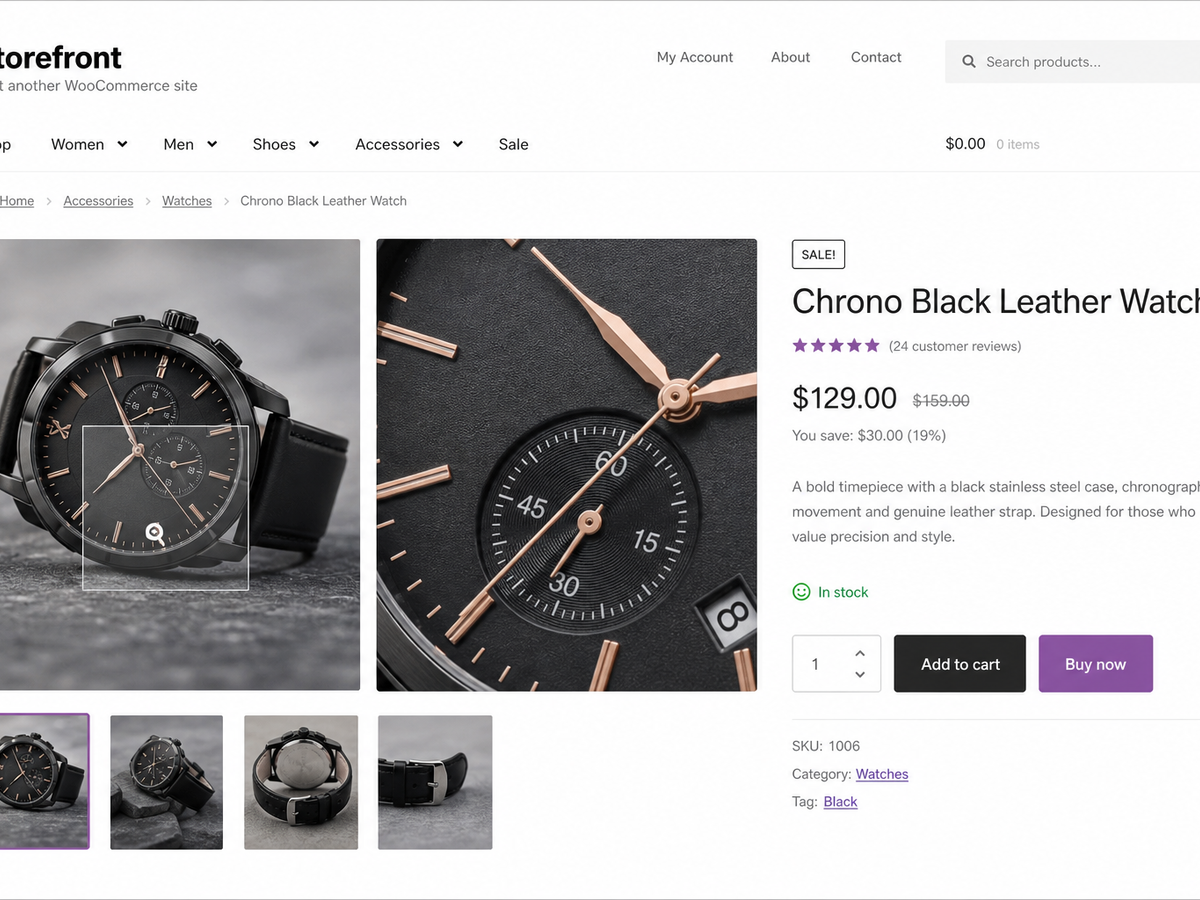
- Hover zoom. Gallery images magnify on hover at a zoom scale you set (1.0× to
3.0×). The transform is clipped to the gallery frame, so the rest of the page
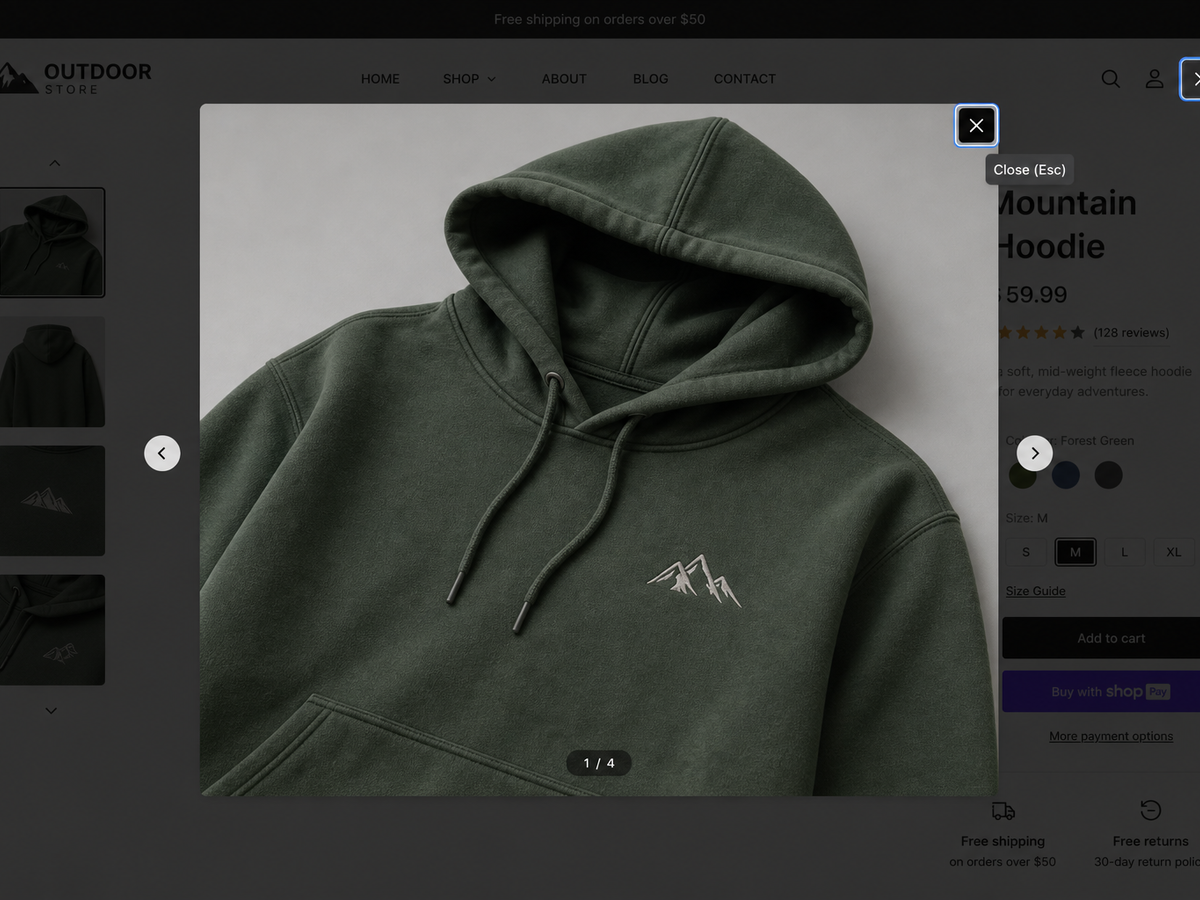
stays put. - Accessible lightbox. Click, or press Enter/Space, on any gallery image to
open it full screen. The lightbox is keyboard-operable: Tab stays on the close
button so focus can’t slip behind the overlay, Escape closes it, and focus
returns to the image you opened. It’s a fixed overlay that starts hidden, so it
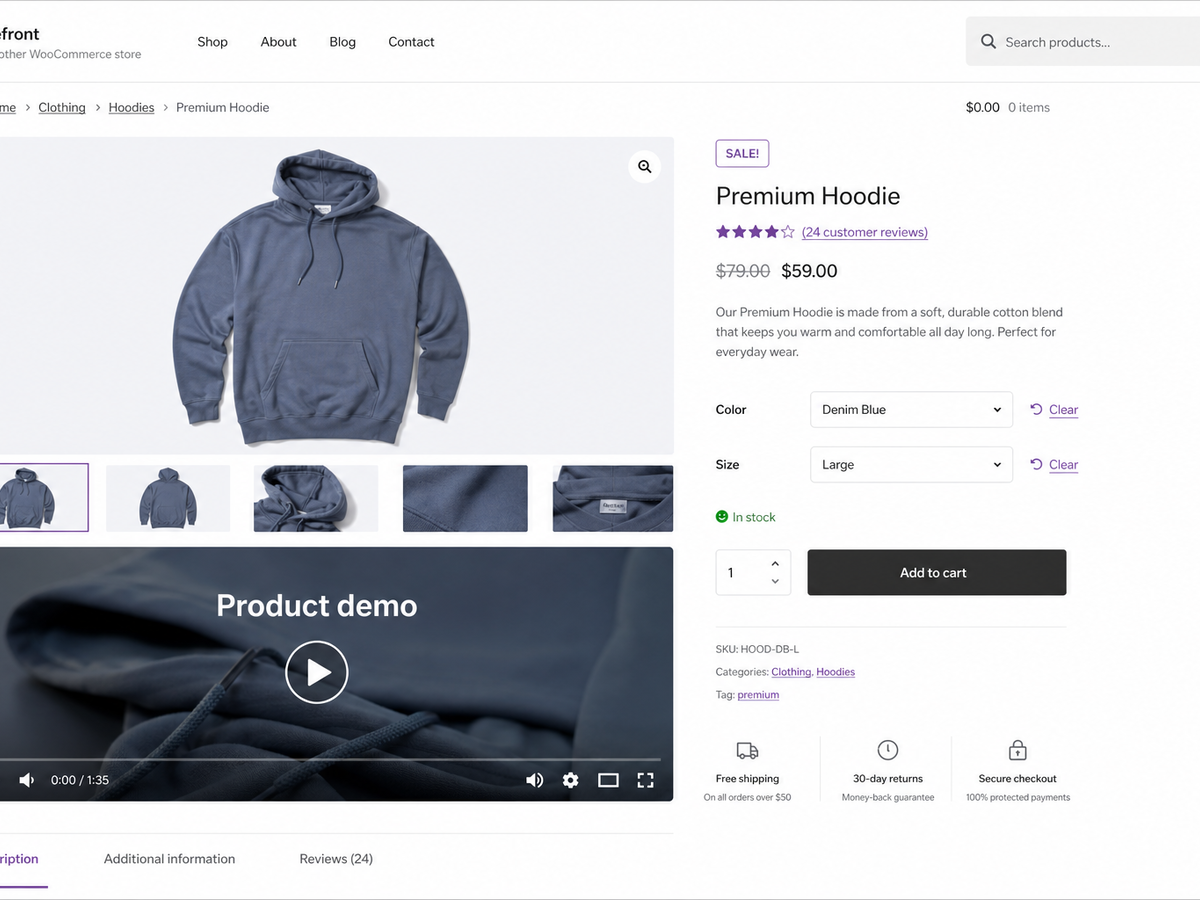
reserves no space until used. - Featured video. Show a per-product video, a self-hosted MP4/WebM file or a
YouTube/Vimeo (oEmbed) URL, after the gallery or before the product summary.
The video sits in a 16:9 frame sized withaspect-ratio, so its space is held
before it loads.
The markup is built in PHP and progressively enhanced by one vanilla-JavaScript
file (no jQuery), deferred and loaded in the footer. Scripts and styles only
enqueue on the single product page.
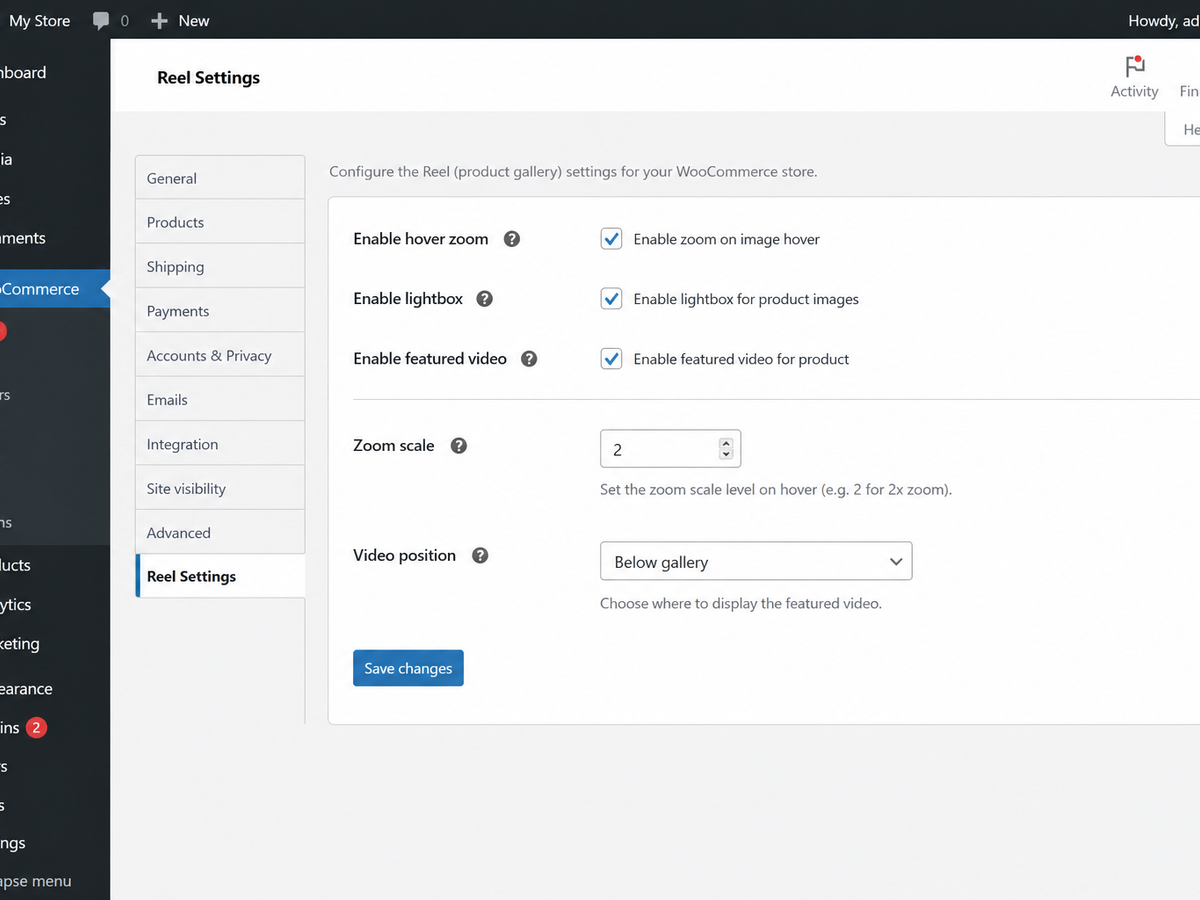
Settings live under a top-level Reel admin menu. Each of the three features
has its own on/off switch; you can also set the zoom scale and skip it on touch
devices, show an alt-text caption in the lightbox, relabel the open-image control
for screen readers, and choose the video’s position, autoplay, heading and intro
text. The per-product video URL is set on the Reel tab in the product editor,
with an optional heading for that product.
To place the video somewhere other than the gallery area, drop the [reel_video]
shortcode (it takes id and title attributes) into any product content. It
renders the current product’s video in the same 16:9 frame.
Source and issue tracker: https://github.com/wppoland/plogins-reel, the plugin is
developed in the open, so bug reports and pull requests are welcome there.
Documentation and links
- Documentation – https://plogins.com/reel/docs/
- Plugin page – https://plogins.com/reel/
- Source code – https://github.com/wppoland/plogins-reel
- Bug reports and feature requests – https://github.com/wppoland/plogins-reel/issues
Features
- Gallery image hover zoom with a configurable scale.
- Accessible, keyboard-operable full-screen lightbox (Escape / backdrop close).
- Featured product video (self-hosted or oEmbed) with selectable position.
[reel_video]shortcode to place the video anywhere.- Optional lightbox caption from the image alt text.
- Skip hover zoom on touch devices (where hover is unreliable).
- Custom accessible label for the open-in-lightbox control.
- Default video heading and optional intro paragraph.
- Reserved-space markup throughout, so no Cumulative Layout Shift.
- No jQuery; one deferred, in-footer script loaded only on product pages.
- Independent on/off toggle for each feature.
- “Settings” link on the plugins list; clean uninstall removes plugin options.
- Translation-ready: bundled .pot template plus a Polish (pl_PL) translation.
- HPOS and cart/checkout blocks compatible.
Plogins Reel PRO
The free edition upgrades the WooCommerce gallery: zoom, lightbox and self-hosted video. Plogins Reel PRO adds richer video and per-variation media:
- Per-variation gallery – a distinct image and video set that swaps in when the shopper selects a variation
- Video autoplay rules – control when and how product videos autoplay
Everything in the free edition stays free and open. Plogins Reel PRO starts at 19 EUR per year (PLN shown at checkout).
Compare editions and pricing: https://plogins.com/plogins-reel-pro/pricing/
External Services
Reel makes no API calls or analytics requests of its own; the zoom, lightbox and self-hosted video features run entirely on your site, and the only data Reel stores is the reel_settings and reel_db_version options plus each product’s _reel_video_url and _reel_video_title meta.
The one exception is when you set a product’s video URL to a YouTube, Vimeo or other oEmbed link. In that case WordPress core’s own wp_oembed_get() fetches the embed markup from that provider, sending the video URL to the provider you chose so it can return the player; Reel caches the result in a transient to avoid repeat requests. No request is made for self-hosted (MP4/WebM) videos. Use of those providers is governed by their own terms and privacy policies, e.g. YouTube (https://www.youtube.com/t/terms, https://policies.google.com/privacy) and Vimeo (https://vimeo.com/terms, https://vimeo.com/privacy).
Translations
Plogins Reel includes Polish, German and Spanish translations for the plugin interface. The text domain is plogins-reel, so WordPress.org language packs can also override or extend these bundled translations.
Screenshots
Blocks
This plugin provides 1 block.
- Reel: Featured video
Installation
- Upload the plugin to
/wp-content/plugins/plogins-reel, or install via Plugins Add New. - Activate it. WooCommerce must be active.
- Go to the Reel menu and enable the features you want.
- For a product video, open a product, go to the Reel tab in the product data panel and paste the video URL.
FAQ
-
Does it require WooCommerce?
-
Yes. Reel is a WooCommerce product gallery plugin and runs on single product pages.
-
Which video sources are supported?
-
Self-hosted files (MP4, M4V, WebM, OGV) are played with WordPress’s native video
player. Any oEmbed-supported URL (YouTube, Vimeo, etc.) is embedded automatically. -
Does it use jQuery?
-
No. Reel ships one vanilla-JavaScript file, deferred and loaded in the footer,
and only on the single product page. -
Does Reel replace the WooCommerce product gallery?
-
No. Reel enhances the existing WooCommerce product gallery with image zoom, lightbox behaviour and optional product video.
-
Can I show a product video outside the gallery?
-
Yes. Use the
[reel_video]shortcode to place the product video in custom product content. -
Will it cause layout shift (CLS)?
-
No. The lightbox is a fixed overlay that starts hidden, the zoom transform is
clipped to the gallery frame, and the video sits in a fixed-ratio frame that
reserves its space before loading. -
Is the lightbox keyboard accessible?
-
Yes. Shoppers can open images with Enter or Space, close with Escape, and focus returns to the image that opened the lightbox.
-
Does this plugin work on WordPress Multisite?
-
Yes. This plugin is compatible with WordPress Multisite. Network activate it or activate it on individual sites; each site keeps its own settings and data.
Reviews
There are no reviews for this plugin.
Contributors & Developers
“Plogins Reel – Product Gallery Zoom & Video for WooCommerce” is open source software. The following people have contributed to this plugin.
Contributors
“Plogins Reel – Product Gallery Zoom & Video for WooCommerce” has been translated into 1 locale. Thank you to the translators for their contributions.
Translate “Plogins Reel – Product Gallery Zoom & Video for WooCommerce” into your language.
Interested in development?
Browse the code, check out the SVN repository, or subscribe to the development log by RSS.
Changelog
1.0.12
- Stopped advertising a block that could not be inserted. The plugin registered
reel/featured-videoserver-side only, with no block.json and no editor script, so it never appeared in the inserter, yet the readme and the settings screen told merchants to look for it. The[reel_video]shortcode does the same job and is unchanged.
1.0.11
- The featured video can now be set from the product editor. A Reel tab on the product data panel takes a YouTube, Vimeo or direct .mp4/.webm URL and an optional heading. The rendering side always shipped here, but nothing in the free plugin could fill those fields in, so the readme asked people to edit a meta field by hand. That was a feature with its interface missing, and it is fixed by adding the interface rather than by removing the feature.
1.0.10
- The package no longer ships .po and .mo files. Translations for plugins hosted on WordPress.org come from translate.wordpress.org, which generates and delivers them per locale. The .pot template stays, since that is what translators import.
1.0.6
- Translations: completed Polish, German and Spanish for the PRO upgrade panel.
1.0.5
- Restored the distinctive display name: Plogins Reel – Product Gallery Zoom & Video for WooCommerce.
1.0.4
- Fixed low-contrast admin headings under an OS dark-mode preference.
1.0.3
- Clearer name: Plogins Reel – Product Gallery Zoom & Video for WooCommerce.
1.0.2
- Added bundled Polish, German and Spanish translations for the plugin interface.
1.0.1
- First stable release.
0.2.1
- Renamed to Plogins Reel for WooCommerce for a more distinctive plugin name.
0.2.0
- Redesigned settings screen: card layout, toggle switches, inline help tooltips and a live zoom-strength control.
- Polished storefront styling: themeable CSS custom properties, fluid sizing, dark-mode support and reduced-motion guards.
- Accessibility: named lightbox dialog, role=tooltip help, visible focus styles and full keyboard operability.
- Robustness: graceful empty/placeholder states, a no-layout-shift video skeleton and hardened event handling.
- Add
[reel_video]shortcode to place the featured video anywhere. - Add lightbox caption (from image alt text) and an option to skip hover zoom on touch devices.
- Add settings for the open-in-lightbox label, a default video heading and an optional intro paragraph.
- Add a “Settings” link on the plugins list and an uninstall routine that removes plugin options.
- Bundle a translation template (languages/reel.pot) and a Polish translation.
0.1.0
- Initial release: gallery hover zoom, accessible lightbox and featured product video.