

Description
Public beta — your feedback shapes the roadmap. Appinio Search is fully functional and safe to run on live stores, but it’s new to the market: you’re among the first shops using it, so expect the occasional rough edge — and please tell us what you find. Report bugs and ideas on GitHub. Early adopters directly shape what ships next.
Appinio Search connects your WooCommerce store to Appinio AI Search — semantic, typo-tolerant product search that understands what shoppers mean, not just the keywords they type. It also speaks 100+ languages out of the box, including true cross-language search: a query typed in one language finds products described in another.
The plugin does two things:
- Keeps your catalog in sync — every product create, update, stock change, trash, and restore is pushed to Appinio automatically, in real time. A one-click Bulk Sync indexes your entire catalog in background batches.
- Adds AI search to your storefront — drops the
<semantic-search>widget onto your store, wired to your existing search box, so shoppers get instant, relevance-ranked results.
The plugin is a thin integration layer: all AI, indexing, embedding, and ranking runs on the Appinio cloud service. You need an Appinio account and an API key to use it.
At a glance
- 100+ languages, true cross-language search — no separate configuration per language.
- Semantic + typo-tolerant — understands meaning and intent, not just exact keywords.
- Real-time sync + one-click Bulk Sync — every change pushed automatically, whole catalog indexed in background batches.
- 17+ product fields mapped — including variable/grouped products, brand, and attributes.
- Managed cloud backend (bge-m3 embeddings), EU-hosted; BYOK (bring your own LLM key) supported.
Features
- Sign up from the plugin — create your Appinio account with an email + one-time code, no dashboard round-trip; your API keys are set up automatically.
- Multilingual & cross-language — 100+ languages out of the box; a query in one language finds products described in another.
- Real-time product sync — create, update, stock change, trash, and restore are all pushed automatically.
- Debounced & reliable — Action Scheduler coalesces WooCommerce’s multiple saves into one API call, so a single edit never triggers duplicate indexing.
- One-click Bulk Sync — index your whole catalog in background batches, with a live progress indicator.
- Rich field mapping — title, description, price, sale/compare-at price, currency, image, stock, SKU, categories, tags, rating, review count, brand, and product attributes.
- Variable & grouped products — the parent is indexed with min/max variation price and aggregated attributes; grouped products include their children.
- AI search widget — the
<semantic-search>element, loaded from the Appinio CDN and auto-wired to your store’s search input. - Light / Dark / Auto appearance — pick a widget theme, or let Auto match your store’s background.
- Category-aware — on category pages the widget scopes results to that category automatically.
- Status guard — only published products are indexed; drafts and trashed products are removed from the index.
- HPOS compatible — declares WooCommerce High-Performance Order Storage compatibility.
Requirements
- WordPress 6.0+
- WooCommerce 8.0+
- PHP 8.1+
- An active Appinio account — sign up at app-in.io.
External services
This plugin relies on the Appinio cloud service to provide AI search. It is not self-hosted.
What is sent and when:
- When a product is created, updated, or its stock changes — and during Bulk Sync — the plugin sends that product’s data (title, description, price, currency, image URL, stock status, SKU, categories, tags, rating, review count, brand, and attributes) to the Appinio API (
https://api.app-in.io), authenticated with your secret API key. Appinio indexes it for search. - When a product is trashed or unpublished, the plugin sends a delete request containing the product ID.
- On every storefront page load (once a Public Key is configured), the plugin loads the Appinio search widget JavaScript from
https://cdn.app-in.io/v1/search.js. The visitor’s browser fetches this file directly from Appinio’s CDN, which receives standard HTTP request metadata (IP address, user agent, referrer). - When a shopper searches, the widget sends the query text and your Public Key to the Appinio API, which returns ranked results.
- If you register from within the plugin, your email address, store name, store URL, and admin language are sent to the Appinio API (
https://api.app-in.io) to create your account and email you a one-time verification code. This happens only when you choose to sign up from the plugin.
No customer personal data is sent — only your store’s product catalog, shoppers’ search queries, and (if you register in-plugin) your own account email.
Terms and privacy:
- Terms of Service: https://app-in.io/terms
- WooCommerce Service Terms (product schedule): https://app-in.io/woocommerce/eula
- Privacy Policy: https://app-in.io/privacy
- Data Processing Agreement (GDPR): https://app-in.io/dpa
Using this plugin means the search widget script runs in visitors’ browsers and product data is transmitted to Appinio. Please update your own site’s privacy notice accordingly.
Support
- Bug reports and feature requests: github.com/app-in-io/appin-woocommerce/issues
Screenshots
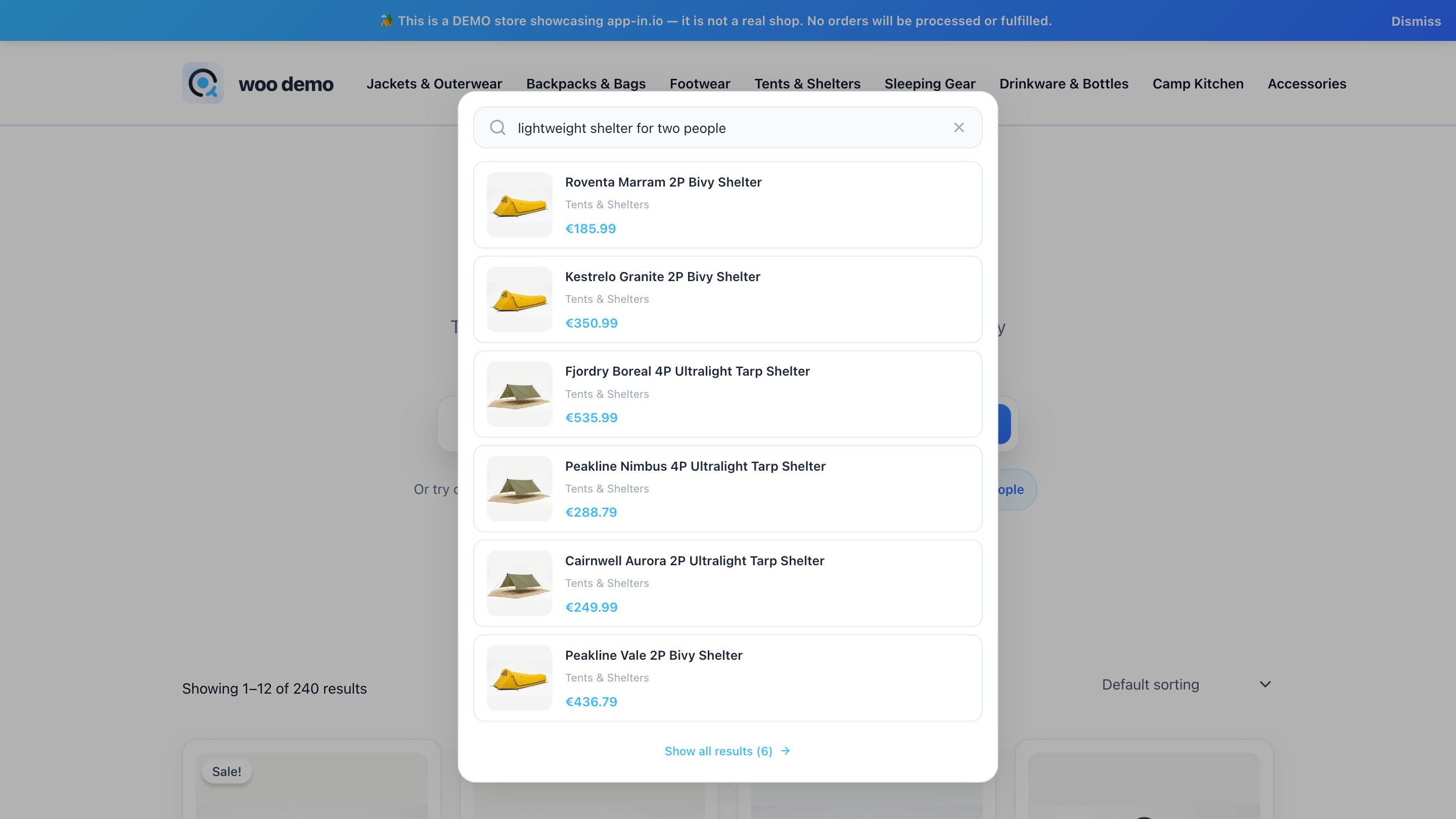
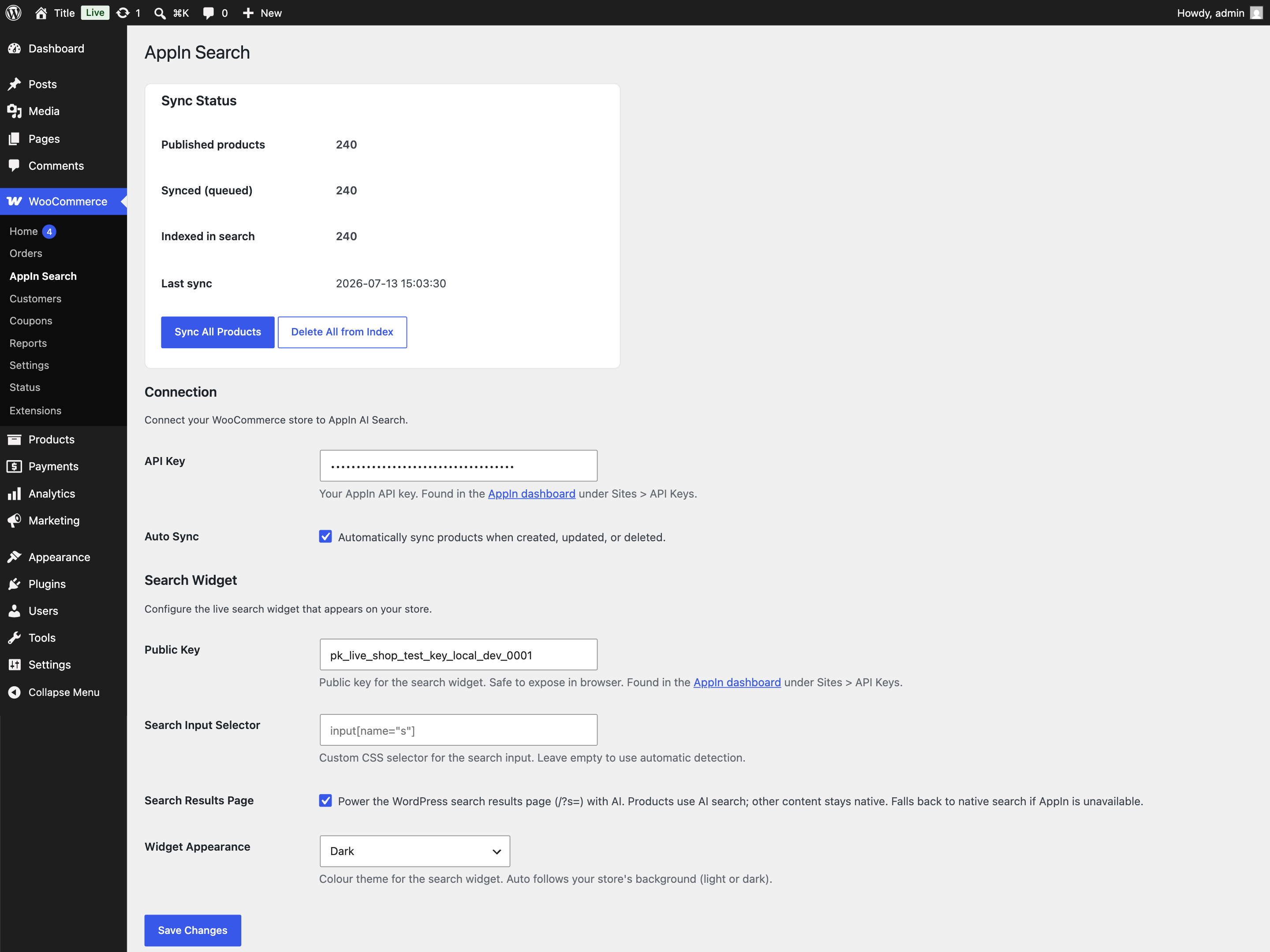 → Appinio Search admin: connection settings, sync status, and Sync All / Delete All controls.” class=”wp-image-9000002″ srcset=”https://i0.wp.com/ps.w.org/appinio-search/assets/screenshot-2.png?rev=3615511&w=300 300w, https://i0.wp.com/ps.w.org/appinio-search/assets/screenshot-2.png?rev=3615511&w=600 600w, https://i0.wp.com/ps.w.org/appinio-search/assets/screenshot-2.png?rev=3615511&w=900 900w” sizes=”(max-width: 599px) 50vw, 33vw” width=”2880″ height=”2160″ loading=”eager” fetchpriority=”high” decoding=”async”/>
Installation
- Upload the plugin via Plugins Add New Upload Plugin, or install it from the WordPress.org plugin directory.
- Activate the plugin (WooCommerce must be active).
- Go to WooCommerce Appinio Search.
- Create your account right here: enter your email and store name, then the 6-digit code we email you. Your keys are set up automatically. (Already have a key? Paste your API Key
sk_live_...instead — get it at my.app-in.io.) - Click Sync All Products to index your catalog.
- The storefront widget uses your Public Key (
pk_live_...), set automatically on registration or entered manually, plus an optional custom search-input CSS selector.
FAQ
-
Do I need an Appinio account?
-
Yes. The plugin is a WooCommerce integration for the Appinio cloud service. Create an account and get your API keys at my.app-in.io.
-
Does it support multiple languages and cross-language search?
-
Yes. Appinio Search understands 100+ languages out of the box, including true cross-language search — a query typed in one language can find products described in another. No per-language setup required.
-
How is this different from a keyword search plugin?
-
Keyword plugins match the literal words a shopper types, so typos, synonyms, or descriptive phrasing (“warm winter jacket”) often return nothing. Appinio Search uses semantic AI embeddings to understand intent and meaning, so it finds relevant products even when the query doesn’t share exact words with the product title or description.
-
Where do I find my API Key and Public Key?
-
In the Appinio dashboard under Sites API Keys. The secret key (
sk_live_...) is used for syncing; the public key (pk_live_...) is safe to expose in the browser and powers the search widget. -
Will it slow down my store?
-
No. Syncing happens in the background via Action Scheduler. The search widget loads as a deferred ES module from the Appinio CDN.
-
Does it handle variable and grouped products?
-
Yes. Variable products are indexed as the parent with min/max variation prices and aggregated attributes. Grouped products include their children.
-
How does real-time sync avoid duplicate API calls?
-
WooCommerce saves a product several times per edit. The plugin debounces these through Action Scheduler with a short coalesce window, so only one sync fires per edit.
-
What happens when I unpublish or trash a product?
-
It is removed from the Appinio index automatically. Only published products stay indexed.
-
Can I re-index everything from scratch?
-
Yes. Use Delete All from Index, then Sync All Products.
Reviews
There are no reviews for this plugin.
Contributors & Developers
“Appinio Search – AI Semantic & Multilingual Product Search for WooCommerce” is open source software. The following people have contributed to this plugin.
Contributors
Interested in development?
Browse the code, check out the SVN repository, or subscribe to the development log by RSS.
Changelog
0.9.0
- Public beta — first release.
- Real-time WooCommerce product sync (create, update, stock, trash, restore) via Action Scheduler.
- One-click Bulk Sync and Delete All from Index with live progress.
- Full field mapping including variable/grouped products, brand, and attributes.
- AI search widget (
<semantic-search>) loaded from the Appinio CDN, auto-wired to the store search input and category-aware. - HPOS compatibility.