

Description
LivoPay is a payment gateway for WooCommerce that allows customers to pay in cash at more than 16,000 SIX stores across Mexico.
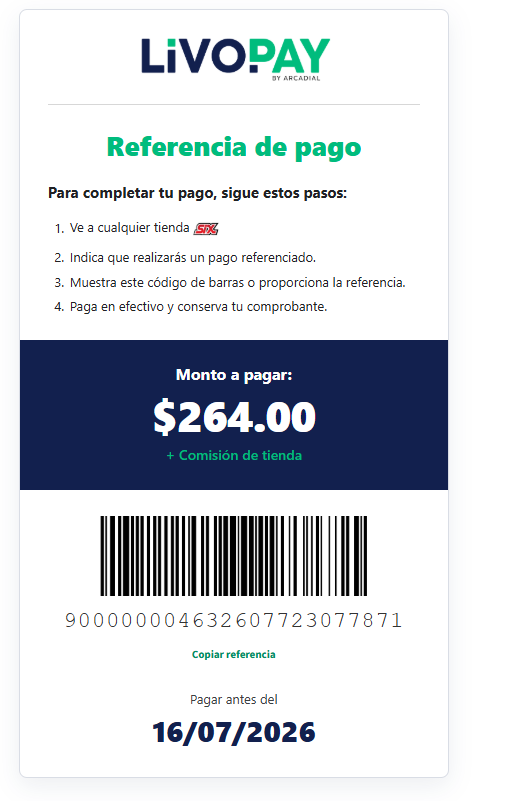
The plugin generates a unique payment reference and barcode for each order. Payments are automatically confirmed through a secure webhook without requiring manual intervention.
This payment method is currently available only in Mexico.
Key Features
- Automatic payment-reference generation with a barcode.
- Automatic payment confirmation through a secure webhook with HMAC-SHA256 signature verification.
- Webhook data validation, including the reference, amount, and currency, before an order is marked as paid.
- Rate limiting to protect the webhook endpoint against brute-force attacks.
- API key encryption in the WordPress database using WordPress salts.
- Configuration diagnostics to verify the gateway status.
- HPOS compatibility with WooCommerce High-Performance Order Storage.
- Automatic cancellation of expired pending orders through WP-Cron.
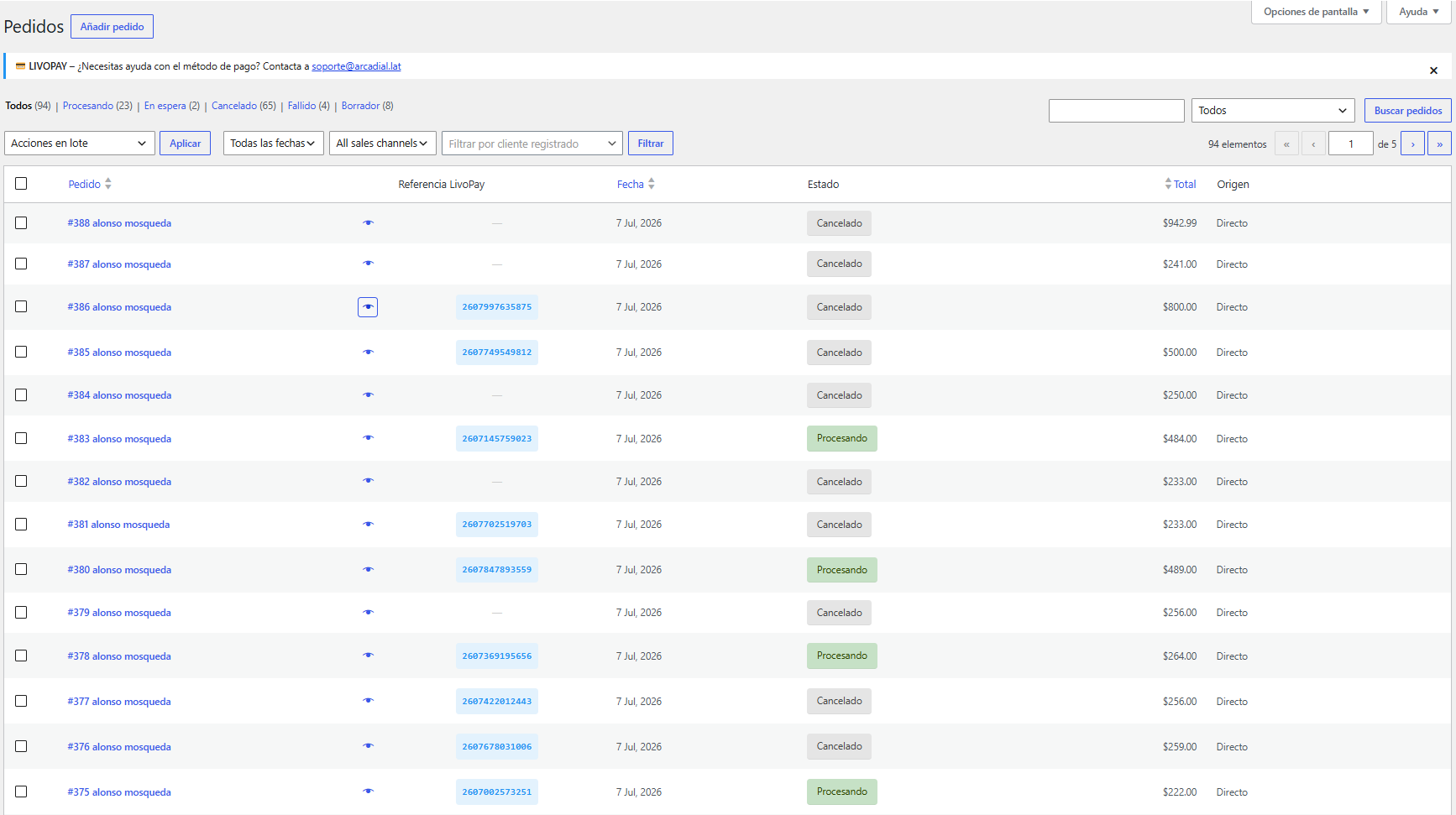
- Payment references displayed in the WooCommerce order list.
- Connection test button in the gateway settings.
- Configurable logging levels: disabled, errors, information, and debugging.
External Services
This plugin connects to the LivoPay service, operated by Arcadial, to generate payment references and process payment confirmations through webhooks.
For the plugin to operate correctly, it sends the following information to the LivoPay API:
- Order data: Order ID, amount, currency, and payment concept.
- Customer data: Name, email address, and phone number provided during checkout.
- Store data: Store name, store ID, website URL, and regional settings.
- Return and webhook URLs: Used to redirect the customer and notify the WooCommerce store about payment-status changes.
Sending this information is necessary for LivoPay to generate the payment reference and notify the WooCommerce store when a payment is completed at a SIX store.
All communication with the LivoPay API uses HTTPS with SSL certificate verification. API credentials are encrypted before they are stored in the WordPress database.
For more information about how data is handled, see the Arcadial Privacy Policy.
Requirements
- WordPress: Version 5.8 or later.
- WooCommerce: Version 5.0 or later.
- PHP: Version 7.4 or later.
- OpenSSL: The PHP OpenSSL extension must be enabled to encrypt API credentials.
- Country: Mexico.
- Currency: Mexican peso (MXN).
Configuration
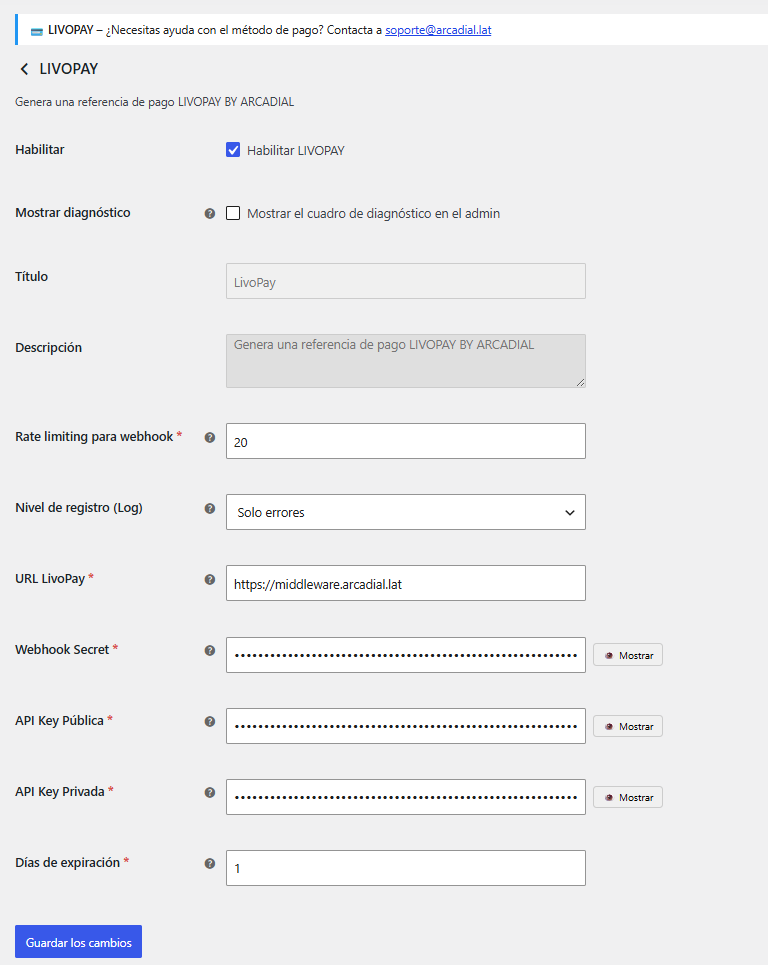
The following options are available in the gateway settings:
- Enable: Enables or disables the payment method.
- Show configuration diagnostics: Displays the configuration-status panel in the administration area.
- Title: The payment-method name displayed during checkout.
- Description: The payment-method description displayed during checkout.
- LivoPay URL: The API endpoint, for example
https://middleware.arcadial.lat. - Public API Key: The public credential provided by LivoPay.
- Private API Key: The private credential provided by LivoPay.
- Webhook Secret: The secret used to verify webhook signatures.
- Expiration Days: The number of days before a payment reference expires, from 1 to 30.
- Webhook Rate Limit: The maximum number of webhook requests accepted per minute, from 20 to 60.
- Log Level: Controls the amount of information stored in WooCommerce logs.
Security
- Credential encryption: API keys and the webhook secret are encrypted before they are stored in the WordPress database.
- Webhook signature verification: Webhook requests are verified using HMAC-SHA256.
- Payment validation: The reference, amount, and currency are validated before an order is marked as paid.
- Rate limiting: Protects the webhook endpoint against excessive requests and brute-force attacks.
- Trusted proxy support: The
X-Forwarded-Forheader is trusted only when the administrator configures trusted proxies through thelivopay_trusted_proxiesfilter. - HTTPS communication: Production API requests require HTTPS and SSL certificate verification.
Screenshots
Installation
- Upload the plugin files to the
/wp-content/plugins/pago-en-tiendas-six-by-livopaydirectory, or install the plugin from the WordPress plugin screen. - Activate the plugin through the Plugins screen in WordPress.
- Go to WooCommerce > Settings > Payments.
- Enable “Pago en tiendas SIX By LivoPay” (the gateway name is shown in Spanish, as this payment method currently targets the Mexican market).
- Select Manage and enter the credentials provided by LivoPay.
- Save the settings and use the connection-test button to verify the configuration.
FAQ
-
What is LivoPay?
-
LivoPay is a payment service that allows customers to pay WooCommerce orders in cash at SIX stores using a unique payment reference.
-
Is this payment method available outside Mexico?
-
No. This payment method is currently available only at participating SIX stores in Mexico.
-
How long does payment confirmation take?
-
Payment confirmation is normally received automatically through the webhook shortly after the customer completes the payment at a SIX store.
-
What happens if the webhook does not work?
-
Check the logs under WooCommerce > Status > Logs and select the LivoPay log source. Verify that the webhook URL is publicly accessible and that the API credentials and webhook secret are correct.
-
Are my API keys secure?
-
The plugin encrypts API credentials before storing them in the WordPress database. Your website should also use HTTPS.
-
How can I test the API connection?
-
Open the LivoPay gateway settings and select Test Connection with LivoPay. The plugin will verify the API URL and credentials.
-
Is the plugin compatible with HPOS?
-
Yes. The plugin supports WooCommerce High-Performance Order Storage.
-
What should I do if I use Cloudflare or another reverse proxy?
-
Add the IP addresses of trusted proxies through the
livopay_trusted_proxiesfilter. Do not trust theX-Forwarded-Forheader without configuring trusted proxies.
Reviews
There are no reviews for this plugin.
Contributors & Developers
“Pago en tiendas SIX By LivoPay” is open source software. The following people have contributed to this plugin.
Contributors
Translate “Pago en tiendas SIX By LivoPay” into your language.
Interested in development?
Browse the code, check out the SVN repository, or subscribe to the development log by RSS.
Changelog
1.1.0
- Improved the administration interface.
- Added an API connection-test button.
- Added configurable gateway diagnostics.
- Improved customer-facing error messages.
- Improved webhook security with signature verification and rate limiting.
- Added encryption for API credentials stored in the database.
- Added compatibility with WooCommerce High-Performance Order Storage.
- Improved logging and debugging.
- Fixed minor issues.
1.0.0
- Initial release.