

Description
IDS Partner Ledger is a WooCommerce administration tool for stores that divide order profit between a business partner and the store owner.
When an eligible order reaches Completed status, the plugin stores the values used for the profit split. Reports and settlement previews use this snapshot instead of changing live data.
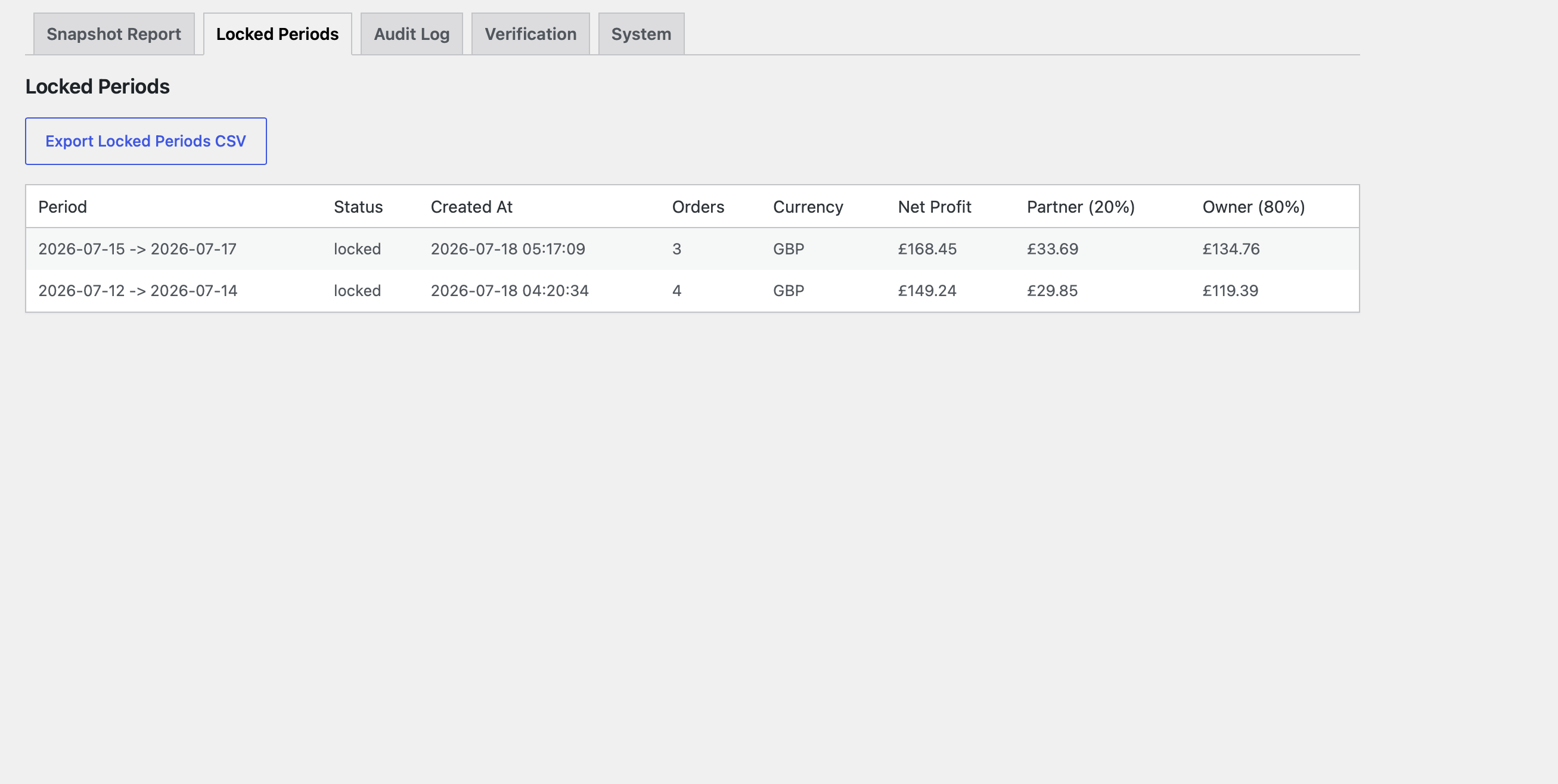
A locked settlement period records its exact order membership, order count, currency, net profit, partner payout, and owner payout. Included snapshots and manual values become read-only, with no unlock or delete action.
It is not accounting, bookkeeping, tax, payment-reconciliation, inventory-management, or currency-conversion software.
Financial calculation
Revenue is discounted WooCommerce merchandise line-item revenue excluding tax, native shipping, and native order fees.
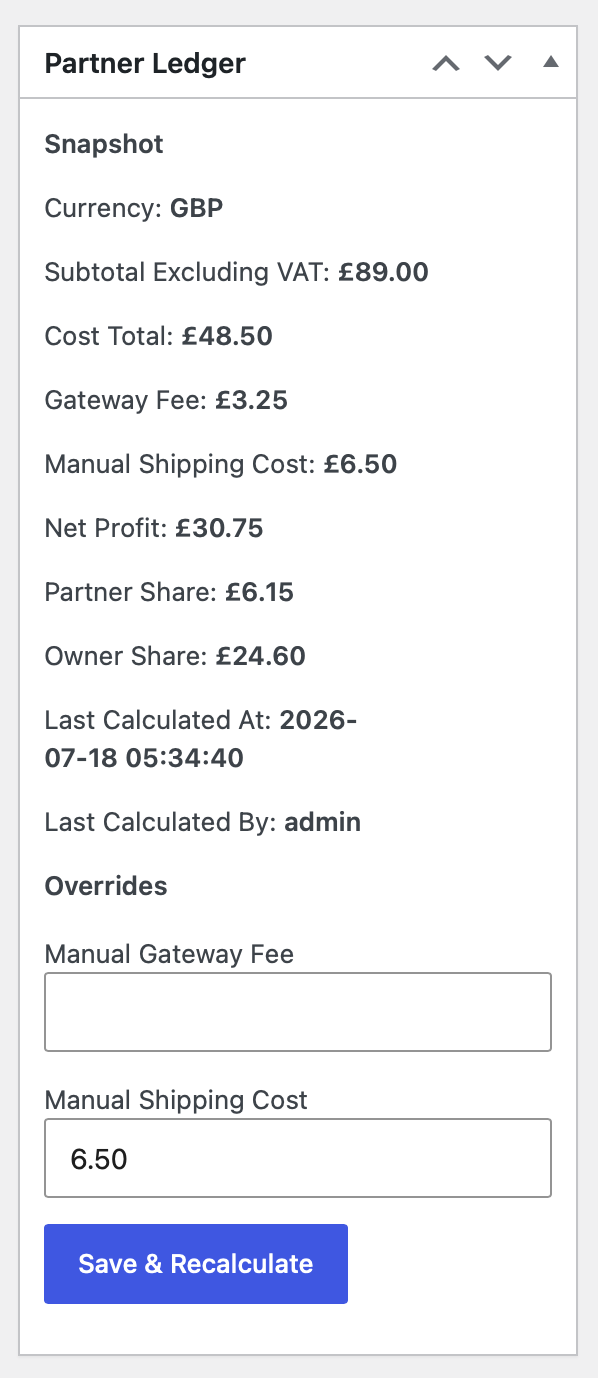
Net Profit = Revenue − Product Cost − Gateway Fee − Manual Shipping Cost
Positive net profit is divided using the configured partner percentage, with the owner receiving the remainder. For zero or negative net profit, the partner share is zero and the owner receives the full result.
Purchase costs
For variations, Partner Ledger checks the variation purchase price first, then the parent product when no variation price exists. An ATUM data-table fallback is supported where available.
Numeric zero is valid. A missing, invalid, negative, malformed, or non-finite price makes the calculation unresolved when the line has a remaining quantity. Unresolved orders cannot create a valid snapshot or enter reporting or settlement.
Gateway fees and Manual Shipping Cost
Gateway fees use this precedence:
- Manual Gateway Fee.
- A supported recorded gateway-fee value.
- The configured Stripe or PayPal estimate when applicable.
- Zero when no supported source applies.
Invalid or negative recognised fee data makes the order unresolved unless a valid manual fee takes precedence. Fees are not reconciled against processor payouts.
Manual Shipping Cost is the complete per-order shipping deduction. It is not copied from or added to WooCommerce native shipping. A notice appears when both are positive.
Refund safeguards
Explicit WooCommerce product-line refunds reduce tax-exclusive merchandise revenue and product cost for explicitly refunded quantities. Shipping and tax refunds do not alter Partner Ledger merchandise revenue or Manual Shipping Cost.
Ambiguous, inconsistent, or unallocated refunds cannot create or overwrite a valid snapshot and are excluded until resolved. A stored refund fingerprint makes an unlocked snapshot stale after a refund change.
A refund recorded after locking does not alter the historical snapshot, membership, or stored settlement totals. Corrections must be handled outside Partner Ledger in version 1.0.0.
Single-currency settlement
Version 1.0.0 supports one settlement currency without conversion. The order currency must be valid and match the configured store currency.
Currency is stored with snapshots and locked periods and shown in reports and CSV exports. A locked period retains its recorded currency if the store currency changes later.
Data and access
Partner Ledger stores separate snapshot, audit, and settlement records. It does not edit WooCommerce native order data.
Access requires the manage_ids_partner_ledger capability, normally granted to Administrators and Shop Managers.
Features
- Stored financial snapshots for eligible completed orders.
- Purchase-cost and gateway-fee resolution with supported ATUM, Stripe, and PayPal sources.
- Refund-state, financial-data, and single-currency safeguards.
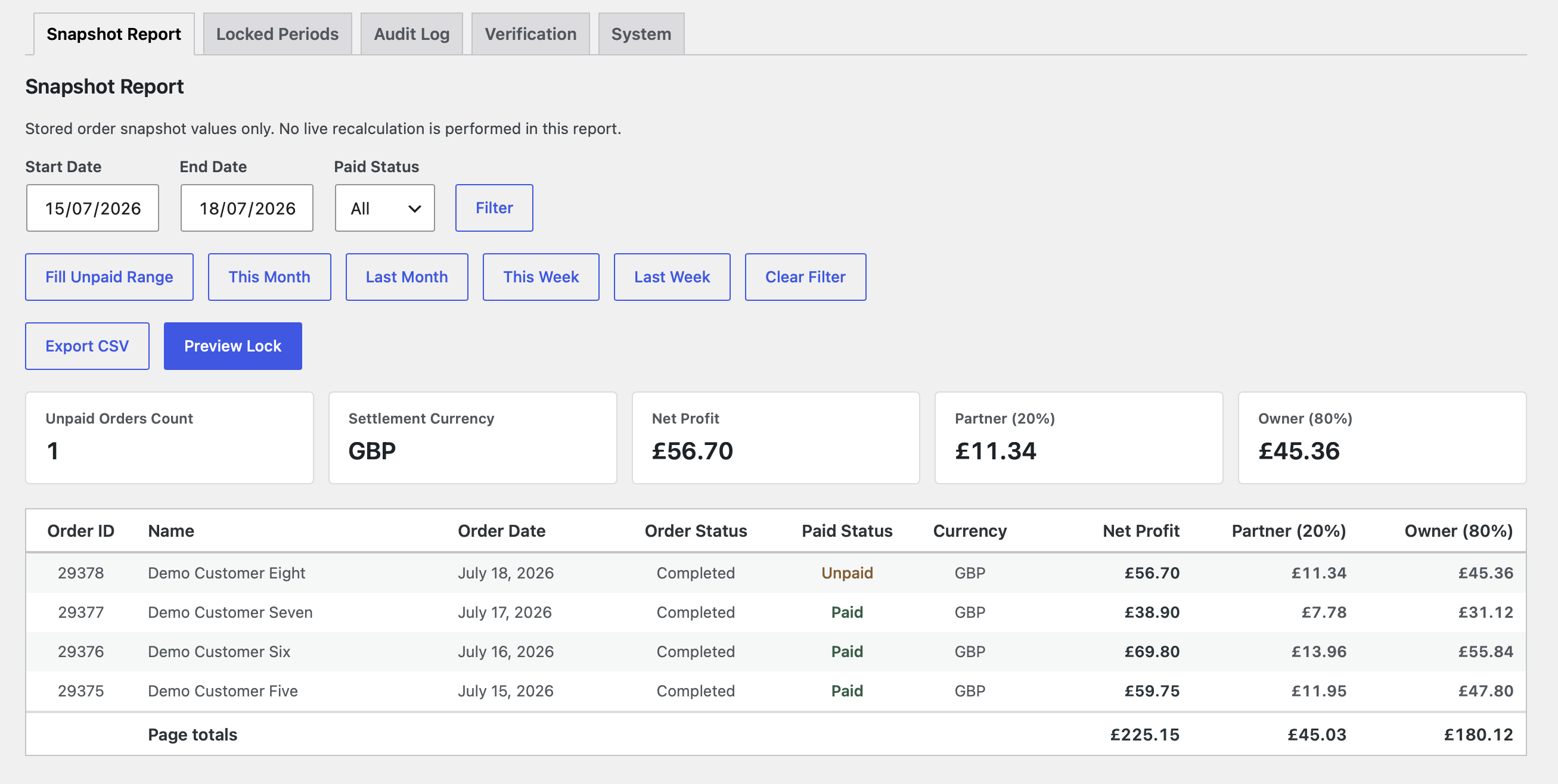
- Snapshot and Locked Period reports with CSV exports.
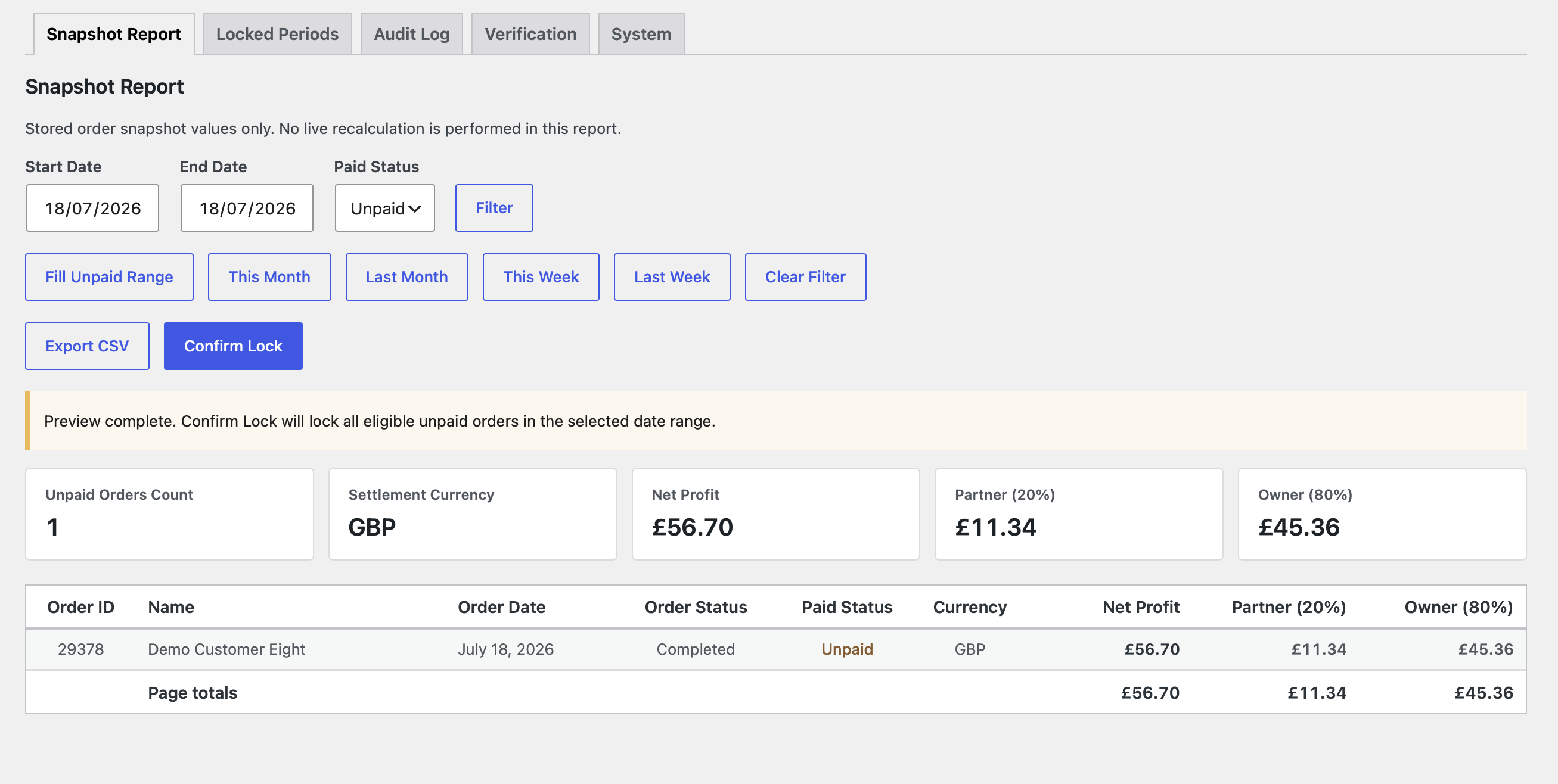
- Settlement previews and one-way locking of exact membership and totals.
- Verification and backfill tools for missing, unresolved, or stale snapshots.
- Audit history for manual overrides, recalculations, and settlement locks.
- WooCommerce HPOS and legacy order-storage support.
Requirements and Compatibility
- WordPress 6.0 or later; tested up to WordPress 7.0.
- PHP 8.0 or later.
- WooCommerce 8.0 or later; tested up to WooCommerce 10.9.4.
- WooCommerce must be installed and active before Partner Ledger is activated.
- Compatible with HPOS and legacy post-based WooCommerce order storage.
- ATUM Inventory Management is optional.
- Remaining sold quantities require valid, non-negative purchase-price data.
- Settlement orders must use the configured WooCommerce store currency.
Getting Started
- Configure labels, the partner percentage, gateway-fee estimates, and excluded customer IDs.
- Confirm that applicable products and variations have valid purchase prices.
- Backfill eligible existing completed orders from the Verification tab.
- Review a completed order and enter manual gateway or shipping costs if required.
- Select Save & Recalculate, then resolve any financial, refund, or currency warning.
- Review the Snapshot Report, preview an unpaid period, and confirm the lock after checking its currency, membership, and totals.
Screenshots
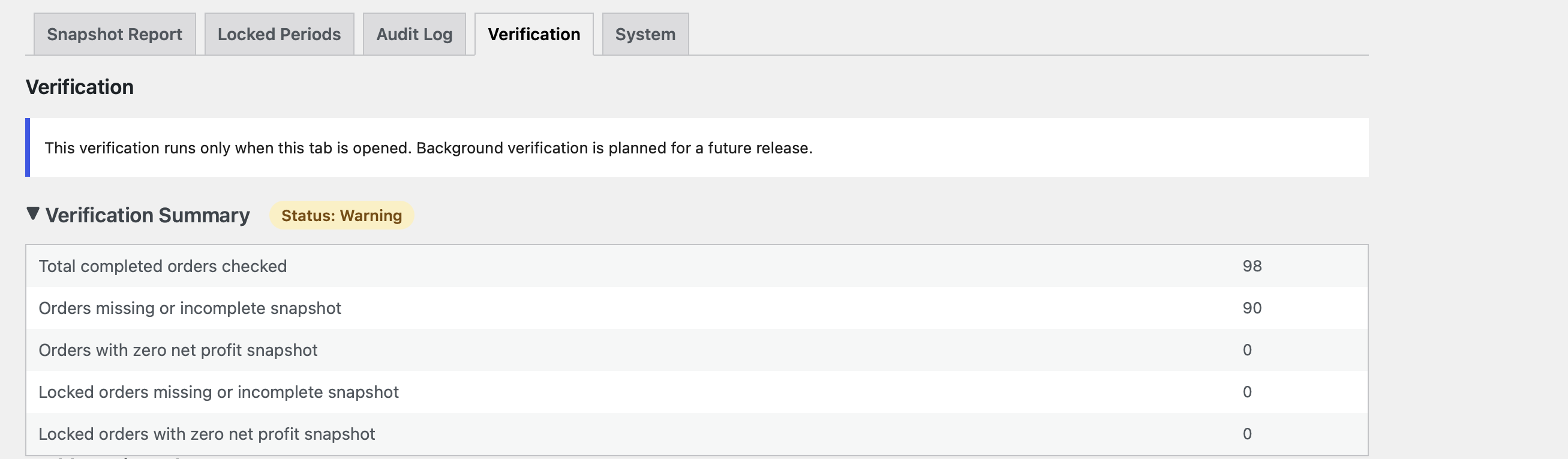
Installation
- Install and activate WooCommerce.
- Install IDS Partner Ledger through the Plugins screen, or upload it to
/wp-content/plugins/ids-partner-ledger/. - Activate IDS Partner Ledger.
- Open WooCommerce Partner Ledger.
FAQ
-
How is net profit calculated?
-
Partner Ledger subtracts product cost, gateway fee, and Manual Shipping Cost from discounted merchandise revenue excluding tax, native shipping, and native fees.
Positive profit uses the configured partner percentage. For zero or negative profit, the partner share is zero and the owner receives the full result.
-
Where do purchase costs come from?
-
For a variation, its price is checked first, then the parent product. An ATUM data-table fallback is supported where available.
-
What happens when a purchase cost is missing or invalid?
-
A line with remaining quantity requires a finite, non-negative purchase price. Otherwise the order is unresolved and excluded until corrected. Missing is not zero; explicit numeric zero is valid. Fully refunded quantities need no price.
-
What does Manual Shipping Cost mean?
-
It is the complete per-order shipping-cost deduction used by Partner Ledger. It is not copied from or added to WooCommerce native shipping. If both are positive, the order panel displays a verification notice.
-
How are gateway fees determined?
-
Precedence is Manual Gateway Fee, supported recorded fee, applicable Stripe or PayPal estimate, then zero. Invalid recorded data blocks the order unless a valid manual fee takes precedence.
-
How are refunds handled?
-
Explicit product-line refunds reduce tax-exclusive merchandise revenue and product cost for refunded quantities. Ambiguous, inconsistent, or unallocated refunds block reporting and settlement. A later refund change makes an unlocked snapshot stale until recalculated.
Refunds after locking do not change the historical snapshot, membership, or totals.
-
Does Partner Ledger support multiple currencies?
-
No. Version 1.0.0 settles only in the configured store currency without conversion. Other-currency orders cannot create valid snapshots. Currency is stored and shown in reports and exports.
-
When are snapshots created and recalculated?
-
An eligible order receives its first snapshot at Completed status. Another Completed transition does not normally overwrite a valid snapshot.
Authorised users can recalculate unlocked orders, and Backfill Missing Snapshots can process eligible existing orders. Locked snapshots are never recalculated or automatically repaired.
-
What happens when a payout period is locked?
-
Exact membership, count, currency, profit, and payouts are stored. Snapshots and manual values become read-only. There is no unlock or delete action.
-
Does Partner Ledger support HPOS?
-
Yes. It declares compatibility with WooCommerce High-Performance Order Storage and supports legacy WooCommerce order storage. WooCommerce order APIs are used for order access.
-
Who can access Partner Ledger?
-
Access requires
manage_ids_partner_ledger, normally granted to Administrators and Shop Managers. Users without it cannot see Partner Ledger financial data, reports, exports, verification, or settlement controls. -
What happens on deactivation and uninstall?
-
Deactivation preserves settings, snapshots, audit history, locked periods, and capabilities.
Uninstall permanently removes Partner Ledger settings, snapshot metadata, audit history, locked periods and membership, plugin-owned records, and the dedicated capability. It does not remove WooCommerce orders, products, customers, or native order data.
Reviews
There are no reviews for this plugin.
Contributors & Developers
“IDS Partner Ledger” is open source software. The following people have contributed to this plugin.
Contributors
Translate “IDS Partner Ledger” into your language.
Interested in development?
Browse the code, check out the SVN repository, or subscribe to the development log by RSS.
Changelog
1.0.0
- Initial public release.