

Description
ClickSyncr for Klaviyo connects your Contact Form 7 forms to Klaviyo, so every form submission becomes a profile in your Klaviyo list — automatically, with no code.
Stop copying and pasting emails between your website and your email marketing. Map your form fields to Klaviyo once, and ClickSyncr keeps your audience growing on autopilot every time someone fills out a form.
“Klaviyo” is a trademark of Klaviyo, Inc. This plugin is an independent integration and is not affiliated with, endorsed by, or sponsored by Klaviyo, Inc.
Why you’ll love it
- Set up in minutes — paste your Klaviyo private API key and you’re connected. No developers, no code.
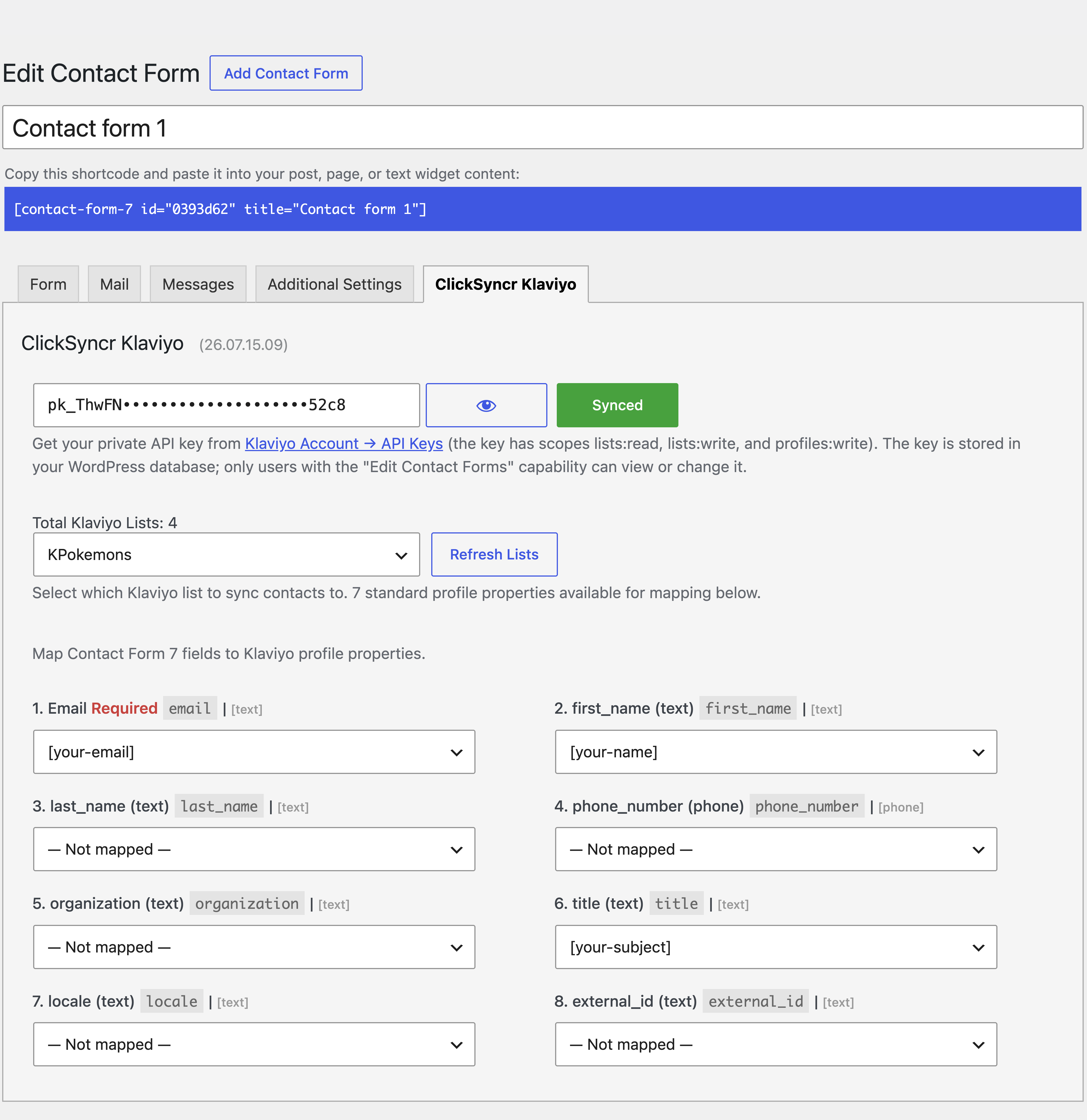
- Your lists load automatically — choose which Klaviyo list new profiles join, right inside the form editor.
- Map the fields that matter — send names, phone numbers, and Klaviyo’s standard profile fields straight from your form.
- No duplicate profiles — existing profiles are updated and new ones are created, every single time.
- A setup for every form — each Contact Form 7 form can sync to a different list with its own field mapping.
- Lightweight and fast — built to WordPress standards, so it never slows your site down.
- You stay in control — you decide exactly what data is sent, and to which list.
Learn more about the Contact Form 7 to Klaviyo integration.
How it works
- Install and activate the plugin.
- Edit any Contact Form 7 form and open the ClickSyncr Klaviyo tab.
- Paste your Klaviyo private API key — your lists and profile fields load instantly.
- Choose a list and map your form fields to Klaviyo profile fields (email is required).
- Save the form. Every submission now syncs to Klaviyo automatically.
What you’ll need
- WordPress 5.0 or higher
- Contact Form 7 installed and activated
- A Klaviyo account with a private API key (free accounts work)
Getting your Klaviyo API key
- Log in to your Klaviyo account.
- Go to Account > Settings > API Keys.
- Create a private API key with
lists:read,lists:write, andprofiles:writeaccess. - Paste it into the ClickSyncr Klaviyo tab.
Support
Need a hand? Visit clicksyncr.com and we’ll be glad to help.
External service: Klaviyo
This plugin connects to Klaviyo, the email marketing service, to sync your Contact Form 7 submissions with your Klaviyo account.
When data is sent: when you connect your API key, when your lists and fields load in the form editor, and when a visitor submits a form you’ve configured with ClickSyncr — at which point their form data (email and any mapped fields) is sent to Klaviyo.
What is sent: your Klaviyo private API key (to authenticate), the subscriber’s email address and any profile fields you choose to map, and the list you select.
By using this plugin you agree to Klaviyo’s Privacy Policy. You are responsible for complying with applicable data-protection laws (such as GDPR and CCPA) and for obtaining consent from your visitors before their data is collected and sent to Klaviyo.
Screenshots
Installation
Automatic installation
- Log in to your WordPress dashboard.
- Go to Plugins > Add New.
- Search for “ClickSyncr for Klaviyo”.
- Click Install Now, then Activate.
Manual installation
- Download the plugin ZIP file.
- In your WordPress dashboard, go to Plugins > Add New > Upload Plugin.
- Choose the ZIP file and click Install Now.
- Activate the plugin.
After installation
- Make sure Contact Form 7 is installed and activated.
- Edit any Contact Form 7 form and open the ClickSyncr Klaviyo tab.
- Follow the on-screen setup. Full guidance is on the ClickSyncr for Klaviyo page.
FAQ
-
Do I need a Klaviyo account?
-
Yes. You’ll need an active Klaviyo account and a private API key to sync your contacts. Free Klaviyo accounts work.
-
Is Contact Form 7 required?
-
Yes. ClickSyncr connects Contact Form 7 to Klaviyo, so Contact Form 7 must be installed and activated.
-
Where do I find my Klaviyo API key?
-
Log in to Klaviyo, go to Account > Settings > API Keys, and create a private key with
lists:read,lists:write, andprofiles:writeaccess. -
Which fields can I map?
-
You can map your form fields to Klaviyo’s standard profile fields: email, first name, last name, phone number, organization, title, locale, and external ID.
-
Will it create duplicate profiles?
-
No. If a profile already exists in your list, ClickSyncr updates it. If not, it creates a new one.
-
What happens if Klaviyo is unreachable?
-
Your form still sends its normal Contact Form 7 email — the plugin never blocks your forms. If the sync doesn’t complete, it simply catches up on the next submission from the same email.
-
Can I use different settings for different forms?
-
Yes. Every Contact Form 7 form has its own ClickSyncr Klaviyo setup, so each can sync to a different list.
Reviews
There are no reviews for this plugin.
Contributors & Developers
“ClickSyncr for Klaviyo” is open source software. The following people have contributed to this plugin.
Contributors
Translate “ClickSyncr for Klaviyo” into your language.
Interested in development?
Browse the code, check out the SVN repository, or subscribe to the development log by RSS.