

Description
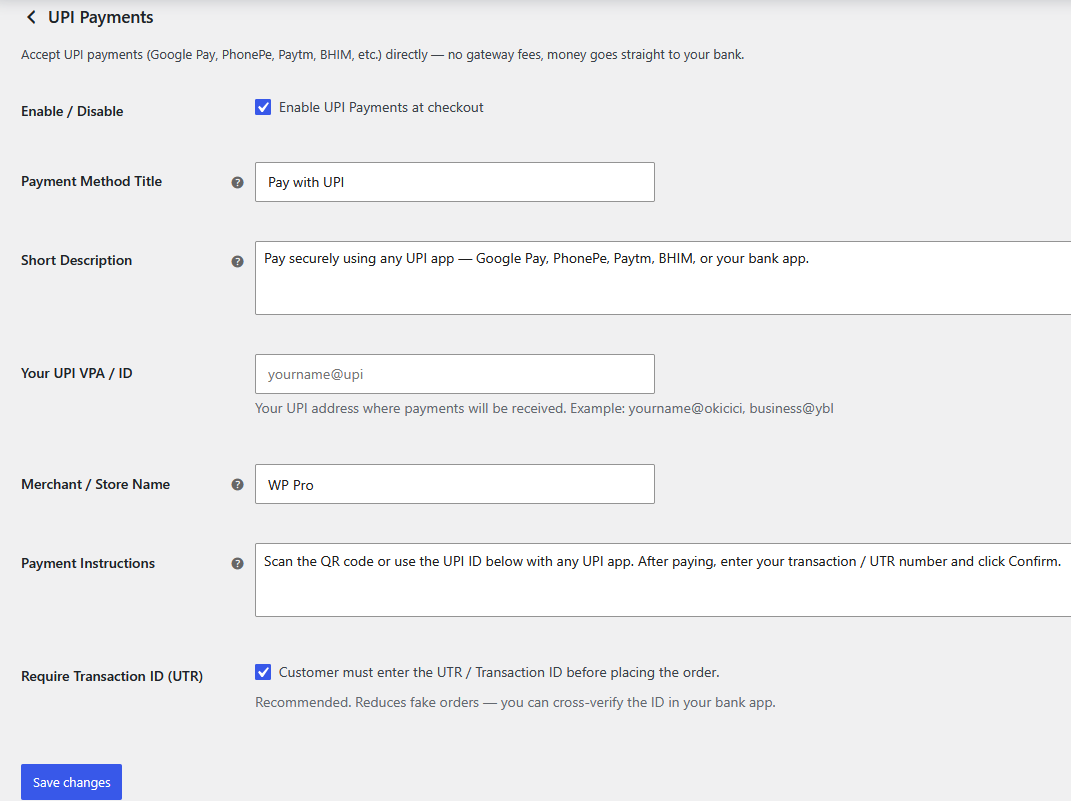
LBC UPI Payments for WooCommerce lets Indian store owners accept payments via any UPI app directly on their WooCommerce store — completely free, with no payment gateway commissions.
Money goes straight from your customer’s UPI app to your bank account.
How it works:
- You enter your UPI ID (VPA) (e.g.
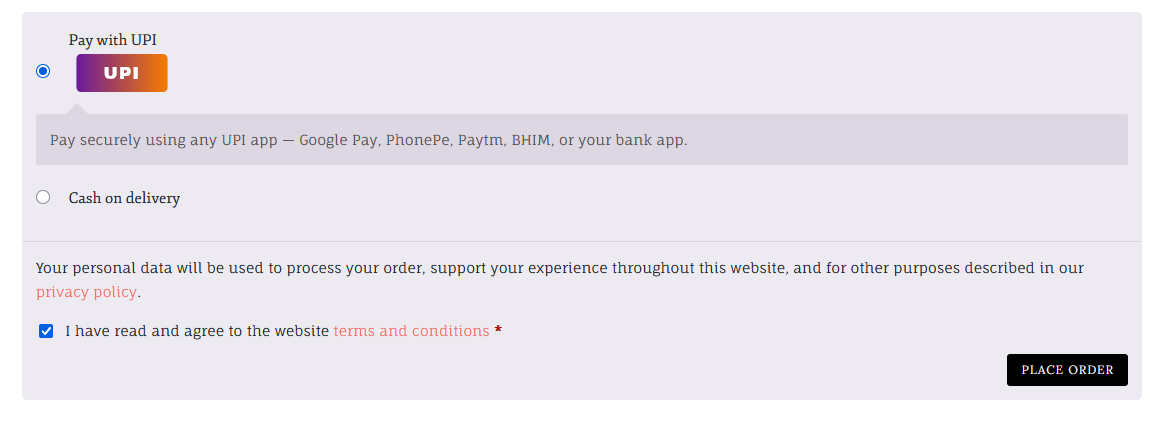
yourstore@upi) in WooCommerce settings. - At checkout customers select “Pay with UPI”.
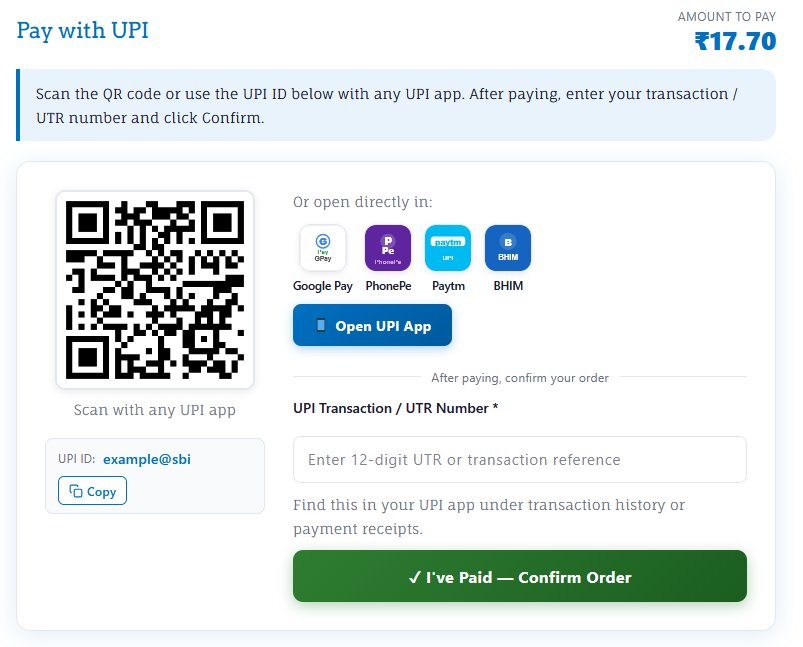
- They are shown a dynamic QR code + your UPI ID + direct app shortcut buttons.
- They pay using any UPI app (Google Pay, PhonePe, Paytm, BHIM, or any bank app).
- They enter their 12-digit UTR / Transaction ID and click “I’ve Paid”.
- The order is placed as On Hold.
- You verify the UTR in your bank app and mark the order Processing / Completed.
Features:
- ✅ Zero Fees & 0% Commission: Payments go directly to your bank account.
- ✅ High-Reliability Dynamic QR Codes: Uses a tuned QR engine optimized for maximum readability by strict scanner apps (Google Pay, Paytm, PhonePe).
- ✅ Strict App Compatibility: Auto-sanitizes merchant details in the background to guarantee the UPI deep-link opens flawlessly in any bank app.
- ✅ Direct App Shortcuts: One-click buttons to open Google Pay, PhonePe, Paytm, or BHIM directly on mobile devices.
- ✅ Automatic Currency Validation: Gateway intelligently hides itself if the store currency is not Indian Rupees (INR), preventing financial discrepancies.
- ✅ Anti-Spam & Security: Built-in protection against duplicate UTR submissions and IDOR (Insecure Direct Object Reference) to keep order data safe.
- ✅ Smart Order Workflow: Accurately manages WooCommerce stock and securely transitions order status to ‘On Hold’ only after the UTR is submitted.
- ✅ Modern Checkout Support: Works out of the box with the new WooCommerce Block checkout and classic shortcode checkouts.
- ✅ HPOS Compatible: Fully supports WooCommerce High-Performance Order Storage.
- ✅ Self-Contained & Fast: No external API calls, no bloat, and minimal admin settings—just enter your UPI ID and go.
⚡Supercharge Your WordPress Speed with Leverage Browser Caching Pro
Is your website feeling sluggish? Upgrade to Leverage Browser Caching Pro and instantly transform your site’s performance! Faster load times mean better user experiences, higher conversion rates, and top-tier SEO rankings by improving your Core Web Vitals.
Discover the premium features designed to optimize your site effortlessly:
- 🚀 Advanced Caching & GZIP Compression: Deliver pages instantly. Fine-tune Cache-Control headers, Keep-Alive connections, and cache lifespans for maximum speed.
- ⚡ Smart Code Minification: Automatically compress HTML, CSS, and JavaScript. Delay non-essential JS to dramatically boost your Google PageSpeed scores.
- 🖼️ Next-Gen Media Optimization: Cut down page weight with intelligent lazy loading for images and iframes, alongside seamless Google Fonts integration.
- 🛠️ Automated Database Cleanup: Keep your site lightweight with routine database optimization, DNS prefetching, heartbeat control, and enhanced XML-RPC security.
- 🛒 100% WooCommerce Compatible: Built for eCommerce! Accelerate your online store safely without disrupting cart fragments or the checkout process.
- ⚙️ Beginner-Friendly Dashboard: No coding required. Easily manage powerful performance settings from a clean, intuitive interface.
- 🛡️ Premium Support & Updates: Get priority assistance from performance experts and enjoy continuous feature enhancements.
👉 Get Leverage Browser Caching Pro Today!
Trademark Disclaimer:
WooCommerce® is a registered trademark of Automattic Inc. Google Pay, PhonePe, Paytm, BHIM, UPI and other UPI applications are trademarks of their respective owners. This plugin is an independent product and is not affiliated with, endorsed by, or sponsored by Automattic Inc. or any of the aforementioned trademark owners.
Credits
- QRious v4.0.2 by Alasdair Mercer – GPLv3
Screenshots
Installation
Option 1: Install via WordPress Dashboard (Recommended)
- Navigate to Dashboard Plugins Add New.
- Search for LBC UPI Payments for WooCommerce.
- Click Install Now, and then click Activate.
Option 2: Upload via WordPress Dashboard
- Download the plugin ZIP from the official repository: https://wordpress.org/plugins/lbc-upi-payments-for-woocommerce/
- Go to Dashboard Plugins Add New Upload Plugin.
- Select the downloaded ZIP file and click Install Now.
- Click Activate Plugin.
Option 3: Upload via FTP
- Download the plugin ZIP file. https://wordpress.org/plugins/lbc-upi-payments-for-woocommerce/
- Extract the ZIP to reveal the
lbc-upi-payments-for-woocommercefolder. - Upload the entire folder to the
/wp-content/plugins/directory on your server. - Go to Dashboard Plugins, locate the plugin, and click Activate.
FAQ
-
Is this really free with no commission?
-
Yes. Your customers pay directly to your UPI ID / VPA. No middleman, no commission.
-
How do I verify payments?
-
Check your bank app or UPI app transaction history. Match the UTR number the customer submitted against incoming transactions.
-
What is a UTR number?
-
UTR (Unique Transaction Reference) is the 12-digit number assigned to every UPI payment. It appears in the payer’s UPI app under “Transaction History”.
-
Why is the UPI payment option not showing at checkout?
-
The plugin automatically hides the UPI payment option if your WooCommerce store currency is not set to Indian Rupees (INR) or if you haven’t entered your UPI ID in the settings. Please ensure your currency is set to INR in WooCommerce Settings.
-
Which UPI apps are supported?
-
All UPI apps work — Google Pay, PhonePe, Paytm, BHIM, Amazon Pay, and any bank UPI app (SBI YONO, HDFC MobileBanking, etc.).
-
Can payments be verified automatically?
-
No. UPI does not provide payment webhooks for direct merchants. You need to manually check the UTR in your bank app and update the order status.
-
Is it compatible with the new WooCommerce block checkout?
-
Yes. Block checkout support is included out of the box.
Reviews
There are no reviews for this plugin.
Contributors & Developers
“LBC UPI Payments for WooCommerce” is open source software. The following people have contributed to this plugin.
Contributors
Translate “LBC UPI Payments for WooCommerce” into your language.
Interested in development?
Browse the code, check out the SVN repository, or subscribe to the development log by RSS.
Changelog
1.0
- Initial release.