

Description
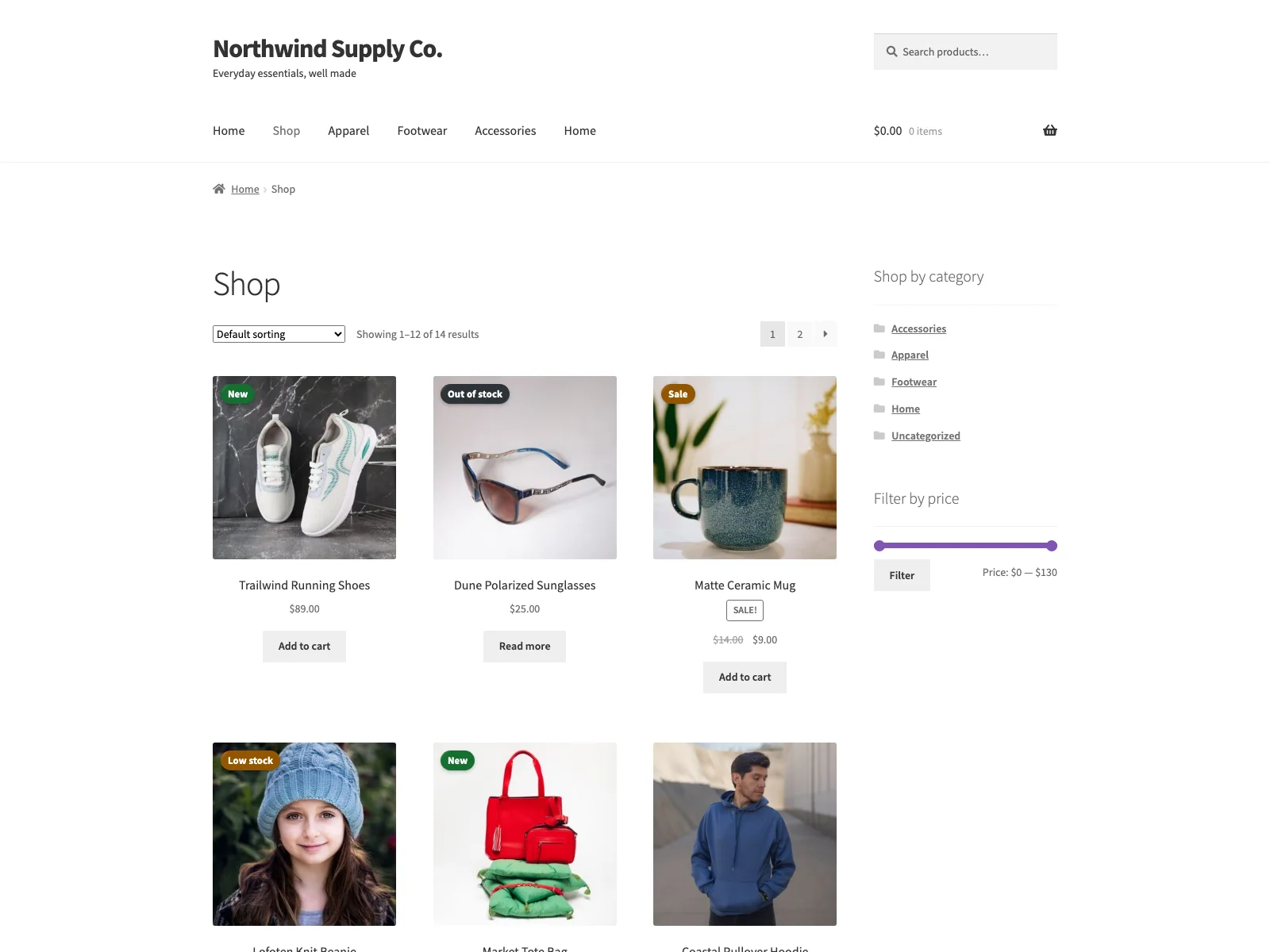
Sale & Stock Badges puts badges on your WooCommerce products. Some appear on their own from each
product’s current state (Sale, New, Low stock, Bestseller, and a few
others), and you can also set one manual badge per product using a store-wide label
and colour.
The badges are drawn with CSS and sit over the product image, so they add no
JavaScript and don’t shift the layout when the page loads. They show on the single
product page and on shop, category and tag listings.
The code is open and lives on GitHub if you want to read
it, file a bug or send a patch.
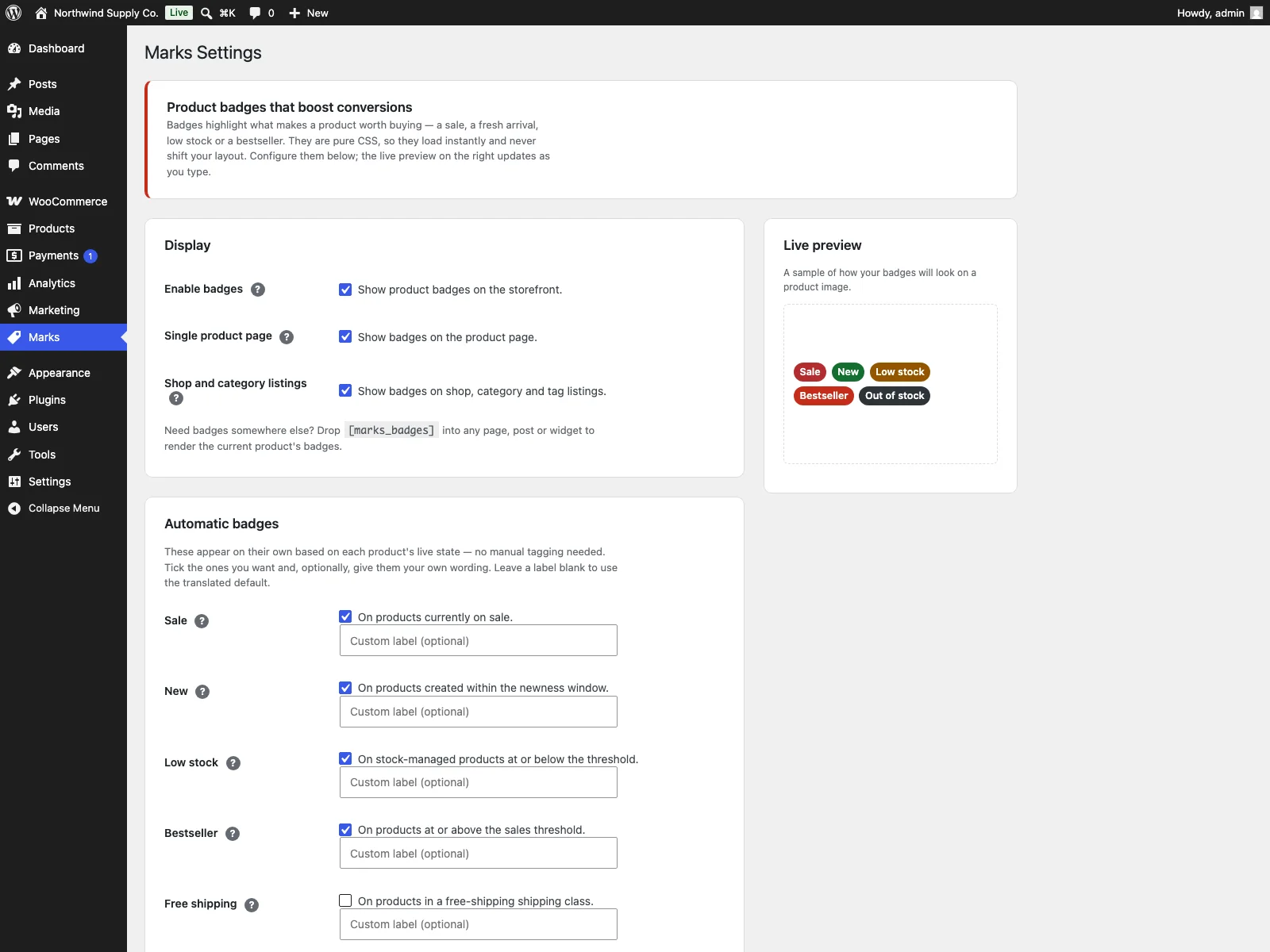
Configuration lives under a top-level Sale & Stock Badges admin menu: a global on/off
toggle, placement controls, per-rule toggles with custom labels, thresholds, an
appearance section (shape, uppercase, per-context caps) and the manual badge
label and colour. Settings are sanitised and clamped on save.
Documentation and links
- Documentation – plogins.com/plogins-marks/docs
- Plugin page – plogins.com/plogins-marks
- Source code – github.com/wppoland/plogins-marks
- Bug reports and feature requests – GitHub issues
Features
- Automatic badges: Sale, New, Low stock, Bestseller, Discount percent, Free shipping, Out of stock.
- Custom label text for every automatic badge.
- Configurable thresholds: newness window, low-stock level, bestseller sales.
- Free-shipping detection by product shipping class.
- Placement controls: single product page and/or shop and category listings.
- Appearance controls: pill or square shape, uppercase, and a per-context badge cap.
[marks_badges]shortcode to place badges anywhere.- A single manual badge (label + colour) shown per product via meta.
- CSS-only rendering: no JavaScript, no layout shift.
- Global on/off toggle and per-rule toggles.
- Translation ready (POT included) and clean uninstall.
- HPOS and cart/checkout blocks compatible.
The [marks_badges] shortcode
Use [marks_badges] to drop a product’s badges into any page, post or widget. With
no attributes it uses the current product (inside a loop or on a single product
page). Pass id to target a specific product and context (single or loop) to
pick the render style:
[marks_badges id="123" context="loop"]
Sale & Stock Badges PRO
The free edition ships the core CSS badges (Sale, New, Low stock, Bestseller, manual). Sale & Stock Badges PRO adds campaign and rules-based badging:
- Scheduled and targeted badges – campaign badges with custom colours, a start/end window and targeting by product, category or tag
- Conditional display rules – store-wide rules that badge a product by category, price threshold or low stock
- Image badges – show a certification or brand logo (PNG/SVG) on a product
- A/B label sets – rotate competing badge labels with sticky cookies and per-variant impression counts
Everything in the free edition stays free and open. Sale & Stock Badges PRO starts at 19 EUR per year (PLN shown at checkout).
Compare editions and pricing: plogins.com/plogins-marks-pro/pricing
External Services
Sale & Stock Badges does not connect to any external services. Badges are computed and drawn entirely on your own server from WooCommerce data already in your database (price, stock, sales, product dates and shipping class), and the badge CSS is served from the plugin’s own assets.
The plugin stores its configuration in two WordPress options (marks_settings and marks_db_version) and reads per-product post meta (_marks_manual_text and _marks_manual_style) for the manual badge. No visitor or store data is sent anywhere, and the plugin does not call home, load remote scripts or fonts, or send email.
Translations
Sale & Stock Badges includes Polish, German and Spanish translations for the plugin interface. The text domain is plogins-sale-stock-badges, so WordPress.org language packs can also override or extend these bundled translations.
Screenshots
Installation
- Upload the plugin to
/wp-content/plugins/marks, or install via Plugins Add New. - Activate it. WooCommerce must be active.
- Go to the Sale & Stock Badges menu, enable badges, and choose which automatic badges to show.
FAQ
-
Does it require WooCommerce?
-
Yes.
-
When does the “New” badge show?
-
On products created within the newness window (30 days by default).
-
When does the “Low stock” badge show?
-
On stock-managed products whose remaining quantity is at or below the configured
low-stock threshold. -
How do I add a manual badge to a single product?
-
Set the manual badge label and colour on the Sale & Stock Badges settings screen, then set the
product meta_marks_manual_text(and optionally_marks_manual_style) on the
products that should display it. -
Does this plugin work on WordPress Multisite?
-
Yes. This plugin is compatible with WordPress Multisite. Network activate it or activate it on individual sites; each site keeps its own settings and data.
Reviews
There are no reviews for this plugin.
Contributors & Developers
“Sale & Stock Badges for WooCommerce” is open source software. The following people have contributed to this plugin.
Contributors
Translate “Sale & Stock Badges for WooCommerce” into your language.
Interested in development?
Browse the code, check out the SVN repository, or subscribe to the development log by RSS.
Changelog
1.0.9
- Simplified the display name to Sale & Stock Badges for WooCommerce (slug and text domain unchanged).
- Added an Elementor widget for product badges (self-guarding: loads only when Elementor is active).
- Admin settings screen now supports dark colour scheme.
1.0.8
- Renamed the plugin to Plogins Sale & Stock Badges for WooCommerce (new slug: plogins-sale-stock-badges) for a clearer, distinctive name per WordPress.org review. Text domain updated to match; internal data keys unchanged.
1.0.7
- Shortened display name to Marks (dropped the Plogins brand prefix; slug unchanged).
1.0.6
- Corrected the product-badges filter prefix to marks_product_badges to match the plugin prefix.
1.0.5
- Prefixed the product-badges filter hook (plogins_marks_product_badges) to satisfy WordPress plugin naming guidelines.
1.0.4
- Accessibility improvements to the admin and storefront markup.
- Fixed low-contrast admin headings under an OS dark-mode preference.
1.0.3
- Clearer name: Plogins Marks – Sale & Stock Badges for WooCommerce.
1.0.2
- Added bundled Polish, German and Spanish translations for the plugin interface.
1.0.1
- First stable release.
0.3.1
- Renamed to Plogins Marks for WooCommerce for a more distinctive plugin name.
0.3.0
- New: optional hide of the default WooCommerce sale flash when the Marks sale badge is enabled.
- Admin settings help tooltips polish.
0.2.0
- Add Discount percent, Free shipping and Out of stock automatic badges.
- Add custom label text for every automatic badge.
- Add configurable newness-window and bestseller thresholds, plus free-shipping class detection.
- Add placement controls (single product page and/or listings).
- Add appearance controls: badge shape, uppercase and per-context badge caps.
- Add the
[marks_badges]shortcode for manual placement. - Add a translation template (languages/marks.pot) and an uninstall cleanup.
0.1.0
- Initial release: automatic Sale / New / Low stock / Bestseller badges, a manual badge, and a settings screen. CSS-only.