

Description
RankWorker is an AI-powered SEO content tool that creates high-quality articles relevant to your business, audience, and goals. It uses your website and project settings to understand your business context before planning and writing content.
RankWorker automatically creates a content plan for the month, researches each topic in detail, and generates complete articles with relevant images, SEO titles, meta descriptions, keywords, and tags. You can review and adjust the content plan before articles are created.
Brand voice, audience, positioning, writing style, and custom instructions are applied across the workflow so the content sounds like it was written by your team—not from a generic template.
This plugin is the publishing connection between your WordPress site and RankWorker. It securely imports completed articles into WordPress, including their images and SEO metadata, without repetitive copying and uploading.
Automatic WordPress article imports
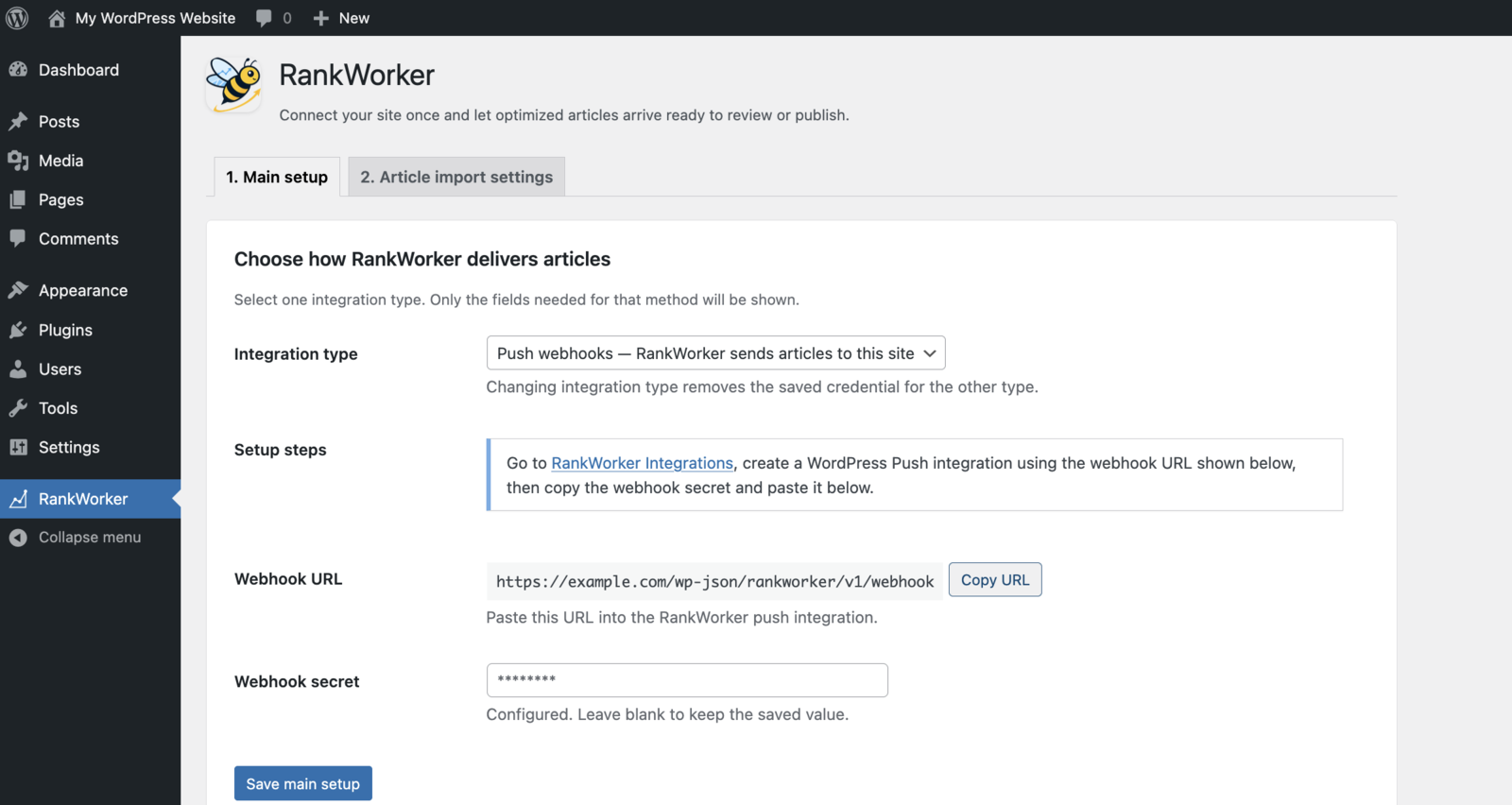
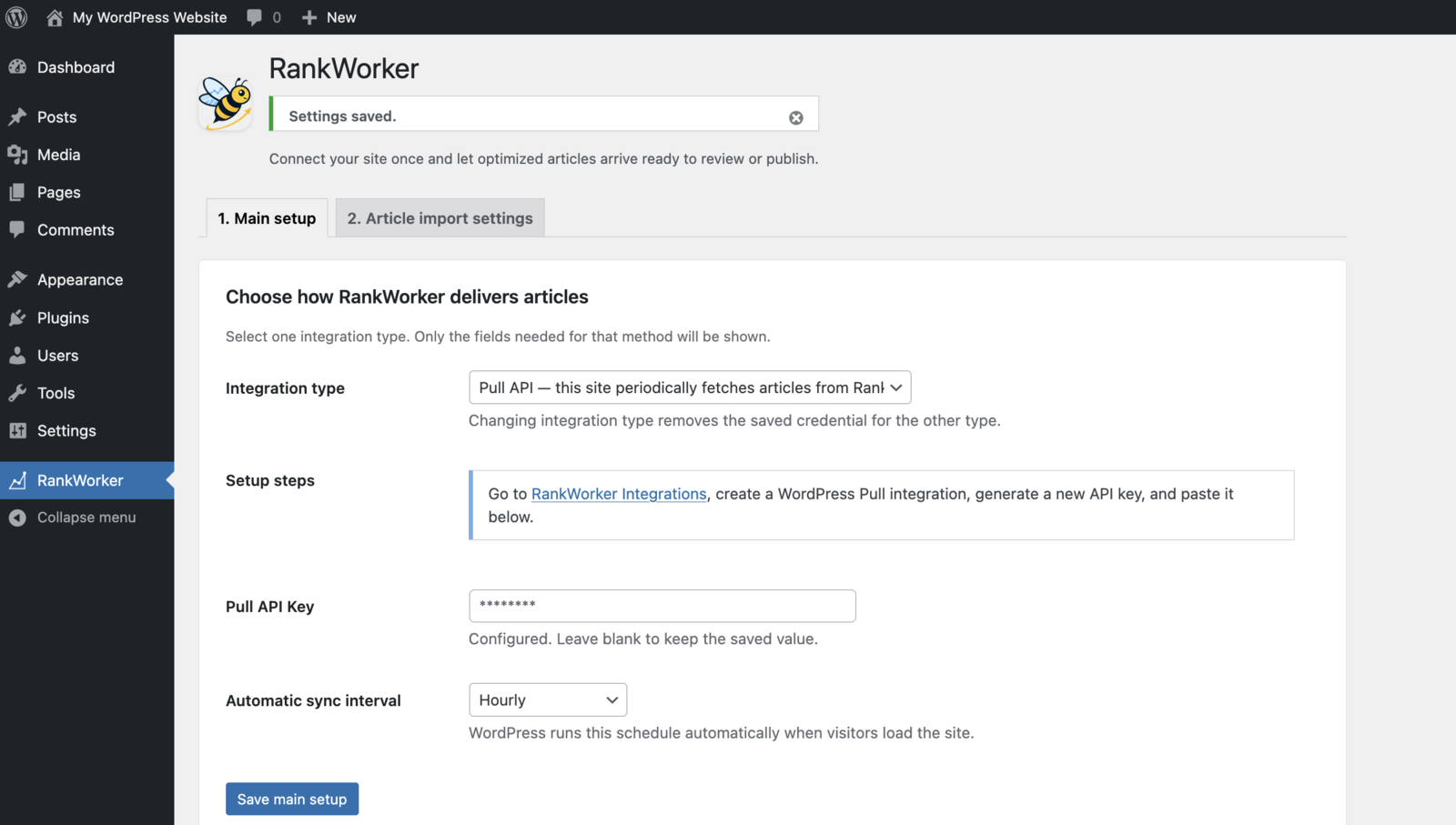
Choose one of two simple integration options:
- Push: RankWorker sends each completed article to WordPress automatically through a secure webhook.
- Pull: WordPress checks the RankWorker API for available articles on a schedule or when you run a manual sync.
Whichever option you choose, the plugin automatically imports article content into WordPress. It can:
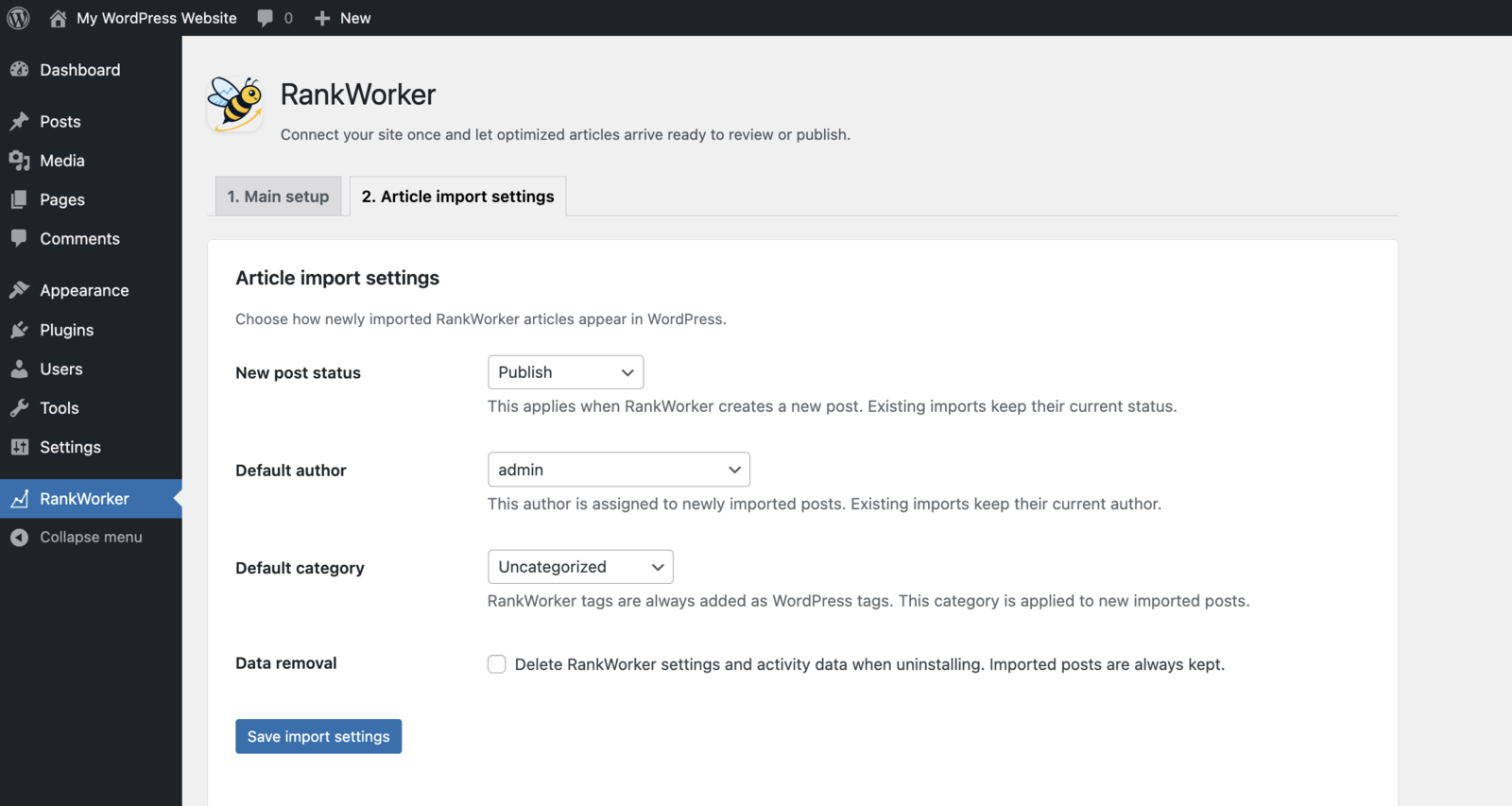
- Set imported articles to Draft, Pending Review, Published, or Private.
- Assign a default WordPress author and category.
- Import article tags and download images to the WordPress Media Library.
- Set the article cover image as the featured image.
- Add SEO metadata for Yoast SEO, Rank Math SEO, SEOPress, or All in One SEO when the corresponding plugin is active.
- Update previously imported articles without creating duplicate posts.
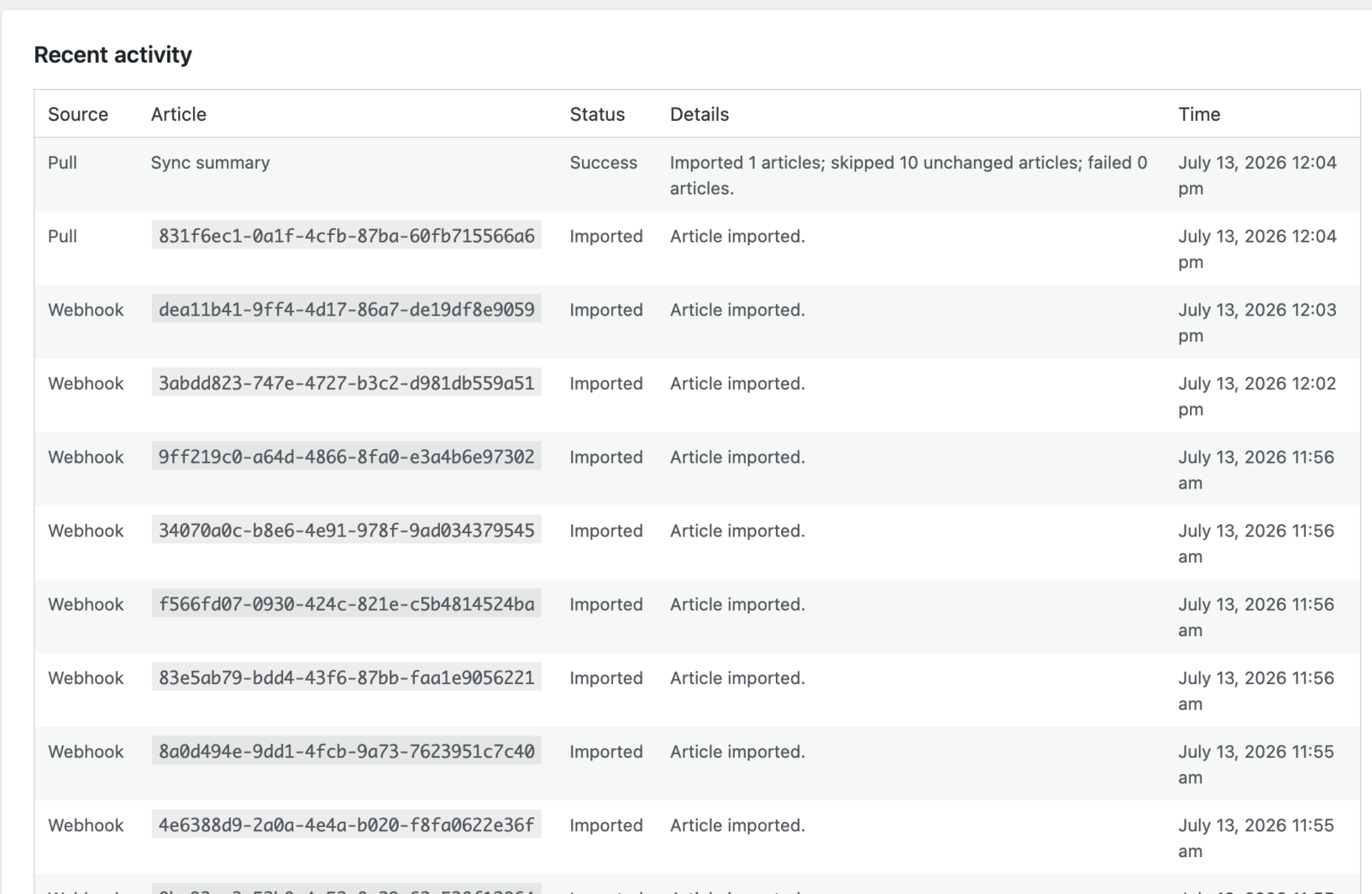
- Show recent import activity, warnings, retries, and failures in WordPress admin.
The API key or webhook signing secret is encrypted at rest using a key derived from your WordPress security salts and is never displayed after being saved.
External services
This plugin connects to RankWorker, a hosted third-party service that creates and delivers the articles imported by the plugin. The connection starts only after a WordPress administrator configures an integration.
In Pull mode, WordPress connects to the RankWorker API using the administrator-provided API key and requests available article data. In Push mode, RankWorker sends article data to the site’s webhook URL. Webhooks are signed by RankWorker and verified by the plugin using the saved webhook signing secret before they are accepted.
Article data can include the title, content, publishing fields, SEO metadata, tags, and image URLs. The plugin downloads provided images into the WordPress Media Library. The plugin does not send WordPress post content, user data, or usage analytics to RankWorker.
Screenshots
Installation
- Install and activate RankWorker through the WordPress Plugins screen.
- Open RankWorker in the WordPress admin menu.
- In your RankWorker account, open Integrations and create a WordPress Push or Pull integration.
- For Push mode, add the webhook URL shown by the plugin to RankWorker, then save the webhook secret in WordPress. For Pull mode, create an API key in RankWorker and save it in WordPress.
- Choose the default post status, author, and category for new imports.
- Save your settings. Pull mode will synchronize on the selected schedule; Push mode will receive articles as RankWorker delivers them.
FAQ
-
Do I need a RankWorker account?
-
Yes. RankWorker is a service plugin: content planning and article generation happen in RankWorker, while this plugin imports the resulting content into WordPress.
-
Can I review articles before they are published?
-
Yes. Review articles in RankWorker before delivery, and set new WordPress imports to Draft or Pending Review if you want an additional editorial step in WordPress. Draft is the default.
-
Can RankWorker publish articles automatically?
-
Yes. Set the new-post status to Published. You can instead choose Draft, Pending Review, or Private to match your editorial workflow.
-
Does RankWorker create duplicate posts?
-
No. The plugin tracks the RankWorker article ID. A later delivery for the same article updates its existing WordPress post, while an unchanged article is skipped.
-
What happens to article images?
-
The plugin downloads available cover and inline images into the WordPress Media Library. It replaces their remote URLs in the article with local attachment URLs and uses the cover image as the featured image when available.
-
Which SEO plugins are supported?
-
The plugin can apply the SEO title, meta description, and focus keyword to Yoast SEO, Rank Math SEO, SEOPress, and All in One SEO when the corresponding plugin is active. It also stores a RankWorker copy of these values in post metadata.
-
Does RankWorker overwrite existing posts?
-
Only posts previously imported by RankWorker with the same RankWorker article ID are updated. The post’s current status and author are preserved on later updates.
-
How are my integration credentials protected?
-
The API token or webhook signing secret is encrypted at rest using a key derived from the site’s WordPress security salts. Saved credentials are never displayed in the settings screen.
-
Can I use Push and Pull at the same time?
-
No. Select one delivery mode at a time. Changing modes removes the stored credential for the previous mode.
-
What happens when I uninstall the plugin?
-
Imported posts remain in WordPress. You can choose whether the plugin removes its settings and activity records during uninstall.
Reviews
There are no reviews for this plugin.
Contributors & Developers
“RankWorker” is open source software. The following people have contributed to this plugin.
Contributors
Translate “RankWorker” into your language.
Interested in development?
Browse the code, check out the SVN repository, or subscribe to the development log by RSS.
Changelog
1.0.0
- Initial release.
- Added secure Push webhook and scheduled Pull API delivery modes.
- Added idempotent article imports, local image handling, publishing controls, activity history, and SEO plugin metadata support.