

Description
Watch the plugin in action (45 seconds, in French):
Is your accountant asking for a file? Your WooCommerce store knows how to sell,
but it does not keep an accounting journal. This plugin fills that gap.
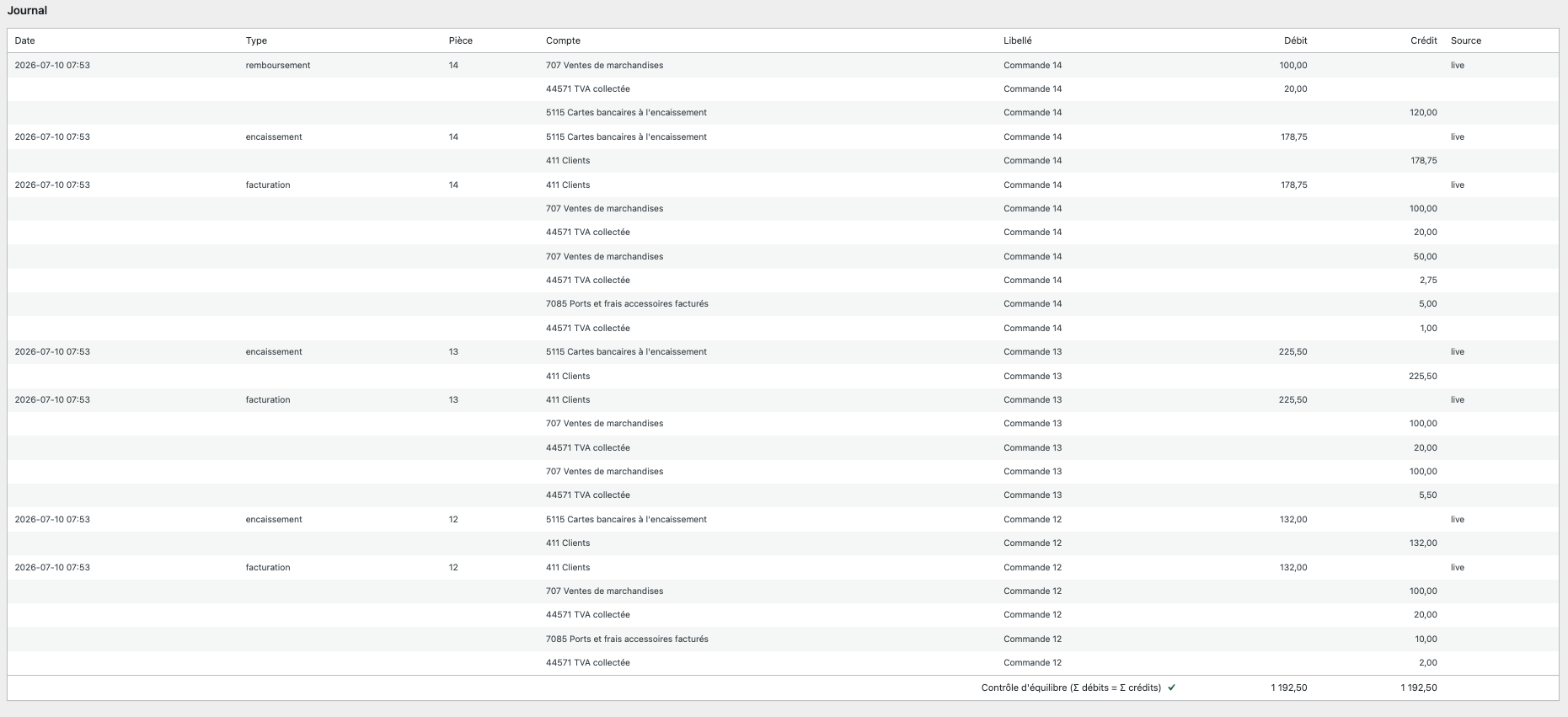
Every time an order is paid, it automatically writes a balanced accounting entry
that follows the French chart of accounts (Plan comptable général): revenue, VAT
collected per rate, shipping charged to the customer, and the payment received.
You read the journal from your dashboard, and export it whenever you are asked
to.
This plugin targets French e-commerce: it produces entries for the French chart
of accounts and an FEC file (Fichier des Écritures Comptables), the ledger export
that French tax authorities may request during an audit.
What the plugin does
- Automatic entries. A paid order creates an entry. A refund is reversed
(contra entry), never deleted: the audit trail stays intact. - Multi-rate VAT. A single order may carry 20%, 10% and 5.5% items. Each rate
gets its own VAT line. Shipping is posted separately, with its own VAT. - History replay. Installing today but selling for two years? Pick an anchor
date and replay your past orders. The operation is idempotent: running it again
never creates duplicates. - Readable journal. One screen, one list, a permanent balance check
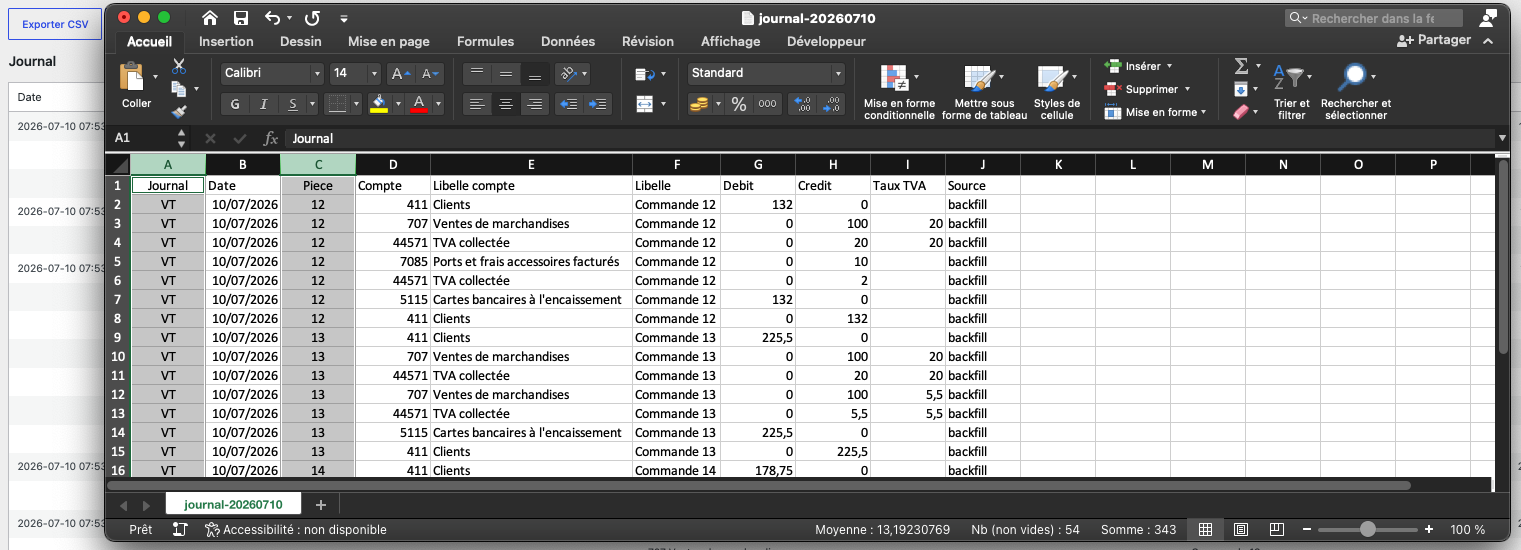
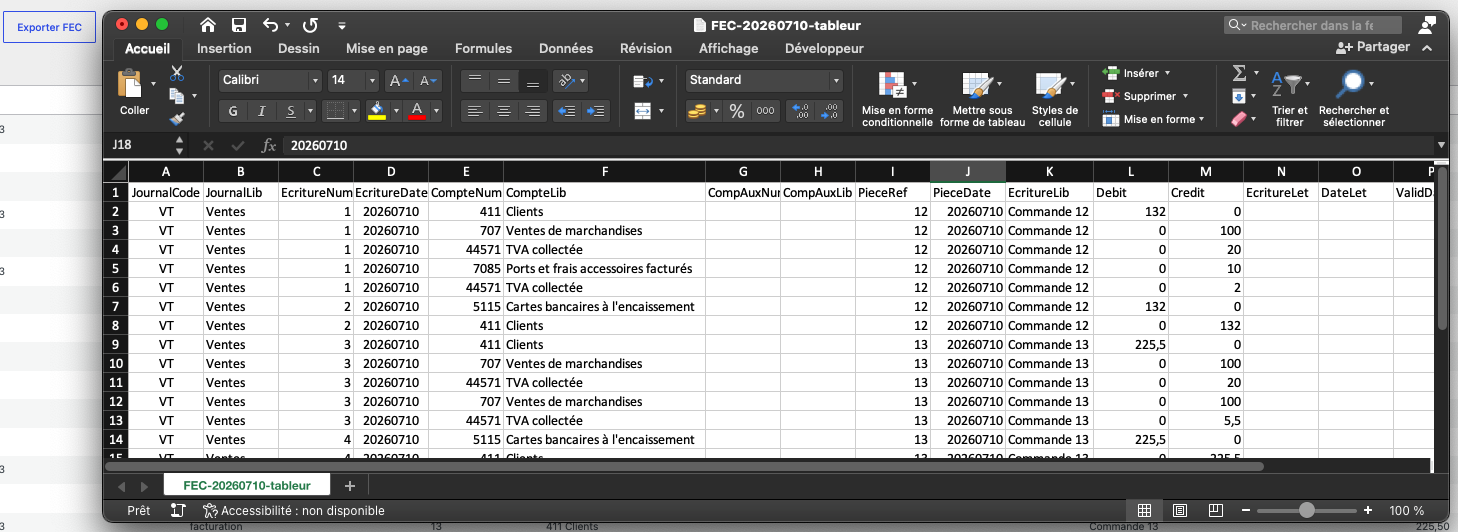
(sum of debits = sum of credits) and a summary of balances per account. - CSV export for your spreadsheet or your accountant, and FEC export
(18 mandatory columns) for the tax authorities. - HPOS compatible (High-Performance Order Storage), as well as legacy storage.
Accounts used
These are the default numbers. There is no settings screen: a developer can
override each of them with a filter, for instance comptafec_account_ventes to post
revenue to 706 instead of 707.
411Clients — customer receivable, the pivot of the sale707Ventes de marchandises — revenue, excluding tax44571TVA collectée — VAT collected, one line per rate7085Ports et frais accessoires facturés — shipping charged5115Cartes bancaires à l’encaissement — card payments in transit
What the plugin does not do (and why)
We would rather say it before you install.
Payments are posted to account 5115 (“card payments in transit”), not
directly to the bank account (512). This is not a shortcut: when a customer
pays by card, the money first sits with the payment provider, which deducts its
fee and settles the remainder later, often bundling several orders together. The
amount actually credited to your bank account is therefore only known afterwards.
The trade-off is deliberate: your revenue and your VAT are correct, but
account 5115 stays open until the provider’s payout has been reconciled against
your bank statement. That reconciliation, and the recording of provider fees, are
outside the scope of this free version.
The plugin also assumes a store selling in euros, under French VAT, to
consumers.
Your data
No data leaves your server. The plugin calls no external service. The accounting
export aggregates sales on the collective account 411 Clients: it contains no
customer name, address or email address.
Screenshots


Installation
- Install and activate WooCommerce first.
- Upload the plugin to
/wp-content/plugins/, or install it from Plugins Add New. - Activate the plugin. The journal tables are created automatically.
- Go to WooCommerce Comptabilité.
- Your next paid orders will generate their entries immediately. For your past orders, pick an anchor date and click Rejouer l’historique (Replay history).
FAQ
-
Is the FEC file compliant?
-
The file follows the mandatory 18-column structure defined by French tax law
(article A. 47 A-1 of the Livre des procédures fiscales): dates as YYYYMMDD,
decimal comma, balanced entries. Compliance of a FEC file also depends on the
consistency of your bookkeeping as a whole: have it reviewed by your chartered
accountant before any audit. -
What happens when I refund an order?
-
The plugin records a reversing entry (contra entry), prorated for a partial
refund. The original entry is neither modified nor deleted: that is the rule in
accounting, and it is what makes the journal trustworthy. -
Can I safely run the history replay again?
-
Yes. Every entry is tied to its source order; an order already recorded is
skipped. A second replay therefore reports zero entries created. -
Why does my 5115 account never clear?
-
That is the expected behaviour of the free version. Account
5115receives the
money collected by your payment provider. It is only cleared when that provider’s
transfer reaches your bank account — a reconciliation step that is not included
here. See “What the plugin does not do”. -
I open the FEC file in Excel and the accents are broken. Is it a bug?
-
No, the file is correct. The FEC is encoded in plain UTF-8, without a byte order
mark, because it is meant for tax authorities and accounting software, some of
which reject that mark. Excel guesses the encoding and gets it wrong.To read it comfortably: in Excel, use Data From Text, then choose the
UTF-8 encoding and the tab separator. The file you hand to your accountant
needs no change. The CSV export, designed for spreadsheets, opens directly. -
Can my theme or my other plugins distort the entries?
-
The plugin reads orders through the official WooCommerce API, relying on the
totals computed by WooCommerce itself. If your order totals are right, your
entries are right. -
Does the plugin handle several currencies, intra-EU VAT or B2B?
-
Not in this version. The store is assumed to sell in euros, under French VAT, to
consumers.
Reviews
There are no reviews for this plugin.
Contributors & Developers
“Comptabilité et Export FEC for WooCommerce” is open source software. The following people have contributed to this plugin.
Contributors
Translate “Comptabilité et Export FEC for WooCommerce” into your language.
Interested in development?
Browse the code, check out the SVN repository, or subscribe to the development log by RSS.
Changelog
0.1.0
- First release.
- Automatic entries on paid orders and refunds (contra entries).
- Multi-rate VAT per order line, shipping posted separately.
- Idempotent history replay from an anchor date.
- Journal, balance check and account summary in the admin.
- CSV and FEC exports.
- HPOS compatibility declared.