

Description
ImReso is a target-size, free bulk image compressor. It resizes and converts your photos and images to exact pixel dimensions or a specific file size, right in your browser — instantly. Free, unlimited and 100% privacy-first: the encoding runs on your own device and nothing is ever uploaded. Need 50 KB or 1000px? No problem.
Most plugins in this space hand your files to a third-party server or an external API. ImReso is different — client-side image compression, so your originals never leave your site, with no API key, no per-file cost, no monthly cap and no bulk-job timeout, even on the cheapest shared hosting.
Give it a size ceiling in KB and each upload is encoded to land under it automatically — no fiddling with a quality slider. ImReso reads JPEG, PNG, WebP, AVIF, HEIC/HEIF, TIFF and BMP, and writes WebP, AVIF or JPEG; SVG and GIF are passed through untouched so nothing ever breaks.
It runs the same engine as ImageResizer.cc, the free online tool by the same team. Need to handle a one-off file without opening WordPress? Use the web app at imageresizer.cc/app — same engine, any browser, nothing uploaded.
What makes it different
- Zero server load — all the work runs in the browser via WebAssembly, so nothing times out and your host isn’t taxed, even on cheap shared hosting.
- Nothing is uploaded — your originals never leave the site; the browser does all the work.
- No API key, no signup, no limits — no credits to buy, no monthly quota, no account. Free, unlimited image compression, always.
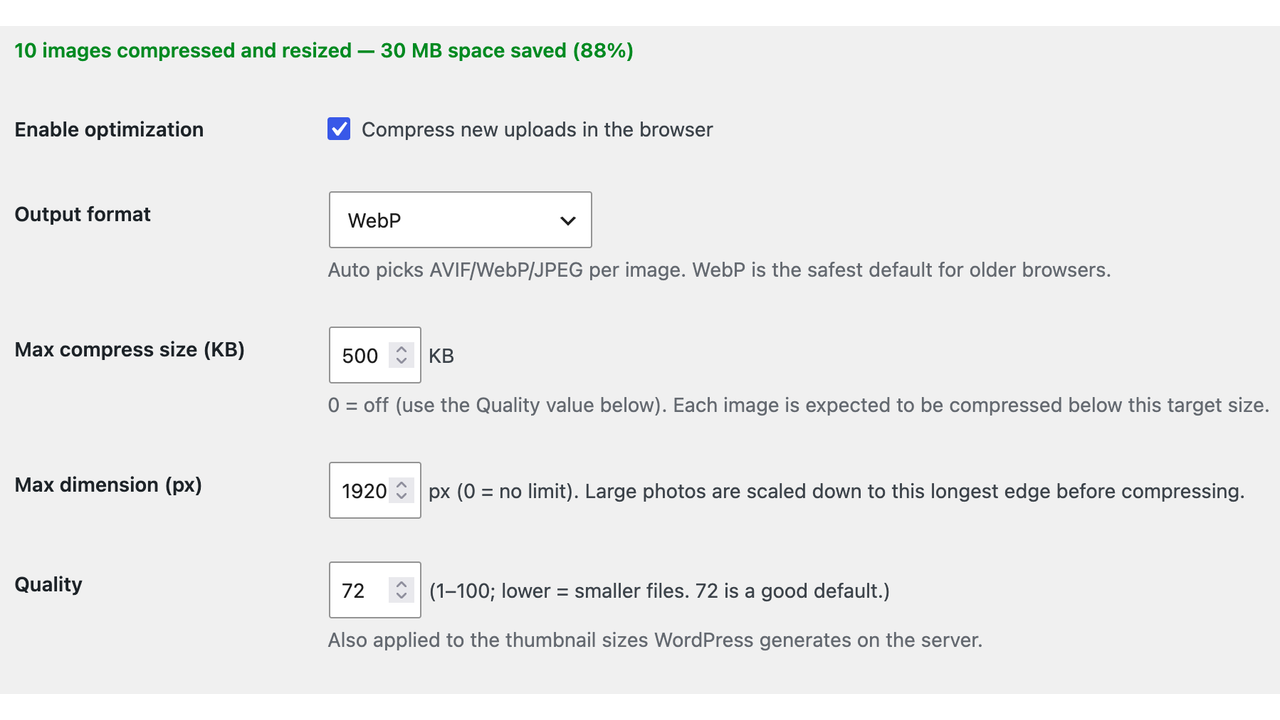
- Target file size — hit an exact size (100, 300, 500 KB…), not just a guessed quality value.
- Max width — scale huge photos down to a longest-edge cap before they are stored.
- HEIC to WebP or AVIF — turn iPhone photos and other heavy formats into modern, lighter ones on upload.
- Leaner thumbnails — the sub-sizes WordPress builds on the server use your chosen quality too.
- Works everywhere — Safari, iOS and every modern browser; fully translatable, with language packs delivered by WordPress.
How you use it
You don’t. Upload the way you already do — the plugin works on the upload itself, so there is no button to press, no queue to start and no bulk job to babysit.
Drop files into the Media Library as usual and each one is compressed in your browser before WordPress stores it. Writing a post is the same: add an Image block, upload, and the file that lands on your site is already the smaller one — the original never leaves your computer.
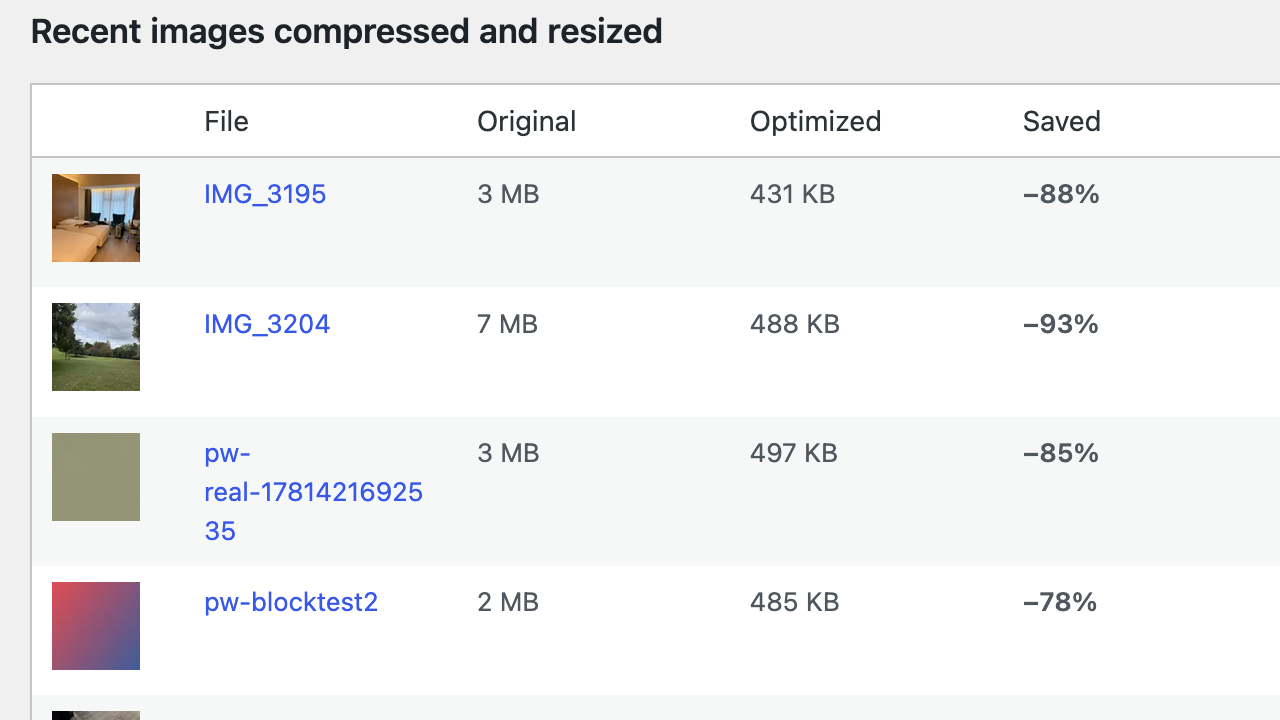
Set the target size and format once in the ImReso menu and you can forget about it. The screenshots below show both, alongside the dashboard that adds up what you saved.
Supported formats
- Read / resize / compress: JPEG, PNG, WebP, AVIF, BMP, TIFF.
- Read & convert to a web format: HEIC / HEIF (iPhone), plus TIFF and BMP.
- Output: WebP, AVIF or JPEG (chosen automatically or fixed in settings).
- Left untouched (uploaded as-is): GIF, whether animated or not (re-encoding would drop frames), SVG (vector), ICO and JPEG 2000. These are uploaded unchanged so nothing is ever broken.
- Already small: a JPEG, PNG, WebP or AVIF under 10 KB is left alone — re-encoding one rarely saves anything and can cost you quality. HEIC, TIFF and BMP are always converted, whatever their size, because the point there is a web-friendly format rather than a smaller file. So a tiny test image is expected to come through untouched.
What gets optimized
Uploads on the media and editor screens: the classic Media Library (upload.php), the Add New Media screen, the “Add Media” dialog and Media Library popup, and inline uploads in the block (post/page) editor — drag-and-drop, paste, and the block “Upload” button.
Everywhere the block editor runs is covered, so that also includes the Site Editor on a block theme and the block widgets screen on a classic one.
Programmatic / REST / WP-CLI / FTP uploads cannot be processed by any client-side tool, including this one.
About ImageResizer.cc
This plugin is made by the team behind ImageResizer.cc — a free, privacy-first online tool to resize, compress and convert images entirely in the browser. The plugin brings that same engine straight into your WordPress upload flow.
Working outside WordPress? The web app handles the same jobs with no install: compress an image to a target size, convert HEIC to JPG, or convert PNG to WebP — all client-side, nothing uploaded, no account.
Source code
Nothing in this plugin is obfuscated. The files under build/ are minified for delivery only. The complete, un-minified sources that produce them ship inside the plugin, and the same tree is public at
https://github.com/AlexStack/imreso-target-size-image-compressor
What ships:
src-js/— every TypeScript/JavaScript source file (worker engine, main-thread client, uploader interceptors, format sniffer).build/ir-worker.js,build/worker-client.js,build/classic-uploader.jsandbuild/block-uploader.jsare built from these.build.mjs— the esbuild configuration that bundlessrc-js/intobuild/.-
package.json— declares the third-party packages listed below. The versions the shippedbuild/was produced from are recorded inlicenses/README.txt.build/chunks/ holds the lazily loaded pieces esbuild split out. They are minified derivatives, not verbatim copies, and they come from three places:
-
Third-party —
encode-*.js,avif_enc-*.js,webp_enc-*.jsandwebp_enc_simd-*.jsare the @jsquash codecs;UTIF-*.jsis utif2 (which bundles pako);heic-to-*.jsis heic-to, and at ~3 MB it is the largest file in the plugin — it is libheif compiled to plain JavaScript, so HEIC decoding needs no extra binary. The readable originals are the npm packages listed under “Third-party libraries” below, reproduced verbatim bynpm install; their full licence texts ship inlicenses/. - Ours — one
chunk-*.jsis built fromsrc-js/wfd-shim.js. - Generated by the build — another
chunk-*.jscarrying esbuild’s own CommonJS interop runtime, andavif_enc_mt-*.js, a one-line stubbuild.mjssubstitutes for the multi-threaded AVIF codec so it is never bundled.
The eight-character hash in each chunk filename is content-derived, so these exact names change whenever a dependency does.
To regenerate everything in build/ from those sources, run this from the plugin folder:
npm install && npm run build
The rebuilt build/ is functionally identical. The four .wasm codecs and the four top-level bundles come out byte-for-byte the same. The lazily loaded files under build/chunks/ carry an esbuild content hash in their filename (heic-to-<hash>.js); that hash is derived from the chunk’s contents, so it moves whenever a dependency version does, and the import statements in ir-worker.js move with it. The chunk contents are unchanged and each build/ is internally consistent. The hash is what stops browsers serving a stale chunk after a plugin update.
The .wasm files
build/ contains four WebAssembly binaries. They are the image encoders themselves — the plugin exists to compress images on the user's own device instead of on a server or an external API, and these are what performs that encoding. Without them the plugin has no function at all.
They are the stock, unmodified binaries published by the @jsquash packages: npm install fetches byte-identical files and build.mjs copies them next to the bundle. Nothing is fetched at runtime — they are loaded from the plugin folder, which is what keeps every image on the user’s own device.
Each is compiled from a public, GPL-compatible upstream C/C++ project:
webp_enc.wasm,webp_enc_simd.wasm— libwebp (BSD-3-Clause) — https://chromium.googlesource.com/webm/libwebpmozjpeg_enc.wasm— mozjpeg (BSD-3-Clause / IJG) — https://github.com/mozilla/mozjpegavif_enc.wasm— libavif (BSD-2-Clause) — https://github.com/AOMediaCodec/libavif — with libaom — https://aomedia.googlesource.com/aom
The build scripts that produce these binaries from those sources are published by jSquash:
https://github.com/jamsinclair/jSquash
Third-party libraries
This plugin bundles the following GPL-compatible open-source libraries. The full text of each licence ships in the plugin’s licenses/ directory, with the exact bundled versions; upstream sources are linked below.
- @jsquash/avif, @jsquash/webp, @jsquash/jpeg — Apache-2.0 — WebAssembly image codecs — https://github.com/jamsinclair/jSquash
- heic-to — LGPL-3.0 — HEIC/HEIF decoding (wraps libheif) — https://github.com/hoppergee/heic-to
- utif2 — MIT — TIFF decoding — https://github.com/photopea/UTIF.js
- pako — MIT AND Zlib — zlib inflate, bundled inside utif2 — https://github.com/nodeca/pako
The codec binaries these packages ship are compiled from libwebp (BSD-3-Clause), mozjpeg (BSD-3-Clause / IJG), libavif + libaom (BSD-2-Clause with the Alliance for Open Media patent grant) and libheif (LGPL-3.0).
Because libheif and heic-to are LGPL-3.0, the combined work is distributed under GPLv3 as permitted by this plugin’s “GPLv2 or later” licence.
Screenshots


Installation
- Upload the
imreso-target-size-image-compressorfolder to/wp-content/plugins/, or install the .zip via Plugins Add New Upload Plugin. - Activate the plugin.
- Go to the ImReso menu and adjust the ImReso options (format, quality, max dimension) if you like — sensible defaults are set automatically.
- Upload images through the Media Library — they are resized and compressed in your browser before they are stored.
FAQ
-
Can I bulk compress and resize images?
-
Yes. Select as many images as you like in the Media Library or “Add Media” dialog and each one is resized and compressed in your browser before upload. There is no per-image limit and nothing is queued on a server.
-
Can I compress to a specific file size?
-
Yes. Set the “Max compress size” in the ImReso menu (default 500 KB) and the plugin searches the encoder quality so each image lands at about that size. Set it to 0 to use a fixed Quality value instead.
-
Can I compress images without a server or external API?
-
Yes — that is the whole point. All processing happens in your browser, so the free plugin makes zero external network requests. Your images are never sent to our servers or anyone else’s.
-
Is there a limit on how many images I can optimize?
-
No. It is genuinely unlimited — there is nothing to meter because the work runs on your own device.
-
Which image formats are supported?
-
It reads JPEG, PNG, WebP, AVIF, BMP, TIFF and HEIC/HEIF, and outputs WebP, AVIF or JPEG. GIF (animated or not), SVG, ICO and JPEG 2000 are left untouched and uploaded as-is.
-
Can it handle iPhone HEIC photos?
-
Yes. HEIC/HEIF images are decoded and converted to WebP, AVIF or JPEG entirely in your browser, so they’re viewable everywhere, and it is the converted file that gets stored — WordPress never sees the HEIC.
The conversion needs JavaScript. If it cannot run, the plugin steps aside and the browser posts the original file; the plugin allows
.heic/.heifthrough the upload filter so that attempt is not blocked, but whether a raw HEIC is accepted and thumbnailed after that is up to your server’s image library, and many do not support it. -
Does it optimize images already in my Media Library?
-
Not yet. This release resizes and compresses new uploads. Bulk optimization of the existing library is planned for a later release.
-
AVIF seems slow on my phone.
-
AVIF encoding is CPU-heavy. On mobile devices the plugin automatically prefers WebP for reliability. You can also fix the format to WebP in the ImReso menu.
-
My browser console says “wasm streaming compile failed”. Is something broken?
-
No — images still compress, and you can confirm it from the savings figures. Some hosts (a few nginx setups in particular) do not yet map the
.wasmextension to theapplication/wasmcontent type. When that happens the browser refuses to compile the codec while it downloads and falls back to loading it into memory first, which is a little slower on the very first image of a page and logs that message. The codecs are read from this plugin’s own folder either way; nothing is fetched from anywhere else. Addingapplication/wasm wasm;to your server’s mime types removes the message. -
What happens if compression fails or doesn’t help?
-
The original file is uploaded unchanged. Compression never blocks or breaks an upload.
-
Does the plugin update automatically?
-
Yes. Updates are delivered by WordPress.org like any other plugin from the directory — you will see them on the Plugins screen, and you can switch on “Enable auto-updates” there to have them installed for you. The plugin ships no updater of its own and contacts no server to check for updates.
-
What languages is the plugin available in?
-
Every string in the interface is translatable, and translations are delivered by WordPress itself: once your site’s locale has been translated on translate.wordpress.org, WordPress installs and updates the language pack for you, with no action needed here. Contributions for any locale are welcome there — the project page is linked from this plugin’s page in the plugin directory.
Reviews
There are no reviews for this plugin.
Contributors & Developers
“ImReso: Unlimited Target-Size Image Compressor” is open source software. The following people have contributed to this plugin.
Contributors
Translate “ImReso: Unlimited Target-Size Image Compressor” into your language.
Interested in development?
Browse the code, check out the SVN repository, or subscribe to the development log by RSS.
Changelog
1.0.17
- The plugin directory strips images out of a description, so the ones added in 1.0.16 rendered as nothing and took their captions with them, leaving gaps in the text. Removed them and wrote the copy where the directory does show a picture: the screenshot captions.
1.0.16
- Listing page: the settings and savings screens now appear at the top of the description, and a “How you use it” section shows what uploading looks like in the Media Library and the post editor.
- Cropped the two upload screenshots to their content — two thirds of one of them was empty margin, which made the annotations hard to read at the width the directory renders them.
1.0.15
- Fixed the repository link in this readme. It was wrapped in bold markers, and link checkers were reading those as part of the address, so the link resolved to a 404 even though the repository is public.
- Added
build/README.txt: a plain-text manifest naming the source of every generated file, so the origin of anything underbuild/can be read without leaving that directory.
1.0.14
- Uploads in the Site Editor and on the block widgets screen are now compressed too. On a block theme those are the main places images get added, and they were the last admin screens left uncovered.
- Documented that files under 10 KB are left alone, so a small test image coming through untouched is expected rather than a fault.
- Clarified what happens to an iPhone HEIC when JavaScript cannot run.
1.0.13
- Fixed: images uploaded on the “Add New Media” screen were compressed correctly but their savings never reached the dashboard or the Media Library’s “Optimized” column. That screen returns the new attachment’s id in a different shape from the Media Library grid, and only the grid’s shape was being read.
1.0.12
- First public release.
- Compresses and resizes images entirely in the browser as you upload them, to a target file size or a maximum dimension, with no server work and no external requests.
- Reads JPEG, PNG, WebP, AVIF, HEIC/HEIF, TIFF and BMP; writes WebP, AVIF or JPEG. GIF, SVG, ICO and JPEG 2000 are passed through untouched.
- Server-generated thumbnail sizes reuse your chosen quality.
- Savings dashboard with per-image before/after figures, and an “Optimized” column in the Media Library.
- Translations are delivered by WordPress from translate.wordpress.org; contributions for any locale are welcome there.
Versions 1.0.0 to 1.0.11 were pre-release builds that were never published to the WordPress.org directory. Their history is in the public repository.