

Description
Codeandcore Smart Image Ratio is a premium WordPress plugin designed for high-fidelity aspect ratio management. It empowers developers and site owners to create perfectly sized image variations with interactive cropping, modern smart-fill technology, and an efficient background processing engine.
The Ultimate Control Over Your Library
In our latest major release, we’ve transformed the plugin into a highly efficient, server-friendly powerhouse:
- Automatic Data Cleanup: Keep your database and literal
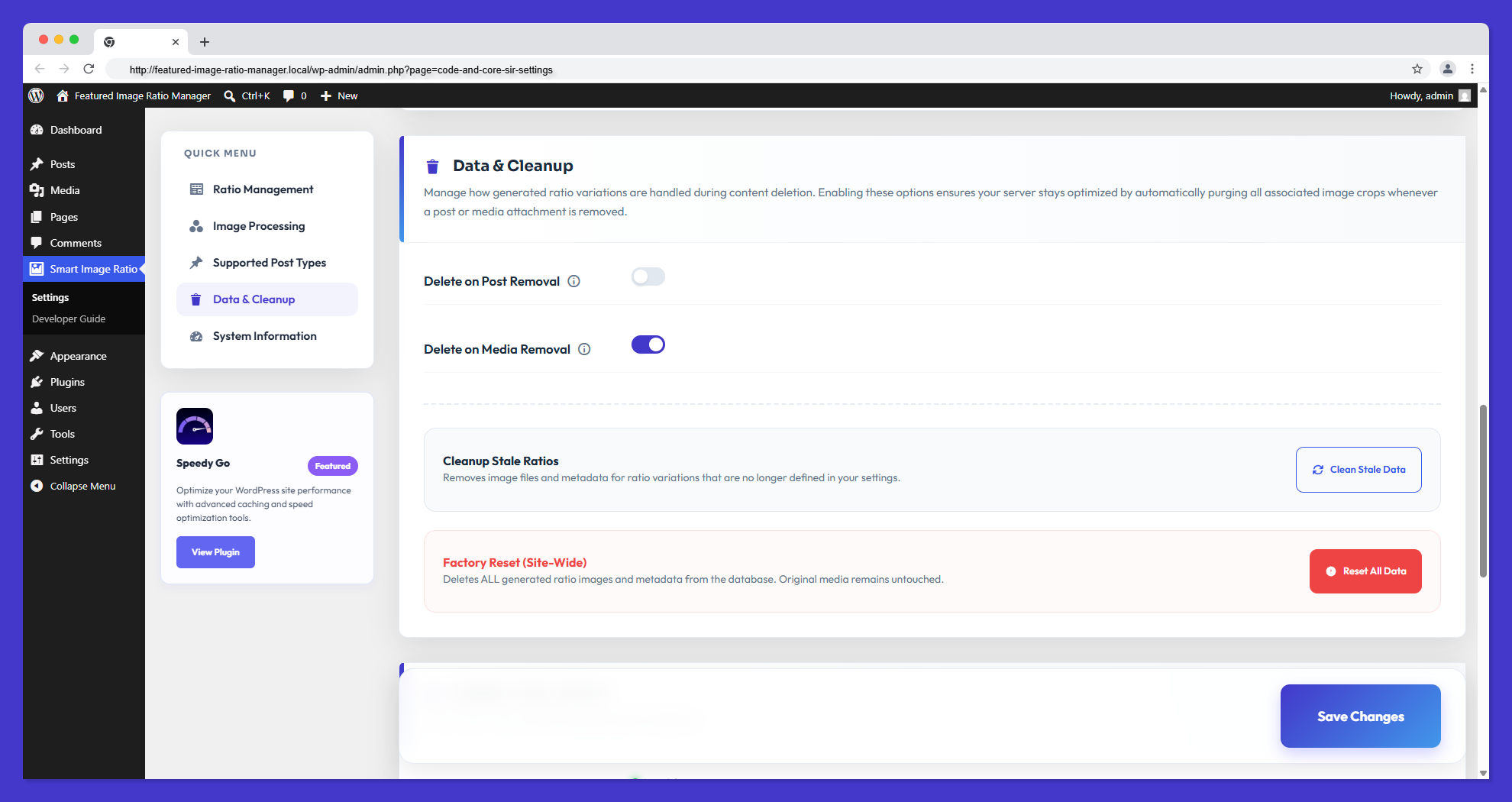
<upload>folders 100% bloat-free. When a post or media attachment is deleted, the plugin intelligently hunts down and permanently deletes all generated ratio variations and tracking metadata. - Conversion Coverage Dashboard: Need to know how many images are actually structured correctly? Our new real-time statistical dashboard displays your conversion progress percentages across all registered post types beautifully.
- Atomic Metadata Infrastructure: Built-in race condition prevention. All metadata updates use optimistic locking to ensure data integrity during concurrent AJAX operations.
- Harden Security & Privacy: All AJAX endpoints strictly enforce capability checks. Custom upload directories are automatically protected with index.php files to prevent directory listing.
- 100% Privacy Compliance (Native Hosting): We’ve completely detached from third-party CDNs. Every single asset (from SweetAlert2 modules to SaaS-inspired Google Fonts) is hosted natively within the plugin folder. 0 tracking, 0 offloaded scripts.
Boost Your SEO & User Experience
Image optimization is a core pillar of technical SEO. By serving perfectly sized aspect ratios, you reduce Layout Shift (CLS), which is a critical Core Web Vital metric. Faster loading, correctly dimensioned images signal search engines that your site provides a high-quality user experience. Additionally, our “Smart-Fill” technology ensures that your featured images always look intentional and professional, reducing bounce rates and increasing user engagement.
Features
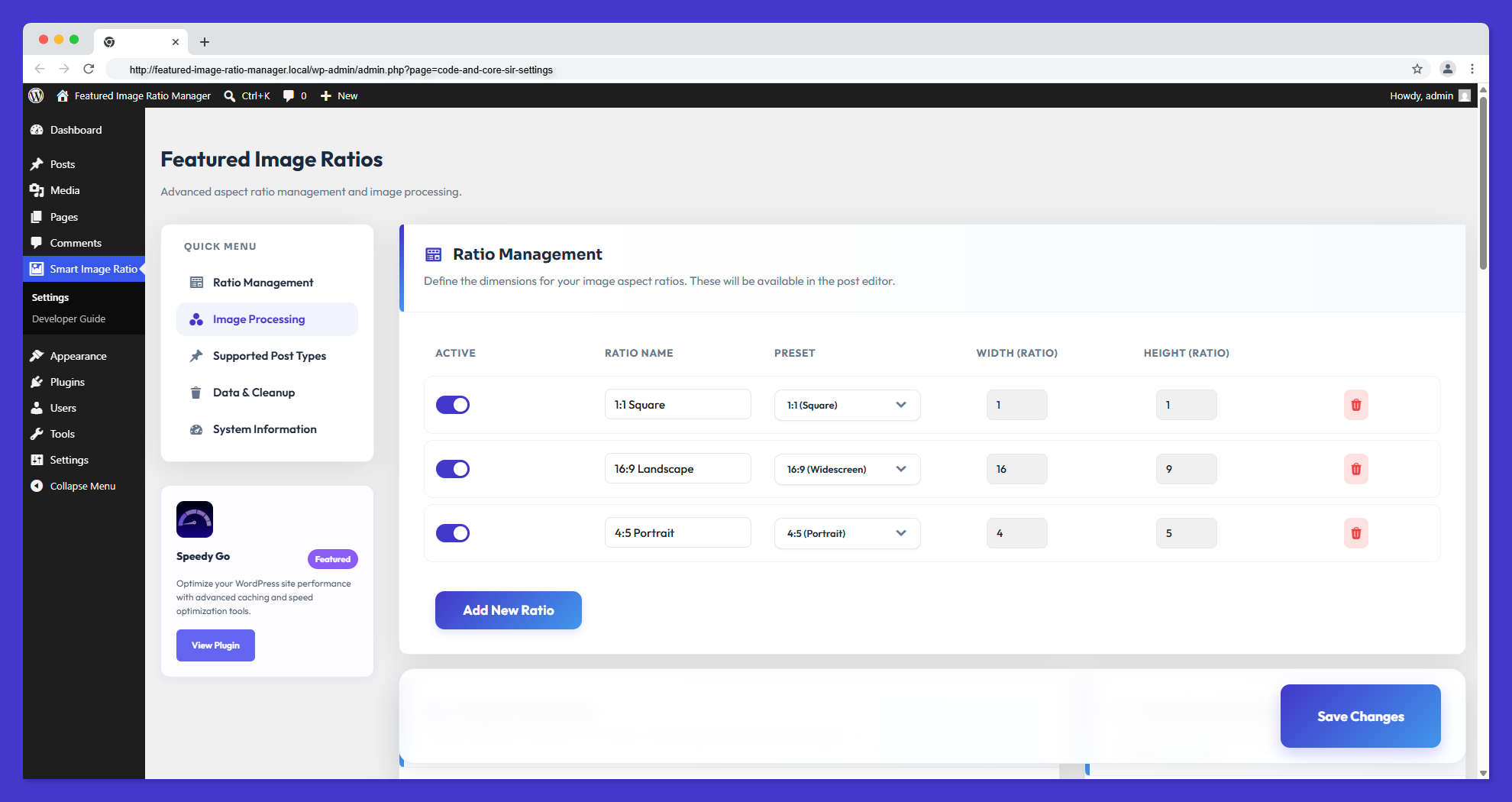
- Custom Aspect Ratios: Define unlimited aspect ratios (e.g., 16:9, 4:3, 1:1) through a sleek, SaaS-inspired admin interface.
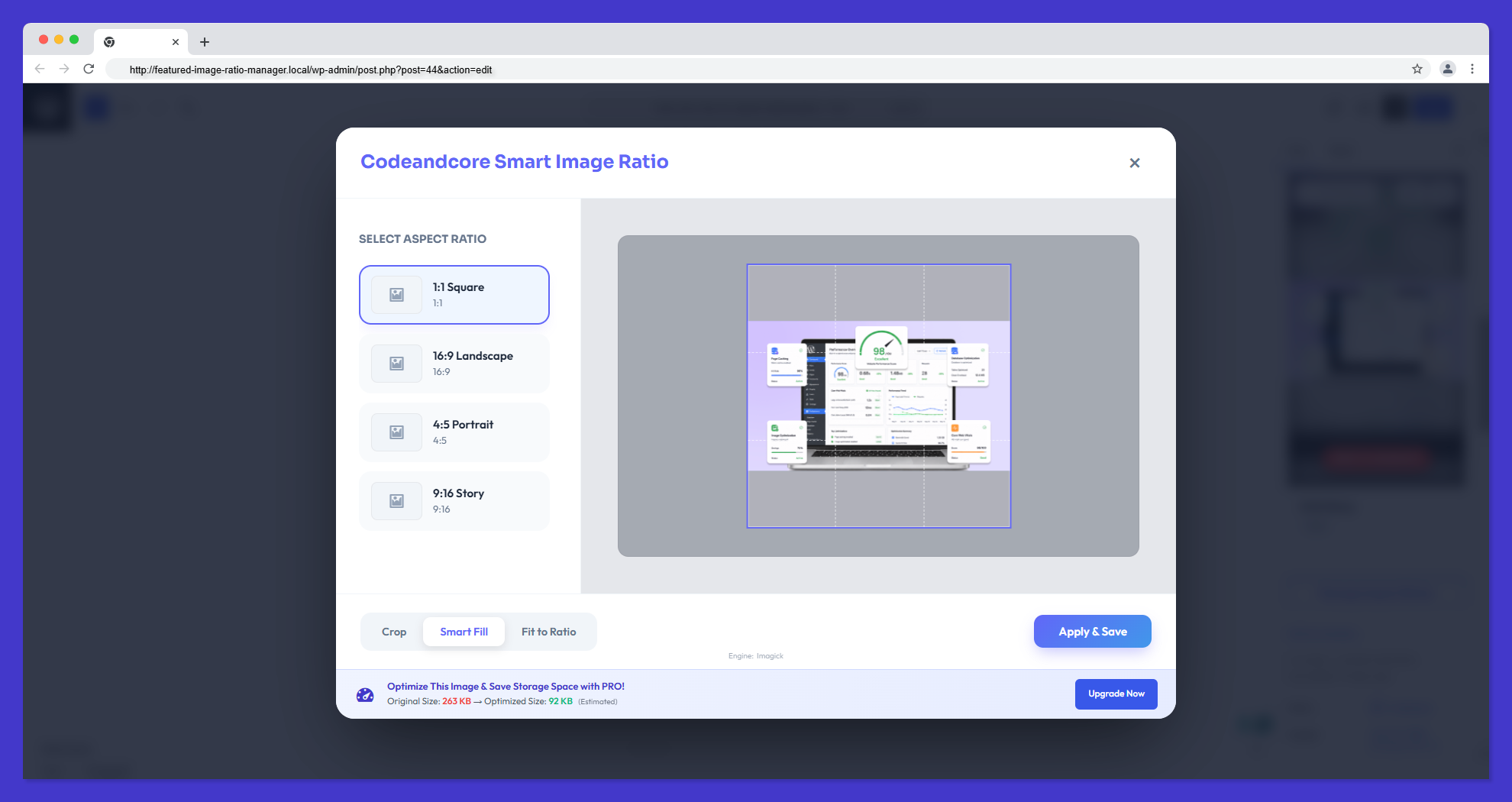
- Interactive Cropping: Powered by Cropper.js, providing a pixel-perfect interface within the WordPress Media Library to adjust every variation manually.
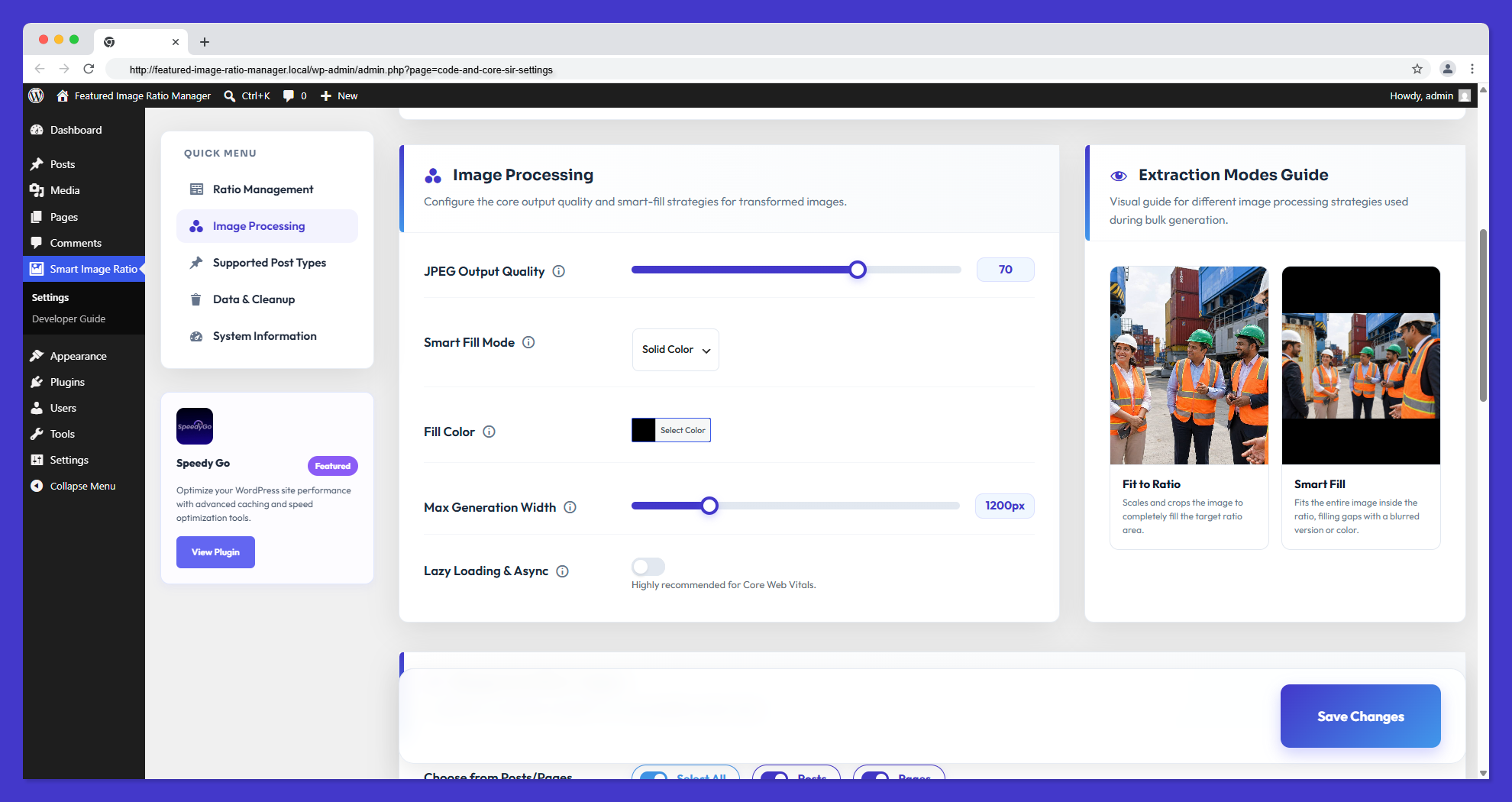
- Smart Fill & Blur Flow: Automatic color-sampled blurred backgrounds for non-standard image compositions—never see awkward white bars again.
- Atomic Metadata Management: Robust optimistic locking system that prevents data corruption during simultaneous image generations.
- Security Hardening: Strict capability enforcement (
edit_posts) for all internal AJAX operations and automatic directory protection for generated assets. - Automatic Storage Cleanup: Intelligent logic that automatically purges image variations and metadata when a Post or Media item is deleted, keeping your server bloat-free.
- Conversion Coverage Dashboard: Real-time card-based statistics showing conversion progress across all registered post types.
- 100% Localized Assets: Zero remote CDN tracking. All dependencies (SweetAlert2, Google Fonts) are shipped locally for absolute privacy standard compliance.
- Developer-First Architecture: Built with modern PHP practices, 100% strict compliance with WordPress Coding Standards (WPCS) & PluginCheck, yielding a clean and deeply documented Public API.
- Gutenberg & Classic Editor Integration: Seamless UI panels (vCards) injected directly into the Block Editor and Classic Post screens to manage ratios dynamically while writing content.
- Frontend Shortcodes & APIs: Simple
[code_and_core_sir_image]shortcode and PHP helper functions for effortless frontend rendering and page-builder (Elementor, Divi) compatibility. - Advanced Debug Logging: Isolated system-level flat-file logging (
cnc-sir-debug.log) for robust server execution monitoring and troubleshooting without cluttering standard WordPress debug logs. - Real-time Quality Playground: Adjust JPEG output quality in settings and see instant canvas-simulated results on your sample images before saving.
- Maintenance & Wipe Tools: Single-click administrative actions to instantly clear background queues, completely wipe ratio configurations, and purge all plugin metadata—assuring a pristine environment when managing staging sites.
Developer & Integration Guide
Retrieving your custom ratios is simple and developer-friendly. Whether you are coding a theme from scratch or using a page builder, we have you covered.
1. Public PHP Helpers (Primary Functions)
Get Ratio URL
code_and_core_sir_get_ratio_image_url( $id, $ratio_id, $fallback = '' )
Retrieve the URL of a specific ratio variation.
* $id: Post ID or Attachment ID.
* $ratio_id: The slug of the ratio (e.g., ratio_16_9).
* $fallback: (Optional) Fallback URL if no image exists.
Get Complete Image Tag
code_and_core_sir_get_image_tag( $id, $ratio_id, $class = '', $fallback = '' )
Retrieve a fully formed tag. Note: If the ratio image is not found, this function automatically falls back to the original featured image for normal users, and displays a red warning placeholder box for administrators to easily spot missing ratios.
* $class: (Optional) CSS class for the img tag.
* $fallback: (Optional) Fallback image URL or HTML if the ratio doesn’t exist.
Check for Ratio Existence
code_and_core_sir_has_ratio( $id, $ratio_id )
Returns true if a specific ratio variation exists for the image.
Bulk Data Retrieval
$ratios = code_and_core_sir_get_all_ratios(get_the_ID());
Returns a complete array of all generated image variations for a post.
Active Ratio State
$active_ratio_id = code_and_core_sir_get_active_ratio( $post_id );
Returns the ID of the ratio currently set as “Active” for the featured image (if the ‘Set as Featured’ feature was used).
2. Implementation Examples
Simple Hero Image (Recommended)
<?php if ( code_and_core_sir_has_ratio( get_the_ID(), 'ratio_16_9' ) ) : ?>
    <div class="hero-image">
        <?php echo code_and_core_sir_get_image_tag( get_the_ID(), 'ratio_16_9', 'hero-img-class' ); ?>
    </div>
<?php endif; ?>
Custom Grid or Card
<?php
$ratio_url = code_and_core_sir_get_ratio_image_url( $post->ID, 'ratio_4_3', get_template_directory_uri() . '/assets/placeholder.jpg' );
?>
<div class="card" style="background-image: url('<?php echo esc_url( $ratio_url ); ?>');">
    <!-- Card Content -->
</div>
Advanced Loop (Display All Ratios)
$ratios = code_and_core_sir_get_all_ratios(get_the_ID());

foreach ($ratios as $ratio_id => $data) {
    if (!empty($data['url'])) {
        echo '<div class="ratio-item">';
        echo '<h4>' . esc_html($ratio_id) . '</h4>';
        echo '<img src="' . esc_url($data['url']) . '" alt="">';
        echo '</div>';
    }
}
Conditional Output (Recommended PHP Fallback)
Use this logic to safely fallback to the full featured image if a specific ratio isn’t generated.
$thumb_id = get_post_thumbnail_id();
$meta = get_post_meta($thumb_id, '_code_and_core_sir_ratios', true);
$url = !empty($meta['ratio_1_1']['url']) ? $meta['ratio_1_1']['url'] : get_the_post_thumbnail_url(get_the_ID(), 'full');

if ($url) {
    echo '<img src="' . esc_url($url) . '" alt="' . esc_attr(get_the_title()) . '">';
}
3. Shortcodes & Page Builders
Basic Usage
[code_and_core_sir_image ratio="ratio_16_9" id="123" class="hero-img"]
- ratio: (Required) The Ratio ID (e.g. ratio_16_9)
- id: (Optional) Attachment ID (defaults to featured image)
- class: (Optional) Custom CSS class
- alt: (Optional) Custom alt text (defaults to attachment alt)
- default: (Optional) Ultimate fallback image URL
Page Builders
Working with Elementor, Divi, Beaver Builder, or Gutenberg? Simply drop the shortcode into a “Shortcode” or “Text” widget.
[code_and_core_sir_image ratio="ratio_4_5"]
4. Technical Details
Metadata Structure
The plugin stores generated ratio information in a single post meta key _code_and_core_sir_ratios for each attachment.
{
  "ratio_16_9": {
    "url": "https://example.com/wp-content/uploads/cnc-sir/2026/04/image-16x9.jpg",
    "path": "/absolute/path/to/image-16x9.jpg",
    "width": 1600,
    "height": 900,
    "mode": "crop",
    "timestamp": 1713170000
  }
}
Advanced Hooks & Filters
The settings are stored in the code_and_core_sir_settings option. Use standard WordPress filters like option_code_and_core_sir_settings to manipulate ratios or capabilities dynamically via code.
External services
This plugin connects to a third-party service at https://wordpress-plugins.pro/ for the following purposes:
- Deactivation Feedback: When you deactivate the plugin, an optional feedback form allows you to share why you are deactivating. If you fill this out, it sends the reason, site URL, plugin/WordPress/PHP versions, and active theme information. This helps us improve the plugin.
- Usage Tracking (Telemetry): If you explicitly opt-in via our settings or the activation modal, the plugin will occasionally send anonymous site diagnostics (site URL, plugin/WP/PHP versions, and active theme info) to help us prioritize compatibility updates and features.
This service is provided by “WordPress Plugins Pro”: General Conditions, Privacy Policy.
Credits
This plugin utilizes the following open-source third-party libraries:
- SweetAlert2 – Beautiful, responsive, customizable, accessible replacement for JavaScript’s popup boxes (MIT License).
- Cropper.js – Robust JavaScript image cropper used for the interactive Media Editor (MIT License).
- Outfit Font – Google Fonts typeface used throughout the plugin’s administration user interface (SIL Open Font License).
Screenshots
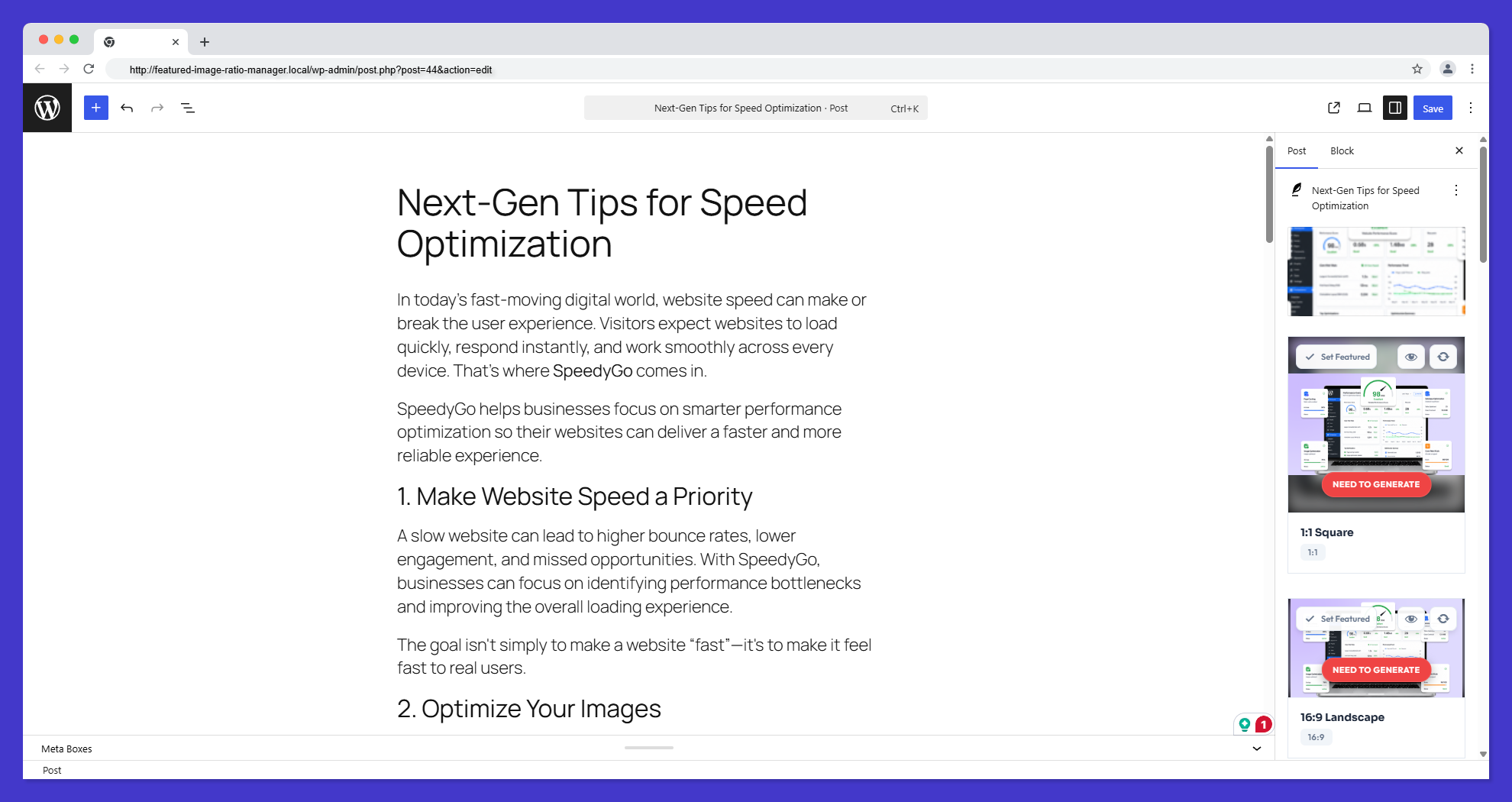
Installation
- Upload the plugin folder to the
/wp-content/plugins/directory. - Activate the plugin through the ‘Plugins’ menu in WordPress.
- Navigate to Smart Image Ratio > Settings to define your desired aspect ratios.
- Edit any Post or Page, locate the Aspect Ratios panel under the Featured Image box in the sidebar, and click “Manage Aspect Ratios” to manually fine-tune your crops.
FAQ
-
Does this plugin affect site performance?
-
No. The plugin generates images in the background and only when needed. Frontend display is extremely fast as it simply retrieves a metadata URL, just like standard WordPress featured images.
-
What happens if I don’t manually crop an image?
-
The plugin will automatically apply the “Fit” or “Smart Fill” mode you’ve selected in the settings to generate the initial variation.
-
Is it compatible with Page Builders like Elementor or Gutenberg?
-
Yes! You can use the provided shortcode or helper functions within any page builder widget that supports shortcodes or custom PHP.
-
Can I use CodeAndCore\SIR for SEO?
-
Yes. By serving exact aspect ratios, you minimize CLS and improve page speed, both of which are critical for SEO rankings.
-
Will my original images be overwritten?
-
No. The plugin generates separate image files for each ratio variation and keeps your original images completely untouched.
-
What image formats are supported?
-
The plugin supports all standard web image formats including JPG, PNG, WebP, and GIF.
-
How do I delete generated images?
-
The plugin automatically deletes all generated image variations when you delete the original image from the media library. You can also manually clear all generated images from the settings.
Reviews
There are no reviews for this plugin.
Contributors & Developers
“Code and core – Smart Image Ratio” is open source software. The following people have contributed to this plugin.
Contributors
Translate “Code and core – Smart Image Ratio” into your language.
Interested in development?
Browse the code, check out the SVN repository, or subscribe to the development log by RSS.
Changelog
1.0.0
- Feature: Custom Aspect Ratios with Interactive Cropper.js editing.
- Feature: Smart Blur-Fill engine for non-standard image compositions.
- Feature: “Data & Cleanup” settings for automatic variation/metadata deletion upon attachment removal.
- Feature: Atomic Metadata Infrastructure preventing race conditions during concurrent updates.
- Security: Security Hardening with strict capability checks and automatic directory protection (index.php).
- Feature: 100% Native Asset Hosting (Zero remote CDN dependencies for complete privacy compliance).
- Feature: Direct SQL monitoring for instant “Stop” button response.
- Feature: Modern, SaaS-inspired card-based UI with SweetAlert2 integration.
- Architecture: 100% strict WPCS (WordPress Coding Standards) and PluginCheck compliance.
- Architecture: Comprehensive codebase inline documentation (PHPDoc, JSDoc, CSSDoc).
- Initial stable release.