

Description
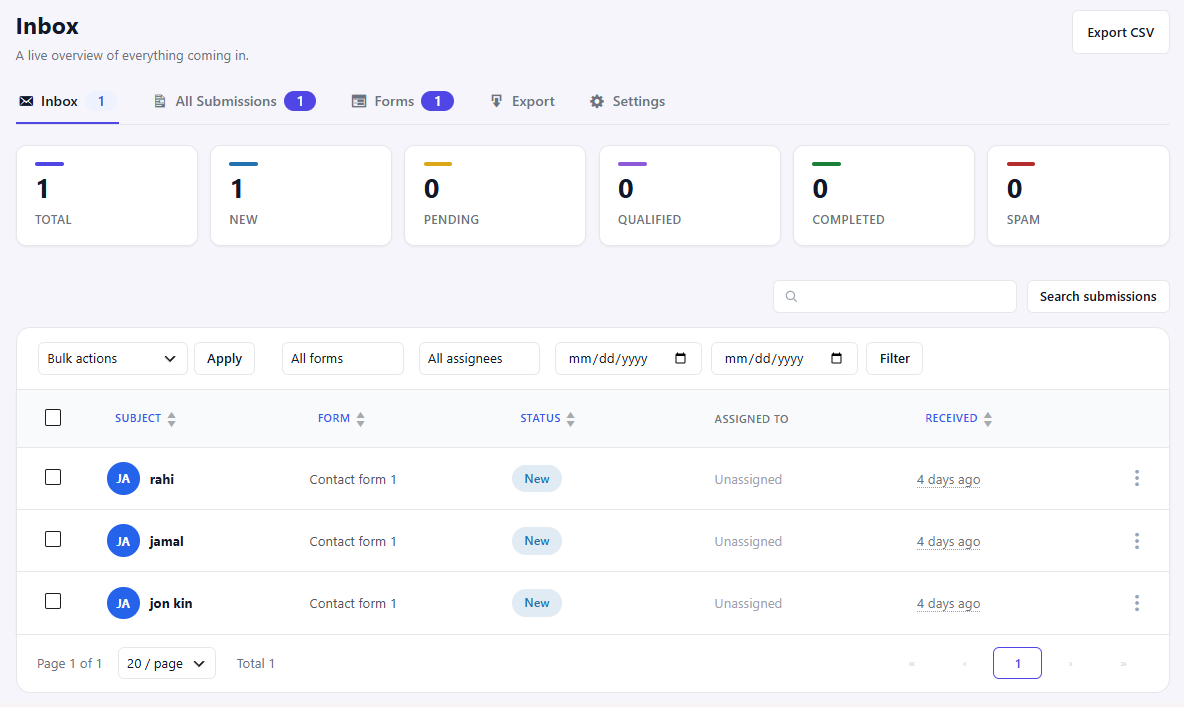
CoxInbox transforms your form submissions into an organized inbox inside your WordPress dashboard.
Instead of depending only on email notifications, every submission is securely stored in your database, making it easy to search, manage, assign, and follow up without losing important messages.
Whether you receive a few inquiries a day or hundreds of customer requests, CoxInbox helps you organize your workflow with a fast and intuitive inbox interface.
Instead of relying only on email notifications, CoxInbox lets you and your team:
- View all submissions in one centralized inbox
- Search and filter by status, assigned user, form, keyword and date range
- Open submission details with all captured fields
- Assign submissions to staff members
- Change submission status (New, Pending, Qualified, Completed, Spam)
- Add internal notes
- Track an activity timeline (status changes, assignments, notes)
- Export submissions to CSV
- Bulk actions (trash, restore, delete, change status)
Features
- Store Contact Form 7 submissions in your WordPress database
- Gmail-style inbox interface
- View all submissions from one centralized dashboard
- Search submissions instantly
- Filter by:
- Status
- Assigned user
- Form
- Keyword
- Date range
- View complete submission details
- Assign submissions to team members
- Update submission status
- New
- Pending
- Qualified
- Completed
- Spam
- Add private internal notes
- Reply to submissions directly from the inbox
- Activity timeline
- Status changes
- Assignments
- Notes
- Export submissions to CSV
- Bulk actions
- Change status
- Move to Trash
- Restore
- Permanently Delete
- Fast and clean admin interface
- WordPress coding standards
- Lightweight and easy to use
Perfect For
- Business websites
- Agencies
- Freelancers
- Customer support teams
- Sales teams
- Lead management
- Contact Form 7 users
Supported forms
- Contact Form 7 (MVP)
Planned: Fluent Forms, WPForms, Gravity Forms, Ninja Forms, Formidable Forms.
Developer Hooks
Actions:
* coxinbox_submission_created ( $submission_id )
* coxinbox_status_changed ( $submission_id, $status )
* coxinbox_assigned_user_changed ( $submission_id, $user_id )
Filters:
* coxinbox_submission_data ( $fields, $form_id, $form_plugin )
* coxinbox_statuses ( $statuses )
* coxinbox_manage_capability ( $capability )
* coxinbox_notification_email ( $mail, $submission_id )
Screenshots
Installation
- Upload the
coxinboxfolder to/wp-content/plugins/. - Activate the plugin through the Plugins menu in WordPress. Database tables are created automatically on activation.
- Make sure Contact Form 7 is installed and active.
- Submit one of your Contact Form 7 forms — the submission appears under CoxInbox Inbox.
FAQ
-
Does CoxInbox require Contact Form 7?
-
Yes. The current version works with Contact Form 7.
-
Will existing forms continue to work?
-
Yes. Your forms continue working normally. CoxInbox simply stores submissions in your database.
-
Does this replace email notifications?
-
No. You can continue using Contact Form 7 email notifications while CoxInbox stores every submission for future reference.
-
Can I assign submissions to team members?
-
Yes. You can assign submissions to WordPress users.
-
Can I export submissions?
-
Yes. Export submissions as CSV.
-
Can I reply from the inbox?
-
Yes. Reply to contacts directly from the inbox interface.
-
Can I add private notes?
-
Yes. Internal notes are only visible to administrators and staff.
Reviews
There are no reviews for this plugin.
Contributors & Developers
“CoxInbox – Form Inbox & Database for Contact Form 7” is open source software. The following people have contributed to this plugin.
Contributors
Translate “CoxInbox – Form Inbox & Database for Contact Form 7” into your language.
Interested in development?
Browse the code, check out the SVN repository, or subscribe to the development log by RSS.
Changelog
1.0.0
- Initial release: Contact Form 7 capture, inbox dashboard, submissions list table with search/filter, submission detail with status/assignment/notes/activity timeline, CSV export, email notifications, bulk actions.