

Description
TideReply is a lightweight plugin that connects your WordPress site to TideReply, an AI customer-support chat trained on your own website and knowledge base. Your visitors get instant, accurate answers in a chat widget – and if they ask “where is my order?”, the answer is verified against your own WooCommerce store.
Features
- One-Click Setup – install the plugin, click Connect, approve, done. No code, no theme editing.
- AI answers from your content – TideReply crawls your site and answers visitor questions accurately, with human handoff when needed.
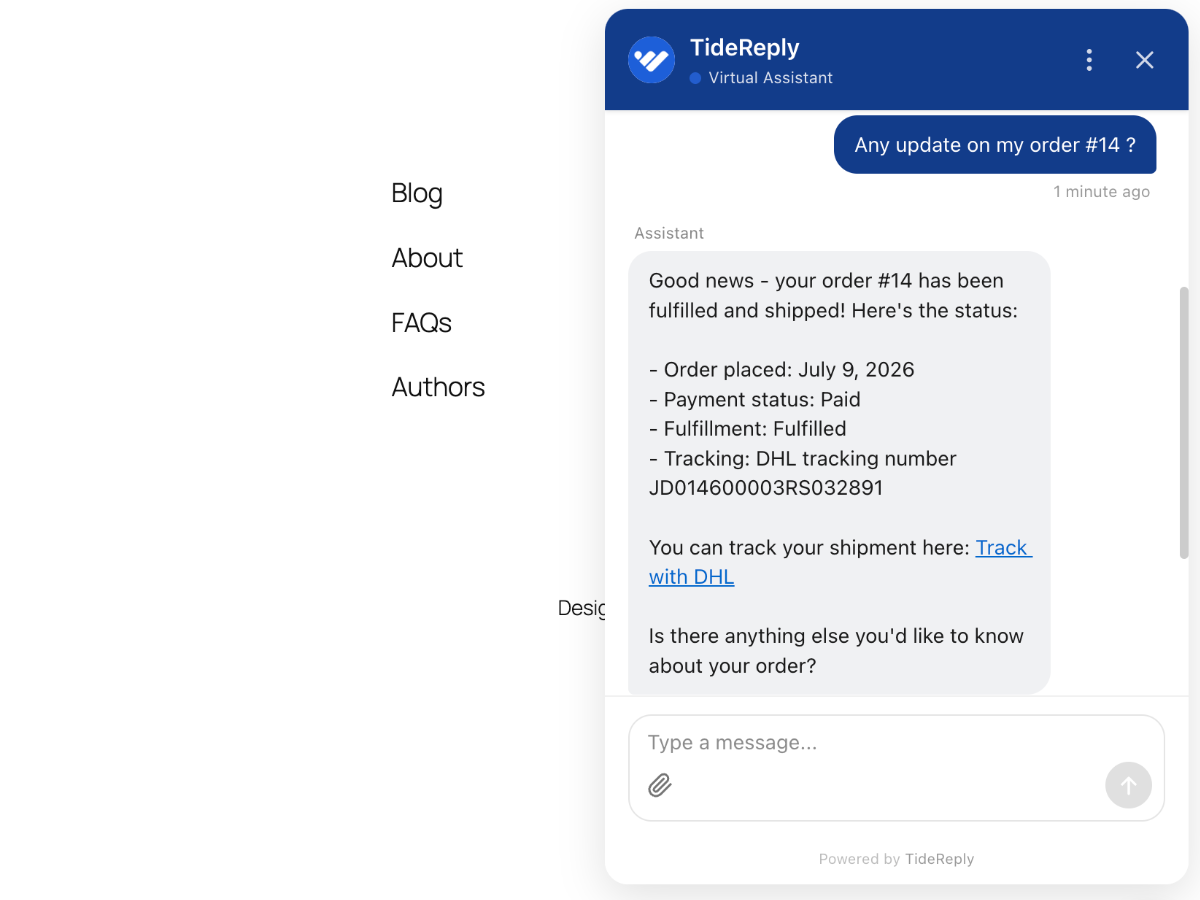
- WooCommerce order status – visitors can ask about their own order in the chat and get fulfillment status and tracking. The order number and checkout email are verified on your own server before anything is shown; customer names and addresses never leave your site.
- Secure by design – callbacks are authenticated with a per-site secret (HMAC, replay-protected), and the order-to-email match happens on your server.
- Lightweight – no database tables, no bloat. One async script tag on the front end.
How It Works
- Install and activate this plugin
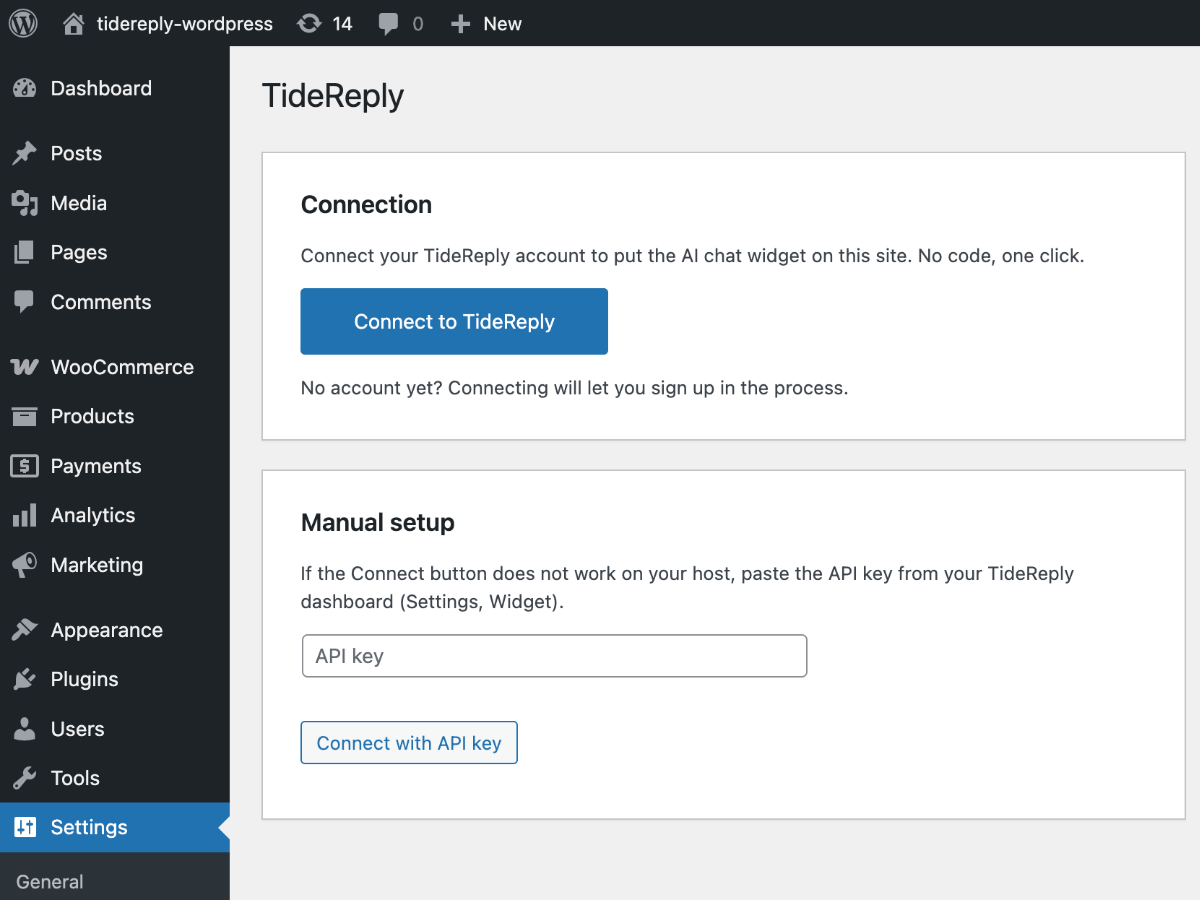
- Go to Settings, TideReply and click “Connect to TideReply”
- Log in (or sign up), pick your business, and approve
- The chat widget is live on your site – with WooCommerce active, order-status answers switch on automatically
Requirements
- WordPress 6.3 or higher
- PHP 7.4 or higher
- A TideReply account (sign up at tidereply.com)
- WooCommerce is optional – only needed for order-status answers
External services
This plugin connects to TideReply (app.tidereply.com), a third-party service operated by Evorbi:
- It loads the chat widget script
https://app.tidereply.com/widget.json your site’s front end. When visitors use the chat, their messages and the page URL are sent to TideReply to generate answers. - During setup, the plugin exchanges a one-time connection code at
https://app.tidereply.com/api/wordpress/connect/exchange(or/manual), sending your site URL, REST API base URL, WordPress and plugin versions, and whether WooCommerce is active. - If WooCommerce is active, TideReply’s servers call back into your site (
/wp-json/tidereply/v1/order-status, HMAC-authenticated) when a visitor asks about their own order. The request carries the order number and email the visitor typed; the response contains order status, tracking and total only – never names or addresses. - On disconnect or deactivation, the plugin notifies
https://app.tidereply.com/api/wordpress/connect/disconnect.
Terms of service: https://tidereply.com/terms
Privacy policy: https://tidereply.com/privacy
Screenshots
Installation
From WordPress Dashboard
- Go to Plugins > Add New
- Search for “TideReply”
- Click “Install Now” and then “Activate”
- Go to Settings > TideReply and click “Connect to TideReply”
- Log in (or sign up), pick your business, and approve. The chat widget is now live.
Manual Installation
- Download the plugin zip file
- Go to Plugins > Add New > Upload Plugin
- Upload the zip file and click “Install Now”
- Activate the plugin
- Go to Settings > TideReply and click “Connect to TideReply”, then approve
If the Connect button does not work on your host
Use the manual setup on the same settings screen: paste the API key from your TideReply dashboard (Settings, Widget) and click “Connect with API key”.
FAQ
-
Does it work without WooCommerce?
-
Yes. The chat widget works on any WordPress site. WooCommerce only adds the order-status answers.
-
What data is sent to TideReply?
-
Visitor chat messages and the page URL (to answer questions), plus the connection metadata listed under External services. Order-status requests are answered by your own site; only status, tracking and total are returned.
-
How do I remove it?
-
Click Disconnect on the settings page (or deactivate the plugin). Uninstalling deletes every option the plugin created.
-
Is the order lookup secure?
-
Yes. Requests are authenticated with a per-site secret (HMAC over the exact request bytes, 5-minute replay window), the order-to-email match happens on your server, and mismatches are indistinguishable from not-found to the person asking.
Reviews
There are no reviews for this plugin.
Contributors & Developers
“TideReply – AI Customer Chat for WooCommerce” is open source software. The following people have contributed to this plugin.
Contributors
Translate “TideReply – AI Customer Chat for WooCommerce” into your language.
Interested in development?
Browse the code, check out the SVN repository, or subscribe to the development log by RSS.
Changelog
1.0.0
- Initial release: one-click connect, widget injection, WooCommerce order-status endpoint.