
Description
Does your WordPress website feel slow? Over time, uploading images and files can clog up your hosting space and slow down your backups. Often, many of these images are uploaded but never actually used in any pages, posts, or galleries.
Emetrio Media Purge is a simple, lightweight utility designed to clean up your website’s database and storage by identifying and removing these unused media files safely and quickly.
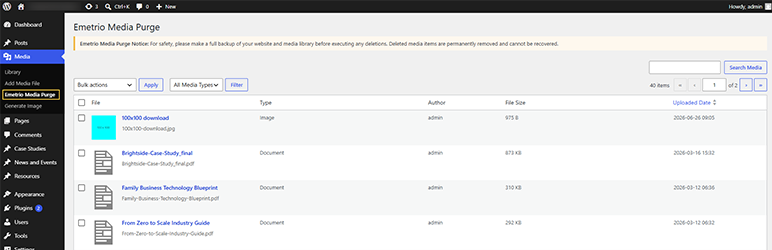
The plugin works by scanning your WordPress media library and matching items against your content. It finds images, videos, audio files, and documents that are completely disconnected from your site, presenting them in a clear, easy-to-use list view for permanent removal.
Key Features and Benefits:
- Smart Deep Scanning: Scans for media files used as featured images, inline post/page content, WooCommerce product galleries, and custom post types.
- Complete Media Support: Supports all file types, including images, videos, audio tracks, and document files (PDFs, ZIPs, etc.).
- Safe Deletion & Bulk Actions: Clean up your site with a single click using bulk deletion options, or delete files individually after reviewing them.
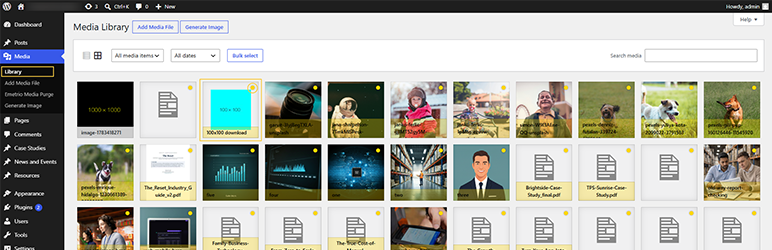
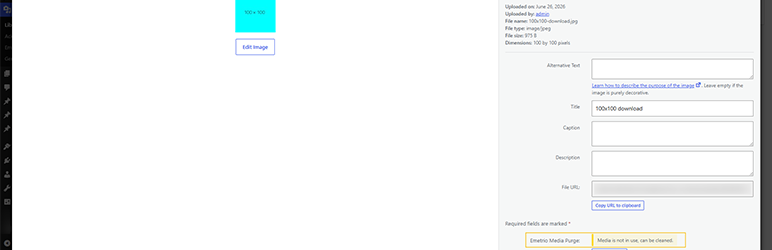
- Seamless WordPress Integration: Integrates directly into your existing interface. Unused items are clearly labeled with a warning badge in both the native WordPress Media Library and the attachment details screen so you never accidentally delete important assets.
- Performance Boost: Freeing up server space minimizes backup file sizes, speeds up your site, and simplifies server management.
Screenshots
Installation
- Install the plugin from the Plugins directory in WordPress Admin, or manually upload the
emetriomediapurgefolder to the/wp-content/plugins/directory. - Activate the plugin through the ‘Plugins’ screen in WordPress Admin.
- Go to Media Emetrio Media Purge to view unused items.
- Make a full backup before deleting items (deletions are permanent).
FAQ
-
Does the plugin delete my files automatically?
-
No. The plugin will never delete any of your files without your consent. It simply scans your media library and displays a list of unused files. You can review this list, select the files you want to delete, and clean them up manually.
-
What counts as an “unused” media file?
-
Our plugin defines “unused” as any image, video, audio file, or document that is not embedded or featured on any of your pages, posts, WooCommerce product galleries, or custom content types. If a file is completely disconnected from your website content, it is considered unused.
-
Is deleting a media file permanent?
-
Yes, deletion is 100% permanent. When you delete an image or file using Emetrio Media Purge, it is deleted from your database and completely removed from your web hosting server. Because this cannot be undone, we strongly advise making a complete backup of your website before deleting any files.
-
Will it delete images used in headers, logos, or theme backgrounds?
-
Because some WordPress themes handle website logos, background patterns, and key styling options in unique ways, there is a small chance these files could show up in the scan. We recommend quickly reviewing the list before performing a bulk delete. If you find your logo or header in the list, you can safely ignore it and choose not to delete it.
-
How does the plugin update the list of unused files?
-
The plugin runs a scan automatically when you first visit the cleanup page. To keep your website fast and running smoothly, it stores these results. If you upload new media or edit existing content, the list updates automatically. You can also refresh this list at any time for the absolute latest status.
Reviews
There are no reviews for this plugin.
Contributors & Developers
“Emetrio Media Purge” is open source software. The following people have contributed to this plugin.
Contributors

Translate “Emetrio Media Purge” into your language.
Interested in development?
Browse the code, check out the SVN repository, or subscribe to the development log by RSS.
Changelog
1.0.0
- Initial release — unused media scan, admin list, single & bulk delete.