

Description
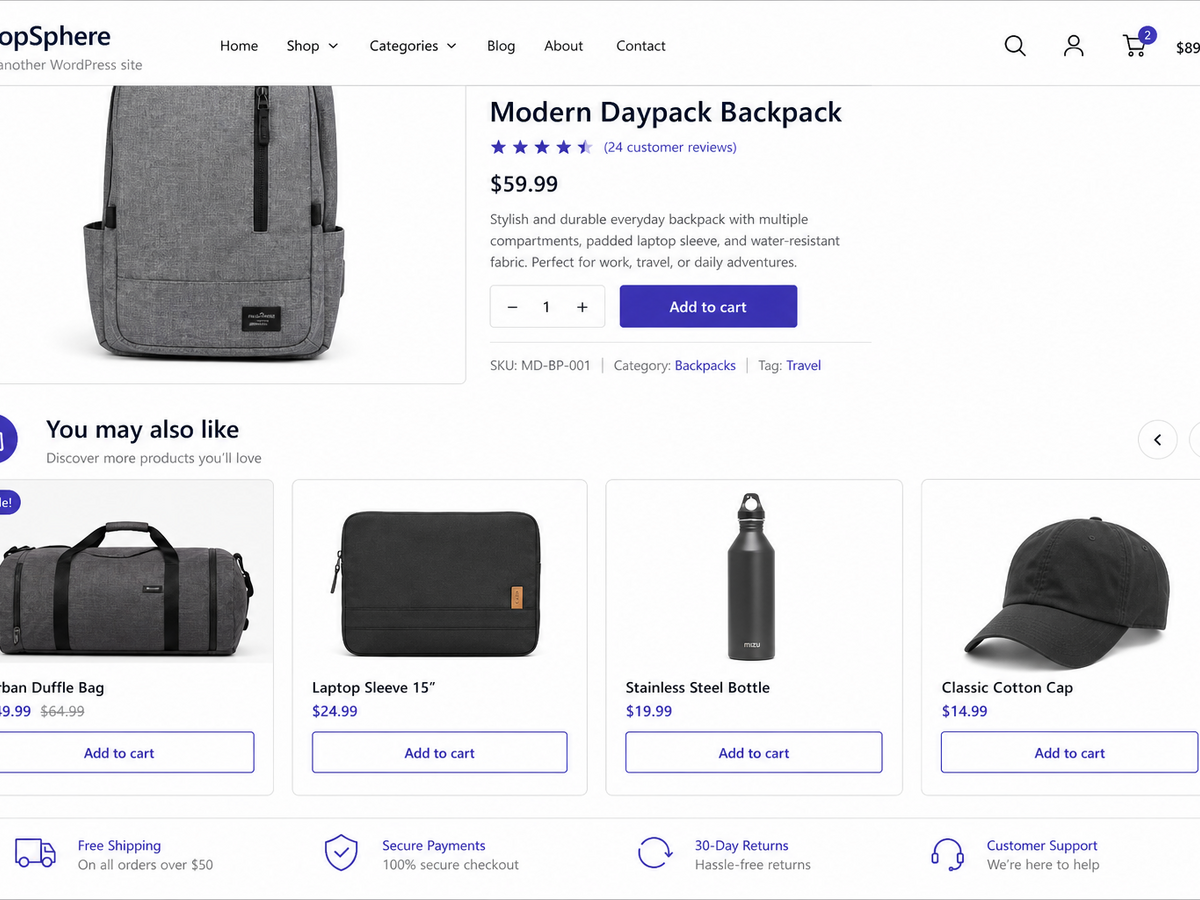
WorkWilla Recommendations brings smart product blocks to your WooCommerce storefront: on product pages and, optionally, in the cart. Instead of generic “related products,” each store gets its own machine-learning model trained on real catalog and order patterns — so suggestions feel relevant to your customers and your assortment.
Connect in minutes, export once, and let WorkWilla handle training and serving recommendations from the cloud. The plugin stays lightweight on your server; heavy ML work runs on WorkWilla infrastructure.
Why store owners choose WorkWilla
- Personalized blocks — “You may also like” on product pages; optional cart upsell block
- Your model, your data — separate ML model per store; data is never mixed with other shops
- Privacy-first export — customer emails and phone numbers are hashed on your site before anything leaves WordPress
- Works with guests — session-based signals when shoppers are not logged in
- Flexible placement — replace or supplement native WooCommerce related products
- Admin-friendly — connect, export, retrain, and monitor usage from WooCommerce WorkWilla
- Developer-ready — filters and actions for titles, limits, payloads, product IDs, and HTTP headers (see Developer hooks on the settings page)
How it works
- Install and activate the plugin (WooCommerce 3.0+ required).
- Open WooCommerce WorkWilla and click Connect to register your store.
- Run Export and train — the plugin sends your catalog and anonymized order history to WorkWilla.
- Recommendation blocks appear on the storefront once the model is ready.
Optional AJAX lazy-loading keeps pages fast. Out-of-stock products are excluded automatically using live WooCommerce stock status.
External service
This plugin requires a free or paid WorkWilla account. Machine learning training and live recommendations run on WorkWilla servers.
When you run Export and train, the plugin sends your full catalog and order export. WorkWilla applies plan quotas on the server side (training data volume, API requests per month, and similar limits). Billing and plan management happen on the WorkWilla dashboard — the plugin does not lock or disable built-in features based on your plan.
Run Export and train to build your first recommendation model.
Legal
Privacy and data sent to WorkWilla
When an administrator connects the plugin, WorkWilla receives:
- Store domain
- Administrator email address
- WordPress, WooCommerce, PHP, and MySQL version metadata
When recommendations are enabled, the plugin may send:
- Product catalog data (titles, categories, stock status) during export/training
- Anonymized order history (hashed customer identifiers, line items, dates) during export/training
- Recommendation request context (cart contents, recently viewed product IDs, anonymized session or user keys)
- Interaction events (product views, add-to-cart, purchases, block impressions and clicks)
Raw customer email addresses and phone numbers are hashed on your site before transmission. The plugin does not contact WorkWilla until an administrator explicitly connects the store.
As a store owner, inform your customers about data processing required for personalized recommendations, in line with applicable privacy laws.
Full details: WorkWilla Privacy Policy
Screenshots
Installation
- Upload the plugin folder to
/wp-content/plugins/or install from the WordPress.org plugin directory. - Activate through the Plugins menu.
- Ensure WooCommerce is active.
- Go to WooCommerce WorkWilla, review the connection form, accept the Privacy Policy and Terms of Use, and click Connect.
- Run Export and train to build your first recommendation model.
FAQ
-
Does this plugin work without WooCommerce?
-
No. WooCommerce 3.0 or newer is required.
-
Does the plugin contact external servers before I connect?
-
No. External requests begin only after an administrator submits the Connect form on the WorkWilla settings page.
-
Is customer personal data sent to the cloud?
-
Only anonymized identifiers and catalog/order data needed for recommendations. Emails and phone numbers are hashed in the plugin before export.
-
Can I use the same account on staging and production?
-
Yes. Staging subdomains such as
test.,dev.,stage., anddemo.are treated as the same site family as your production domain. -
How do I customize block titles or product count?
-
Use the settings page or the
workwilla_recommendations_pdp_title,workwilla_recommendations_cart_title, andworkwilla_recommendations_product_limitfilters. -
Is there a free plan?
-
Yes. WorkWilla offers a free starter tier. Usage quotas (API requests, training data volume) are enforced on the WorkWilla service, not by disabling plugin code. Paid plans are optional at workwilla.ru.
Reviews
There are no reviews for this plugin.
Contributors & Developers
“WorkWilla Recommendations” is open source software. The following people have contributed to this plugin.
Contributors
Translate “WorkWilla Recommendations” into your language.
Interested in development?
Browse the code, check out the SVN repository, or subscribe to the development log by RSS.
Changelog
1.3.7
- Export sends the full catalog and order history from the store; plan quotas are enforced only on the WorkWilla server
- Optional cart recommendations block (admin setting)
- Recommendations exclude out-of-stock products using live WooCommerce stock status
- WordPress.org listing: readme, assets, contributor metadata, and directory copy limits (5 tags, 150-char short description)
1.3.6
- Optional cart recommendations block controlled by admin checkbox
1.3.5
- Recommendations exclude out-of-stock products using live WooCommerce stock status
1.3.4
- Improved export progress and plan usage display in admin
1.3.3
- Export log: localized messages, clearer server errors, auto-scroll to latest line
- Connect form reliability fix on the WorkWilla admin page
1.3.2
- Connect form runs on the correct admin page load hook (fixes silent Connect button)
1.3.1
- Explicit opt-in connection: no automatic registration on plugin activation
- Production WorkWilla URL by default; privacy policy and terms links in Connect form
- Privacy and external-service documentation in readme; GPL license.txt added
1.3.0
- HMAC request signing for platform and ML API calls
- Domain binding via X-Store-Domain header
- Plugin Check and WordPress.org coding standards compliance
1.2.1
- Plugin slug renamed to
workwilla-recommendationsfor WordPress.org - WordPress coding standards: class file names, hooks, text domain, constants
- Legacy
cbsr_*options and cron hooks migrated automatically
1.2.0
- Guest recommendations toggle
- Block impression and click tracking
- Developer hooks documentation in admin
- Domain binding for API requests
- Improved export progress UI
1.0.0
- Initial release