

Description
Light and fast — it won’t slow your site down. ReadyGo Reading Time shows readers how long a post takes to read, with an optional progress bar (or circle) and a live countdown that keeps them reading to the end. It adds almost nothing to your pages, and the extras only load when you actually use them.
Many visitors decide whether to read a post in the first second, and a long wall of text scares them off. Telling them “only 4 minutes to read” sets expectations, and a progress indicator keeps them moving — so more people finish your posts.
Why people choose ReadyGo Reading Time
- Light and fast. Built to stay out of the way and keep your pages loading quickly. It adds almost nothing to a normal page, and extras like the progress bar only load where you use them.
- Gets the time right. Long posts won’t show a silly “1 minute read.” It correctly counts content from page builders (Elementor, Divi), block editors, and other languages.
- Plays nicely with caching. It does its work when you save a post, so it keeps your site fast and works with caching plugins out of the box.
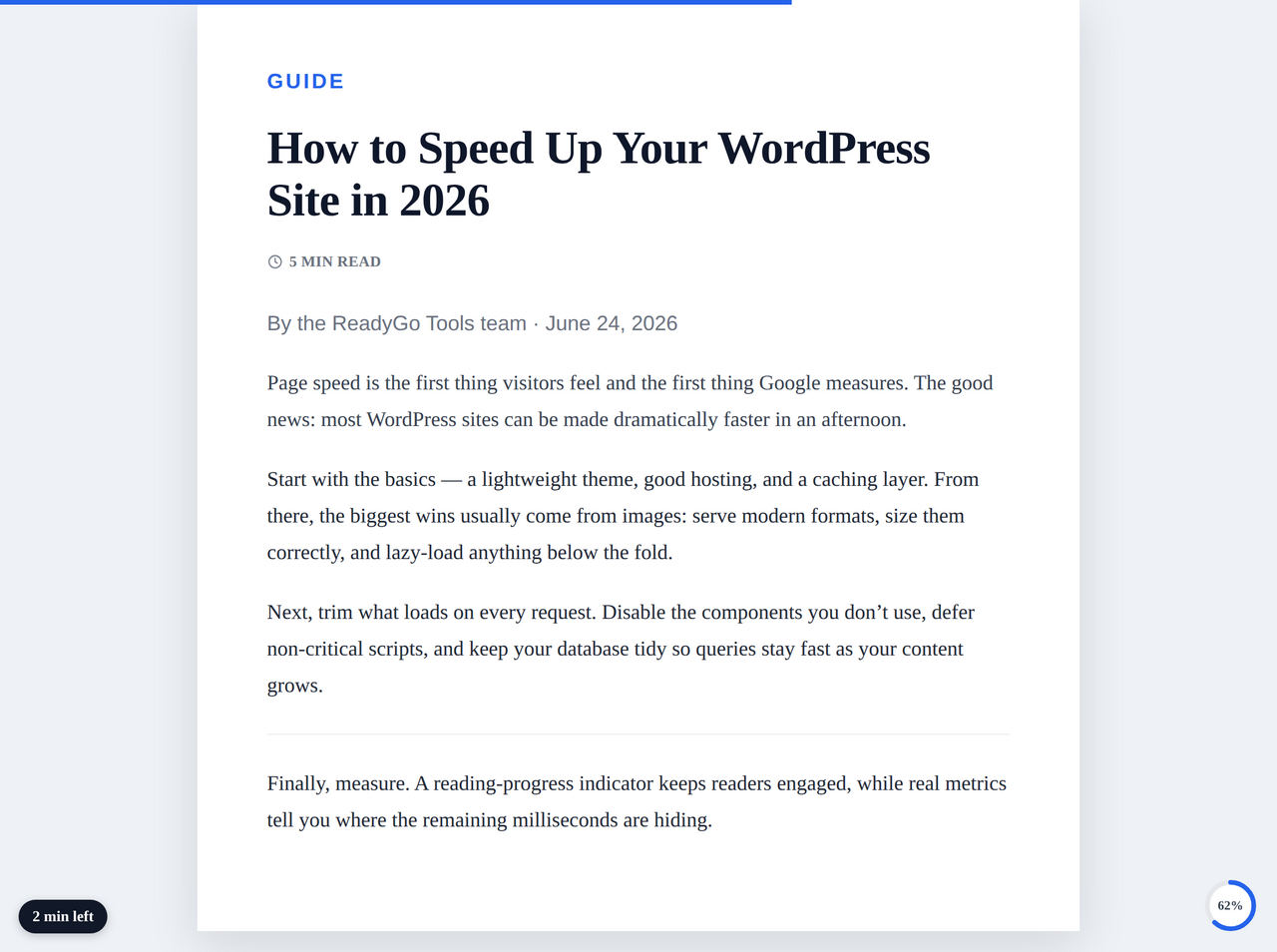
- A progress bar or a circle. Add a slim bar at the top or bottom of the screen, or a small circle in a corner — so readers can see how far they’ve come.
- A live countdown. A little “3 min left” that counts down as people scroll — a friendly nudge to keep reading to the end.
- No clutter. No ads, no nags, no tracking, and it never gets in the way of your menu.
Show it wherever you want
- Automatically above your content, or above/below the title.
- With a shortcode —
[readygo_reading_time]anywhere, or[readygo_reading_time id="47"]for a specific post. - As a block you can drop into the editor.
Easy options (no code needed)
- Show it on posts, your blog page, and archive pages — and pick which post types.
- Choose your reading speed (words per minute).
- Add the time to look at images and/or read comments.
- Add your own wording before and after the time (e.g. “Reading time:” … “min read”).
- Style it: text size, spacing, background and text color, and an optional clock icon.
Progress bar / circle options
- Bar (top or bottom) or a circle (any corner).
- Solid or gradient colors, and how thick the bar is.
Countdown options
- Put it in any corner, with your own wording (use
{n}for the minutes left) and a “finished” message.
For developers
readygo_countable_content— add text from page builders, ACF, or custom fields to the word count.readygo_display_text— customize the displayed reading-time string.- Lightweight by design: roughly 0.4 KB of CSS and no JavaScript on a normal page, with no jQuery dependency. The progress bar/countdown assets (~6 KB, vanilla JS) load only where enabled.
Everything runs on your own site — no accounts, no outside services, no data collection.
More from ReadyGo Tools
Built by ReadyGo Tools. Browse more free WordPress plugins and online tools at readygotools.com/plugins. Documentation and support: readygotools.com/plugins/readygo-reading-time.
Screenshots

Blocks
This plugin provides 1 block.
- Reading Time Displays the estimated reading time for the current post.
Installation
Setup takes about a minute — install, activate, done. No wizard, no account, nothing to configure to get started.
- In your dashboard, go to Plugins Add New Upload Plugin, choose the plugin’s zip file, and click Install Now. (Or upload the
readygo-reading-timefolder to/wp-content/plugins/.) - Click Activate.
- That’s it — the reading time appears on your posts right away. To fine-tune it, go to Settings RGT Reading Time.
FAQ
-
Will it slow my site down?
-
No — that’s the whole point. It’s built to be very light, does its calculating when you save a post, and only loads the progress bar/countdown on the pages where you switch them on.
-
Why do other plugins show “1 minute” on long posts?
-
They miss text added by page builders. ReadyGo Reading Time reads that content correctly, so the time is accurate. (Developers can also feed in custom text with the
readygo_countable_contentfilter.) -
Does it work with caching plugins?
-
Yes, out of the box. It stores the reading time when you save, so your cached pages stay fast.
-
How do I show a bar or a circle?
-
On the Progress Bar tab, turn it on and pick Bar or Circle, then choose its position and colors.
-
Can I show how much time is left to read?
-
Yes. On the Time Left tab, turn on the countdown — it shows the minutes left and counts down as the reader scrolls.
-
How do I place the reading time myself?
-
Set the position to “Off” and use the
[readygo_reading_time]shortcode or the Reading Time block wherever you like. -
Does it send my data anywhere?
-
No. It makes no outside connections and collects no data.
Reviews
There are no reviews for this plugin.
Contributors & Developers
“ReadyGo Reading Time” is open source software. The following people have contributed to this plugin.
Contributors
Translate “ReadyGo Reading Time” into your language.
Interested in development?
Browse the code, check out the SVN repository, or subscribe to the development log by RSS.
Changelog
1.2.0
- New: show the progress bar and the circle at the same time — Indicator Type is now two checkboxes instead of an either/or choice.
- New: “Stacking” option for the live countdown (vertical or horizontal) so it never overlaps the progress circle when they share the same corner.
- Tidied the settings menu label to “RGT Reading Time”.
1.1.0
- More accurate counting, including content from page builders and block editors (plus a
readygo_countable_contentfilter for developers). - Stores the reading time on save, so it stays fast and works with caching.
- New: progress indicator as a bar or a circle (solid/gradient colors, thickness).
- New: live countdown that ticks down as the reader scrolls.
- New: a Gutenberg block.
- New: support for Chinese/Japanese/Korean text.
- New: more placement and styling options, include comments, and a tabbed settings screen.
1.0.0
- Initial release: auto-insert, shortcode, configurable reading speed and post types, optional image time.