

Description
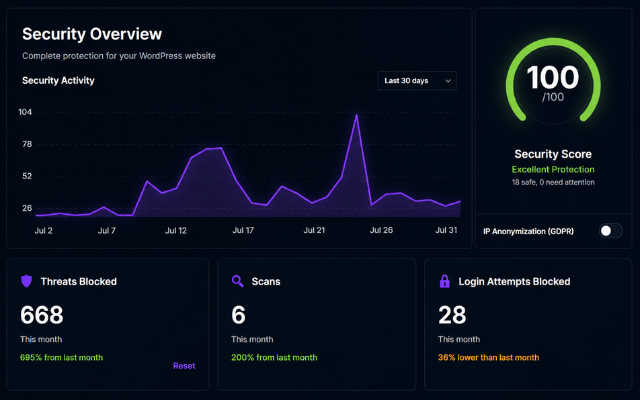
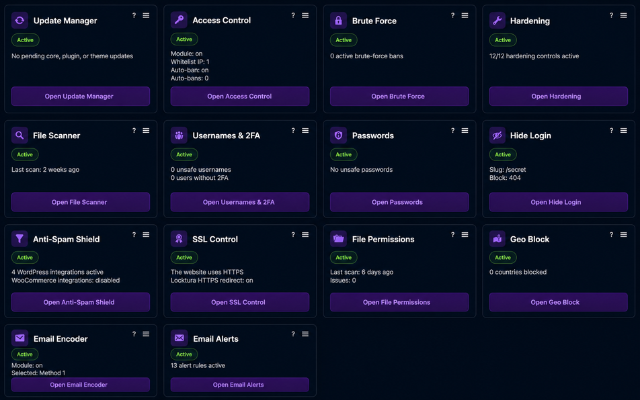
Locktura Security helps WordPress administrators manage core site protection from one plugin. This WordPress.org package includes 18 modules for firewall rules, login protection, anti-spam, hardening, update visibility, file checks, traffic review, logging, alerts, and privacy controls.
Most protection runs locally inside WordPress. Enable only the modules you need, review local events, and manage common security tasks from one dashboard.
Included in this plugin
- Firewall – Blocks suspicious requests with bundled community rules and request analysis.
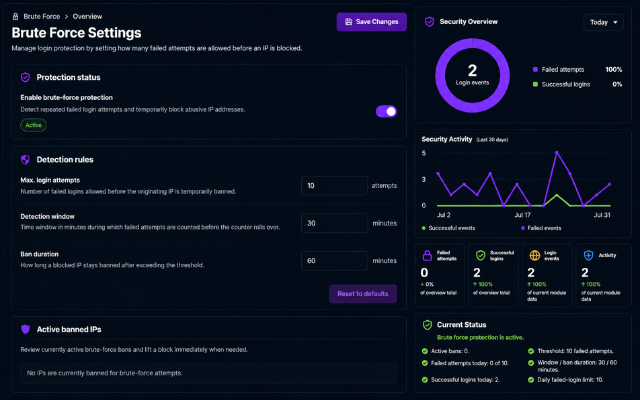
- Brute Force Defense – Limits repeated failed login attempts and manages temporary bans.
- Hardening – Reduces common WordPress attack surfaces such as enumeration, file editing, XML-RPC abuse, and direct exposure of sensitive server files.
- Update Manager – Reviews WordPress core, plugin, and theme updates and stores local update history.
- Access Control – Manages allowed, excluded, and blocked IP access controls.
- Geo Block – Blocks configured countries using geolocation data for public IP addresses.
- Hide Login – Replaces default login and admin entry points with a custom slug.
- Anti-Spam Shield – Combines CAPTCHA challenges with spam-prevention controls for login, comments, and custom forms.
- Usernames & 2FA – Reviews unsafe usernames, recent users, and per-user 2FA status.
- Password Manager – Adds password policy checks, forced reset workflows, and password risk visibility.
- Email Alerts – Sends security notifications for important events.
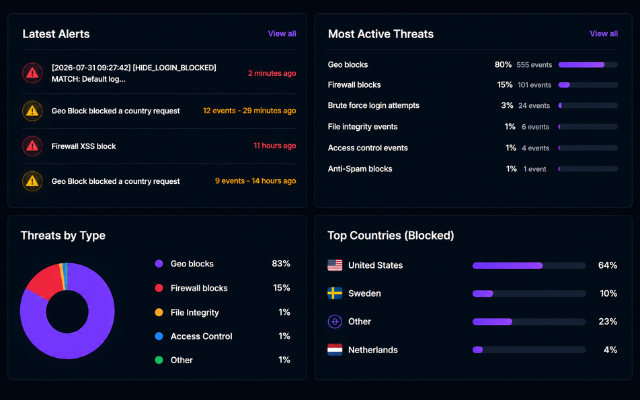
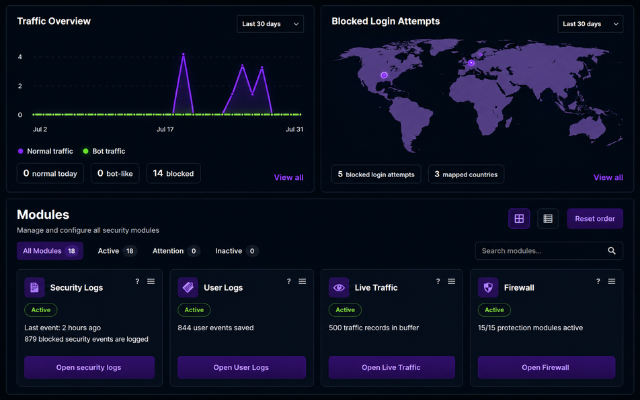
- Security Logs – Stores local security events and firewall activity for review.
- Live Traffic – Shows recent request activity with optional geolocation details.
- User Log – Tracks user activity for audit and review.
- File Scanner – Scans files for suspicious patterns and includes file integrity monitoring.
- File Permissions – Checks risky file and directory permissions.
- SSL Control – Helps enforce HTTPS and SSL-related protection.
- Email Encoder – Obfuscates public email addresses against scraping.
Hardening module options
The Hardening module includes administrator-controlled options for user enumeration, file editor access, privilege-escalation probes, XML-RPC, sensitive paths, directory browsing, image hotlinking, RSS feeds, and server exposure protection. Apache and LiteSpeed installations can use managed .htaccess deny rules for PHP files in uploads, environment files, debug logs, and WordPress configuration backups. Locktura stores the previous managed .htaccess content for restoration. Other web servers receive manual configuration guidance instead of a non-functional toggle.
Separate Premium plugin
Locktura Premium is a separately distributed plugin and is not included in this WordPress.org package. All functionality described above is included in this WordPress.org plugin.
The separate Premium plugin adds these additional modules:
- Pattern Recognition
- Behavior Analytics
- Admin Lockdown
- Virtual Patching
- Header Hardening
- API Guardian
- Neural Bot Suppressor
- Malware Scanner & Cleanup
- Smart 404
- Extra Hardening Tools
- Monthly Reports
- Extra User Safety Tools
- Premium Signature Pack
Privacy
Locktura Security stores security data locally. Its modules can store IP addresses, request details, usernames, login activity, security events, email alert settings, password-policy status flags, 2FA status data, recent-user scan history, and update history.
Geo-IP lookups can use external services when administrators enable modules that need country or network data. The Password Manager can use Have I Been Pwned when breach checks are enabled. Administrators are responsible for log retention, email recipients, lookup usage, and privacy settings.
External services
Locktura Security does not load JavaScript, CSS, fonts, or images from third-party services. It can make the network requests described below when an administrator enables or uses the related feature, clicks an external link, or asks WordPress to perform an update operation.
WordPress.org and extension update providers
- Service endpoints: WordPress update and package services under
api.wordpress.org,downloads.wordpress.org,plugins.svn.wordpress.org, andthemes.svn.wordpress.org, plus an extension’s own update endpoint when that extension declares one. - Purpose: update checks and update downloads for WordPress core, plugins, and themes when administrators use the Update Manager module or WordPress update APIs.
- Trigger: an administrator opens or uses the Update Manager module, starts an update, or WordPress performs its normal scheduled update checks.
- Data sent: WordPress core version, site URL, PHP/MySQL versions, locale, and installed plugin/theme metadata may be sent by WordPress core to WordPress.org or to configured third-party extension update endpoints.
- Local storage: Locktura Security stores completed update history locally with date, item, type, old version, and new version.
- Documentation: https://developer.wordpress.org/apis/handbook/wordpress-org/update-api/
- Service policies: https://developer.wordpress.org/plugins/wordpress-org/detailed-plugin-guidelines/ and https://wordpress.org/about/license/
- Privacy policy: https://wordpress.org/about/privacy/
Have I Been Pwned Pwned Passwords
- Service endpoint:
https://api.pwnedpasswords.com/range/{first5-sha1} - Purpose: optional password breach check in the Password Manager policy flow.
- Trigger: only when the administrator enables breached-password checks and a password is evaluated by that policy.
- Data sent: only the first 5 characters of the submitted password’s SHA-1 hash. The plain password and complete hash are not sent.
- Local storage: the range response for a hash prefix is stored in a WordPress transient cache for 24 hours.
- Documentation: https://haveibeenpwned.com/API/v3#PwnedPasswords
- Terms: https://haveibeenpwned.com/TermsOfUse
- Privacy policy: https://haveibeenpwned.com/Privacy
Country / country.is
- Service endpoint:
https://api.country.is/{ip} - Purpose: primary country-code lookup for enabled geolocation features.
- Trigger: when an enabled geolocation feature needs uncached country data for a public IP and no trusted server country header is available.
- Data sent: the public IP address being looked up.
- Local storage: returned country, city, and organization data can be stored in a WordPress transient cache for 24 hours.
- Usage and privacy: the service states that it is free for commercial use, applies an infrastructure limit of 10 requests per second per client IP, and does not log requests.
- Documentation, service terms, and privacy information: https://country.is/
- Open-source implementation and self-hosting information: https://github.com/lineofflight/country
IPWhois / ipwho.is
- Service endpoint:
https://ipwho.is/{ip} - Purpose: fallback IP geolocation lookup for enabled geolocation features.
- Trigger: when an enabled geolocation feature needs uncached location data and Country does not return usable data.
- Data sent: the public IP address being looked up.
- Local storage: returned country, city, and organization data can be stored in a WordPress transient cache for 24 hours.
- Documentation: https://ipwhois.io/documentation
- Terms: https://ipwhois.io/terms
- Privacy policy: https://ipwhois.io/privacy
ipapi.co
- Service endpoint:
https://ipapi.co/{ip}/json/ - Purpose: final fallback IP geolocation lookup if the earlier providers do not return usable data.
- Trigger: only after an enabled geolocation feature needs uncached location data and both Country and IPWhois do not return usable data.
- Data sent: the public IP address being looked up.
- Local storage: returned country, city, and organization data can be stored in the same WordPress transient cache for 24 hours.
- Documentation: https://ipapi.co/api/
- Terms: https://ipapi.co/terms/
- Privacy policy: https://ipapi.co/privacy/
Own-site HTTPS and TLS checks
- Service endpoint: the WordPress site’s own configured
home_url()orsite_url()and its HTTPS host. - Purpose: verify the site’s HTTPS response and certificate.
- Trigger: when an administrator opens or runs the related SSL Control feature; results are cached briefly where applicable.
- Data sent: a normal HTTP HEAD request or TLS handshake to the site’s own host, including ordinary network metadata such as the server IP and a Locktura user-agent. No security log is transmitted.
- Terms and privacy: these requests go to the administrator’s own site and hosting provider, so the policies configured for that site and host apply. No third-party endpoint is selected by Locktura.
Site-configured email delivery
- Purpose: deliver enabled security alerts to administrator-configured recipients.
- Trigger: when an enabled email-alert event occurs or an administrator explicitly sends a test message.
- Data sent: alert emails can contain the configured recipient, site URL, event type, timestamp, IP address, request or account context, and remediation links.
- Mail provider: WordPress passes messages to the mail transport configured by the site. If an SMTP or mail-delivery service is configured, that provider processes the message under the site owner’s agreement with that provider; Locktura does not select that provider.
- Local storage: security events can remain in local Security Logs according to the site’s retention settings.
Locktura website links
- Service endpoint: pages under
https://locktura.com/. - Purpose: provide links to Locktura documentation, the plugin website, Premium information, and support where available.
- Trigger: only when an administrator explicitly clicks one of these links. The plugin does not call these pages in the background.
- Data sent: the administrator’s browser sends ordinary web-request metadata such as IP address, user agent, and referrer. Locktura does not append security logs, plugin settings, or license data to these links.
- Locktura terms: https://locktura.com/terms-and-conditions/
- Locktura privacy policy: https://locktura.com/privacy-policy/
Translations
Locktura Security includes a Dutch translation (nl_NL).
Bundled assets
Locktura Security bundles Flag Icons SVG files for local country flag display. Flag Icons is licensed under the MIT License, and the license text is included in assets/images/flags/LICENSE-flag-icons.txt.
Locktura Security bundles Inter and Bebas Neue font files for local admin UI typography. Both font families are licensed under the SIL Open Font License 1.1, and the license texts are included in assets/fonts/inter-OFL.txt and assets/fonts/bebas-neue-OFL.txt.
Locktura Security bundles QRCode for JavaScript for local two-factor authentication setup QR code generation. QRCode for JavaScript is licensed under the MIT License, and the license text is included in assets/js/LICENSE-qrcode.txt.
Locktura Security bundles a modified public-domain world map SVG from Wikimedia Commons for local dashboard visualization. Source and license details are included in assets/images/world-map.SOURCE.txt.
The bundled Locktura logo image is plugin artwork distributed with Locktura Security under the same GPLv2 or later license.
Screenshots
Installation
- Upload the
lockturafolder to/wp-content/plugins/, or install it through the WordPress Plugins screen. - Activate Locktura Security and open the Locktura dashboard.
- Review the modules, enable the protections you need, and save changed settings.
FAQ
-
Is the firewall included?
-
Yes. Locktura Security includes the firewall with bundled community rules.
-
Does Locktura Security include 18 modules?
-
Yes. This WordPress.org package includes 18 protection modules.
-
Do I need a cloud account to use Locktura Security?
-
No. The protection modules run locally inside your WordPress installation. External services are used only for specific optional features described below.
-
Does Locktura Security store security logs?
-
Yes. Locktura Security can store security events locally on your site so administrators can review firewall activity, traffic, user activity, and module events.
-
Can IP addresses be anonymized?
-
Yes. Locktura Security includes an IP anonymization setting for privacy-friendly logging.
Reviews
There are no reviews for this plugin.
Contributors & Developers
“Locktura Security” is open source software. The following people have contributed to this plugin.
Contributors
Translate “Locktura Security” into your language.
Interested in development?
Browse the code, check out the SVN repository, or subscribe to the development log by RSS.
Changelog
2.3.8
- Corrected the display of the separate Premium plugin section on the public plugin page.
2.3.7
- Improved WordPress.org packaging, translation handling, and repository compatibility.
- Strengthened settings sanitization, request validation, and permission checks.
- Improved scanner, alert, and filesystem compatibility across different hosting configurations.
2.3.6
- Improved Hide Login compatibility with customized WordPress login screens.
- Improved long-running security scan reliability and reduced false positives.
- Improved Firewall compatibility with cryptographically authenticated MainWP Child requests.
- Recognized verified 360 Monitoring availability checks without weakening bot protection for spoofed requests.
2.2.12
- Improved Email Alerts with a bulk rule switch and consistent module-specific notification controls.
- Used the configured site title as the sender name for Locktura security emails.
- Added cached country context for the IP address shown in security emails.