

Description
Most tracking plugins set up your pixels. Conversion Tracking Kit also proves they work.
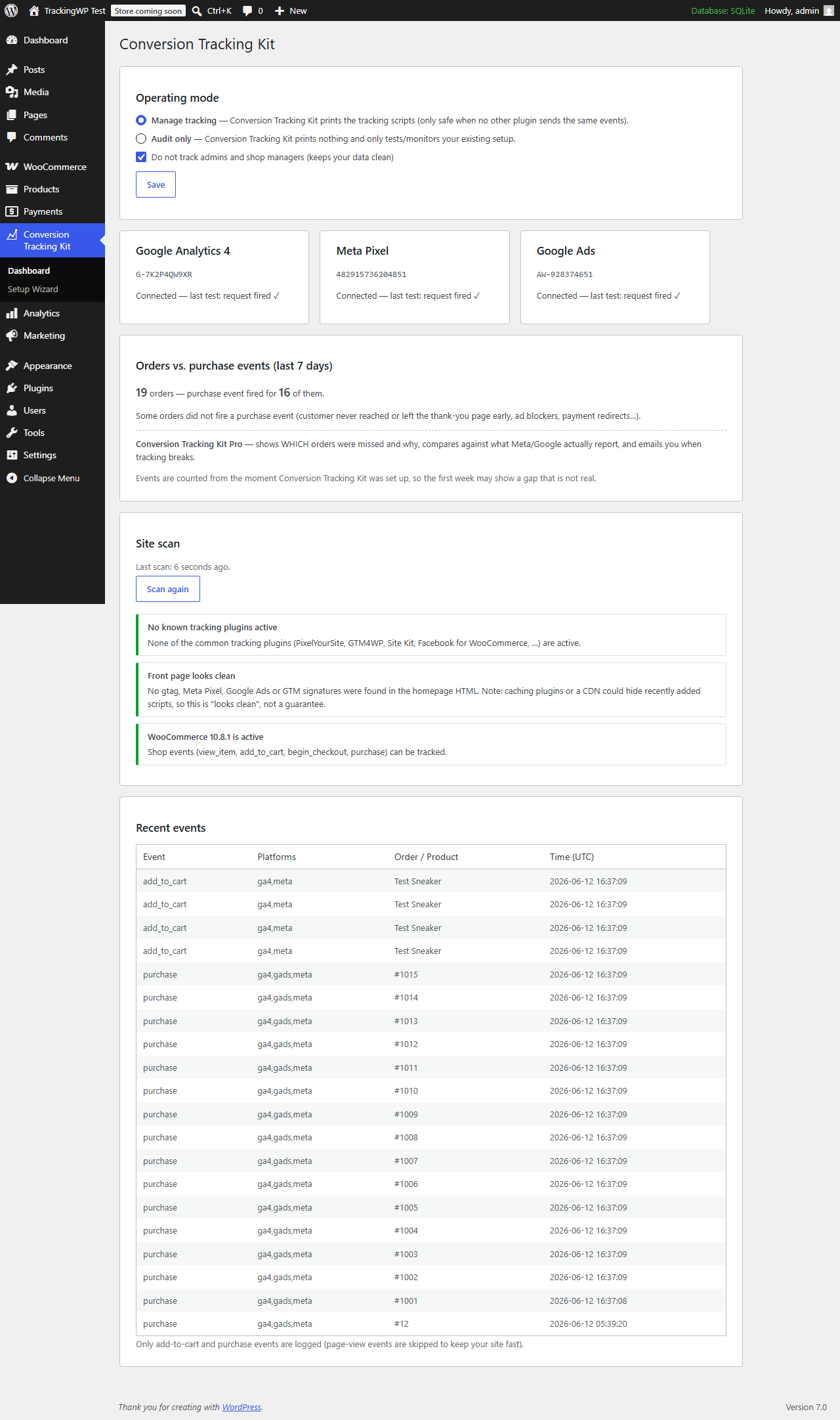
“Meta reports 14 conversions, WooCommerce has 19 orders, Google Ads says 3 — which one is right?” Conversion Tracking Kit exists to answer that question.
- Guided setup wizard — paste your GA4 Measurement ID, Meta Pixel ID and Google Ads Conversion ID; done in about 3 minutes.
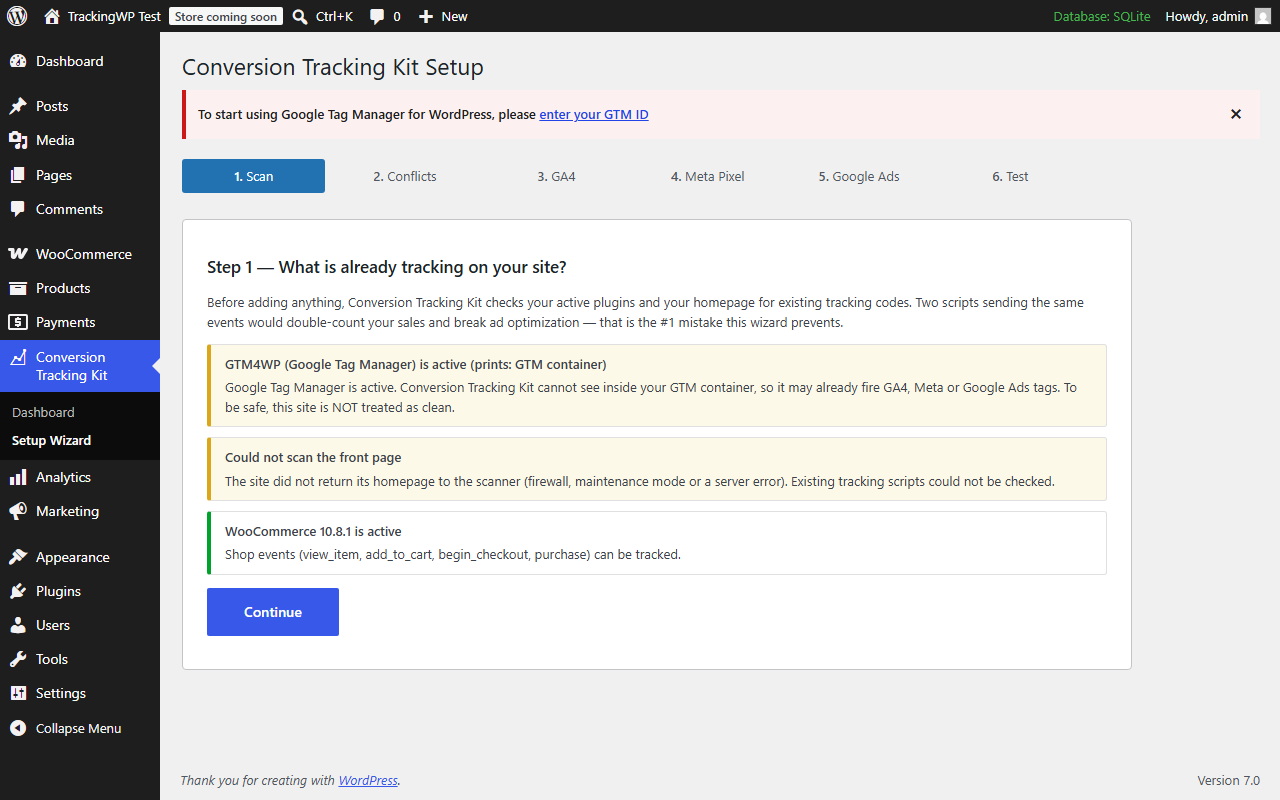
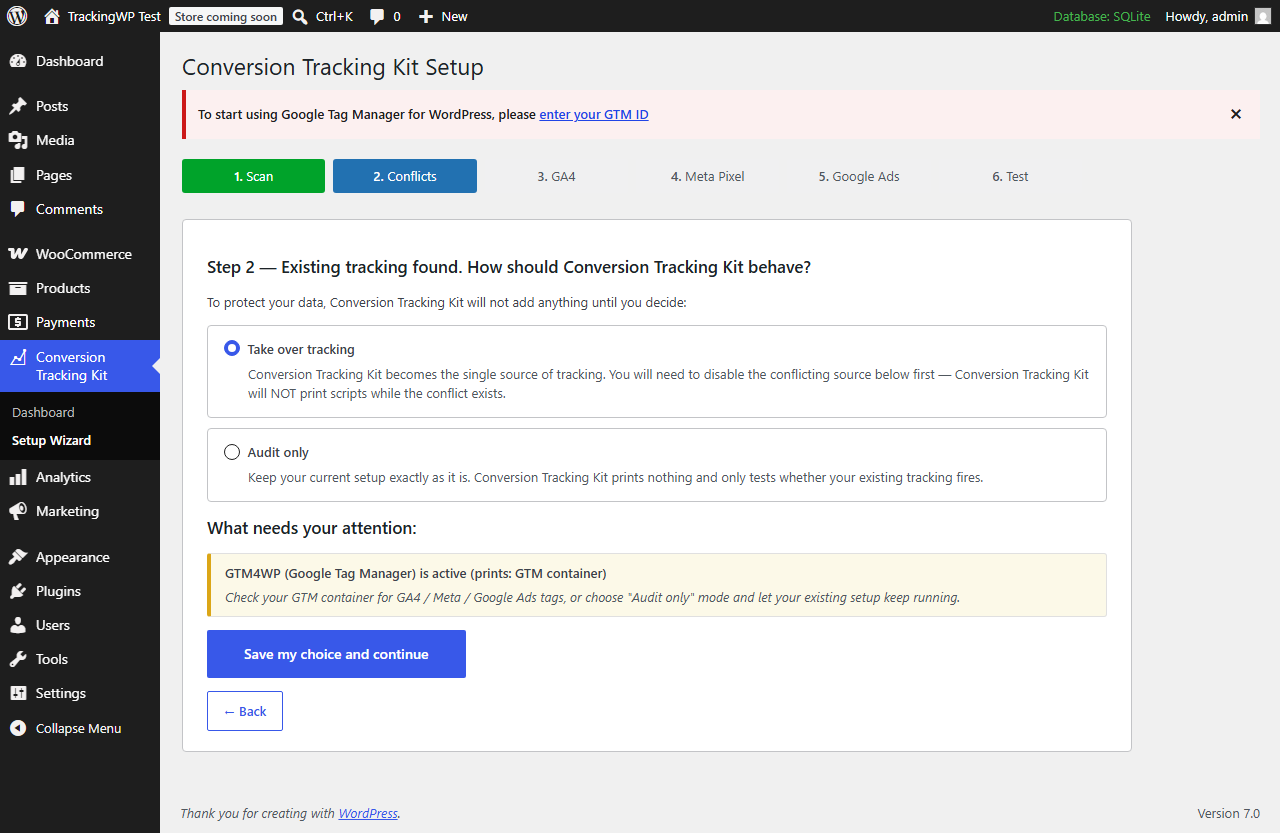
- Conflict protection — scans your plugins and homepage first. If another plugin or your theme already sends events, Conversion Tracking Kit refuses to double-fire and asks you to choose: take over, or audit-only.
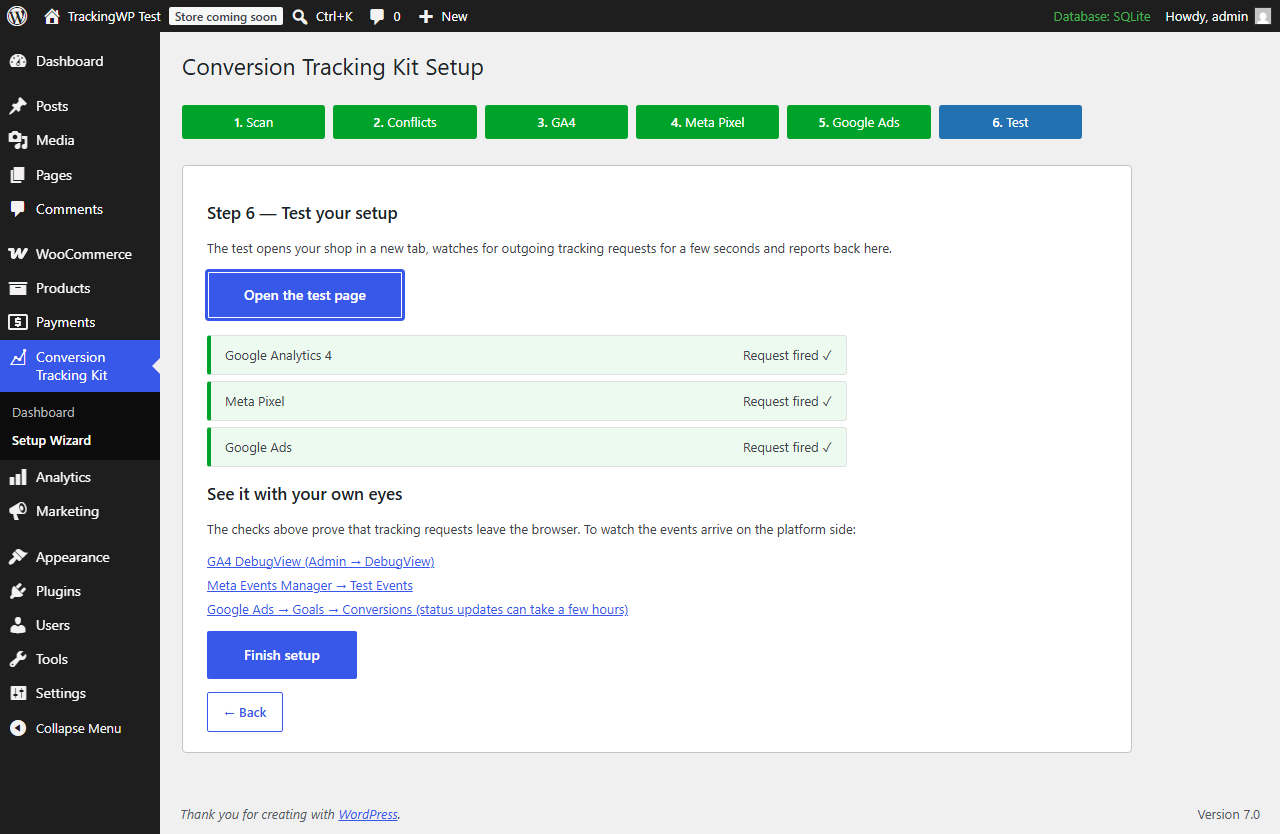
- Setup test — one click verifies the scripts load and tracking requests actually leave the browser, with deep links to GA4 DebugView and Meta Test Events.
- Orders vs. events — a dashboard card compares your recent orders against the purchase events that actually fired.
- Safe by default — purchase deduplication (no double counting on page reloads), Google Consent Mode v2, admin traffic excluded, staging sites never fire events.
The free version tracks view_item, add_to_cart, begin_checkout and purchase for GA4, Meta Pixel and Google Ads.
External services
This plugin is a conversion-tracking tool, so by design it can load the official tracking libraries of the advertising platforms you choose to connect. Nothing is loaded until you enter the corresponding ID in the setup wizard, and tracking is additionally gated by Google Consent Mode v2, admin exclusion and staging detection.
Google (Google Analytics 4 and Google Ads — gtag.js)
When you enter a GA4 Measurement ID (G-…) and/or a Google Ads Conversion ID (AW-…), the plugin loads Google’s gtag.js library from https://www.googletagmanager.com and sends data to Google. What is sent and when: on each page view, and on shop events (view_item, add_to_cart, begin_checkout, purchase), it sends the configured ID(s) together with the event name and its parameters — for example page URL, referrer, product identifiers, transaction ID, order value and currency — subject to the visitor’s consent state. This is used to measure analytics and ad conversions.
Google terms of service: https://policies.google.com/terms — Google privacy policy: https://policies.google.com/privacy
Meta Pixel (Facebook — fbevents.js)
When you enter a Meta Pixel ID, the plugin loads the Meta Pixel library fbevents.js from https://connect.facebook.net and sends data to Meta. What is sent and when: on each page view (PageView) and on shop events (ViewContent, AddToCart, InitiateCheckout, Purchase), it sends the Pixel ID together with the event name and its parameters — for example content identifiers, value and currency — plus standard browser data Meta collects (such as IP address and user agent). When JavaScript is disabled, a fallback tracking image is requested from https://www.facebook.com/tr. This is used to measure ad conversions.
Meta terms of service: https://www.facebook.com/legal/terms — Meta privacy policy: https://www.facebook.com/privacy/policy — Meta Business Tools terms: https://www.facebook.com/legal/terms/businesstools
Showing a cookie banner and collecting the legally required consent for these services remains the responsibility of the site owner; this plugin is not a consent-management plugin.
Screenshots
FAQ
Will Conversion Tracking Kit duplicate my existing tracking?
No — that is the #1 mistake it is built to prevent. Before printing anything, Conversion Tracking Kit scans your active plugins and your homepage for existing GA4, Meta Pixel, Google Ads and GTM code. If it finds any, it will not output a single script until you either remove the conflicting source or switch to audit-only mode.
Do I need API keys or access tokens?
No. The free version only needs the public IDs you already have: a GA4 Measurement ID (G-…), a Meta Pixel ID (a number) and/or a Google Ads Conversion ID (AW-…).
What exactly does the setup test verify?
It verifies that the tracking scripts load on your page and that the browser actually fires network requests to Google and Meta. It does not (and cannot, without API credentials) confirm platform-side receipt — for that, the test screen links you straight to GA4 DebugView and Meta Test Events so you can watch the events arrive yourself.
Yes. Conversion Tracking Kit prints a Google Consent Mode v2 default block before any Google tag. When a known consent plugin (CookieYes, Complianz, Cookiebot, Borlabs, Moove) is active, consent defaults to denied and your consent plugin stays in charge.
Why are no events tracked on my staging site?
By design. When the site URL looks like a staging or local environment (localhost, .test, .local, “staging”), Conversion Tracking Kit fires nothing so test traffic never pollutes your real store data.
Why did the purchase event not fire for some orders?
The purchase event fires on the order received (thank-you) page. If the customer never reaches that page (closed the tab, payment app redirect failed) or an ad blocker intervened, the event is missed — the dashboard card shows you exactly how many orders this affected in the last 7 days.
Reviews
There are no reviews for this plugin.
Contributors & Developers
“Ustun Conversion Tracking for WooCommerce” is open source software. The following people have contributed to this plugin.
Contributors
Translate “Ustun Conversion Tracking for WooCommerce” into your language.
Interested in development?
Browse the code, check out the SVN repository, or subscribe to the development log by RSS.
Changelog
1.5.1
- The event log is now a fixed, performance-only rolling buffer: removed the retention filter so no limit is ever raised by payment, and every free feature works fully within it.
- Reworded the dashboard upgrade hints so they only mention capabilities that genuinely require external resources (platform API comparison, server-side CAPI recovery, continuous monitoring and email alerts) — no locally available reporting is held back.
1.5.0
- The plugin now focuses solely on online-sales (WooCommerce) conversion tracking, fully free and fully functional. Lead tracking (calls, WhatsApp, form submissions) has moved entirely to the separate Conversion Tracking Kit Pro plugin — no lead code ships in the free plugin anymore.
- Unified all internal handles under a single, distinct prefix to avoid any chance of conflicts with other plugins.
- Security: the self-hosted update channel now pins TLS verification and only accepts an update package served from the official domain, so a tampered manifest can never point WordPress at an off-site plugin zip.
1.4.0
- New: “Conversions by channel” dashboard card — see where your tracked conversions came from (organic search, Google Ads, Meta, TikTok, direct, referral…), including organic search which ad platforms never credit. Captured first-party from referrer + click IDs; no external API.
1.3.0
- Setup wizard refinements and clearer guidance through the GA4, Meta Pixel and Google Ads steps.
1.1.0
- Extension hooks for add-ons (tracker filter, dashboard action, purchase action).
- Event log: new “source” column (browser/CAPI) and per-order distinct purchase counting.
- Automatic table migration after updates.
1.0.3
- All database queries now use fully prepared statements (%i identifier placeholders); minimum WordPress raised to 6.2.
- gtag.js loader is now properly enqueued (async) via wp_enqueue_script instead of a hardcoded script tag.
- Plugin Check compliance pass.
1.0.2
- Setup test: also detect Meta Pixel requests sent as POST to facebook.com/tr/ without a query string (large payloads) — fixes false “no request detected” for Meta.
1.0.1
- Setup test: raised the resource timing buffer and added a PerformanceObserver stream so tracking requests are not missed on asset-heavy pages (false “no request detected” results).
1.0.0
- Initial release: setup wizard, conflict scanner, GA4 + Meta Pixel + Google Ads tracking, setup test, orders-vs-events comparison, event log, Consent Mode v2.